


Kustomer's AI quality assurance (AI QA), launched on 14 October 2026, scores every closed conversation, whether a person or an AI agent handled it, against a weighted scorecard you write in plain language, and shows its reasoning beside each score. On Enterprise and Ultimate it is an add-on at $0.05 per execution, and Kustomer doesn't say what counts as one execution, so work out your volume before you switch it on. Unlike Gorgias Auto QA, you can write your own criteria, so checking replies against your own policies is in reach; the open question is trust, so read the lowest scores and correct them by hand. eesel has no Kustomer integration, so on Kustomer I'd use the native feature and keep eesel for Zendesk, Freshdesk, Gorgias or Help Scout queues. With the eesel CLI, an AI coding agent can write a QA rubric into eesel and test it on sample tickets before anything goes live, though a helpdesk connection still needs an admin's approval.
What is Kustomer AI quality assurance?
Kustomer AI quality assurance is an automated review of conversations. On its AI QA page, Kustomer says it "scores every AI agent conversation and every human rep conversation against a scorecard you define, automatically", with the AI's reasoning attached to every score. It arrived together with Conversation Intelligence in an October 2026 launch.
The pitch is about coverage. A CSAT survey only hears from the 2-3% of customers who answer it, which is the figure Kustomer's CEO Brad Birnbaum uses in the launch release, and manual quality assurance reads a small sample on top of that. Scoring every closed conversation is the part no lead can do by hand. I work on the product side at eesel, so I read it the way I'd read our own feature: what it scores, what it needs, what it costs, and what the docs leave out.
What does Kustomer AI QA score?
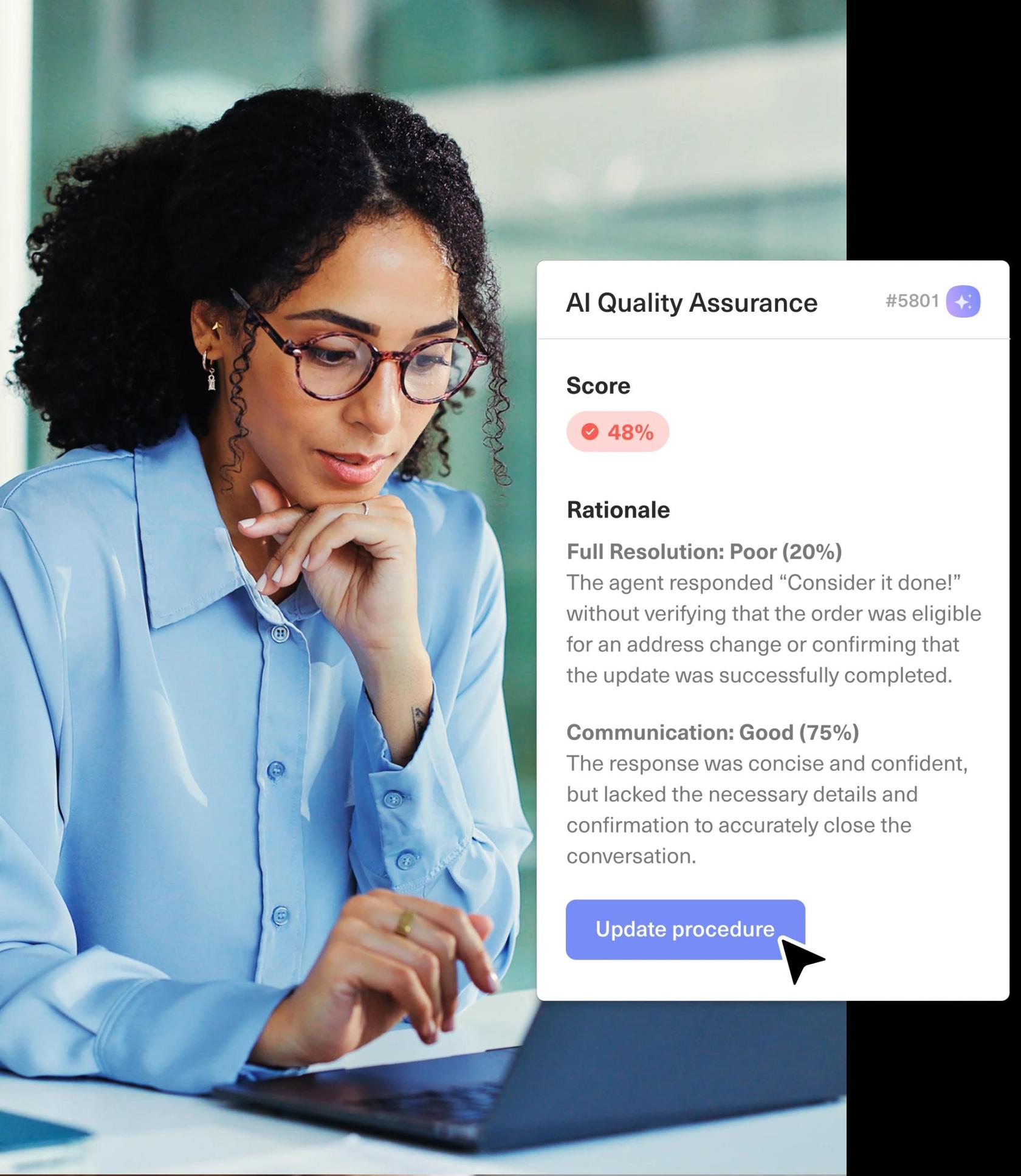
It scores whatever criteria you write, each with a weight. Kustomer's launch article says you define criteria "in plain language" and assign a weight to each, and that one scorecard covers both AI agents and human reps, so you don't keep two rubrics.
Kustomer's examples show what that looks like:
- For AI agents: procedure adherence, resolution and handoff quality. The 48% example above lost points on full resolution because the agent confirmed an address change without checking the order was eligible.
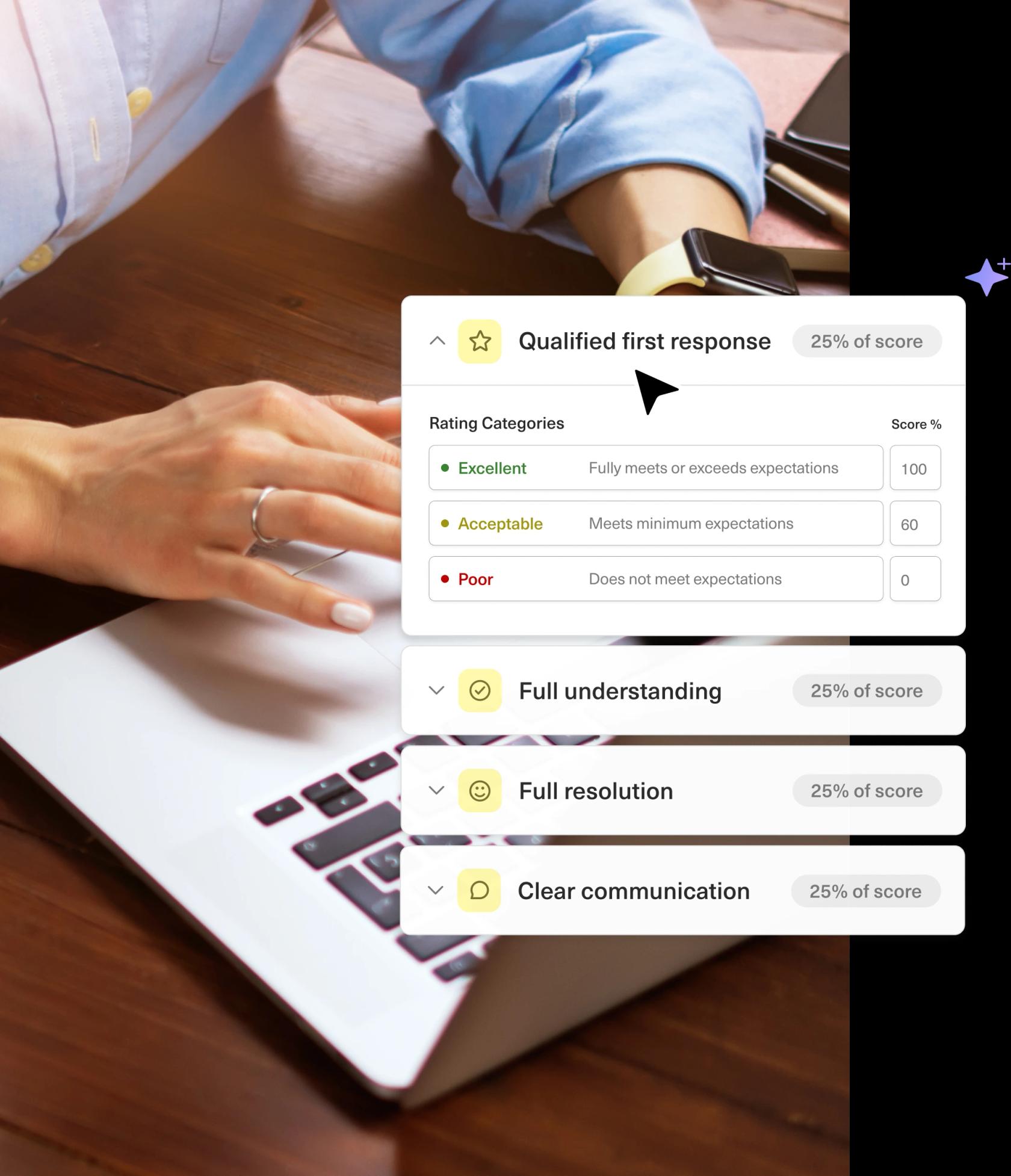
- For human reps: the same rubric, with pass or fail reasoning per criterion. The sample scorecard on Kustomer's page weights four criteria at 25% each (qualified first response, full understanding, full resolution and clear communication), with rating categories such as Excellent, Acceptable and Poor.
- For a handoff: the article says the full conversation is scored as one unit, including how the AI-to-human handoff went.
This is the difference that matters if you read my notes on Gorgias AI quality assurance: Gorgias fixes seven criteria and lets AI score three. Kustomer lets you write the rubric, so "did the agent check eligibility before promising a refund" is a line you can add. Kustomer's blog also says assessments are "grounded in your own knowledge bases, policies, and procedures", though the pages don't spell out how a knowledge base is attached to a scorecard.
How does a score get made, and what happens next?
A conversation closes, AI QA scores it against your weighted criteria, and the score lands as a normal field. Kustomer's October product update says a score "is a normal attribute", so it flows into reporting and Data Explorer, and you can filter for the lowest-scoring conversations, human or AI.
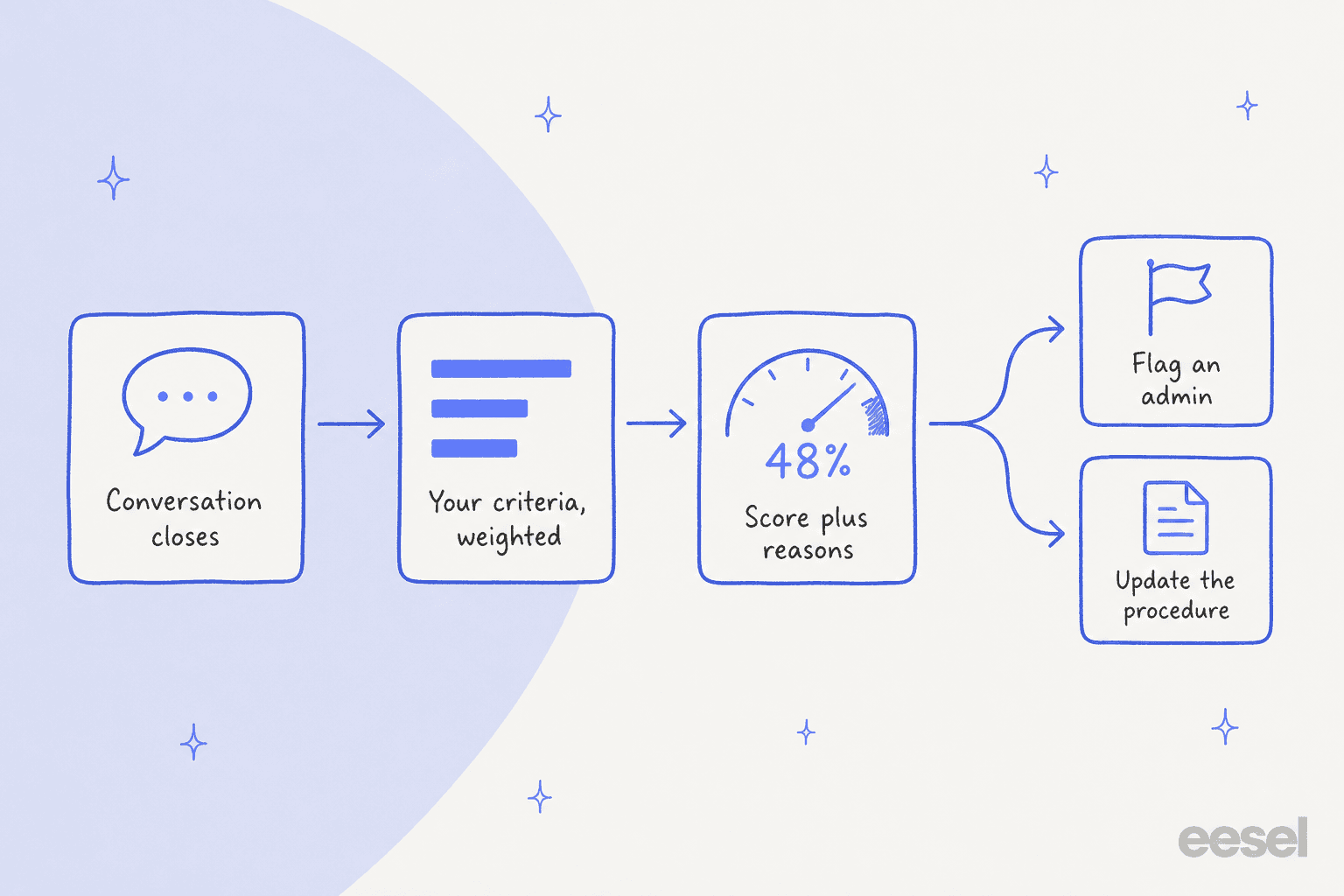
The launch article gives two follow-ups. A low score on an AI agent can trigger a workflow that alerts an admin, and the reasoning shows which step the agent broke so you can rewrite its instructions. An unusually high score on a rep can flag a manager, so the conversation becomes a training example. Both depend on a workflow you build yourself.
How do you set up AI QA in Kustomer?
Setup is short, and Kustomer's pages describe it in four moves. This is from the product update, because I couldn't find a step-by-step help article for AI QA itself.
- Turn on the preconfigured field. Kustomer says a ready-made AI QA field "turns on in a single click".
- Edit it to match your standards. Write each criterion in plain language and give it a weight.
- Choose when it runs. Every closed conversation is scored once the field is set to run.
- Spot-check and correct. Admins can override any score by hand, and the article says a corrected value "won't be silently overwritten the next time the field runs."
If you want more than a quality score, such as contact reasons or order numbers pulled into fields, that is the sibling feature, Conversation Intelligence. Kustomer's AI attributes help article lists its three attribute types: Classifier, Score and Extractor. My notes on Kustomer AI sentiment analysis walk through building one, and set up AI in Kustomer covers the rest of the AI setup.
How much does Kustomer AI QA cost?
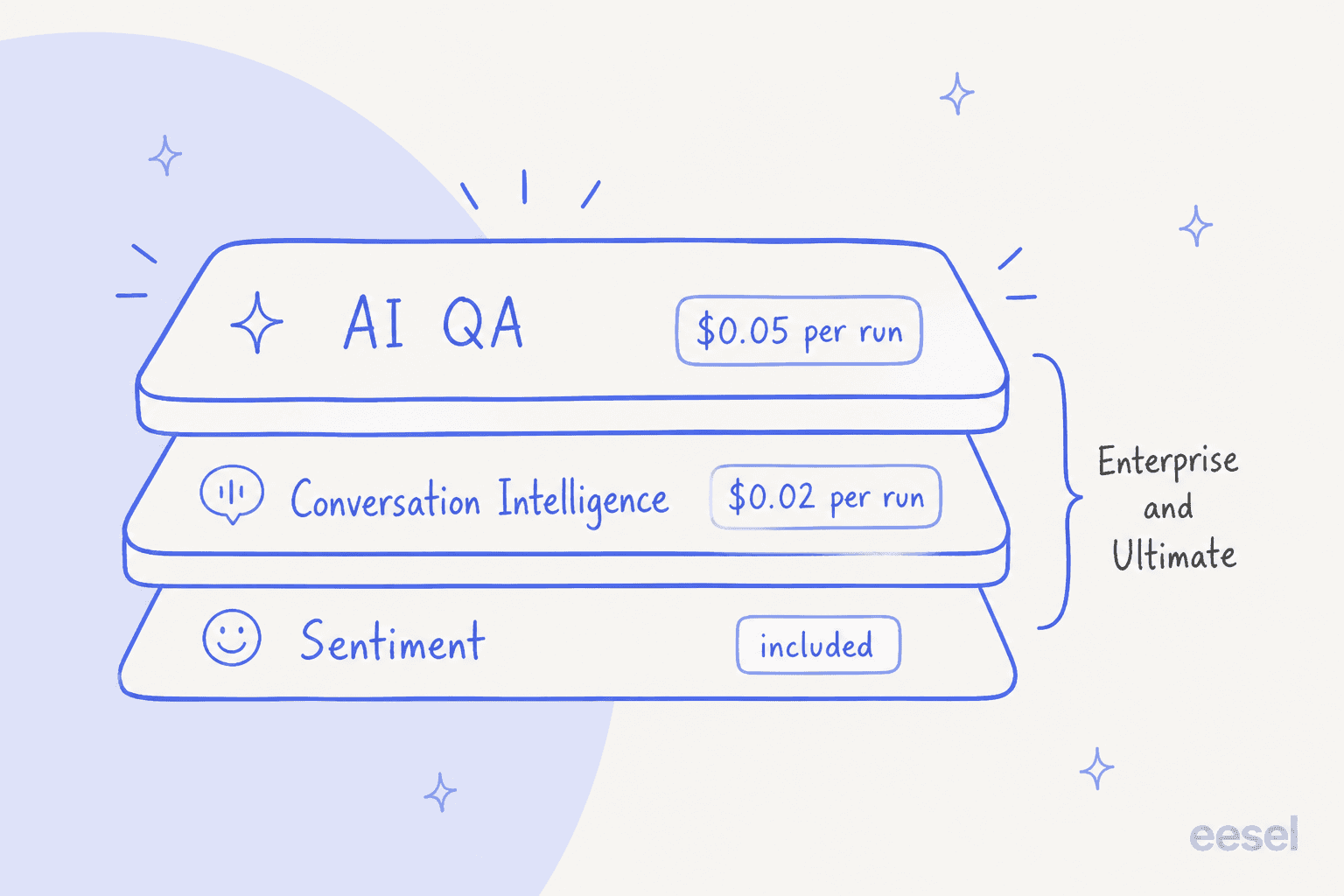
AI QA is metered. Kustomer's pricing details page (checked 22 November 2026) lists it as an add-on for the current Enterprise and Ultimate plans:
| Item | Enterprise | Ultimate | Legacy plans |
|---|---|---|---|
| AI QA | $0.05 per execution (20 executions per credit) | $0.05 per execution (20 executions per credit) | Not listed |
| Conversation Intelligence | $0.02 per execution (50 per credit) | $0.02 per execution (50 per credit) | Not listed |
| Sentiment Tracking | Included | Included | Included |
| Platform price | "Talk to Sales" | "Talk to Sales" | "Talk to Sales" |
Kustomer doesn't define "execution". If one execution means one scored conversation, the cost is easy to estimate. If a scorecard with several criteria counts as several, it isn't. Try the estimate below, and treat it as a floor until Kustomer confirms the unit in your contract.
For a team closing 8,000 conversations a month, that is about $400 a month for AI QA, plus the $0.02 per execution for any Conversation Intelligence attribute you run beside it. Kustomer pricing covers the platform side, and a cost-per-ticket comparison puts the number in context.
What does Kustomer leave undocumented?
Kustomer's pages are specific about the idea and thin on limits. Here is what I couldn't find on any Kustomer page:
- What an execution is. Only the $0.05 rate and "20 executions per credit" are listed.
- Who can buy it. The product update says Conversation Intelligence is available "as a paid add-on for existing customers", and it doesn't state AI QA's availability for new customers. Ask your account team.
- Channels covered. The pages say "conversations" and don't list omnichannel channels such as phone or social.
- The scoring scale. The product update documents 0 to 100 for Conversation Intelligence scores, and not for AI QA specifically. Screenshots show percentages.
- Accuracy. There is no published accuracy figure or independent test. The coverage claim ("100%") comes from Kustomer.
- Auto-fail rules. A press recap of the launch mentions them. I didn't find them on Kustomer's own AI QA pages, so I wouldn't plan around them.
None of that is a reason to skip the feature. It is a list of questions for your demo.
How do you trust AI QA scores?
You earn trust by reading the scores that look wrong. An AI score with a reason is something you can argue with, which is a real advantage over a bare number, and Kustomer's override sticks. The risk is vague criteria: a model can't score "good tone" the way your best reviewer would unless you say what good looks like.
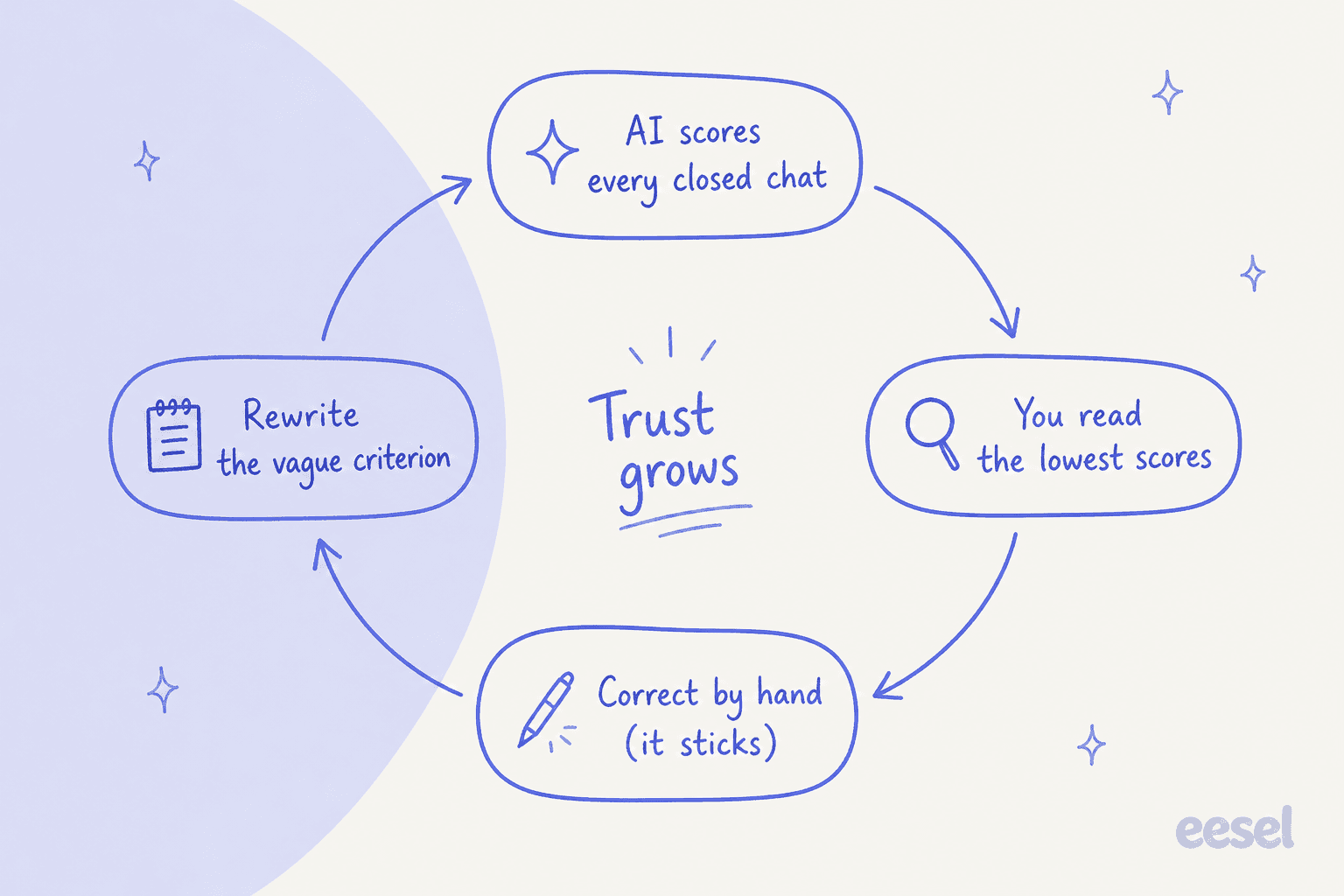
What I'd do in the first month:
- Start with three to five criteria, each tied to something you can point at in a transcript, such as "checked order eligibility before promising a change".
- Read the 20 lowest and 20 random scores each week, and override any you disagree with.
- Rewrite the criteria that caused the disagreements. Support QA calibration and these QA feedback examples help with wording.
- Keep your real CSAT survey running. AI QA judges your handling, and customers judge the outcome. They can disagree.
- Watch outcomes, not just scores. Compare QA trends against first contact resolution and escalation before you coach anyone on a number.
AI support quality assurance covers how to judge an AI agent before and after launch, and support QA with AI covers the human side. If you run Kustomer's own agent, my notes on Kustomer AI and Kustomer AI deflection explain what it handles.
Can you run QA on Kustomer conversations outside Kustomer?
Yes, through connectors, and this is the honest place for eesel to step back. Kustomer lists third-party QA tools on its integrations pages:
- Scorebuddy says it will "automatically sync interactions from Kustomer" for its own AI QA evaluations.
- Intryc says setup needs "an API key with the right roles and your Kustomer domain", and claims it can analyze up to 100% of conversations, per its Kustomer page. Those are vendor claims without published accuracy data.
- Solidroad also has a Kustomer listing.
The trade-off is one more vendor holding customer conversations, which your security review will ask about. My support QA tools roundup compares them, and the best AI for support QA and best AI QA assistant lists go wider.
eesel is not one of these options for Kustomer, because it has no Kustomer integration, and I'd rather say so than stretch the claim. Where it fits is a team whose queue is on Zendesk, Freshdesk, Gorgias or Help Scout: there, eesel runs on a schedule, reads each closed ticket, scores it on a rubric you write in plain words and leaves the reasons as an internal note. That is the same idea as Kustomer's native feature, in a helpdesk that lacks it.
eesel also moves QA upstream. SaunaSpace has eesel draft Gorgias replies in its calm, direct brand voice, from about 1,550 pages, articles and past tickets, with a person always sending: 180 draft replies across 110 conversations in a month. A draft in your voice needs less fixing after the fact, so there is less for any QA to catch.
Is Kustomer AI QA worth it?
For a team already on Enterprise or Ultimate, yes, with a budget check first. The design is sound: your own criteria, reasons on every score, one rubric for people and AI agents, overrides that stick, and scores that are ordinary fields you can report and automate on. It beats sampling 2-3% of tickets by hand.
My take: switch it on for one queue, price it at $0.05 per closed conversation until Kustomer says otherwise, and don't coach a rep on a score you haven't read. If your rubric depends on facts the pages don't show how to supply, such as policy documents, test a few known-bad conversations first. And if you're comparing helpdesks partly on QA, see my Kustomer review, the enterprise view, or Kustomer alternatives.
Try eesel for QA beyond Kustomer
If part of your support runs in a helpdesk that has no AI QA of its own, an AI helpdesk teammate like eesel can review closed tickets against your rubric every morning, tag the misses and post a summary for the lead. You choose what it may do alone, and every action can be set to run, ask first or stay off in actions and approvals. Try eesel on a week of closed tickets and compare its notes with your own reviews.
