Choosing a customer service platform is a decision that sticks with you. Switching later is painful, so getting it right the first time matters. Kustomer has built a reputation as a serious contender for teams that need omnichannel support with a modern twist. But is it the right fit for your team?
This Kustomer customer review digs into what the platform actually offers, what real users say about it, and whether the investment makes sense. We'll look at features, pricing, and the honest pros and cons you won't find in marketing materials.
What is Kustomer?
Kustomer is a customer service CRM platform built around a simple but powerful idea: every interaction with a customer should be visible in one place. Instead of treating each email or chat as an isolated ticket, Kustomer creates a chronological timeline of the entire customer relationship.
The company was founded in 2015 by Brad Birnbaum and Jeremy Suriel, raised $173.5 million from investors like Coatue and Tiger Global, and went through an interesting journey: acquired by Facebook in late 2020, then spun out as an independent company in 2023. Today they employ 201-500 people from their New York headquarters.
Kustomer targets mid-market to enterprise teams that handle high volumes of support across multiple channels. If your customers reach out via email, chat, phone, and social media (sometimes all in the same day), Kustomer is designed to keep those conversations connected.
Kustomer features overview
We break down what Kustomer actually delivers. The platform packs a lot of capabilities, so we'll focus on the features that matter most to support teams.
Omnichannel support
Kustomer's core strength is bringing every communication channel into one interface. Email, live chat, phone calls, SMS, and social media messages all feed into a unified inbox. Agents see the complete conversation history regardless of which channel the customer used.
The customer timeline is the standout feature here. Rather than searching through separate tickets, agents see a chronological view of every interaction, order, and note associated with that customer. It gives context that traditional ticket-based systems often miss.
AI and automation
Kustomer includes several AI-powered capabilities:
- Customer Assist: An AI chatbot that handles routine inquiries automatically
- Intelligent routing: Tickets automatically route to the right agent based on content and skills
- Sentiment analysis: The platform detects customer mood and flags urgent or frustrated customers
- Predictive insights: Forecasts customer needs based on historical patterns
Everlane reported a 4x increase in deflections using Kustomer's AI capabilities, which suggests the automation works when configured properly.
Integrations
Kustomer connects with over 100 tools. The standout integration is with Shopify, where order data flows directly into the customer timeline. Agents can see purchase history, process refunds, and check order status without leaving Kustomer.
Other notable integrations include Magento, WooCommerce, Salesforce, HubSpot, Slack, Microsoft Teams, and Zapier. The platform also offers a RESTful API for custom connections.
CRM capabilities
Beyond support, Kustomer functions as a lightweight CRM. You get custom fields, business rules, customer journey mapping, and no-code workflow customization. This lets teams build processes that match their specific needs without engineering help.
Kustomer pricing explained
This is where things get less transparent. Kustomer does not publish detailed pricing on their website, which is common for enterprise-focused software but frustrating for buyers trying to budget.
According to TrustRadius, pricing starts at $89 per user per month. Enterprise plans with advanced automation, dedicated support, and custom integrations require contacting sales for a quote.
| Plan | Monthly Price | Annual Price | What's Included |
|---|---|---|---|
| Base Plan | $89/user/month | Contact sales | Core omnichannel features, basic AI |
| Enterprise | Custom pricing | Custom pricing | Advanced automation, dedicated support, custom integrations |
Volume discounts are available for larger teams. You will also want to budget for potential add-ons like advanced analytics modules or increased API rate limits.
At $89 per user per month, Kustomer sits at the higher end of the market. For a team of 10 agents, you are looking at nearly $11,000 annually before any add-ons. That pricing makes sense for teams that will use the full feature set, but it is likely overkill for smaller operations.
What users love about Kustomer
Real user feedback tells a more complete story than feature lists. This is what actual Kustomer users praise most.
Omnichannel excellence comes up repeatedly. Users appreciate having every channel in one place without switching between tools. The unified timeline gets specific praise for giving agents full context before they respond.
Shopify integration is a consistent highlight for e-commerce teams. One Shopify merchant noted: "All order info comes through to the customer's timeline seamlessly, making the conversation more efficient and more personalized."
Customization is another strength. Teams can build workflows, create business rules, and configure the platform to match their processes. A verified user on Capterra said: "The platform allows for tailoring workflows based on specific business needs and customer segments, enabling personalized support."
AI capabilities deliver measurable results when implemented well. Beyond Everlane's 4x deflection increase, teams report that automated routing and sentiment detection help prioritize the right conversations.
A TrustRadius reviewer summarized: "We used Kustomer as our main B2C communication tool. It was super helpful in keeping comms organized and gave everyone on our team transparency into each other's workload."
Common complaints and limitations
No platform is perfect, and Kustomer has its share of criticism. Here's what users struggle with.
The learning curve is real. Multiple reviewers mention that Kustomer's power comes with complexity. New users need training to navigate the interface and configure workflows effectively. One Gartner reviewer put it bluntly: "Kustomer has a lot of customization, is AI first, and has regular updates" (positive) but "the front end is user friendly and very intuitive but the backend is horrible, all the data structure is a mess."
Pricing limits accessibility. At $89 per user per month, smaller teams often find Kustomer expensive compared to alternatives. Several reviewers mention they switched to Kustomer from other platforms specifically when they outgrew simpler tools.
Backend complexity concerns appear in enterprise reviews. A data analyst on Gartner noted: "Any integration creates a chaos on the main conversation metrics as the platform doesn't properly differentiate between outbounds and inbounds."
API development has stagnated according to some long-term users. A Capterra reviewer who used Kustomer for more than two years reported: "Seems somewhat stagnant in terms of API updates."
End-consumer frustration appears on Trustpilot, though this requires context. The negative reviews there come from consumers experiencing Kustomer through brands like Curve and Tide, not from businesses using the platform. One frustrated consumer wrote: "This is no customer relationship management platform, its a brand destruction platform." This likely reflects poor implementation by specific brands rather than fundamental platform flaws, but it is worth noting that Kustomer implementations can go wrong.
Customer success stories
Kustomer's website features several case studies with impressive metrics:
| Customer | Metric | Improvement |
|---|---|---|
| Hopper | CSAT scores | 10% increase |
| Hopper | First response time | 50% reduction |
| Everlane | Agent hours saved | 25% |
| Everlane | AI deflections | 4x increase |
| Bulletproof | Average handle time | 50% reduction |
| Bulletproof | First contact resolution | 15% increase |
| APLAZO | CSAT | 40% improvement |
These results suggest Kustomer delivers value when implemented well, particularly for e-commerce and travel companies that benefit from the Shopify integration and omnichannel capabilities.
Who should use Kustomer?
Kustomer makes sense for specific types of teams. You are a good fit if:
- You run an e-commerce business using Shopify and need order data integrated with support
- Your team handles high volumes across multiple channels (email, chat, phone, social)
- You have the budget for a premium solution and the resources to configure it properly
- You need extensive customization to match complex workflows
- You're scaling from a simpler tool and need enterprise-grade features
Kustomer is probably not the right choice if:
- You are a small team with straightforward support needs
- Budget is tight and you need something that works out of the box
- Your support volume is low enough that omnichannel consolidation isn't a priority
- You do not have time or resources for training and setup
A simpler alternative for AI-powered support
If Kustomer's complexity and pricing give you pause, there's another approach. We built eesel AI as an AI teammate that learns your business in minutes, not weeks.

Here is the difference: instead of configuring workflows and routing rules, you invite eesel to your team like a new hire. It reads your past tickets, help center articles, and macros to understand how you work. Then it starts drafting replies for your agents to review. As it proves itself, you expand its role until it is handling frontline support autonomously.
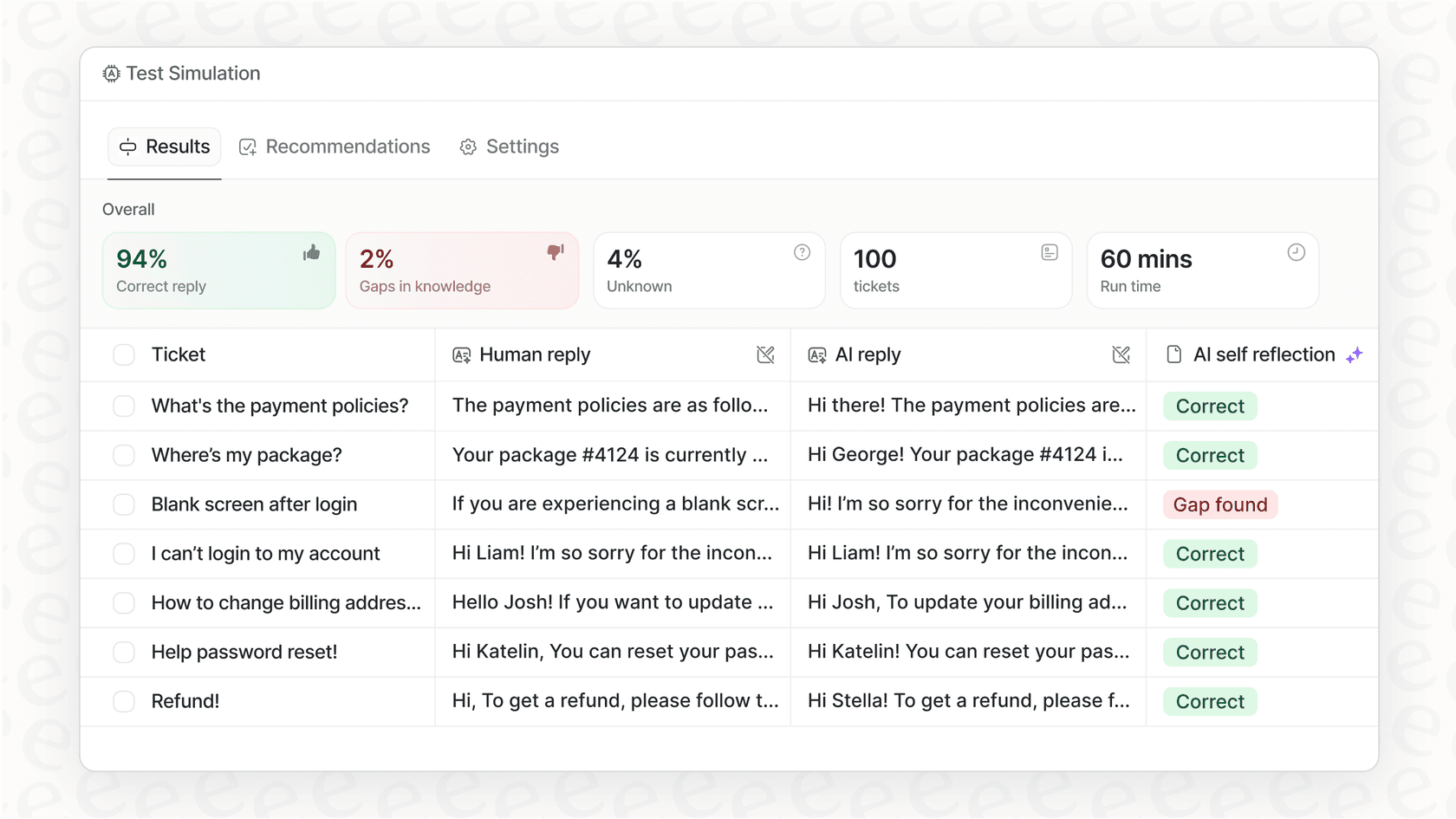
Our AI Agent can achieve up to 81% autonomous resolution in mature deployments. But the key difference is how you get there. You can run simulations on thousands of past tickets before going live, so you know exactly how it will perform. You define escalation rules in plain English ("Always escalate billing disputes to a human") rather than building complex workflows.
Pricing works differently too. Instead of per-seat fees, you pay per interaction. Our Team plan starts at $299 per month for up to 3 bots and 1,000 interactions. That often works out cheaper than per-agent pricing for teams that want AI handling a significant portion of their volume.
If Kustomer feels like more than you need, try eesel AI for a more straightforward path to AI-powered support.
Making your Kustomer customer review decision
We bring this together. Kustomer is a capable platform with genuine strengths: excellent omnichannel support, powerful Shopify integration, extensive customization, and AI features that deliver results for teams that invest in proper configuration.
The drawbacks are equally real. The learning curve is steep, pricing is at the premium end of the market, and the platform's complexity can become a liability if you do not have resources to manage it.
Bottom line? Kustomer fits enterprise and mid-market teams with complex support needs, especially e-commerce operations using Shopify. If that describes you and you have the budget, it is worth serious consideration.
For teams that want AI-powered support without the configuration overhead, alternatives like eesel AI offer a different approach: faster setup, progressive autonomy, and plain-English control over how the AI behaves.
The right choice depends on your team size, budget, technical resources, and how quickly you need to get up and running. Either way, make sure you test thoroughly before committing. Your future self will appreciate the thorough testing.