


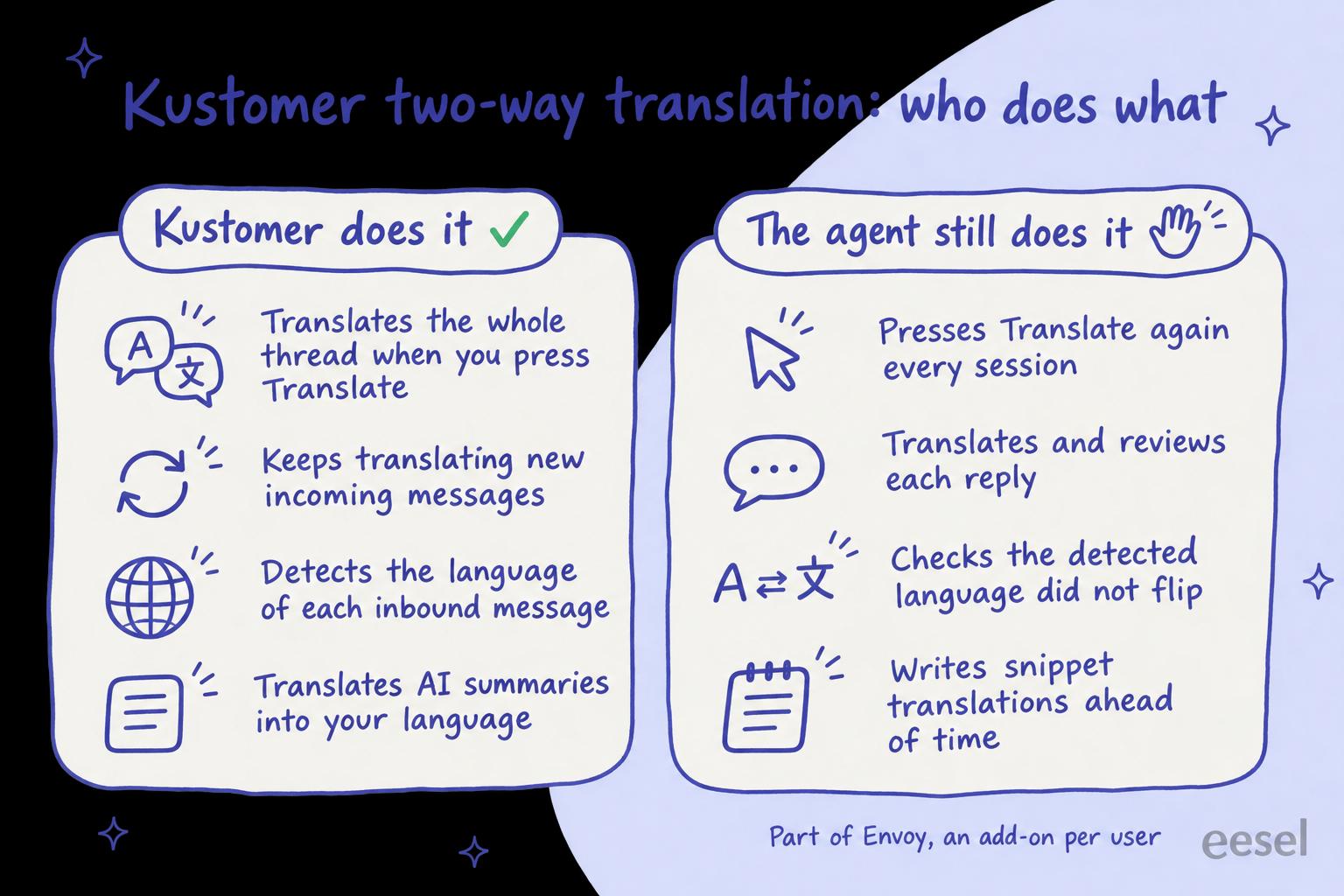
Kustomer's AI conversation translation is two-way translation inside Envoy, an add-on Kustomer lists at $50 per user per month. An agent presses Translate in the conversation header, Kustomer translates the whole thread and keeps translating new messages, and each reply is translated and reviewed before sending. It is a good reading and writing aid for a team that gets the odd conversation in a language nobody speaks. Two things trip teams up, both in Kustomer's own help center: agents must press Translate again in every session, and the conversation's language is re-detected on every inbound message, so one message in another language can switch it.
On Zendesk, Freshdesk, Gorgias or Help Scout, an AI helpdesk agent such as eesel writes the reply in the customer's language from the start; it has no Kustomer integration. With the eesel CLI, an AI coding agent can upload approved help articles and ask test questions in each language before anything goes live, though an admin still has to approve the helpdesk connection.
What is Kustomer AI conversation translation?
It is the translation built into Kustomer's agent workspace, so an agent can read and answer a customer in another language without leaving the conversation, much like Zendesk translation. Kustomer files it under Envoy, its set of AI tools for human agents ("reps"), alongside Copilot (an agent assist tool), summaries and Signals. Envoy's overview lists it among Copilot's features: "Instantly translate incoming messages and agent replies into supported languages directly within the conversation." The customer-facing side of Kustomer AI is a separate product, Concierge (below).
My colleague Riell covered Gorgias ticket translation recently. I build integrations at eesel, so I read this feature the way I read any vendor's: what triggers it, what it sends to a model, and what is left for a person. In Kustomer's case it comes down to three parts.
- Language detection. Per Kustomer's language detection guide, the Intelligence app installs a workflow called detect-language-at-message-creation. It runs on every new inbound message that has text and isn't imported, and when the language score is at least 0.6 it updates the message, customer and conversation language.
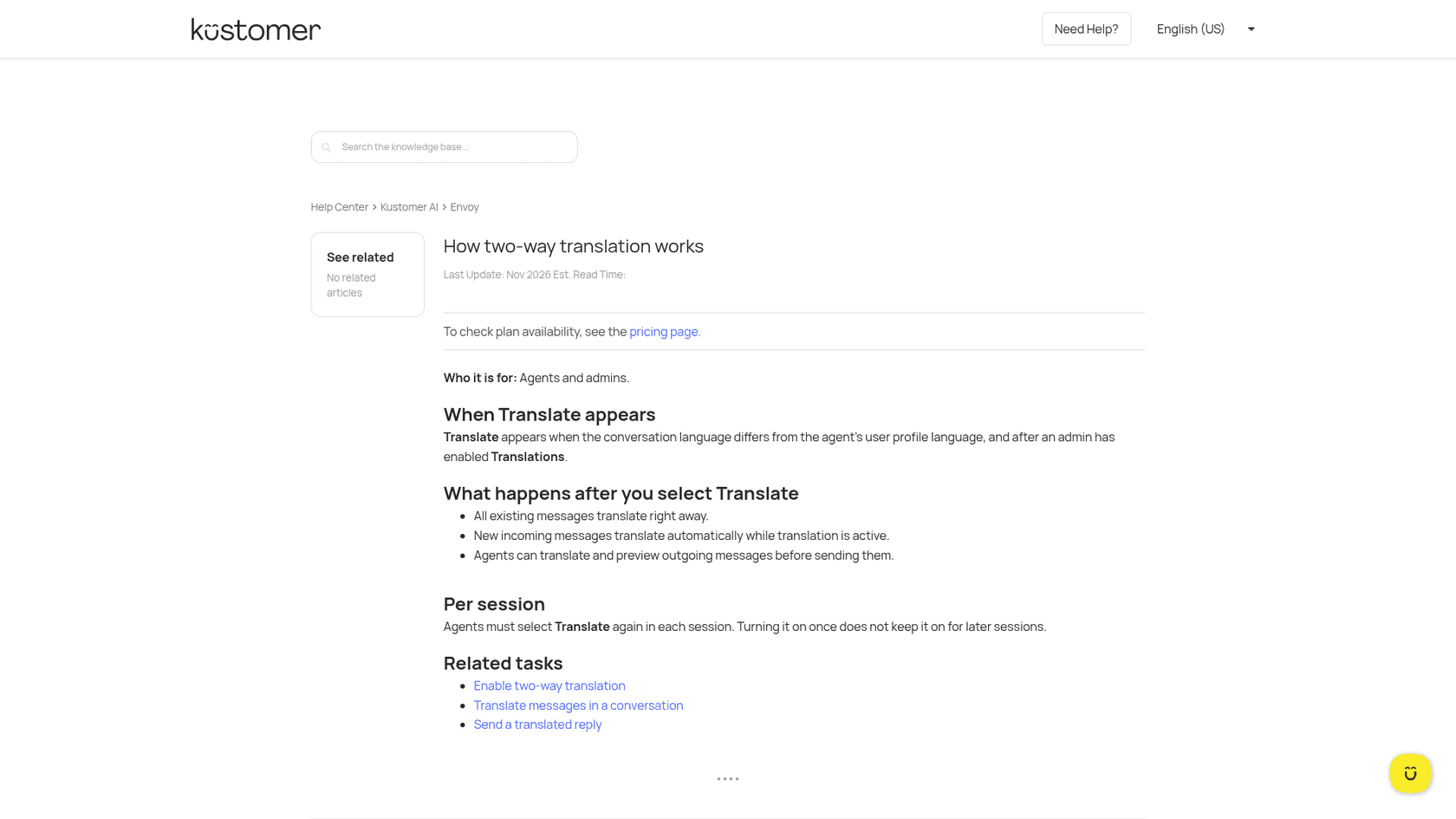
- The Translate button. Per How two-way translation works, it appears when the conversation language differs from the agent's profile language and an admin has turned on Translations. Since 11 November 2026, agents can also translate a conversation by hand from Conversation Options, even when Kustomer didn't detect a different language (November release notes).
- Translated replies. The agent writes in their own language, presses Translate in the editor, reviews the result and sends it. Since 3 February 2026, outbound translations use AWS's Nova models, which Kustomer says "capture dialects better" (February release notes).
How to turn on two-way translation in Kustomer
An admin does the setup once; each agent then uses it per conversation.
- Turn on language detection. Install the Intelligence app from Apps, then open it and check Detect language automatically. Without it, Kustomer has no conversation language to compare against.
- Turn on Translations. Per Enable two-way translation, open Kustomer AI in the left navigation, select Reps and switch on Translations.
- Turn it on for Copilot too, if you use it. Copilot has its own Translate message and Translate Reply controls. Per Kustomer's Copilot guide, go to Kustomer AI > Reps > Copilot, scroll to the bottom and switch on Translations.
- Check every agent's profile language. The button only appears when the conversation's language differs from the agent's profile language. If an agent never sees it, Kustomer's Envoy overview says to check that their language preference is set.
- Show agents the reply flow. Per Send a translated reply: write the message in your language, optionally pick the language pair (EN to FR, for example), select Translate, review the translated text, then Send.
Then test it on a real conversation in each language you get most, with someone who reads that language checking five translated replies against your support translation glossary. I'd do that before trusting it for refunds or anything with a policy in it.
How does Kustomer pick the conversation language?
Kustomer sets a Conversation Default Language attribute once it detects the language, and you can use it for routing, search and reports. Kustomer suggests adding it to the Conversation Insight Details card so agents can see it:
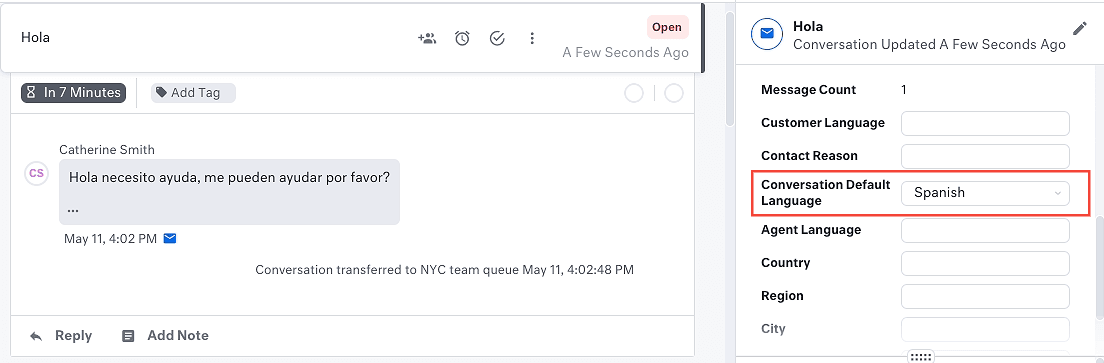
That field drives more than the Translate button. Per Kustomer's automatic language detection article, snippets used in a reply are translated into the conversation's default language when a translation exists, and Copilot's Translate Reply translates into it too (translation limits). So it pays to know when it changes. Kustomer is direct about it: "If a single message is detected as a different language, the conversation's default language updates to match." A German customer who pastes an English error message can turn the conversation English, and the satisfaction survey and snippets can follow.
Kustomer gives two fixes for a language that keeps getting overwritten, for example when a team assignment workflow sets it from the sender address: duplicate the system workflow and only set the language when none is set yet, or hardcode the greeting and sign-off in a per-address email template.
Where does Kustomer translation fall short?
The feature does what its help center says. The gaps are in what it leaves to the agent and to the setup.
- It switches off between sessions. "Agents must select Translate again in each session. Turning it on once does not keep it on for later sessions." An agent who comes back after lunch sees the original language until they press it again.
- Every reply is a manual step. Outbound translation is write, Translate, review, Send. That keeps a person in control, which is right for most teams, but a busy agent who skips the Translate step sends their own language.
- Long messages may not fully translate. Kustomer's translation limits article sets a 10,000 character limit per message for two-way translation to fully translate it.
- Five languages aren't supported: Belarusian, Kyrgyz, Luxembourgish, Montenegrin and Twi, per the same article.
- Copilot can answer in the wrong language. Kustomer's Copilot translation guide lists three causes to check in order: the Translations setting, the customer's browser language, and a knowledge base with articles in several languages that Copilot may draw from.
- Snippets need their translations written first. A snippet carries translations you add under Settings > Administration > Snippets, and snippets aren't available in workflows (Use snippets). Each channel also needs the language turned on separately, or chat shows the default language (snippet fix). Multilingual live chat covers the chat side.
None of this is a reason to skip it. It is a reason to put "press Translate" in onboarding, add the language field to the insight card, and decide who owns snippet translations.
What are the other ways to handle languages in Kustomer?
Two-way translation is one of four options, and they solve different problems.
Route on the conversation language
If you have agents who speak the language, routing beats translating. Kustomer's language detection article suggests using the default language to route "all conversations of a particular language to the correct team". Kustomer conversation routing covers how queues and routing rules use that attribute.
Concierge, the customer-facing AI agent
Concierge answers customers directly. Kustomer's guidance is that it "can hold conversations in languages other than English, but test each supported language end to end rather than testing only the greeting, and confirm that tone and custom guidance produce the response language you expect." It is billed at $0.75 per engaged conversation. Kustomer AI auto-reply covers what it answers on its own.
A multilingual knowledge base and snippets
For self-service, turn on languages under Settings > Administration > Localization and write articles and snippet translations in each. The number of languages depends on the plan: Kustomer's pricing details list 20 on Enterprise and all languages on Ultimate. Multilingual knowledge base software compares the wider field.
An AI agent that writes in the customer's language
An AI agent connected to the helpdesk can draft the reply in the customer's language from the start, so nobody translates at the last step. eesel does that on the helpdesks it connects to (below); best AI for multilingual support lists other options.
Pick what your team needs to see which Kustomer setup handles it.
What does Kustomer translation cost?
Two-way translation comes with Envoy, which Kustomer's pricing details page (updated 12 October 2026) lists at $50 per user per month on both Enterprise and Ultimate. Kustomer doesn't publish the plan prices themselves; both say "Talk to Sales".
| What | Enterprise | Ultimate |
|---|---|---|
| Automatic language detection | Included | Included |
| Languages | 20 | All |
| Envoy (two-way translation, Copilot, summaries) | $50 per user / month | $50 per user / month |
| Concierge (customer-facing AI agent) | $0.75 per engaged conversation | $0.75 per engaged conversation |
For 20 agents, Envoy is 20 x $50 = $1,000 a month, or $12,000 a year, on top of the platform. That also buys Copilot and conversation summaries, so judge it on all of them, and against what non-English AI support costs elsewhere. Kustomer's main pricing page also lists Envoy among what its packages include, so ask your account manager whether your contract already has it. Kustomer pricing covers the platform side.
Where does eesel fit?
eesel fits a team weighing a move off Kustomer, or one running a second helpdesk next to it. eesel is an AI teammate that joins the tools a team already uses; on support it works in the helpdesk queue, learns from past tickets and is tested against them before it replies. On Zendesk, Freshdesk, Gorgias and Help Scout it writes the reply in the language the customer wrote in, so the translation step disappears rather than moving to a button.
Two published stories show the shape. Innr runs eesel on Freshdesk: when a customer writes in Dutch, German, English or French, eesel leaves a draft reply in that language as an internal note, and a person sends it. Koffer.ch gets a draft reply (a draft, not an internal note) in German, French, English or Italian, with Swiss spelling in German, and a person sends it.
eesel has no Kustomer integration: Kustomer is not in eesel's helpdesk docs, so I can't tell you to connect it to your Kustomer workspace. If you are staying on Kustomer, Envoy's two-way translation is the native answer, and my advice is the setup above: detection on, the language field on the insight card, and "press Translate" in onboarding.
Try eesel for replies in your customer's language
If you're comparing helpdesks partly on how they handle languages, try eesel on a trial of Zendesk, Freshdesk, Gorgias or Help Scout next to your Kustomer evaluation. Start with drafts as internal notes in the customer's language, read a week of them, then decide what it may send on its own: what eesel does alone and what waits for a person's yes is set per action in actions and approvals. The free trial lets you watch it draft on real tickets before you pay.

Try eesel on one language first, or compare options in best AI for Kustomer.