


Kustomer scores the sentiment of every inbound text message from -1 (unhappy) to +1 (happy) once the Intelligence app is installed, and its pricing page includes Sentiment Tracking on Enterprise and Ultimate. That makes it an included, always-on signal for spotting an upset customer in the queue. The catch is the conversation-level number: Kustomer's own docs describe it once as an average of every message's score and elsewhere as the last inbound message's score, and those can point in opposite directions. If you want to escalate when a customer gets angrier, build a Conversation Intelligence Score that judges whether sentiment worsened, at $0.02 per execution.
On Zendesk, Freshdesk, Gorgias or Help Scout, an AI helpdesk agent such as eesel reads the whole thread before it tags or routes, so "angry and getting angrier" is an instruction, not a score to tune; it has no Kustomer integration. With the eesel CLI, an AI coding agent can upload your escalation policy and run test questions against past tickets before anything goes live, though connecting the helpdesk still needs an admin's approval.
What is Kustomer AI sentiment analysis?
It is the sentiment analysis Kustomer runs on customer messages, so agents and managers can see who is frustrated without reading every thread. I build features and AI agents at eesel, so I read it the way I'd read our own: what triggers it, what model it calls, where the number is stored, and what you can build on top. In Kustomer there are three layers, and they are easy to mix up.
- Built-in message sentiment. Per Kustomer's language detection and sentiment guide, a system workflow called detect-language-at-message-creation scores each new inbound message and assigns a classification such as positive, neutral or negative. It is part of the platform, not an add-on, much like Zendesk sentiment analysis. Gorgias does the same with sentiment detection.
- Conversation Intelligence. AI attributes you define yourself: a Classifier, a Score or an Extractor that reads the conversation and saves the result as a field. This is where a custom "is this customer getting angrier?" signal lives. It is billed per execution.
- AI QA. Scorecards that grade how a conversation was handled, at $0.05 per execution. It judges your team, not the customer's mood, so I leave it out below except where it overlaps; AI support quality assurance covers that job.
The rest of Kustomer AI, such as Concierge and the Envoy tools behind conversation summaries, is separate from all three.
How does Kustomer calculate sentiment?
Kustomer scores one message at a time, and only inbound customer messages. The guide lists two conditions: the message is not imported, and it contains text. So conversations you migrated in from an old helpdesk carry no sentiment, and an inbound message that is only an image or attachment isn't scored.
Kustomer's natural language processing pipeline has changed over time. Kustomer's 2024 Sentiment scores article says it called Amazon Comprehend on every message create. The June 2026 automatic language detection article says "Sentiment analysis is performed using modern large language models hosted in AWS Bedrock", with Comprehend kept as a fallback when the main service is unavailable. That same article describes the default workflow as detecting "the sentiment of an inbound email message", while the guide says it runs on all inbound messages with text, so test a chat message too if chat is your main channel.
Each scored message stores two numbers, per Kustomer's message attributes reference:
| Field | Range | What it means |
|---|---|---|
Sentiment Polarity (sentiment.polarity) | -1 to +1 | -1 is unhappy and negative, +1 is happy and positive |
Sentiment Confidence (sentiment.confidence) | 0 to 100 | How sure the model is about that rating |
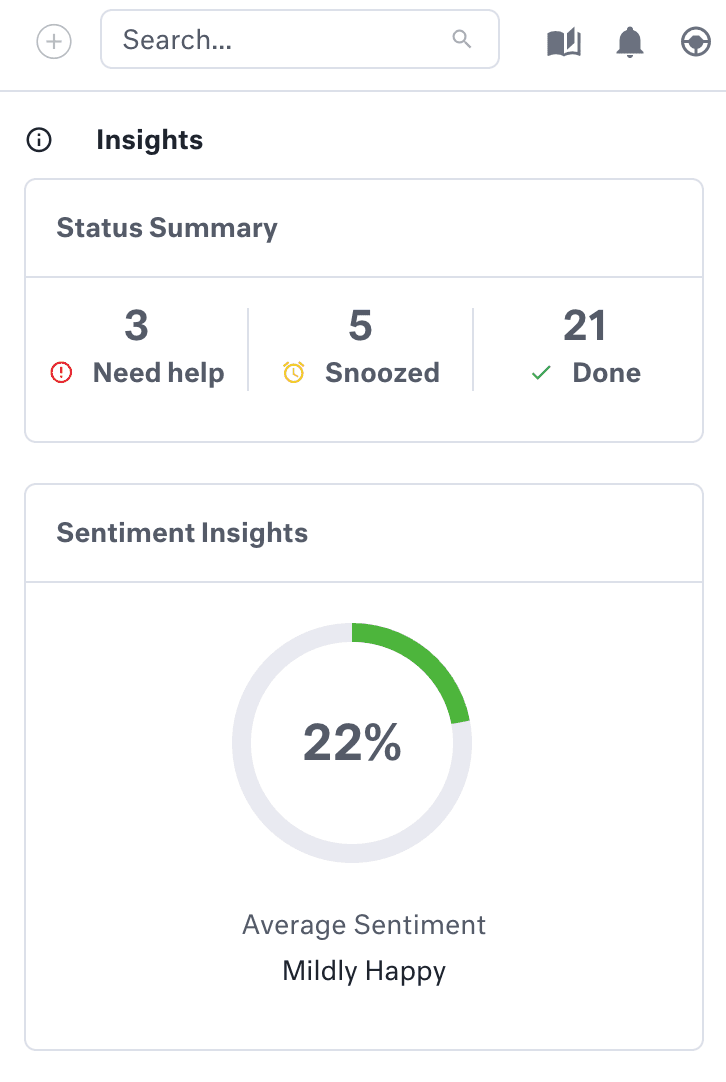
In the agent view, the guide says scores "represent the model's confidence in the detected tone of the message" and show as percentages. A manager running a search on customers gets a Sentiment Insights card with the average:
Is a Kustomer conversation's sentiment an average or the last message?
This is the part I'd check before building anything on it, because Kustomer's docs give two answers. The Sentiment scores article says "Conversation and customer sentiment values are averages of all message scores attached to the conversation or customer." The conversation attributes reference describes the conversation's Sentiment Polarity as the sentiment "for the last inbound message for the customer associated with this conversation", and the customer attributes reference says the customer's sentiment is that of the last inbound message, with separate fields for the last conversation.
Both readings are useful. They just answer different questions, and in a short thread they can disagree completely:
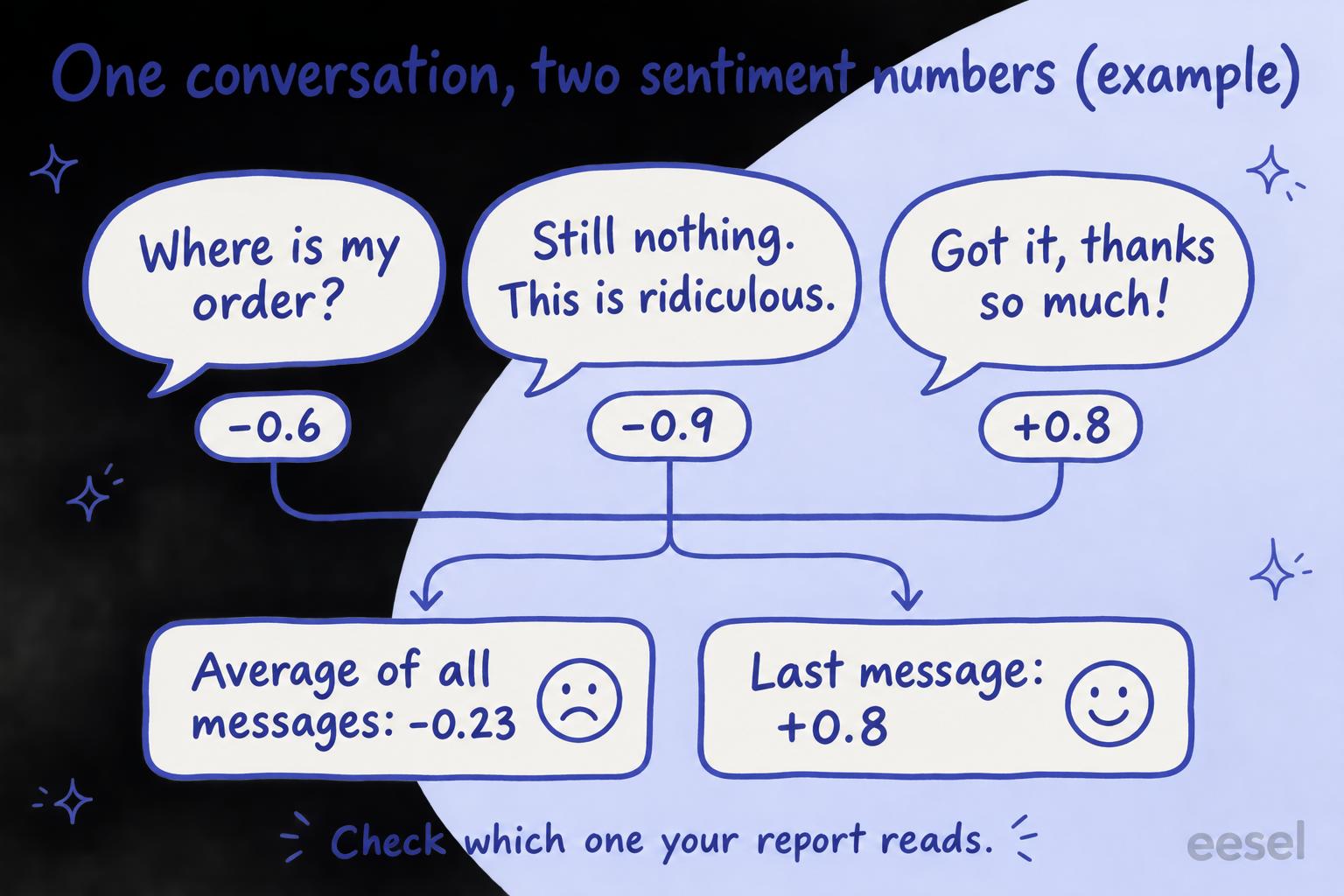
An average is the right number for a monthly trend: "were customers who wrote about shipping unhappier in November?" The last message is the right number for the queue: "is this person upset right now?" Neither tells you the direction, which is what escalation usually needs. Sentiment analysis on tickets goes into how reliable each kind is.
Switch between the three conversations to see when an average and a last-message score disagree.
How to turn on sentiment analysis in Kustomer
An admin does this once, and scoring starts on new messages from then on.
- Install the Intelligence app. From the left navigation click Apps, search for Intelligence, open it and click Install.
- Turn on detection. From the left navigation within any Apps page, click Intelligence and check Detect language automatically. The guide says that with the app installed, you must enable language detection and sentiment analysis this way; the guide lists no separate sentiment switch.
- Check it on a real conversation. Open a new inbound conversation and look for the sentiment insight card in the Insights panel. Try one email and one chat, given the email-only wording in the June article.
- Put sentiment where your team looks. Agents see the card in the conversation's Insights panel. For managers, Kustomer lists Segmentation by Sentiment under reporting on Enterprise and Ultimate, and the Sentiment Insights card sits on customer searches.
- Decide which number your report uses. Open three conversations whose messages swing in tone and compare the conversation's sentiment with each message's. Whatever you see there is how your instance behaves, whatever the docs say.
One side effect to know about: the same workflow re-detects the conversation's language on every inbound message, which can change which language snippets and the satisfaction survey use. One option Kustomer gives is to duplicate the system workflow (the original can't be edited), add a condition and turn the original off. If you do that, keep the sentiment step in your copy. Kustomer conversation translation covers the language side of that workflow.
How to escalate on sentiment with Conversation Intelligence
For a signal you act on, I'd build a Conversation Intelligence attribute rather than lean on the averaged number. Kustomer's own example for a Score attribute, in Using AI attributes, includes a criterion called Customer sentiment: "Did the customer's sentiment improve, remain neutral, or worsen during the interaction?" That is the direction question the built-in score can't answer.
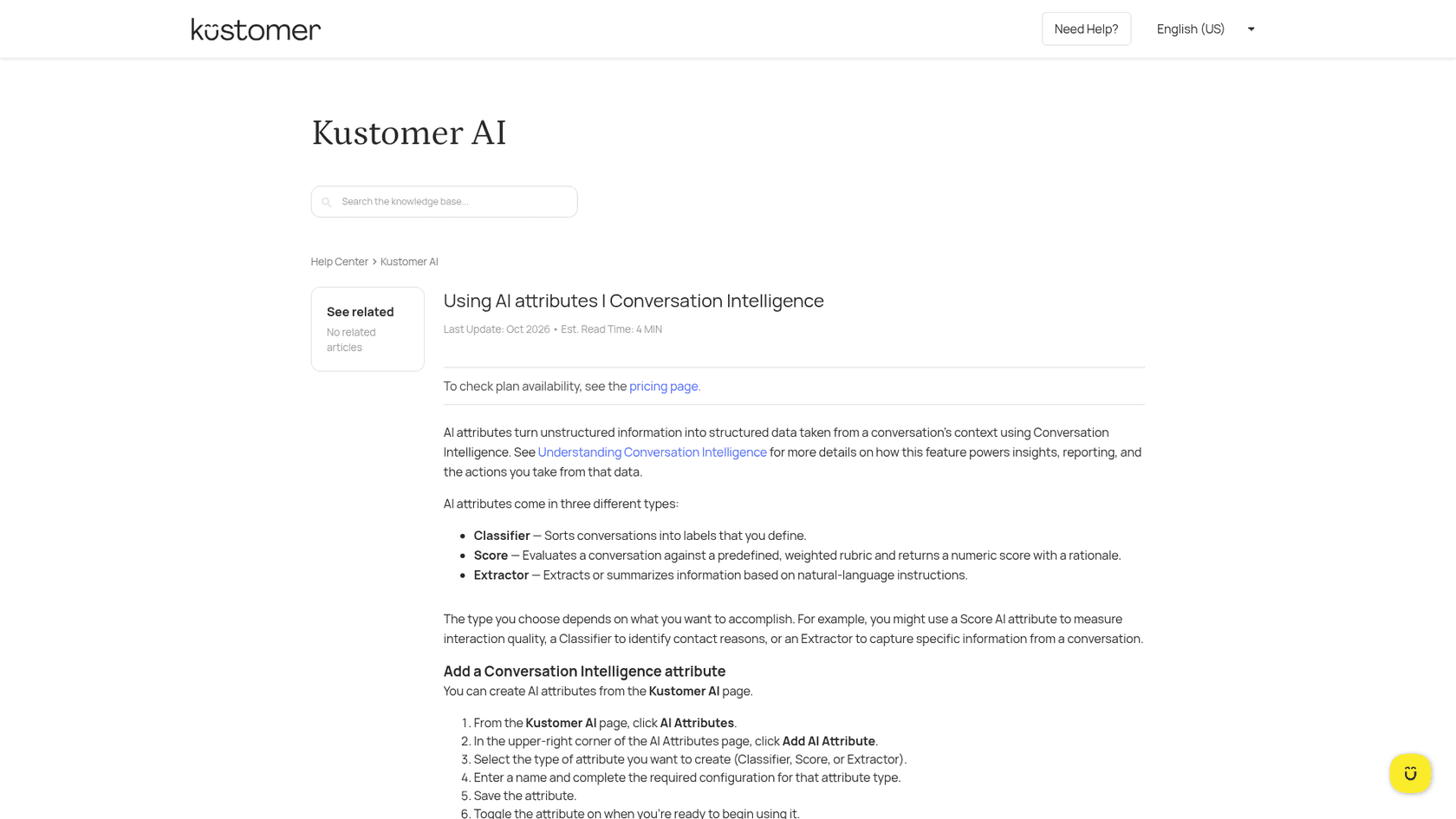
- From the Kustomer AI page, click AI Attributes, then Add AI Attribute.
- Pick the type. A Score returns 0 to 100 from weighted criteria, with a rationale. A Classifier puts the conversation in one of your labels, for example "Calm", "Frustrated" or "Threatening to cancel".
- Write the instructions and criteria. Give each criterion a name, description, weight and rating categories. For escalation, weight sentiment direction and "asked for a manager or a refund" above tone.
- Choose when it runs. An attribute can have up to 3 triggers, and each trigger creates an execution, so pick one moment that matters rather than every event.
- Save it, toggle it on, then add a workflow that acts on the result, such as ticket routing to a senior queue. Kustomer's Conversation Intelligence overview gives "Trigger a workflow when an interaction quality score falls below a certain threshold" and routing a "Cancellation request" to a retention team as examples.
Two things to plan for. Some properties that decide how an attribute stores its output can't be changed after it is created, so settle Score versus Classifier before you build reports on it. And Kustomer is clear that an AI-inferred satisfaction score is "a proxy for customer satisfaction, rather than a rating submitted by the customer", so keep your real CSAT survey running next to it. AI escalation covers what a good handover looks like once something fires.
What does Kustomer sentiment analysis cost?
The built-in sentiment is included; the custom kind is metered. Kustomer's pricing details page (last updated 12 October 2026) doesn't publish plan prices, which are "Talk to Sales", but it does list what each plan includes and the usage rates:
| What | Enterprise | Ultimate | Legacy Professional / Business |
|---|---|---|---|
| Sentiment Tracking | Included | Included | Included |
| Segmentation by Sentiment | Included | Included | Not included |
| Automatic Language Detection | Included | Included | Business only |
| Conversation Intelligence | $0.02 per execution | $0.02 per execution | Not listed |
| AI QA | $0.05 per execution | $0.05 per execution | Not listed |
The pricing page also lists AI Attributes as available at additional charge, and lets you pay for executions with Kustomer Usage Credits (50 Conversation Intelligence executions per credit).
For a team with 8,000 conversations a month and one sentiment Score whose trigger fires once per conversation, that is 8,000 x $0.02 = $160 a month. Three triggers that each fire once make it $480, and a trigger that fires on every customer message multiplies the bill by your messages per conversation. Add an AI QA scorecard on every conversation and that is another 8,000 x $0.05 = $400. It scales with volume, so set the trigger narrowly. Kustomer pricing covers the platform side.
Where does Kustomer sentiment fall short?
The feature does what its docs say. The gaps are in what the number can and can't carry.
- Imported history has no sentiment. Messages brought in from an old helpdesk aren't scored, so trend reports start the day you switched on the Intelligence app.
- One number per message. A message that says "the product is great but your courier is a disaster" gets one polarity. If you need to know what the customer was unhappy about, that is a Classifier or Extractor job, the same split Freshdesk sentiment analysis runs into.
- The conversation number is ambiguous. As above, two docs describe it two ways, and an average hides a late turn for the worse.
- Outbound messages aren't scored. It reads customers, not agents. Tone of your replies is AI QA's job.
- It doesn't say why. The built-in score is a polarity and a confidence. A Conversation Intelligence Score adds a rationale, which is worth the $0.02 when an agent needs to trust the flag.
Kustomer's MCP server returns sentiment with a conversation's details, so an outside AI tool can read it too. That helps if your team already asks an assistant about escalations, though it is still the same number.
Where does eesel fit?
eesel fits a team weighing a move off Kustomer, or one running a second helpdesk beside it. eesel is an AI teammate that joins the tools a team already uses; on support it works in the helpdesk queue, learns from past tickets and is tested against them before it replies. Rather than a sentiment score you then build rules on, it reads the whole thread and follows a plain instruction such as "if the customer has written three times about the same order or asks for a manager, tag it urgent and assign it to the escalations group". On Zendesk and Gorgias, eesel's Zendesk docs list tagging, assigning and updating fields like priority among its actions.
Rúngne, a climbing apparel brand on Gorgias, runs a draft agent that reads the full thread first, looking for a promise a teammate already made, a return in motion, or a frustrated customer, and a triage agent that tags each new ticket it runs on, including a human_review_required tag. Cancellations, damaged items and anyone who asks for a human go to the team.
eesel has no Kustomer integration: Kustomer is not in eesel's helpdesk docs, so I can't tell you to connect it to your Kustomer workspace. If you're staying on Kustomer, my advice is the setup above: turn on the Intelligence app, check what your conversation number really is, and pay the $0.02 for a Score where you need to act on direction.
Try eesel next to your Kustomer setup
If you're comparing helpdesks partly on how they handle unhappy customers, try eesel on a trial of Zendesk, Freshdesk, Gorgias or Help Scout. Write your escalation rule in plain words, run it against a week of past tickets, and read which ones it would have flagged and why. What eesel does alone and what waits for a person's yes is set per action in actions and approvals, so it can start by tagging and leaving a note before it ever reassigns anything.

Try eesel on your escalation rule first, or compare options in best AI for Kustomer.