HubSpot help desk AI after-hours support: what covers the night and what waits

Rama Adi

Katelin Teen
Last edited November 22, 2026

HubSpot's help desk covers the night in layers, and only one layer answers anyone. User working hours decide who gets tickets, chat availability decides what visitors see, and Customer Agent is the only part that replies, at 50 credits per resolved text conversation. Email and form tickets wait in Unassigned until someone's day starts. I'd set Customer Agent to answer outside your hours, write a handoff message that names the morning, and keep refunds with a person. eesel can draft replies on those waiting tickets. With the eesel CLI, an AI coding agent can upload approved policies as knowledge, then ask test questions and check the answers before anything goes live.
What happens to a 2am message in HubSpot Help Desk?
It depends on the channel, and on which of three separate hour settings you have filled in. I read HubSpot's docs on user availability, chat channels, Customer Agent deployment and handoff, plus the credits article and service pricing page. I haven't run these in a live account, so what follows is what HubSpot documents, and I flag the gaps. For the general playbook, see my guide to AI after-hours support.
| Message arrives at 2am | With nothing set up | With hours and chat settings | With Customer Agent on |
|---|---|---|---|
| Email to a connected inbox | Ticket sits in Unassigned | Same: no setting I found sends an acknowledgement | Agent can reply if the channel's hours allow |
| Live chat | Widget follows your availability choice | Away message, return time or hidden launcher | Agent answers if deployed to chat |
| Form submission | Ticket in Unassigned | Same | Agent replies from the set reply email |
| Reply on an old ticket | Waits | Waits | Not documented; a reply after 72 hours reopens the resolution window |
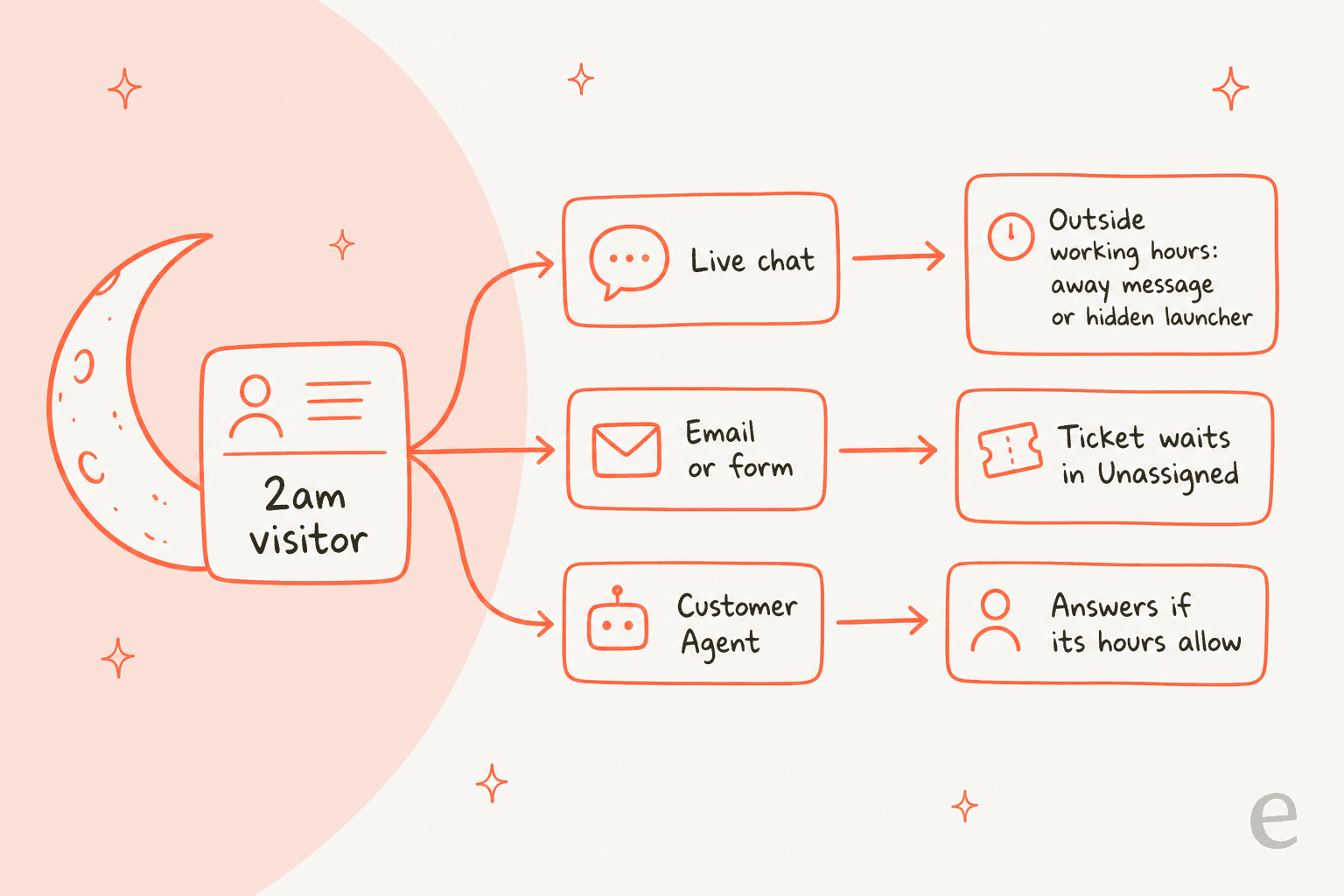
The thing I'd underline: HubSpot has no after-hours auto-reply switch for email tickets that I could find in these docs. A workflow could send one, but I didn't see a documented after-hours condition for it, so test before you promise a customer anything. My HubSpot help desk SLA goals post covers the timer side.
How do working hours decide who gets tickets?
Each user's working hours flip them between Available and Away, and only Available people receive automatic assignments. HubSpot's docs say that outside a user's working hours their status changes to Away and they aren't eligible for automatic assignment, and at the start of the next shift it switches back to Available. You set it under Users & Teams, on the user's Preferences tab, in Working hours, with a timezone. Out-of-office dates work the same way and can sync from Google or Outlook calendars.
Two defaults matter at night:
- Tickets start unassigned. HubSpot says incoming tickets in help desk are left unassigned by default, and routing rules need an assigned Service Seat.
- Only available agents get tickets. The Assign to available users only box is on by default, so with nobody available the ticket stays unassigned. Clear it and tickets are assigned regardless of availability, so I'd only do that if someone really will see them.
That is why a night shift in another timezone works well here: give those agents working hours that cover your night, and routing treats them as the available team. My posts on HubSpot ticket routing, skill matching and capacity limits cover what happens once someone is available. A seat is the price of entry: HubSpot's pricing page lists Service Hub Professional at $90 per seat a month ($100 on the other billing option) plus a $1,500 one-time onboarding, and Enterprise at $150 plus $3,500. My HubSpot pricing breakdown has the full table.
What does live chat show outside working hours?
Whatever you configure per chat channel, and visitors can't message you unless you allow it. In a chat channel's availability settings HubSpot offers three modes: Based on user availability, Based on chat operating hours, and Chat is available 24/7. Then three experiences: Available, Away (during business hours), and Outside working hours. For that last one you pick show return time, show an away message, or hide the chat launcher.
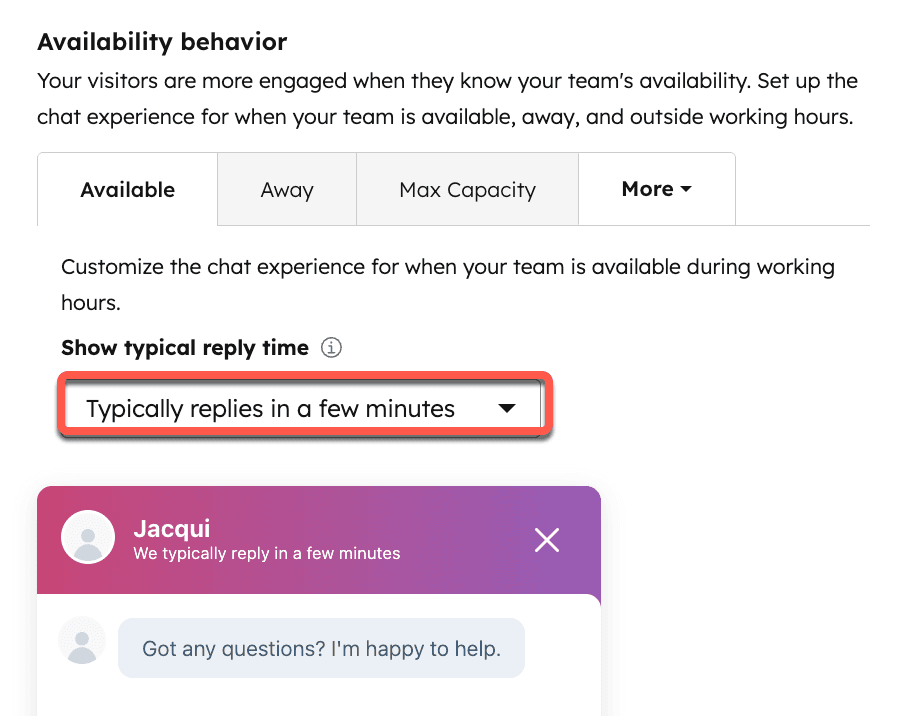
HubSpot adds a note that visitors cannot send messages outside your team's working hours, and a toggle called Allow visitors to send messages to let them leave one anyway. I'd turn it on and tell them when to expect a reply. A hidden launcher saves you a bad promise, but it also sends the 2am visitor to email, which waits. For the bot version of this, see my HubSpot chatbot guide and live chat vs AI chatbot.
There is one trick in the chatflow settings. HubSpot documents an option, Assign to Customer Agent if no users are available, which sends chats to the agent when nobody is online. If you tick it, the deployment settings for that chat channel can't be edited from Customer Agent settings, so decide where you want to manage hours before you tick it.
Can Customer Agent answer after hours?
Yes, and its working hours are separate from your team's. When you deploy Customer Agent to a channel, HubSpot's Working Hours section has three options: All hours, During specific hours, and Only outside specific hours. The agent can go on live chat, forms, email, WhatsApp, Facebook, SMS and calling (beta). For email you can include or exclude contact lists, and a Conversation coverage percentage lets you start with a slice of traffic.
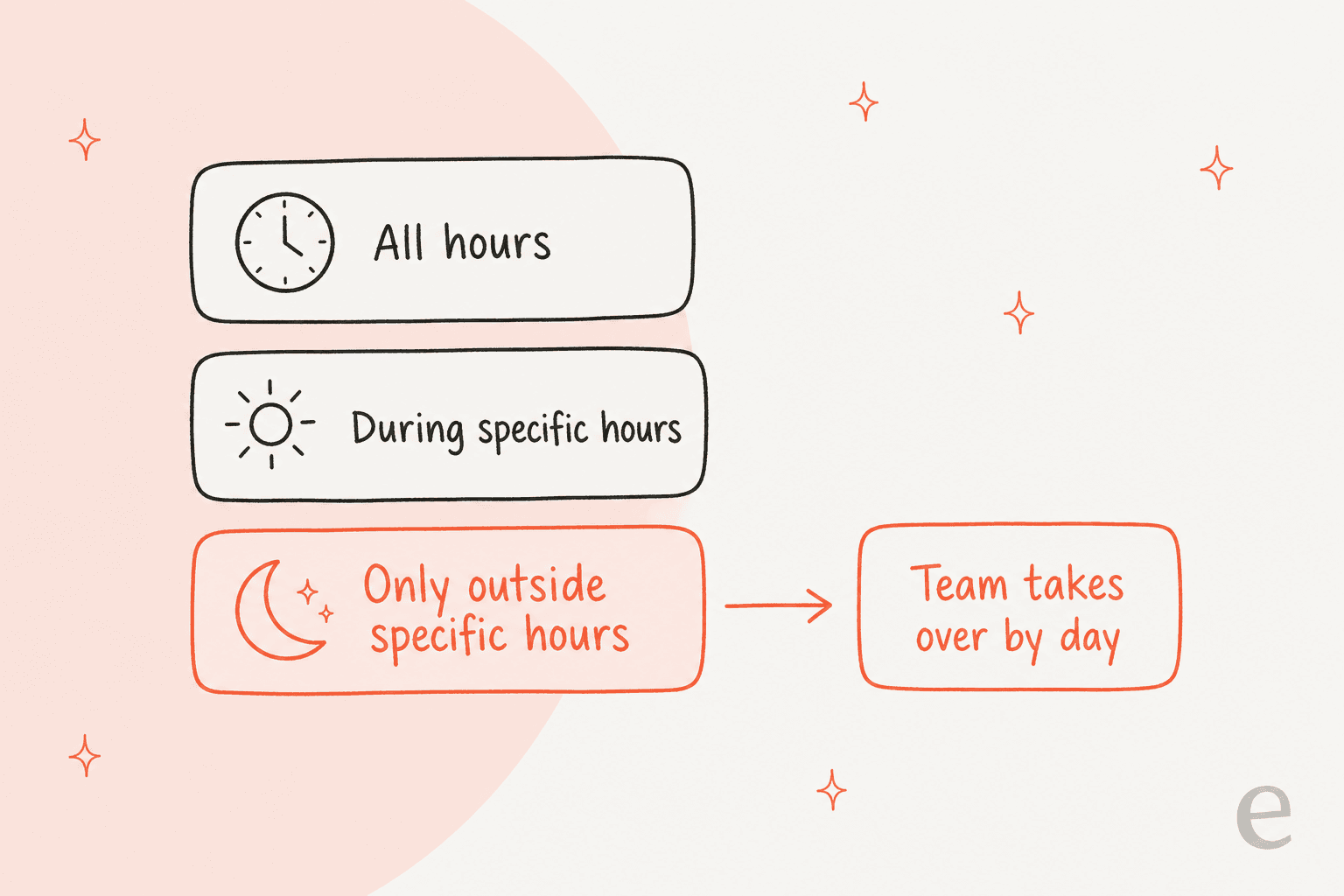
Only outside specific hours is the setting I'd use for after-hours coverage: your team answers by day, the agent answers by night, and the section below it, Assignments when the Customer Agent isn't set to respond, controls who gets the conversation during the day. The deploy screen also shows coverage and response time per channel.
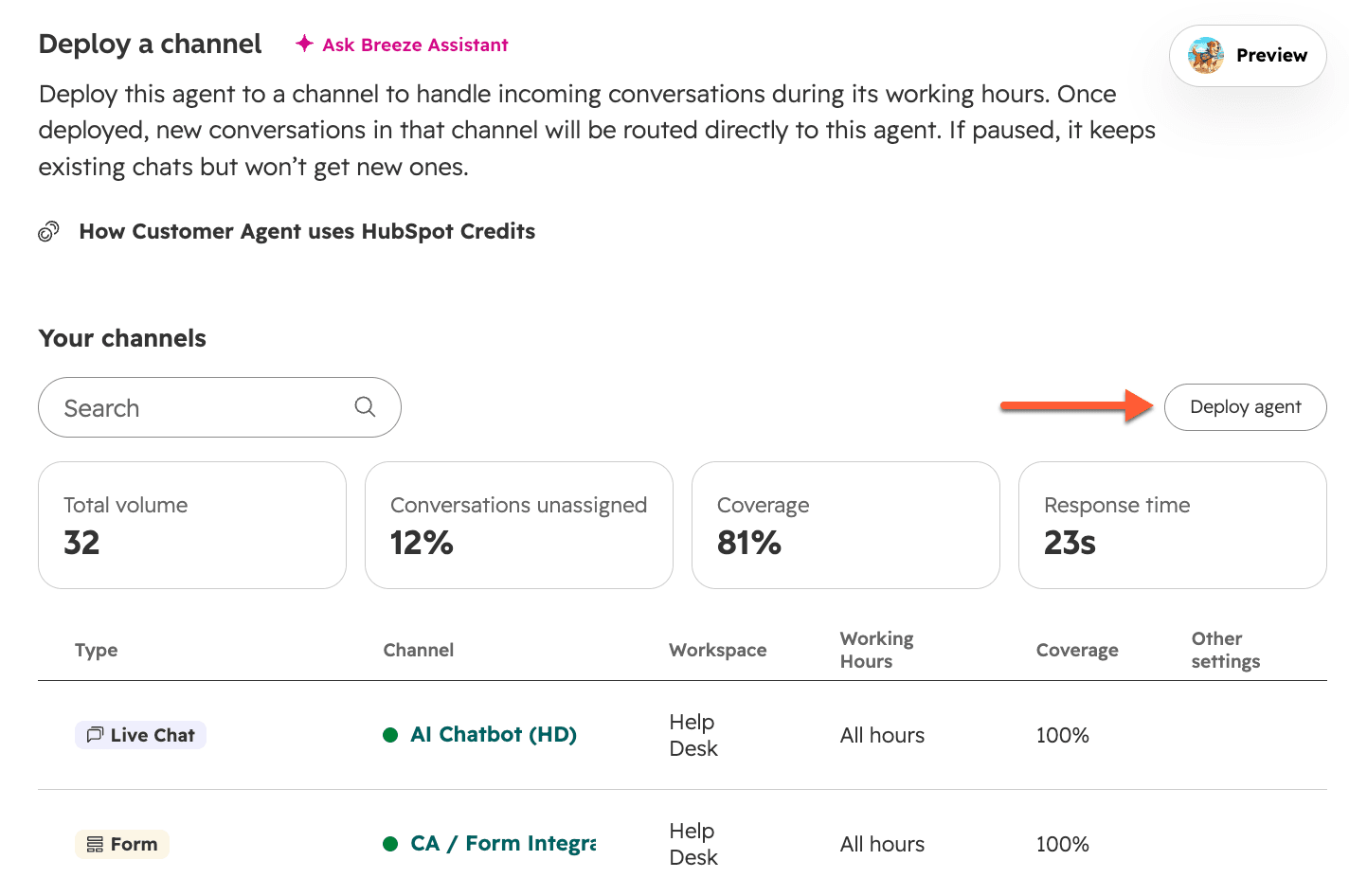
HubSpot's content sources guide and batch testing matter more at night than by day, because nobody is watching. Plan access is Professional or Enterprise on a qualifying hub, with HubSpot Credits, and the pricing page offers 14 days of free Customer Agent access when you buy at least one Professional or Enterprise Service Seat. My HubSpot AI agent review goes deeper on what it handles.
What happens when Customer Agent hands off at night?
It follows the handoff process you set, and that process looks at people, not chat widget hours. By default the agent hands off when it can't answer, the visitor asks for a human, or the agent is paused. You choose per channel between live handoff, async handoff, or none. HubSpot's docs say Customer Agent assigns conversations based on user availability and does not take chat widget availability into account.
Two details save you at 3am:
- Team only ignores availability. HubSpot says that with Team only the agent hands off even if nobody is available. Use Specific users and teams instead.
- Write both messages. There are separate boxes for the message shown when your team is available and when it isn't. The unavailable one should name the next working time.
When a handoff lands on nobody, the Customer Agent ticket status property shows Awaiting Human Assignment, which is a filter your morning shift can start from. My Customer Agent channel handoffs post covers triggers and live versus async in detail, and AI agent handoff best practices covers wording.
What does after-hours coverage cost in credits?
Fifty credits per resolved text conversation, which is $0.50 once you're past your plan's credits. HubSpot's product and services catalog lists "Resolve one conversation (text-based channels)" at 50 credits, and extra credits at $0.010 each. A conversation counts as resolved when the agent shared a content source or performed an action and there was no visitor-initiated handoff within 72 hours of the last visitor response.
| Plan | Included credits a month | Resolutions at 50 credits |
|---|---|---|
| Service Hub Starter | 500 | 10 |
| Service Hub Professional | 3,000 | 60 |
| Service Hub Enterprise | 5,000 | 100 |
Included credits come from HubSpot's pricing page, and the resolution counts are my arithmetic, assuming Customer Agent is the only thing spending credits. Starter doesn't list Customer Agent in its feature table, so treat that row as the credit allowance, not an access promise. Three limits worth knowing, all from the credits docs: if credits run out, the agent stops being assigned new conversations until the next reset or a purchase; extra credits come as pay-as-you-go or 1,000-credit capacity packs; and after you buy capacity, an account spend limit is set 50% above your total. You can also set a monthly limit for Customer Agent alone. See HubSpot credits, HubSpot AI agent pricing and HubSpot AI pricing for more.
The night-shift consequence: a cap that runs out on day 20 turns your after-hours coverage into the Unassigned view with no warning to the customer. Put the cap above your expected volume.
What waits for the morning shift?
Everything the agent didn't resolve: email, forms and handoffs that landed on nobody. When working hours begin, availability flips to Available and routing assigns what's waiting. If every matching agent is at capacity, the waitlist takes over.
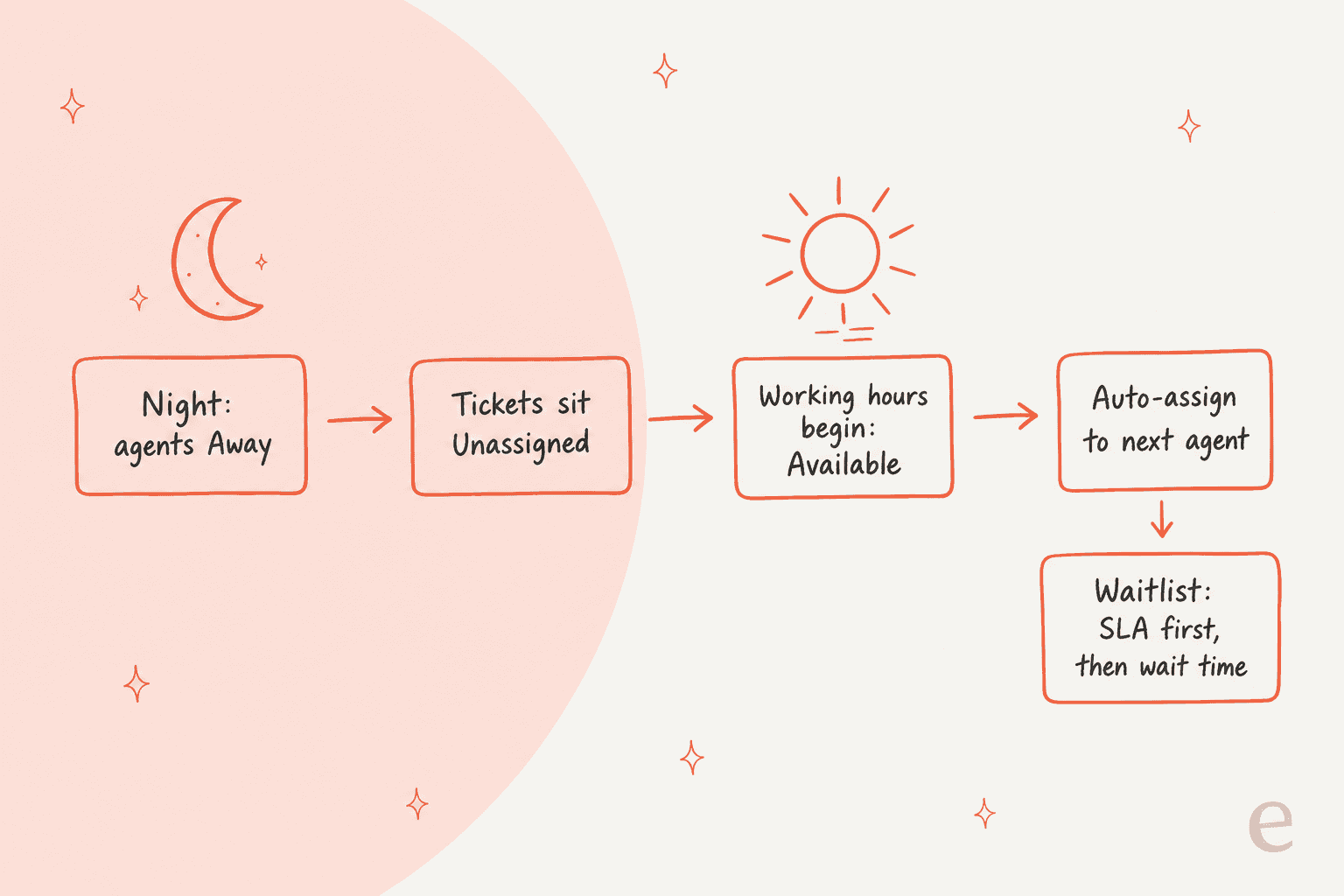
HubSpot says the waitlist holds tickets when all eligible agents reach their ticket capacity limit, orders them by priority (first by SLA, then wait time), and assigns the highest-priority one to the first available matching agent. It needs an assigned Service Seat and a Super Admin who has set capacity limits. Tickets created or handed off from a customer agent or bot go there too.
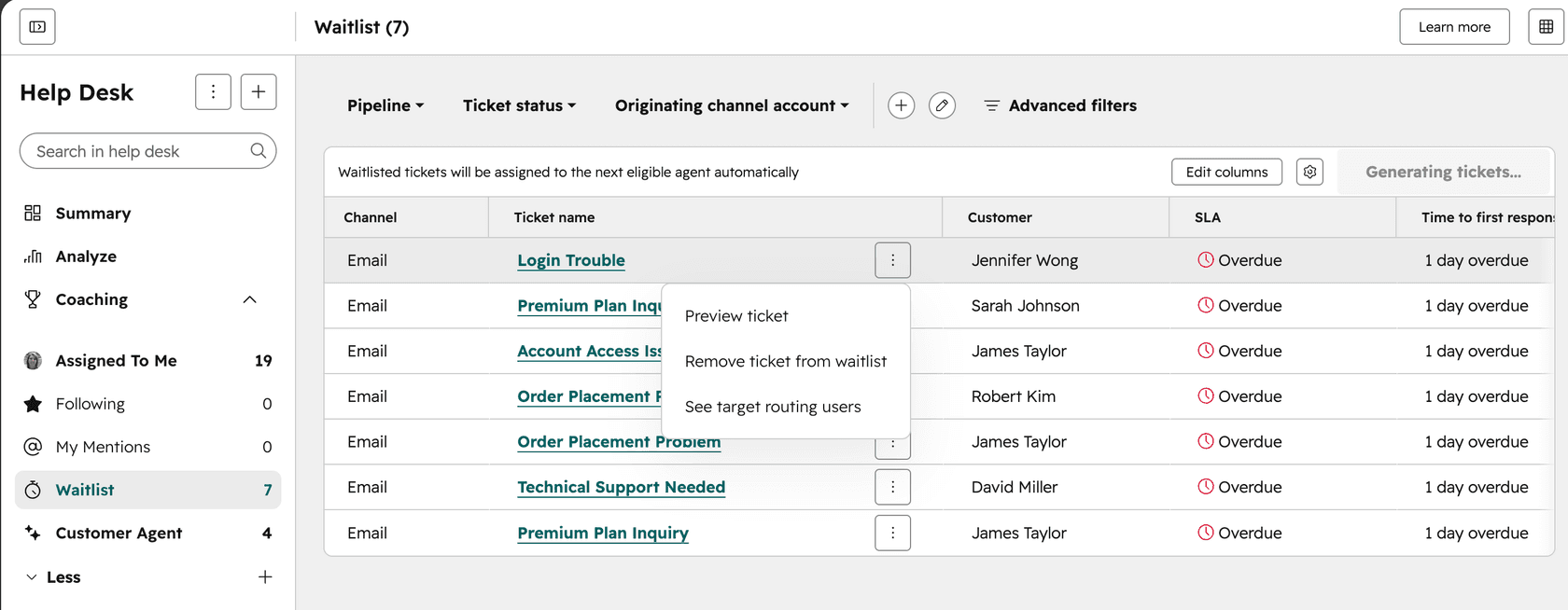
The picture above is what an unattended night looks like: seven emails, every SLA overdue. That is a reporting problem as much as a customer one. HubSpot's SLA setup lets you pick a schedule, so overnight hours don't count against first response time, but my SLA best practices post argues for being honest about what customers actually experience. Priority matters here too, since it drives waitlist order; see HubSpot ticket prioritization.
How I'd set up after-hours coverage in HubSpot
In this order, each step closing a gap the last one leaves:
- Set working hours for every agent, with their real timezone, so availability and routing match your coverage, and build a custom view for the overnight pile.
- Choose the chat behavior. Pick away message or hidden launcher, and turn on Allow visitors to send messages if you want leave-a-message.
- Fix your content sources first. Customer Agent can only answer from what it has; see HubSpot knowledge base AI and your knowledge base.
- Add handoff guidelines for refunds, cancellations and "can't log in", with the unavailable message naming your next working time.
- Deploy to one channel with Only outside specific hours and a modest coverage percentage.
- Set a credit limit with room to spare.
- Review the Awaiting Human Assignment tickets each morning, and read a few resolved ones too, since resolved means the customer didn't object, not that they were happy. Containment and escalation covers that trap.
Skip one thing: Team only handoff with nobody on shift. It tells the visitor someone is coming when nobody is.
How does eesel cover the HubSpot night shift?
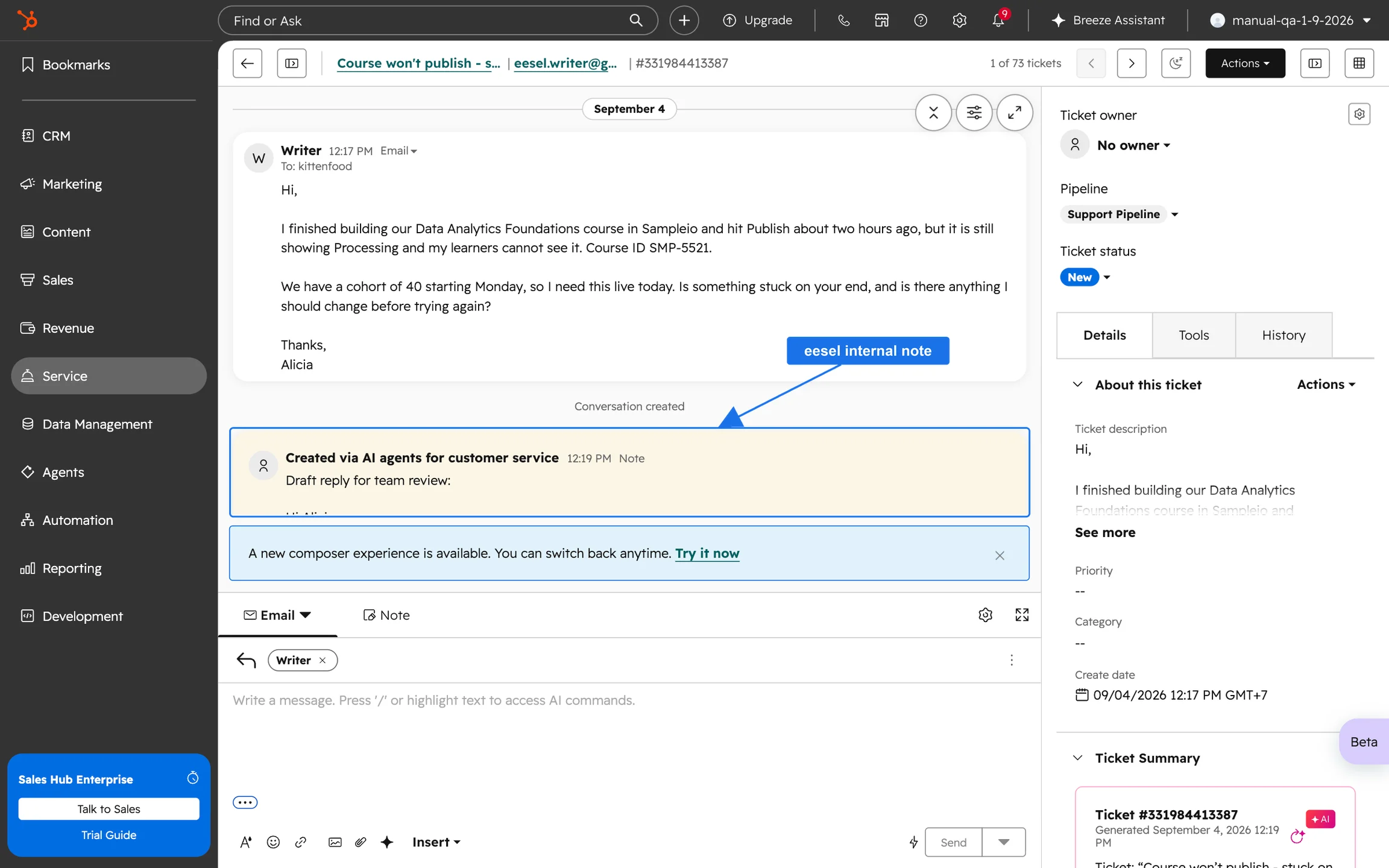
Customer Agent answers questions your content covers. What's left overnight is email, forms and replies it doesn't take, and that's the work I'd hand to an AI agent inside HubSpot. MentorShow is the live example: a French learning platform whose support team works entirely in HubSpot Service Hub, getting between 5,000 and 13,000 tickets a month. In the month from 8 August to 8 September 2026, eesel read about 1,200 HubSpot conversations and tickets and wrote 432 drafts, each with an analysis note and a draft in the member's language, as an internal note.
The story doesn't claim night coverage, and I won't either. What it shows is the pattern I'd use for the waiting queue: the agent decides whether to act, reads the contact record for subscription and renewal date, and hands refunds, billing checks and account changes straight to a person. It may reply directly on six narrow topics, and only on brand-new tickets nobody has touched. Run overnight, the morning shift would open to drafts instead of a cold queue. More on that in HubSpot AI draft replies, and for weekends specifically, AI weekend support coverage.
eesel connects to HubSpot through its HubSpot integration, learns from your help center and past tickets, and each action can run on its own, ask first or stay off. You can start with notes and drafts, read them every morning, and let it send once you trust them. The human in the loop stays in place for as long as you want it.
Try eesel on your HubSpot night shift
If Customer Agent already covers your help center questions, the gap left overnight is the tickets it won't take, and the escalations that wake nobody. eesel for HubSpot works like a new hire in Service Hub: it reads each ticket with the contact's record and past tickets, and leaves a draft reply as an internal comment, so your 9am shift starts with replies to check instead of a queue to read.