

To get support agents to adopt AI, start with one ticket type they'd happily give away, have your best agent write its steps, and check acceptance per agent every week, since 44% of employees who don't use AI say it can't help with their work, in Gallup's research. Only 16% blame a lack of access. In Zendesk, that means tag-based auto assist on one ticket type, a procedure written with your best agent, and the Copilot dashboard open every Monday.
The newest agents gain the most. In an NBER study of about 5,000 support agents, an AI assistant lifted issues resolved per hour by about 14% on average and 35% for the least experienced, with close to nothing for the most experienced. So roll it out to the people it helps first, and let your veterans write the steps it follows.
If you'd rather add an AI teammate than a per-seat add-on, eesel drafts Zendesk replies as internal notes, and agents can call it into any ticket with an @eesel note. An AI coding agent can do much of the setup through the eesel CLI, such as uploading your macros or asking test questions before go-live, though connecting Zendesk still needs an admin's approval.
Why don't support agents use the AI tools they're given?
Most agents who skip AI tools don't think the tools fit their work. When Gallup asked US employees at organisations that had begun using AI what stopped them, 44% of non-users said AI can't help with the work they do, 16% said they had no access, 11% named resistance to changing how they work, 10% didn't know how to use it and 8% felt unsafe using it (Gallup). The top barrier for everyone was an unclear use case, at 16%.
Support work makes this sharper. An agent who has answered the same "where is my order" ticket 400 times doesn't need AI to explain it. What they need is for that ticket to take ten seconds instead of two minutes, and for a tricky one to come with the context already pulled, which is the job of agent assist tools. A tool pitched as "AI for everything" lands as AI for nothing in particular.
People who do the work aren't against AI as such. Here is how one person who works in support put it:
"As someone who does support I think the end result looks a lot different. AI, for a lot of support questions works quite well and does solve lots of problems in almost every field that needs support."

Zendesk's own packaging adds a second reason. Without the Copilot add-on, Professional plans get writing tools, ticket summaries and similar tickets with a pooled allowance of 5 uses per agent per month, capped at 500 per account (Zendesk's allowance guide). Five uses a month is about one a week per agent, which is a demo, not a habit. If you're judging whether your team "uses AI" on the free allowance, you're measuring the allowance. The add-on costs $50 per agent per month, paid yearly, on Professional plans and up (Zendesk pricing; the plan comparison shows which those are), and a 30-day trial removes the limit. The Zendesk AI pricing breakdown has the full plan picture.
Who gains most from AI on a support team?
New and less experienced agents gain the most. A study of about 5,000 agents at a Fortune 500 software company followed them as a generative AI assistant was rolled out in stages. Issues resolved per hour rose about 14% on average, and 35% for the least skilled and least experienced agents, with "zero or small negative effects on the most experienced/most able workers" (NBER digest). An agent two months in, using the tool, performed as well as an agent six months in without it.
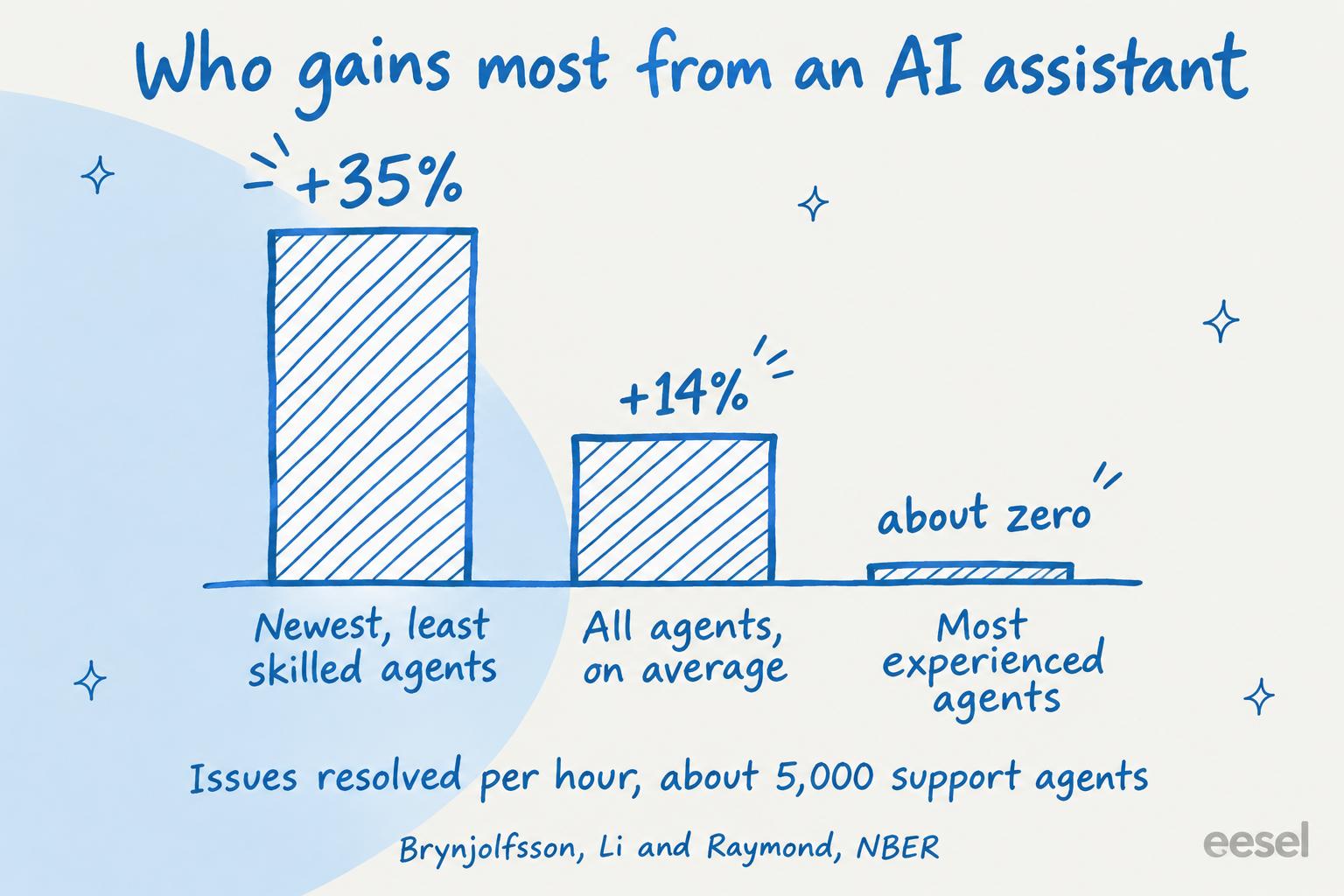
The later version of the paper adds a warning for your veterans: the most experienced agents saw "small gains in speed and small declines in quality". The researchers' explanation is the useful part. The assistant was trained on the best-resolved conversations, so it spread the habits of top performers to everyone else, and it "was also able to give more frequent feedback than a human manager" (NBER digest). Your top performers are already the source of those habits.
Two side effects matter for adoption, beyond the productivity gains themselves. Customers were more likely to express positive sentiment and less likely to ask for a supervisor when the agent had AI help, and attrition among agents with access was 8.6% lower (NBER digest). Customer satisfaction didn't change significantly, so the speed didn't cost quality on average.
What I'd take from this: roll AI out to new hires and the middle of your team first, and give your best agents the job of writing what it follows, rather than asking them to use it on tickets they already solve in their sleep. The guide to support agent onboarding covers the rest of a new hire's first month.
Step 1: Start with one ticket type agents would happily give away
Pick one high-volume, low-judgement ticket type: order status, password resets, invoice copies, address changes. If a shared macro already answers it most of the time, it's a strong candidate. Agents adopt AI on the work they're bored of, and they resist it on the work they're proud of. Pull the top ten ticket tags from the last 90 days in Explore and ask the team which one they'd give away first. Their answer is your pilot.
In Zendesk, auto assist, the part of Zendesk Copilot that suggests replies and actions, can be scoped to exactly that ticket type. It has two modes: suggestions on tickets carrying the agent_copilot_enabled tag, or suggestions only when its confidence score clears a threshold. With both on, tagged tickets always get suggestions and untagged ones only when the model is confident (About auto assist).
Start with the tag mode alone, so agents only see AI on the ticket type they chose:
- In Admin Center, go to AI > Agent copilot > Auto assist and click Settings. Choose the groups that can use it, turn on tag-based suggestions only, and click Save (Zendesk setup guide).
- Create a ticket trigger with conditions that match your pilot type (a tag, a form or a category field). Zendesk's guide sets this up for messaging and email tickets.
- Add the action Ticket > Add tags with
agent_copilot_enabled, plus a second tag naming the type, such ascopilot_order_status. Zendesk suggests this second tag so you can report on that procedure later (same guide).
Auto assist and its procedures need the Copilot add-on. The setup details for actions are in eesel's guide to auto assist actions.
Step 2: Write the procedure with your best agent
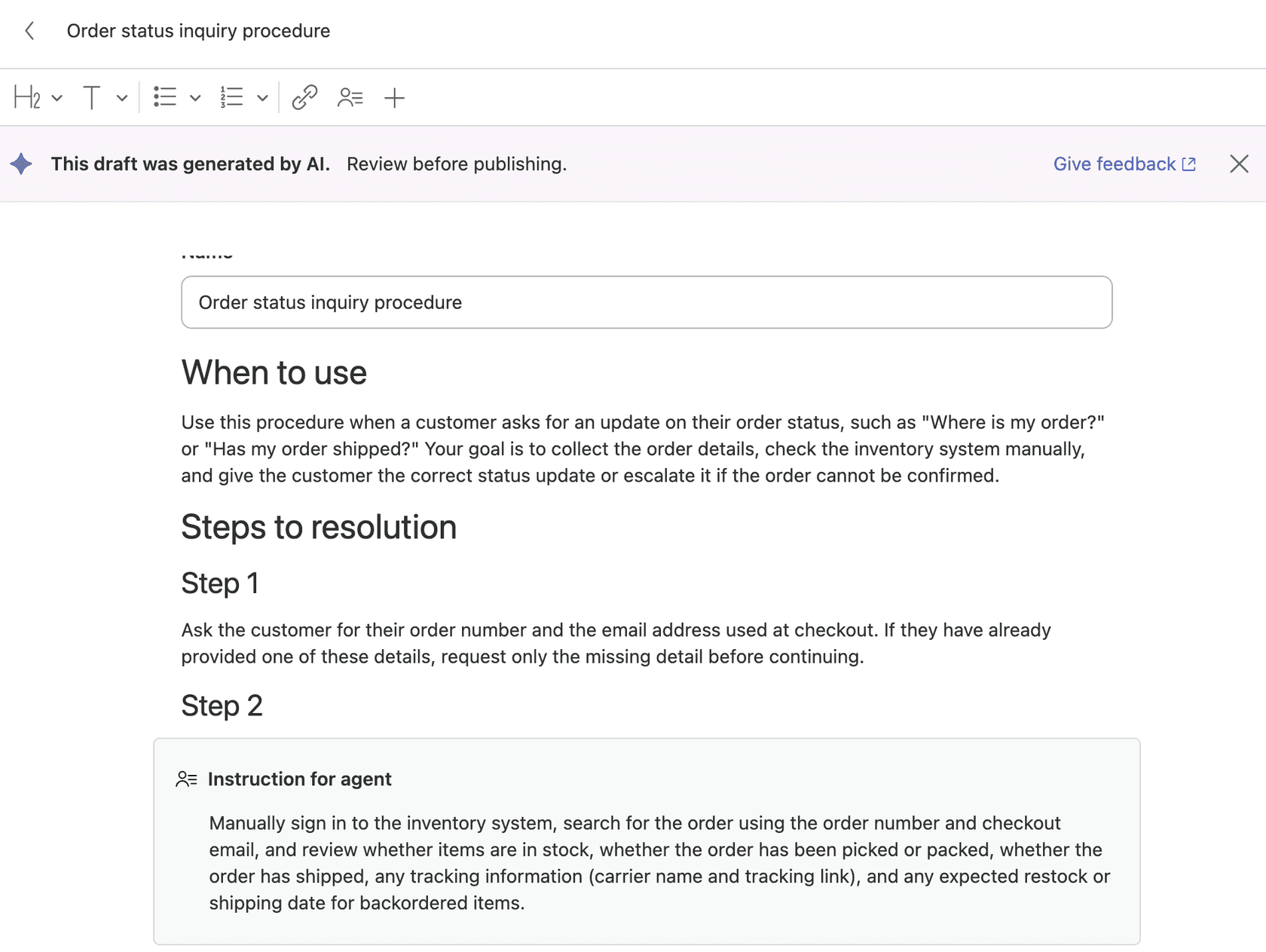
A procedure is the written steps auto assist follows for one kind of request, and Zendesk is blunt about it: "Procedures are essential and should be used as your primary" source, with help center articles used alongside them (About auto assist). You create them in Knowledge admin under Content > Procedures, and you can scope each one by brand, assignee group and ticket tags (Creating procedures).
Sit your most experienced agent down with the draft for an hour. This is where the NBER finding pays off: the AI is only as good as the habits it copies, and the person with those habits is the one most likely to shrug at the tool. Giving them authorship turns your most likely sceptic into its editor. Ask them three questions as they read it:
- What do you check before you answer this, that a new hire would skip?
- When do you stop and hand this to someone else?
- What does the customer usually get wrong in their first message?
Their answers become the steps and the "instruction for agent" blocks. The same habits feed suggested first replies if you turn those on later. If a procedure links a help center article, check that the help center isn't restricted to signed-in users, which procedures can't read (Creating procedures). A quick knowledge base audit before you start saves rewriting later.
Step 3: Keep agents in charge of every reply
Agents adopt AI they can overrule. Auto assist's suggested replies and actions "require agent approval before being sent to a customer", and agents can edit a suggestion before approving it (About auto assist). Say that out loud in the kickoff: nothing goes to a customer without them. It's the human-in-the-loop promise, and it's the one that makes trying it feel safe.
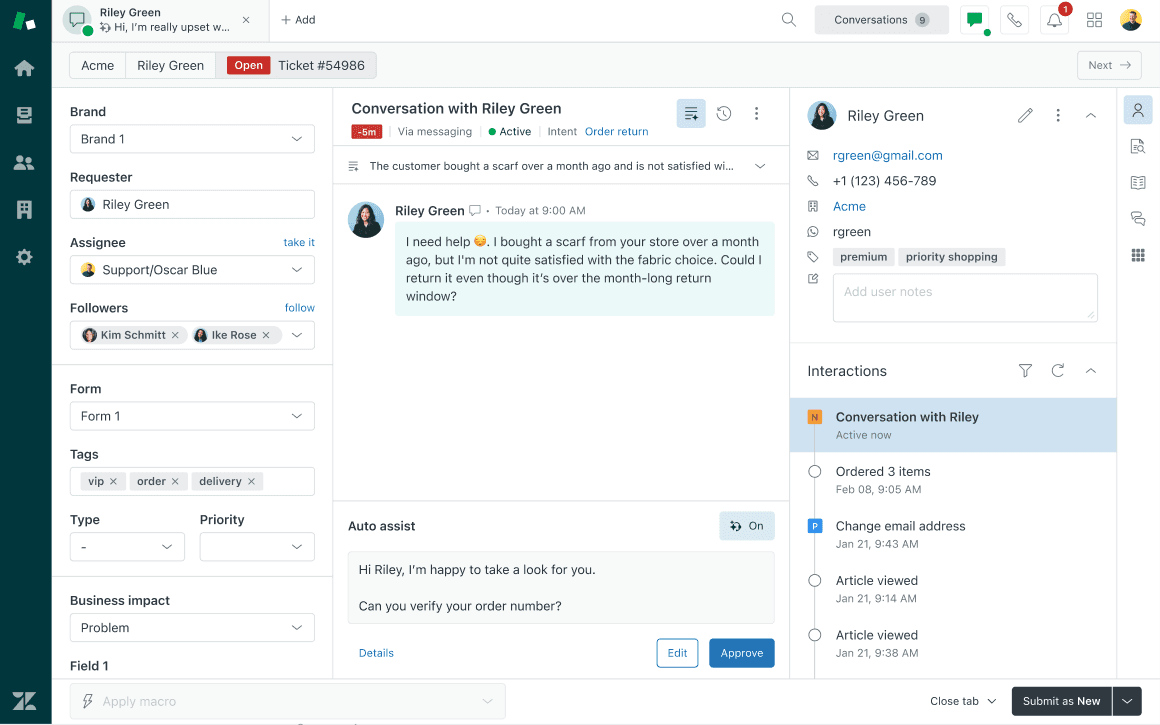
Control also means being able to ask again. Today auto assist writes a new suggestion only after each customer reply, which one Zendesk admin flagged as an adoption problem:
"Auto Assist only generates a new suggestion after each customer response. If the ticket is updated while an agent is editing, they can select View suggestions to see the new ones, and in the updated composer they can go back to an available suggestion with the Auto Assist icon. There's no way to ask for a new suggestion when the current one isn't useful."
Her request lists the benefit plainly: "Higher Auto Assist adoption, since agents aren't stuck with one suggestion per customer message." Until that ships, tell agents the fallback: the writing tools (Expand, Simplify, Rewrite in your tone, Make more friendly, Make more formal, or a custom prompt) can rework a suggestion they've pulled into the composer.
This is also where eesel works differently. At smava, where eesel prepared 15,300 draft replies in a month across one Zendesk, an agent approves the draft "or writes @eesel in an internal note to ask for a different macro and gets a new draft". At Adverscale, eesel only ever works on a ticket a support agent has pointed it at, with an @eesel internal note. An AI your agents call in is an AI they chose to use.
Step 4: Say out loud what AI means for their jobs
Agents who use AI more worry more about their jobs, not less. Gallup found that workers who use AI daily or several times a week are more than twice as likely to fear their job will be eliminated within five years: 6.3% against 3.1% for infrequent users in early 2026 (Gallup). Watching a tool do part of your job every day raises the question; using it once a month doesn't.
Managers are what bring that fear down. In the same study, workers who felt respected, or felt their organisation cared about their wellbeing, showed a much weaker link between heavy AI use and job fear (6.8 and 11.1 points smaller). And it pays off in use: employees who strongly agree their manager actively supports AI are 2.1 times as likely to use it a few times a week or more, yet only 28% strongly agree their manager does (Gallup).
What that looks like on a support team:
- Say what the time saved is for. "Fewer order-status tickets so you can take the escalations and the QA work" is a plan. Silence reads as headcount. The post asking whether AI can replace a support team has the honest version of that answer.
- Have team leads use it on live tickets in front of the team, including the suggestions they reject and why, and the tickets they escalate anyway.
- Gallup's advice is to aim one-to-one conversations at people "with less seniority", because broad AI strategy messages are "unlikely to reach them". In support, that's your newest agents, who are also the ones the tool helps most.
Stressed teams adopt nothing new, so if the queue is already overwhelming people, start with reducing agent burnout and come back to this.
Step 5: Measure adoption per agent, every week
Team-wide numbers hide the story. Zendesk's Copilot: Agent productivity dashboard, in Explore's dashboard library, has an Auto assist tab with four headline numbers: agents who accepted an auto assist, tickets where suggestions were accepted, applied suggestions and the acceptance rate. You can filter it by procedure and by agent name (Analyzing your Copilot activity). Zendesk's own dashboard overview advises checking it weekly.
Both tabs can be filtered by agent, and the AI suggestions tab (suggested first replies, suggested macros, similar tickets and more) has a per-agent table. Zendesk's sample shows why that matters:
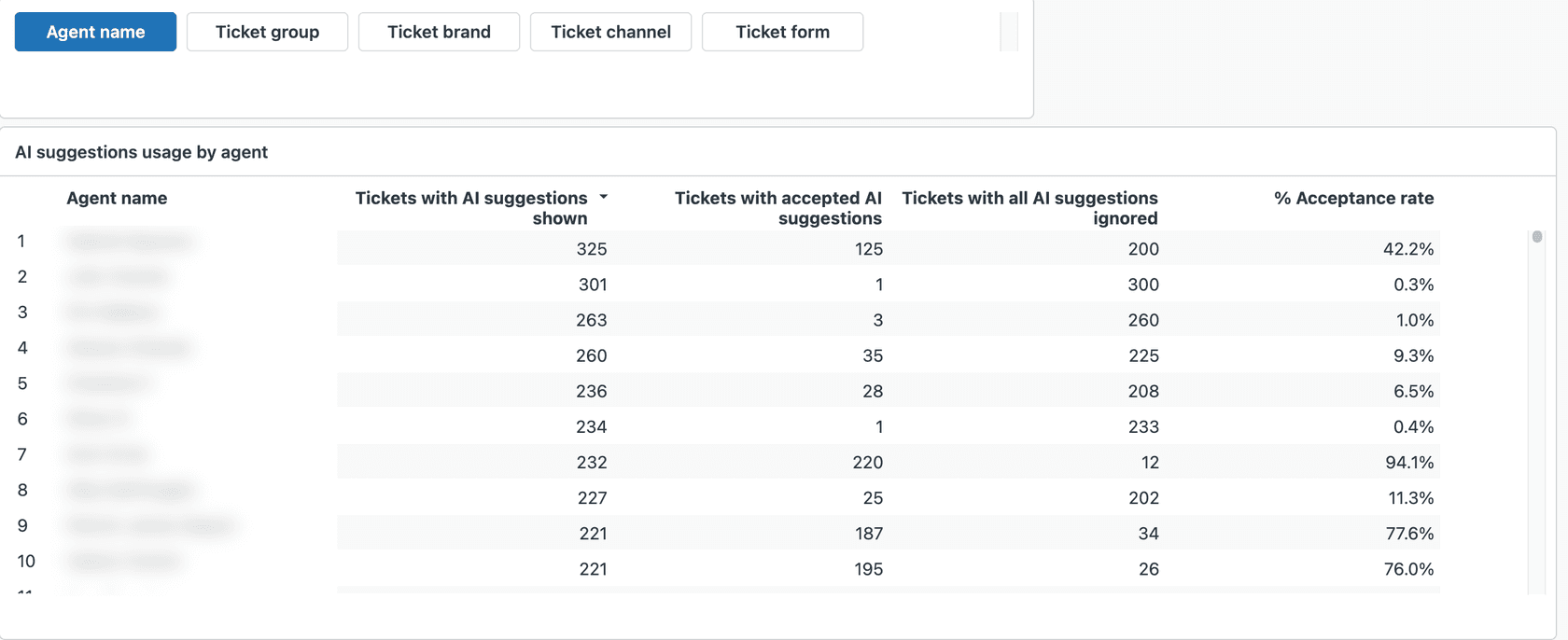
In that sample, one agent accepted suggestions on 220 of 232 tickets and another on 1 of 301. A team average of the two tells you nothing, which is why a per-agent comparison beats a single team number. The agent at 0.3% is the one to talk to, and the question isn't "why aren't you using it?" but "what's wrong with what it suggests?" Run the same check on the Auto assist tab, filtered by agent, for your pilot procedure: there, a low rate usually points at a missing step, which goes back to Step 2.
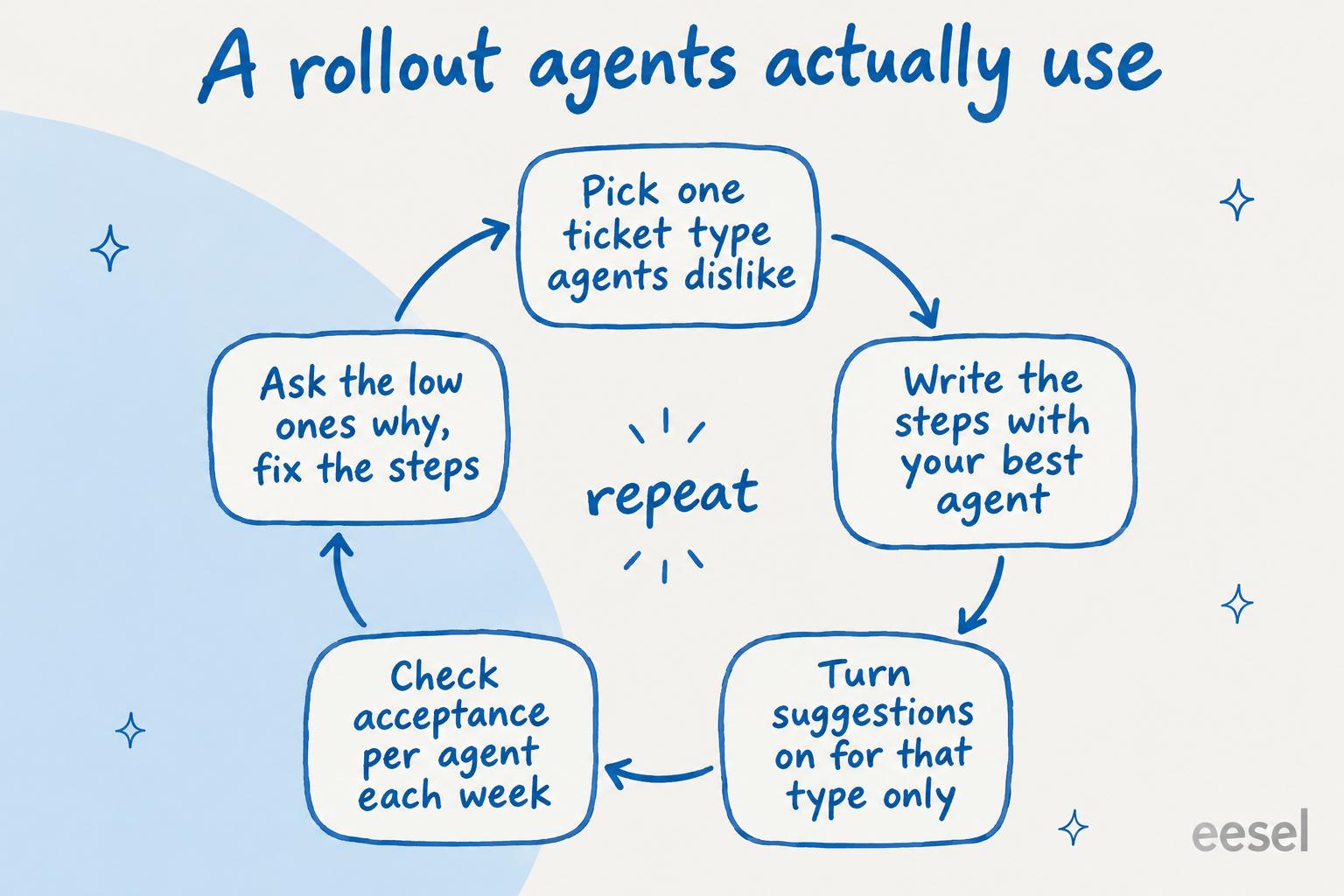
Pair the acceptance rate with an outcome, so adoption doesn't become the goal. The same dashboard's AI agent tools tab compares full resolution time on tickets where a writing tool was used against tickets where none was (Zendesk), and the procedure tag from Step 1 lets you build an Explore report on your pilot tickets alone. If acceptance climbs and resolution time doesn't move, agents may be approving drafts they then rewrite by hand. The guide to Explore dashboards for leaders covers building the follow-up reports.
What does a first month of AI rollout look like?
A first month covers one ticket type, start to finish. Step through it week by week:
Step through the four weeks to see what each one has to finish before the next.
If your rollout has a bigger scope (an AI agent answering customers, not just suggesting to agents), the AI support implementation timeline lays out the longer version.
Common mistakes that stall adoption
Most stalled rollouts make one of these:
- Turning everything on at once. Confidence-based suggestions on every ticket means agents meet the AI first on the tickets it's worst at. Start tag-based on one type.
- Judging the tool on the free allowance. At 5 uses per agent a month, nobody builds a habit. Run the 30-day trial or a pilot with real volume before deciding.
- Making acceptance rate a target. Agents will approve and rewrite. Track it to find broken procedures, never as a ranking the way average handle time often gets used, and judge the rollout on first contact resolution and resolution time.
- Asking your best agents to use it first. They have the least to gain and the most to lose on quality, per the NBER paper. Ask them to write the procedures instead.
- Saying nothing about jobs. Gallup's data says heavy users worry most. Say what the freed-up time is for before anyone asks.
For the mistakes that come later, when AI starts answering customers directly, see the list of AI implementation mistakes.
Try eesel with your Zendesk team
If the problem is getting agents to use AI, an AI they call in is easier to adopt than one that appears on every ticket. It's one of several agent assist tools that work this way. eesel joins your Zendesk as a teammate: it learns from your past tickets, macros and help center, drafts replies as internal notes, and wakes on any ticket when an agent writes @eesel in an internal note. You decide what it may do on its own and what waits for a person's yes, so it can draft every reply for your newest agents while sending nothing without approval. Your team keeps the send button; eesel does the first draft.
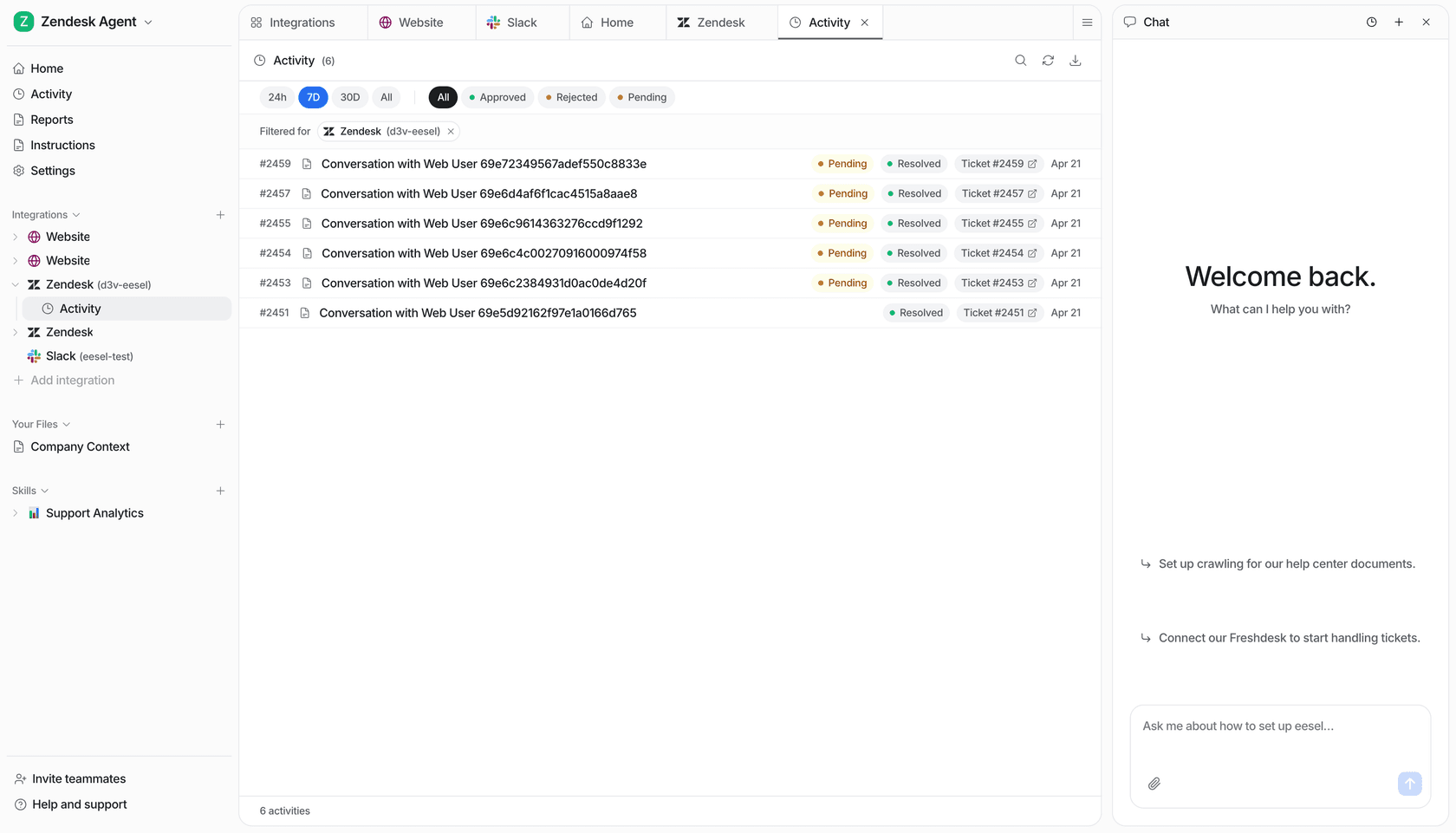
Try eesel on one ticket type first, the same way this guide suggests rolling out any AI.