


To reduce support agent burnout, fix the queue before you coach the person, starting with a cap on how many open tickets one agent holds: all five of Gallup's root causes of burnout (unfair treatment, an unmanageable workload, unclear communication from managers, a lack of manager support and unreasonable time pressure) show up in how tickets reach an agent. On Zendesk, that means capacity rules so nobody gets buried when they come online (Suite Team and up), a real break status that hands their open tickets to someone else (Suite Professional and up), routing that stops cherry-picking, and taking the repeat questions off the queue.
An AI teammate like eesel can answer or draft the repeat tickets inside Zendesk, so people get the ones that need them. An AI coding agent can load your approved macros and help articles into it with the eesel CLI and ask it test questions before it goes live, though connecting Zendesk still needs an admin's approval.
What is support agent burnout?
Burnout isn't a bad week. The World Health Organization describes it as "a syndrome conceptualized as resulting from chronic workplace stress that has not been successfully managed", with three dimensions: exhaustion, "increased mental distance from one's job, or feelings of negativism or cynicism related to one's job", and reduced professional efficacy (WHO, ICD-11). It's an occupational phenomenon, the WHO adds, "not classified as a medical condition". In other words, it comes from the job, so the job is where you fix it.
I work on eesel's support team, and the version of it I recognise is the agent who used to write careful replies and now pastes the macro and moves on. That's the cynicism dimension, and it usually arrives before anyone says the word "burnout".
Support work is built for it. The US Bureau of Labor Statistics says customer service representatives "may be under pressure to answer a designated number of calls while supervisors monitor them", and that "the work may be stressful when representatives must interact with dissatisfied customers" (BLS). It projects about 289,500 openings a year for the job over the next decade, all of them from replacing people who leave, while total employment is expected to shrink by 5%. One support manager on Hacker News named the part that dashboards miss:
"When a customer team gets burnout from high support volume, it's rarely the volume alone that makes agents hurt. It's the volume AND context switching. 50 phone calls about different things will leave you a zombie by the end of the day."

What causes burnout in support teams?
Gallup's research found five root causes that correlate most strongly with burnout, and "they point directly to how well employees are managed": unfair treatment at work, unmanageable workload, unclear communication from managers, lack of manager support and unreasonable time pressure (Gallup). Its figures for each, from a page updated this month (Gallup):
| Cause | Gallup's finding | Where it shows up in a support queue |
|---|---|---|
| Unfair treatment | Often treated unfairly: 2.3 times more likely to have high burnout | Some agents cherry-pick easy tickets; others inherit the angry ones |
| Unmanageable workload | "Always have too much to do": 2.2 times more likely to burn out very often or always | Coming online to a pile of tickets assigned at once |
| Unclear communication | Knowing what's expected: 47% less likely to burn out often | No written rule for when to escalate, refund or hand off |
| Lack of manager support | Feeling supported by their manager: about 70% less likely | Leads who watch the dashboard but never take a hard ticket |
| Unreasonable time pressure | Enough time to do the work: 70% less likely | SLA and handle-time targets set without the team |
Gallup's original 2018 study of nearly 7,500 employees found burned-out employees were "63% more likely to take a sick day" and "2.6 times as likely to be actively seeking a different job" (Gallup). It also has a line every support lead should pin up: "time constraints are often imposed by people who do not know how long it takes to deliver quality work or great customer service."
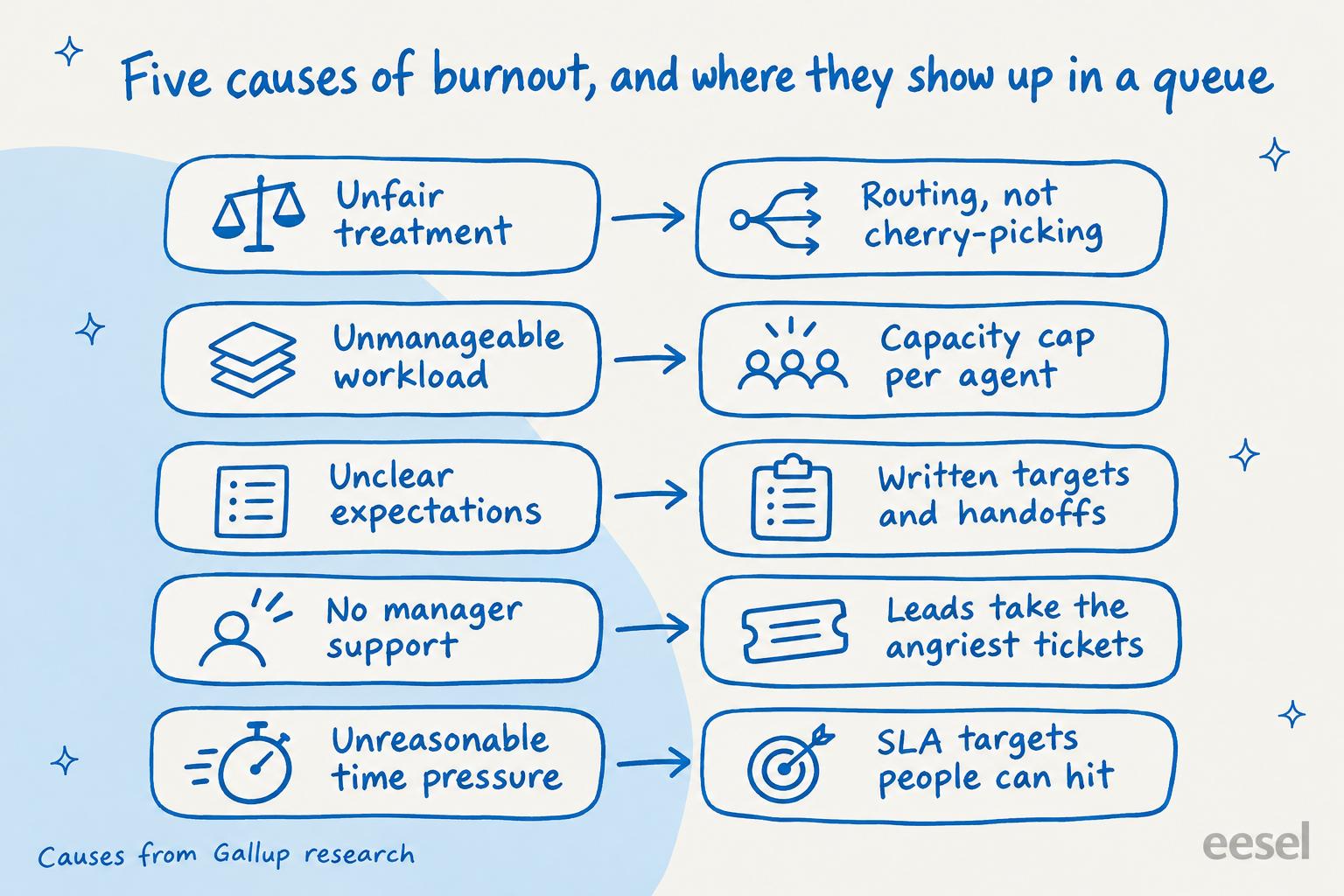
None of the five is "agents aren't resilient enough". That's why a wellness webinar on its own rarely moves anything: the person comes back to the same queue. The steps below take each cause in turn, with the Zendesk setting that does the work where there is one, and links to our Zendesk plan comparison where a feature depends on your plan.
Step 1: Cap how much work one agent holds
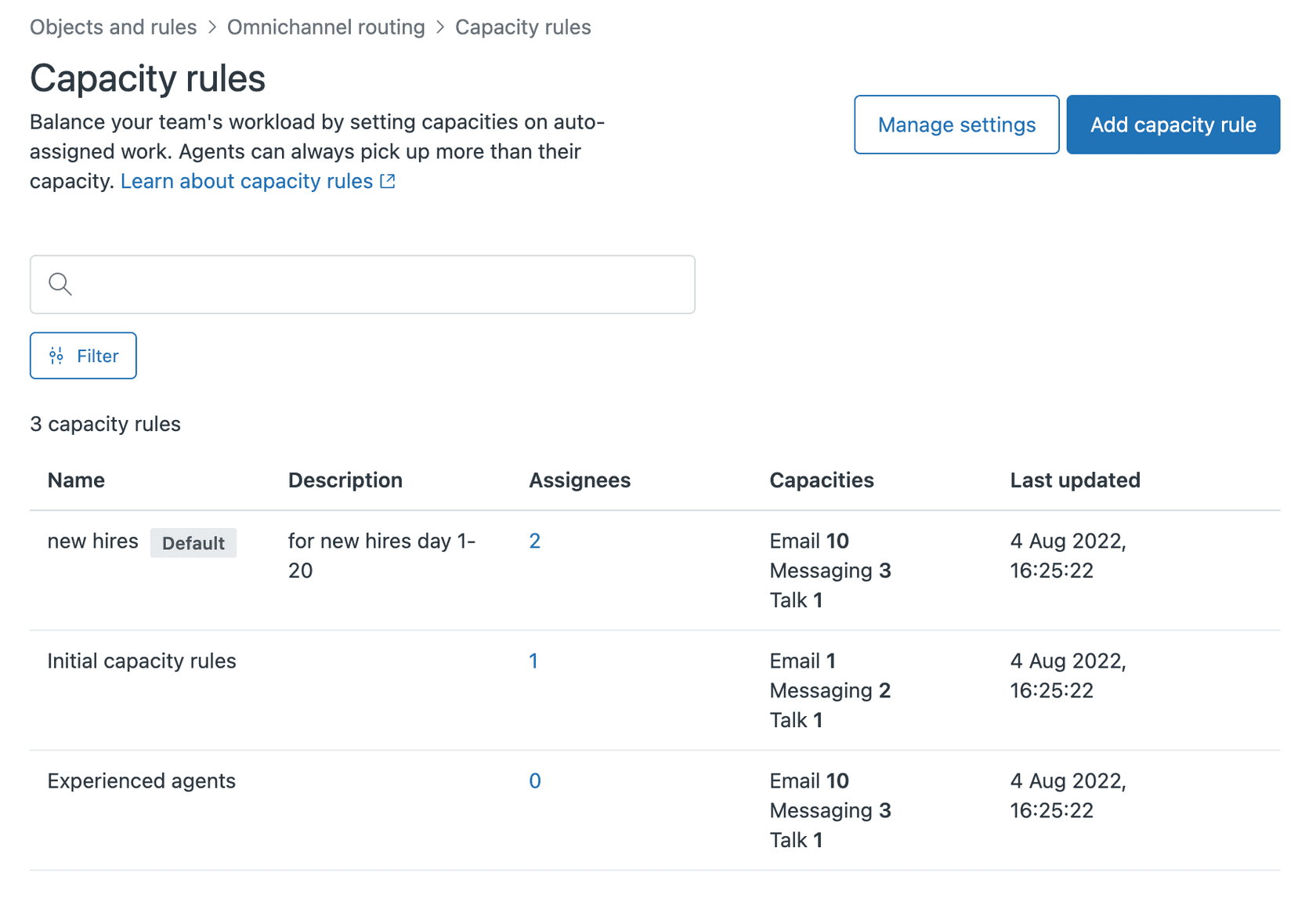
An unmanageable workload is often a routing setting. With omnichannel routing on, Zendesk assigns new and open tickets "based on their availability and capacity", and a capacity rule sets the ceiling (Zendesk, omnichannel routing). Each rule caps open email tickets (up to 500 per agent; pending and on-hold don't count), messaging conversations (up to 20, counted separately for messaging and live chat) and calls (0 or 1) (Zendesk, capacity rules). Zendesk's own example is a limit of 10 open email tickets so that "less experienced agents are not assigned too much work while they ramp up". Routing and capacity rules come with Suite Team, at $55 an agent a month billed yearly (Zendesk pricing); see our Zendesk pricing guide for the other plans.
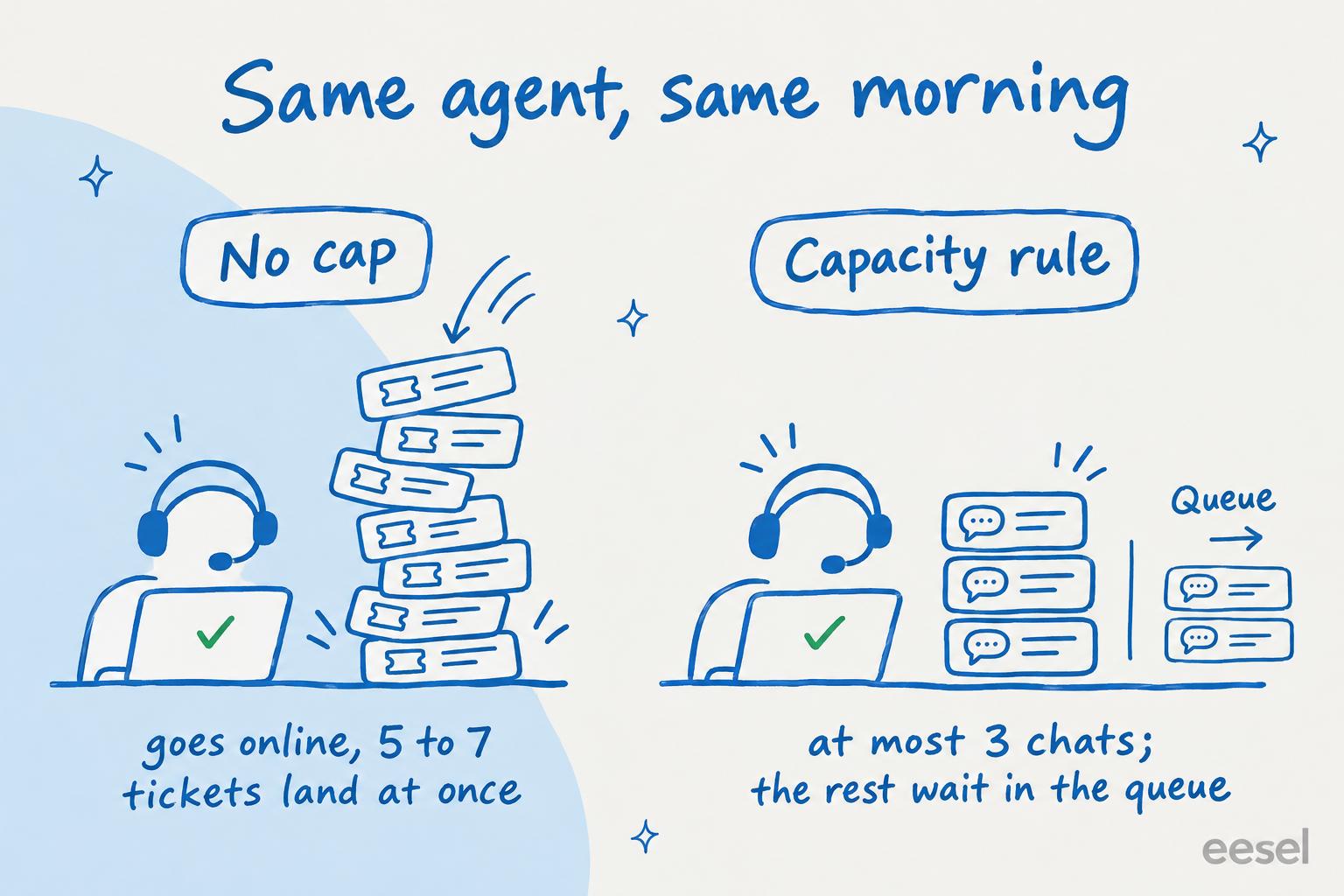
Without a sensible cap, coming online feels like opening a fire hose. A Zendesk admin described it on the community forum:
"Our agents are currently receiving a high volume of tickets at once, sometimes up to 5-7 tickets when they set themselves to online. This can be overwhelming for the agent, and they have suggested that there be a buffer in place for ticket distribution"
A Zendesk product manager's answer in that thread was to group those agents into a lower-capacity rule. Three more settings matter:
- Focus mode "assigns an agent work from one real-time channel at a time" (Zendesk, routing configuration). That's the context switching from the quote above, removed by a checkbox. Email isn't included in the restriction.
- A messaging conversation goes inactive after 10 minutes with no reply from the customer, and counting those toward capacity is off by default. Leave it off unless your customers routinely go quiet and come back to the same chat.
- Manual assignment gets around the cap. The Capacity rules screen in Admin Center itself warns that "agents can always pick up more than their capacity", and the help article says agents can exceed it "by manually assigning work in excess of the limits". If leads keep assigning tickets by hand, the cap is a suggestion.
Step 2: Make breaks and time off real
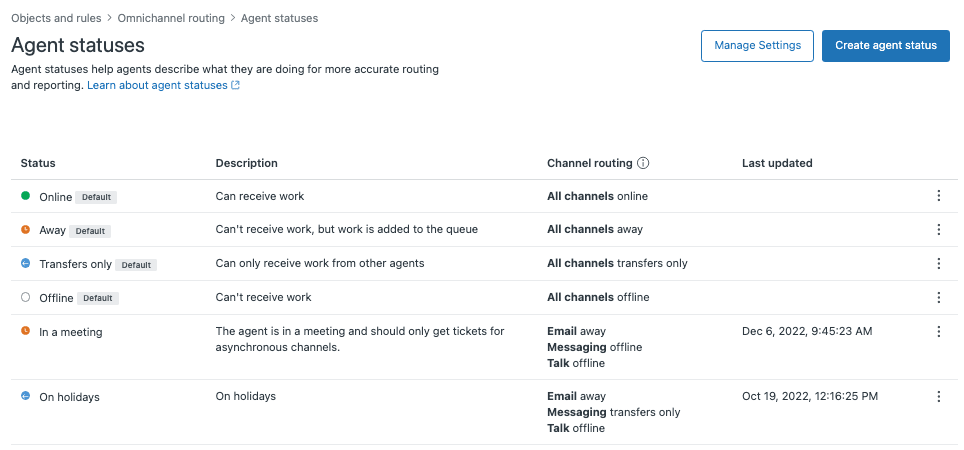
Zendesk's four standard statuses are Online, Away (email only), Transfer only and Offline, and agents "are encouraged to change their status to offline before any breaks" (Zendesk, agent statuses). That works until an agent has seven open tickets and knows going offline leaves them sitting there. So they skip the break, which is exactly the unreasonable time pressure Gallup measured.
Two settings fix it. First, custom statuses such as "Out to lunch" or a status for holidays, each with its own routing per channel. They need Suite Professional or above: 5 custom statuses on Professional and 100 on Enterprise, and none on Team or Growth (Zendesk, custom statuses). Second, auto reassign open tickets: when an agent switches to a status you choose, "the 50 most recently updated open email and messaging tickets of specified priority that are assigned to the agent are reassigned", after a one-minute delay (Zendesk, routing configuration). Now a break doesn't leave customers waiting on someone eating lunch.
Watch one trap. Zendesk can set an idle or disconnected agent offline automatically, and the community has the receipts: one admin reported that when an agent picks a "Break" status and locks their screen, "the system automatically forces the agent into an 'Offline' state" (Zendesk Community). For time off, Zendesk's own recipe is a custom Out of Office status with every channel set to offline and its disconnection setting on Keep current status, which it says "fully replaces the Out of Office app" (Zendesk workflow). Zendesk's routing configuration guide also warns you to use different statuses for the idle timeout and for reassignment, or an idle agent's tickets get handed out too.
If you plan shifts in Zendesk, Workforce Management builds schedules "down to the minute" with training and breaks in them, and agents can request time off and swap shifts inside Zendesk (Zendesk, Trying WFM). Zendesk sells it in the Workforce Engagement Bundle at $50 an agent a month billed yearly (Zendesk pricing); for WFM on its own, the product page sends you to sales. Plan holidays as well as lunches; our guide to Zendesk holiday schedules covers the business-hours side.
Step 3: Hand out the hard tickets fairly
Unfair treatment heads Gallup's list, and in support it usually looks like cherry-picking: some agents take the easy tickets from the view, others inherit what's left. Zendesk lists "Agents can't 'cherry pick' the tickets they want to work on" as a benefit of ticket routing (Zendesk), and an admin on the community forum described what happens without it:
"This happens on a daily basis when agents view the queue in order to take easier tickets. This then inflates their stats inappropriately. This also causes customers to wait longer as tickets are taken out of order."
Turn on routing and stop ranking people on raw ticket counts, since a count rewards exactly that behaviour. Then send hard tickets to people who can handle them:
- Skills-based routing (Suite Professional and up) matches tickets to agents by skill, with up to 10 skill types of up to 30 skills each, such as a language, a product or a time zone (Zendesk, About skills).
- Intelligent triage classifies tickets "by topic, entity, sentiment, and language", and Zendesk suggests using it to "act quickly on high-risk or high-priority tickets" (Zendesk). The classifications are on Professional and up, but using them in triggers and routing needs the $50 Copilot add-on. Our guide to auto-assigning by sentiment has the rules.
- Routing order matters too. On Growth and up, routing can pick the ticket closest to breaching its SLA instead of the oldest one, and on Professional and up it can go by priority (Zendesk).
Step 4: Take the repeat questions off the queue
The fastest way to cut an unmanageable workload is fewer tickets that need a person. Start with macros, on every Zendesk plan, for "support requests that can be solved with a single, standard response or action" (Zendesk). Pull last month's top ten repeat questions and check each has a shared macro that's actually right; our guide to Zendesk macro categories helps once there are hundreds.
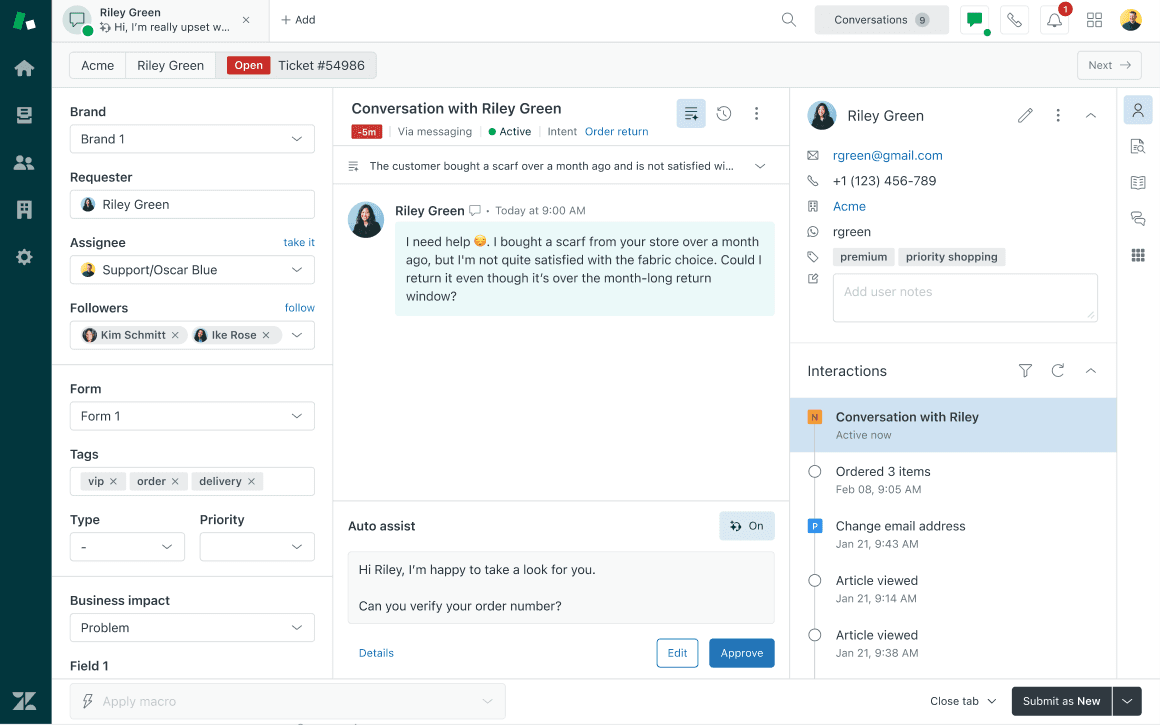
Then let AI take the repeats. Zendesk's AI agents are included in every plan with 5 automated resolutions per agent a month on Team plans (10 on Suite Professional), then $1.50 each committed or $2.00 pay-as-you-go. Its Copilot add-on, $50 an agent a month on Professional and up, adds auto assist, which suggests replies and actions that "require agent approval before being sent to a customer" (Zendesk pricing; About auto assist). Zendesk's own AI Effect study, of teams already using its AI, found "90% said AI makes it easier to manage stress and workload" (Zendesk blog). It's vendor research on its own customers, so read it as a direction, not a forecast.
One caution from experience: AI only lowers the load if it takes whole tickets off someone's plate or hands them a reply they can send. A tool that writes a draft the agent has to fact-check from scratch adds a step. Gartner found in April 2026 that 85% of service leaders are adding tasks to their human agents' roles even as AI arrives (Gartner), so expect what's left for people to be harder, and give the hard tickets the time the easy ones used to take. Our post on AI for agent productivity covers what to measure.
Step 5: Set time targets people can hit
Gallup found people who "often or always have enough time to do all of their work are 70% less likely to experience high burnout" (Gallup), and its prevention advice includes "Place Performance Metrics Within Employees' Control" (Gallup). In a queue, that means three things:
- Set SLA targets by priority, with the team. Zendesk SLA policies "set and track ticket response, resolution, and agent work-time targets by priority" on Suite Growth and up (Zendesk). Ask the people working the queue what's realistic for each priority before you publish it. Our walkthrough of creating Zendesk SLA policies has the steps.
- Don't rank individuals on average handle time. It depends on which tickets they got, which routing decides, not them. Use it to spot tickets that need a better macro or article.
- Write down the rules nobody wrote down. When to refund without asking, when to escalate, when to hand off an abusive customer. Knowing what's expected made Gallup's respondents 47% less likely to burn out often, and it costs one document. Our guide to support escalations is a starting point.
Which fix should you start with?
You won't do all five steps this week, and you don't need to. Start with the sign you can already see on your team.
Pick what you're seeing to get the likely cause and the Zendesk setting to try first.
If you see more than one, start with workload. An agent who isn't buried has the energy to raise the rest.
Step 6: Back agents up on the worst conversations
Lack of manager support is the cause no setting fixes. Gallup found employees who feel supported by their manager are about 70% less likely to burn out regularly, and that those "whose manager is always willing to listen to their work-related problems are 62% less likely to experience burnout" (Gallup). Someone who has worked in several support teams put the practical version on Hacker News:
"Every rep you lose to burnout is like losing a limb. Your managers (or you as a founder/exec) have to be both willing and able to take the biggest bullets from angry customers so the reps can focus on solving problems."
Abusive customers are the sharpest edge of this. A study of 531 inbound call centre agents found customer-assistance agents "experience greater customer verbal aggression and emotional dissonance" than agents on an information line, and that for those agents emotional dissonance, showing feelings they don't have, fully explained the link between workload and distress (Frontiers in Psychology). Give agents a written right to hand a conversation to a lead, a macro for it, and a lead who actually picks it up; our guide on dealing with angry customers has scripts.
Then watch the load, not only the output. Zendesk's workforce activity tracking gives agent activity tracking and performance metrics "at no additional cost" on Suite Professional and up (Zendesk), and the full WFM agent activity page shows "untracked or idle time" against each agent's day (Zendesk). The same data that shows who's off-schedule shows who never took a break and who stays past their shift. Check that view in your one-to-ones, alongside the agent performance reports you already run.
Try eesel on your Zendesk queue
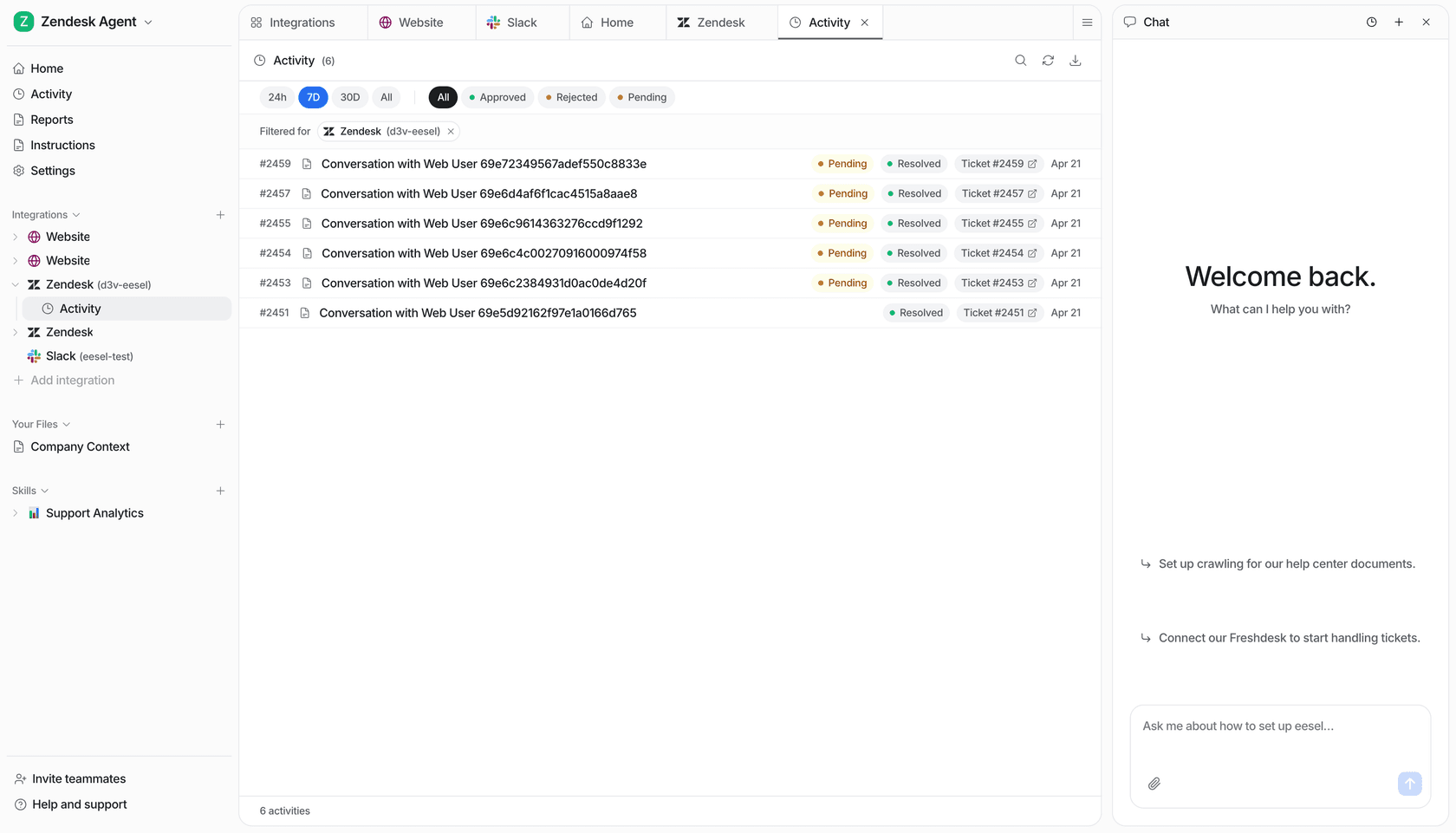
If repeat questions are what's wearing your team down, an AI teammate is the one change on this list that takes whole tickets away instead of making them faster. What eesel may do depends on who's asking: it can act on its own for your team, ask first before a refund for a verified customer, and stay away from account details for an anonymous visitor. It joins your Zendesk, learns from your knowledge base, macros and past tickets, and answers customers or drafts replies inside the tickets your team already works.
smava, a German consumer-credit comparison platform, runs three eesel agents on one Zendesk across about 27,000 tickets a month: one categorises every ticket, and the others draft replies from its 820 macros and help centre articles before an advisor sees it. Lesson Pro has eesel leave a note on each ticket with the brand, context and what to do next, plus a draft its team approves before anything reaches a customer.
Try eesel on your Zendesk, and give your agents the tickets that need a person.