


Re:amaze covers a night shift with five pieces: office hours, email autoresponders, chat bots, an AI Agent, and AI Pre-Filter. I found no setting that schedules the AI Agent, and SMS gets no autoresponder at all. The AI Agent answers chat, email and SMS whenever it is on, with 5, 10 or 20 resolutions per seat included and $0.85 for each one after that. I'd keep it for instant chat and add eesel for email, which checks Re:amaze every ten minutes and leaves drafts for the morning.
Re:amaze is where the conversations live, so the cheapest fix is to learn what it already does at 2 am. The eesel CLI lets a coding agent upload approved knowledge, such as exported Re:amaze FAQ articles and response templates, then ask it test questions and check the answers before anything goes live. Connecting the Re:amaze account itself still needs someone to copy an API token.
What does Re:amaze do when your team is offline?
It does less automatically than the feature list suggests. I went through the Re:amaze help center and its pricing page on 23 November 2026, and the picture is a set of separate tools that don't share one "night mode".
| Layer | What it does when you're away | Where it stops |
|---|---|---|
| Office hours and blackout dates | Tells chat visitors the team is away; Staff reports ignore messages that arrive outside hours | Sends nothing by itself |
| Email autoresponder | Sends only outside office hours, once per thread | Email channels only |
| Real-Time Chat | Shows an expected response time; replies also go out by email | Not AI, a person still replies |
| Classic Chat (Plus) | Per-agent availability hours | Needs a staff member online on a desktop browser |
| AI Agent | Answers chat, email and SMS from your FAQ, templates and store data | No documented schedule; billed per resolution |
| Cue and Workflow bots | Scripted flows; keep running while the AI Agent is on | Scripted, not generative |
| AI Pre-Filter | Keeps chosen topics away from the AI Agent | Needs the AI Agent on |
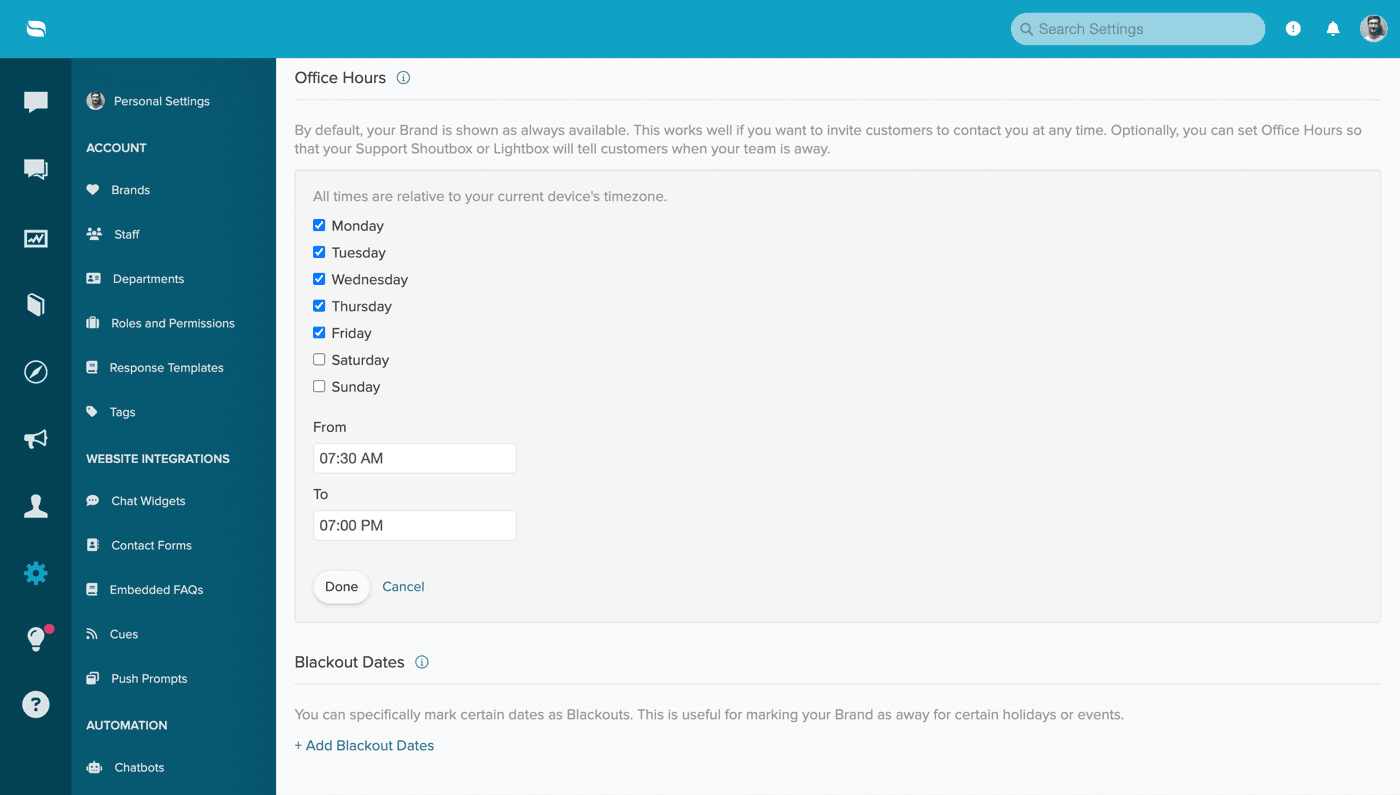
The channel matters more than the layer. Here is what a 2 am message meets on each one.
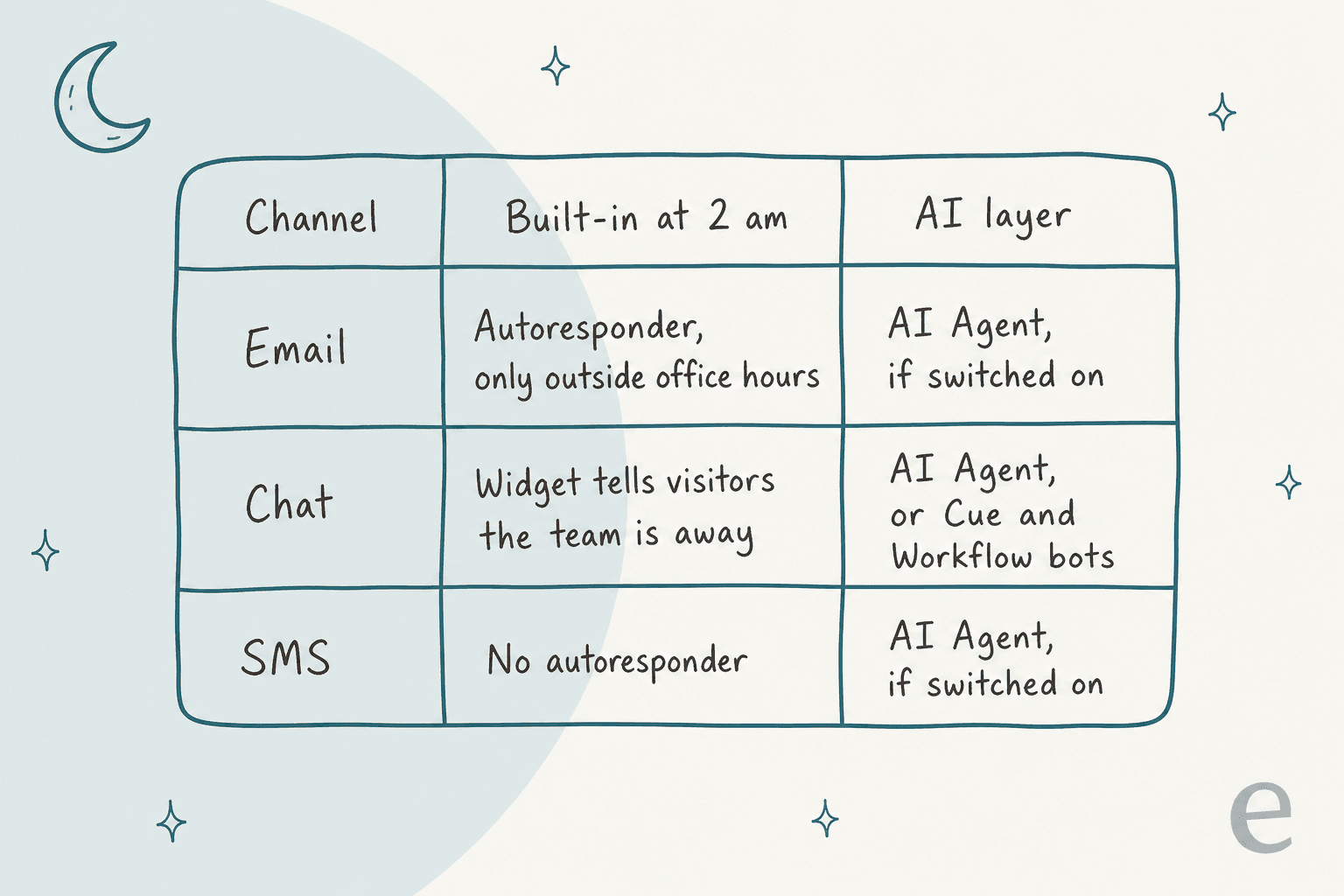
How do office hours and blackout dates work in Re:amaze?
They describe your availability, and a few other features read that description. By default, a brand is shown as always available. Set office hours and your Shoutbox or Lightbox tells visitors when the team is away.
You add them under Settings > Chat and Office Hours per brand, in separate blocks per day if you want, so a split shift is fine. Blackout dates cover days such as July 4th or December 24th and 25th, and can be broken down by hours. Two details I'd check before trusting them:
- The timezone is your device's. The settings screen says all times are relative to your current device's timezone, so set them from a machine in the timezone your customers expect.
- Office hours drive other features. Email autoresponders can follow office hours, and staff reports use them to decide which waits to count.
Plus also lists Shifts and Vacation Days on the pricing page. I didn't find a help article that connects those to customer-facing behaviour, so treat them as staffing tools until you test them.
Does the Re:amaze AI Agent answer at night?
Yes, whenever it is on, and I found no schedule setting. The setup guide says the AI Agent handles conversations on Chat, Email and SMS, and you pick which email and SMS channels it covers under AI > Manage Bots. It answers from FAQ articles, response templates, custom AI context and Shopify or WooCommerce data, per the AI Agent guide.
Three behaviours matter after hours:
- It replaces the classic bots. While it is on, Hello Bot, Order Bot, Shopping Bot, AI FAQ Bot and FAQ Bot don't run. Cue Bots and Workflow Bots keep running.
- A reply sets the conversation to "Responded". It isn't Done, so your morning queue still shows every conversation the AI Agent touched.
- Escalation is the handoff. The test tool's outcomes are Answered, Escalated, Resolved and Failed. The pages I read don't describe what a customer sees after an escalation at 3 am, so test that path yourself.
You can rehearse in the Test AI Agent tab, which uses the same knowledge sources but no real order data. So an "Where is my order?" test won't prove the order lookup works. For the wider picture, my Re:amaze AI deflection guide walks through every layer.
What does nights-and-weekends AI cost on Re:amaze?
A resolution is a thread the AI Agent handles without escalating to a person, counted once however many messages it has. Every resolution counts, not only night ones, so the bill depends on your total AI volume. Here is a 4-seat team on monthly billing whose AI Agent finishes 300 conversations in a month:
| Plan | Seats x price | Included resolutions | Billed at $0.85 | Month total |
|---|---|---|---|---|
| Basic | 4 x $29 = $116 | 20 | 280 = $238 | $354 |
| Pro | 4 x $49 = $196 | 40 | 260 = $221 | $417 |
| Plus | 4 x $69 = $276 | 80 | 220 = $187 | $463 |
Plus comes out pricier overall despite the biggest allowance, because the seat price rises faster than the free resolutions help. If you only want the AI Agent, the cheapest plan wins at this volume. Pro is where AI Intents and multiple brands start, so the choice is usually about features, not resolutions. Volume plans skip seat allowances and bill every resolution at $0.85. My Re:amaze pricing breakdown and the shorter cost guide cover the rest.
One overnight risk: with Usage Overage turned off, the AI Agent stops when resolutions run out and the classic bots take over as a free fallback. A busy long weekend can flip that switch while nobody is watching.
Can Cues, Workflows and AI Pre-Filter fill the gaps?
Partly, and they are the only tools with real conditions. A Workflow runs on When, If and Then rules, and it can tag, assign, leave a note or respond. The docs' own example of a Workflow Bot trigger is "a new chat arrives outside office hours", which is the closest thing to a night mode in the product.
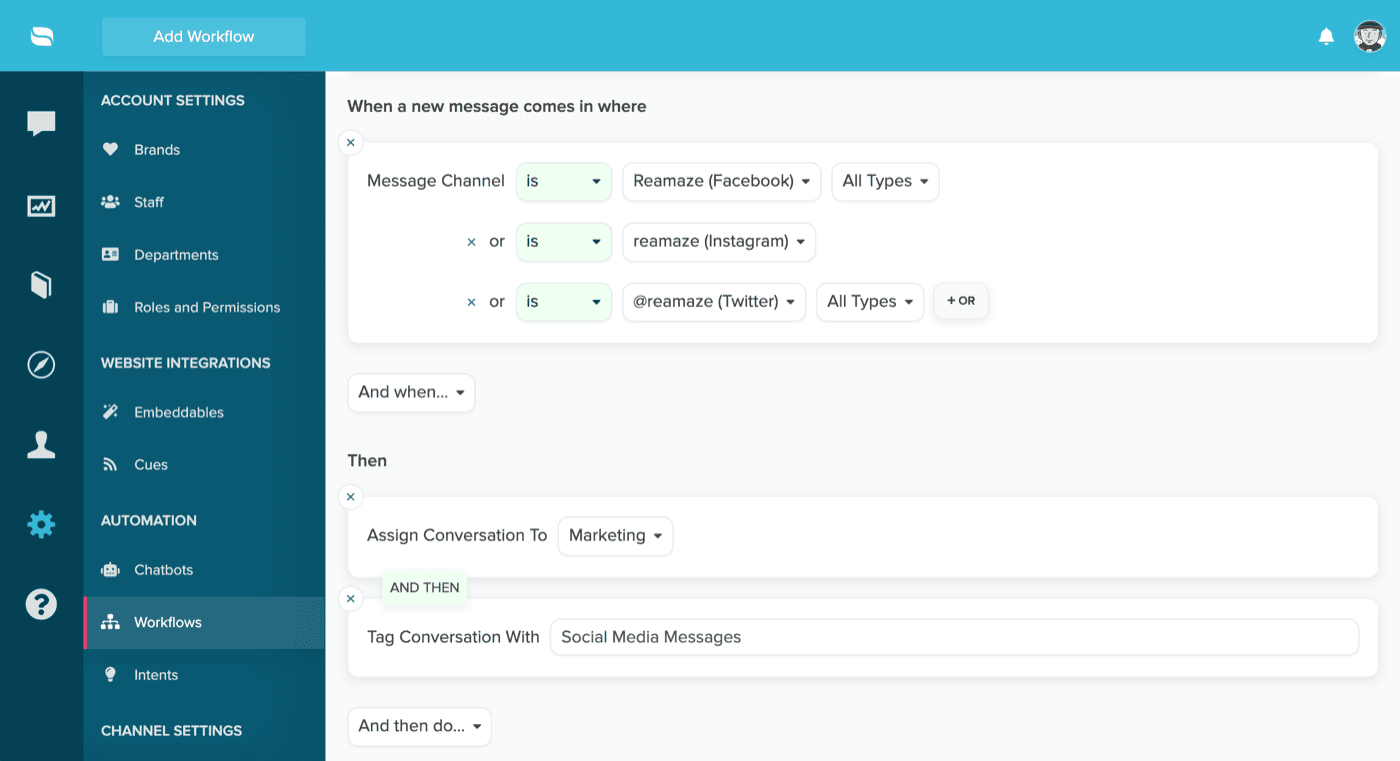
Practical limits I'd plan around:
- Replies need a user. A Workflow's "Run Workflow As" setting needs a staff user for commands like replying, or the reply is attributed to your brand.
- They fire once. The builder notes that automated Workflows trigger once per conversation, so a customer's second message at 4 am doesn't re-run it.
- Intents are Pro and up. The Intents feature that lets a Workflow match "Where is my order?" by meaning is listed under Pro on the pricing page.
- Pre-Filter beats Workflows. If a conversation matches both, the Pre-Filter runs and the Workflow is skipped, and a matched conversation never reaches the AI Agent. Prompts are capped at 500 characters.
That last rule is the useful one for nights. Keep refunds, cancellations and VIP customers out of the AI Agent's hands with a Pre-Filter, tag them, and let them wait for a person. My guides on Re:amaze AI ticket tagging and escalation to a human show how I'd set the routing.
What does a customer actually see after hours?
It depends on the channel, and live chat is the one people get wrong. Re:amaze offers two modes, and only one handles a sleeping team well.
Real-Time Chat works like a messaging app. The widget shows an expected response time based on your team's historical availability, your team is notified on the dashboard, email and mobile app, and each reply also goes out as an email if the customer hasn't viewed it in chat. That is a fine after-hours experience for a human-answered shop.
Classic Chat wants both sides online at once. It's Plus-only, agents set their own availability hours, and a chat that ends can't be revived by a new reply. The Staff Busy message only fires when all online agents hit their chat limit, so it doesn't cover "nobody is here". You can convert missed chats into regular conversations, which keeps them from vanishing.
For email, the autoresponder is the plain version of a night mode: off during office hours, on outside them, once per thread, with a 10-minute limit per recipient. It's email-only, so a customer texting your SMS number gets nothing from it. In practice that means a quick, honest acknowledgement for email, a human-sounding expectation for chat, and the AI Agent for answers.
If your customers' questions are mostly "where is my order", the better after-hours move is answering, not acknowledging. My guide on AI for weekend coverage and the general 24/7 AI support overview explain when that is safe.
What happens to your reports when AI answers at night?
Office hours change which numbers you see, so decide that before you read a dashboard on Monday. Re:amaze documents two response-time views in How Response Times Are Calculated:
- The Response Time report measures how long a customer waits, night included.
- The Staff report skips customer messages that arrive outside office hours.
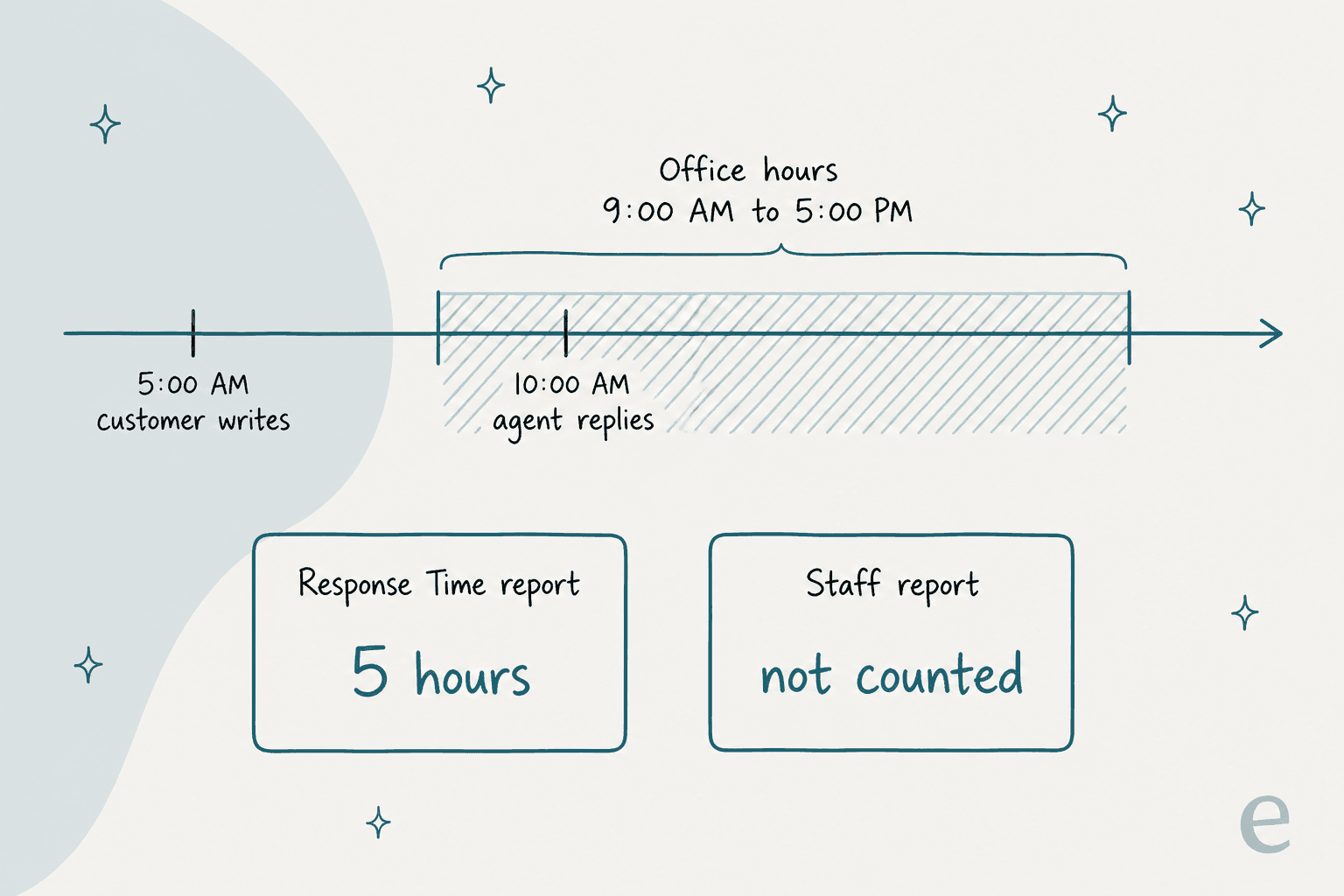
Two consequences. First, a team that fixes nights with AI will see the team report improve while the staff report barely moves, because the staff report never counted those hours. Second, the same page says internal notes also count toward staff response time metrics. If you add an assistant that writes drafts as internal notes, check whether your staff numbers look better than the customer's real wait. I haven't tested how the AI Agent's own replies show up in those reports.
As for SLAs, the pages I read describe response-time reports, not SLA timers, so I wouldn't promise customers a contractual overnight reply time based on Re:amaze alone. If you track the metric, first response time and SLA are worth defining before you compare periods.
Where are the gaps?
Re:amaze handles the polite parts of nights well, and the answering part is where it gets thin. These are the gaps I'd write on a whiteboard:
- No schedule for the AI Agent. I found no setting that keys it to office hours, so "AI only at night" is a manual toggle.
- SMS has no autoresponder. Autoresponders are email only.
- Holidays are a test, not a promise. Blackout dates belong to office hours, but the autoresponder article doesn't say it honours them.
- Escalation is undocumented overnight. The pages I read don't say what the customer is told when the AI Agent escalates.
- The AI Agent answers from your help content. The guide lists FAQ articles, response templates, custom context and store data. Learned Answers cover escalated conversations a person finished, not your whole reply history.
- Order lookups can't be rehearsed. The test tab uses no real order data.
None of these is a flaw in an everyday helpdesk. They are the places where "set it and sleep" turns into "check it Monday", which is why I'd measure the first few weeks against real conversations and keep an eye on hallucination risk.
How does eesel add after-hours coverage on Re:amaze?
eesel runs inside your Re:amaze account as another agent, and it learns from what your team already wrote. I should be clear about where I'm coming from: eesel has spent years putting AI onto live support queues, and the lesson that keeps repeating is that the first overnight run should never be the first real test. eesel simulates every rollout against historical tickets before it replies to anyone, and I'd do the same with any AI you point at a queue.
Per eesel's Re:amaze docs, here is what it does:
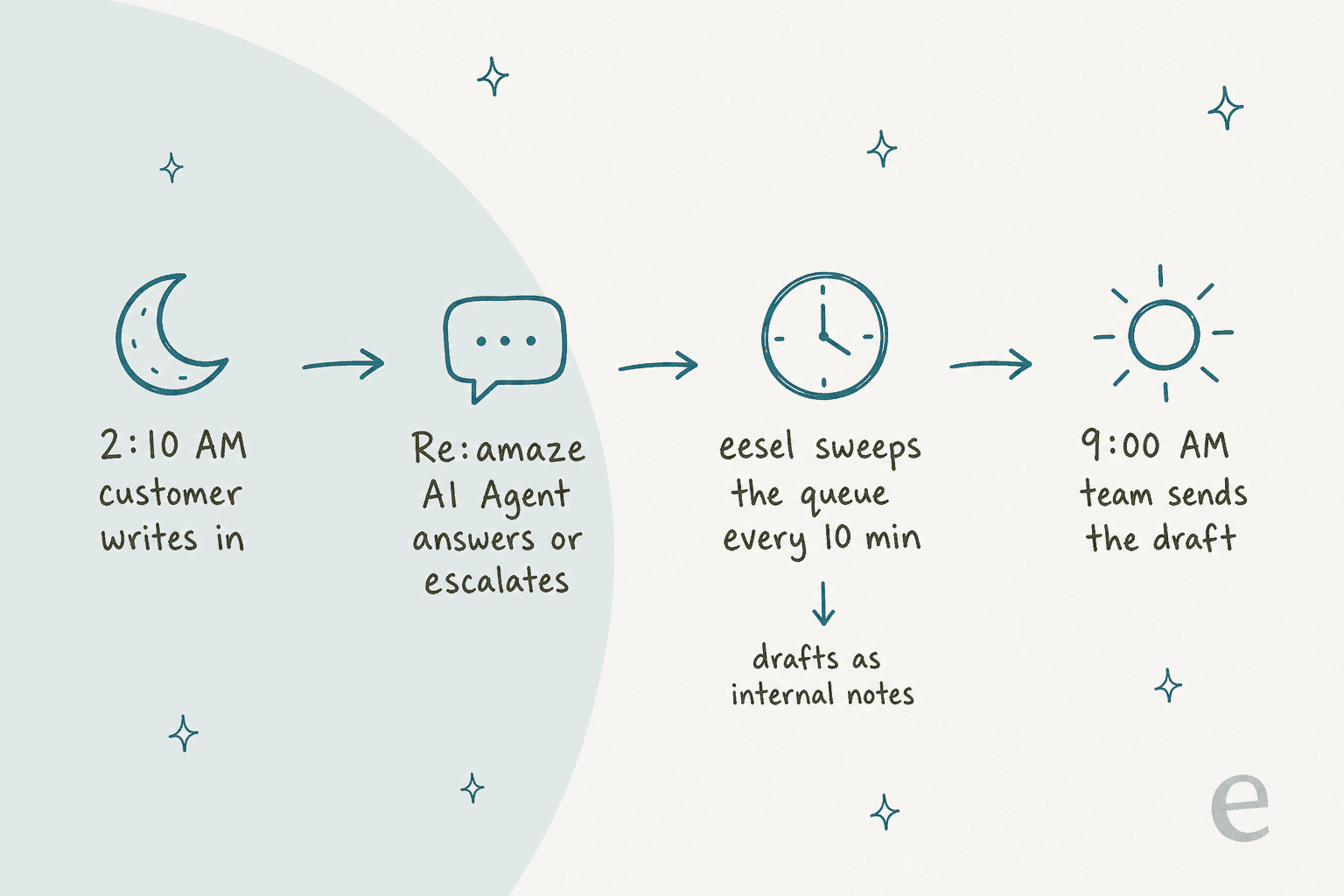
- It runs on a schedule. Re:amaze has no event triggers in eesel, so it checks for conversations matching its instructions as often as every ten minutes. A message at 2:10 am is picked up by around 2:20 am, not instantly.
- It reads your response templates and past conversations. By default that is resolved and archived conversations from the last 30 days, and you can change the statuses and window. Help center articles are read live.
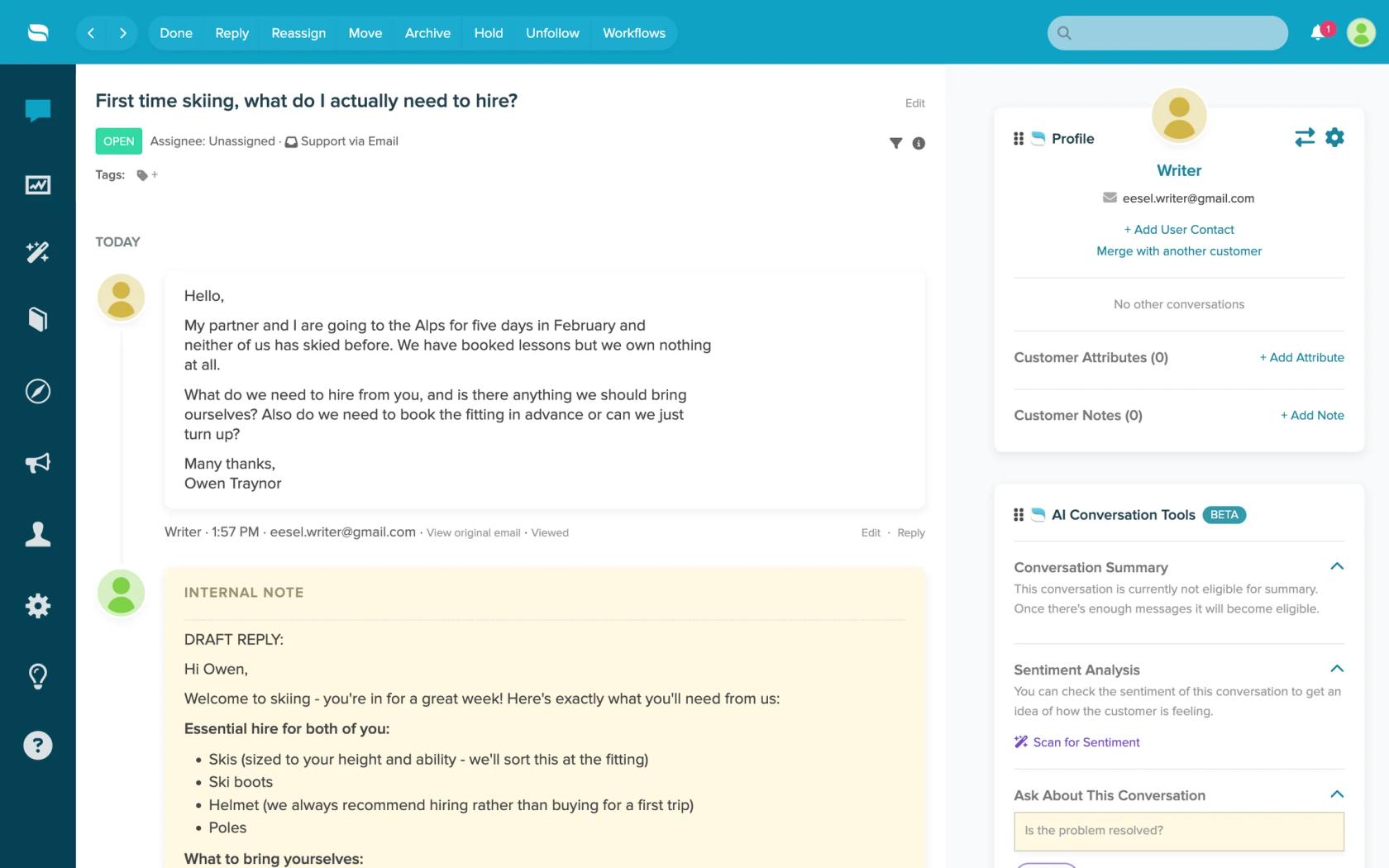
- It can draft or send. Leave internal note writes a private draft for a person to send, and Send conversation reply posts a visible reply. Before sending it re-reads the thread and stops if someone already answered.
- It has limits. It reads the newest 40 messages of a thread, doesn't see attachments or custom fields, and replies post as the staff account whose token you connected. Replying doesn't resolve the conversation unless you ask it to.
I couldn't confirm from the docs whether a schedule can be limited to night hours only, or whether eesel respects Re:amaze office hours. It lists neither, so I'd write "only conversations with no reply that are older than 15 minutes" into the instructions and let it run all day.
Does eesel work for after-hours support in practice?
The closest proof I have is from two published stories, both on Gorgias, not Re:amaze, so read them as the pattern rather than a Re:amaze result. STIL Classics sells planners and binders on Shopify. In one month eesel prepared about 320 tickets, left about 430 internal notes, most of them draft replies, and looked up about 230 Shopify orders. Nothing goes to a customer without a person checking it, which is the morning-handoff shape.
Question Beauty gets short messages at all hours in many languages. In a month eesel handled about 990 Gorgias tickets, sent about 960 replies, looked up about 290 Shopify orders and closed about 280 tickets without a person. Its customer care team covers customers around the clock, so eesel works beside them, not instead of them. Both used eesel as one agent among a team, with refunds and complaints routed to a person.
For a Re:amaze shop, that suggests a split. Let the built-in AI Agent take instant chat, since it can't wait ten minutes, and let eesel work the email queue on a schedule. My Re:amaze AI draft replies guide and the Re:amaze chatbot overview go deeper on each. If you're comparing options, best AI for Re:amaze and Re:amaze AI alternatives cover the field, and adding AI to Re:amaze is the setup walkthrough.
What setup would I use for a small Re:amaze team?
For a store with a team of 2 to 5 and an email-heavy queue, this is the order I'd work in, about an hour of setup.
- Set office hours and blackout dates under Settings > Chat and Office Hours, from a device in your customers' timezone. Add your real holidays.
- Turn on an email autoresponder that follows office hours. Keep it to one honest sentence about when a person will reply. Test it from an address that isn't a staff account.
- Pick Real-Time Chat unless you staff chat live all day. Skip Classic Chat for nights.
- Add Pre-Filters for refunds, cancellations and VIPs so those wait for a person.
- Decide the AI Agent on purpose. Turn it on for chat, check Usage Overage, and run the Test AI Agent tab on your ten most common questions.
- Add eesel on the email queue with drafts as internal notes first. Review a week of overnight drafts, then let it send the topics that held up. My guide on training an AI agent lists what to check.
- Review Monday's reports with the office-hours effect in mind, and read escalated conversations, not just counts. Human handoff best practices is a good checklist.
The same setup fits other helpdesks, and my posts on Help Scout after-hours support and Gorgias autoresponders outside business hours show how their built-in tools compare. If you're deciding whether Re:amaze is the right fit at all, Re:amaze review and is Re:amaze worth it cover that.
Try eesel on your Re:amaze queue
If your nights fill with email, eesel's AI helpdesk teammate joins your Re:amaze account, learns from your templates and past conversations, and leaves a draft or sends a reply you approve. For an ecommerce store, it can work next to your Shopify store data, as it does for STIL Classics, and the AI agent can be tested before it answers a customer. Plans are on the eesel pricing page. See also the best AI for ecommerce support.