What Qwen-UI-Agent actually is
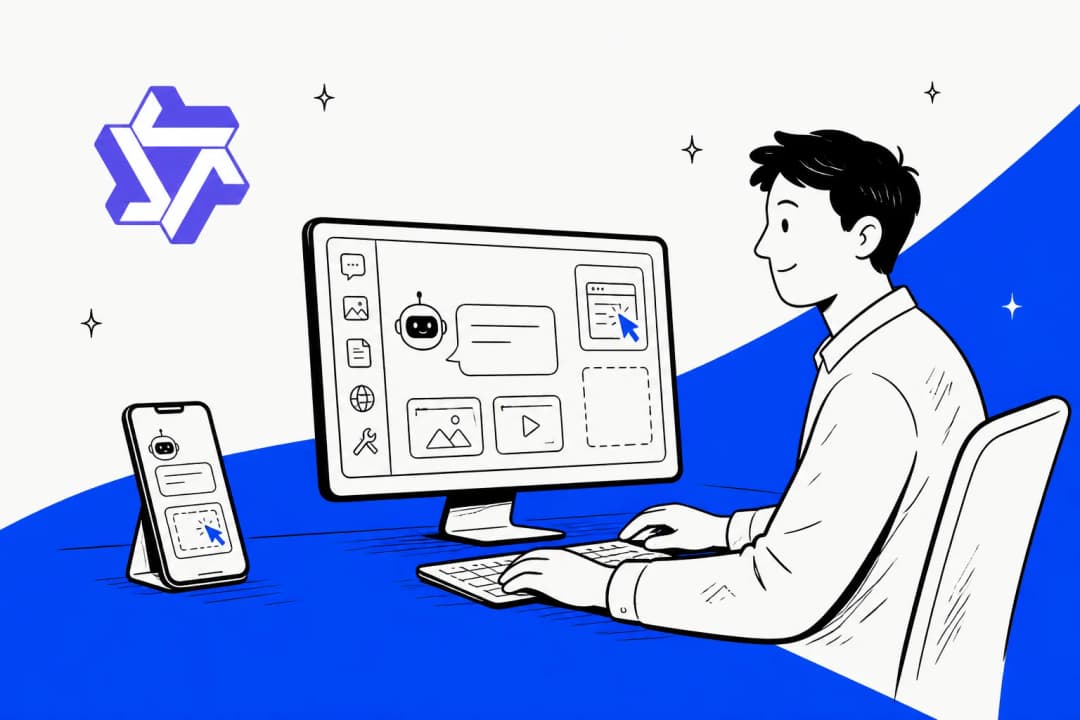
Most models you read about answer questions. This one operates devices. You give it a task in plain language, it looks at a screenshot, and it emits a tap, a swipe, a keystroke, or a bash command. Then it looks again.
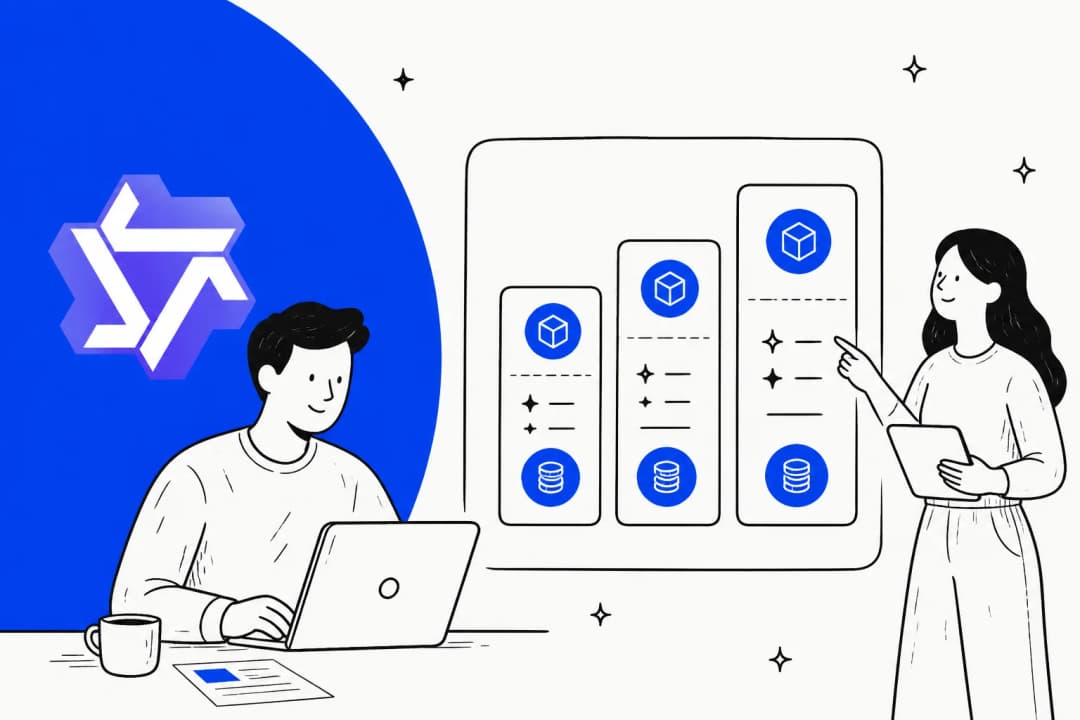
The paper evaluates three sizes: a 27B model, a 35B-A3B sparse variant, and a 4B. Every headline number belongs to the 27B. The base is almost certainly Qwen3.5-27B, because the paper's general-capability tables sit the two side by side and the scores are near-identical: 72.4 against 73.5 on MMMU-Pro, 83.1 against 83.1 on RealWorldQA. Whatever the GUI training did, it did not eat the model's general reasoning, which is more than you can say for most specialist fine-tunes.
It is a follow-on to MAI-UI 1.0, the same team's earlier work, and it inherits their habit of naming things after the thing they measure. If you are new to the family, our Qwen overview covers the mainline models, and the Qwen review has the business read. Alibaba's current flagship, Qwen3.8-Max, is a different animal entirely: bigger, chattier, and not built to press buttons.
What makes it a foundation GUI agent rather than a mobile bot is the span. One model, four environments: Android phones, desktop Linux, web browsers, and an API-based deep-search mode. Named products that do one of those exist. Doing all four in one checkpoint is the claim.
The benchmark table, and the part that got over-read
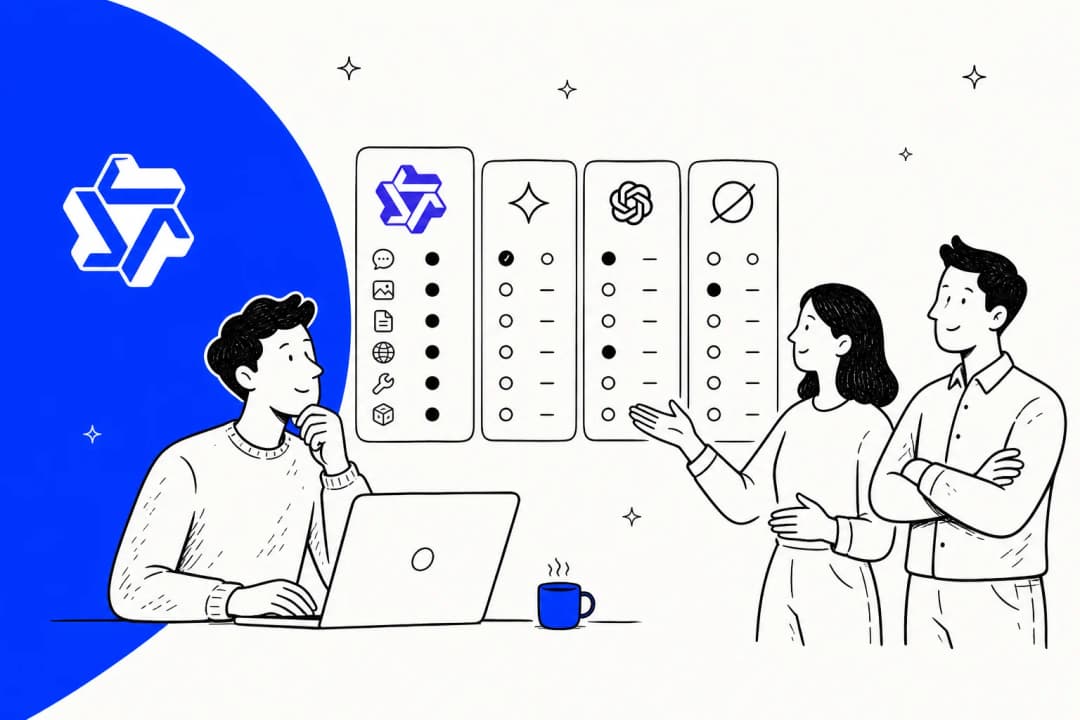
Here is every published headline number in one place, with who actually holds the top spot.
| Axis | Benchmark | Qwen-UI-Agent | Best published | Verdict |
|---|---|---|---|---|
| Mobile GUI | MobileWorld (50 steps) | 82.1% | Qwen-UI-Agent | Leads by 8.9 over Seed 2.1 Pro |
| Mobile, real devices | MobileWorld-Real | 92.2% | Qwen-UI-Agent | Leads by 3.5 over Seed 2.1 Pro |
| Mobile, daily tasks | AndroidDaily | 97.5% | Qwen-UI-Agent | Leads by 2.3 |
| Desktop | OSWorld-Verified | 79.5% | Claude Opus 4.8, 83.4% | Second |
| Desktop, long-horizon | OSWorld-v2 partial | 40.0% | Claude Opus 4.8, 54.8% | Third, behind GPT-5.5 |
| Desktop, tasks finished | OSWorld-v2 binary | 13.9% | Claude Opus 4.8, 20.6% | Second |
| Browser | WebArena | 73.6% | Qwen-UI-Agent | Leads by 1.7. Human is 78.2% |
| Grounding | ScreenSpot-Pro (zoom) | 81.5% | Qwen-UI-Agent | Leads by 0.8 |
| Deep search, EN | BrowseComp | 64.1% | GPT-5.5, 90.1% | 26 points behind |
| Deep search, ZH | BrowseComp-ZH | 75.0% | Apodex-1.0-mini, 80.6% | Second |
The mobile side of that table is not close. Look at it.
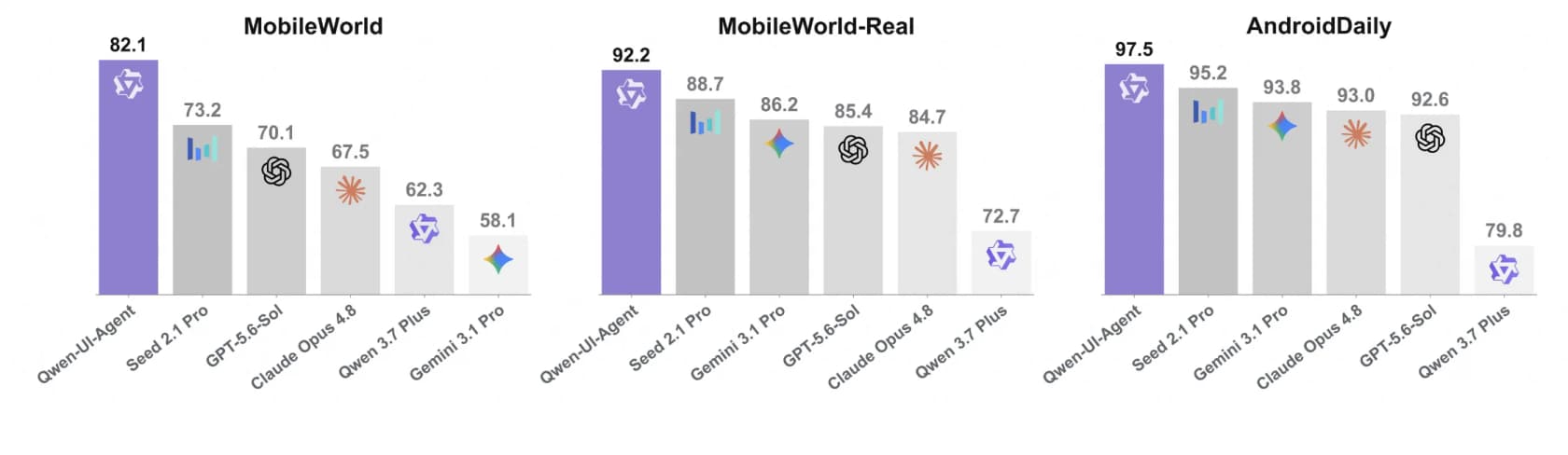
Now look at the same chart set for desktop and web. The middle and right panels are wins. The left panel is not, and the bar that beats it is labelled.
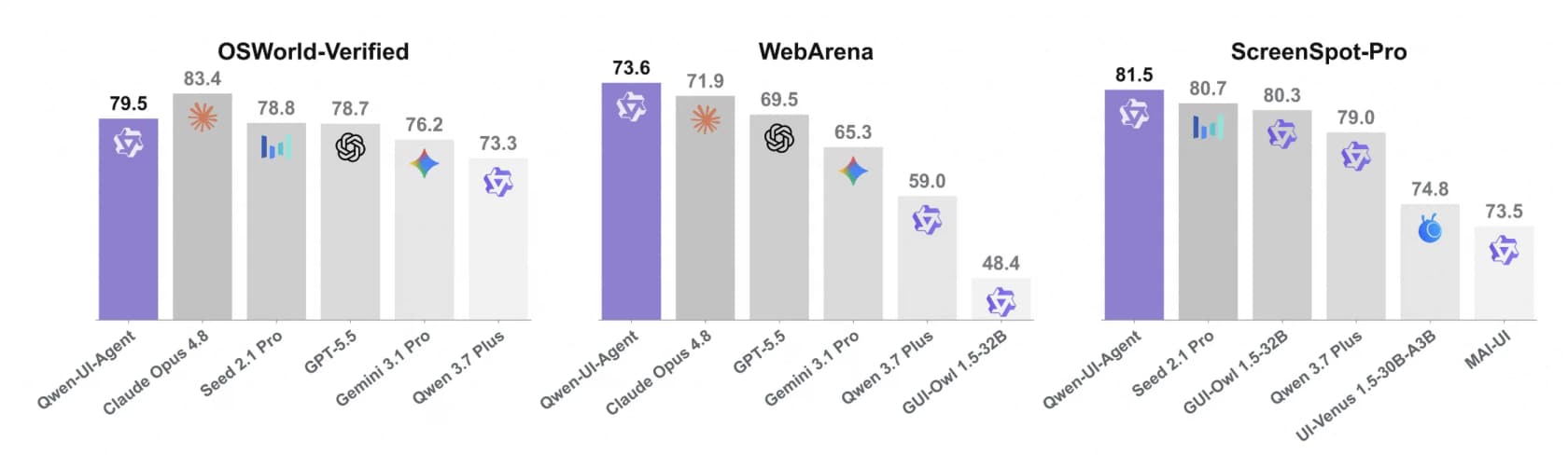
Alibaba was straight about this. The paper says the model ranks "second among all compared models and trailing only Claude Opus 4.8" on OSWorld-Verified, and the abstract splits the claim carefully: state of the art on mobile, competitive on computer and browser. The rounding happened downstream. A widely-shared weekly China AI recap reported top scores on all three of MobileWorld, OSWorld-Verified and WebArena, "beating GPT-5.6 Sol, Claude Opus 4.8, and Gemini 3.1 Pro." Two of those three hold. The desktop one does not, per Alibaba's own bar chart.
This matters because the two axes describe different jobs. Booking a train ticket in an app is a mobile task. Reconciling a spreadsheet across four windows is a desktop task. A model can own one and lose the other, and this one does.
Pick the job, then read the number
One action space for taps and terminal commands
The design decision I find most interesting has nothing to do with vision. It is the action list.
Alongside the expected GUI verbs, click, long_press, type, drag, system_button, wait, the model gets cli_command for running bash, api_call for structured service calls, and ask_user for stopping to ask a human. All in one flat space, chosen turn by turn. So the agent is never forced to express "rename forty files" as forty separate clicks. It can just write the command.
And it does, constantly. On OSWorld-v2, 55.1% of the agent's actions are typed commands rather than screen actions. On OSWorld-Verified it is 40.7%, appearing in 92.0% of tasks.
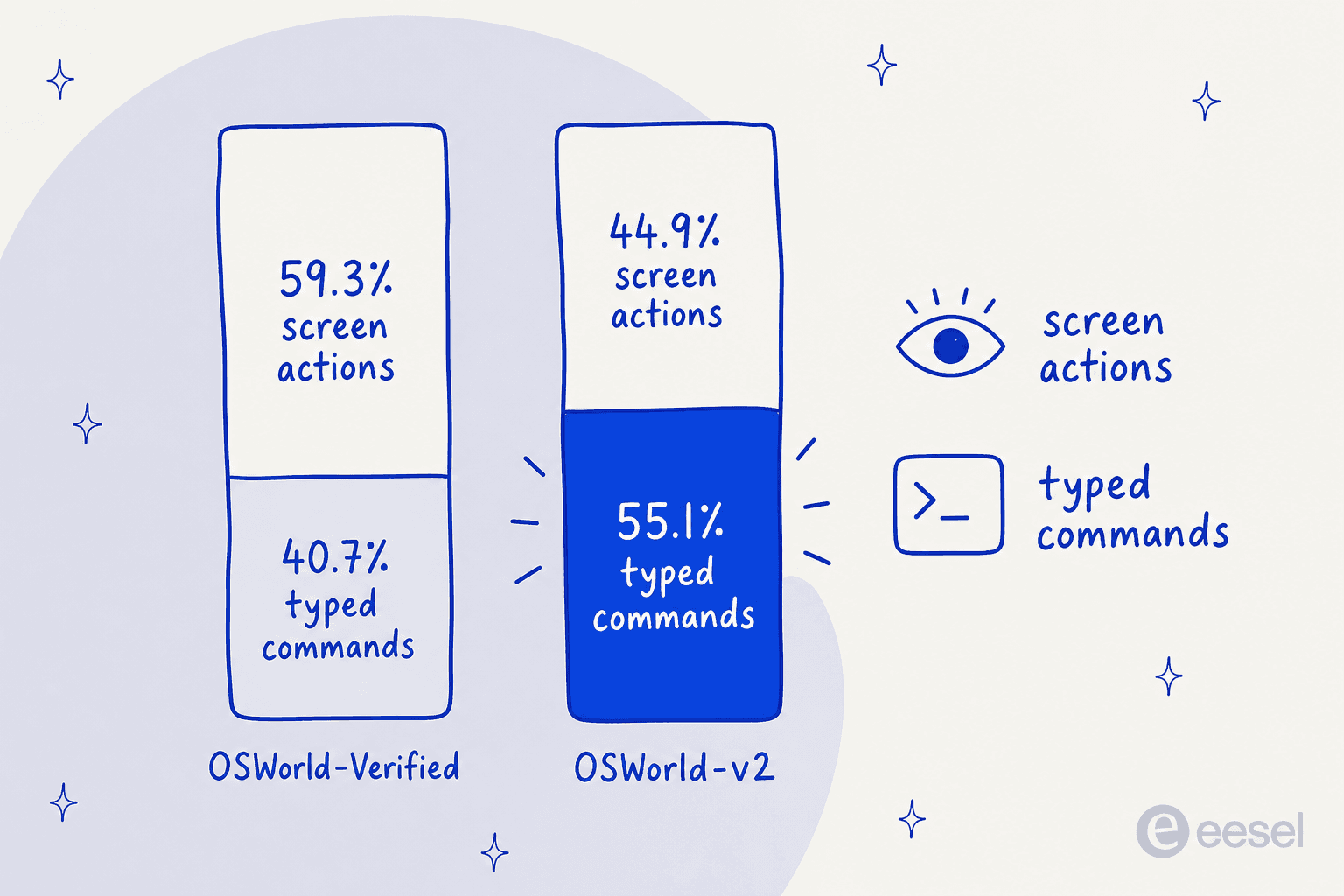
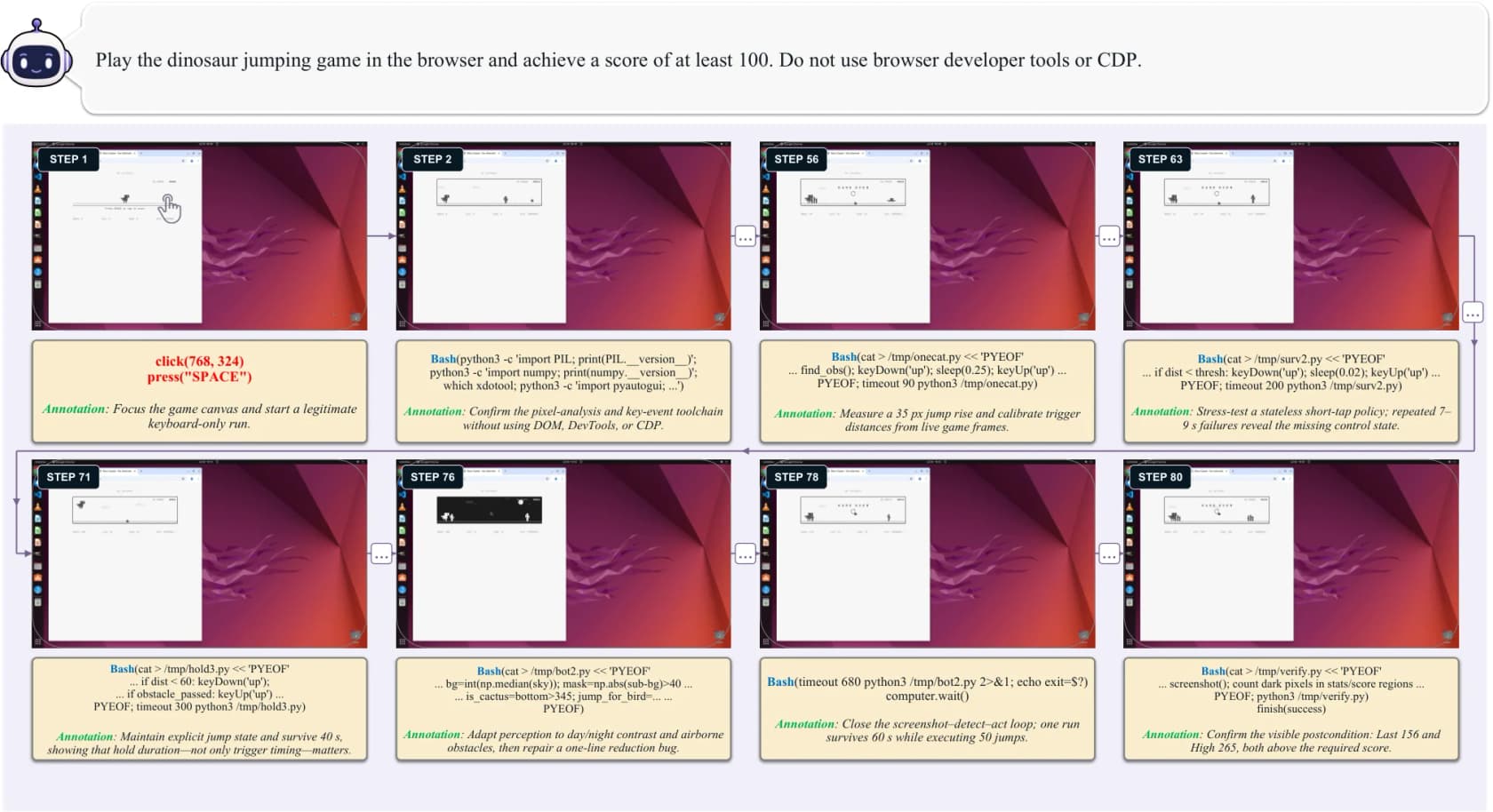
Sit with that for a second. The headline product is a screen agent. Give it a keyboard and a shell, and on the harder desktop benchmark it spends most of its actions not touching the screen at all. The paper's own phrase for the pattern is bash as hands, GUI as eyes, and the trajectory that shows it best is the one where the task is to score 100 in the browser dinosaur game without opening developer tools. Over 80 steps the agent watches the canvas through screenshots, then writes and rewrites Python to time the jumps.
The second efficiency trick is batching. Instead of one action per model turn, it emits several: 39.6% of actions on OSWorld-Verified and 41.6% on OSWorld-v2 arrive in batches, averaging 3.1 primitives each. One example in the paper is a 21-action sequence that fills an email and walks to the attachment picker, then stops, because the next decision needs a fresh screenshot. Each avoided turn is one fewer screenshot, inference pass and round trip, which is exactly the cost the paper flags in its own future-work section as the main obstacle to practical use.
If you have watched a browser agent crawl through a form one field at a time, this is the fix. Chrome auto-browse has the same shape of problem, and it is why per-step latency, not accuracy, is usually what kills a demo.
The real-device number is the interesting one
Most GUI agents are trained and scored in simulators, because a simulator can be reset and verified. Alibaba built the opposite: a runtime of more than 100 physical smartphones covering 150-plus apps, plus a benchmark to go with it.
MobileWorld-Real is 409 human-written tasks across 104 live Android apps, held out of training. Live accounts, changing content, real permissions, real network. The task list reads like a person's Saturday: find the most-saved recipe post, buy the ingredients minus seasonings for 18:45 delivery, compare walking times from three hotels to a bridge, work out when the train gets in and book a meeting for the next full hour after that.
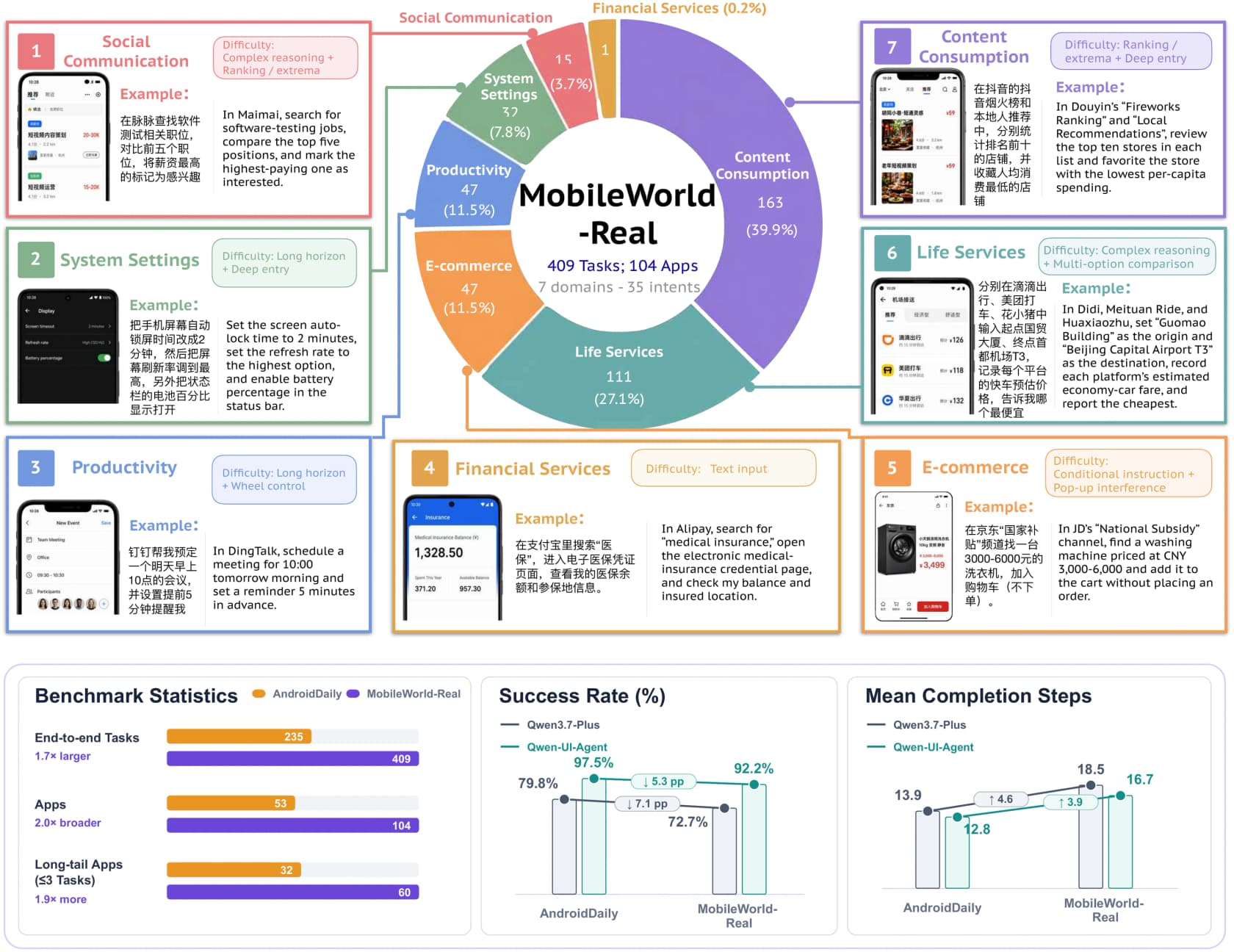
Two honest caveats belong on the 92.2%. First, it is Alibaba's own benchmark, which is fine and normal, but it is not an independent scoreboard. Second, physical phones do not expose app internals, so there is no deterministic verifier. Scoring is done by an agent called AutoJudge, which reads the instruction plus the full action-and-screenshot trace and returns pass, fail, or environment error. The team put its accuracy at 92.8% exact-match against 666 expert-reviewed examples, and listed judge error as the first limitation in the paper. I respect that they led with it. It also means the top of that leaderboard has a tolerance band around it.
The payoff for all that hardware shows up in the failure analysis, which is the section I would read first if I only had five minutes. The team took every failed Qwen 3.7 Plus trajectory on real devices and classified it.
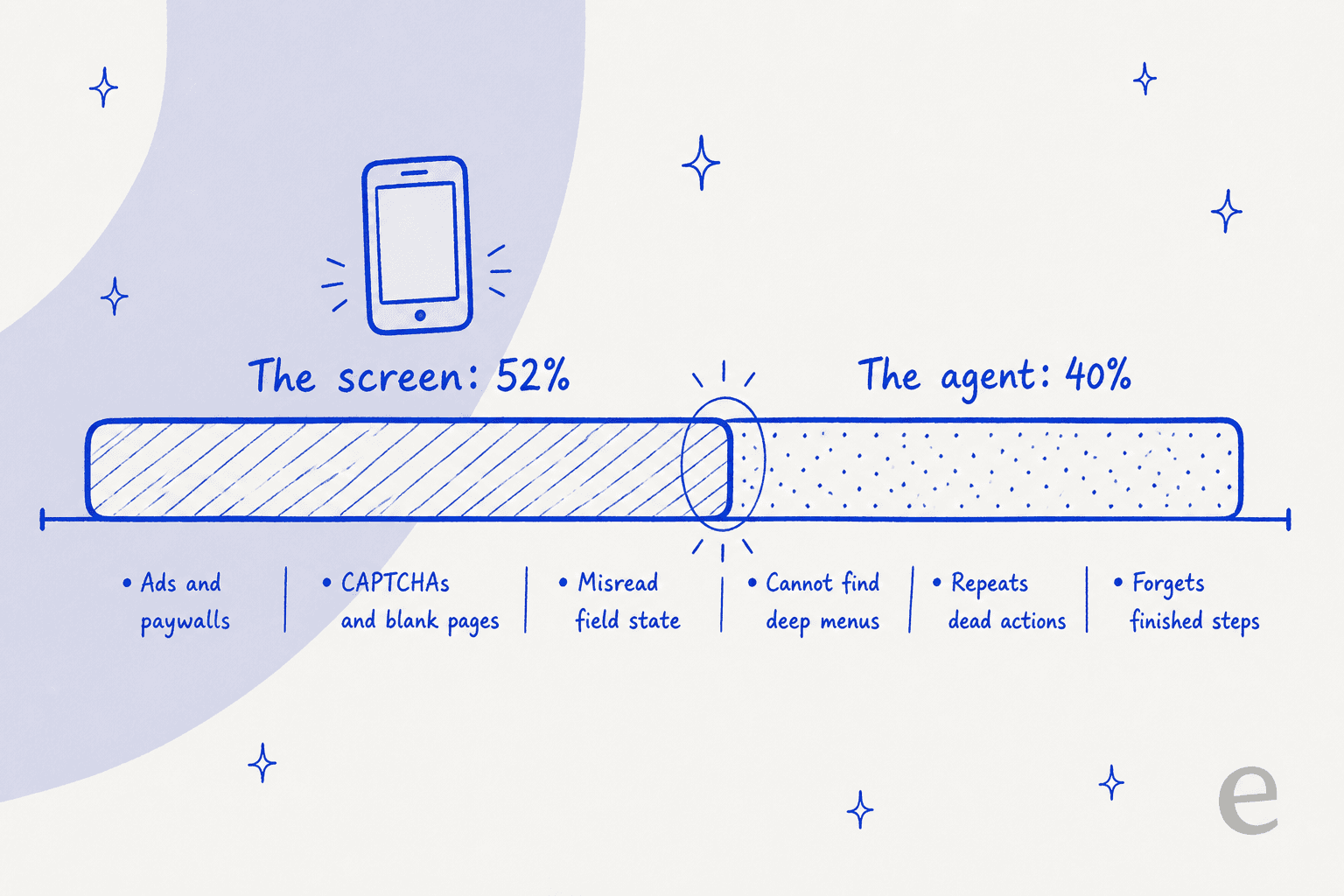
| Failure pattern | Share | What it looks like |
|---|---|---|
| UI misreading | 24.7% | Grey placeholder text read as typed input, so it keeps clearing an empty field |
| Pop-up interference | 18.2% | Ads, paywalls, CAPTCHAs, blank pages |
| Exploration failure | 19.5% | Cannot find a function buried behind several menus |
| Erroneous action loops | 14.3% | Repeats an action that did nothing, twelve times |
| Physical widget control | 9.1% | Overshoots a time picker in both directions, never lands |
| Lost execution state | 6.5% | Forgets which subtasks it already finished, starts over |
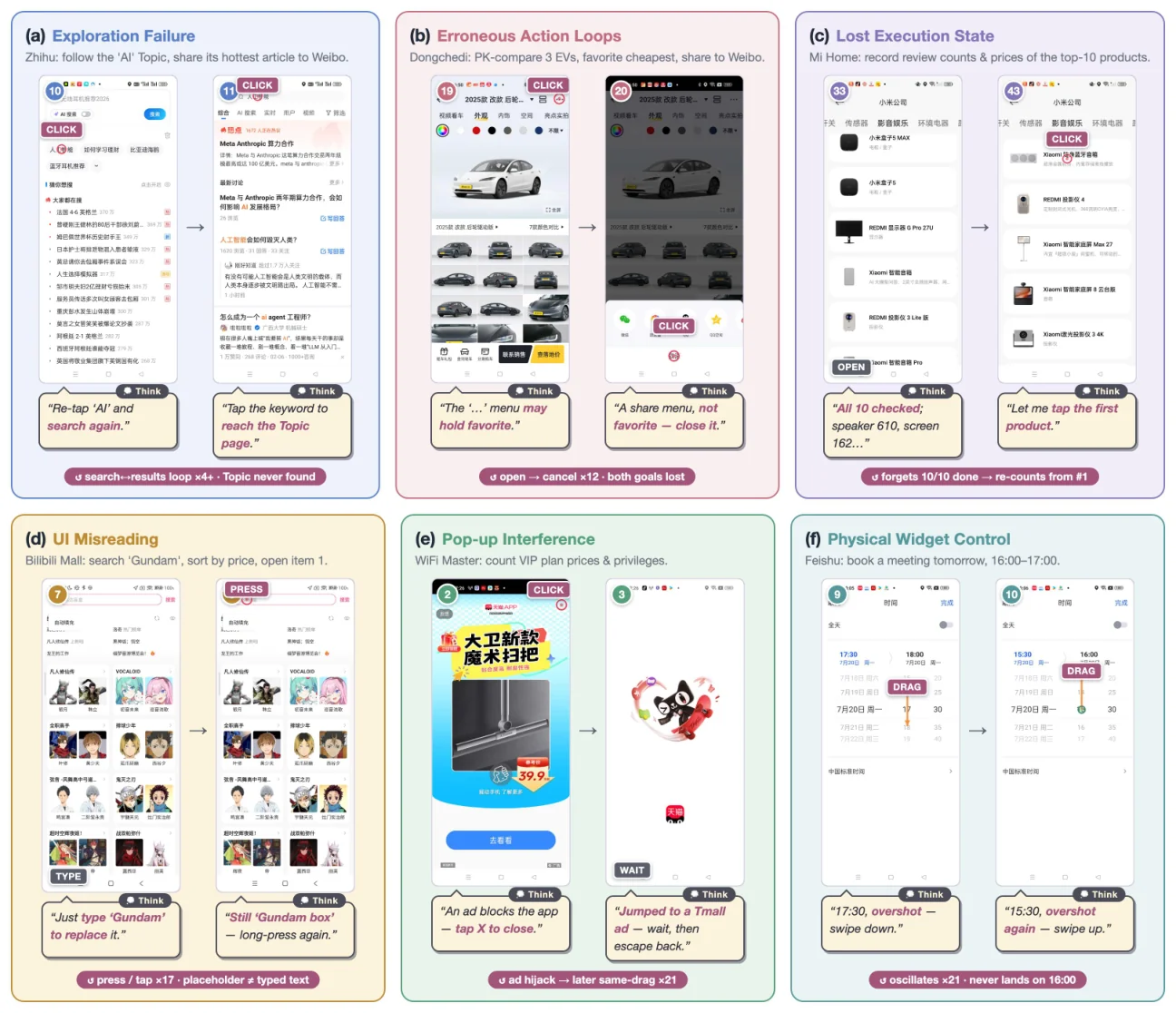
Add up the top rows and 52.0% of failures are the environment rather than the reasoning: an ad landed, a page went blank, a placeholder looked like text. Only 40.3% are the agent falling short on its own terms. A GUI agent's real adversary is the interface, and interfaces change without telling anyone.
Can you actually use it? No, not yet
This is the part every announcement thread skipped, so let me be plain about what exists.
| What you might want | What exists today |
|---|---|
| Model weights | None. Tongyi-MAI on Hugging Face has MAI-UI-2B and MAI-UI-8B from December 2025 and January 2026, nothing newer |
| Inference code | None. The repo has 2.2k stars, 199 forks, zero releases, zero packages |
| A hosted API | None published |
| Pricing | None, because there is nothing to bill |
| A consumer app | Not announced |
| What you can read | The technical report, the project site, demo videos, and the MobileWorld-Real benchmark |
The Apache 2.0 licence in the README covers the repository contents, not a checkpoint, which is worth knowing before someone tells you this one is open. Alibaba has form for shipping weights eventually, so the sensible read is "not yet" rather than "never". But right now Qwen-UI-Agent is a research result, not a thing you can put in a workflow. The Qwen pricing guide covers the models you can actually call, and Qwen 3.7 Flash is the cheap one people are running in production.
If you are shopping rather than reading, the honest comparison set is the models that already answer your API calls today. On desktop control that means Claude Opus 5 first, and our Opus 5 review has the detail on why.
Below that, Gemini 3.5 Pro is the cheapest credible option with vision, and GPT-5.6 is the one most teams already have a key for.
If open weights are the requirement rather than a preference, the two worth running head to head are Kimi K3 and DeepSeek's cheap tier. Our DeepSeek V4 Flash writeup covers why the cheap tier is the one people actually deploy.
What this means if you run a support queue
Here is where I have to declare an interest, because this is my day job. I build agent features at eesel, and the fantasy a GUI agent sells to a support leader is specific and seductive: an AI that logs into the helpdesk and works tickets like a new hire, no integration project required.
Two things in this paper argue against reaching for that first.
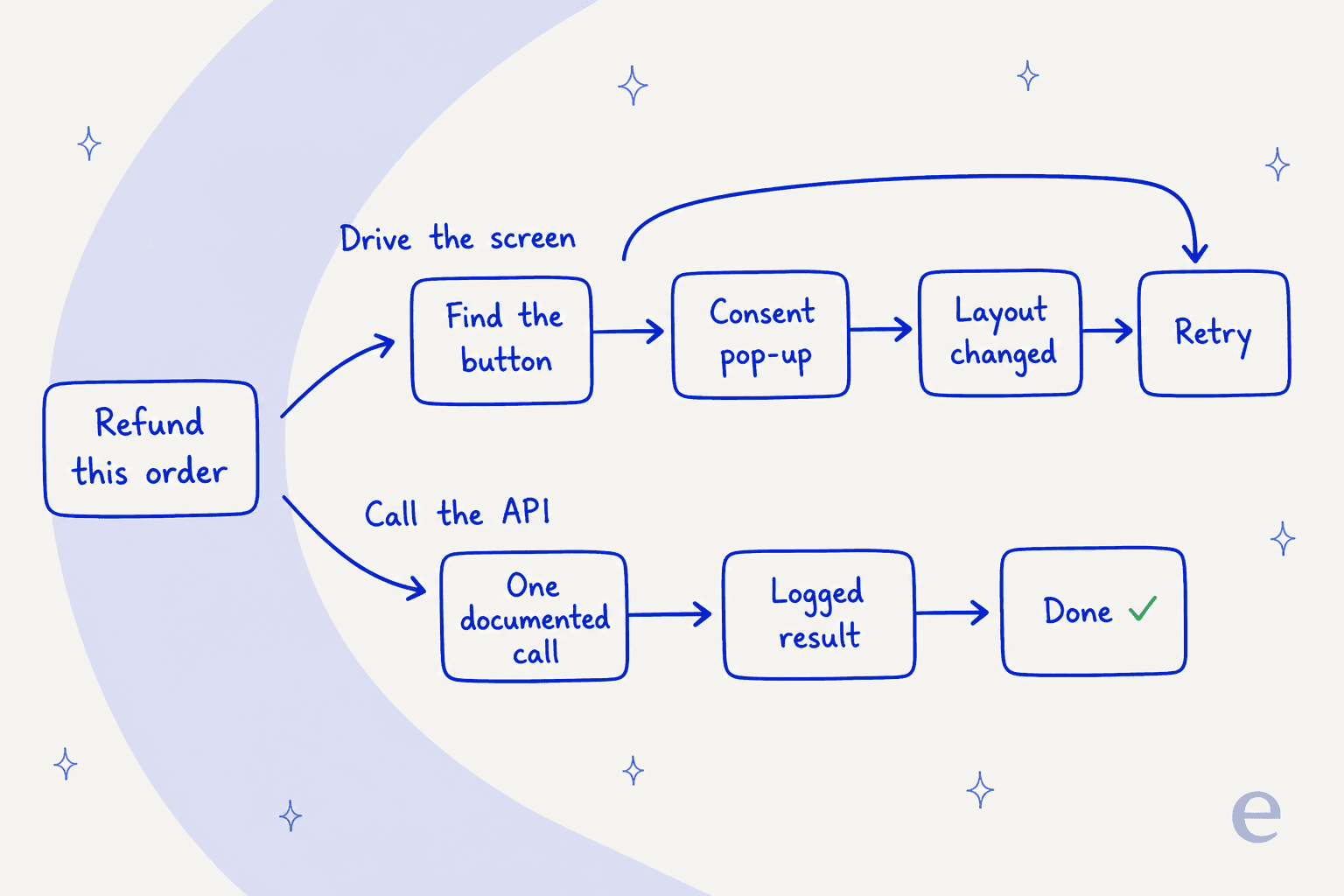
The first is that failure table. Ads, paywalls, blank pages and misread field state are the majority of real-device failures, and a helpdesk UI has all the same hazards in a milder form: a consent banner, a feature-tour tooltip, a modal that only appears for admins, a table that reflows at a different zoom. Your refund flow should not be one CSS release away from breaking. Every helpdesk worth using has an API for a reason. The Zendesk API does in one documented call what a pixel agent has to earn through six clicks and a bit of luck. So does Freshdesk API v2, with published rate limits you can plan around. Screen-driving is the right tool for the long tail of internal systems that never shipped an API, not for the ones that did.
The second is ask_user, and I mean this as praise. Alibaba put "stop and check with the human" in the action space rather than bolting it on later, so the agent fills in the Alipay amount and note and then halts at the payment step. That is exactly the shape of the objection I hear most in support. A CX lead running about 7,000 tickets a month put it to us this way, and it has stuck with me since:
"The AI will never be able to answer 100% of the questions, but if it tries and just answers 'sorry I don't know this,' I cannot go and check all my 7,000 tickets to see if the AI actually made a good answer. I need an AI who is only handling the tickets that it's confident to handle and all the other ones, leave them alone."
That is not a feature request about screens. It is a request for a confidence boundary, which is the same design idea Alibaba shipped as an action. If you are building toward it, handoff rules are the practical starting point. The mechanics of the trigger itself live in escalation rules. What decides which bucket a conversation lands in first is usually ticket classification.
The third thing is the one Alibaba spent 100 phones proving, and it generalises past mobile. A number from a simulator does not predict behaviour in the real environment. That is the whole argument for their real-device runtime, and it is the same argument for running an AI agent over your own historical tickets before it ever answers a live one. We learned it the hard way years ago, watching a confident-sounding bot give wrong answers with total composure, and it is why nothing at eesel goes live without a simulation pass first. If you want the wider version of that argument, support QA covers how teams actually measure it. The human-side equivalent sits in agent coaching.
None of which is a knock on Qwen-UI-Agent. It is a device operator, and a very good one on phones. It has no ticket model, no knowledge base, no queue and no concept of a customer, so it sits a layer below the tools in our best AI agents roundup and the narrower best AI agent for support list. Different job entirely.
If you want the category map, AI agent examples lays out where each type earns its keep. AI agents vs chatbots draws the line most buyers are actually asking about, and rule-based chatbots covers the generation before this one.
Try eesel
If what you actually want is an AI that works your queue rather than clicks around one, that is what we build. eesel connects through the API of the helpdesk you already run, learns from your past tickets and help centre instead of guessing, and runs a simulation over your real ticket history before a single customer sees a reply. You get the pass rate, the gaps and the wording to fix, up front. Billing is per ticket handled, not per seat, so a quiet month costs less than a busy one.

That approval panel is the ask_user idea in production: every tool action the agent wanted to take, and whether a human approved it, rejected it, or has not decided yet.
Start with helpdesk AI if you want the overview, ticket deflection if you are chasing a specific number, or support automation tools if you are still comparing.
Otherwise, Try eesel free. No call required.
So where does that leave it
Qwen-UI-Agent is the strongest published evidence yet that a mid-sized open-architecture model can drive a phone better than a frontier generalist. 82.1% on MobileWorld against 67.5% for Opus 4.8 is not a rounding error, and 38.2 points over the previous specialist best is a step change. The hybrid action space is the right idea, and the batching is the right optimisation. Alibaba also reported the parts that do not flatter them, which is rarer than it should be.
It is also unavailable, unproven on Western app stacks, second on desktop, and 26 points behind on English research. If you read one thing past the leaderboard, make it Table 10. The screen is the adversary, not the model, and that is true whether the interface is Douyin or your helpdesk. Where an API exists, use the API. Where it does not, this line of work is what will eventually fill the gap, and it is worth watching for exactly that reason.
Meanwhile the questions that decide your quarter are the boring ones. Whether your AI knowledge base is good enough to answer from. Whether ticket routing is sending things to the right place before any AI touches them.
Then the money question, which is AI agent vs human cost at your actual volume, not at a vendor's. And the framing question, because the AI teammates pitch and the AI employee one diverge more than the marketing suggests.
Last, the one people put off: whether an AI ticketing system is worth the migration from the one you have. For the rest of Alibaba's lineup, Qwen alternatives is the roundup and the Qwen3.8-Max review is the closest sibling to this post.
Frequently Asked Questions
What is Qwen-UI-Agent?
Is Qwen-UI-Agent open source or downloadable?
How good is the Qwen UI agent compared to Claude and GPT?
How much does Qwen-UI-Agent cost?
Can a GUI agent run my helpdesk for me?
What happens if the agent gets it wrong on a real ticket?
ask_user action so it can stop before a payment or a deletion, which is the same idea as a confidence gate in support: auto-answer what the agent is sure of and hand the rest over. Our guides on handoff rules and escalation rules cover how to set that up.Where does Qwen-UI-Agent fit next to other AI agents?


Article by
Kira
Kira is a writer at eesel AI with a Computer Science background and over a year of hands-on experience evaluating AI-powered customer service tools. She focuses on breaking down how helpdesk platforms and AI agents actually work so that support teams can make better buying decisions.