

How much does Krea 3 cost?
Krea 3 has two price lists, and which one applies depends on where you use it. In the Krea web app, Krea 3 draws on the compute units in your plan. Through the API, it is a flat price per image from a separate prepaid balance. The model itself launched in open beta on October 15, 2026, as Krea's new image editing model with native 2K output, and my Krea 3 explainer covers what it does.
I'm a software engineer and writer at eesel with two years in SEO, so I start a pricing post from the search itself. People typing "krea 3 pricing" have already seen the $0.06 headline. What they want to know is what a real edit costs and which plan they need. Here is the API side first, because it is the clearest.
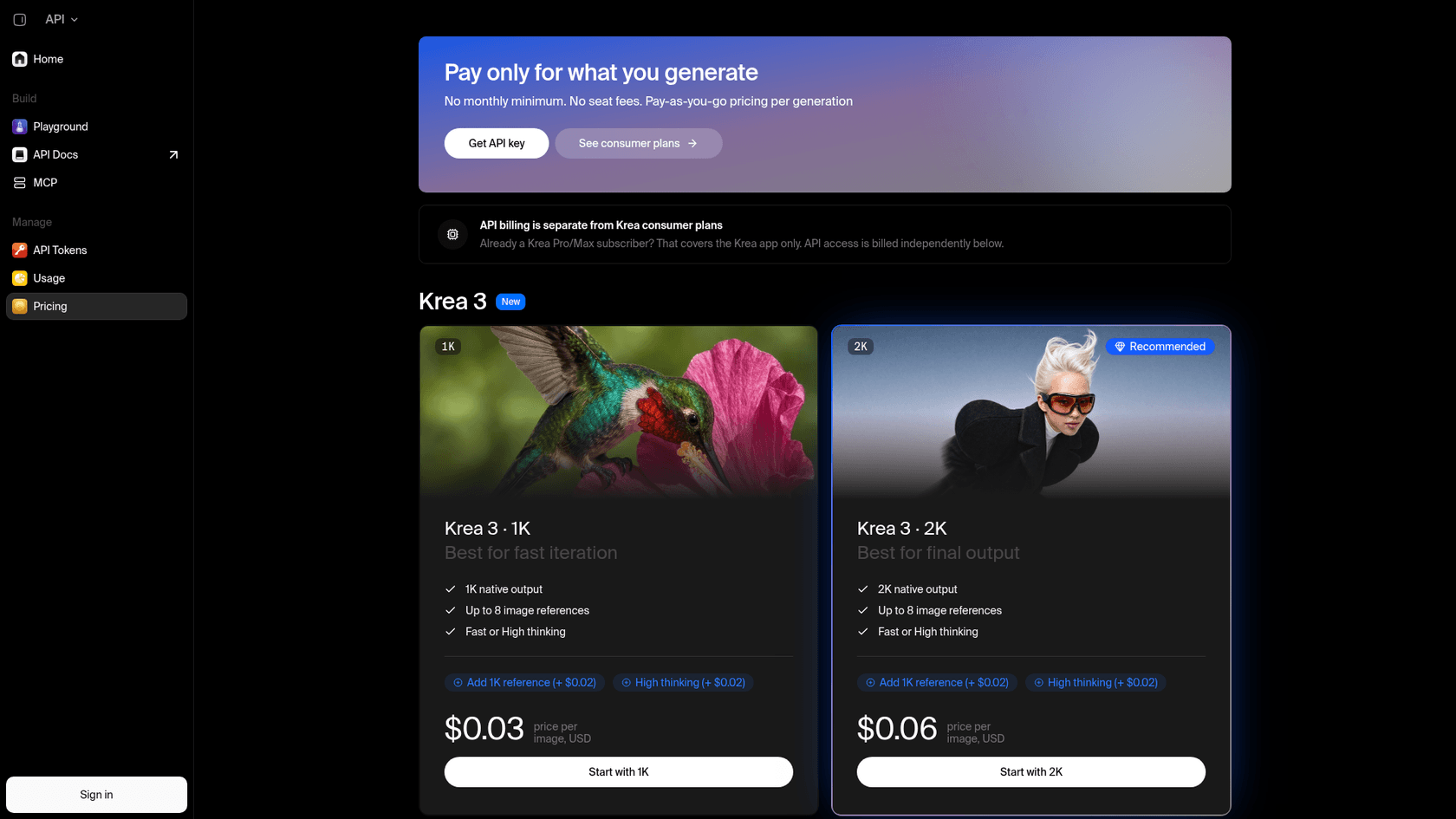
| API line item | Price | What triggers it |
|---|---|---|
| Krea 3 image, 1K | $0.03 | Every completed 1K output |
| Krea 3 image, 2K | $0.06 | Every completed 2K output |
| Reference up to 1024 x 1024 pixels | +$0.02 each | Each input image of 1,048,576 pixels or fewer, measured after resizing |
| Reference larger than that | +$0.07 each | Each bigger input image |
| High thinking mode | +$0.02 | Setting thinking_mode to high |
| Failed or cancelled jobs | $0 | Krea bills completed jobs only |
The table above comes from Krea's API pricing page and the billing section of its API keys and billing docs. Krea's landing page FAQ adds a line I like: "The launch price is the list price," with the company saying it expects the price to go down, not up.
What actually goes on a Krea 3 bill?
The billable unit is one completed image. Resolution sets the base, then you add a charge per reference and an optional charge for high thinking. That sounds simple until you notice that the reference charge depends on the size of the image you upload, not on the output resolution.
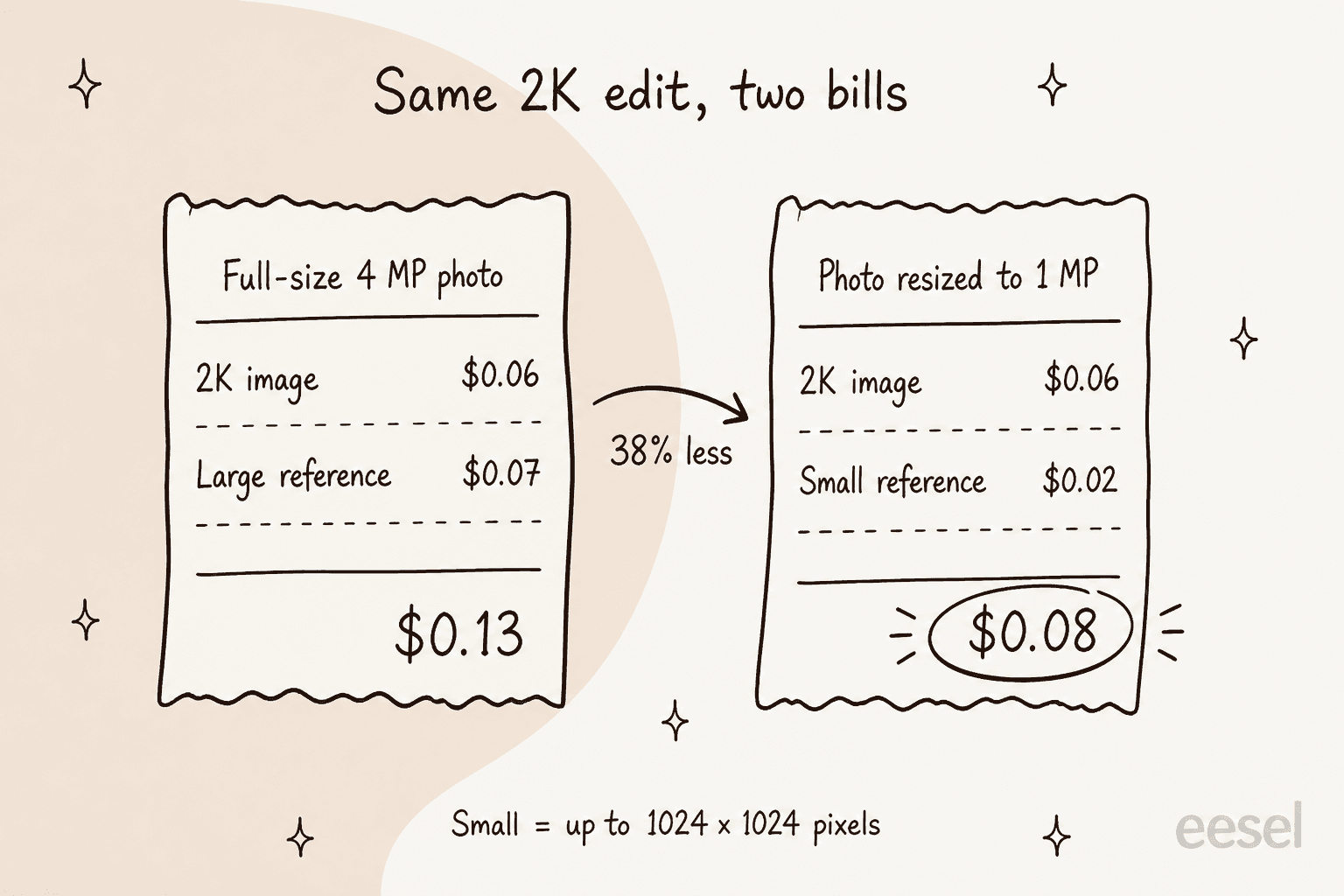
That catches people out. The Krea 3 API docs say the model uses each reference at its uploaded resolution, shrinks anything over 4 MP down to 4 MP, and that "around 1 MP is enough for most edits." A photo straight off a phone is usually 4 MP or more, so if you send it as-is, you pay the $0.07 rate on every edit.
Here are the bills I would expect for the common setups:
| Job | Base | References | Thinking | Per image |
|---|---|---|---|---|
| 1K text-to-image | $0.03 | none | fast | $0.03 |
| 2K text-to-image | $0.06 | none | fast | $0.06 |
| 2K edit, one reference up to 1 MP | $0.06 | $0.02 | fast | $0.08 |
| 2K edit, one large reference | $0.06 | $0.07 | fast | $0.13 |
| 2K edit, one large reference, high thinking | $0.06 | $0.07 | $0.02 | $0.15 |
| 2K product composite, three large references | $0.06 | $0.21 | fast | $0.27 |
Two details are worth knowing before you build a pipeline. With five or more references in one request, the docs say Krea resizes each one to at most 1536 pixels on the longest side, which is still above the 1 MP line for most shapes, so you keep paying the larger rate. And the docs suggest sending the highest-resolution version only "when fine details matter," like small text, logos or fabric. For everything else, downsizing is free money.
High thinking is the other lever. Krea describes it as a stronger reasoning step for complex or multi-step edits, and recommends it when a fast result missed the request. At $0.02 it is cheap, but in a batch of 10,000 edits that is $200 a month for a setting most edits don't need.
How much do Krea's app plans cost?
If you use Krea 3 in the browser, you don't pay per image. You buy a plan with a monthly pool of compute units, and Krea 3 draws from that pool along with every other model in the app. Krea's user guide for Krea 3 says the model is available to everyone and that Krea 3 Ultra needs a Max plan or higher.
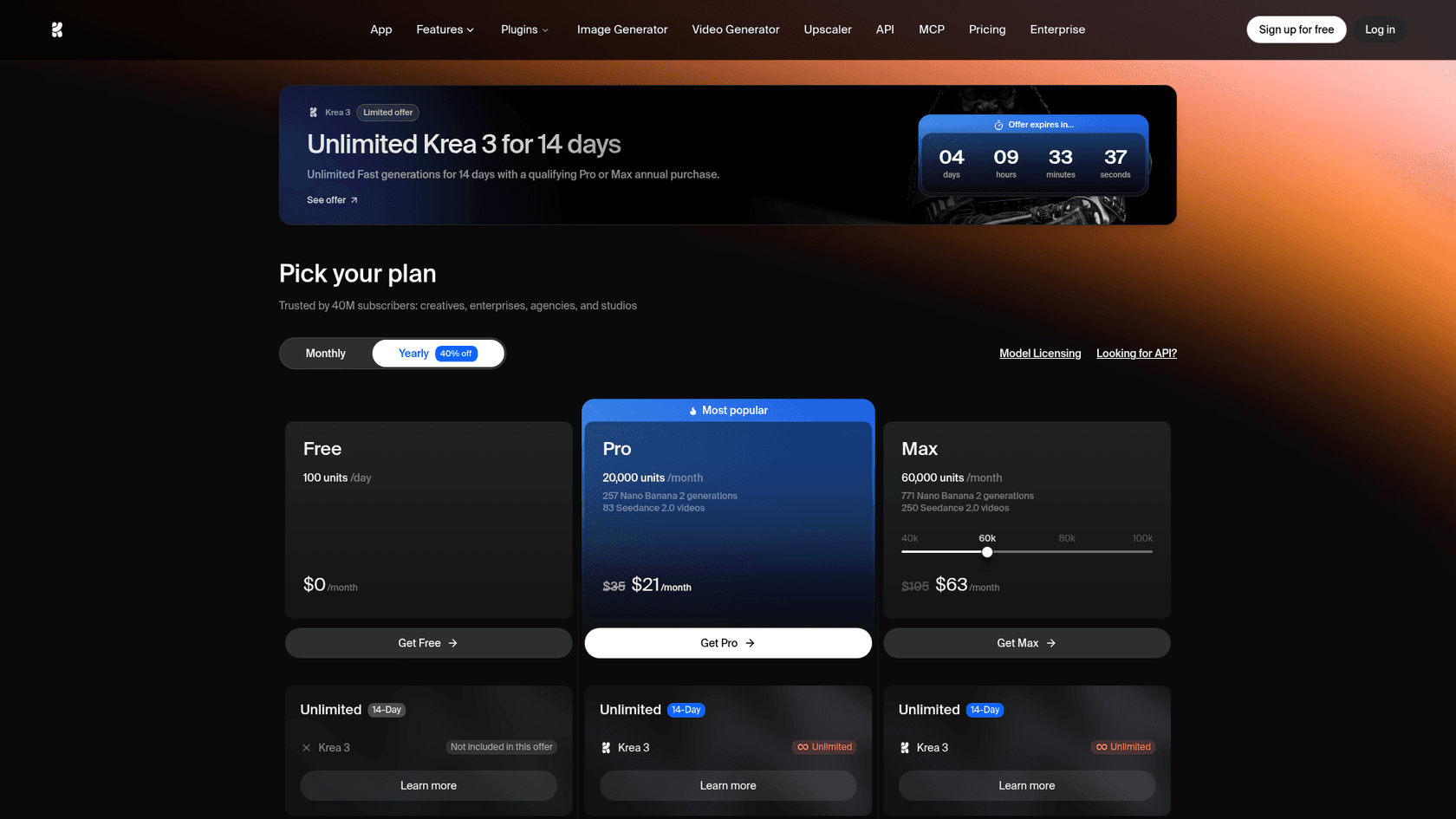
| Plan | Monthly price | Yearly price (per month) | Compute units | Krea 3 images (Krea's estimate) | Notable limits |
|---|---|---|---|---|---|
| Free | $0 | $0 | 100 a day | About 5 a day | 1 image at a time, no commercial license |
| Pro | $35 | $21 | 20,000 a month | About 1,111 a month | 8 images at a time, commercial license, no Ultra |
| Max (40k) | $70 | $42 | 40,000 a month | About 2,222 a month | Krea 3 Ultra, unlimited image concurrency |
| Max (60k) | $105 | $63 | 60,000 a month | Not listed | Default on the pricing card |
| Max (80k) | $135 | $81 | 80,000 a month | Not listed | |
| Max (100k) | $165 | $99 | 100,000 a month | Not listed | |
| Business (20k) | $50 | $40 | 20,000 a month | Not listed | Up to 50 members, units roll over |
| Business (80k) | $200 | $160 | 80,000 a month | Not listed | Default on the pricing card |
| Business (1.5M) | $2,850 | $2,280 | 1,500,000 a month | Not listed | Top published tier |
| Enterprise | Custom | Custom | Custom | Custom | SAML SSO, dedicated support, self-hosting option |
Prices and unit counts are from Krea's pricing page, read on October 18, 2026. Pro and Max get 40% off on yearly billing, while Business gets 20% off. Business also has tiers at 40k, 160k, 240k, 400k, 500k, 750k and 1M units between the rows above. The image estimates come from Krea's plan comparison table, which gives Max exactly twice Pro's count for every model, so it appears to be built on the 40k Max tier rather than the 60k default.
A few plan rules change the math. The compute units guide says Pro and Max units do not roll over, while Business and Enterprise units do: monthly plans carry to the next month and annual plans for up to 12 months. Extra compute comes in one-time packs of 2,000 to 50,000 units that expire after 90 days, and their prices only show once you sign in. Every paid plan also lists "unlimited relaxed generations" with supported in-house image models after your units run out, but the page doesn't say whether Krea 3 is one of them, so I wouldn't plan around it.
At the time of writing, the pricing page also runs a promotion: unlimited Krea 3 Fast generations for 14 days with a qualifying Pro or Max annual purchase, shown with a countdown timer. Take that as a bonus on an annual plan you already wanted, not a reason to buy one.
If you are weighing this against other creative suites, the closest shapes are Leonardo AI pricing and Freepik AI pricing, which also sell credit pools across many models. Design teams already paying for Canva should check Canva AI pricing first, since its AI image tools are part of its paid plans.
Is the app or the API cheaper per image?
On Krea's own numbers, the app is cheaper per image, and the API is more predictable. Pro gives about 1,111 Krea 3 images for $35 a month, so roughly $0.03 an image, or about $0.02 on yearly billing. The API never goes below $0.03, and a typical 2K edit with a reference costs $0.08 to $0.13.
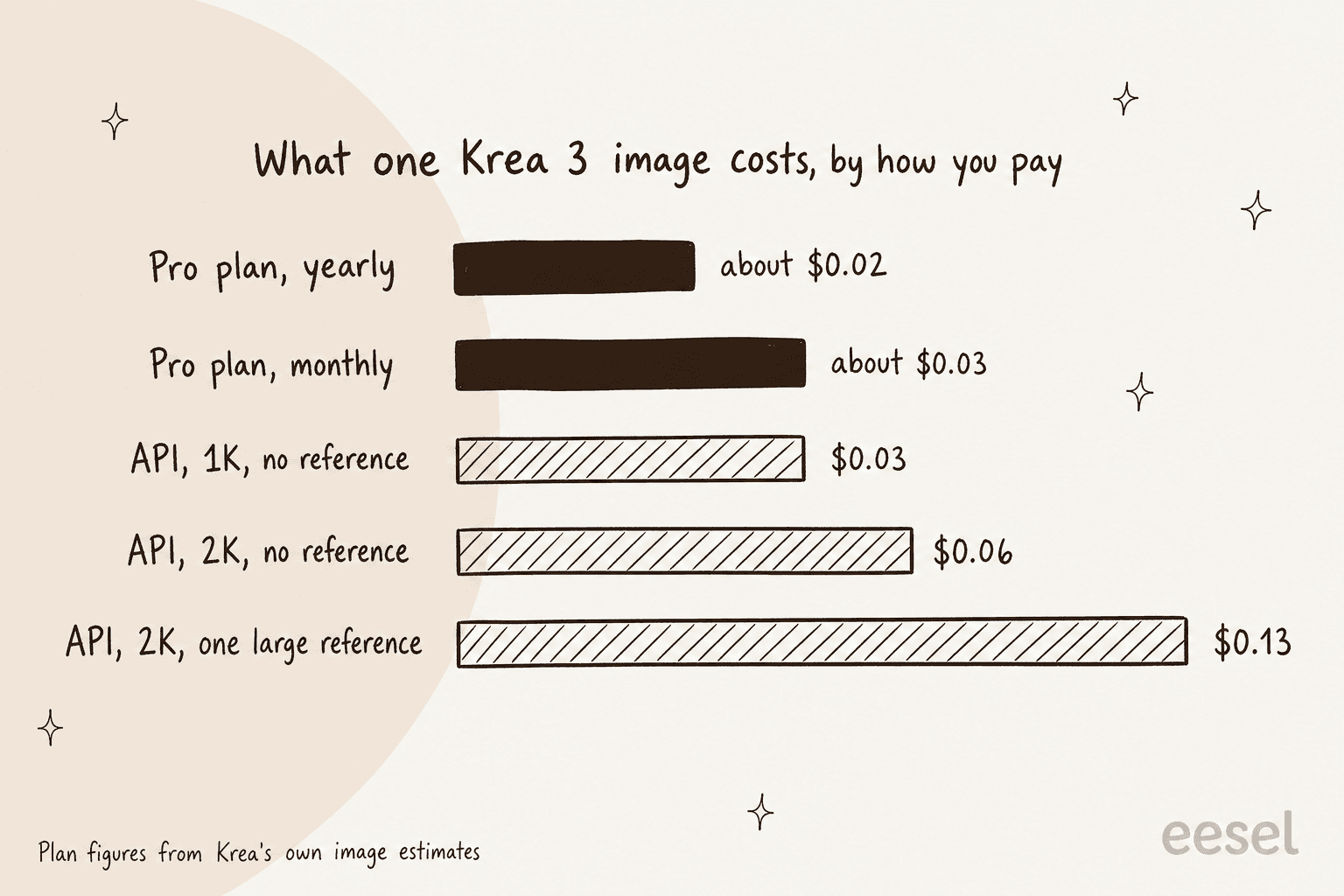
There is a catch in the app figure. Krea's plan table says "settings are shown when relevant," but it doesn't state which resolution, reference count or mode the 1,111 estimate assumes, and the user guide tells you to check the model picker for the cost of your selected settings. Treat the app numbers as a ballpark, then check the picker for your usual 2K edit before you commit to a tier.
The two routes are also not interchangeable. Krea's API pricing page is explicit that a Pro or Max subscription covers the Krea app only, and the API is metered against its own balance. So the real question is not which is cheaper, it's which job you have:
- You edit by hand in a browser. Use a plan. The per-image rate is lower and you get every other model in the app too, including Nano Banana 2 and FLUX 3.
- Your code makes the images. Use the API. You pay per completed job, there's no seat fee or monthly minimum, and failed jobs are free.
- Both. Expect two bills. A team on Business that also runs a script needs a Business plan and a topped-up API balance.
How does Krea 3 compare to Nano Banana Pro and GPT Image on price?
Krea's launch post puts its price next to the two models most teams compare it with. These are Krea's numbers, measured on Krea's own platform between September 24 and October 1, 2026, using list prices without image references:
| Model | Price per 2K image (Krea's table) | Median time per edit (Krea's table) | 100,000 edits a month |
|---|---|---|---|
| Krea 3 | $0.06 | Under 8 seconds | $6,000 |
| Nano Banana Pro | $0.135 | 33 seconds | $13,500 |
| GPT Image 2 | $0.22 | 90 seconds | $22,000 |
Source: Introducing Krea 3. For each rival's own price list, my Nano Banana Pro pricing breakdown and ChatGPT Images 2.5 pricing guide go line by line.
Two things keep this table honest. First, it excludes references, and Krea 3 edits always use one, so the fair Krea figure for 100,000 edits is $8,000 with small references or $13,000 with large ones. That's still below Nano Banana Pro, but the gap narrows a lot. Second, GPT Image has several quality levels, and not every job needs the top one. A Hacker News commenter made that point on the launch thread:
"The latest GPT image model has five quality levels and the first three are entirely sufficient for almost every use case."

Krea launched with hosting partners including Together AI, Replicate, fal and OpenRouter, and at least one of them matched the list price on the base image. OpenRouter's launch thread put it plainly:
"Pricing: $0.03 per image at 1K, $0.06 at 2K"
If you are still choosing a model rather than a plan, my Krea 3 review scores it against the field. The Nano Banana Pro review and ChatGPT Images 2.5 review cover the two rivals in the same depth.
For open-weight options with no per-image fee, look at Qwen Image 2.1, and for a wider shortlist, my roundups of ChatGPT Images 2.5 alternatives and FLUX 3 alternatives list the rest.
What are the hidden costs and gotchas?
The per-image price is clean. The friction sits around it. These are the six things I would check before putting Krea 3 into a budget.
1. API access is gated. The Krea 3 API overview says the API is in early access, only workspaces in the Krea 3 beta can call it, and you request access through sales@krea.ai. The public price list is real, but you can't just sign up and start a batch job today.
2. The API balance is prepaid, with no balance endpoint. You top up from $5 to $10,000 by card, and when the balance hits zero, new requests fail with HTTP 402. The billing docs say there is no public endpoint to check the balance from code, so a pipeline needs a human watching the dashboard or a generous buffer.
3. Reference limits disagree across Krea's own pages. The API docs and API pricing page say up to 8 references, the launch blog says up to 6, and OpenRouter's listing takes 1 to 4. If your job needs a lot of references, test it on the route you'll actually use.
4. Units on personal plans expire. A quiet month on Pro or Max is money left on the table. If your volume swings, Business with rollover can beat a bigger Max tier.
5. The signup flow pushes discounts. Several early users on the launch thread didn't like it:
"Sneaky pricing. Offers you plans when you sign up, if you decline them, it offers you a discount. Just offer the discounted price up front."
Diego from Krea's team replied in the same thread that the consumer market is fiercely competitive, and said this mostly doesn't happen on Business or Enterprise tiers. If you're buying for a team, start with Business pricing instead of the personal checkout.
6. Cheap still isn't cheap for everyone. For some product builders, a few cents an edit adds up at user scale:
"IMO still to expensive for most “product” use cases. Fast and affordable imaging editing unlocks tons of cool use cases."
If your edits are mostly background swaps on product photos, a dedicated tool may fit better, and my Photoroom pricing breakdown lets you compare. If you need edits at consumer-app scale, compare against a lighter model like Nano Banana 2 Lite or GPT Image 1 Mini before you commit.
Which Krea 3 plan should you pick?
Most people only need to answer one question: who presses the button, a person or a script? From there the route is short.
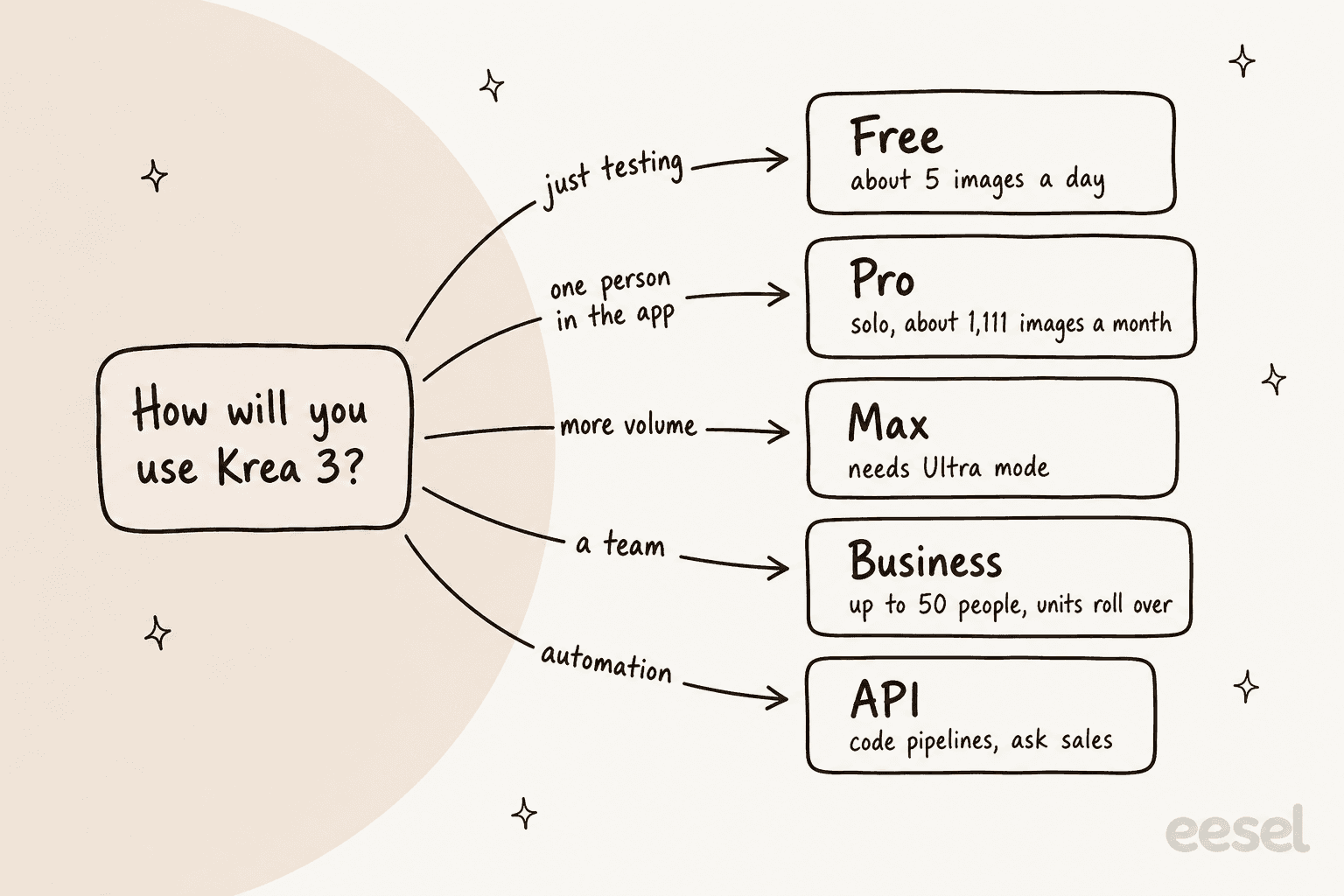
Here's how that plays out at three sizes. I'm using the 2K edit with one reference as the default job, since that's what Krea 3 is built for.
A solo designer making 300 edits a month. Pro covers it with room to spare: $35 a month, or $21 billed yearly. The same 300 edits on the API would be $24 with small references or $39 with large ones, so the app wins unless you need automation.
A content team making 1,800 images a month. This one is close to home. The blog pipeline I work on at eesel generates a hero banner and three to five infographics for every post, and in my experience roughly 1 in 3 renders needs a redo. One SEO content lead in eesel's customer records runs 360+ posts a month through it, about 12 a day. At five images a post that's 1,800 finished images, or about 2,700 renders once a third of them need a second try. In the app, that's past Max 40k's 2,222-image estimate, so you're looking at Max 60k: $105 a month or $63 yearly. On the API at $0.06 per 2K image with no references, it's about $162 a month. Redos, not list price, are what move this budget.
A catalog pipeline running 100,000 edits a month. This is the scenario in Krea's own table, and it's API territory. With one small reference per edit, the bill is about $8,000 a month. Send full-size photos and it's $13,000. Krea's API page invites anyone generating 10,000+ images a month to talk to sales about volume discounts, and its FAQ mentions volume pricing at 100,000+ a month, so at this size the list price is a starting point for a conversation.
For a wider view of what image-heavy content really costs, my guide to creating AI blog images compares the main routes, and the Ideogram pricing and Recraft AI pricing breakdowns cover two design-first alternatives.
Where do Krea 3 images end up?
For a lot of teams, the answer is a blog post, a landing page or a product page. That's where the image budget and the content budget meet, and where most of the waste hides. An image you paid for is only worth something once it sits inside a page someone reads.
That's the job of eesel's AI blog writer, a teammate you hire for one job: publishing posts. It finds the topic, researches it with every claim cited, writes in your brand voice, and generates its own hero banner and on-brand infographics, the same way the visuals in this post were made. If you edit product shots in Krea 3 for an ecommerce blog, the writer builds the article around them. Agencies running content for clients use it the same way, which my post on an AI blog writer for agencies walks through.
Try eesel
If you're pricing Krea 3 because your content calendar needs more visuals, the slower and pricier part is usually the article, not the picture. eesel's AI blog writer takes a keyword, researches it, drafts a cited post in your voice, and adds its own banner and diagrams, then takes plain edits like "make the intro shorter." See how teams set up an AI blog writer workflow, what an AI blog writer costs, and how it stacks up among the best AI blog writers.

Keep Krea 3 for the edits it's fast at, and let the writer turn them into posts that rank. Try eesel free with your next topic.