


How does FLUX 3 Klein score at a glance?
I'm a software engineer at eesel with a computer science background, and I build features and AI agents, including the agent that draws the hero banner and diagrams for every post I publish. So I read a new image model the way I'd read a spec: what it promises, what its own docs admit, and where early users hit the edge. I did not run a controlled bake-off against rival models. I weighted the criteria by what a content or catalogue team feels first, which is price and editing.
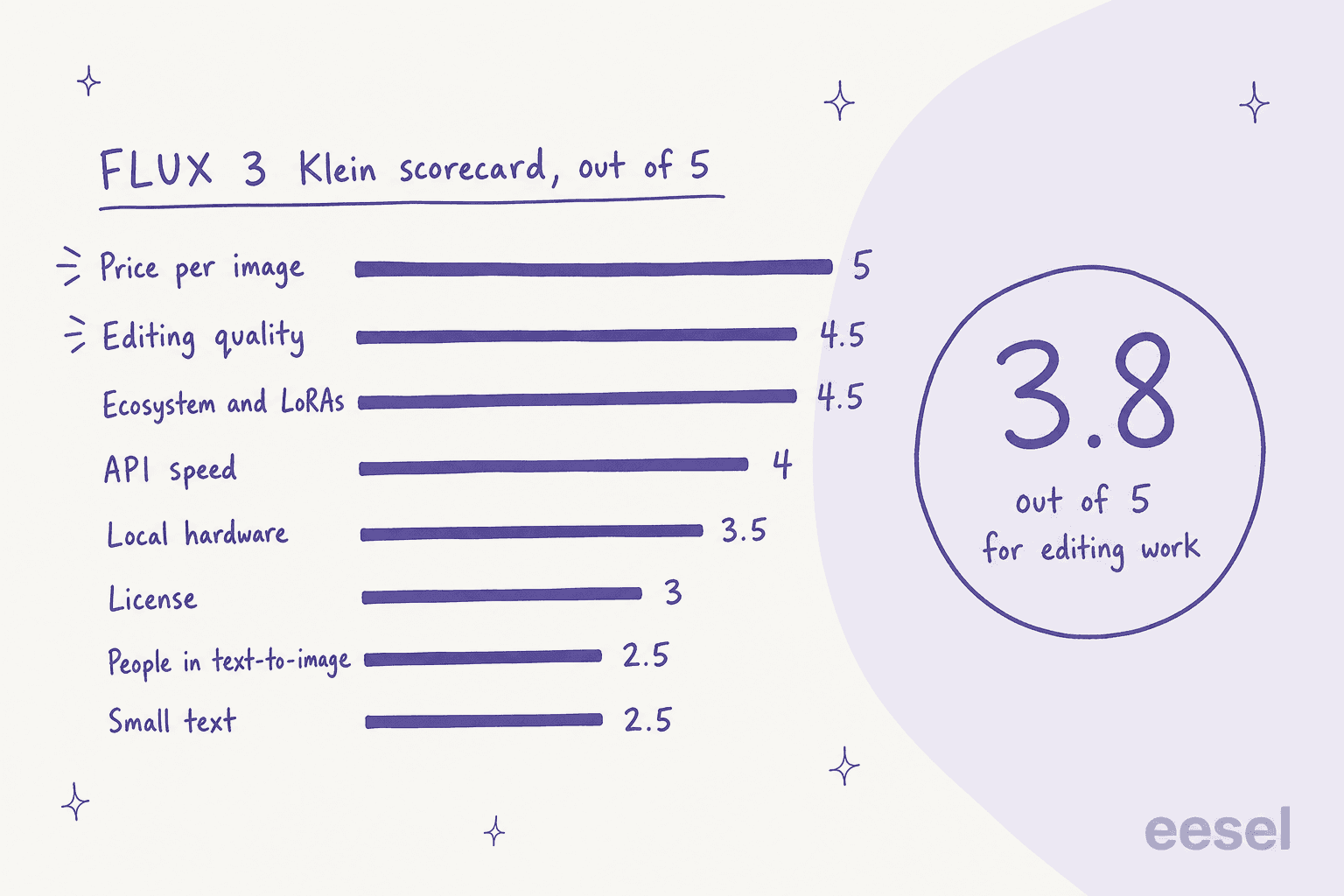
| Criterion | Score | Weight | Evidence | Evidence type |
|---|---|---|---|---|
| Price per image | 5 | 2x | $0.014 at 2K, edits cost the same, about 86% below full FLUX 3 Image | Vendor price list |
| Editing quality | 4.5 | 2x | +70 Elo over FLUX.2 [klein] 9B; testers call editing solid | Vendor rating, community |
| Ecosystem and LoRAs | 4.5 | 1x | Base model for training, day-one support in 5 runtimes | Vendor docs |
| API speed | 4 | 1x | 4.54 s text to image, 7.18 s edit at 1 MP, median | Vendor-measured |
| Local hardware | 3.5 | 1x | Generator fits 8 GB in INT8, upsampler adds about 28 GB | Vendor docs |
| License | 3 | 1.5x | Free commercial use only under $5M revenue, affiliates counted | License text |
| People in text-to-image | 2.5 | 1.5x | Several testers report distorted anatomy; results split on the upsampler | Community |
| Small text | 2.5 | 1x | Model card warns text may be inaccurate; BFL's own sample stamp misspells | Vendor docs, community |
The weighted average is 3.8. Weigh all eight criteria equally and it drops to 3.7, so the headline is stable. The last column matters more than the scores: several of the eight rest on BFL's own numbers, and I mark those so you can discount them.
Is FLUX 3 Klein fast, and does the speed hold up?
On the API, yes by BFL's account. The launch post reports a median of 4.54 seconds for a 1 MP text to image render and 7.18 seconds for an edit, end to end including queueing. That is faster than Qwen-Image 2.1 and Krea 2 on the same chart.
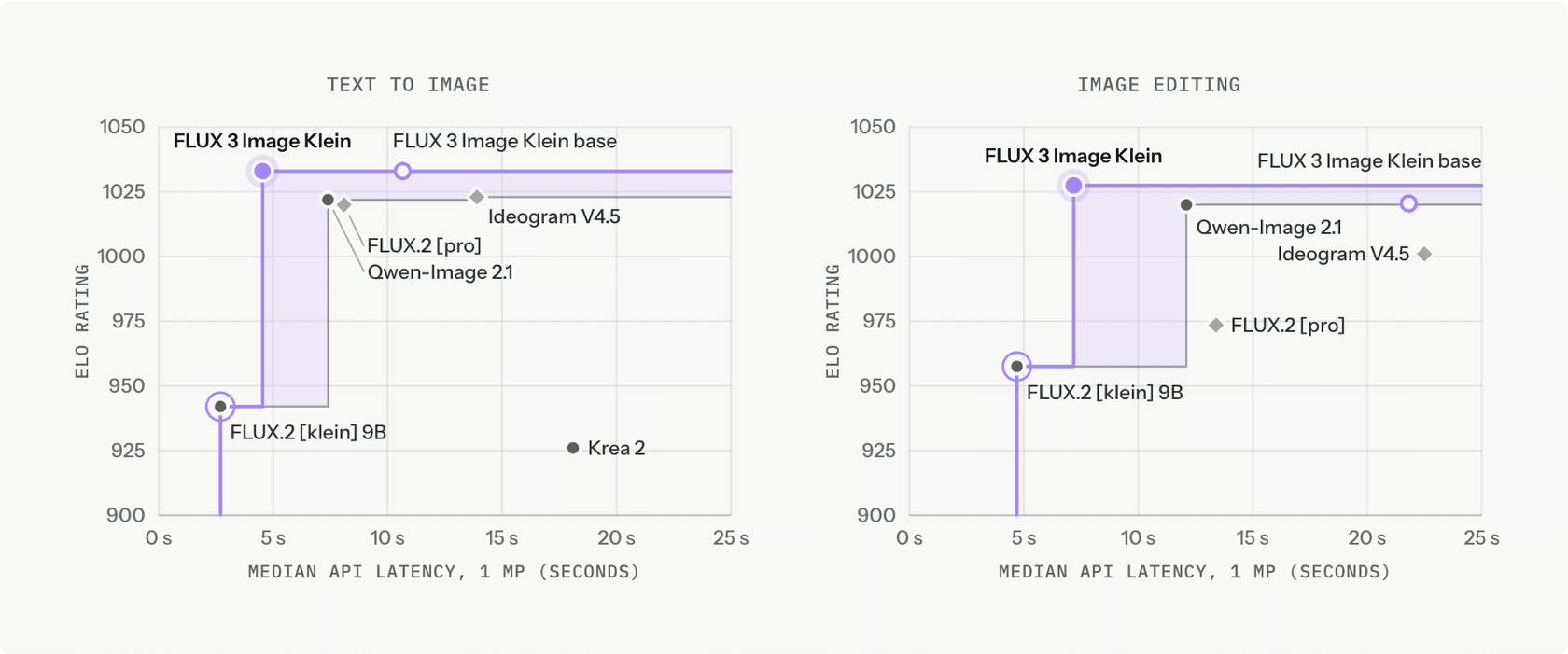
I give it 4 and not 5 for one reason BFL states in the same post: Klein was timed on BFL's own servers, while the other models were timed from the client, which adds polling and network time. The chart is a fair signal of speed class, not a controlled race. One early API user on Hacker News put it plainly, and it is the same split I see in the numbers:
"It's really fast on the OpenRouter API, but it's clearly worse than Flux 3's normal model."

Speed is the criterion where I would trust the vendor most, because the cost of being wrong shows up in your first ten renders. Quality is where I would not.
How good are the edits?
Editing is the reason Klein earns a 4.5. BFL's ratings put it at a gain of 70 Elo in image editing over its own FLUX.2 [klein] 9B, with 38% fewer parameters, and the hosted version adds a pixel restoration step that keeps unedited regions exactly as they were. The Klein docs also let you draw bounding boxes on a 0 to 1000 grid to place an element or confine an edit.
I hold back half a point because boxes are soft guidance, not a mask. The model card says edits can still change content outside the box. That is a real limit for catalogue work where a logo must not move, and it is the first thing I would test with your own product shots. Compare this with Krea's approach in my Krea 3 review, where regional edits are the headline feature.
The community agrees on the direction. One tester on the launch thread called the editing really solid, and BFL's own ratings point the same way. For a deeper look at the instruction-edit category, see Qwen Image Edit and the OpenAI edit API.
Where does Klein lose points?
People and small text. These two criteria are the reason the headline is 3.8 and not 4.3, and the evidence is the least settled of anything in this review.
The loudest complaint on the launch thread was anatomy. One early user wrote:
"Very disappointing compared to Flux 2 Klein. I was excited to see what the next frontier of small local image gen might be like, but this model is absolutely atrocious."
Others who ran the full stack saw something milder, and the split tracks one variable: whether the prompt upsampler was in the loop. Klein was trained on long scene captions, and BFL says not to use it without the upsampler. One tester who tried both ways found it was not a clean win either:
"my results have been hit or miss with that claim. Some basic prompts are better, some upscaled prompts are better."
A third tester, dragonwriter, used the whole stack and said the errors were occasional and that "this is much less common than with Flux 2 Klein." So I score people at 2.5, which means: usable with a good prompt and a retry budget, risky as the only generator in a pipeline. BFL's response two days after launch was a workflow fix, not a new model:
"To get the best results, the model should be used with our prompt upsampling and 2K resolutions."
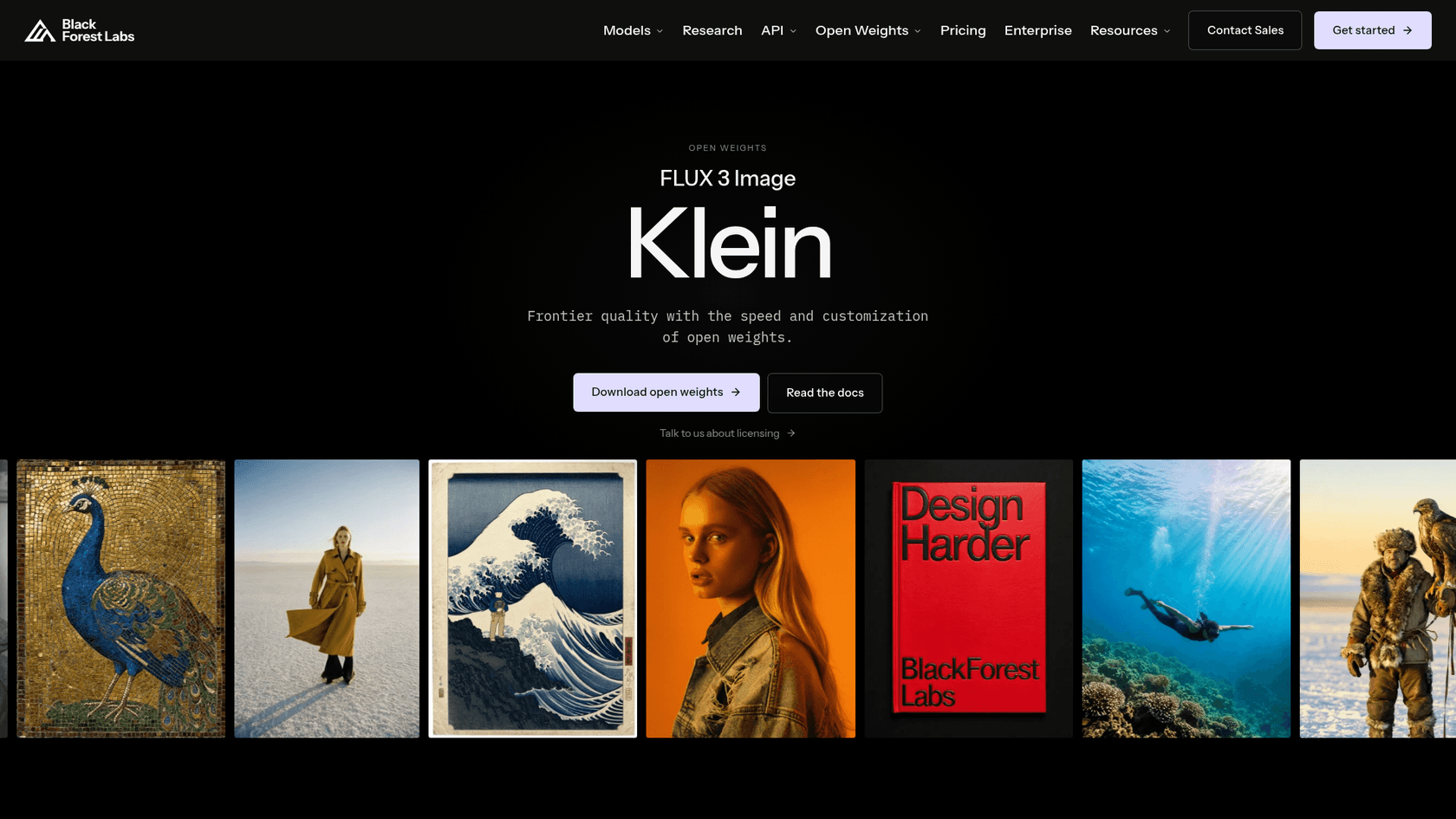
Small text is the other low score, and BFL's own showcase backs it up. In the sample collage on the model page, the postage stamp renders its English caption with doubled and misplaced letters, which fits the model card's warning that rendered text may be inaccurate.

If dense typography is your job, Ideogram is the usual first stop, and my Ideogram pricing guide shows what it costs. For design assets, try Recraft.
How does Klein compare with FLUX.2 klein and full FLUX 3 Image?
Against FLUX.2 [klein] 9B, the evidence favours Klein on paper and splits in practice. BFL reports gains of 91 Elo in text to image and 70 in editing. Early testers disagreed, and the pattern above, upsampler on or off, explains most of the gap.
Against the full FLUX 3 Image model, there is no published number. BFL's launch comparison leaves it out, so I cannot give you a rating gap, and I would not trust anyone who does. What I can give you is the price ratio, plus the one hands-on report above that says the standard model is clearly better. Here is how the three stack up on the facts that are checkable:
| FLUX 3 Klein | FLUX.2 [klein] 4B | FLUX.2 [klein] 9B | FLUX 3 Image | |
|---|---|---|---|---|
| API price, 1K | $0.009 | $0.014 | $0.015 | $0.048 |
| API price, 2K | $0.014 | $0.017 | $0.021 | $0.10 |
| Open weights | Yes | Yes | Yes | No |
| License | FLUX Kommunity, $5M line | Apache 2.0 | Non-commercial | API terms |
| Quality signal | BFL Elo, split reports | Not compared | Baseline for BFL's +91 / +70 | One report says better than Klein |
The 4B license is Apache 2.0 and the 9B license is a non-commercial one, per their Hugging Face listings. The FLUX.2 2K prices use BFL's first-megapixel plus extra-megapixel formula on the pricing page, at 4 MP for 2K.
For the family-level view, my FLUX 3 alternatives post compares it with the closed competition, and the FLUX 3 Action post covers the robotics sibling.
What does a FLUX 3 Klein job really cost?
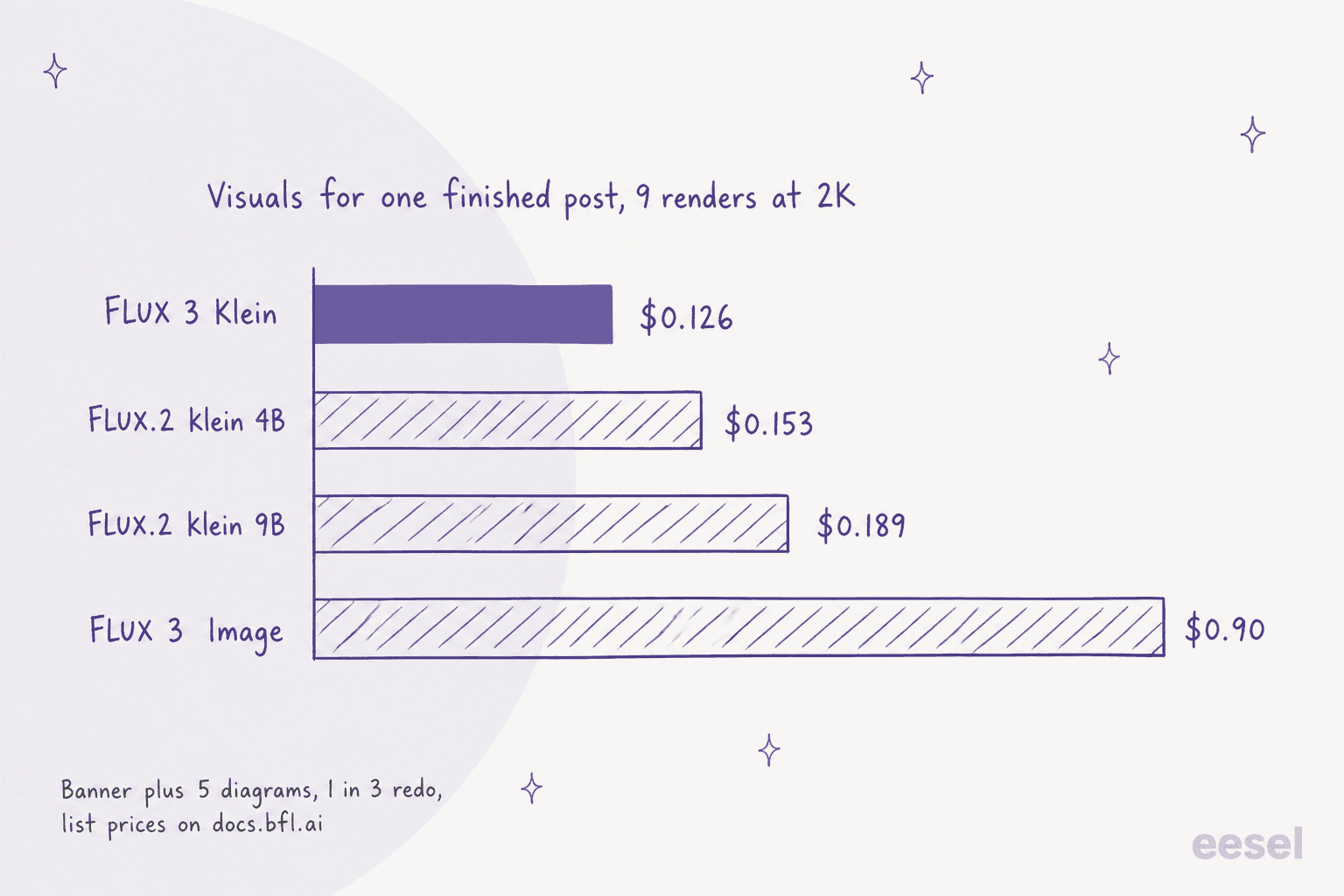
The sticker is $0.009 per 1K image. The real number depends on two choices: the resolution BFL tells you to use, and your redo rate. BFL recommends 2K, so I price at $0.014 per render, and in my own pipeline roughly 1 in 3 renders needs a redo, so I multiply by 1.5. Prices below come straight from BFL's API pricing page, which I re-checked on October 18, 2026.
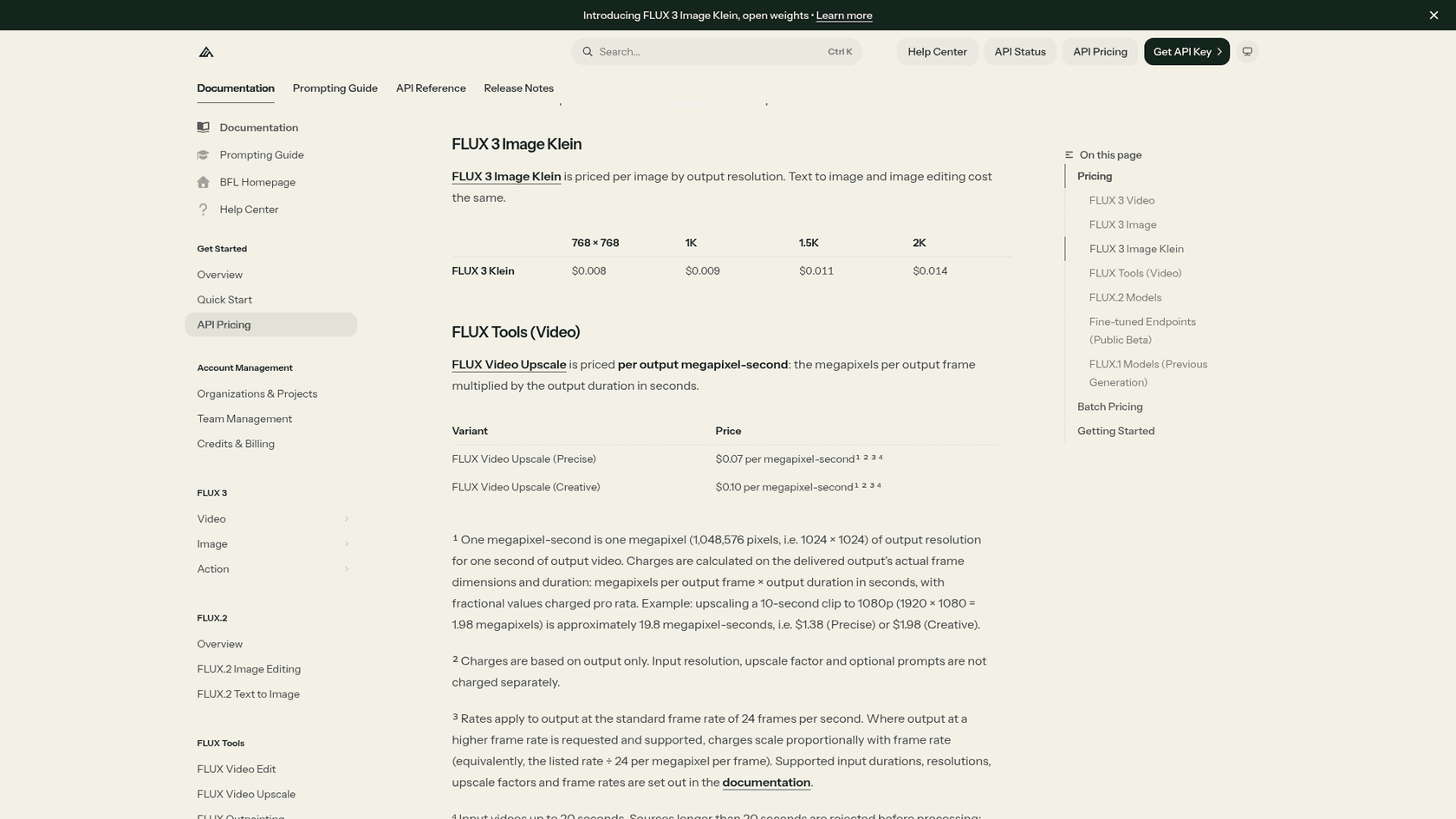
| Job | Renders (with 1 in 3 redo) | FLUX 3 Klein | FLUX 3 Image | Klein saving |
|---|---|---|---|---|
| Blog visuals: banner plus 5 diagrams, 2K | 9 | $0.126 | $0.90 | 86% |
| Catalogue edit batch: 200 edits, 2K | 300 | $4.20 | $30.00 | 86% |
| Campaign posters: 20 finished at 4K | 30 | $1.08 | $18.21 | 94% |
Here is the part that changes the maths. Klein is cheaper per render by a fixed ratio, so you can ask how bad its hit rate would have to get before the saving disappears:
| Resolution | Klein price | FLUX 3 Image price | Klein attempts per keeper to break even |
|---|---|---|---|
| 1K | $0.009 | $0.048 | 5.3 |
| 2K | $0.014 | $0.10 | 7.1 |
| 4K | $0.036 | $0.607 | 16.9 |
If the full model got every image right the first time, Klein would need about 7 attempts per keeper at 2K before it lost on cost. If the full model itself needs 1.5 attempts per keeper, the break-even for Klein rises to about 10.7 attempts at 2K. The honest risk is not the bill. It is your time reviewing renders, which is the cost this table cannot price. For outside reference, my Krea 3 pricing post puts a 2K image at $0.06, and ChatGPT Images 2.5 pricing covers the closed side. The GPT Image 1 Mini guide covers the budget tier.
Can you run FLUX 3 Klein locally?
The generator, yes. The pipeline BFL recommends, mostly no. I score hardware at 3.5 for that gap.
BFL says the generator weights take 11.2 GB in BF16 and 5.6 GB in FP8, and the INT8 build runs on GeForce RTX cards with as little as 8 GB of VRAM. The docs name an RTX 3090 as a floor for the standard setup. The image transformer is 5.6B parameters, and the text encoder is a separate Qwen3-VL-4B model, so "5.6B" undercounts what loads.
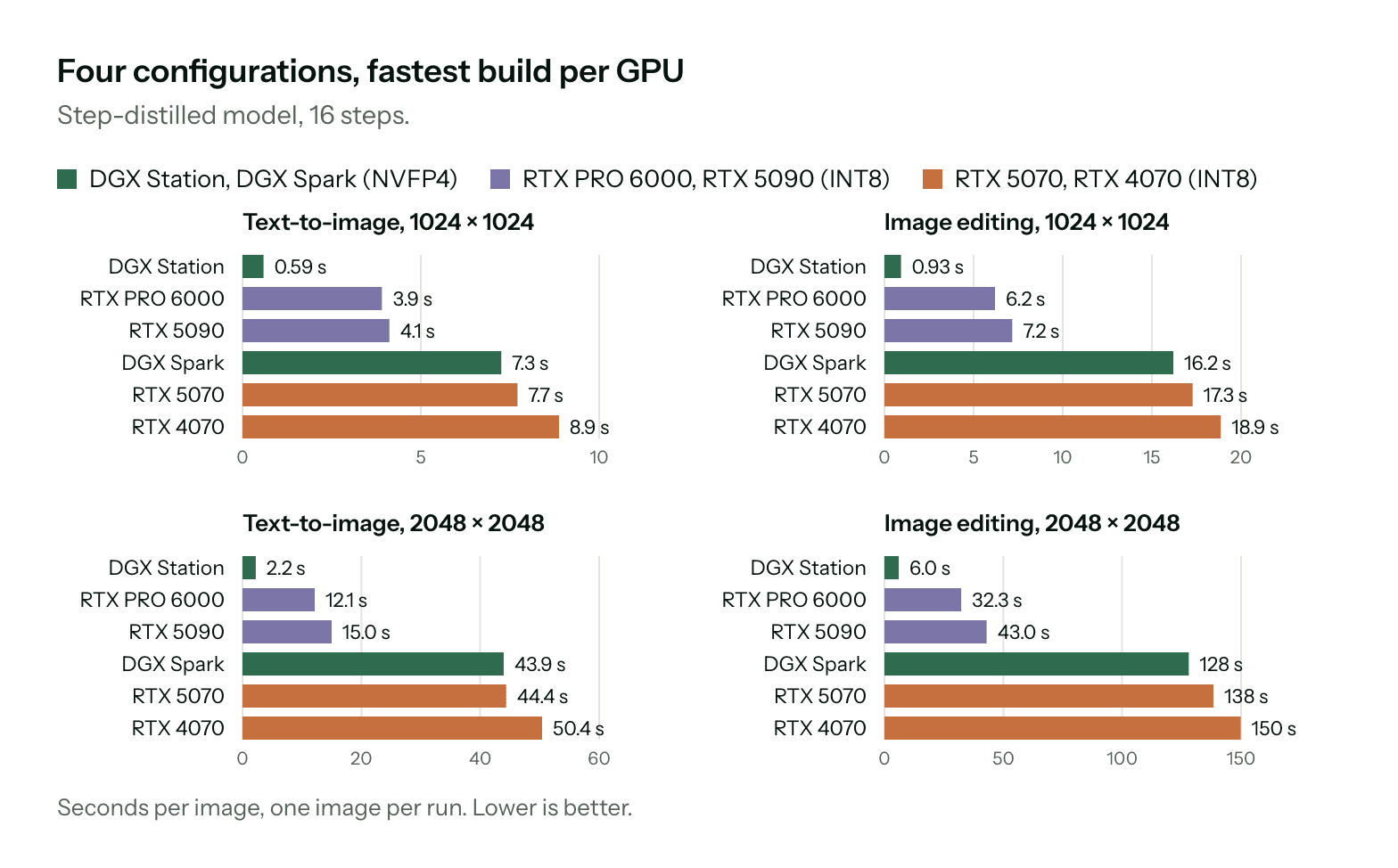
Put BFL's advice to use 2K next to the chart. On an RTX 4070, a 1 MP image takes 8.9 seconds and a 2K image takes 50.4 seconds. That is fine for a hobby workflow and slow for a team with a queue. The bigger catch is the prompt upsampler, which the Klein docs say adds about 28 GB of GPU memory on its own.
So the practical choices are three. Run the upsampler on a bigger or second card. Point BFL's published system prompt at a hosted language model. Or use the API, where upsampling is included in the per-image price. If you are renting GPUs, Together AI pricing shows what hosted inference costs. Fireworks AI is another host, and so is Replicate.
What is the FLUX Kommunity License trap?
This is where I'd slow down before shipping anything. The weights come under the FLUX Kommunity License, and I read the whole text. The headline, free commercial use under $5M, is accurate. Five details around it are the ones that bite.
- The test runs "at any time". A Qualifying User is you "if at any time you together with your affiliates' gross annualized revenue is less than US$5,000,000." Affiliate revenue counts, so a small team inside a larger group may not qualify.
- The cap covers outputs and production use. Below the line you may use outputs commercially and run the model in production to generate them. Above it, the license sends you to BFL for a commercial license, which "may be subject to a fee, royalty or other revenue share."
- Two compliance conditions apply. You must run content filters or review outputs before they go out, and label outputs as AI-generated where the law requires.
- You indemnify BFL. Section 7 makes you responsible for claims arising from your use of the model and outputs, including a failure to run the required filters.
- BFL can end the license. Section 8 lets the company terminate the license in whole or in part at any time on notice.
Training is the other trap. Using the model to train, fine-tune or distill other models for commercial use is not a non-commercial purpose, and a derivative model includes anything made by distillation or by training on its outputs. If your plan is "generate a synthetic dataset, then train our own model", this license is not your friend.
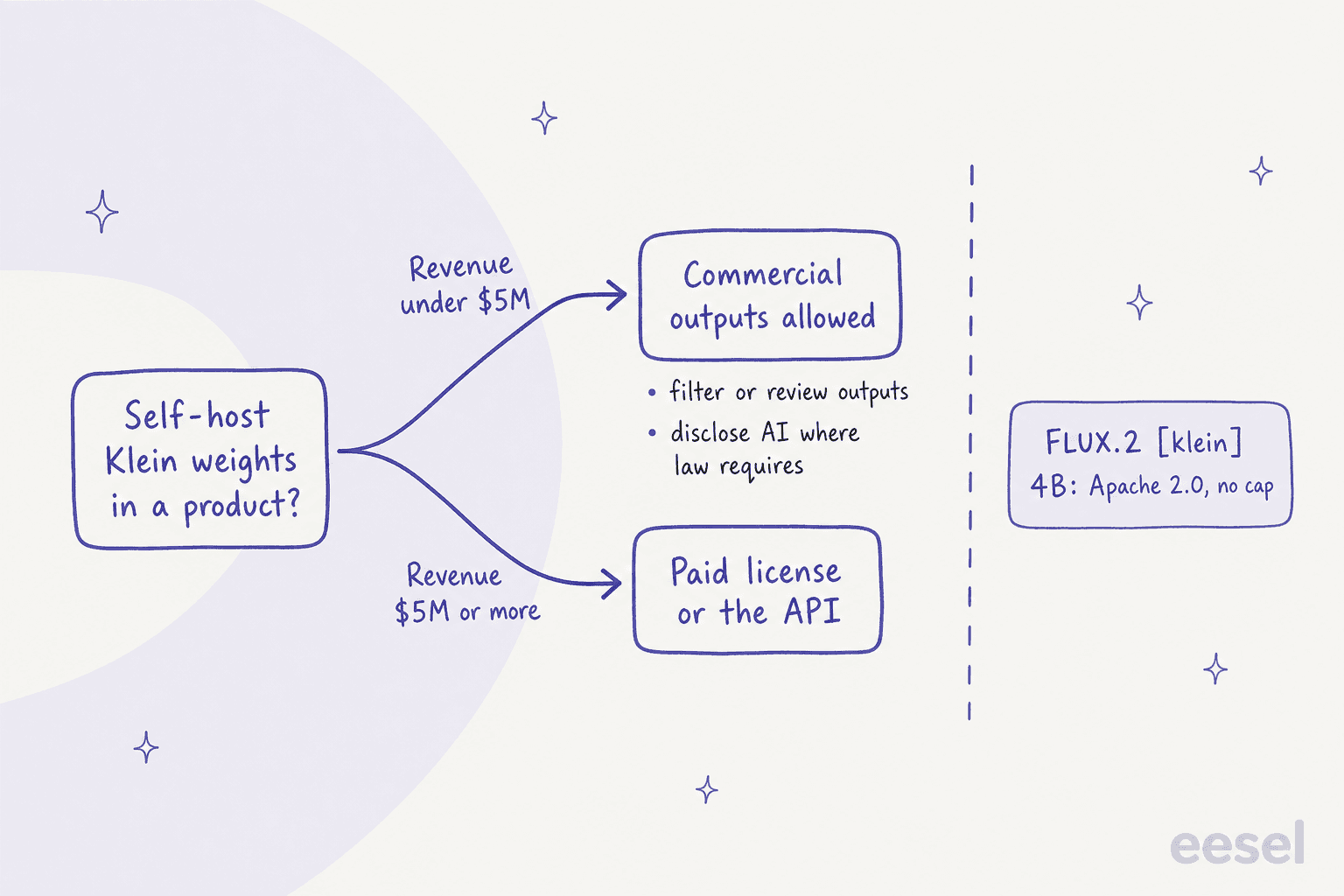
The cleanest escape is the API. BFL's launch post says larger organisations can deploy commercially through self-hosted licensing options or the API. The older FLUX.2 [klein] 4B is Apache 2.0 with no revenue cap, so a pipeline built on it that quietly swaps in Klein inherits all five conditions. One commenter on the launch thread listed Ideogram, Krea, Flux and Qwen as labs that have moved to their own bespoke licenses, so check the license before you upgrade. My Ideogram alternatives roundup lists the license on each pick.
Who should use FLUX 3 Klein, and who should skip it?
My verdict is 3.8 out of 5, and here is how I would act on it.
Pick it if your job is edits at volume: product shots on new backgrounds, seasonal variants, consistent changes across a catalogue. Price, speed and the pixel restoration step all point that way, and a small studio under $5M gets open weights it can fine-tune with a LoRA. Photoroom pricing is the comparison if you only need product backgrounds.
Test hard first if your job is new photoreal people. Run 50 of your real prompts through the API with upsampling on, and count keepers before you build a workflow. Qwen-Image 2.1 is the model testers kept reaching for.
Skip it if you need legible small text, or you are past $5M and want unrestricted self-hosting. For those, the closed options worth a side-by-side are my Nano Banana Pro review and the Seedream 5.0 Pro review.
Two more are worth a look: Meta Muse Image, and Freepik as a bundle.
If you prefer an app to an API, start with Midjourney pricing. Then read Leonardo AI pricing, and use Midjourney alternatives for the rest.
Where does Klein fit in a content workflow?
A cheap model removes one cost and leaves the rest. At $0.126 for a banner and five diagrams, the picture is the cheapest line in the production budget. What stays expensive is knowing which section needs a visual, writing the long scene prompt Klein wants, reviewing each render, and placing it with a caption. My notes on adding images to blogs walk through that part.
That is the gap eesel's AI blog writer fills. It is a teammate you hire for one job: it researches a topic with every claim cited, writes in your brand voice, and draws its own hero banner and diagrams, redrawing a render when one misses. If you generate product images with Klein for an ecommerce blog or a marketing team, the two sit side by side: Klein for the product edit, the writer for the article around it.
Try eesel
If you are testing FLUX 3 Klein because your content calendar needs more visuals, the slow part is usually the writing, not the picture. eesel's AI blog writer researches a topic, drafts a cited post in your voice, adds its own infographics, and takes plain-language edits like "make the intro punchier." See how it handles an AI blog writer with images and how teams set up an AI blog writer workflow.
For running cost, my AI blog writer cost breakdown has the numbers, and the best AI blog writers list shows where it ranks.

Pair it with your Klein edits and you get the whole post, not just the picture. Try eesel free and give it your next topic.