


What is FLUX 3 Klein?
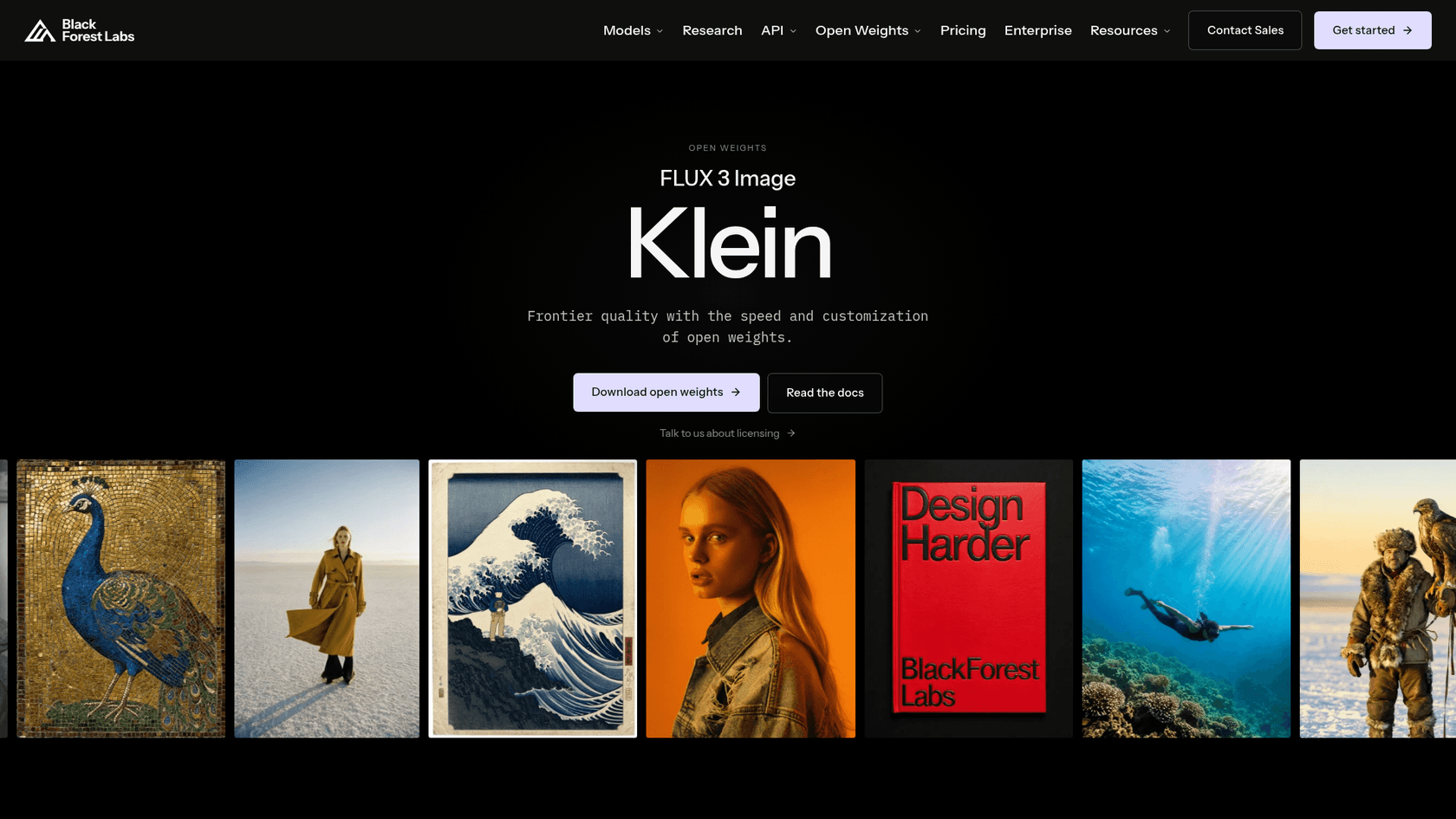
FLUX 3 Klein is the small, downloadable member of the FLUX 3 family. In its launch post, Black Forest Labs describes it as a 5.6B parameter model for text to image, image editing and multi-reference generation with up to 10 references. It shares the headline features of the full FLUX 3 Image model: native 4K output, instruction editing, and bounding boxes that place elements or confine an edit to one region.
It is the second open-weights release in the family after FLUX 3 Action, the robotics model. The public launch came on October 15, in the same week as Krea 3, and the weights sit on Hugging Face behind a short contact-sharing form.
It ships in two variants, per the Klein docs:
| Klein (distilled) | Klein Base | |
|---|---|---|
| Parameters | 5.6B | 5.6B |
| Max resolution | Up to 4K | Up to 4K |
| Inference steps | 16 | 50 |
| Guidance (CFG) | 1 | 3.5 |
| Bounding boxes | Yes | Yes |
| Built for | Fast generation, local use | Fine-tuning, LoRA training, research |
| On the API | Yes, as flux-3-image-klein | No, weights only |
| License | FLUX Kommunity License | FLUX Kommunity License |
One detail worth knowing before you compare it to other "small" models: the 5.6B figure is the image transformer only. The model card says the text encoder is a separate Qwen3-VL-4B-Instruct model, which ships under Apache 2.0.
How FLUX 3 Klein actually works
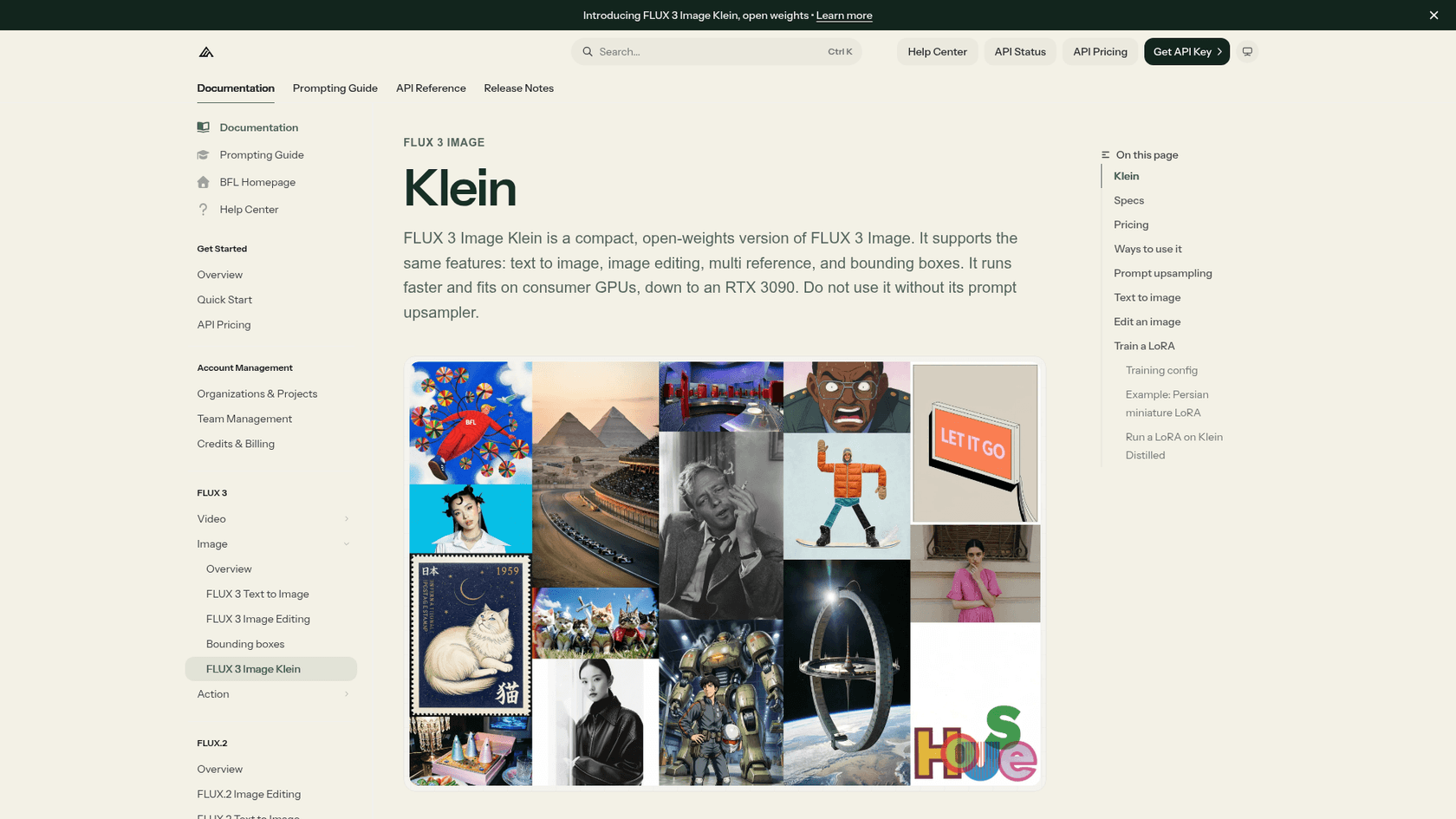
The part of Klein that matters most isn't in the parameter count. It's the prompt upsampler. Klein was trained on long, detailed scene captions, and BFL's docs put the warning in a box at the top of the usage section: do not use Klein without it, because a prompt sent as typed gives noticeably weaker results.
The upsampler is a separate model built on Qwen 3.5. It takes your short request, plus any reference images, and rewrites it into the caption Klein expects: medium and style, scene, lighting and camera, then each subject with its colors, materials and position. If you want an image of "a red fox asleep in a suitcase on a train", the model never sees those words. It sees a paragraph.
This matched what my own pipeline taught me the slow way. The prompts behind every infographic on this blog run to several hundred words of style rules and constraints before the one-line content brief, because short prompts come back looking like everyone else's AI art. BFL has simply moved that step inside the product. On the API it runs automatically. In ComfyUI and the reference CLI it runs by default. In Diffusers it doesn't run at all unless you wire it in, and BFL says you can swap in any LLM using its published system prompts.
Three other mechanics are worth knowing:
- Distilled vs Base. The distilled model takes 16 steps instead of 50, and a LoRA trained on Base loads straight into Distilled. BFL's docs recommend a LoRA scale of 0.75 there.
- Bounding boxes. You give each element a box on a 0 to 1000 grid and a description. The model card is clear that boxes guide placement and scale; they are not a hard mask, and edits can still change content outside the box.
- Pixel restoration. The API version adds a step that keeps unedited regions of an image exactly as they were, according to the launch post, which matters most for edits.
If you've used the OpenAI image edit API or Qwen-Image Edit, the instruction-style workflow will feel familiar. The difference is that here you can download the weights.
How good is FLUX 3 Klein?
There are two answers, and they disagree in an instructive way.
BFL's internal evaluations put Klein first among open-weights models in text to image, multi-reference and editing, ahead of Qwen-Image 2.1 at 7B and Krea 2 at 12.9B. It also rates above two closed models in the comparison, Ideogram V4.5 and FLUX.2 [pro]. Against its own predecessor, FLUX.2 [klein] 9B, BFL reports a gain of 91 Elo in text to image and 70 in editing, with 38% fewer parameters.
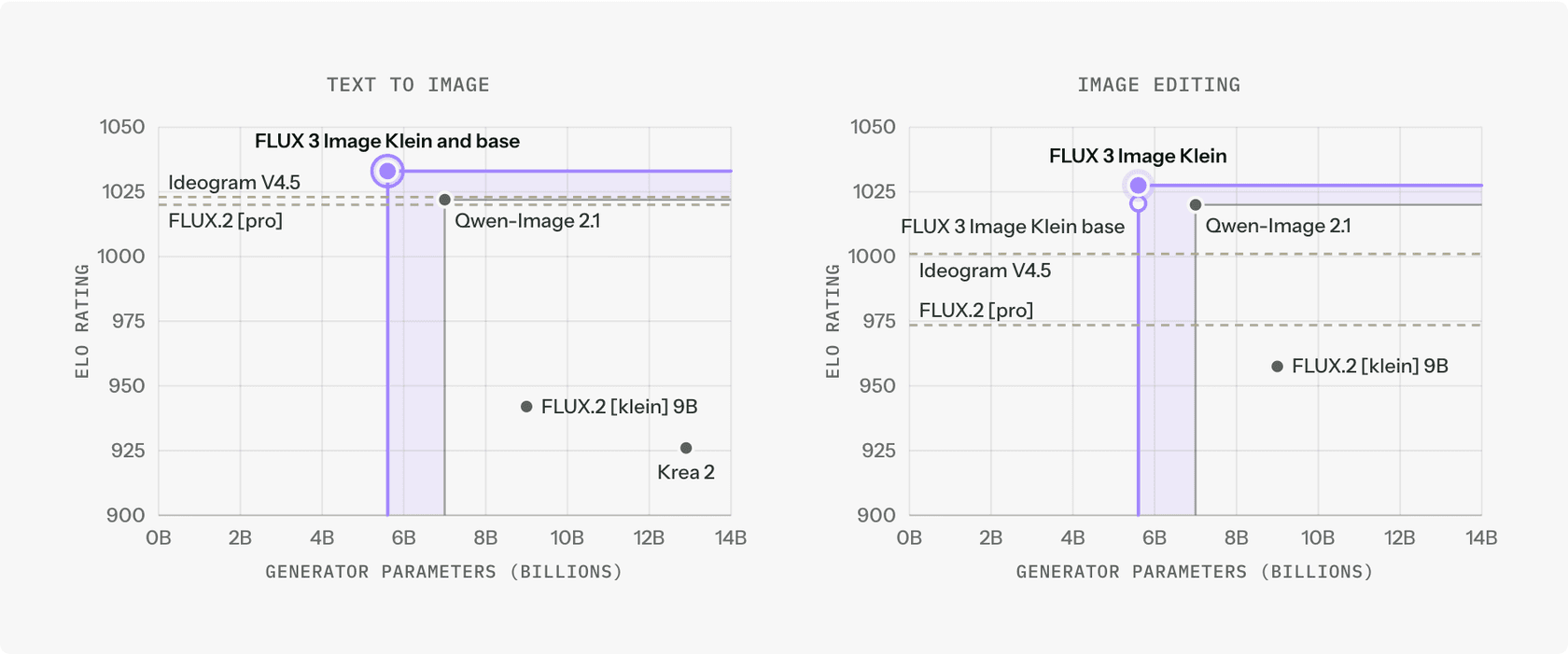
On speed, BFL measured a median end-to-end API latency of 4.54 seconds for a 1MP image and 7.18 seconds for an edit, including queueing. The chart puts it ahead of FLUX.2 [pro], Qwen-Image 2.1, Ideogram V4.5 and Krea 2 on latency at its rating. One caveat BFL states itself: Klein was timed on BFL's own servers, while the other models were timed from the client, which adds network and polling time.
Then the community got its hands on it. The Hacker News thread on launch day reached 209 points and 58 comments, and the loudest theme was people. Several testers reported distorted faces, hands and bodies in text to image:
"I've been running it through tests on my local machine. The Text-to-Image component is VERY poor."

"I gave Flux 3 Klein my typical human test that has never failed on newer image models and it did fail"
That second tester ran it through OpenRouter against the BFL API, so the upsampler was in the loop. But the same thread also carried the other half of the picture. Editing got consistent praise, and one commenter who ran the full stack pushed back on the scale of the complaint:
"The complaint has some basis but is greatly exaggerated. When the whole stack comprising the model is used, it occasionally produce erroneous anatomy"
"It's editing capabilities have been really solid, but I've been disappointed with its ability to do finer text details"
BFL's response, two days after launch, was a workflow fix rather than a new model. It updated the ComfyUI workflow and the Hugging Face Space, and said this:
"To get the best results, the model should be used with our prompt upsampling and 2K resolutions."
My read: Klein is an editor first and a generator second. If your job is "change the background, keep the product exactly the same", the benchmark and the community agree. If your job is new photoreal people from scratch, run your own test set first. The text-detail complaint shows up in BFL's own sample grid too: the postage stamp illustration on the docs page spells its caption with doubled and missing letters, which matches the model card's own warning that rendered text may be inaccurate.
Can you run FLUX 3 Klein locally?
Yes, with an asterisk most coverage leaves off.
The generator is small. BFL says its weights take 11.2 GB in BF16 and 5.6 GB in FP8, and the INT8 build runs on GeForce RTX cards with as little as 8 GB of VRAM through ComfyUI or Diffusers. The docs page names an RTX 3090 as a floor for the standard setup. NVIDIA measured these times for the distilled model at 16 steps:
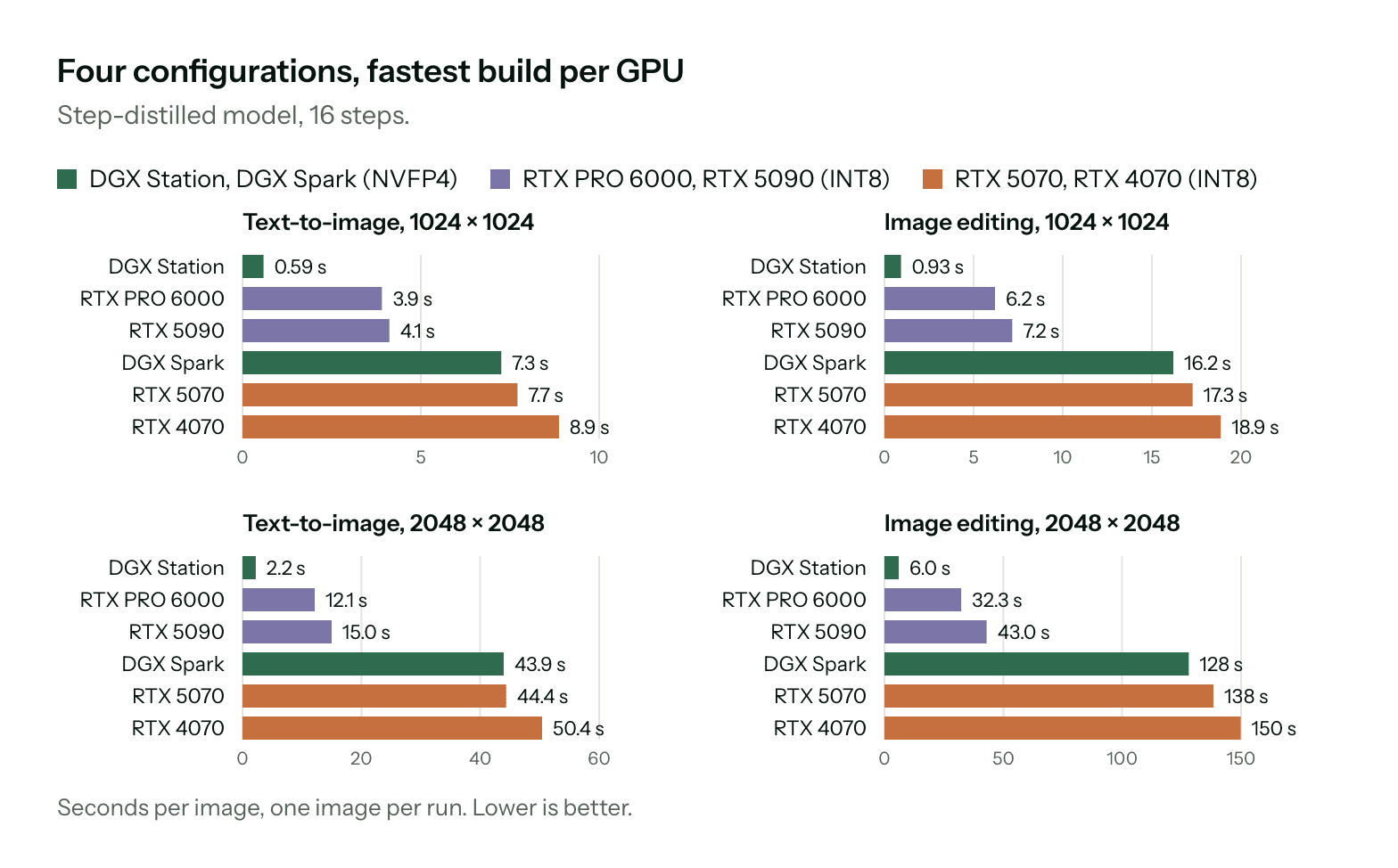
Put those numbers next to BFL's advice to use 2K resolutions and the trade-off gets concrete. On an RTX 4070, a 1MP image takes 8.9 seconds, a 2K image takes 50.4 seconds, and a 2K edit takes 150 seconds. Fine for a hobby workflow, slow for anything with a queue behind it.
The asterisk is the upsampler. Running BFL's own upsampler adds about 28 GB of GPU memory, per the docs, and the model card lists peak memory for the reference code at 31 GB in BF16 on a B200 with the upsampler off. So "runs on an 8 GB card" is true for the generator and not for the pipeline BFL tells you to use.
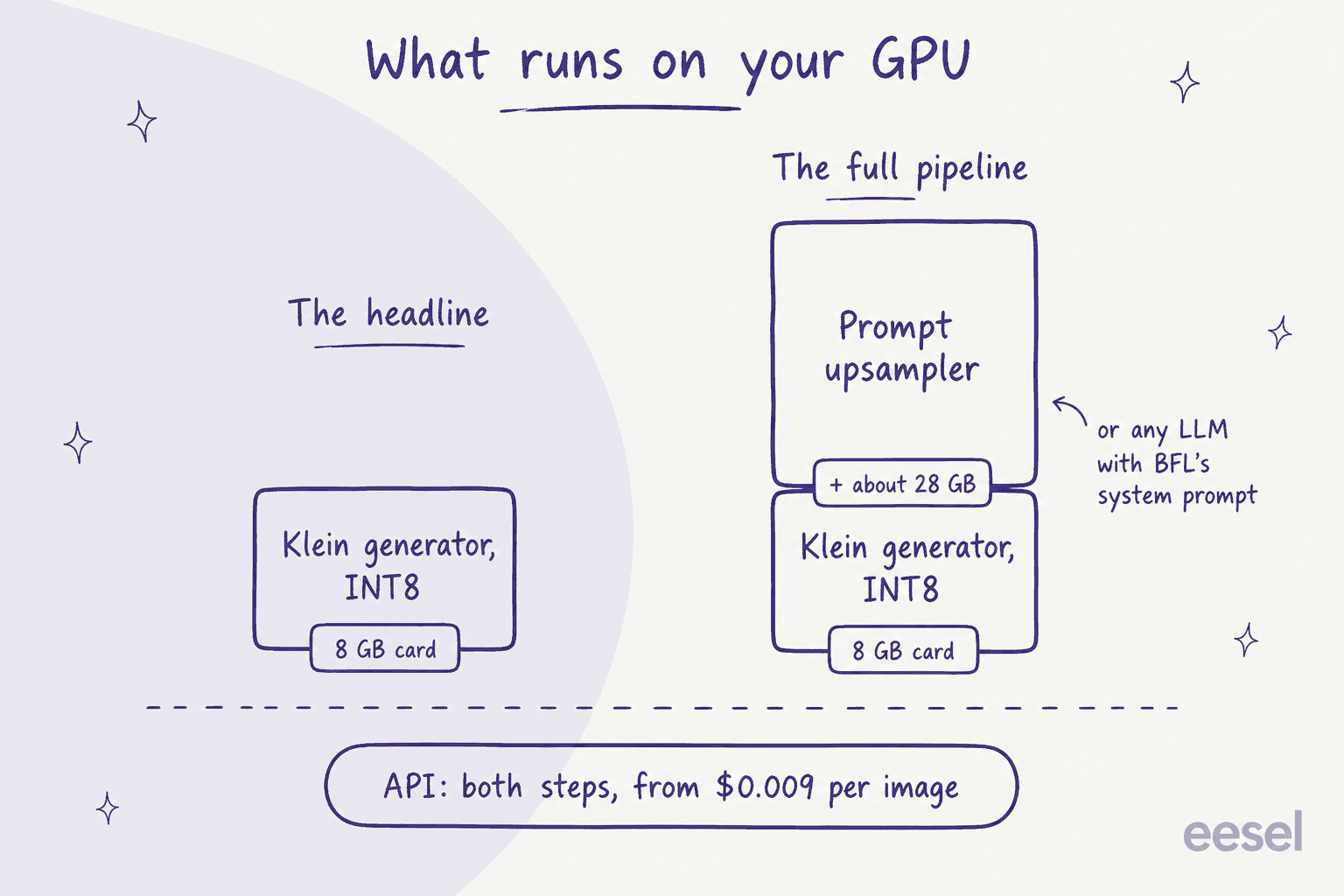
There are three ways around it. Run the upsampler on a bigger card or a second GPU. Point BFL's system prompt at a hosted LLM and send the caption it writes to your local Klein. Or skip local entirely, since the API includes upsampling and pixel restoration in the per-image price. If you're weighing rented GPUs, my notes on Together AI pricing and Fireworks AI cover what hosted inference costs. Day-one support also landed in ComfyUI, Diffusers, TensorRT-LLM, SGLang Diffusion and vLLM-Omni, per the launch post, so the usual hosts such as Replicate have what they need to add it.
FLUX 3 Klein pricing
FLUX 3 Klein is priced per image by output resolution, and text to image and editing cost the same. These are the list prices from BFL's API pricing page, next to the full FLUX 3 Image model from the same page:
| Resolution | Output size | FLUX 3 Klein | FLUX 3 Image | Klein saving |
|---|---|---|---|---|
| 768 × 768 | 768 × 768 | $0.008 | $0.041 | 80% |
| 1K | About 1 MP | $0.009 | $0.048 | 81% |
| 1.5K | About 2 MP | $0.011 | $0.07 | 84% |
| 2K | About 4 MP | $0.014 | $0.10 | 86% |
| 4K | About 16 MP | $0.036 | $0.607 | 94% |
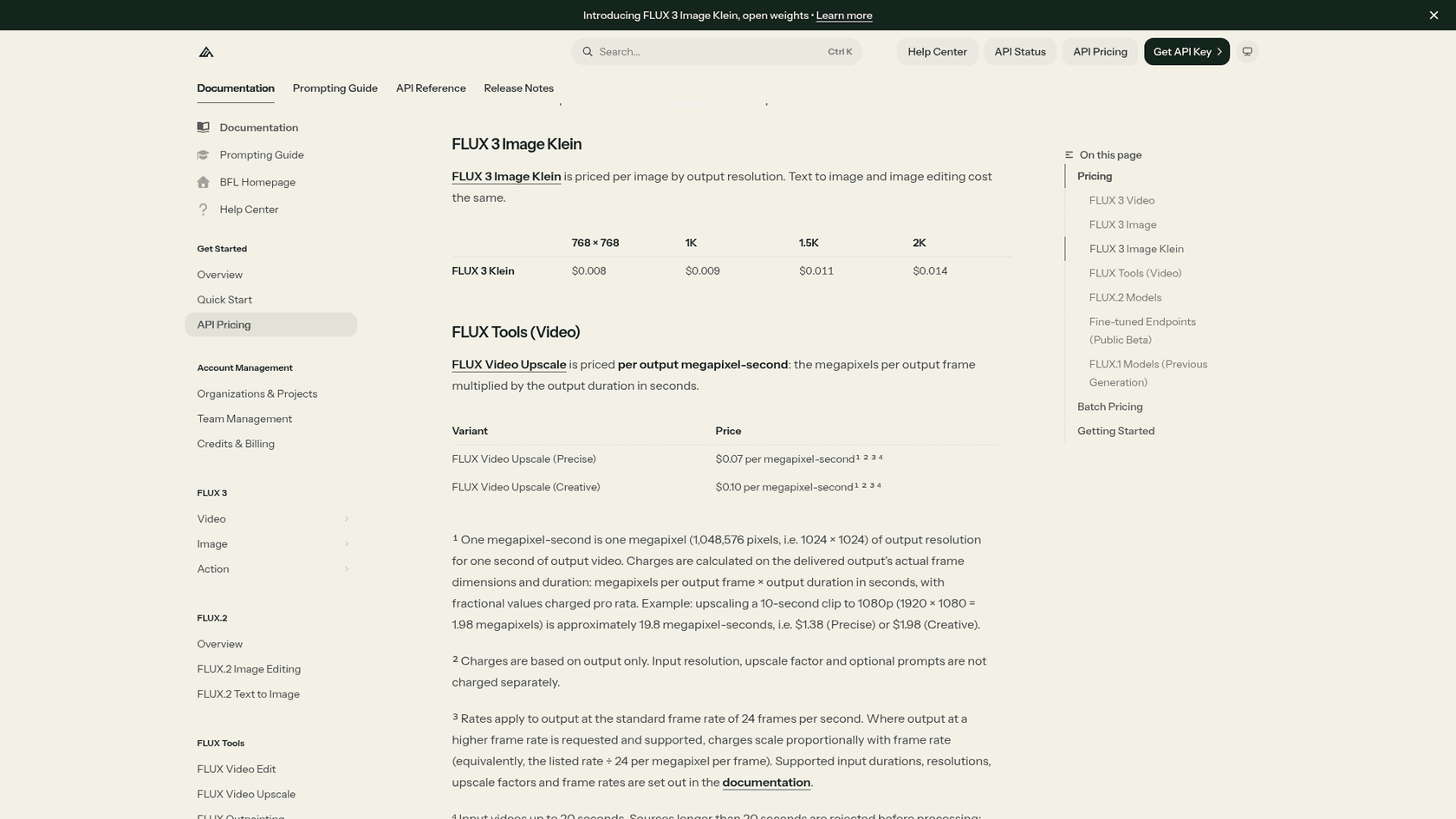
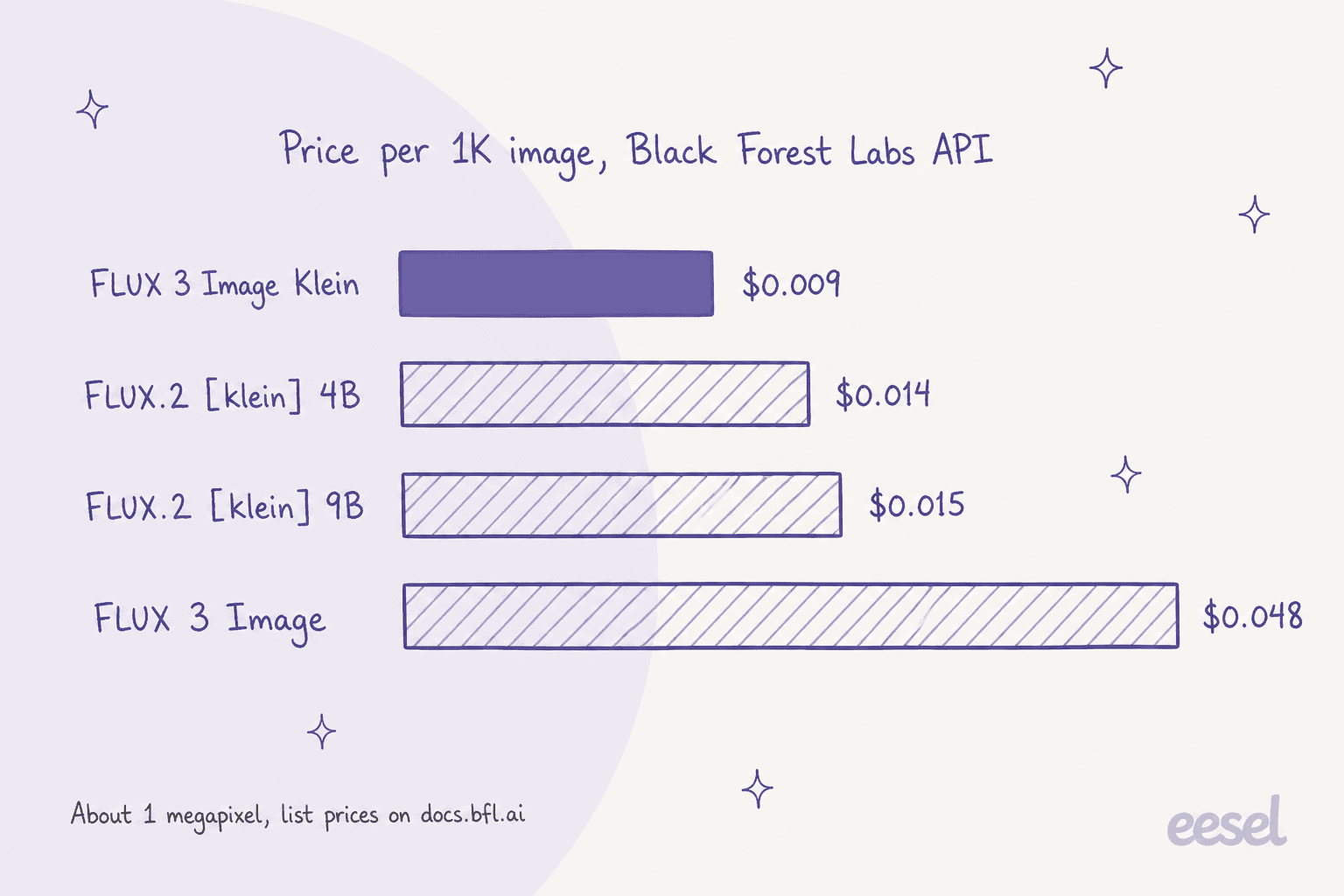
1 credit equals $0.01, and BFL charges the same price in the API and the Playground. Batch requests simply multiply the per-image cost by the number of images. Klein also undercuts the previous generation: FLUX.2 [klein] 4B starts at $0.014 for the first megapixel and 9B at $0.015, with $0.001 and $0.002 for each extra megapixel.
For outside reference, the Krea 3 API charges $0.03 for a 1K image and $0.06 for 2K, which I broke down in my Krea 3 pricing post. Klein at 2K costs less than Krea 3 at 1K.
The closed models sit higher again. My ChatGPT Images 2.5 pricing, Nano Banana Pro pricing and GPT Image 1 Mini guides cover what those cost per image.
The real bill depends on redo rate. If 1 in 3 renders misses, as it does in my pipeline, your effective price is 1.5 times the list price. Plug in your own numbers:
The FLUX Kommunity License, in plain words
This is the part I'd read twice before shipping anything. Klein's weights come under the new FLUX Kommunity License, and it sits between the two licenses the last Klein generation used.
The license allows non-commercial use for everyone. On top of that, a "Qualifying User", meaning you plus your affiliates have gross annualized revenue under US$5,000,000, may use outputs commercially and run the model in production for that purpose. Two conditions come with it: you have to run content filters or review outputs before they go out, and you have to disclose that outputs were AI-generated where the law requires it. You also can't use outputs to train a competing image model.
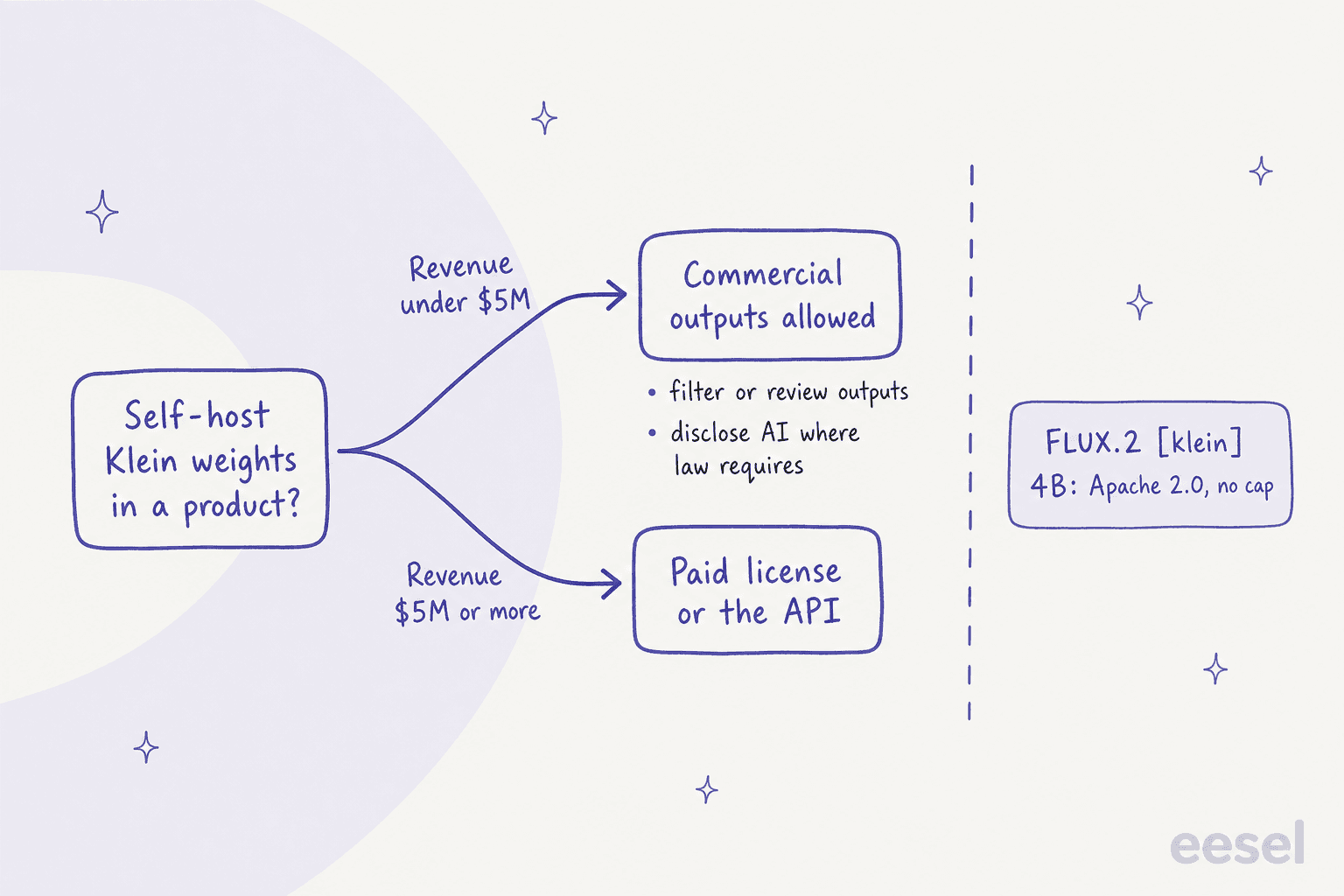
Here's the shift worth noticing. The previous generation split two ways: per the Hugging Face listings, FLUX.2 [klein] 4B is Apache 2.0 with no revenue cap, while FLUX.2 [klein] 9B used a non-commercial license. FLUX 3 Klein is more open than the 9B and less open than the 4B. A startup gains rights. A company past $5M that built on the 4B loses the "download it and ship it" option, and the model page says plainly that running Klein in a product at scale needs a commercial license from sales.
The open-weights field is heading the same way. One commenter in the HN thread listed Ideogram, Krea, Flux and Qwen as labs that have moved to their own bespoke licenses. If an Apache license matters to you, it's now a selection criterion and not a default. My Qwen-Image 2.1 alternatives and Ideogram alternatives roundups list the license on each pick.
FLUX 3 Klein vs FLUX.2 [klein] vs FLUX 3 Image
Here's how the options stack up on the facts BFL publishes:
| FLUX 3 Klein | FLUX.2 [klein] 4B | FLUX.2 [klein] 9B | FLUX 3 Image | |
|---|---|---|---|---|
| Parameters | 5.6B | 4B | 9B | Not published |
| Open weights | Yes | Yes | Yes | No |
| License | FLUX Kommunity, $5M cap | Apache 2.0 | Non-commercial | API terms |
| API price, 1K | $0.009 | $0.014 | $0.015 | $0.048 |
| API price, 2K | $0.014 | From $0.014 + $0.001/MP | From $0.015 + $0.002/MP | $0.10 |
| Max references | 10 | Not compared | Not compared | 10 |
| Bounding boxes | Yes | Not listed | Not listed | Yes |
| Best for | Cheap editing at volume | Unrestricted commercial self-hosting | Research, local tests | Highest FLUX quality |
If you want the deep dive on the big model, my FLUX 3 review covers it, and FLUX 3 alternatives compares the family with the closed competition.
The closed models worth a side-by-side are Nano Banana 2, Seedream 5.0 Pro and Meta Muse Image. None of them ships weights you can download.
Who should use FLUX 3 Klein?
After reading everything BFL published and the first three days of testing, here's where I land.
Pick Klein if you edit images at volume: product shots on new backgrounds, seasonal variants, consistent edits across a catalogue. The API price is hard to beat, pixel restoration keeps untouched areas intact, and BFL's own ratings and community testers agree editing is its strength. It's also the obvious pick for a small studio or startup under $5M that wants open weights it can fine-tune with a LoRA on a single GPU.
Test hard first if your work is new photoreal people. The anatomy complaints are loud enough that I'd run 50 of your real prompts through the API, with upsampling on, before building anything around it. Qwen-Image 2.1 is the comparison testers kept reaching for.
Skip it if you need dense, legible text inside images, or if you're past $5M in revenue and want unrestricted self-hosting. For text-heavy work, Ideogram pricing and Recraft are worth a look, and for product photography see Photoroom pricing.
If you'd rather use an app than an API, my Midjourney pricing and Leonardo AI pricing guides cover the subscription side, and Midjourney alternatives lists the rest.
Using FLUX 3 Klein for blog and content images
A cheap model changes the maths on illustrating content. At $0.014 for a 2K image, a post with a banner and five diagrams costs about 13 cents to draw, even at my redo rate. What stays expensive is everything around it: knowing which section needs a diagram, writing the long caption the model wants, checking each render, and placing it with a caption. My guide to adding images to blogs walks through that part.
The defaults matter more than the price. One eesel customer, a therapist, put it to the eesel AI blog writer in a single line:
"Going forward, stop giving only Caucasian images. I work with diverse races and ethnicities."
That's the same lesson BFL wrote into Klein's upsampler: the model draws what the caption describes, so the caption is where your standards live.
eesel AI blog writer: images that arrive inside the post
If you're looking at FLUX 3 Klein because you need images for content, the image is the smaller half of the job. The eesel AI blog writer is a teammate that researches the topic, drafts a cited long-form article in your voice, and generates its own hero banner and infographics in the same run. It writes the long scene prompts for you, and redraws a render when it misses.

The same kind of pipeline drew the diagrams in this post. If you're comparing costs, my AI blog writer cost breakdown and guide to an AI blog writer with images show what it replaces. You can try eesel for free and have a finished, illustrated draft in front of you in a few minutes.