


Dixa does ship AI quality assurance: its Quality Assurance add-on includes Auto QA, which can score every solved conversation, human or Mim, against yes, no or N/A questions you can rewrite, at €0.10 per review on any plan. The catch is in Dixa's own help center: Auto QA reads only the messages, not internal notes, tags, custom attributes or timestamps, so "was the contact reason set right?" or "was this refund inside the window?" stays a human question. For those, put a person on a hybrid form, or have an AI teammate like eesel read the conversations you point it at, notes included, against your written policy. With the eesel CLI, an AI coding agent such as Claude Code can upload your QA rubric and policies and ask test questions before anything goes live; a Dixa admin still has to connect Dixa to eesel.
Does Dixa have AI quality assurance?
Yes, and it's a full quality assurance product, not just a score. Dixa bought Miuros, a QA and analytics company, in March 2022, and its QA product still runs on Miuros: the help center lives at miuros.elevio.help, with Dixa in its examples. Dixa's QA page says the add-on "includes custom scorecards, manual review workflows, and AI Auto QA". I build integrations at eesel, so I read a QA tool by asking what data it actually gets. Here is what each piece gives a QA lead.
| Dixa feature | Plan and price | What it tells a QA lead | What it doesn't |
|---|---|---|---|
| Quality Assurance: review forms, calibration, disputes | Add-on on every plan | Human scores on your own scorecard, pass or fail, critical fails | Anything nobody reviewed |
| Auto QA | Same add-on, €0.10 per review | A yes, no or N/A answer to each question, on every conversation a job picks up | Anything outside the message text |
| Advanced Insights | €29 per agent a month, included in Enterprise | Contact reasons, sentiment shifts, recurring issues (Dixa AI sentiment analysis covers it) | Whether a given reply was right |
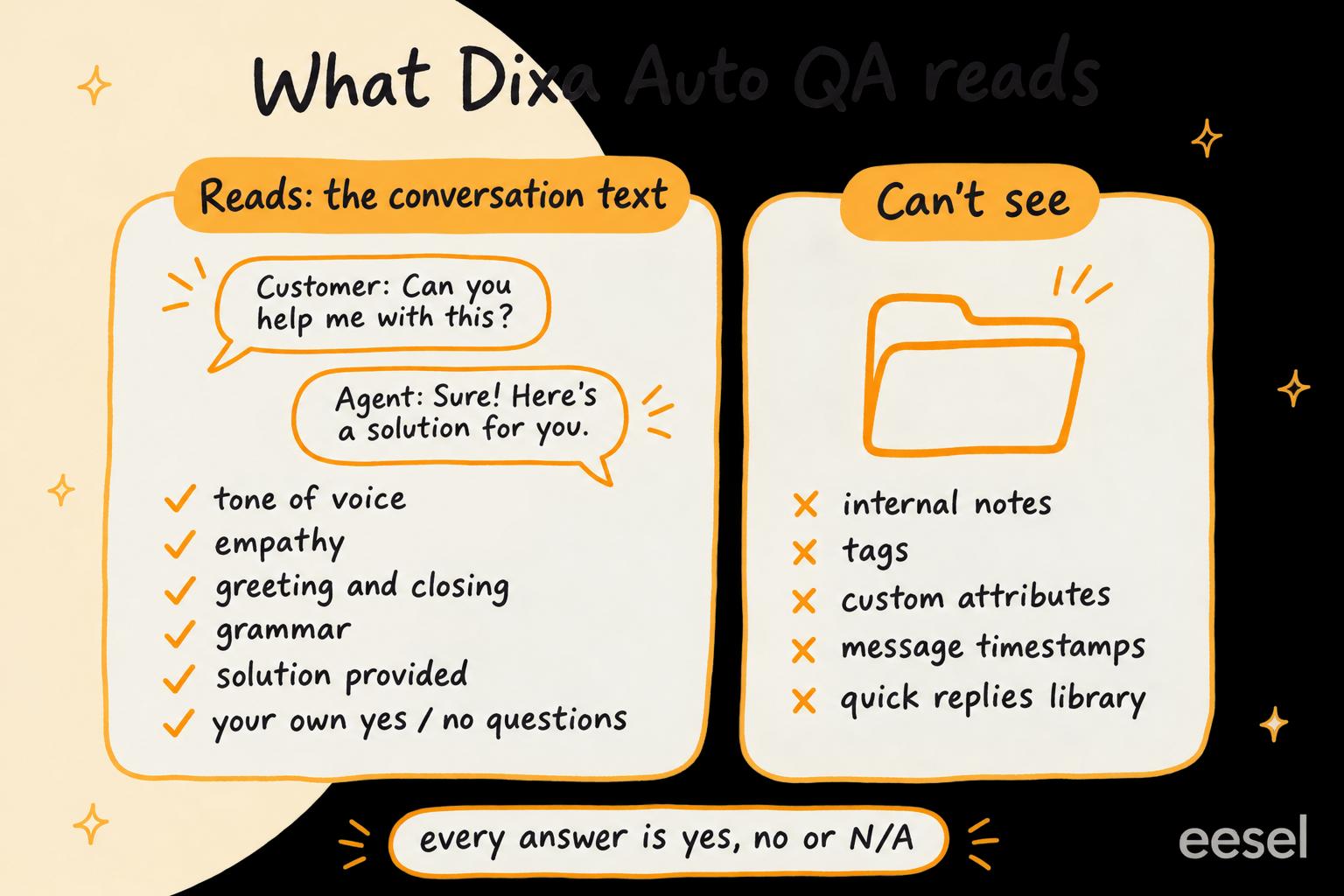
What does Dixa Auto QA score?
Out of the box, Dixa's Auto QA article lists these questions:
- Tone of voice: whether the agent used an appropriate tone.
- Empathy: whether the agent showed adequate empathy.
- Greeting and closing: professional etiquette at both ends.
- Grammar: whether replies are grammatically and syntactically accurate.
- Solution provided: judged twice, as "Agent provided solution" (the agent's or process view) and "User considers issue solved" (the customer's).
Each answer is yes, no or N/A, and every question has a written definition you can change. The default for "Agent provided solution" reads, in part:
"If the agent transfers the customer to another department or colleague, this should be a "N/A"."
You can remove the defaults and write your own questions, which is where a team's own policy goes in. Dixa's own examples include "Did the agent follow up on the agreed upon action items" and "Were the company's processes and procedures clearly explained to the customer". Its rule for a good question is that you can define exactly what counts as yes: "has the agent correctly followed the process" gives unpredictable results, while "has the agent greeted the customer using their name and asked 'is there anything else I can help you with?' at the end of the conversation" works.
That is real customisation. Dixa's QA page names "policy adherence" among the criteria you can define, and with a well-written question, it can check a rule the conversation itself shows.
How does Auto QA run?
There are two ways, both built on review forms (sections of questions, points per answer, a "required score to pass" and optional critical fails, per Dixa's review form article):
- Fully automated. You filter conversations on the Ticket Analysis or Activity Analysis screen, click Schedule AutoQA job, pick a form that holds only Auto QA questions, and set how many days to wait after a conversation is solved. Dixa recommends at least 1, "as otherwise you might be reviewing ongoing conversations". The job then "will run every hour, generating reviews for all recently solved tickets that match the filter with the Assigned Agent of the ticket being the reviewed agent." Reviews show up with "AI reviewer Bot" as the reviewer.
- Hybrid. A form mixes human questions with Auto QA ones. When a reviewer opens an assigned review, the AI answers its questions and leaves a comment on each, which can take a couple of minutes.
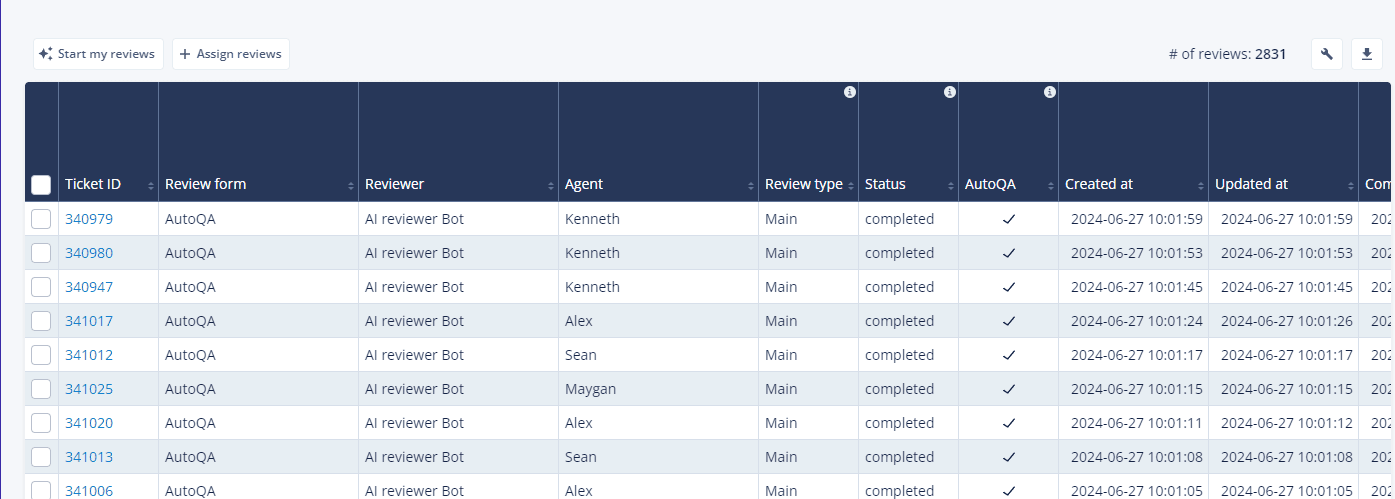
Before a job starts, Dixa tells you how many reviews to expect. Keep an eye on that number, since every review is billed:
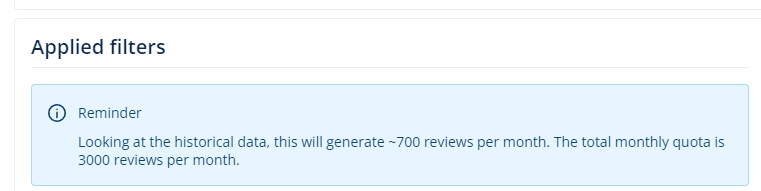
The human side is mature too. Calibration reviews are kept separate from main reviews and, per Dixa's calibration article, are "excluded from the Agent Reporting". Agents can dispute a review, and a dispute can go to a third-party mediator. If calibration is new to your team, my guide to support QA calibration is a good start.
What can't Dixa Auto QA see?
This is the part to read before you buy. Dixa's article on creating Auto QA questions is plain about it:
"At this stage the AI only has access to the conversation's text - that is the back & forth messages between the customer and the agent. It does not have access to meta conversation attributes like: internal notes, tags, custom attributes, message timestamp or quick replies library."
Dixa's own example of a question that fails is "has the agent properly set the contact reason custom attribute on the conversation". So four kinds of check are out of Auto QA's reach:
- Fields and tags. Contact reason, tags and any custom attribute your reports run on.
- What happened behind the scenes. An escalation note, a handover to another team, a quick reply that should have been used. None of it is in the text Auto QA reads.
- Timing. Dixa's QA page lists response time as a criterion, but the help center says the AI can't see message timestamps, so "replied within the hour" belongs on a human question or in Dixa's analytics.
- Policy that needs data. "Refunds only within 30 days of delivery" can only be judged if the dates are written in the conversation. Auto QA doesn't look up the order.
There is a second limit, on how much policy fits. The definitions article warns: "The more instructions/examples you give the machine, the harder it becomes for it to consistently follow all of them." Its answer is several review forms (one for German email customers, one for partners, and so on), each matched to its conversations by a filter. That works, but your refund policy, warranty rules and shipping exceptions end up spread across many short definitions you maintain by hand.
Two dates to weigh: the Auto QA articles were updated on 24 March 2026, and Dixa's Q3 2026 roadmap lists "AutoQA prompt and model upgrades". If notes or attributes matter to you, ask Dixa in a demo whether the AI can read them yet.
Tap each check to see whether Auto QA can answer it, and what covers it if not.
How much does Dixa QA cost?
Dixa's pricing page lists these on 22 November 2026, per agent a month billed annually:
| Item | Price | What it adds for QA |
|---|---|---|
| Team | €49 per agent | Base platform; QA is an add-on |
| Professional | €139 per agent | Same add-on |
| Enterprise | Custom | Same add-on; Advanced Insights included |
| Quality Assurance (Auto QA) | €0.10 per review | Scorecards, manual reviews and Auto QA on 100% of conversations |
| Advanced Insights | €29 per agent | Contact reasons and sentiment shifts, not per-reply quality |
| Voice Transcription | €0.012 per minute | Lets phone calls show up in QA like other channels (call center QA covers voice) |
For a 10-agent team on Team that has Auto QA review 2,000 solved conversations a month: seats are 10 x €49 = €490, reviews are 2,000 x €0.10 = €200, so €690 a month, with QA adding €200. On Professional the same team pays 10 x €139 + €200 = €1,590. Two things the pricing page doesn't say: how a hybrid review that a person finishes is counted, and whether one conversation matched by two forms bills as two reviews. If you split policy across forms the way Dixa recommends, ask before you budget. The Dixa pricing breakdown covers the rest of the bill, and my Dixa review covers the platform.
How do you cover what Auto QA can't see?
Two ways, and they work well together.
Put a person on the questions that need context
Dixa already has the tool for this: a hybrid form. Auto QA answers the text questions (tone, empathy, solution, your written rules), and a reviewer answers the ones that need the record: right contact reason, right tags, escalation note left, order checked. Start the reviewer's list with low Auto QA scores and low CSAT ratings rather than a random sample. My guides to support QA with AI and QA feedback examples cover the human side.
The limit is the usual one: a person reads a sample, so a field mistake on a conversation nobody opened stays unseen.
Have an AI teammate review with notes and your policy
The second route is an AI reviewer that reads more than the messages. This is what I'd do with eesel. Dixa isn't one of eesel's built-in helpdesk integrations; eesel connects to it through Pipedream, the service it uses for apps outside its built-in list. Through that connection, its Dixa actions let it fetch a conversation, read its messages and its internal notes, add an internal note and tag the conversation. It also reads your help center and policies, so a rule in your knowledge base is something it has read.
Give it the conversations to check (paste this week's low-scoring conversation IDs into the dashboard chat or a Slack mention, for example) and it:
- Reads each conversation, messages and internal notes.
- Checks it against rules you write in plain words ("damaged items get a photo request before any refund", "escalations to the warehouse need a note with the order number").
- Leaves its verdict and reasons as an internal note, which the customer never sees, and can add a tag such as "qa-review" so a lead can filter for them.
Know the limits first. Pipedream's Dixa actions have no way to list or search conversations, so eesel reviews the ones you give it rather than sweeping Dixa by itself, and a new Dixa conversation doesn't start it. What it may do is yours to set: in eesel's actions and approvals, each action can run on its own, ask first or stay off, so tagging can wait for a lead's yes.
Daily checks like this already run for eesel's customers. Cactus Club Cafe runs a second eesel agent on its Zendesk helpdesk that audits the daily finance extract every morning: it checks each store and either solves the ticket as balanced or leaves it open with the imbalance named. Between 8 August and 8 September 2026 it ran about 60 times. A QA review is the same shape: a check against written rules, with the result left where the team works.
Is Dixa's QA enough?
For most of what QA programs measure, yes, and it's one of the better native QA setups in a helpdesk. Custom questions, hybrid forms, calibration, disputes and Mim conversations scored next to human ones is a full program, not a sentiment badge. And at €0.10 a review, scoring every solved conversation is a line item you can predict from your volume.
My take: if you're on Dixa, buy the add-on, keep each Auto QA definition short, and split forms by market or channel the way Dixa suggests. Then be clear about what a "yes" means: the messages read well and answered the question. It doesn't mean the tags were right, the note was left or the refund was allowed. Put those on a hybrid form, or hand them to a reviewer that can read notes and your policy. Other helpdesks' answers to the same question are in my posts on Freshchat AI quality assurance, Gorgias AI quality assurance, Kustomer AI quality assurance and Re:amaze AI quality assurance, and my roundup of AI tools for support QA compares dedicated options, as does this list of support QA tools. For the rest of Dixa's AI, see Dixa AI draft replies, conversation summaries and conversation routing. Weighing a move instead? See Dixa alternatives.
Try eesel as your Dixa policy reviewer
If the check you're missing is "was this right by our policy, and did the agent leave the record straight?", eesel is the reviewer I'd add next to Auto QA. It reads the Dixa conversations you give it, internal notes included, checks them against the rules you write and your help center, and leaves its reasons as an internal note. Start with ten of last week's lowest Auto QA scores in the dashboard chat, read what it flags, and keep the rules that catch real misses.

Try eesel free, or book a demo to see it review your own Dixa conversations.