

Front's AI quality assurance is Smart QA: on the Enterprise plan ($105 a seat a month, billed annually), Front's AI scores every resolved or archived conversation in the shared inboxes you pick against a scorecard you build from 15 default criteria and your own custom ones. Scores show in a sidebar panel and a Smart QA report, and an admin can override any of them. It does more than a tone check, with two catches. Its criteria read only the conversation's messages, so Front says tags, timestamps and routing can't be scored, and it moved to a stricter model on 20 November 2026, so averages fall from that date without your team getting worse. To check what Smart QA can't (the right tag, the right inbox, the policy in your help center), a lead can read a weekly sample, or an AI teammate like eesel can review each archived conversation against rules you write and leave its reasons in an internal comment. A coding agent such as Claude Code can set that review up through the eesel CLI, though someone allowed to authorize apps in Front still approves the connection.
Does Front have AI quality assurance?
Yes. Front calls it Smart QA, and its product page pitch is that "someone has to review every ticket" but it doesn't have to be you. I build eesel's integrations, so I read a feature like this for what it actually reads and writes, not what the product page says.
Smart QA isn't Front's only quality assurance signal. Here is what a support lead gets, from Front's own docs and pricing page:
| Front feature | Plan | What it tells a QA lead | What it doesn't |
|---|---|---|---|
| Smart QA | Enterprise | How each teammate and AI agent scored on your criteria, with reasons and cited excerpts | Anything in tags, timestamps or routing |
| Smart CSAT | Enterprise | How satisfied the customer probably was, from sentiment, effort and resolution | Which part was the rep's doing |
| Compass simulations | With an Autopilot agent | Whether the AI agent passes your criteria on real past conversations before go-live | How human teammates are doing |
| AI Topics | Every plan | Why customers write in | Whether they got a good answer |
How does Front Smart QA work?
Front's AI reads each conversation once it is resolved or archived, scores every teammate who replied against the criteria on your scorecard, and writes a short reason for each score. Setup is two pieces:
- A scorecard. In company settings, open Front AI, then the Smart QA tab, and click Create scorecard. Tick the default criteria you want, add custom ones, and edit how any of them is scored. You can keep several scorecards.
- A rule. In a workspace's Rules and macros, create a rule from the Review conversations with Smart QA template. It asks which conversation types, which shared inboxes, which teammates' replies, how long to wait after a conversation is archived or resolved, and which scorecard to use.
The 15 default criteria sit in three groups. Communication has Brevity, Empathy, Friendliness, Grammar and spelling, Greeting offered, Information gathering, Personalization, Professionalism, Readability and Tone. Solution has Comprehension and Solution offered. Proactivity has Adaptability, Demo offered and Upsell. Some apply only when the moment came up (Upsell, when "a clear opportunity to upsell/cross-sell arose"); otherwise the criterion reads N/A and doesn't count.
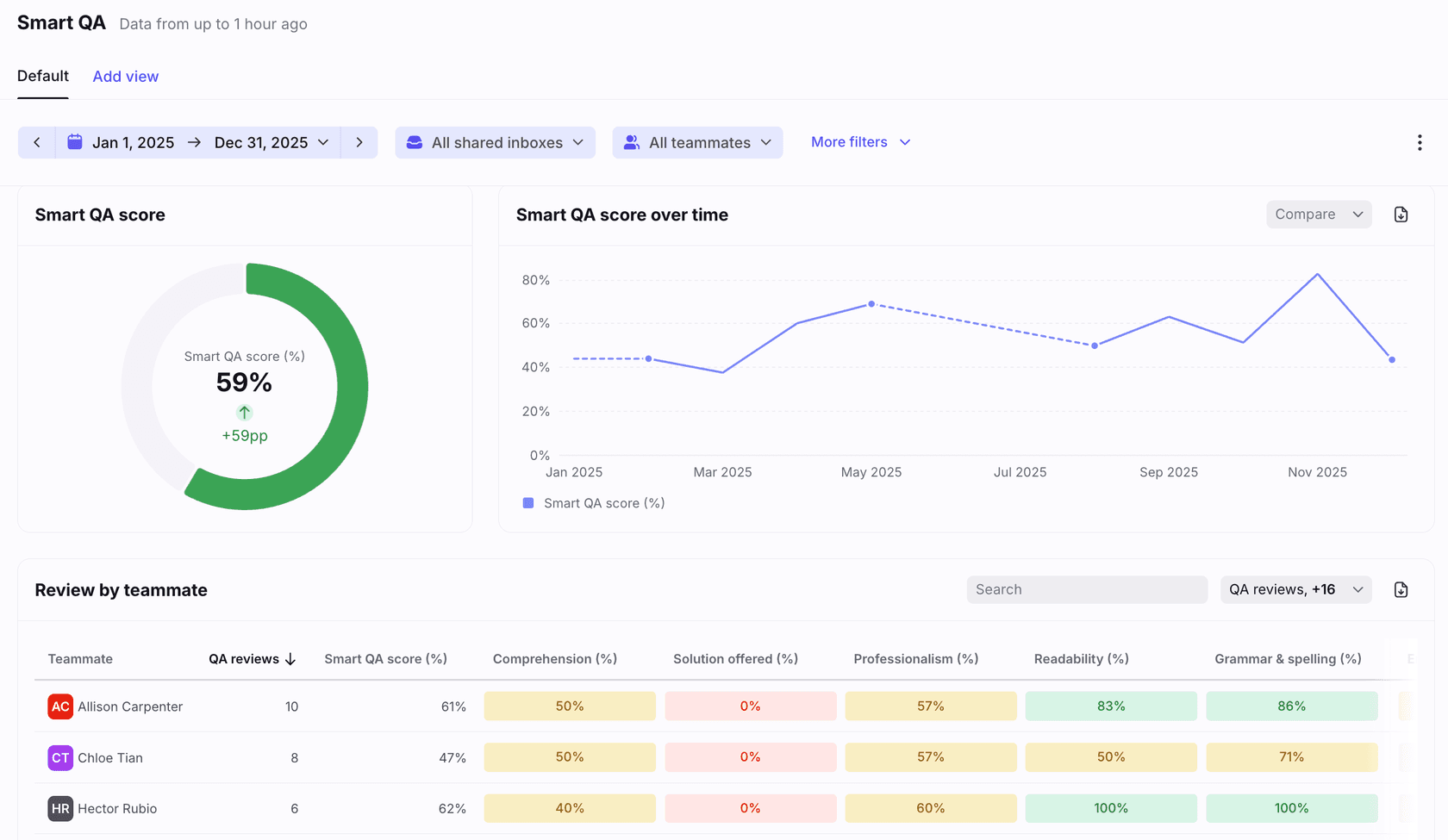
Each criterion scores on a 1 to 5 range or a pass and fail binary. Ranges become percentages (a 1 is 0%, a 4 is 75%), and the report averages them, so a teammate with a 1 and a 4 on Tone shows 38%.
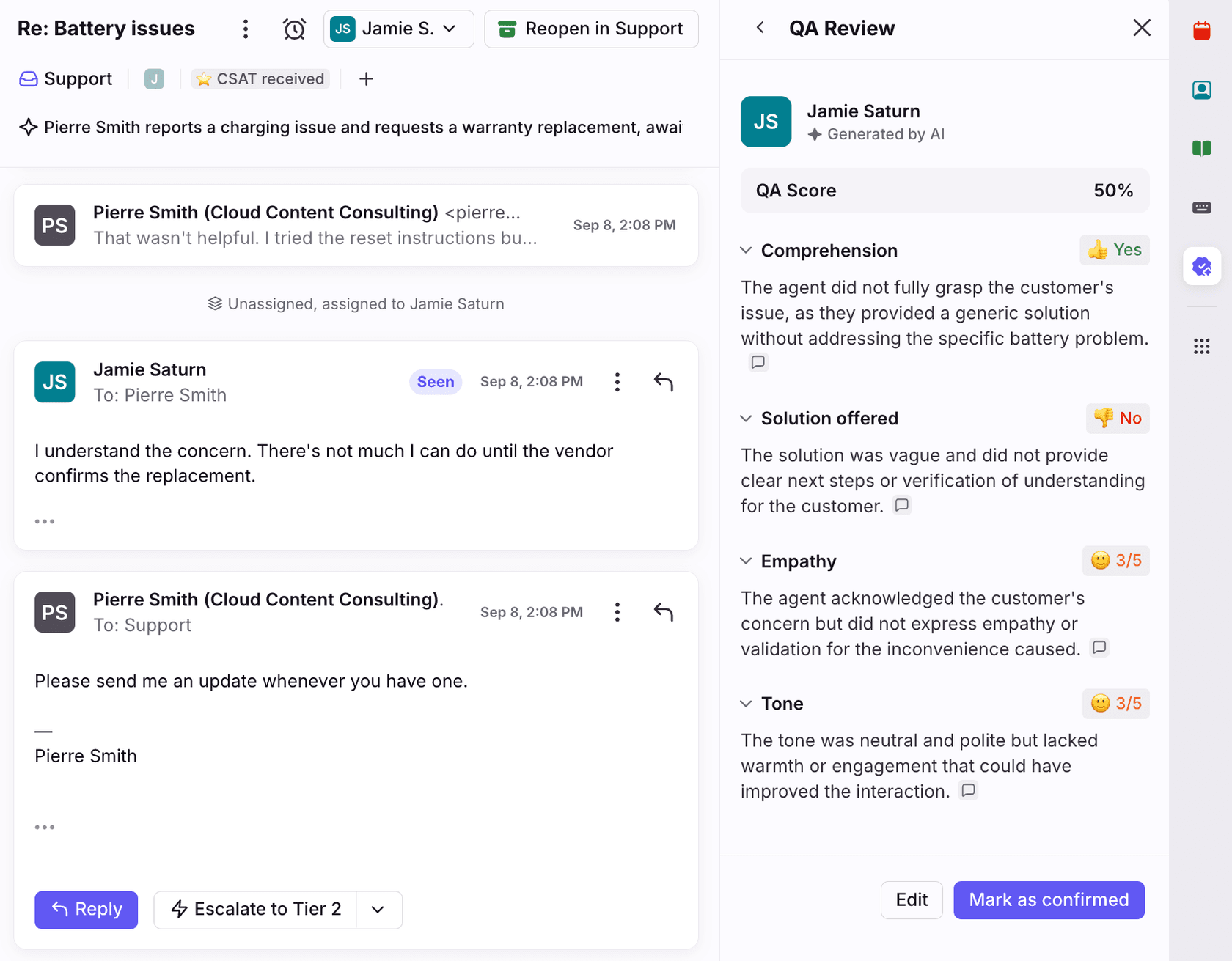
Results show in two places, next to Smart CSAT if you run it. The Smart QA and CSAT panel in the conversation sidebar shows the review, and for conversations scored after 6 September 2026 each reason cites up to three excerpts you can click to jump to. The Smart QA report in Analytics averages every criterion per teammate, sorts conversations by score and exports to a file.
The rules worth knowing before you trust the numbers:
- Admins can override. Edit a score from the panel or the report, add a comment, and click Save & mark as reviewed. The admin's name replaces "Generated by AI", and the report updates within an hour.
- Agents see only their own. Admins with analytics permissions see everything. Front also asks you to tell agents when Smart QA is applied to their conversations.
- AI agents are scored too. Every teammate who replies before the conversation is resolved or archived is evaluated, "both human teammates and AI agents". Front AI agent evaluation covers testing an agent before it goes live.
- Front says not to rely on it alone. Its article asks you to "rely on your own assessment and analysis or that of experts for significant decisions".
Why did Front Smart QA scores drop in November 2026?
Because Front changed the model. On 20 November 2026 Smart QA moved to an upgraded model that Front says scores closer to expert human reviewers. The part a lead will feel: "Before the upgrade, about two-thirds of scores were 5s. Now, about 1 in 4 conversations score a 5." Front tells you to expect lower averages and to treat the upgrade date as a new baseline.
So if your team's Smart QA score fell this week, don't open a coaching plan yet. Compare weeks after 20 November with each other, and if you report QA upward, mark the break on the chart. I'd take it as good news: a scale where two-thirds of conversations get top marks can't tell your best rep from an average one.
How do custom criteria work in Front Smart QA?
You describe the check in plain words and Front turns it into a scale. Under the Criteria toggle on the Smart QA tab, click Create criteria, give it a name and a description, and Front's docs suggest saying "what the criteria assesses, what it does not assess". Generate writes a 1 to 5 or pass and fail scale from it, which you can edit, and Applicability sets whether it runs on every conversation or only on ones you describe. A validator flags "Too vague" or "Not a condition", though it still lets you save.
Front's own example is a criterion called Solution accuracy:
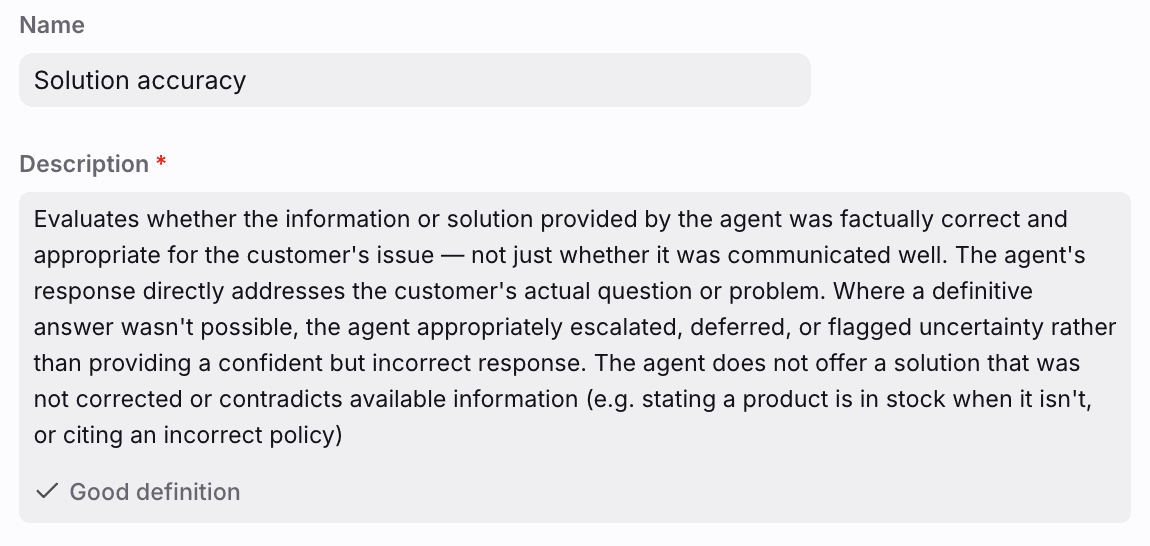
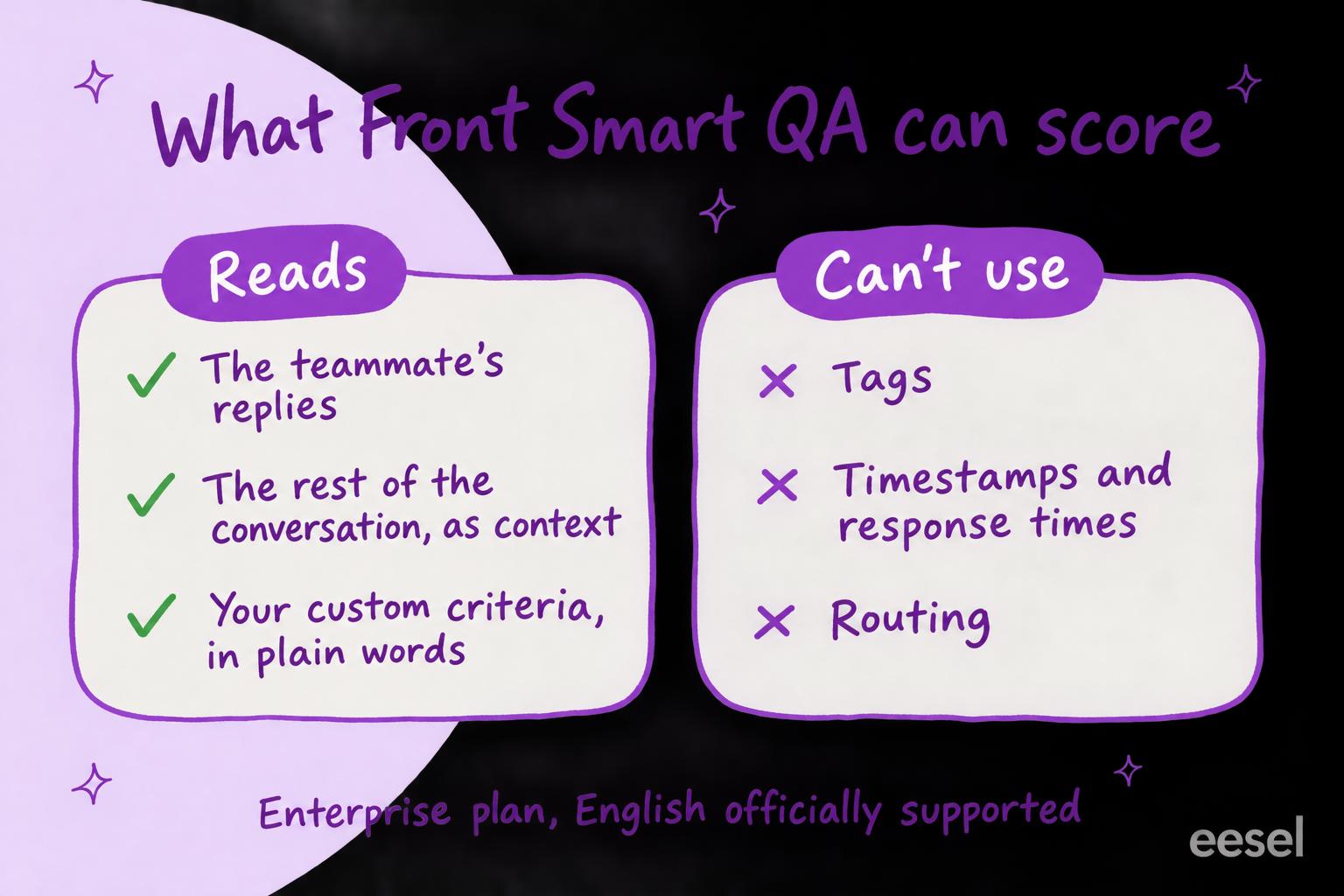
That is the criterion most teams want first, and it shows the limit too. The description asks whether the reply contradicts "available information (e.g. stating a product is in stock when it isn't, or citing an incorrect policy)". Front's article says what a criterion evaluates: the reviewed teammate's responses, with "all other messages in the conversation as context". It doesn't list your help center, your stock levels or your policy docs as inputs. So a policy check works when the rule is in the criterion itself ("refunds after 30 days need a manager's approval") or in the conversation, and I'd test it on a few conversations you already know the answer to before trusting it.
What can't Front Smart QA see?
The record around the conversation. Front's article is explicit: "Conversation metadata such as tags, time between responses, and other information is not able to be used in the evaluation." So no criterion can check that a refund request got the Refund tag, that a billing question was moved to the Billing inbox, or that a reply went out inside your SLA. If your reporting runs on tags, a wrong tag is a QA miss Smart QA won't catch. Front's ticket statuses and assignment rules need checking another way.
The other limits, from the same article:
- Shared inboxes only. Personal inboxes aren't reviewed unless an admin mirrors them into a shared one with a rule.
- Resolved or archived, with a reply. A conversation needs at least one inbound and one outbound message.
- Not retroactive. A rule scores conversations archived or resolved after it was created, so last quarter stays unscored.
- English. "Only English is officially supported at this time"; other languages may give "unexpected results". Multilingual support QA covers the options.
- Exclusions are set in the rule. It narrows by inbox, conversation type and teammate; anything else is a manual override after the fact.
How much does Front's AI QA cost?
Smart QA comes with Enterprise. Front's help center says it is "included with the latest Enterprise plan at no additional cost", and the pricing page lists "AI Copilot, QA, and CSAT included" under Enterprise. The word "latest" matters if you're on an older Enterprise contract: ask Front whether yours includes it. Prices checked 21 November 2026, billed annually:
| Plan | Per seat a month | Seat limit | What it adds for QA |
|---|---|---|---|
| Starter | $25 | Up to 10 | Basic analytics, AI Topics |
| Professional | $65 | Up to 50 | Advanced analytics; Copilot is a $20 a seat add-on |
| Enterprise | $105 | None listed | Smart QA, Smart CSAT and Copilot included, custom reports |
For a team of 10, Professional is $650 a month and Enterprise is $1,050, so Smart QA arrives with a $400 a month step up. If you'd buy Copilot anyway ($200 a month for 10 seats on Professional), the gap is $200, which also buys Smart CSAT, AI routing and tagging, and unlimited rules. To try first, the rule template has a Start free trial button that starts 30 days of Enterprise. eesel's Front pricing breakdown has the rest, including Autopilot's per-conversation charge.
What does a QA program need that Smart QA leaves to you?
Most QA programs check three things Smart QA can't fully reach: whether the answer matched a policy that lives in a document, whether the conversation was tagged and routed the way your reports expect, and how it went for conversations in another language or in a personal inbox. Pick what you want to check and see what covers it:
Pick a check to see what covers it in Front, and what covers it if nothing does.
There are two ways to cover the rest.
Score a sample by hand
The cheapest route needs nothing new, and it's where most guides to support QA with AI start. Each week a lead filters last week's archived conversations in one inbox, reads ten or twenty (the lowest Smart QA scores first, if you have them), and checks each against a short rubric in a spreadsheet: right answer for the policy, right tag, right inbox. Agree what each score means first so two reviewers score the same conversation the same way: support QA calibration helps, and so do these QA feedback examples.
The limit is the obvious one: a person reads a sample, and the results live outside Front.
Have an AI teammate review against your rules
The second route is an AI agent that runs the review on its own and leaves the result in Front. This is what I'd do with eesel. eesel's Front integration can start a run when a conversation is archived, and the run already has the conversation's tags, assignee, custom fields, inbox and the thread, internal comments included (on a very long conversation, the newest page of messages). It learns from your Front help center ahead of time, so a policy you've published is something it has read.
Set an automation on that trigger and for each archived conversation it:
- Reads the thread with its tags and inbox.
- Checks it against the rules you wrote in plain words ("refunds after 30 days need a manager's approval", "billing questions get the Billing tag", "never promise a ship date").
- Leaves its verdict and reasons as an internal comment on the conversation.
- Adds a tag you created in Front, such as qa-review, to the ones a lead should read, so a view or an analytics filter can find them.
You write the rules, so tagging, routing and policy are just more lines, changed whenever your policies change. One thing to know first: eesel adds only tags that already exist in Front, one at a time, so a person creates the review tag before you start. The same eesel agent can triage new email and draft replies as internal comments too, if you want it to.
Daily checks like this already run for eesel's customers. Cactus Club Cafe runs a second eesel agent on its Zendesk helpdesk that audits the daily finance extract every morning: it checks each store and either solves the ticket as balanced or leaves it open with the imbalance named. Between 8 August and 8 September 2026 it ran about 60 times. A QA review is the same shape: a check against written rules, with the result left on the conversation.
Is Front Smart QA enough?
Credit where it's due: Smart QA covers a lot. Custom criteria in plain words, a pass and fail option, cited excerpts, manual overrides that feed the report, and AI agents scored on the same card as people. Front's own Solution accuracy example shows it knows what teams want from QA beyond tone.
My take: on Enterprise, turn it on, start with five or six criteria (Solution offered, Comprehension, Tone, and one custom criterion that writes your most-broken policy out in full), and use the lowest scores as your reading list. Re-baseline from 20 November. Don't treat it as the whole program: a rep can score well on every criterion while tagging the conversation wrong, and Smart QA will never know. If you're on Professional, Enterprise is a $400 a month step for 10 seats with QA one of several things it adds, and a reviewer that checks your rules and your tags on every conversation covers more of what a scorecard is for. eesel has the same breakdown for Help Scout and HubSpot's QA score, and its roundup of support QA tools covers the dedicated scorers too.
Try eesel next to Front
Keep Smart QA for what it does well. What eesel may do depends on who is asking, and you choose which of its actions run on their own, which ask first and which stay off; for a review run, let comments and tags run on their own and keep replies off. Let it read your archived Front conversations against the rest of your rubric (your published policies, your tags and inboxes), written in plain words and changed whenever your policies change. It leaves its reasons in an internal comment and tags the conversations a lead should read.
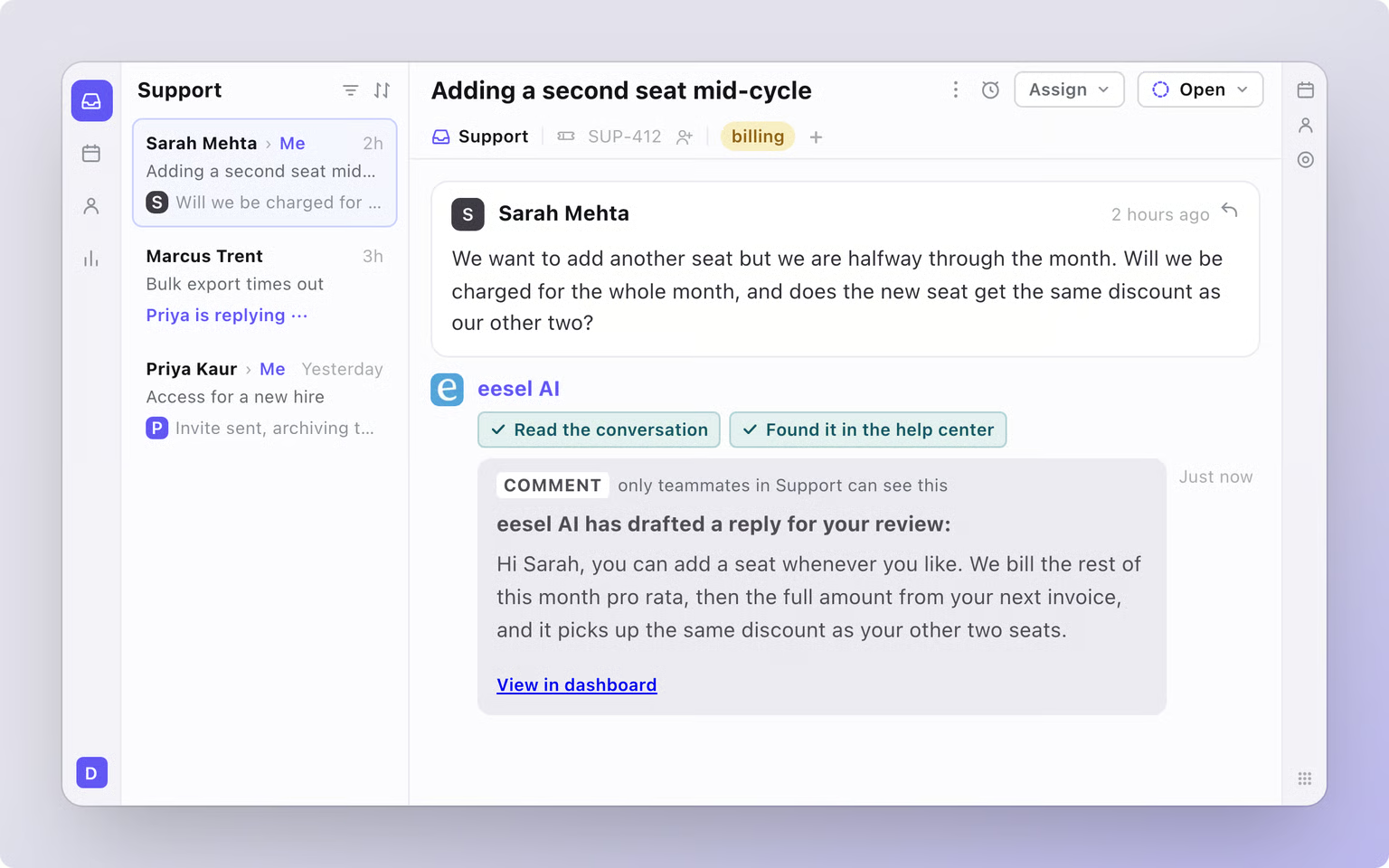
Try eesel in your Front inbox, starting with yesterday's archived conversations.