What I tested, and what I did not
I build AI agents at eesel, so the instinct with a release like this one is to go at the mechanism first. What the model is actually shown. What the harness does before the weights ever see a pixel. And where the failure is going to land once real inputs start arriving. That is the lens for the whole review here.
Here is the methodology, stated plainly so you can discount it in the right amount. I read the vision guide line by line, then did the same on the pricing page, and after that pulled three days of real production telemetry off OpenRouter.
Then I worked through every single comment on the launch thread, which ran up to 495 points and 153 comments. Where a hands-on result gets quoted here, the hands are somebody else's, and I say whose.
What I did not do: run a controlled vision eval of my own over a few hundred images. That matters, because the biggest single lesson out of this thread is that small-sample vision testing produces confident, wrong conclusions, and committing the exact error the post is about would be a poor look. So treat this as a review of the evidence, not as a benchmark of mine.
If what you want is the release explained end to end, with the pricing arithmetic and the full limits table, that one lives in my launch breakdown. This piece is only about whether the thing is any good.
The clock test is a case study in how not to review a vision model
The most-read exchange on the whole launch thread is a clock. Worth walking through in order, this one, because it is the cleanest illustration I have seen of how vision reviews go wrong.
It opened up with a straightforward failure report:
"It fails the simple clock test for me which Qwen3.8 27B got (nearly) right."

The detail is worse than that summary. Handed a rendered analog clock, DeepSeek came back with 5:10, missing the hour hand by three hours and mislabelling which hand was which colour on top of that. Qwen3.8 27B said 8:10. True time was 08:09:25, so both of them were wrong, only wrong in different ways, and one commenter's read on the difference is sharper than most benchmark commentary:
"Also worth noting that both models got it wrong. Qwen made a mistake that humans very good at reading clocks would make. Deepseek made a mistake that a human who had just learned to read clocks would make."
Then somebody reran the thing, and the finding flipped over.
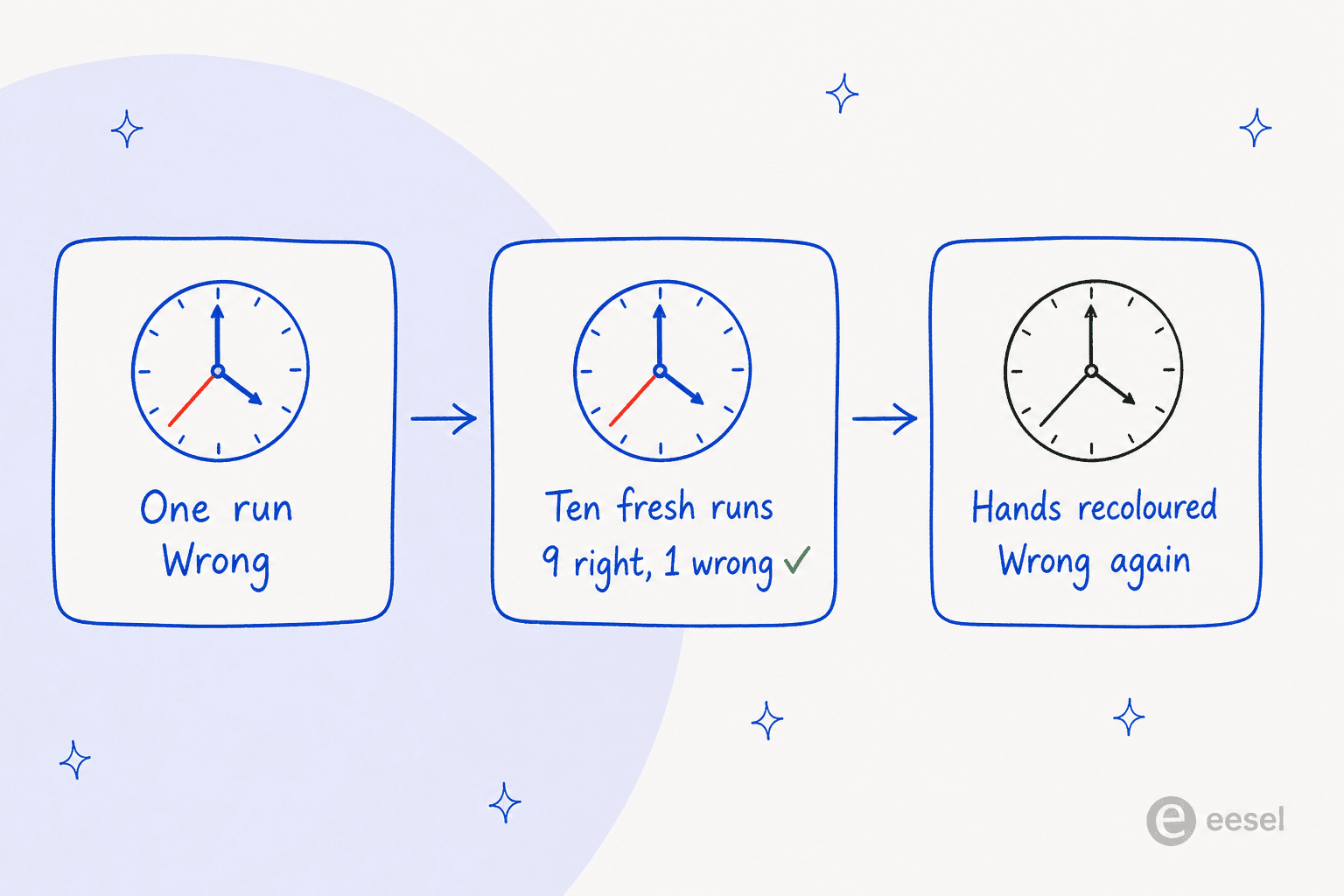
"I now ran the test 10 times total, fresh session every time, and DS4 got it right 9 out of 10 times. Lesson learned to double check what I read on the internet."
So the model is fine then? Not quite, and here is where it gets interesting. Three separate people went and picked the rerun apart.
First one, the grading was lenient. Those nine "correct" answers were all 8:10, while the actual time on the dial was 8:09:25, and one reader pointed this out directly:
"fwiw the clock reads 8:09:25 not 8:10:25 although it would be passable to read it as 8:10 if there were no second hand"
Second one, the test image itself was odd. Every hand on the clock had a different colour, which is not at all how clocks normally look, and one reader admitted the design had fooled them too:
"I know that the hand lengths and thicknesses on this image are correct but for some reason I, a totally human person who grew up when analog clocks were still common, see this and think the hand on the 5 is the minute hand."
Third, and this is the diagnostic one, the original poster took that suggestion up and reran with all the hands drawn black. DeepSeek then answered 8:25, losing the second hand completely and promoting it into the minute hand. Which is a strong hint that it had been keying on hand colour the whole time and not on hand length. So the 9 out of 10 was real. The reason underneath it was not the reason anybody assumed.
And the finding that reframes the whole sub-thread came from somebody who just went and ran the same image everywhere else:
"Gemini 3.7 Flash and 5.6-Sol (on all reasoning levels) also answer 8:10:25. The new "stealth" Ox Alpha also replies with the same. Opus 5 replies with 8:10 (no seconds). Not sure why this is so hard for them; Gemini is especially good at vision and I would have expected better from it."
Nothing that anybody tested landed on 8:09:25. Not Gemini, not Opus 5, not any reasoning level. So the thing that looked like a DeepSeek weakness at n=1 turned out to be a blind spot shared across the entire frontier, and the whole flap resolved itself into a fact about analog clocks instead of a fact about this model.
There is a fair counter-argument about whether this test is even relevant in the first place, and one reader made it well:
"Reading any analog clock at any time level (edit: and a non-noisy vector rendered image at that) is absolutely table stakes for an allegedly frontier flagship vision model. As much as 1:1 OCR."
I have sympathy for that view. And it is not a hypothetical task either: one commenter described asking a coding agent to QA a clock-reading game for their kids by screenshotting the Godot build, which is this exact problem sitting inside a real software workflow.
The operating lesson though is the one I would stick on a wall. A single vision test tells you almost nothing. Variance across identical runs was big enough to flip the verdict on its own. The stimulus design changed the failure mode, and the grading threshold changed the score. If you are evaluating any vision model for real work, this one included, run it many times on your own inputs, and then grade it strictly. Same principle that sits behind proper support QA instead of trusting a demo.
Where the resize actually bites, and where it does not
The mechanism is simple, and it is also the most important single thing about this model. Before inference, DeepSeek resizes every image so the total pixel count lands roughly where an 800 by 800 image would land, aspect ratio kept. Out of that comes a hard ceiling of 384 tokens for one image, and the docs state the consequence flatly: a 2000 by 2000 image and a 5000 by 5000 image consume the same number of tokens.
One commenter put that number into perspective better than the docs manage to:
"800x800 is 640,000 pixels, or 0.64 Megapixels. That is less than the resolution of computer screens from 1995, Super VGA which has around 0.79 MPs."
The useful question here is not "is 0.64 MP enough". It is "enough for what". And the answer sorts itself almost entirely by glyph size, task difficulty barely comes into it.
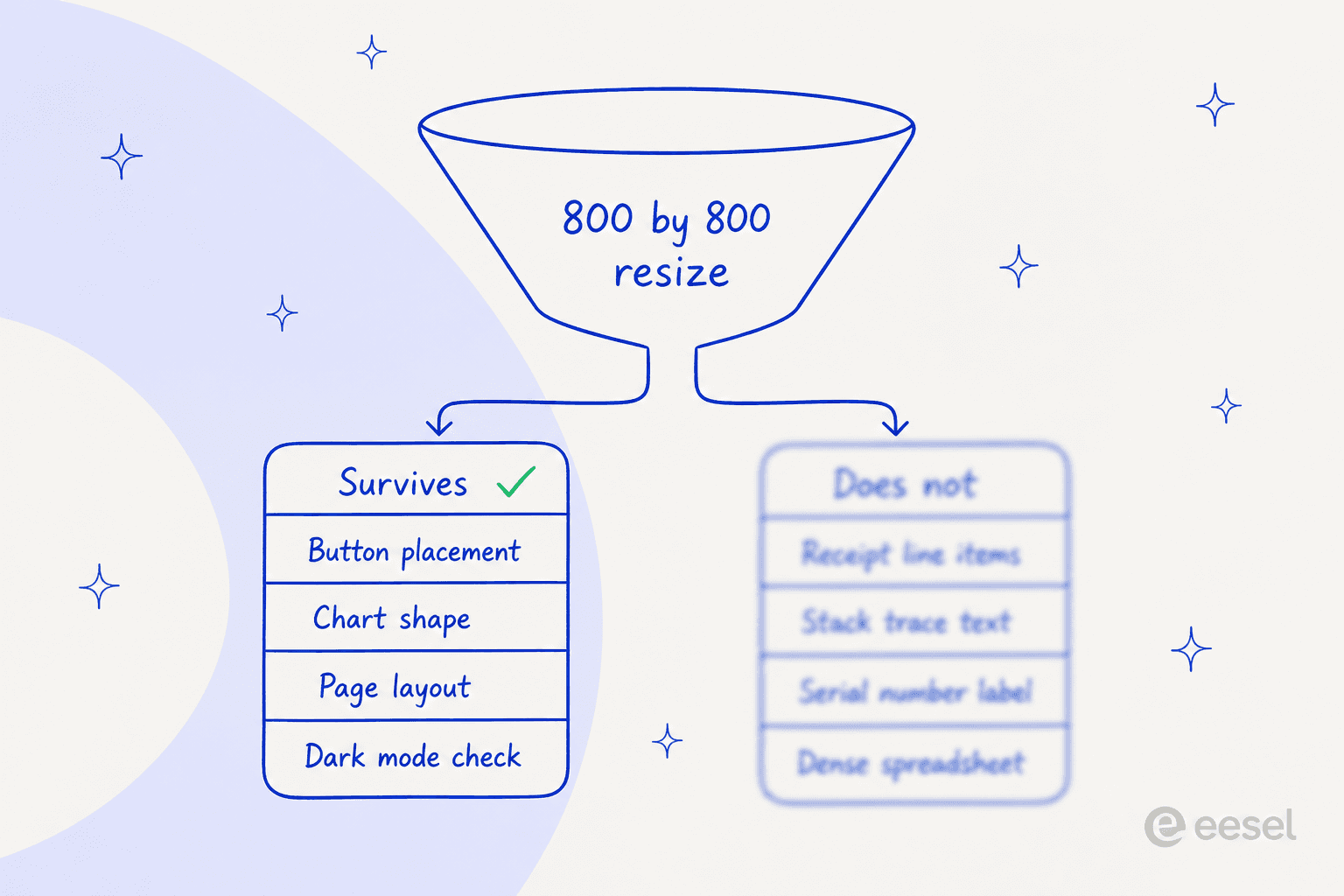
Checking that a button rendered in the right place, reading the shape of a chart, verifying a dark-mode layout, confirming the structure of a page: all of that survives a downscale in comfort. Reading line items off a receipt, a stack trace inside an error dialog, a serial number on a product label, or a dense spreadsheet: that is the place where it falls apart. A full-page document sits right on the boundary, and one reader flagged that immediately:
"It's useful but for OCR and a lot of other applications it needs to be a bit higher (eg: putting in a full A4 / Letter sized page)"
To make it concrete instead of a rule of thumb, here is the arithmetic run on your own inputs. Put in the dimensions of an image you would really send, plus the height in pixels of the smallest text sitting in it.
Run it with a 2560 by 1440 screenshot and 14px UI text, and the smallest text lands at 5.8px. Drop down to a plain 1920 by 1080 shot and you get 7.8px. A normal screenshot of normal interface text does not clear the bar, and that is the uncomfortable version of the story, because what comes back is a plausible answer that is sometimes wrong, never an obvious failure.
The workaround the thread landed on together is a crop tool, and one commenter spelled out the exact pipeline they run:
"When the LLM tries to read an image, it will be resized by DeepSeek's server to 800x800, which might be a bit blurry. The LLM will then crop a smaller image from the high resolution image (using e.g. the
converttool via bash) and will then read the small cropped image. This image will still be resized to 800x800 by DeepSeek's server, but since it is already small, there is no or little loss of quality."
That works, and several people confirmed it working for them. It is not free though. The grid-crop variant of the same idea, where you tile up a large image and process every cell, costs at least double the tokens by one commenter's estimate, and stitching nine crops back into one spatial understanding is a problem of its own. If you are building this yourself, it is a real chunk of harness work sitting on top of a tool-calling loop you already have to maintain. Several of the open-source agents worth a look ship something like it already.
And the defence that a cheap fast model simply has to cap its resolution does not quite survive contact with the competition. Somebody argued exactly that, and the reply came immediately:
"Gemini "flash" models have an option for media resolution, including a high resolution option for screenshots."
That is the fairest single comparison anywhere in the thread. A competitor sitting in the same speed-and-cost tier does expose the control, and Google has been building agentic vision on top of it. DeepSeek's detail parameter looks like it should do the same, then it does not. low really does downscale to 512 by 512, while high, original and auto all currently mean one identical thing, which is keep the original and apply the standard resize regardless.
Worth saying as well that plenty of people reported the cap being a non-issue for their actual work. One put it bluntly:
"It can read and extract information from screenshots and PDFs just fine (my setup). No need to worry about edge cases."
Another one noted that if their screenshots run past 800px, they could probably have framed the shot better in the first place. Both points are fair. The cap is a constraint and not a defect, and whether it bites you depends entirely on what you point it at.
The benchmark table is softer than it looks
Now the numbers, which are the part most reviews reprint without ever reading closely.
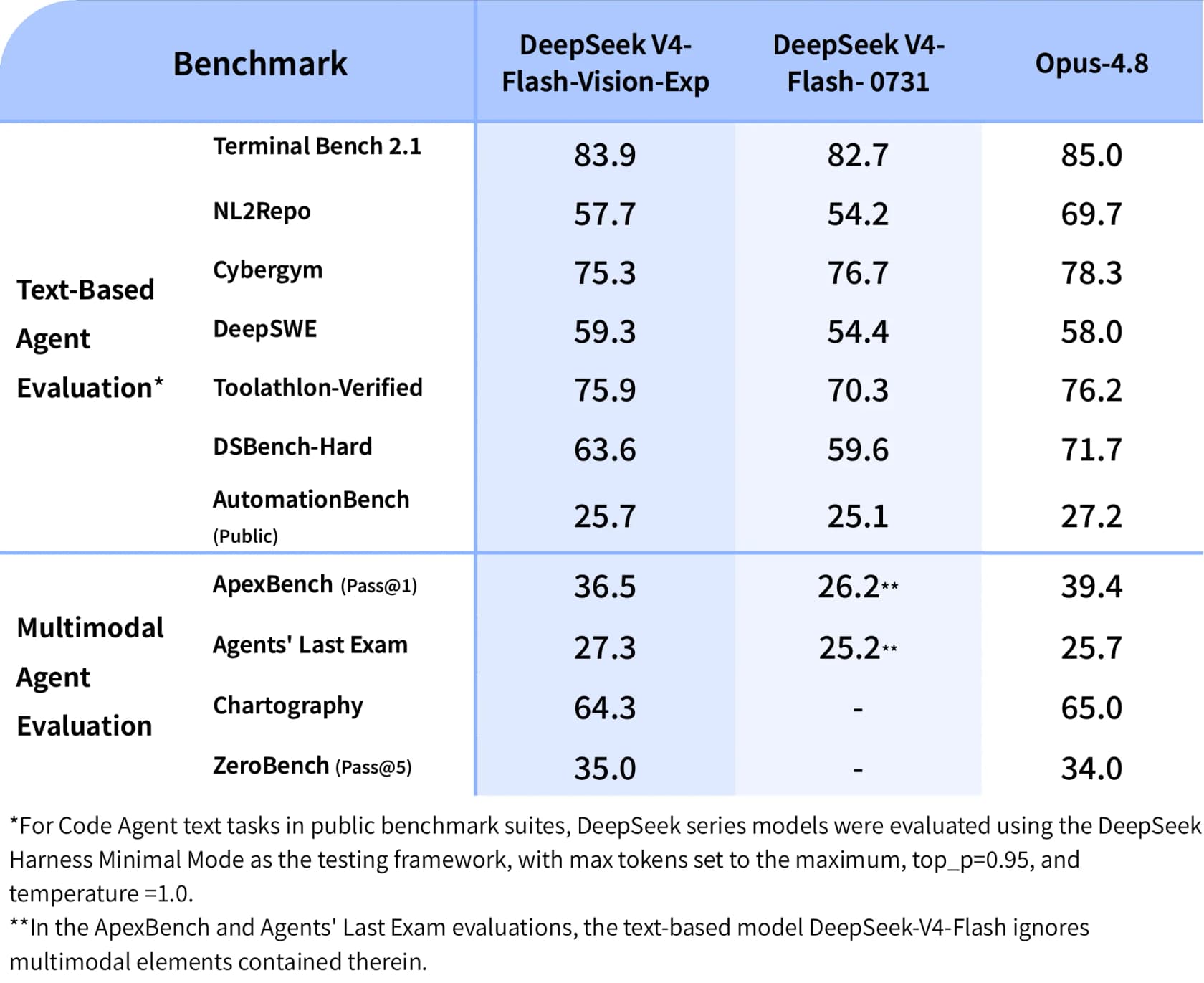
Start from what holds up. Across the seven text agent rows, the vision build beats text-only V4-Flash on six of them: DeepSWE 59.3 against 54.4, Toolathlon-Verified 75.9 against 70.3, NL2Repo 57.7 against 54.2, DSBench-Hard 63.6 against 59.6, Terminal Bench 2.1 83.9 against 82.7, AutomationBench 25.7 against 25.1. The only loss is Cybergym, 75.3 against 76.7. DeepSeek's own release note calls this "matching" V4-Flash on text, which undersells their own result by a wide margin.
Three caveats sit on top of that, and every one of them came from somebody reading the table more carefully than the launch coverage managed.
The headline number overlaps a competitor's error bar. On the DeepSWE row, one reader went and lined the intervals up:
"The DeepSWE benchmark they report (59.3%) overlaps with the confidence interval of 5.6-Sol Medium (61% +/- 2%), but likely at 1/18th the cost (they did not report the DeepSWE benchmark cost, but v4-flash had this cost ratio against Sol Medium)."
So "beats a frontier model on DeepSWE" is really "statistically indistinguishable from one, at a fraction of the price". Still a good result, and a different claim. Also worth noting: the 1/18th cost ratio is inferred out of V4-Flash rather than published for this run, and the whole thing sits unverified by DeepSWE officially.
The comparison model is flattering. A second reader pointed out that the peer picked for the cost story is not the tightest one available:
"The closer comparison would be 5.6-Luna. On DeepSWE at Xhigh it's 57% at 1/6 the cost of Sol M, on Max it's 67% at 1/3rd the cost."
Against a discounted GPT-5.6 variant, the cost-performance gap narrows down a lot. Still an advance. Much less of a step change.
The multimodal "leap" partly measures the ability to see. That one is sitting in DeepSeek's own footnote. On ApexBench and Agents' Last Exam, the text-only V4-Flash column got scored while the multimodal elements of the task were ignored, which is the reason it sits at 26.2 and 25.2. So comparing 36.5 against 26.2 measures "one model can see and the other cannot" as much as it measures any capability gain. The honest comparison is the Opus-4.8 column, where DeepSeek trails by 2.9 on ApexBench and by 0.7 on Chartography, then edges ahead on Agents' Last Exam and on ZeroBench.
One more framing point, and it is easy to miss. Every DeepSeek-series number in that table came out of DeepSeek Harness Minimal Mode at top_p=0.95 and temperature=1.0, which is the vendor's own scaffolding, on launch day. First-party tables are useful, and they are not replications. Treat them how you would treat any vendor's table, the ones in my own model comparisons included.
Confident agreement is the worse failure
Here is the hands-on result I keep on coming back to, because it is the only one in that thread with a scored set and a named failure pattern attached.
One commenter runs a small caption-validation benchmark: you hand the model an image plus a claimed subject, then ask whether the claim is true or not. The question there is "is this what I say it is", never "what is this". They ran it over DeepSeek and over ByteDance's seed 2.1 turbo:
"Asked "Is this Salisbury Cathedral" and supplied a picture of Wells Cathedral, it answers "Yes, the west facade of Salisbury Cathedral". Bytedance seed 2.1 turbo correctly says no. Similar results for a picture of Manhattan Bridge sent as Brooklyn Bridge, Chartres Cathedral sent as Notre Dame, etc."
The score across their 12-image set: DeepSeek 6, seed 2.1 turbo 11. The broader ranking on that same set put Gemini 3.7 Flash at the top, then seed, then GPT-5.6-Luna, and after that two Qwen builds, roughly the same order my Qwen versus V4-Flash comparison lands on for text as well. They volunteer the caveat themselves too, that this is a tiny set next to a real VLM benchmark suite, and somebody in the thread argued reasonably that a small coding-oriented model was never trained for landmark recognition anyway.
Both true. Still, the interesting part is not the landmark score at all, in my reading. The interesting part is that it did not say "no", it said "yes, and here is a confident detail I made up". The west facade of Salisbury Cathedral is a specific and authoritative-sounding elaboration bolted onto the wrong building. That is not a resolution problem, and no high-resolution mode would fix it. It is the model agreeing with the premise somebody handed it.
If you work in support, you have met this exact failure before. On a call I read back through in my own notes, a B2B technical support team had watched a bot answer "yes, we support your car model" for brands that were not in their database at all, because the help centre said "we support all models". The bot was reading correctly and reasoning off the wrong premise, and their own word for the setup phase was "trial and error in the beginning". Same shape, different domain. Confident agreement is the more dangerous one, more than a blurry misread, because a blurry misread usually looks wrong and confident agreement never looks wrong. It is also the line between a real agent and a scripted chatbot, and it decides if ticket deflection becomes a win or a complaint queue.
This is the reason "can the model see the screenshot" is the easy half of the support question, and the easy half is the one a model release can answer. The hard half is whether the answer is right. That comes out of what the agent is allowed to draw on, plus how it behaves at the moment it does not know. A retrieval and guardrail problem, in other words, not a vision problem, and it is the difference between RAG and a raw LLM call.
The reliability picture nobody screenshots
Across 153 comments nobody reported an API error, a 5xx, a rate limit or an outage, which is a good sign for an experimental endpoint that is three days old. Nobody reported latency distributions either though, and the interesting number lives exactly there.
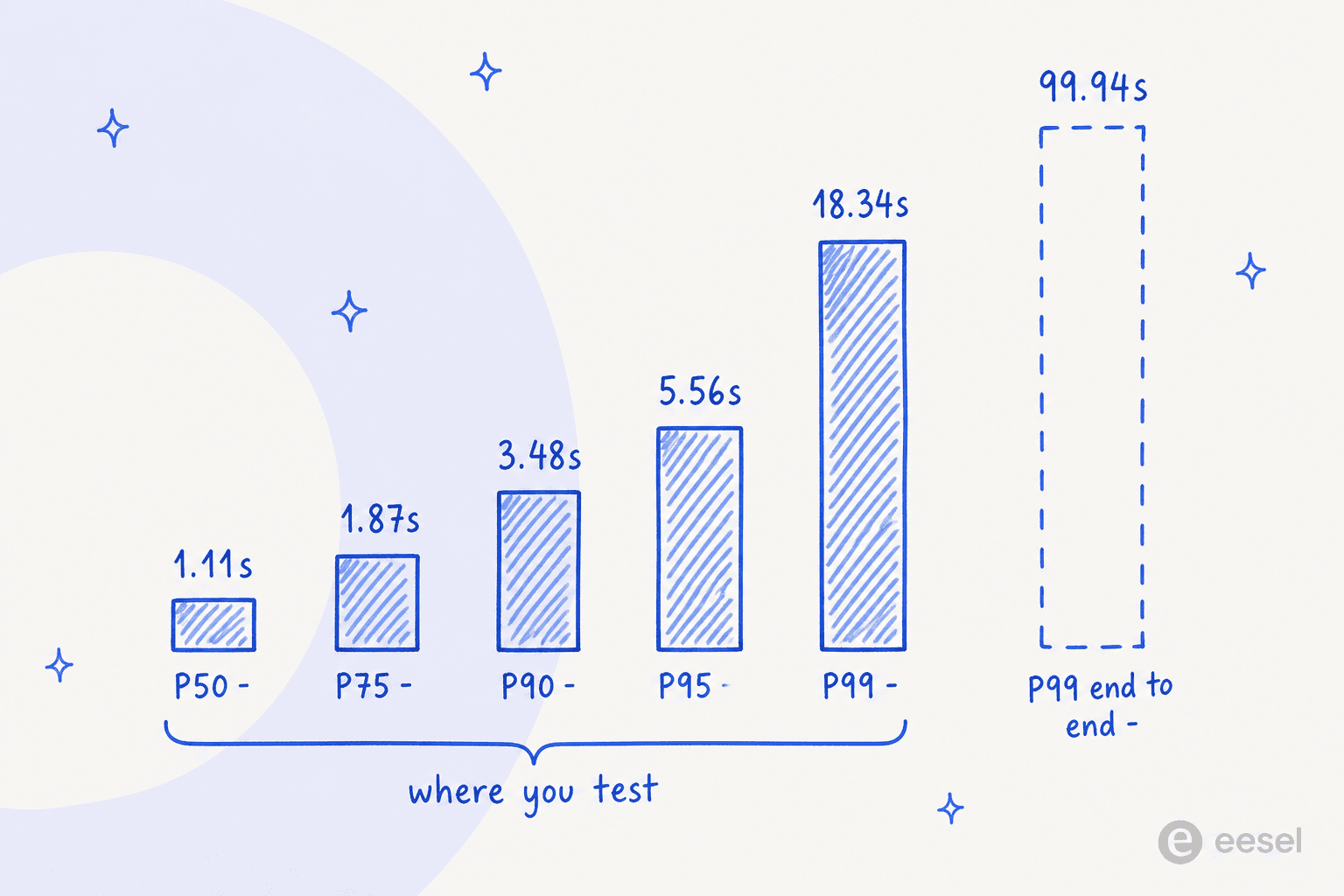
From three days of production traffic: P50 latency 1.11 seconds, throughput 85 tokens per second, uptime 100%. So a fast model, and the median is excellent for this price band. One commenter's own transcript backs that up, showing 368ms of thinking and 4.4 seconds in total for a single image.
Then look to the right of it. P90 is 3.48s, P95 is 5.56s, and P99 is 18.34 seconds. End to end, P99 goes up to 99.94 seconds. The tool-call error rate averages out at 1.27%, which is competitive (Gemini 3.7 Flash sits on 1.41% at its best endpoint), and availability across the same window was 99.93%.
The practical consequence of that is a timeout budget, a benchmark it is not. Set a 10-second client timeout because your median is one second, and you will be dropping roughly one request in a hundred. In an agent loop that runs twelve tool calls for one task, one-in-a-hundred per call turns into something more like one task in nine. There is no failover either: a single provider serves this model, so at the moment it goes slow, a router has nowhere else to send the request. If you have wired up any kind of first-response automation, the tail is the part your customers experience, the median is not.
Who is actually calling this model
This is the finding I did not expect at all, and it is the one that moved my verdict.
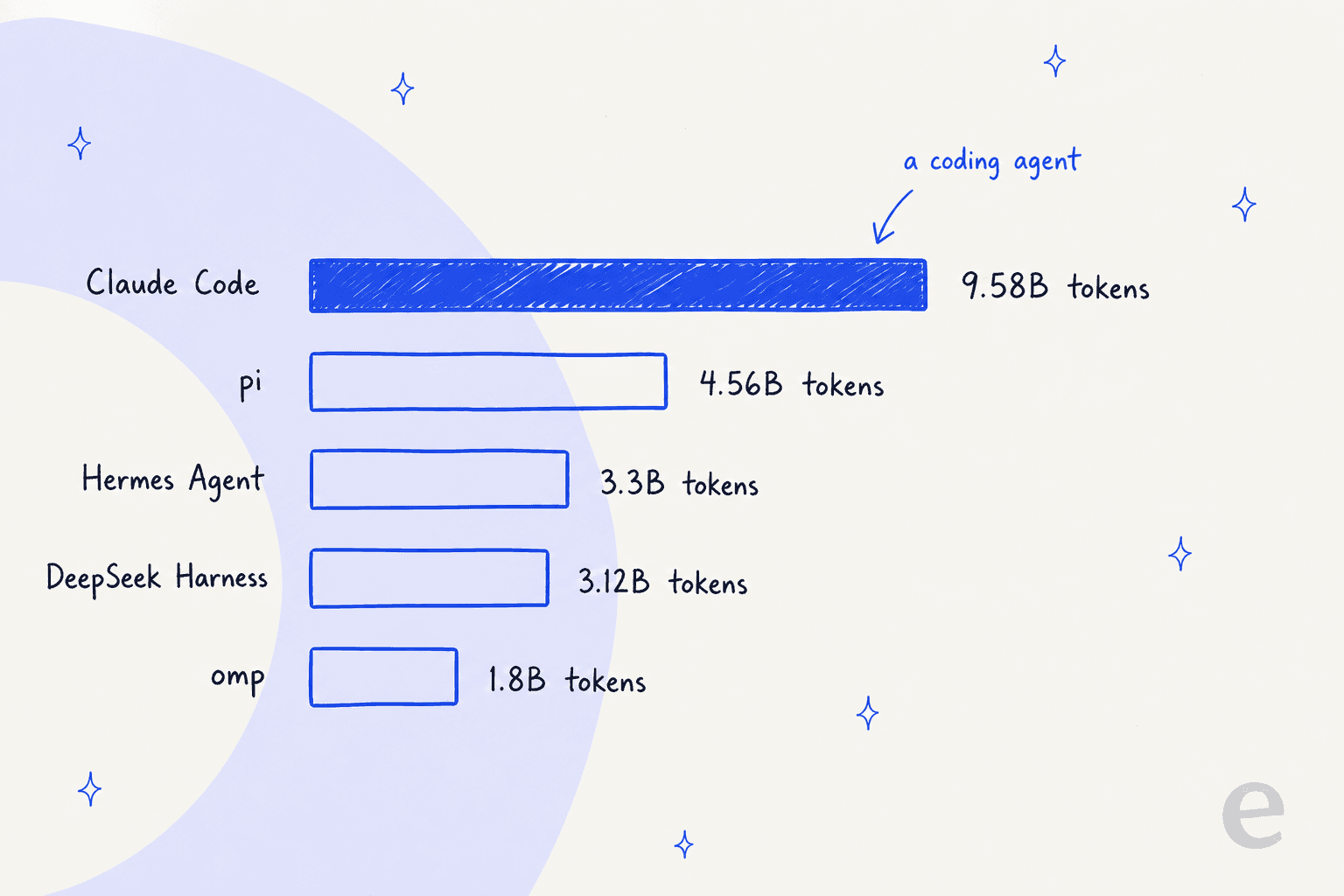
The public apps pushing the most traffic into deepseek-v4-flash-vision-exp over its first days, in order: Claude Code at 9.58B tokens, pi at 4.56B, Hermes Agent at 3.3B, DeepSeek's own multimodal-bridge harness at 3.12B, and omp at 1.8B. The single largest consumer of DeepSeek's first vision model is a coding tool. Out of that top five, only one entry is explicitly about images.
The token mix tells the same story from another angle. Across those first days: 25B prompt tokens, 69.6M completion tokens, and 139M reasoning tokens. The prompt-to-completion ratio there is around 359 to 1, which is the signature of an agent stuffing large codebases and tool output into a context window, and not the signature of an image-captioning workload. It flags a cost trap worth knowing about as well. Reasoning is running at roughly twice completion, thinking mode is on by default, and reasoning bills you at the output rate. So if your cost model treats output as the length of the answer, it is off by something like 3x, the same trap the V4-Flash pricing breakdown walks through.
Somebody in the thread asked the obvious follow-up, and I think it is the right question to ask:
"I've been using v4-flash without vision for this months — it's my go-to for code tasks. Now with vision, I'm wondering: if this model can do everything the text-only version does (plus see images), why keep the text-only one around?"
Nobody gave them a clean answer back, and on the published evidence there is not one to give, other than the two missing features below and that word exp sitting in the name.
Two things quietly missing
Both of these show up only in the spec table, and both of them matter more than the marketing does.
FIM completion is gone. The pricing page lists Fill-in-the-Middle completion as available in non-thinking mode for deepseek-v4-flash and for deepseek-v4-pro both, then as "Not supported" for the vision build. If FIM is what you use for inline code completion, this one is no drop-in replacement for the model it forks from, however good that DeepSWE row looks.
There is no date stamp. The MODEL VERSION field reads DeepSeek-V4-Flash-Vision-Exp, while the siblings read DeepSeek-V4-Flash-0731 and DeepSeek-V4-Pro-0813. Pinning the build is not possible. With everything above about run-to-run variance, that turns into a real evaluation problem: the model you benchmarked on Monday is not guaranteed to be the model serving your traffic on Friday, and there is no version string on hand to prove otherwise. On an experimental endpoint that is defensible. On anything you put in front of customers it is not.
There is a third gap worth reporting with care, because the thread went and corrected itself on it. One commenter said images could not come back as tool-call results, which would be a serious limitation for any screenshot-verify agent loop. Another one corrected them: the restriction applies to Chat Completions, while the Responses API and the Anthropic-compatible Messages endpoint do accept images in tool output. The original commenter then quoted the docs back, confirming that input_image inside function_call_output is processed as a real image for this model. So the capability is there, on two surfaces out of three. If you are building on Chat Completions, that is a rewrite for you.
Still on the subject of rewrites, one more restriction that will bite an existing agent: images are accepted in user messages only. Put one into a system or an assistant message and back comes a 400. Plenty of agent loops stash their tool output in an assistant turn, and those loops need changing first, before a single image gets through. Anyone who has migrated between OpenAI's file handling and some other vendor's knows how these small shape differences pile up.
How it compares against the other vision models
Rate card and real measured performance, all of it from the same source so the columns stay comparable. One caveat: DeepSeek's window is three days, because the model is three days old, while the others are one-week windows. For the head-to-head on text instead of images, see V4-Flash versus Kimi K3.
| Model | Input /M | Output /M | Cache read /M | Best P50 latency | Best throughput | Uptime | Resolution control? |
|---|---|---|---|---|---|---|---|
| DeepSeek V4 Flash Vision Exp | $0.22 | $0.66 | $0.007 | 1.11s | 85 tps | 100.00% | No high-res mode |
| Gemini 3.7 Flash | $1.50 | $7.50 | $0.15 | 1.70s | 197 tps | 99.74% | Yes, media resolution |
| Qwen3.8-Max | $2.00 | $6.00 | $0.25 | 1.83s | 45 tps | 100.00% | Not documented |
| GPT-5.6 | $4.00 | $20.00 | $0.40 | 3.55s | 45 tps | 98.50% | Yes, detail levels |
On price this one is not close. DeepSeek runs roughly 6.8x cheaper on listed input than Gemini 3.7 Flash and 18x cheaper than GPT-5.6, and it has the lowest median latency of the four as well. Two honest asterisks on that. Gemini carries promotional discounts on OpenRouter right now (75% off via Vertex, 50% via AI Studio) which temporarily close a lot of that gap, and the same tester whose caption benchmark ranked Gemini first noted it only made his shortlist because of the discount.
Cache economics deserve a line as well, because they shift the picture more than the sticker price does. The observed cache hit rate on DeepSeek is 88.9%, and that pulls the effective input price down to $0.03073 per million against a listed $0.22. Output barely moves at all, $0.6595 effective against $0.66 listed. So your bill here is an output bill with a rounding error attached, and any comparison lining up listed input prices is comparing the wrong column entirely. If you are working out what an AI workload really costs you, my notes on cost per resolution are a more useful frame than any per-million rate. The human agent comparison is the other half of the same sum.
My verdict
Use it if your workload is text agents, coding or tool use, and you sit on DeepSeek V4 Flash today. Six of seven benchmark rows point one way and the actual traffic profile points the same way, the price is identical, and swapping the model string is the entire migration. My V4-Flash review is the baseline this gets measured against. Check your FIM usage before anything else.
Use it if your image work is structural: layout checks, chart shapes, UI verification, screenshot triage, design-to-code. At roughly $0.00008 an image off-peak the cost of looking rounds down to nothing, and 0.64 MP is plenty for "did this render correctly". The same logic makes it cheap for bulk ticket classification on attachments.
Build a crop tool if fine detail is what you need. The pattern is proven and several people run it in production already, and what it costs you is tokens and harness complexity, not accuracy. A reasonable trade at this price.
Look elsewhere if the fine detail is the job, and especially when you need the model to disagree with a claim instead of confirming it. Small text, document OCR at full-page scale, caption validation: all of those are better served by something that exposes a resolution control. Gemini's Flash line is the obvious comparison here. My roundup of V4-Flash alternatives covers the rest of the band. And if open weights matter to you, note that several people in the thread expect a release while nobody has confirmed one, so do not plan around it.
Wait if reproducibility is a requirement for you. No date stamp, plus real run-to-run variance, is a bad combination for anything you have to certify. The exp in the name is doing honest work there.
The broader read, for anyone choosing models instead of reviewing them: this release makes a better argument for DeepSeek's text line than for its vision. Set it against V4 Pro, then against Kimi K3, and against where V3.2 sat a year ago, and the price-performance curve on text agents keeps bending the same direction. The vision part is a competent and cheap bonus that is blurry on purpose.
eesel for support queues where the answer has to be right
If you landed here because your queue is full of customer screenshots, let me be straight with you on what a model release solves and what it does not.
Customers send screenshots because something small and specific has gone wrong. An error dialog. A line on an invoice, or a field that will not save. It is the highest-value input in support and the worst possible fit for a resolution ceiling, since the small text is the information. And even when the model reads it perfectly, the harder problem is still waiting, which is the Salisbury Cathedral problem: a fluent and confident answer built on the wrong premise, sent out to a real customer under your own brand.

eesel's answer to that is to make you look at the wrong answers before your customers do. You connect up your helpdesk and your help content, and then before anything goes live you replay the agent over your own historical tickets. So you see exactly which ones it would have handled, which ones it would have fumbled, and the words it would have used. You set what it is allowed to answer on its own and what goes straight to a human, and every action stays visible and reversible inside the log above. Start it off as an AI copilot drafting for your agents, if handing it the queue on day one feels like too much. It is the opposite of flipping a switch and reading the postmortem afterwards.
That is the piece a cheap vision model does not hand you, and it is also the piece that decides whether AI in your queue saves money or costs you trust. If you want to see it run against your own tickets, try eesel free.
If you are still at the shortlisting stage, start from my practical notes on choosing a support model. After that, which LLM fits support work is a good one, and what an AI helpdesk agent actually does day to day is the other worth reading.
Frequently Asked Questions
Is DeepSeek V4 Flash Vision Exp any good?
What is the catch with DeepSeek V4 Flash Vision Exp?
How much does DeepSeek V4 Flash Vision Exp cost?
Is DeepSeek V4 Flash Vision Exp better than Gemini 3.7 Flash for vision?
Can DeepSeek V4 Flash Vision Exp read customer support screenshots?
What is missing from DeepSeek V4 Flash Vision Exp?
Should I switch my agent from V4-Flash to the vision build?


Article by
Kira
Kira is a writer at eesel AI with a Computer Science background and over a year of hands-on experience evaluating AI-powered customer service tools. She focuses on breaking down how helpdesk platforms and AI agents actually work so that support teams can make better buying decisions.