


AI for feature request tracking does four jobs: it spots the ask inside a support ticket, sorts it from bugs and how-to questions, links it to one shared request so demand gets counted, and replies to everyone who asked once the feature ships. The first three are well covered by tools like Canny, Linear and Productboard. The fourth, the reply, is the one almost none of them do inside the ticket, and it's the one your customers notice.
So set it up from the support side, not the product side. Let the AI tag each ticket from a fixed list, file or find the matching request, and keep the ticket linked. When the request ships, those linked tickets are your notify list. Canny's Autopilot is included on every plan and reads closed tickets on its own. Linear's Zendesk integration reopens the ticket when the issue is done, but a person still writes the reply.
If your queue runs on Zendesk, Freshdesk or Gorgias and your product team runs on Jira, eesel does the support half in one pass: it tags the ask, searches Jira for an existing issue before filing a new one, and drafts the "it's live" reply when the issue closes. smava already uses it to categorize 14,600 Zendesk tickets a month into fields, which is the same skill feature request tagging runs on.
What does AI for feature request tracking actually do?
AI for feature request tracking reads each support conversation, decides whether the customer is asking for something the product doesn't do yet, and turns that into a counted, linked record your product team can act on. It doesn't decide what gets built.
I work eesel's support queue, and I see the raw version of this daily. Someone sends four paragraphs about a billing question, then the very last line says "also, would be great if this exported to Sheets". That one line is the request. To a product manager the rest is noise, and a Hacker News commenter said as much years before LLMs could help:
"The Customer Support teams of your customers are going to be one of the main channels for capturing feature requests. We use Zendesk and have custom fields for categorizing and sub-categorizing requests along with a brief description. We do this so that the PMs don't have to read the entire Support ticket if one sentence is about the feature request out of 10 pages of text."

That's pretty much the job. You pull out the one sentence and file it somewhere it gets counted, while keeping the link back to the ticket. For the AI, it breaks into four steps:
- Spot it. Find the ask, even when it's buried inside a ticket about something else.
- Sort it. Is it a real request, a bug, a how-to question, or something the product already does?
- Link and count it. Attach the ticket to one shared request, rather than opening a fresh one each time.
- Reply when it ships. Use the linked tickets to tell every customer who asked.
Steps one to three are the "tracking" part, and they overlap heavily with AI ticket tagging and ticket deduplication. Most setups stop before step four. If you already run a voice of customer program, think of this as the support-ticket slice of it.
Why do feature requests get lost in support?
Feature requests get lost because support writes them down in whatever is closest to hand, while product goes looking somewhere else. The ticket says "I've passed this to the team". After that, the ask ends up in a Slack thread or a spreadsheet, or maybe in a ticket tag nobody reports on.
Here's the spreadsheet version, from a Head of Product on Reddit:
"So, what ends up happening is each of these customers has a google sheet of their asks/needs/requests. As the Head of Product, I am always checking these spreadsheets and trying to prioritize burning asks into our dev cycles. Its a nightmare to see it all in one place, and understand "what is the biggest need from our clients right now". I find myself prioritizing one feature only impacting a $400K client vs. a feature that would benefit 10 $20K clients."

And here's the customer's side of the same mess, from someone whose ticket sat for a month:
"I'm not asking for instantaneous results. I'm asking for communication. My ticket sat untouched for something like a month before I sent a support ticket in and it was then tagged as a feature request."
Look at what actually annoyed that customer. It wasn't that the feature didn't ship. It was that the ticket got tagged as a feature request and then nothing came back. A tag is filing, not an answer.
I've watched this go right on eesel's own product. The requests that showed up most in eesel's sales notes were missing helpdesk integrations: Front, HubSpot Service Hub, Jira Service Management and Zoho Desk kept coming up, and deals were lost over them. Those asks got counted instead of scattered, so they turned into work, and all four are on the integrations list now. When a customer's ask ships, the update in eesel's team channel looks something like this one my colleague Amogh posted in May: "CUS-605 prompt compressor shipped, unblocked." One issue ID and one customer, plus one person who now knows to go tell them.
How does AI sort a feature request from a bug or a how-to question?
AI sorts these by intent, but it only does that well once you write the categories down with examples. The usual split has three lanes: "the export button is broken" is a bug, "can you add weekly exports" is a feature request, "I can't find the export button" is a how-to question. I'd add a fourth one, since it's the lane that saves the most time.
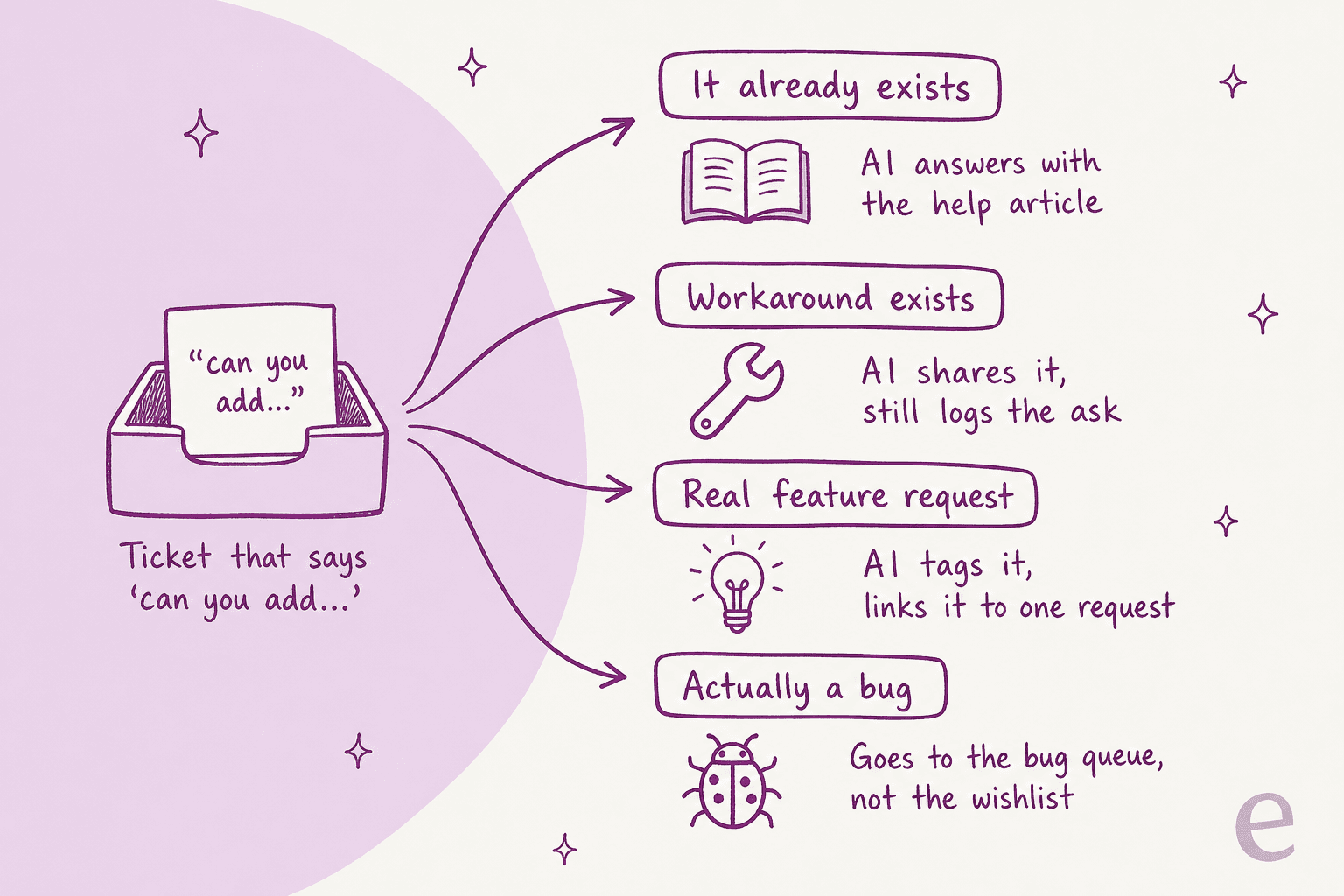
It already exists. A fair number of "can you add X" tickets turn out to be about something the product already does. A good support AI should answer those from your help center rather than log them, since a request for an existing feature is really a discoverability problem. One customer success manager on Reddit pushed back on vague handoffs for this exact reason:
"So you don't have any detail on the request? No validation? What if its actually something they could already do or approximately do 80% of with existing features? You don't have conversations around why they want it or how it will benefit them? "Hey PM. Mr customer said they want to send emails! Figure it out!""
A workaround exists. Share it, but log the ask anyway. Someone living on a workaround still counts as a vote.
It's a real request. Tag it and write the ask in the customer's own words, then link it to the matching request.
It's actually a bug. Send it over to the bug triage flow. A bug filed as a wish can sit on a roadmap board for months, and meanwhile the customer thinks you're ignoring something broken.
What makes this reliable is a fixed list. Rúngne, a climbing apparel brand on Gorgias, runs its eesel triage agent on a set list of tags. The story's own count is 880 tickets tagged in a month, all from that list, "nothing invented". A feature request tag works the same way. The AI picks from your list instead of making up a new category every Tuesday. If you're starting from scratch, my guide on how to automate ticket tagging walks through building that list.
What should each tracked request record?
Each tracked request should hold the ask in the customer's own words, a link back to every ticket, who asked, any workaround you gave them, and a status. That's five fields, and you'll end up needing every one of them later.
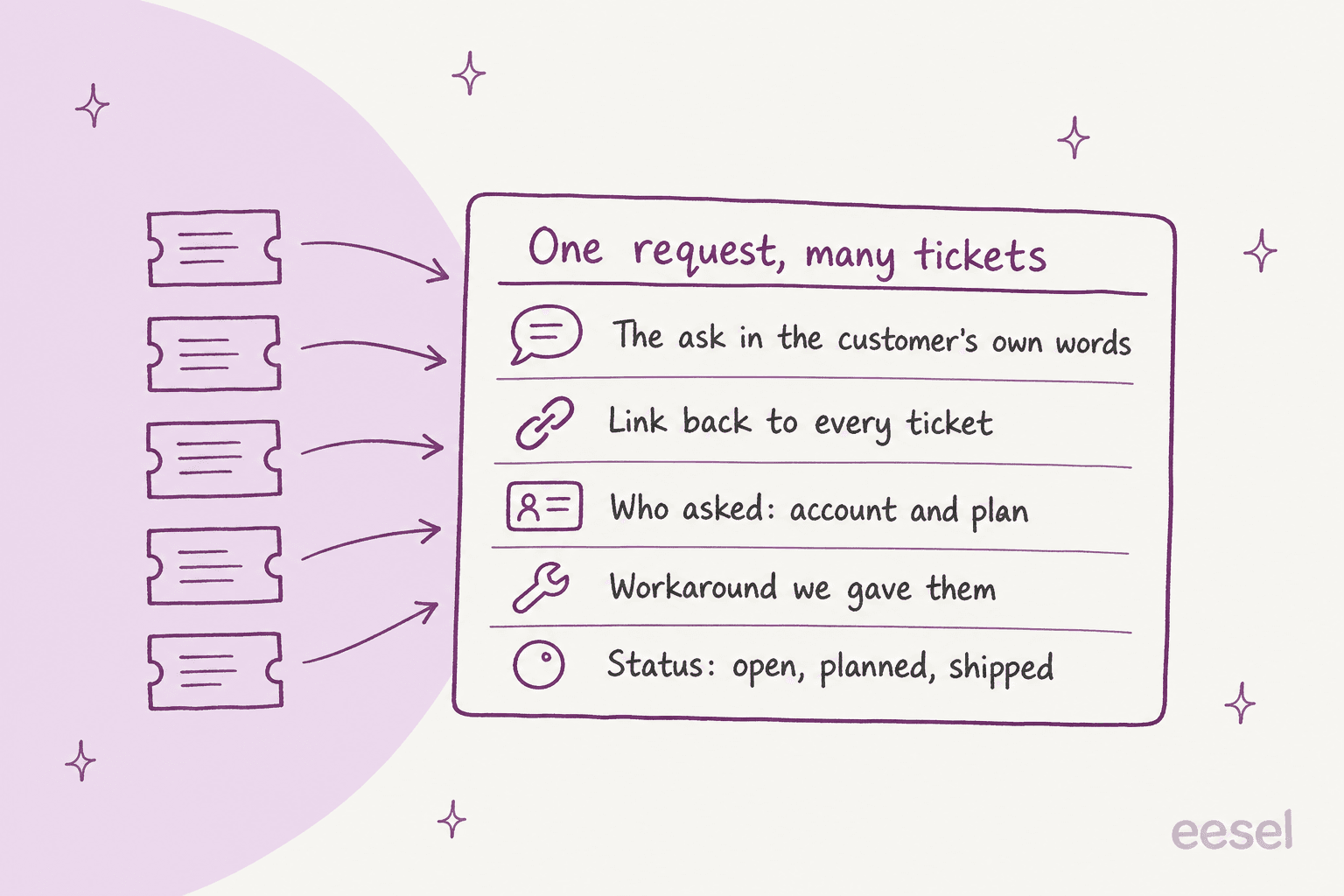
Most setups lose the link back to every ticket. Paste a summary into a spreadsheet and the ticket link just drops off, so six months later, when the feature ships, nobody can say who asked. Linear handles this well: when an issue is created or linked from Zendesk, it "will automatically add a request pointing back to the source", and the request quotes the customer's original message with their name and a timestamp.
"Who asked" matters because a raw count on its own lies. The Reddit Head of Product above was weighing one $400K client against ten $20K clients. Linear lets you mark a request as important per customer, and Canny's voter list shows each customer's MRR next to the linked Zendesk ticket. When your helpdesk already knows the plan or account size, get the AI to write it onto the request, so the count can be weighed and not only added up.
Paul Graham made the other half of the point back in 2009, writing about Hacker News's own feature request page:
"One of the main points of the feature request page is to separate feature requests from submmissions. You want to do this because most are either duplicates or bad ideas, and yet (like all meta discussion, including this post) tend to get a lot of upvotes. The feature request page serves that purpose even if no one reads it."
Duplicates are normal, not the exception. So "link to an existing request" has to be the AI's first move, with "create a new one" as the fallback.
Which tools track feature requests from support tickets?
The tools that track feature requests from support tickets split into product-side boards (Canny, Productboard, Featurebase, Jira Product Discovery), an issue tracker that takes requests (Linear), and AI inside the helpdesk itself (Zendesk's intelligent triage, or an agent like eesel). Here's how they stack up on the four jobs. Prices are from each vendor's own pricing page, checked on 2026-10-30.
| Tool | How tickets get in | What the AI does | How the requester hears back | Starting price |
|---|---|---|---|---|
| Canny | Autopilot reads closed tickets from Zendesk, Freshdesk, Help Scout; Zendesk sidebar app | Finds requests, merges duplicates, manual or automated mode | Status emails, including to "users tracked internally" | Free for 25 tracked users; Pro $99/mo for 100 ($79 annual) |
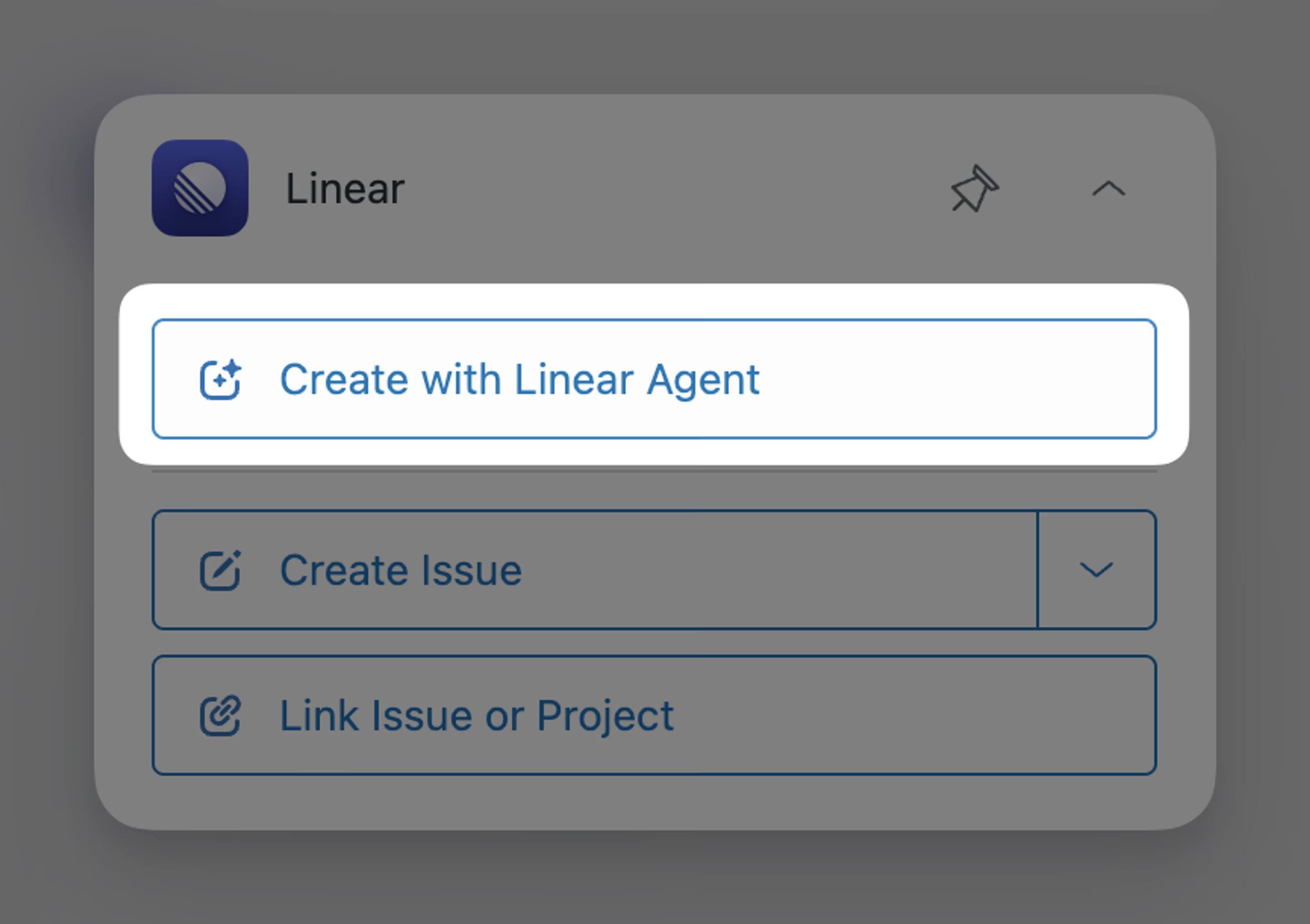
| Linear | Create or link an issue from the Zendesk or Front sidebar | "Create with Linear Agent" writes the issue from the whole conversation; Triage Intelligence flags duplicates | Internal note + ticket reopened; a person writes the reply | Business $16/user/mo, billed yearly (needed for Zendesk) |
| Productboard | Zendesk tickets pulled in by tag or trigger; Freshdesk one at a time | Spark ranks feedback into opportunities; auto-linking to features is "Not yet" in Spark | A product manager writes a portal update | Not published; minimum 5 makers |
| Featurebase | Its own inbox (AI), Zendesk and HubSpot apps (manual) | Links feedback to requests, merges clear duplicates, splits multi-ask messages | Status email; custom update can reply in linked conversations | Growth $29/seat/mo annual ($37 monthly) |
| Jira Product Discovery | Paste a Zendesk or JSM link onto an idea as an insight | Rovo summarize and brainstorm, Premium only | Nothing built in today | Free for 3 creators; Standard $10.50/creator/mo |
| Zendesk intelligent triage | Classifies every ticket with a public comment | Tags intent; needs a custom "feature request" topic | Nothing built in | Suite Professional; Copilot $50/agent/mo to use it in workflows |
| eesel | Joins Zendesk, Freshdesk, Gorgias and other helpdesks as an agent | Tags from your list, writes fields, searches Jira for duplicates before filing | Drafts the reply in each linked ticket, woken by a webhook | Free 100 credits; $299/mo for 500 credits |
A few rows in that table are worth a closer look.
Canny is the most hands-off on capture. Autopilot is "Included in all plans", and it reads tickets only "after they are closed out" in the helpdesk, starting with the previous 30 days on first connect. It also skips personal data fields. What to watch is the count: people whose feedback Autopilot finds count as tracked users, and Pro's price steps up with tracked users (100 for $99 a month, 500 for $349, 1,000 for $661 on monthly billing).
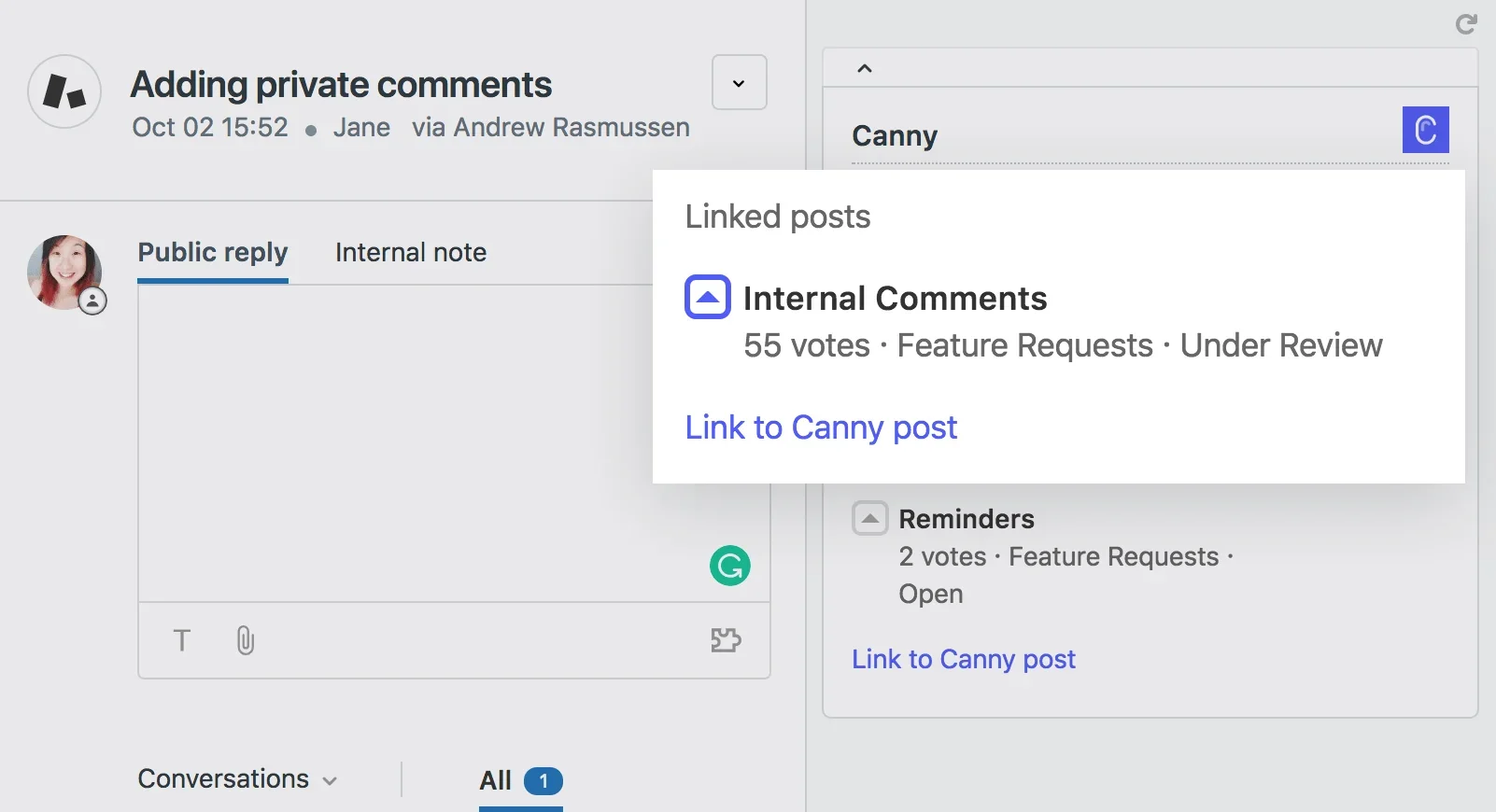
Linear is the strongest at keeping the link. You can link "as many Zendesk tickets to a Linear issue as you like", and when duplicate issues get merged the Zendesk links move to the surviving issue so automations keep working. Its AI is triggered by an agent. Someone working the ticket clicks "Create with Linear Agent", then Linear reads the whole conversation, attachments included, to write the issue. It won't scan every ticket on its own.
Zendesk's own AI can tag but not track. Intelligent triage classifies tickets by intent, but I couldn't find a built-in "feature request" topic in its docs. You'd have to create a custom topic for it yourself. It also doesn't count demand per feature, so you'd still need a board or a tracker on the other end. My intelligent triage breakdown goes deeper on the plans.
Productboard's AI reads but doesn't yet link. Spark is included with every workspace and reads Zendesk feedback into a ranked list of opportunities with citations. But in Productboard's own comparison table, insights auto-linking for Spark is marked "Not yet", and the older Productboard AI that did it is no longer for sale.
If you're weighing the product-side tools on their own, my posts on Featurebase alternatives, Jira Product Discovery AI and Linear vs Jira go further than I can here.
What happens when the requested feature ships?
When the feature ships, most tools either send a status email from the product tool or drop an internal note in the ticket. Someone in support still has to write the actual reply. The "tracking" is automated almost everywhere. The "telling the customer" mostly isn't.
Here's what each tool does at that last step, going by their own docs:
- Linear posts an internal note and reopens the Zendesk or Front ticket "so that your agents will be able to notify the customers". A person writes the reply.
- Featurebase adds an internal note to linked conversations on a status change. "Sending a customer reply is a separate action", per its status updates doc, though a custom update can reply in linked conversations.
- Canny emails users whose request came in through a ticket if you tick "Notify users tracked internally". The email comes from Canny, and "if a user replies directly to the email, the reply is not recorded", per its status change emails doc.
- Productboard lets a product manager write a portal update and send it to voters plus anyone with a linked insight. "It is not yet possible to reply to email updates", per its close the loop guide.
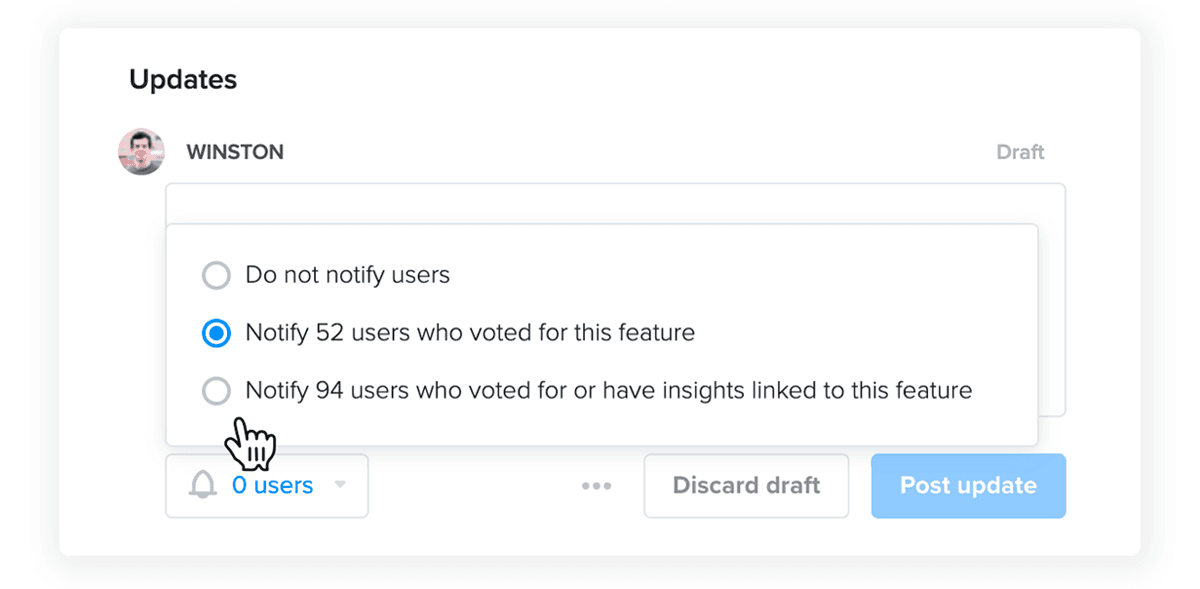
In that Productboard example, 52 people voted, but 94 had either voted or had feedback linked. So the people who asked through support are a big slice of the audience, and they never touched the board at all. They asked in a ticket. One G2 reviewer of Canny put the gap plainly:
"It is very basic. Unless the PM makes comments, it is difficult to understand if there has been any progress. There is no way to close the loop when a feature has been released."

That review comes from a team where Canny "was a way for our support team to submit feature ideas to the Product team", which is exactly the setup this post is about.
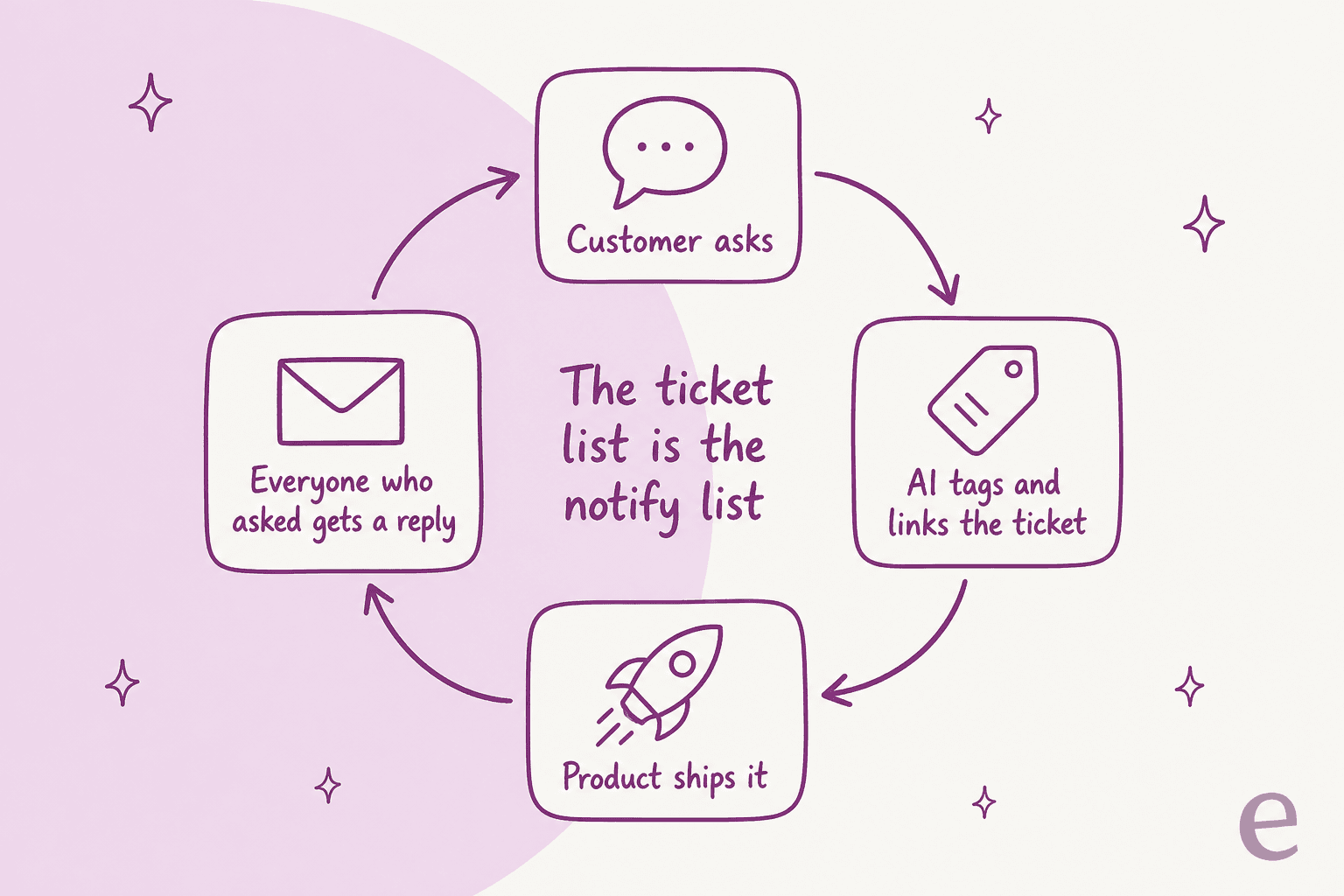
This is the shift I'd make if I were setting this up today. Treat the ticket list as the notify list. If every request keeps a link to every ticket that asked for it, then "it shipped" is a known list of conversations, each with its own context. An AI can draft a reply in each one, mentioning what that customer wanted and what they used in the meantime, and a person approves them. The customer hears back in the same thread they asked in, from the same team. It's the same idea as escalating Zendesk tickets to Jira, run in reverse.
How do you set up AI feature request tracking in your helpdesk?
You set it up in six steps: define what counts as a request, give the AI a fixed tag list, pick where requests live, make it search before it files, start on approvals, and wire up the "it shipped" reply. Below is how I'd handle each one. I'm using eesel as the example because it's what I know, but the steps carry over to any agent.
1. Write down what a feature request is
Put the four lanes from earlier into the agent's instructions with two or three real examples each, pulled from your own tickets. Include the "already exists" lane, with the help articles it should answer from. Instructions in eesel are plain text, which means changing what counts is a quick edit rather than a project. smava's setup works the same way: its categorization agent "picks one category from smava's mapping document, judging by intent", and every rule lives in the instructions.
2. Give it a fixed tag list and a field
Pick one tag for feature requests and, if your helpdesk has custom fields, a field for the product area. eesel's Zendesk actions include Add tags, Update ticket and Get ticket field options, the last one so it reads your real field values instead of guessing. SE Ranking uses this for measurement. It asked for an ai_handled tag on every ticket eesel touches, so the numbers live in Zendesk and not in someone's head. If you report in Zendesk Explore, my guide to reporting on ticket tags shows how to chart the counts.
3. Decide where requests live
If your product team runs on Jira, the agent can file there directly (my Zendesk and Jira guide covers the native route too). eesel's Jira Service Management integration has Create Issue (project, summary, description, assignee, labels) and Label Issue. If your team runs on Asana, there's a native Asana integration that creates tasks. For Linear, Canny or Productboard there's no native eesel integration in the docs, so you'd connect their API through Network Access, which lets the agent make GET, POST, PATCH and DELETE calls to any REST API you allow. The other option is to keep the tracker's own Zendesk app for linking and use the agent only for tagging and replies.
4. Make it search before it files
This step is what stops duplicates. eesel's Jira integration has a Search Issues action that "finds issues with a JQL query, so your agent can find related or duplicate issues". The Asana docs say it bluntly: "Tell it to search before it creates. Otherwise you get a second copy of a task that already exists." Write that into the instructions. Search first and link if there's a match, create only when there isn't one, and either way add the ticket link and the customer to the issue.
5. Start with merges and new issues on approval
Every eesel action can run on Auto, Needs approval or Disabled, per agent, as the actions and approvals doc describes. My pick would be tagging on Auto from day one, with Create Issue on Needs approval for the first few weeks. Unchecked AI merges can bury a customer's ask, and that's what happened to this Canny user:
"Their AI assistant that auto-creates features for you merges tickets in a way that's not helpful. What the AI tool was doing was: 1. Creating a feature request based on feedback 2. Merging an old ticket into the newly created feature request That was driving me mad! The trouble was being able to find my old ticket that I KNEW I created."
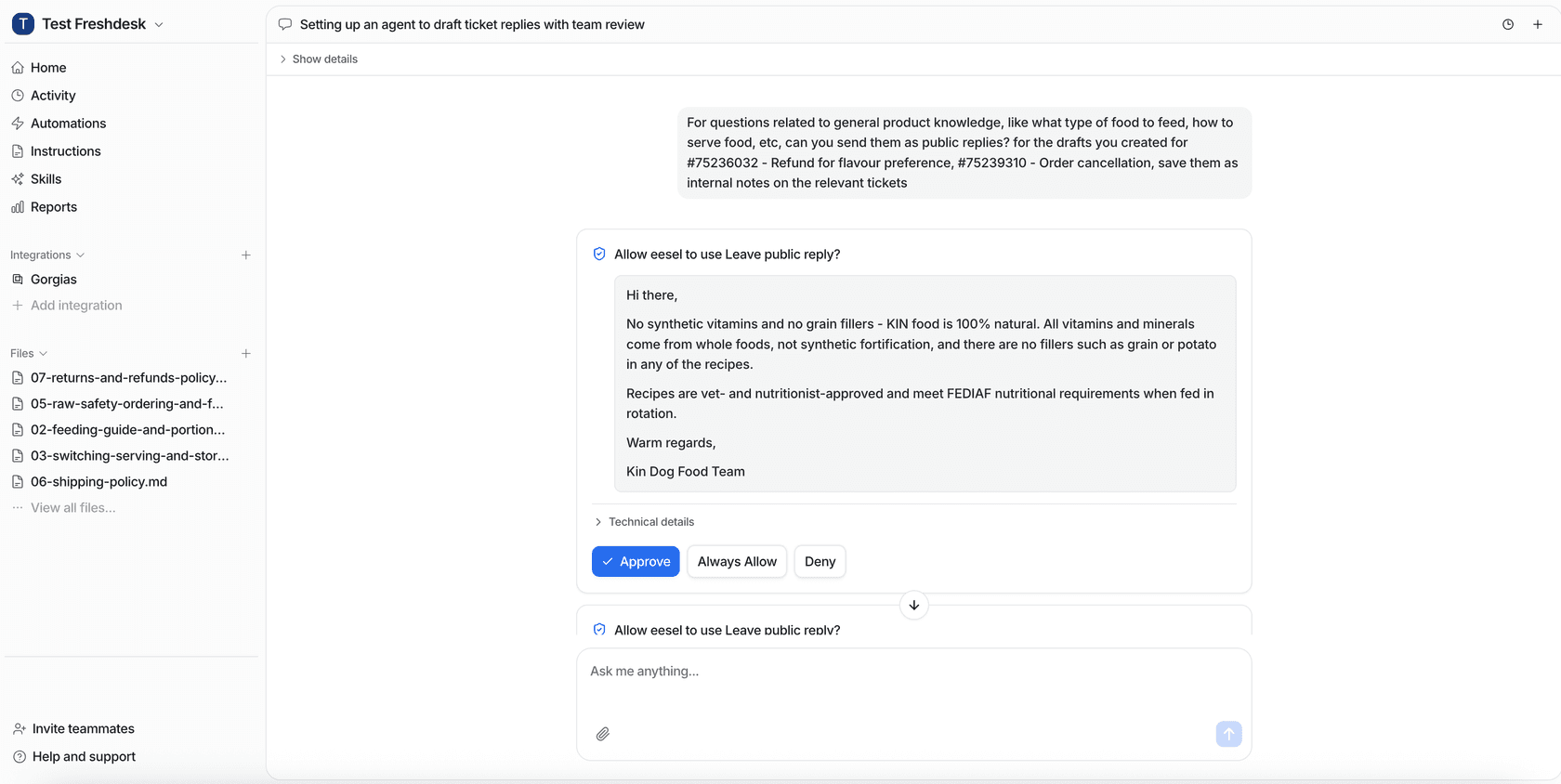
After a few weeks, if the approvals look right, click "Always allow" on the ones you trust, and that action switches to Auto from then on.
6. Wire up the "it shipped" reply
There's a real limit here. eesel's Jira triggers fire when an issue is created or commented on, not when its status changes, so it won't hear "Done" by itself. The workaround is a Jira Automation rule that sends a web request to an eesel webhook when an issue moves to Done. "Send any JSON you like, and your agent reads all of it." The agent wakes up with the issue key, searches the helpdesk for tickets tagged and linked to it, and drafts a reply in each. I'd keep replies on Needs approval, at least until you've read through a batch.
For the weekly view, a schedule can run every Monday and post the top requests to a Slack channel with eesel's Slack integration, as long as it's been invited to that channel. The Reports skill "Analyze ticket trends" covers the same ground from the other direction: the themes that keep coming up, with volume and sentiment. If you'd rather drive it from a terminal, the eesel CLI lists automations with eesel automations, connects Jira with eesel integrations connect jira, and handles approvals from the terminal, so a coding agent like Claude Code can drive the same agent you set up in the dashboard.
Should you count feature requests or weigh them?
Weigh them, but keep the raw count visible too. On its own, a raw count rewards whoever writes in the most. A Reddit product manager running Canny described that exact bias:
"I just feel like they just make it easier for users to throw feature requests at my team and in my experience often the vast majority of feature request don't help a ton unless a common request and they could be biased by power users."
A cleverer AI score won't fix it. Better inputs will. If each linked ticket carries the account and plan, a product manager can sort by "requests from customers on the top plan" or "requests from accounts that mentioned cancelling". Linear's docs give the example of a view of Enterprise-tier issues "where each issue has at least 20 requests", sorted by customer count. Support's part is making sure that data sits on the request, and deciding what to build stays with product.
There's a support-side reason to log it carefully as well, and a customer success manager on Reddit put it well:
"It's pretty big, especially in a CYA way. For example, if an Enterprise customer threatens to cancel for years due to a missing feature, you need to make that well known in case they churn so people know that you sounded the alarms."
A tag with the account on it is that alarm, written down. And once requests are tagged consistently, they slot straight into contact-reason reporting next to everything else your queue tells you.
Track feature requests with eesel
eesel is an AI helpdesk teammate that joins your existing queue in Zendesk, Freshdesk or Gorgias, so feature request tracking happens where the ask arrives, not in a separate tool support has to remember to open. It answers the "already exists" tickets from your help center, tags the real requests from your own list, searches Jira before filing so duplicates link instead of multiplying, and drafts the "it's live" reply in every linked ticket when the work ships.
The tagging part is already running at volume: smava categorizes 14,600 Zendesk tickets a month into fields, Dokument 24 tags 430 tickets a month by product, and SE Ranking's agents created about 400 tickets for its second-line team in a month with the evidence attached.
Pricing is per ticket, not per seat: $299 a month for 500 credits, and a ticket is 1 credit however much the agent does inside it, so tagging, searching Jira and filing an issue in one ticket still costs one credit. There's a free plan with 100 credits to test it on your own queue. Try eesel.