

WHMCS has no AI of its own, so adding AI support means choosing where it sits: a chat on your client area that answers before a ticket exists, a reply assistant module inside the WHMCS ticket page, or a separate helpdesk that reads WHMCS data. For most hosts I'd start with staff drafts plus a client area chat for DNS, email and plan questions, and keep EPP codes, password resets and refunds with a person. eesel has no native WHMCS integration, but it can be that client area chat, answering DNS and email questions from your knowledgebase and sending the rest to your ticket form, or work inside Zendesk or Freshdesk if your tickets move there.
With the eesel CLI, a coding agent can set up that chat bubble, add your exported knowledgebase articles and run test questions before launch; hooking it into WHMCS still needs someone with WHMCS admin access.
What does WHMCS give you for support out of the box?
I work eesel's support queue every day, and the first thing I check with any new tool is what the team already has. With WHMCS, it's a lot. The support tickets module is a full ticket desk with threaded replies, private notes, assignment, priorities, predefined replies and automatic closing of inactive tickets. Tickets come in through the client area or by email, using email piping on self-hosted installs or email importing on WHMCS Cloud.
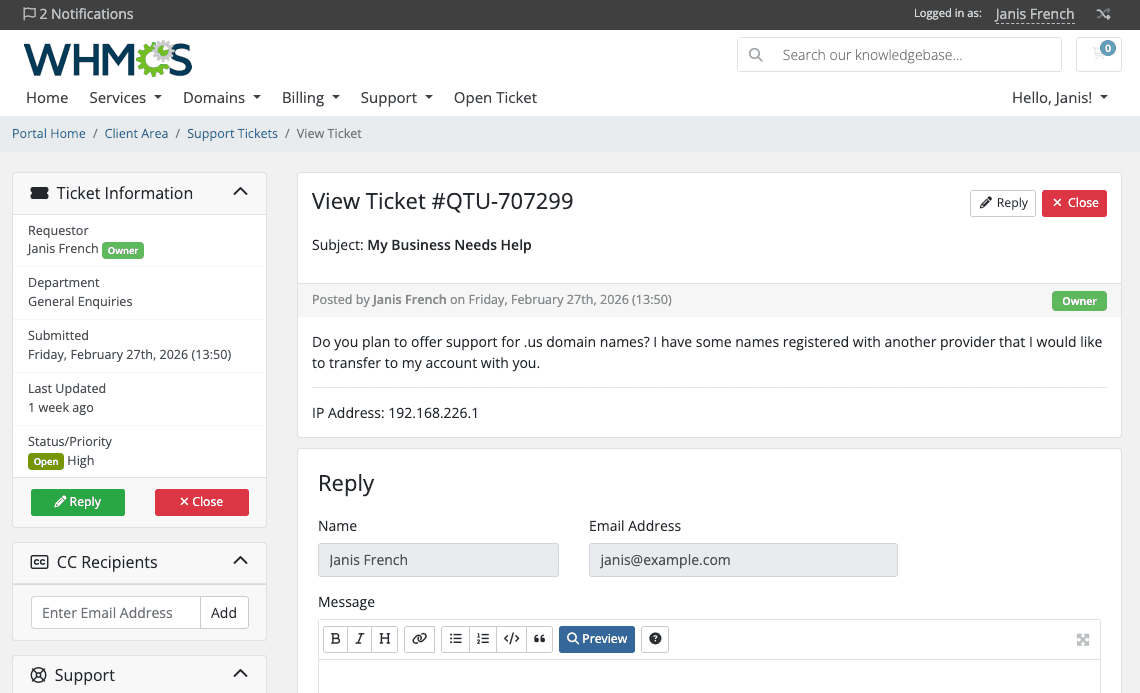
What WHMCS doesn't have is AI. The closest thing is knowledgebase suggestions, which show related articles while a client types a ticket. They use MySQL full-text search and only switch on once you have at least five articles of 30 words or more. There's also a paid Live Chat addon that turns chat transcripts into tickets, but it runs on self-hosted installs only, and it's live chat for your staff, not an AI.
For a small team, that all-in-one setup is the appeal: billing and ticketing in one place. Some resellers even get WHMCS bundled with their hosting:
"I use WHMCS as I started with selling hosting / domains., it manages our billing and support tickets. It’s free with our reseller hosting provider Krystal."

If that's you, answering for hosting you resell, my guide to AI for reseller support covers the extra wrinkle of fielding questions about someone else's servers.
If you buy it yourself, here's what WHMCS charges, straight from its pricing page. Prices are per month, excluding tax, and WHMCS says license pricing changes for new orders and renewals from January 1, 2027.
| Plan | Hosting | Active clients | Price | What's included |
|---|---|---|---|---|
| Plus | Self-hosted | Up to 250 | $34.95/mo | Email support |
| Professional | Self-hosted | Up to 500 | $54.95/mo | Email support |
| Business | Self-hosted | 1,000 (tiers up to 10,000) | from $84.95/mo | Email and live chat support, priority support |
| Starter | Fully managed (Cloud) | Up to 25 | $9.99/mo | $0.40 per extra client |
| Growth | Fully managed (Cloud) | Up to 100 | $25.00/mo | $0.25 per extra client, one premium addon |
| Expansion | Fully managed (Cloud) | Up to 300 | $75.00/mo | $0.25 per extra client, both premium addons |
None of these plans include an AI feature. WHMCS reports more than 35,000 customers in over 200 countries, and on G2 it holds 4.3 out of 5 from 59 reviews, and the pros reviewers tag most are ease of use, invoicing and automation. One reviewer summed it up in a line:
"It automates billing and support for us"

Where can AI sit in a WHMCS support flow?
The real decision is placement, not the AI model. A hosting customer's question passes three points where AI can step in, and each one sees different data and carries different risk.
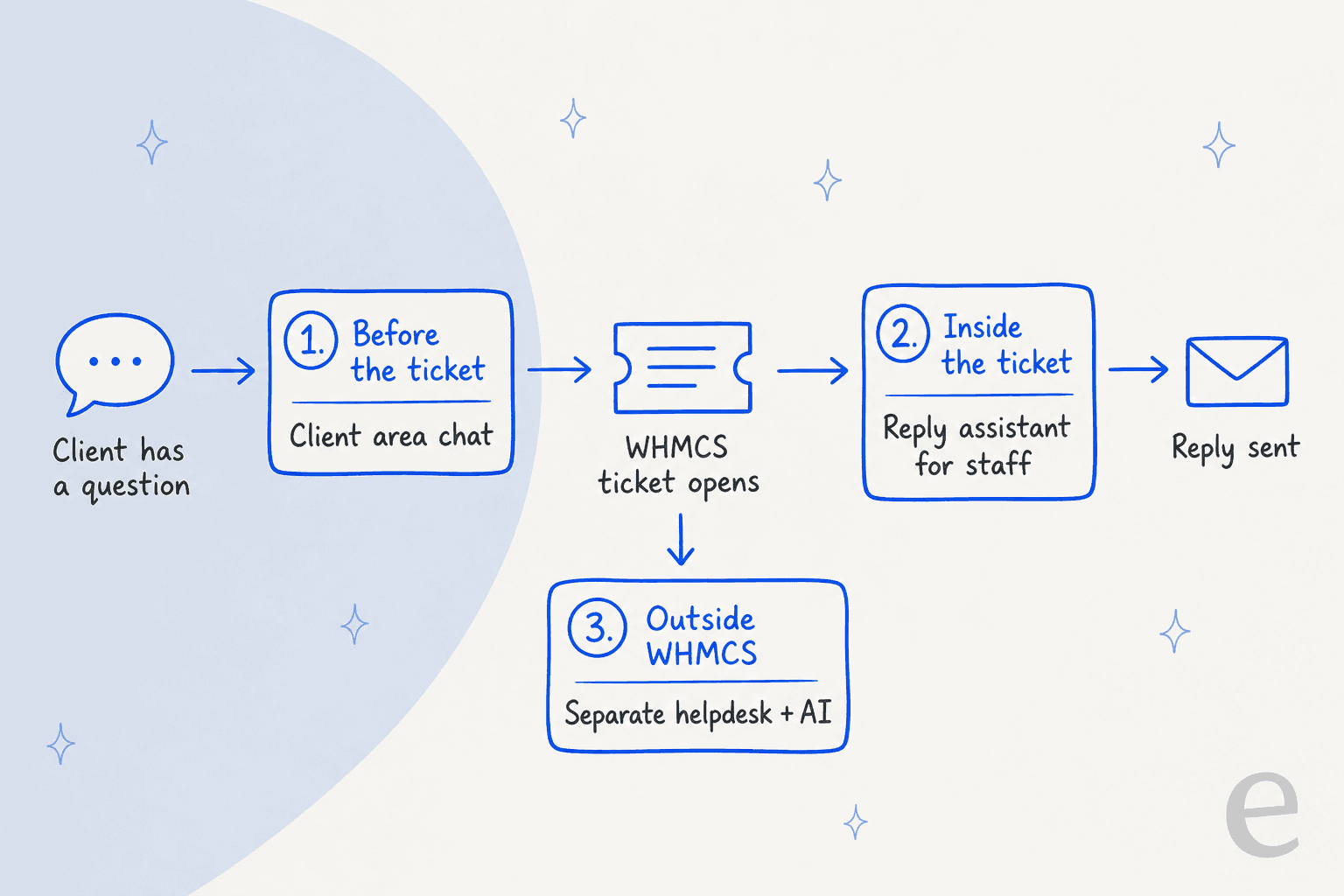
- Before the ticket. A chat widget on your client area and order pages answers the question so no ticket gets opened. It's the cheapest ticket you'll ever handle, and it's how ticket deflection works on any platform. The risk is a bot that loops when it doesn't know, so the handover matters more than the answers.
- Inside the ticket. A module adds AI to the admin ticket page. Staff click a button, get a draft from the conversation, edit it and send. Nothing reaches the customer without a person, which makes it the safest place to start. Think of it as an AI copilot for your WHMCS queue.
- Outside WHMCS. You keep WHMCS for billing and provisioning and run tickets in a dedicated helpdesk like Zendesk or Freshdesk, which has its own AI options. It's the biggest change, and it only pays off if you've outgrown the WHMCS ticket desk anyway.
You can mix them. My pick for a small hosting team is stop 2 for every ticket plus stop 1 for the questions that repeat all day.
Which hosting tickets should the AI actually take?
Before picking a tool, sort a month of tickets into four boxes. It's the first thing I'd do, and it settles most of the "which tool" debate before it starts.
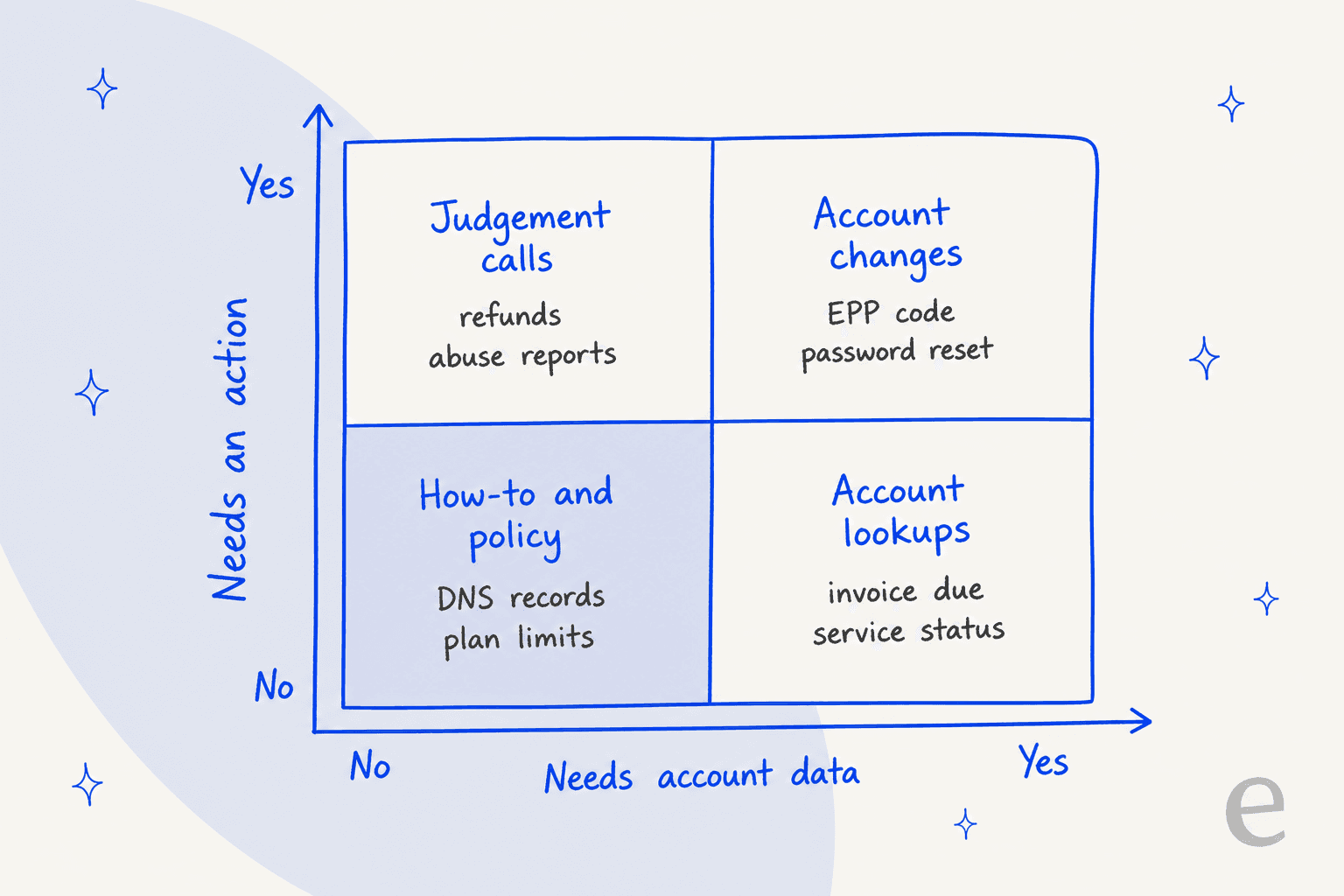
- How-to and policy (no account data, no action): pointing a domain at your nameservers, setting up email on a phone, what a plan includes, when maintenance runs. Any AI with access to your knowledgebase and website can answer these, and because clients ask them again and again, they're the easiest to automate.
- Account lookups (account data, no action): "is my invoice paid?", "when does my domain renew?", "is my service suspended?". The AI needs to read WHMCS data, which means a WHMCS-native module or custom work. Billing questions follow the same pattern I cover in AI billing support.
- Account changes (account data and an action): EPP codes, nameserver changes, password resets. Only automate these behind identity checks, and only once the first two boxes run cleanly.
- Judgement calls (no clean data, a decision): refunds, abuse reports, outage compensation. These stay with your team, with a clean escalation path from whatever the AI touches first.
Start with the bottom-left box. If most of your tickets land there, a client area chat plus staff drafts covers the bulk of the load without the AI ever touching an account. If most of your volume is account lookups, you need a tool that can read WHMCS, and that narrows the field fast.
Why aren't WHMCS knowledgebase suggestions enough?
Because keyword matching can't tell what the client is asking. A client who types "site down after DNS change" gets articles that share those words, which might be the right one, or three near misses. An AI agent reads the whole question, answers it in a sentence or two, and hands the client to a person when it doesn't know.
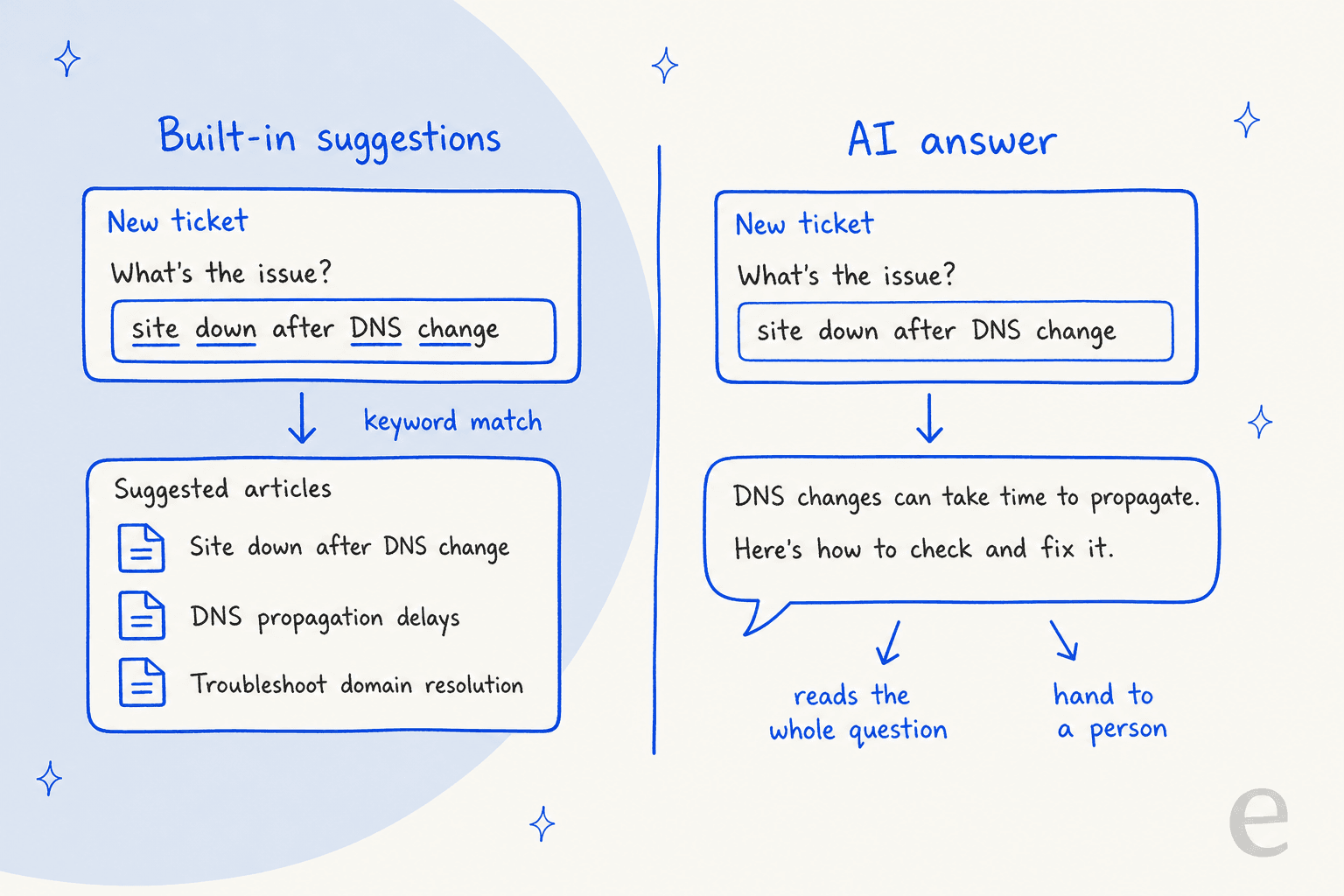
There's a developer-friendly middle step here that most guides skip. WHMCS fires a SubmitTicketAnswerSuggestions hook before it looks up suggestions, passing the ticket text in, and your code can return its own list of article IDs. If fewer than five come back, WHMCS fills in the rest itself. So a developer can swap in a smarter search without changing the client's screen at all. It still only shows articles, not answers, so it's a stepping stone rather than AI support.
Whichever route you take, the quality of the answers depends on your knowledgebase. If yours is thin or out of date, fix that first; my checklist for an AI knowledge base audit is a good place to start.
Which AI modules work inside WHMCS today?
The WHMCS Marketplace lists 142 apps under Support Tools, and several now carry AI. Here are the four I'd look at first, with prices from each listing.
| Module | Where the AI sits | Who sends the reply | Price on the listing | AI provider |
|---|---|---|---|---|
| MacawHost AI Ticket Assistant | Admin ticket page | Staff approve every reply | Free | Your own OpenAI key |
| AI Polish | Admin ticket page | Staff write, AI tidies | $79 one-time | Your own DeepSeek key |
| AI Support Assistant | Ticket page and client area chat | Draft mode or Auto mode | From about $9/mo (own key) to about $81/mo (2,500 replies) | Claude, OpenAI, or DNS Cloud's service |
| Asyntai AI Chatbot | Client area, order forms, ticket pages | AI answers clients | Free module, free Asyntai plan | Asyntai |
A few things stood out when I read the listings:
- MacawHost is the cleanest "inside the ticket" option. It drafts from the current ticket conversation, lets you add your brand voice, policies and services, and requires human approval before any customer-facing reply goes out.
- AI Polish is narrower on purpose. Your staff write the answer, and one click translates it into the client's language and fixes formatting. The listing is blunt that it "never answers for you". Good for multilingual teams; more on that in my guide to multilingual AI support.
- AI Support Assistant from DNS Cloud goes furthest. It reads WHMCS data, can reply on its own after a delay you set, stops when staff reply, and in the client area chat it gates actions like EPP codes and nameserver changes behind email verification codes, each off until you enable it. Its ticket page tools also summarize tickets and translate replies, and its paid tiers are 300, 1,000 and 2,500 AI replies a month.
- Asyntai sends your published knowledgebase articles to its service and answers clients in over 30 languages, saying it doesn't know rather than guessing.
One honest caveat: all four listings showed zero marketplace reviews when I checked, so treat them as new. Install on a staging copy first, and check that "bring your own key" modules leave you paying the AI provider separately.
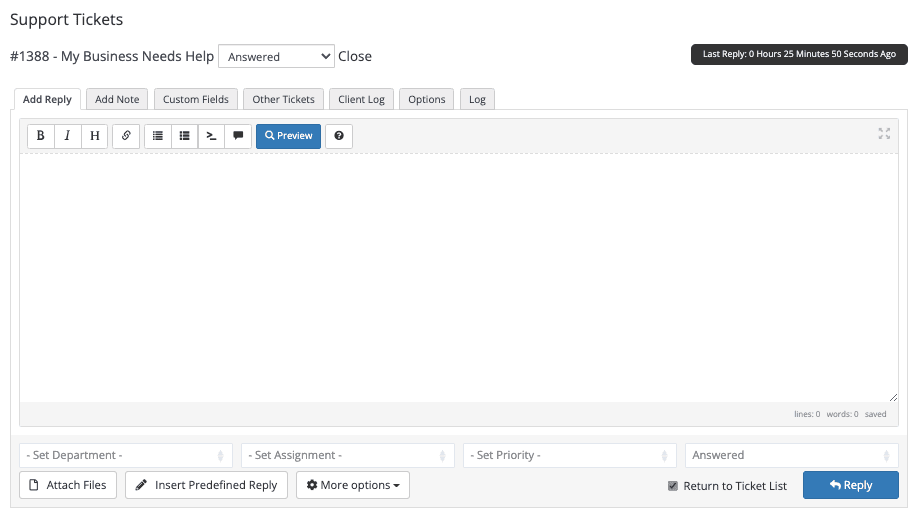
That admin reply box is where the "inside the ticket" modules add their buttons. If your staff already lean on predefined replies, an AI draft is the natural next step; my piece on AI canned responses compares the two.
Should you move tickets out of WHMCS instead?
Sometimes. Some hosts keep WHMCS for billing and move tickets to a dedicated helpdesk, and there's tooling built for it. ModulesGarden's WHMCS app for Zendesk shows each client's details, ordered products, domains and due invoices in the Zendesk ticket sidebar, and a separate module lets clients manage those tickets from your WHMCS client area. The app has 34 reviews on the Zendesk Marketplace.
Once tickets live in Zendesk or Freshdesk, the full range of helpdesk AI opens up, from Zendesk AI to eesel, which plugs into Zendesk as a teammate that drafts and sends replies, tags and routes. Freshdesk gets the same through eesel's Freshdesk integration. The catch is paying for a second system.
Check Zendesk pricing before you decide, compare it with my Freshdesk pricing breakdown, and read my Zendesk vs Freshdesk comparison if you're torn between them.
eesel has run this route in production, as the chatbot for a Dutch web-hosting company on Zendesk's help center and messaging, on a plan of roughly 7,600 interactions. The answers were rarely the problem. Almost every painful moment was at the handover: the bot telling a customer it was passing them to a person when the transfer hadn't happened, the customer's name and email not reaching the ticket, and business-hours rules that didn't hold up across time zones. That's why I'd test the handover before a single answer, whatever tool you pick.
The infrastructure crowd tends to be hard to impress, which is why this review from Gcore, a cloud and edge infrastructure company, stuck with me:
"I've tested many AI agent solutions, but so far Eesel is one of the best. It has many features we need, such as broad sources availability, variety of options, integrations, and so on. Highly recommended."
Mikita Tsybulka, Gcore, in a Zendesk Marketplace review of eesel
How does eesel fit with a WHMCS setup?
Straight answer first: eesel has no native WHMCS integration. Its helpdesk integrations cover Zendesk, Freshdesk, HubSpot, Gorgias, Help Scout, Front, Salesforce, Jira Service Management, Zoho Desk and Re:amaze, and WHMCS isn't on that list. It also can't read WHMCS invoices or services without custom work. If you need an AI that looks up a client's services inside the WHMCS ticket, a WHMCS-native module is the more direct path.
Where eesel does fit is as the AI helpdesk teammate around WHMCS, in two lanes that don't need WHMCS to change.
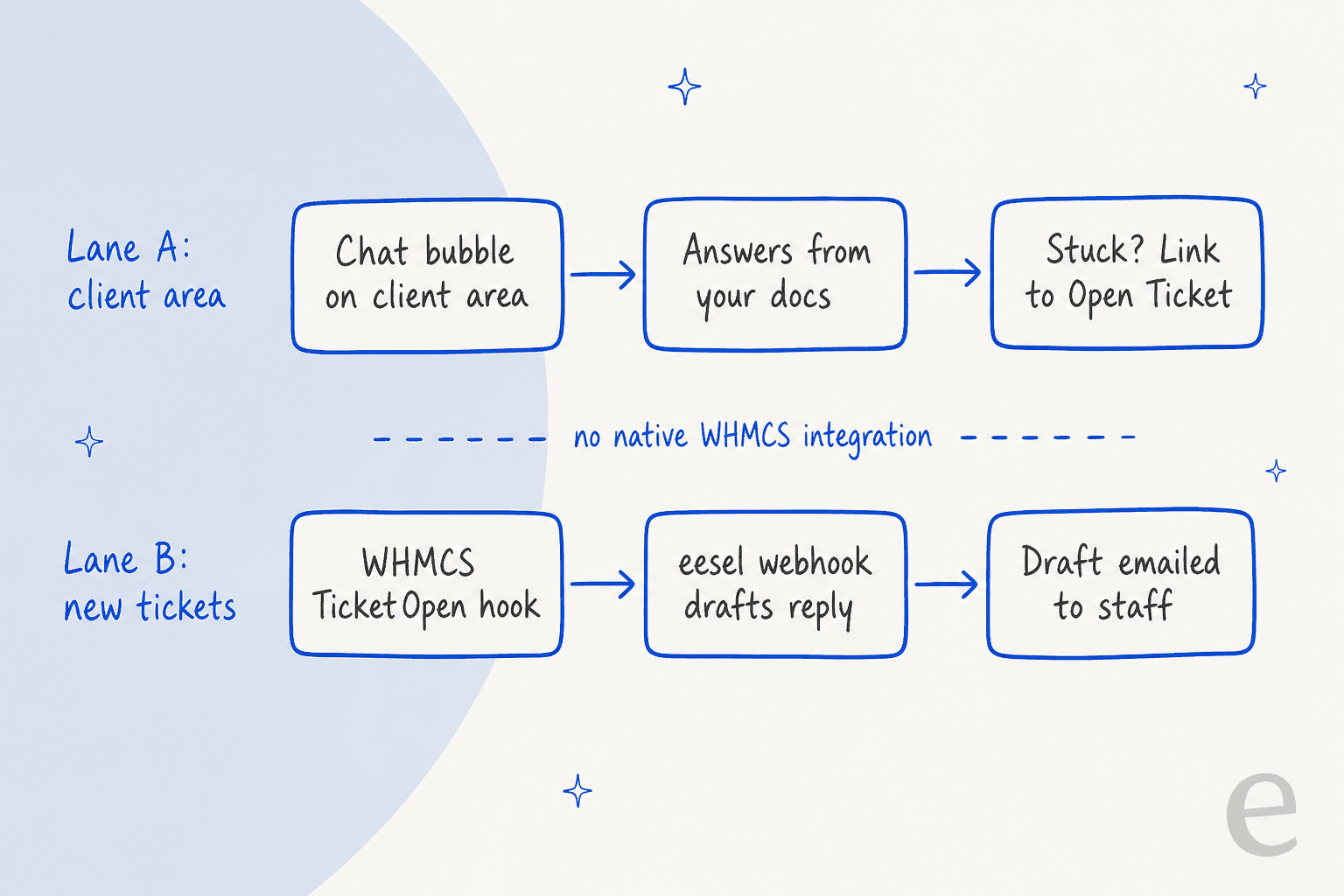
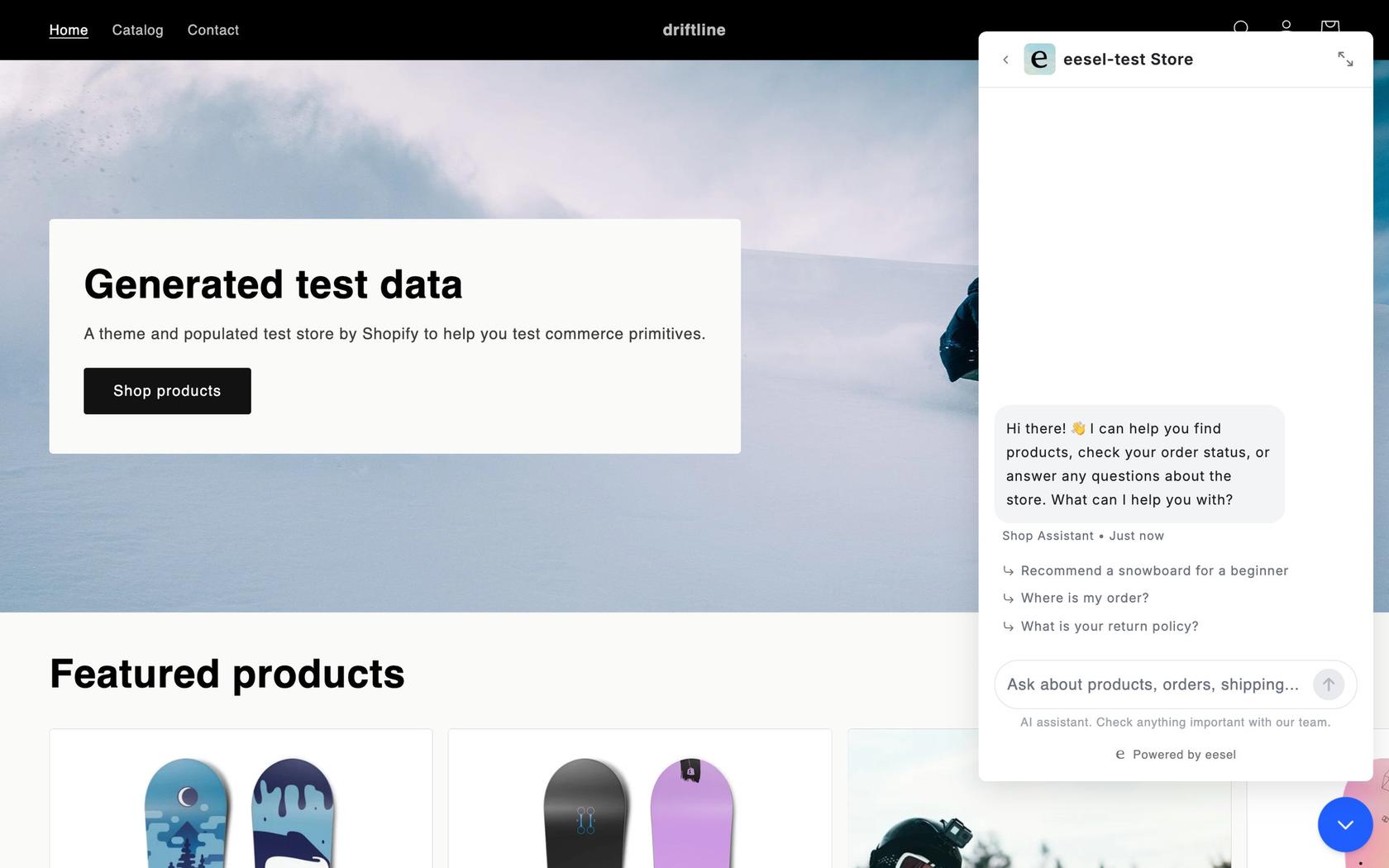
Lane A: a chat bubble on your client area. The eesel chat bubble is one script tag that works on any site that allows custom scripts. In WHMCS you'd add it to your theme's footer or output it with the ClientAreaFooterOutput hook. It answers from the pages and knowledgebase articles you connect, including your public WHMCS knowledgebase if you add its URL as a website source. For the handover, you write rules in plain language: send the client to your Open Ticket page with a summary to paste, or email your team. On WHMCS Cloud, which runs a curated module set, check that custom hooks or theme edits are allowed before you plan around this.
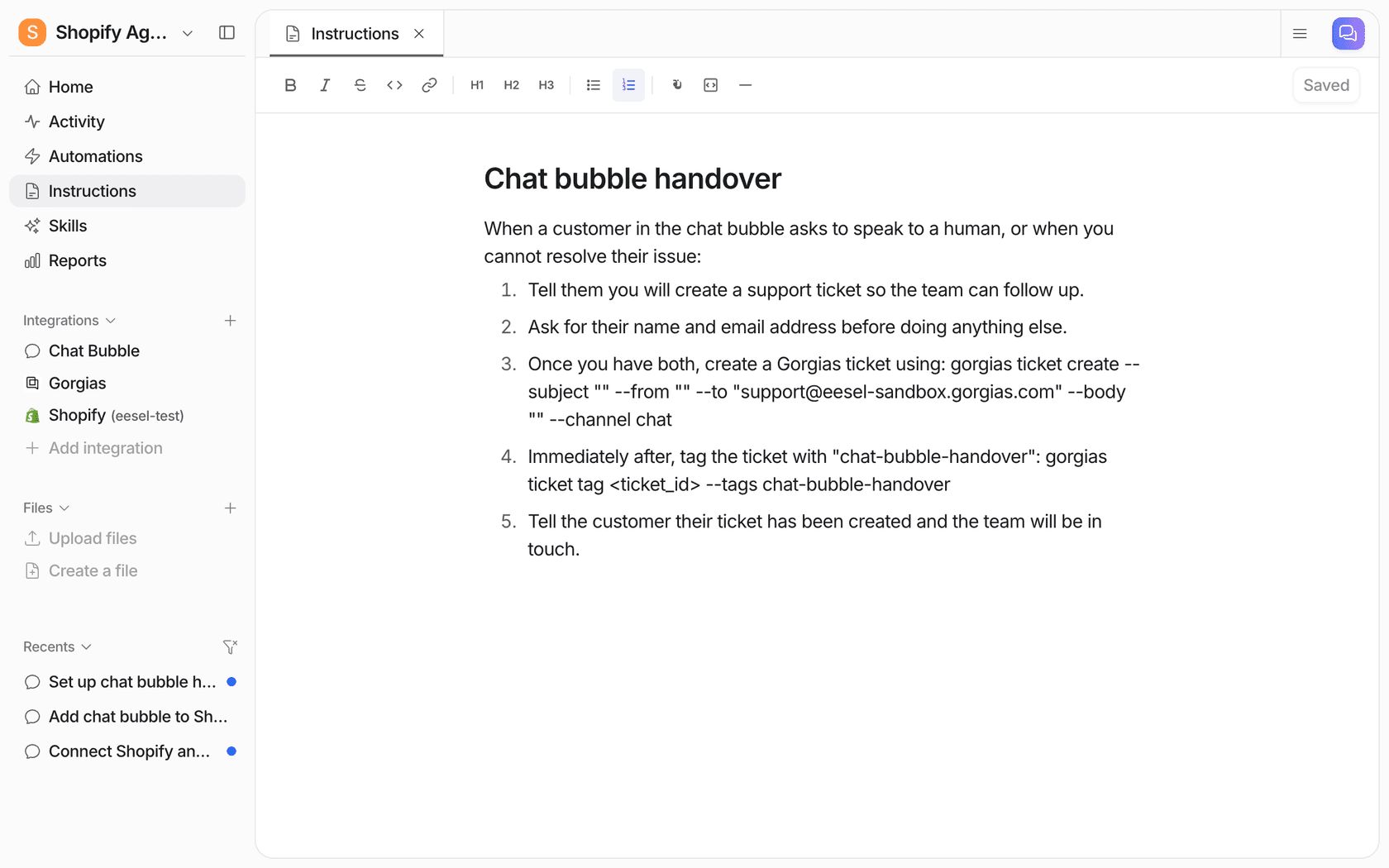
That screenshot shows a Gorgias handover, since eesel creates tickets directly only in helpdesks it connects to. With WHMCS, the rule points the client to your ticket form instead.
Lane B: drafts on new tickets. WHMCS fires a TicketOpen hook with the ticket ID, department, subject and message. A short PHP hook can POST that to an eesel webhook automation, and eesel drafts a reply from your knowledge and emails it to your staff, who paste and send it in WHMCS. eesel's email only goes to members of your eesel workspace, capped at 200 emails a day, so it suits a small team.
Writing the draft back into WHMCS is real developer work, the same trade-off I cover in my support agent API guide. WHMCS's API reads its credentials from the request body, while eesel's Your APIs page attaches credentials as headers. So you'd need a small endpoint on your server that takes eesel's draft and posts it as a private note with WHMCS's AddTicketNote call. It works, but budget a developer's afternoon, not a toggle.
The closest published example of this kind of technical work is Timengo, whose DPG secure email product draws tickets about certificates, Outlook add-ins and mail flow, much like a host's email tickets. eesel learns from about 5,300 past tickets and help articles and prepared about 300 Freshdesk tickets in a month, writing about 180 draft replies that an engineer checks before sending. Two public chat pages answer the common how-to questions directly.
If you want both lanes at once, SamCart is a good model: one eesel agent on its website chat bubble and another on Freshdesk tickets, both answering from the same 280-article help center.
If you work from a terminal, the eesel CLI lets you or a coding agent like Claude Code create that webhook automation, read back its URL, send a test payload and check the run with eesel activity. It doesn't touch WHMCS, so the hook file is still yours to write and deploy.
How do you roll out AI support in WHMCS without hurting customers?
Here's the order I'd follow, whichever tool you pick:
- Sort 200 recent tickets into the four boxes. Use WHMCS ticket tags so you can search them later, or hand that job to AI ticket classification once you trust it. This tells you whether you need a client area chat, a reply assistant, or a tool that reads WHMCS data.
- Fix the knowledgebase before the AI reads it. Retire old articles, add the answers your staff keep typing, and make sure nameserver and email settings match what you sell today. Old pages are the fastest route to wrong answers, which my AI knowledge base guide covers in detail.
- Start in draft mode. Staff send every reply for the first few weeks. Then run the AI against past tickets before it talks to anyone; simulation testing catches the confident wrong answer before a client does.
- Design the handover first. SE Ranking tells customers to expect a reply in one or two business days, never that someone is joining now, and sends a repeated question straight to the team. In one month eesel answered 2,100 live chats first for them. My guide to AI agent handoff has the full checklist.
- Keep account changes behind verification. EPP codes and password resets stay with staff until you have identity checks in place, such as email codes or a support PIN.
- Read the unanswered list every week. Every question the AI couldn't answer is a missing knowledgebase article. Track your deflection rate alongside it so you know whether the chat is actually saving tickets.
One more for hosts with overnight gaps: a client area chat that answers DNS and email questions at 3am is a cheap form of after-hours support, as long as it promises a reply time rather than a person.
Try eesel on your WHMCS client area
If your WHMCS queue is full of DNS, email and "what does my plan include" questions, eesel can sit on your client area as an AI website chatbot, answer from your knowledgebase and website, and send everything else to your ticket form with a summary. You can paste one script tag and ask it test questions the same afternoon, then add webhook drafts for new tickets once you trust the answers. It starts at $299/month for 500 credits on eesel pricing, with 100 free credits to try first. Try eesel.
Frequently Asked Questions
Does WHMCS have built-in AI support?
No. WHMCS gives you a ticket desk, support departments, email importing and a knowledgebase. Its knowledgebase suggestions use MySQL full-text search, so they match keywords rather than reading the question. AI support in WHMCS comes from marketplace modules, a chat widget on your client area, or a separate helpdesk. My guide to AI for FAQ deflection shows what that layer adds.
What is the best AI support module for WHMCS?
It depends on where you want the AI. For staff drafts inside the ticket page, MacawHost AI Ticket Assistant is free with your own OpenAI key. For a module that can also reply on its own, AI Support Assistant from DNS Cloud has draft and auto modes from about $9/month. For a client area chat, Asyntai's module is free. For WHMCS AI support across chat and email in a helpdesk, see my AI helpdesk roundup.
Can AI reply to WHMCS tickets automatically?
Some modules can. AI Support Assistant has an Auto mode that sends after a delay you choose and stops when a staff member replies. I would still start in draft mode, with a person sending, until you have checked a few hundred answers. My notes on first response automation cover when to switch.
Does eesel integrate with WHMCS?
Not natively. eesel can run as a chat bubble on your WHMCS client area, take new tickets from a WHMCS hook through a webhook, or work inside Zendesk, Freshdesk or Help Scout if your tickets live there. It does not read WHMCS invoices or services without custom work. The chat bubble is the quickest start.
Which WHMCS tickets should AI handle first?
How-to and policy questions: DNS records, nameservers, email setup, plan limits, where to find an invoice. They need no account data and no action. Leave EPP codes, password resets and refunds with staff until you have identity checks in place. My guide to password reset requests explains why.
How much does it cost to add AI to WHMCS support?
Marketplace modules range from free (bring your own AI key) to a $79 one-time licence, or about $9 to $81 a month for AI Support Assistant depending on reply volume. eesel starts at $299/month for 500 credits, where a ticket or a chat is 1 credit. See eesel pricing for every size.
Is WHMCS AI support safe for account security?
It can be, if the AI never changes an account without a verified customer. AI Support Assistant gates actions like EPP codes behind email verification codes, and each one is off until you enable it. Whatever tool you use, send account changes to a person first and test answers before launch. My piece on preventing AI hallucinations covers the checks.