Recharge subscription delivery frequency: what happens to the next charge

Kurnia Kharisma

Katelin Teen
Last edited November 6, 2026

In Recharge, delivery frequency is really two clocks: how often a customer is charged and how often an order ships. On a regular subscription they match; on a prepaid plan one charge covers several shipments. Changing frequency makes Recharge recalculate the next charge date when its recalculation setting is on, which causes most "why did my next order date change?" tickets. An AI agent like eesel can change how often a subscription ships and bills for a verified customer, but prepaid plans and anything involving money belong with a person.
Why does a frequency change cause so many "my date moved" tickets?
Because a customer who asks for "every 2 weeks instead of monthly" thinks they changed one number, and Recharge changes the schedule.
I read Recharge's help center, its developer reference and eesel's own Recharge docs side by side for this post, and the same pattern shows up in all three. Frequency lives in at least two fields, a date is recalculated from it, and Shopify keeps its own picture of the plan. When those three disagree, the customer sees a date they didn't expect and writes in. I haven't run a Recharge store, so I'm not going to pretend to have lived in the admin for a year. What I can do is show exactly what the documentation says happens, and where the gaps are.
This is the fifth post in a small series on Recharge tickets. The earlier ones cover skipping an order and pausing.
Two more cover swapping a product and adding a one-time product. Frequency is the one that touches all of them, because skips, pauses and dates all hang off it.
If you want an AI coding agent to help test this on your own workspace, the eesel CLI can list the Recharge actions your agent has with eesel integrations recharge actions, then you ask it test questions about a real subscriber and read the answers before anything goes live. Someone with admin access still has to approve the Recharge connection itself.
What is the difference between a charge interval and an order interval?
The charge interval is how often Recharge bills the customer. The order interval is how often it creates a shipment. Recharge's subscription reference defines charge_interval_frequency as the number of units, set by order_interval_unit, between each charge. Its own example is order_interval_unit=month with charge_interval_frequency=3, which means a charge every 3 months.
On a regular subscription both are the same number, so the distinction never shows up. On a prepaid subscription it's the whole point.
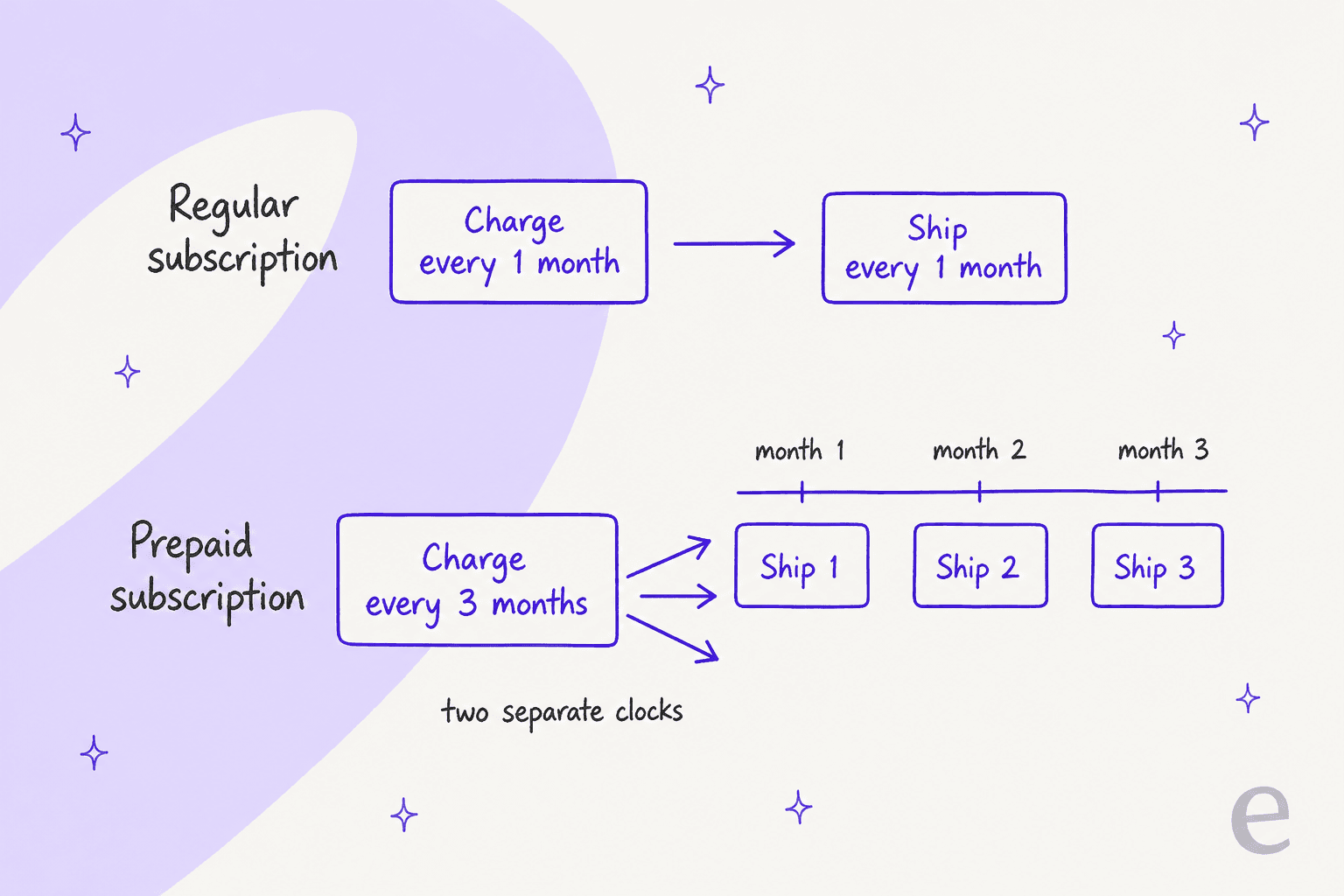
Here is how the fields line up between the API, the merchant portal and what the customer sees:
| Field | What it controls | Where you see it | Customer-facing wording |
|---|---|---|---|
charge_interval_frequency | How often the customer is billed | Edit frequency in the merchant portal, API | "Charged every 3 months" |
order_interval_frequency | How often an order ships | Same dialog, API | "Delivery every 30 days" |
order_interval_unit | Days, weeks or months for the order interval | Same dialog, API | The unit in the frequency drop-down |
| Plan | The frequency options a product offers | Products in the merchant portal | The choices in the portal drop-down |
Two details from the API reference save real headaches. If you update any of order_interval_unit, order_interval_frequency or charge_interval_frequency, all three are required. And when you create a subscription through the API, the interval values don't have to match the plan's, though the product does need at least one plan. A subscription can therefore carry a frequency no plan offers, and that matters again when we reach Shopify.
What happens to the next charge date when frequency changes?
It depends on one setting, and it's the first thing to check on any "my date moved" ticket. In Recharge's order schedule guide, the setting lives under Settings > Payment and is called Automatically recalculate next charge date when the subscription charge frequency is changed.
Recharge's own worked example is the clearest I've found. The last charge was on September 30 and the customer moves from every 2 months to every 1 month:
- Setting on: the next charge becomes October 30, one new interval after the last charge.
- Setting off: the next charge stays on November 30, and the one after is December 30.
- Setting on, but the recalculated date has already passed: Recharge counts from the day you made the change. Change it on November 1 and the next charge becomes December 1.
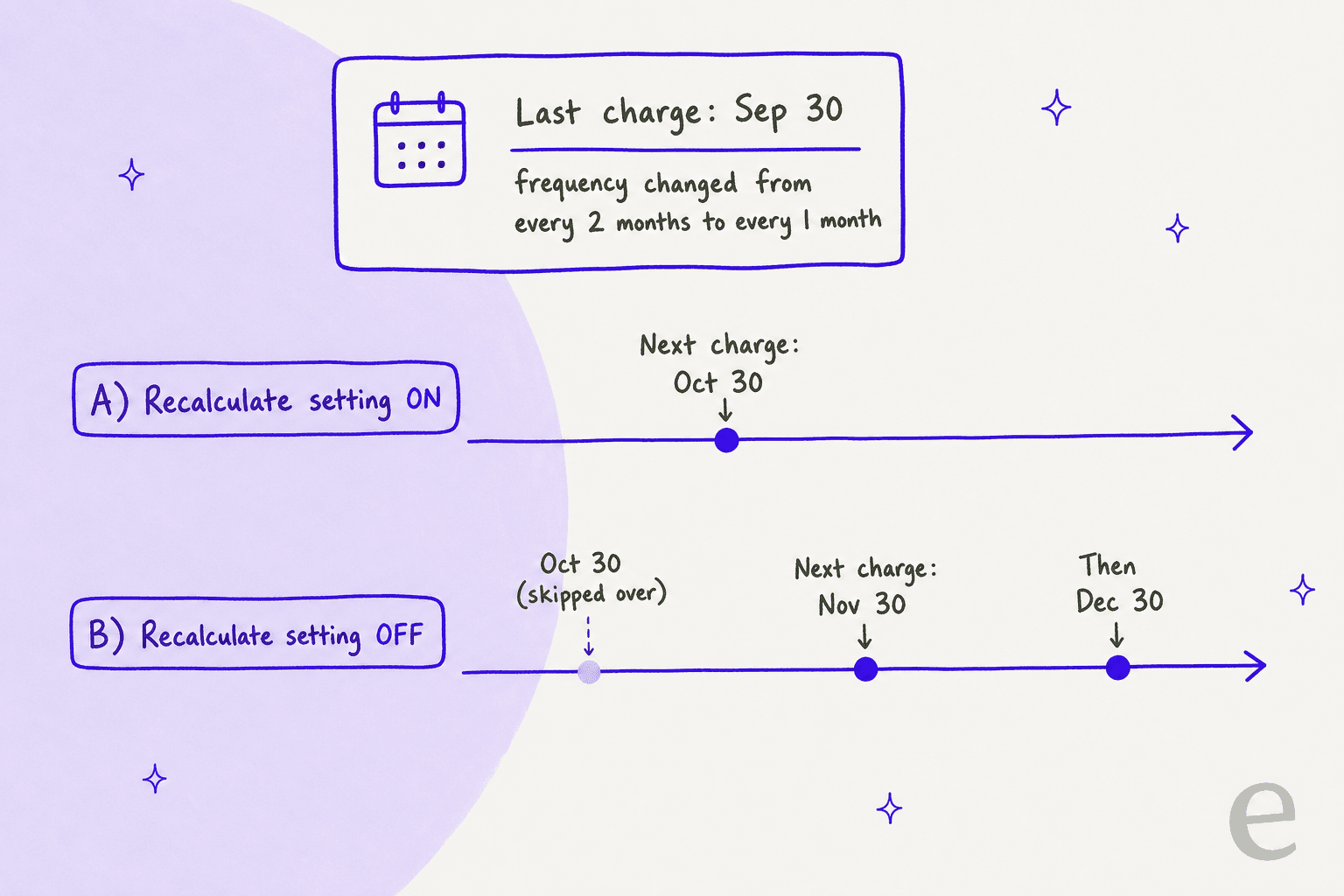
Recharge says the recalculation exists "to prevent duplicate charges", which is why I'd leave it on for most stores. The ticket cost is the other side of that coin: a customer who asked for a faster cadence may see their next date move out, not in. If a customer is surprised, that is usually the date they're pointing at.
The same guide has two ordering rules worth memorizing. If you need to change both the frequency and the date, change the frequency first, because a frequency action overrides a date you set earlier. The developer reference says the same for the API, since updating frequency parameters recalculates next_charge_scheduled_at.
Try the scenarios yourself. Pick a case and read what happens and what to tell the customer.
Where does the next charge land?
Last charge Sep 30. The customer moves from every 2 months to every 1 month. What happened?
Next charge: Oct 30.
Why: Recharge pushes the date to one new interval after the last charge.
Tell them: "Your next order is now Oct 30, then monthly after that."
Next charge: Nov 30, then Dec 30.
Why: the existing date is untouched and only later charges follow the new frequency.
Tell them: "Your current order stays on Nov 30. From there you'll be charged monthly."
Next charge: Dec 1.
Why: the recalculated date (Oct 30) had already passed, so Recharge counts from the day of the change.
Tell them: "Your next order is Dec 1, a month from today."
Effect: a prepaid plan of 12 shipments over 12 months becomes 6 orders when ship goes from 1 to 2.
Check: the current prepaid cycle is untouched, and the renewal price does not update on its own.
Tell them: what changes from the next cycle, and the new price if there is one.
Skips are the quiet casualty. Recharge's charge dates guide lists "the subscription's order frequency is updated" among the actions that remove a subscription from a skipped charge, and it emits a subscription/removed_from_skipped_charge webhook when that happens. The bulk guide is blunter: changing frequency in bulk can bring skipped charges back, and you re-skip them afterwards. A customer who skipped January, then changed frequency, can find January charging again.
How do you change frequency in the merchant portal?
Six clicks, and the dialog is where the prepaid fork lives. Recharge's schedule guide gives the steps:
- Click Customers and select Customers from the dropdown.
- Search and select the customer.
- Hover over the subscription product and open the three vertical dots menu.
- Select Edit frequency.
- Adjust the frequency value and interval.
- Click Confirm: update frequency.
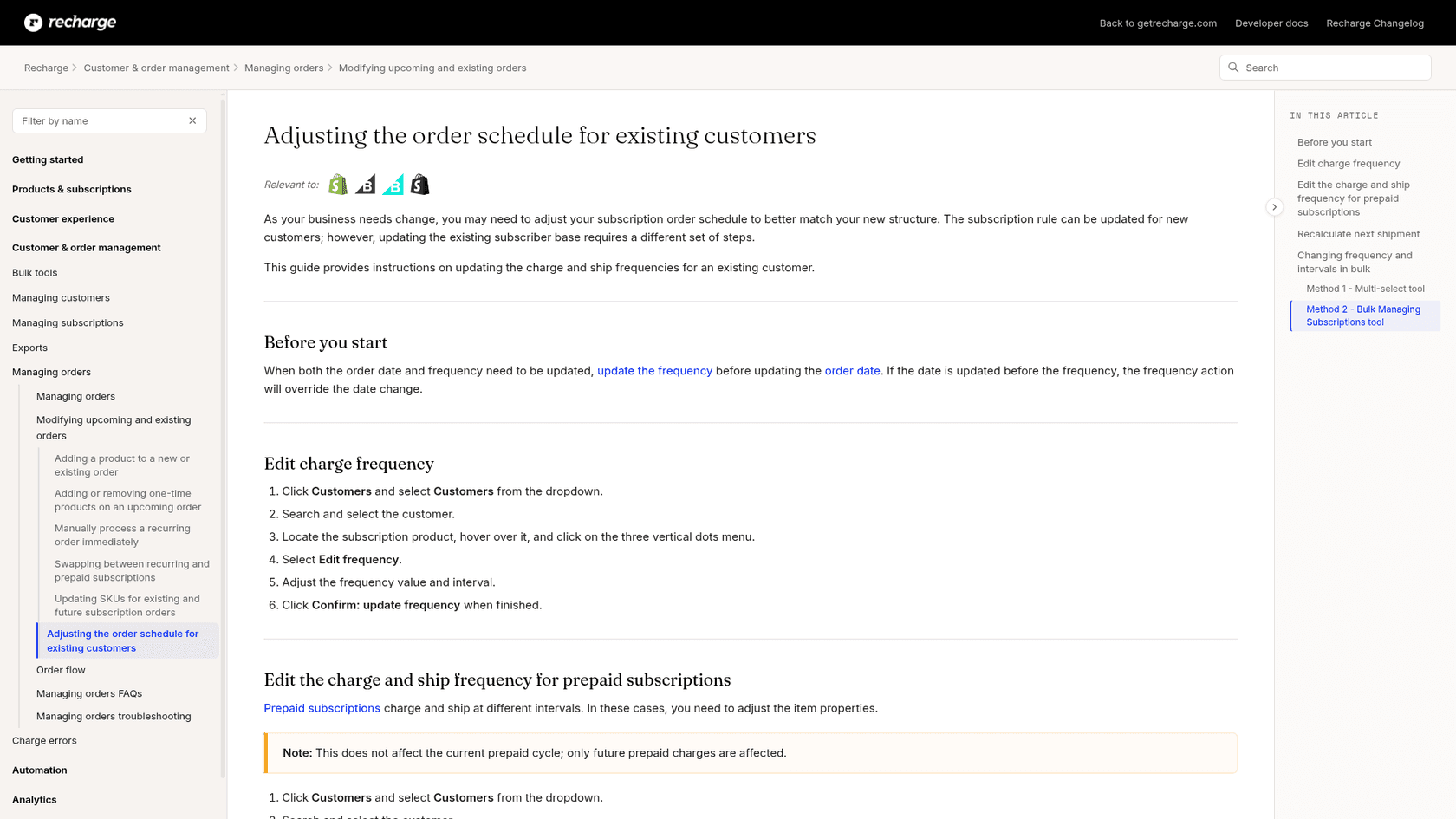
For bulk changes there are two routes. The Multi-select tool needs three fields filled in, charge interval frequency, order interval frequency and order interval unit. The import template uses subscription_id, order_interval_frequency, order_interval_unit and charge_interval_frequency, with allow_frequency_override set to TRUE for prepaid. Units are days, weeks or months. Do those on a copy first, since a wrong column can change something you didn't mean to.
What can customers change themselves?
Whatever you let them. The permission sits under Storefront > Customer portal > Customer portal functionality, and Recharge's portal settings guide lists "Changing subscription frequency" among the actions you can allow. Once it's on, a second option appears called Subscription frequency options with two choices:
- Customers can only choose from the plans you set up for each product. The drop-down shows the frequencies your plans offer and nothing else.
- Customers can choose any frequency, regardless of the product's plans. The customer sets a custom delivery interval.
Which portal you run changes the path. In the Affinity portal, a customer opens Manage subscriptions, picks Manage this subscription, changes quantity and frequency and clicks Save changes, as Recharge's instructions describe. In Unity, they go to Subscriptions, scroll to the product, click Edit options and pick from the Frequency drop-down, per the Unity guide.
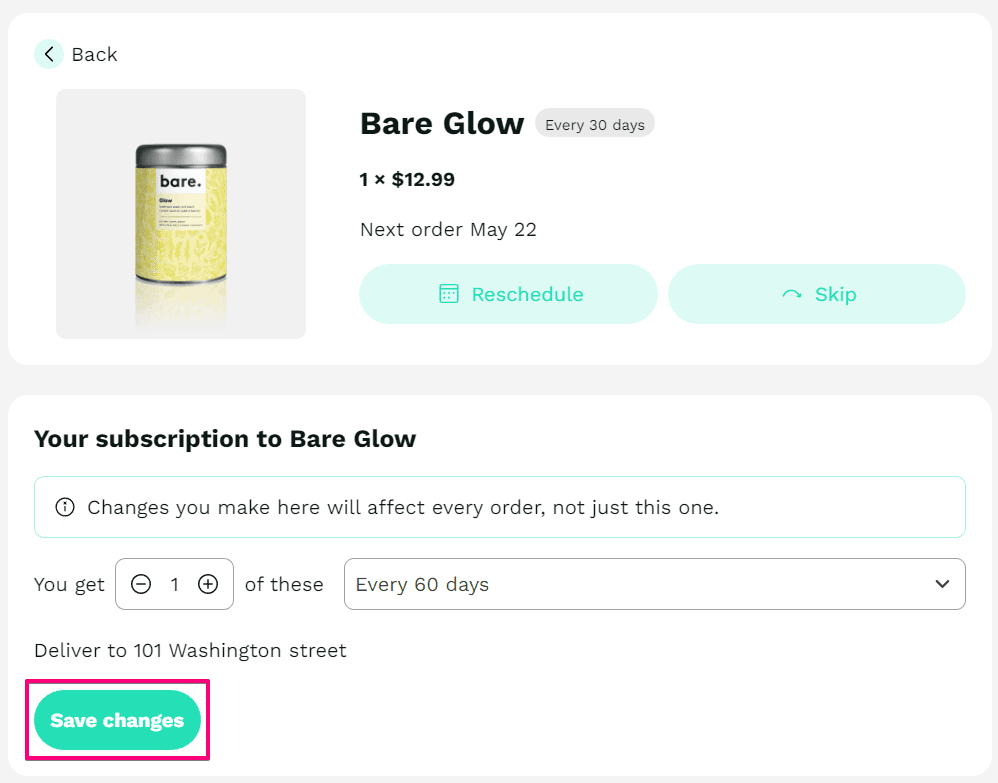
Both portals warn the customer that the change affects every order, not just the next one. That's helpful and also a trap. The customer reads "every order", but the date they care about is the next one, and the recalculation setting decides that.
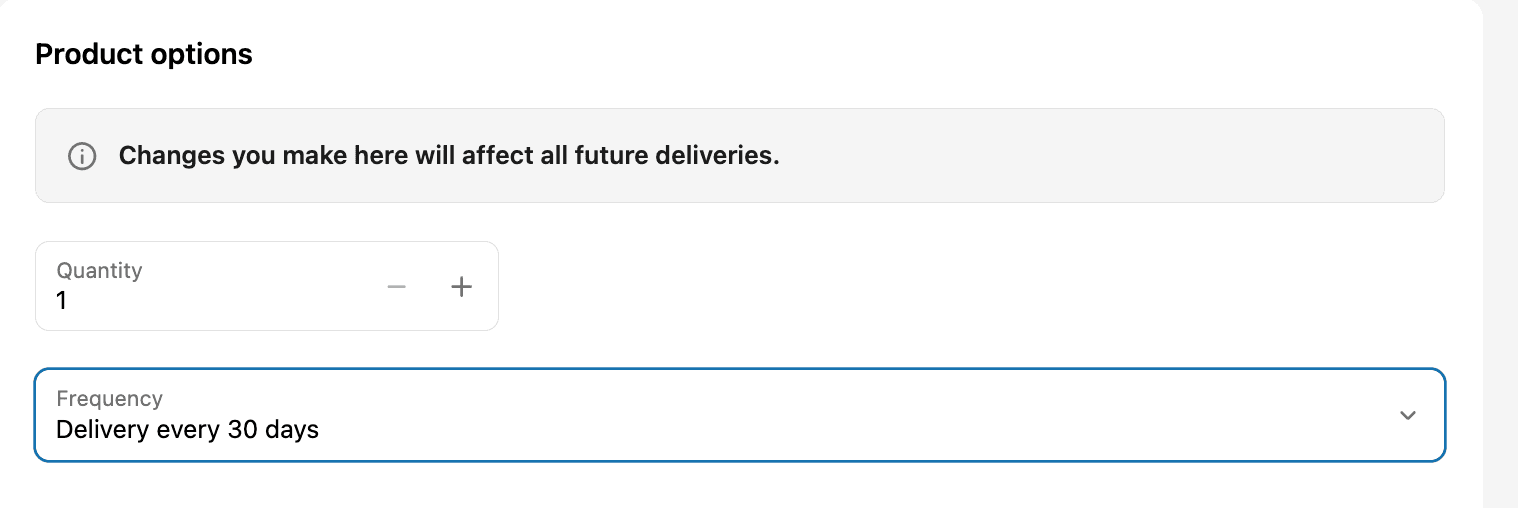
A G2 reviewer describes why this is worth switching on:
"The customer portal is particularly valuable, giving subscribers the ability to self-manage their subscriptions by skipping, pausing, swapping products, or updating billing and shipping details without needing to contact support, which has significantly reduced our support ticket volume."

The portal choice also decides the price. Recharge's pricing guide says frequency changes made by picking from the product's plans apply the latest Shopify price, while changes made with the any-frequency setting keep the subscription's existing price. Its example: a customer subscribed at $20 every two weeks, and you later raise the plan to $22. A plan-based frequency change moves them to $22; an any-frequency change leaves them at $20.
| Who changes it | Where | Price effect | Date effect |
|---|---|---|---|
| Customer, plans only | Portal frequency drop-down | Latest Shopify plan price applies | Recalculated if the setting is on |
| Customer, any frequency | Portal frequency drop-down | Existing price kept | Recalculated if the setting is on |
| Merchant | Edit frequency | Not stated in the guide | Recalculated if the setting is on |
| API or bulk | Subscription update | Not stated in the guide | Recalculated; may remove skips |
The practical advice is a short one. If you offer plans with different discounts, a "plans only" portal is the safer default, since a custom interval can sit outside your discount structure. If your customers want weird cadences, any-frequency is friendlier but quieter about money. I'd pick based on how many discount-bearing plans you run, and I'd write the choice down for support.
How do prepaid plans handle a frequency change?
Differently, and with fewer shortcuts. A prepaid plan has a ship interval and a charge interval, and Recharge's prepaid guide says the charge interval must be a multiple of how often the product ships. Ship every 2 months, for example, means you can charge every 4, 6 or 8.
In the merchant portal, the Edit frequency dialog has a This is a prepaid subscription option where you enter both intervals. Three details from the schedule guide are worth keeping on a card:
- The change doesn't touch the current prepaid cycle, only future charges.
- If you add shipments, for example Charge 12, Ship 1 becoming Charge 12, Ship 2, the number of prepaid orders drops from 12 to 6.
- The renewal price doesn't adjust automatically. Someone has to update the subscription price to match the new structure.
Shipment dates are a separate job. Recharge's prepaid shipment dates guide warns that changing or skipping one shipment date affects the other shipment dates or the upcoming charge date, so you may need to move both the next shipment and the next charge to keep them aligned.
Converting a prepaid subscription to monthly isn't a frequency edit at all. Recharge's conversion guide says to cancel the prepaid subscription, cancel any remaining queued shipments since cancelling doesn't do that for you, and add a monthly subscription. That is a three-step handoff, not a reply.
The one thing I couldn't find is a customer-facing guide for editing a prepaid plan's two intervals in the portal. Recharge's prepaid upsell lets a customer upgrade a regular subscription to prepaid, but the instructions I found for changing both prepaid intervals are merchant portal steps. If your customers ask, check your own portal before you promise.
Why does Shopify show the wrong frequency after a change?
Because Shopify has its own record of the plan, and a frequency outside it gets a default label. Recharge's troubleshooting article says that when a subscription's frequency is updated to something that exists outside of Shopify, Shopify creates the selling plan with a default option. The customer then sees the wrong frequency on the Shopify order details and in notifications.
The charge dates guide adds the reassuring part: this is a display limitation on Shopify's side, and the order is still charged and shipped on the updated frequency. So the reply is "your order is correct, the label in the Shopify email is not." Recharge's recommended fix is the only choose from the plans you set up portal setting, so customers can only select frequencies your plans define.
Variant Level Plans make this more interesting. The plans guide gives a coffee example where small bags ship every two weeks and large bags every four, on the same product. A customer who switches variant could meet a different frequency list, which is another source of "the dropdown changed" tickets. It's also where a Shopify support setup that reads the live subscription earns its keep.
Why did my next order date change, and what do I reply?
Start with the four causes below. They cover everything the documentation describes.
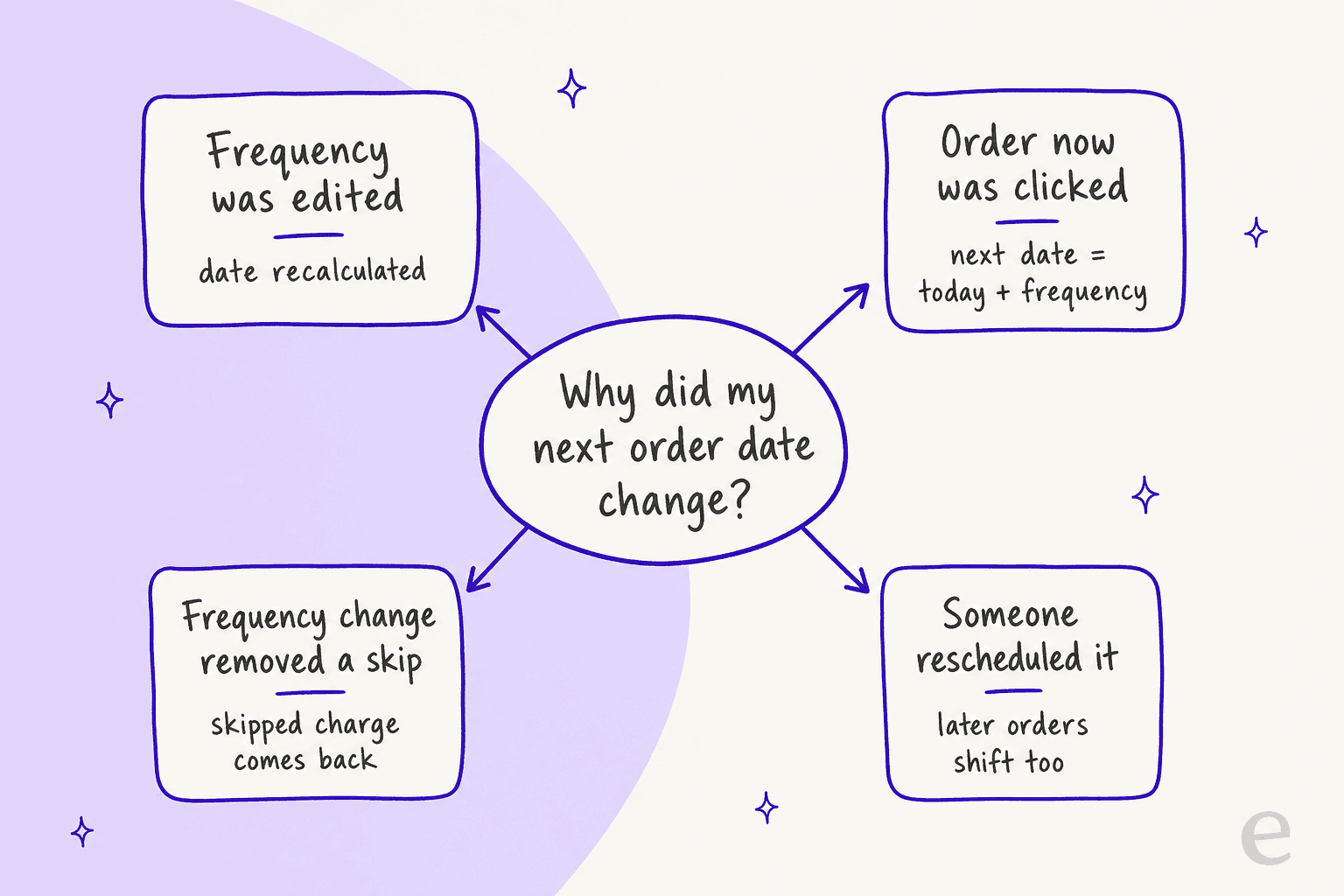
- Frequency was edited. If recalculation is on, the date moved to one new interval after the last charge.
- Order now was clicked. After the order processes, the next date is recalculated from the frequency. Recharge's example: a monthly subscription processed on January 1 has its next order on February 1.
- A skip came back. A frequency change cleared a skip, so a charge the customer thought was gone is scheduled again.
- Someone rescheduled it. In the portal, following orders reschedule based on the new date and the subscription's frequency.
Then reply with the date, the cause and what stays the same. Three templates I'd keep:
Hi Sam, I've changed your delivery to every 2 weeks. Because the schedule restarts from your last order, your next delivery is now March 14, then every two weeks after that. Your price stays at $20 per delivery.
Hi Sam, thanks for flagging that. Your next order moved from March 28 to March 14 because the frequency change recalculated it. If you'd rather keep March 28, reply and I'll move it back.
Hi Sam, your plan is prepaid, so you're billed every 3 months and shipped monthly. I've changed the shipping to every 2 months starting with your next prepaid cycle. The new price is $X, which I've updated on your subscription.
Notice that none of them promise a date the team hasn't read. A macro holds them fine, and our macro templates show the pattern for money questions.
If a charge already ran on the wrong date, that's a refund request that should go through a refund approval matrix, not through an agent's guess.
Tag these tickets. A tag like frequency-change will tell you in a month whether customers keep changing cadence because the product is too frequent, which is a churn signal you can act on with cancellation retention offers. Set up ticket tagging once and it comes free after that.
How do helpdesks and AI agents handle frequency tickets?
Most teams work them from the helpdesk with Recharge open in another tab, and the cost is the lookup: find the subscriber, read the current frequency, check the date, make the change, read the date again. Gorgias has a Recharge sidebar and AI Agent actions for subscriptions; I haven't verified whether any of them change frequency, so check Gorgias's current docs before you plan around it. Our Gorgias and Recharge guide covers the setup.
eesel is narrower on purpose. According to its Recharge docs, the agent finds a subscriber by the email address they wrote from and lists their subscriptions with each one's status, product, quantity, frequency and next charge date. Its Update subscription action changes the quantity or how often a subscription ships and bills, and it cannot swap the product. The same page says it can skip one charge, cancel, reactivate, create a subscription and update an address, and that for a pause or a date change it tells the customer what it can't do and hands the request to your team.
I'd be straight about the limits, because they matter for exactly the cases in this post:
- Prepaid plans. The docs say a prepaid plan is one charge covering several shipments. They don't say whether the update action sets the ship and charge intervals separately, so I'd test that on a real prepaid subscriber before relying on it and keep prepaid changes with a person otherwise.
- The recalculation setting. The docs don't describe how the action interacts with Recharge's recalculation setting. The safe habit is to have the agent read the next charge date back after the change and quote that, instead of computing it.
- Price. A frequency change can change price on plan-based edits. The agent shouldn't promise a price it hasn't read, and anything with money attached belongs in an approval step.
You control what runs on its own. The Actions and Approvals page lets you decide which actions need your OK first, and Recharge's page says a held action appears as an approval in the chat and on your Activity page. That's the right place to start with a frequency change.
Poseidon Animal Health is a useful comparison even though it doesn't run Recharge. Poseidon sells equine supplements through Gorgias and lists "can I pause my auto-ship" among its typical customer questions. Its team drafts replies with eesel's browser extension across about 610 conversations in a month, and every draft is read by a person who checks auto-ship changes before it goes out. MentorShow, a French learning subscription on HubSpot, has its agent read subscription status and the next renewal date from the member's record before drafting. Both are the same discipline: read the record, then write.
What I'd look for before letting any agent change cadence:
- It reads before and after. Frequency and next charge date before the change, and the next charge date again after it.
- It names the intervals. "Every 2 weeks" and "billed monthly" aren't the same sentence on a prepaid plan.
- It hands prepaid and price over. Those are the two places a reply goes wrong silently.
- It's tested on old tickets. Run it through simulation testing on past frequency tickets before go-live.
- It has a clean handoff. The handoff best practices and human handoff in chat guides cover what the person receiving it needs.
For the bigger picture, our subscription business roundup compares the tools, and subscription box support shows the wider ticket mix. If you're picking a helpdesk for this work, start with the ecommerce helpdesk comparison.
Does the Recharge plan change what you can do?
I found no plan restriction in the frequency guides, so this isn't described as gated. Here is Recharge's current pricing:
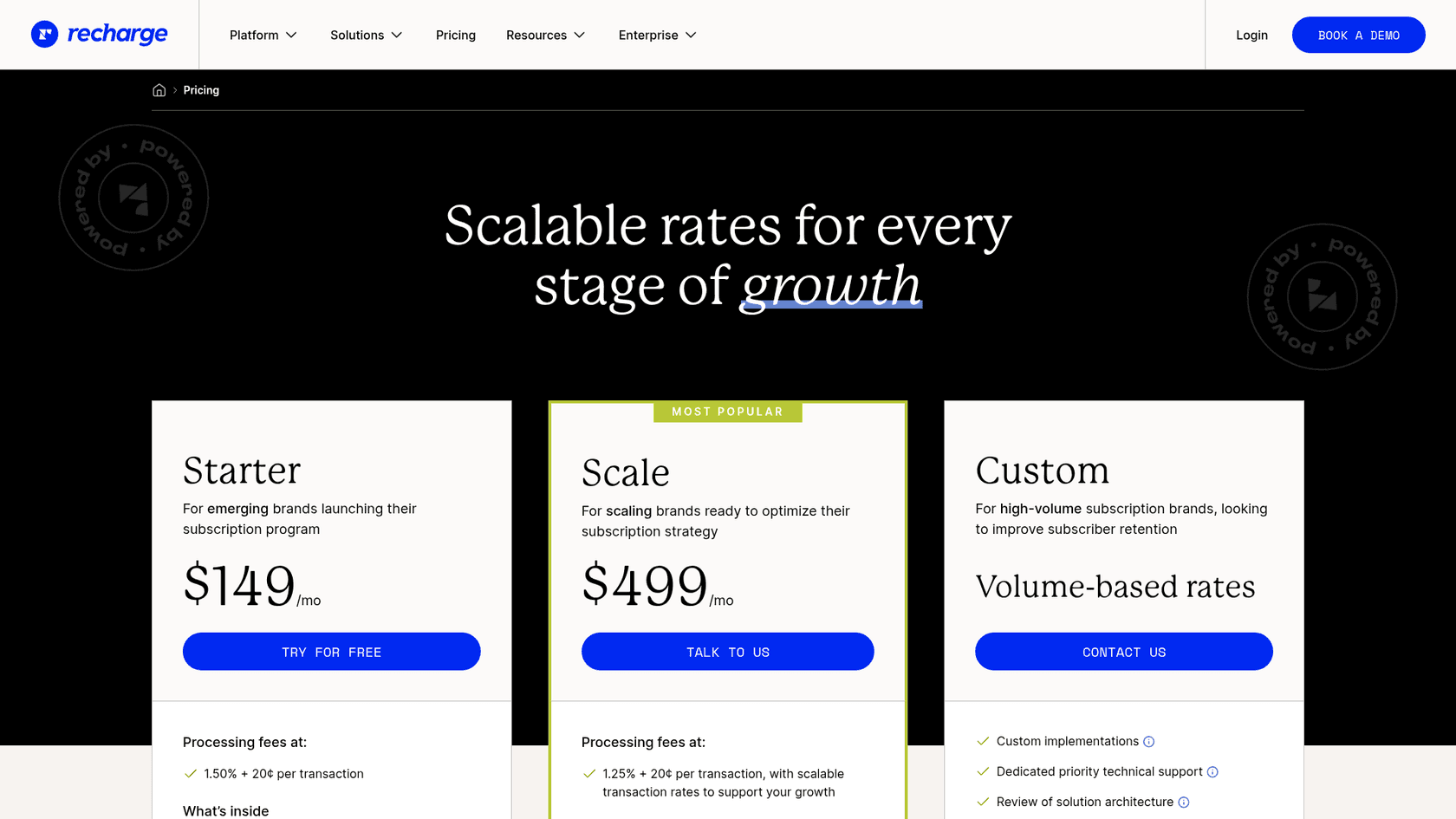
| Plan | Monthly fee | Processing fees |
|---|---|---|
| Starter | $149/mo | 1.50% + 20¢ per transaction |
| Scale | $499/mo | 1.25% + 20¢ per transaction, with scalable rates |
| Custom | Volume-based rates | Custom |
Check the pricing page for what each plan includes before you decide.
Try eesel for Recharge frequency tickets
If "can you make it every two weeks?" fills your queue, eesel can answer it from the live subscription inside the helpdesk you already use. It's an AI helpdesk teammate for Shopify support: it finds the subscriber, reads their current frequency and next charge date in Recharge, can update how often a subscription ships and bills for a verified customer, and hands pauses, date changes, prepaid edits and money questions to your team.
Connect Recharge and Shopify, point it at a real subscriber, and ask it for their frequency and next charge date before it touches a live ticket. Try eesel free.