What is the OpenAI Decisions API?
The Decisions API is a new OpenAI endpoint for one narrow job: choosing between options you define in advance. Here's how OpenAI's DevDay 2026 recap describes it:
"Decisions API enables real-time decision-making by focusing Luna's intelligence on a specific set of user-defined questions with finite pre-defined answers. Developers supply context using text or images, and get back answers they can use to classify content, route requests, or choose an agent's next action."
I build AI agents for a living, and most of the model calls inside one of them don't write anything at all. They are small forks in the road, like which team owns this ticket or does this need a human. A general model can answer those fine, only it goes the slow way, by generating text first. The Decisions API is OpenAI betting that this kind of call should get its own lane.
It sits beside the bigger DevDay launches, like the always-on OpenAI Dots agents, the GPT-6.1 Sol model and Codex Security Cloud.
It got less stage time than those. The keynote segment is under a minute, starting around 22:15 in the keynote, and the same week also brought ChatGPT Space. Still, if you run a support queue, this is the launch that maps the closest onto your daily work.
How does the Decisions API work?
You send in three things and you get one thing back. The flow, as far as OpenAI has described it, looks like this:
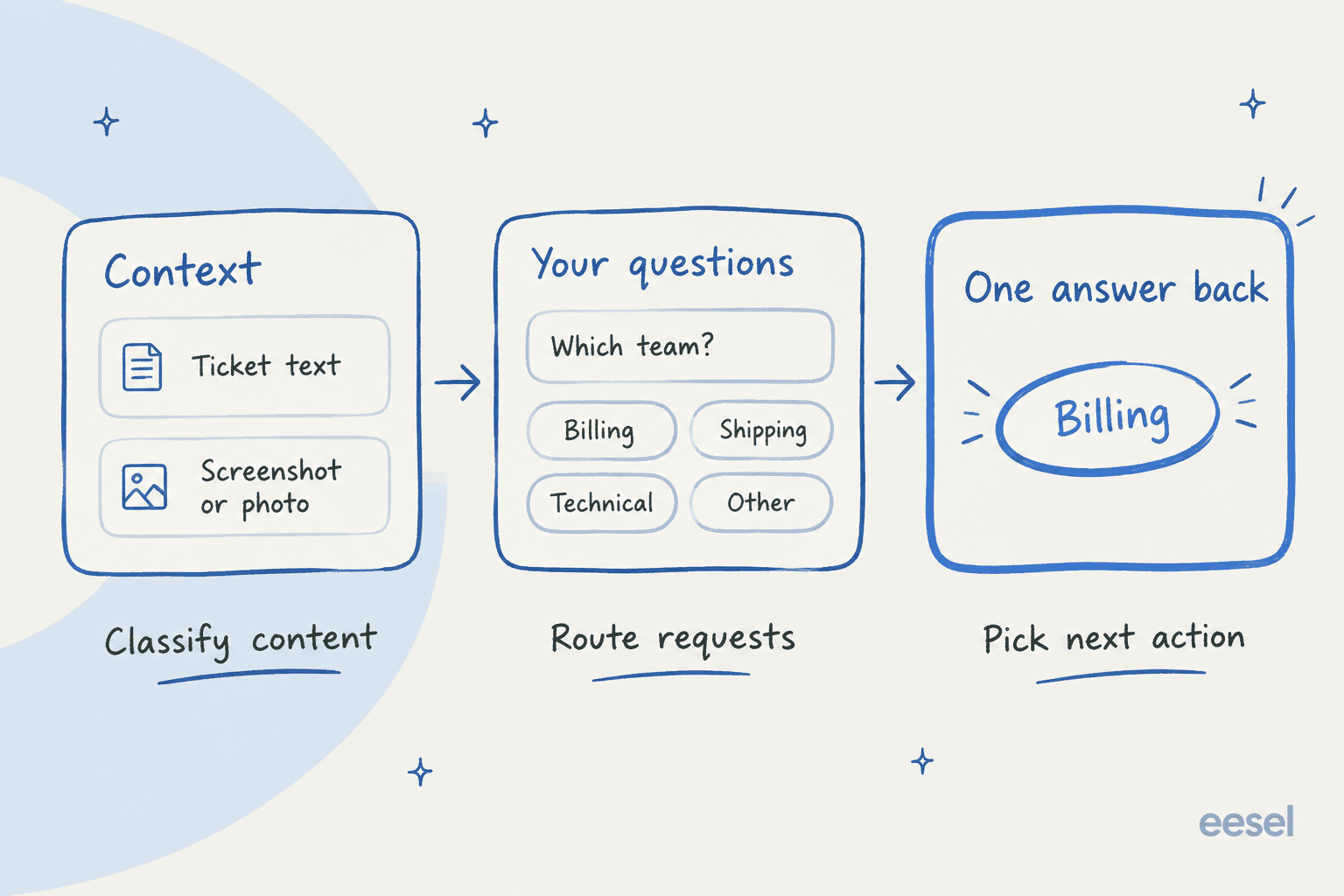
- Context. Text or images, so a ticket body or a chat transcript, or a product photo the customer attached.
- Questions with finite answers. You define each question, plus the full list of answers it is allowed to return.
- A selection back. One answer out of your list, and then your code acts on it.
The support example actually came from OpenAI's developer account itself, in a thread from @OpenAIDevs:
"Send text or images as context. For example, supply a support request and the teams it could go to. The API returns a selection your app can use."
Under the hood it runs on GPT-6 Luna, which OpenAI calls its "most efficient model for focused, high-volume tasks" on the Luna model page. How the keynote explains the speed is that a pre-defined set of options is what lets Luna answer in a fraction of a second. Nothing has to be written out word by word, so there's less to wait for.
If you plan to build on it, the parts OpenAI hasn't explained yet matter about as much:
- The request and response schema, since there is no API reference page.
- Whether one call can carry several questions, and how many answers each question can have.
- Whether the response carries a confidence score. Press coverage says yes, but I found no OpenAI page or post that mentions one.
- The billing unit and rate limits, also whether Batch or Flex apply.
One Hacker News reader took a guess at the mechanism in the DevDay thread: "I think they simply use the LLMs softmax scores (uncalibrated confidence)". It's a plausible reading, though nobody has confirmed it.
Can you use the OpenAI Decisions API yet?
Only if OpenAI picked you. The recap says it's "available in limited preview today with a broad release planned in the coming days", and the OpenAI Developers thread adds that "preview access is limited to selected API customers for testing."
I went and checked what this means in practice. POST https://api.openai.com/v1/decisions is a real route, and a standard key gets this answer from it:
{"error":{"message":"Decision API is not enabled for this user.","type":"invalid_request_error","param":null,"code":null}}
That is an HTTP 403, which means a feature gate rather than a missing route. Nearby paths like /v1/decisions/create and /v1/beta/decisions do return 404. The gate fires even on an empty body, so the errors also don't leak anything about the request shape. I got the same 403 on October 1, then again on October 2, three days after the "coming days" promise.
The paper trail is thin as well. As of October 2:
| What I checked | Result |
|---|---|
Docs guide (/api/docs/guides/decisions) | 404 |
API reference (/api/reference/decisions) | 404 |
| API changelog, Sep 29 entries | No Decisions API entry |
| API pricing page | No Decisions API row |
| Standalone announcement post | None, only the DevDay recap |
GET /v1/models | No model ID containing "decision" |
So for now the Decisions API is a promise and a gated endpoint. That is pretty normal for a preview, but it does mean you can't load test it or price it yet, and you can't read its limits either.
What does the Decisions API add over structured outputs?
One HN commenter asked the obvious question within hours of the launch:
"It seems a bit silly since OpenAI LLMs already can output structured data."

It's a fair point. You can already make Luna answer from a fixed list today: use the Responses API, set reasoning to none, then pass a strict JSON schema where the only field is an enum of your answers. Below is the exact request I ran while the Decisions API stayed gated:
{"model":"gpt-6-luna","reasoning":{"effort":"none"},
 "input":[{"role":"developer","content":"Route the support ticket. Which queue?"},
          {"role":"user","content":"I was charged twice for my order #4471"}],
 "text":{"format":{"type":"json_schema","name":"route","strict":true,
   "schema":{"type":"object","properties":{"queue":{"type":"string","enum":["billing","shipping","technical","other"]}},
   "required":["queue"],"additionalProperties":false}}}}
It came back {"queue":"billing"} on all three runs, using 60 input tokens and 12 output tokens. That works out to $0.000012 a call at Luna's Standard rates. Anyone who used OpenAI function calling will know the idea, just with a tighter leash, and it's also the setup behind most AI ticket routing for SaaS today.
There is a catch though, which a commenter raised in an earlier HN thread about OpenAI and Jev:
"It's not guaranteed to be correct: it's guaranteed to be formatted in a particular way. You can get the same thing with grammars on any LLM."
So the format problem is solved already. What the Decisions API promises on top is speed, plus whatever accuracy tuning "focusing Luna's intelligence" turns out to mean. On what's public so far, the two compare like this:
| Decisions API | Luna + structured outputs | |
|---|---|---|
| Status | Limited preview, selected customers | Available now |
| Input | Text or images | Text and images |
| Output | "A selection" from your answers | JSON that matches your schema |
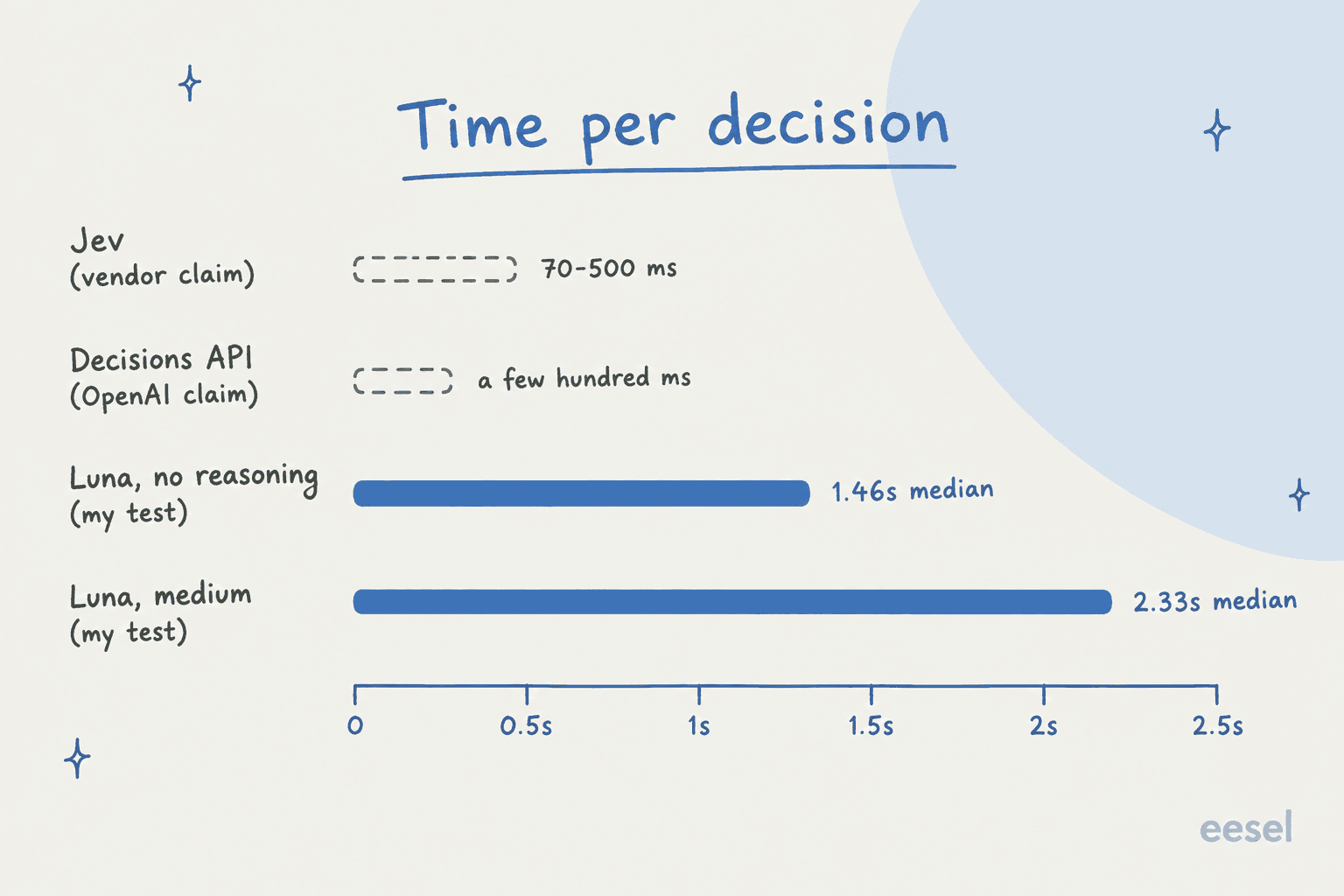
| Speed | "Less than a few hundreds of milliseconds end to end" (OpenAI staff claim) | 1.46s median in my test |
| Price | Not published | $0.10 input / $0.50 output per 1M tokens |
| Confidence score | Not confirmed | None by default |
| Docs | None yet | Structured outputs guide |
How fast is the Decisions API?
The only written speed claim from OpenAI comes from a staff member, there's nothing in the docs. Thibault Sottiaux, who works at OpenAI, posted on launch day:
"Decisions API, for lightning fast constrained decision making powered by Luna. Supports visual inputs, and tuned to be able to make decisions in less than a few hundreds of milliseconds end to end."
To see what that would be beating, I routed 20 support tickets through Luna twice per setup and asked for a queue and a priority, also whether the ticket was safe to auto-reply. That's 160 calls in all, timed end to end from a laptop, so the network round trip is counted in.
| Setup (my test) | Median | Fastest | Slowest |
|---|---|---|---|
| GPT-6 Luna, reasoning none | 1.46s | 0.95s | 2.79s |
| GPT-6 Luna, reasoning low | 1.62s | 0.95s | 3.20s |
| GPT-6 Luna, reasoning medium | 2.33s | 1.44s | 5.75s |
| GPT-6.1 Sol, reasoning low | 2.17s | 1.52s | 4.98s |
If OpenAI's claim holds up, the Decisions API would be roughly five times faster than my best Luna setup. Where that gap matters, and where it doesn't:
- Email and ticket triage. Not really. Nobody notices if a ticket got tagged in 300ms or in 1.5 seconds.
- Live chat. Yes. A 1.5 second pause before the bot has even decided who should answer, that adds up over a conversation.
- Agents. Here is where it matters the most. An agent built with something like OpenAI AgentKit that makes 20 small choices per task waits 30 seconds on Luna, versus a few seconds at the claimed speed.
Some press coverage shows a "150 ms vs 1.6 s" chart. I couldn't find those numbers on any OpenAI page or post, so I wouldn't plan around them before the docs ship.
How does it compare with TypeSafe Jev?
It's hard to talk about this launch without bringing up TypeSafe Jev. TypeSafe launched Jev on September 15 as a model built only for typed decisions, then the Decisions API showed up two weeks after. One HN commenter said it bluntly in the DevDay thread: "Decisions API is a validation for Jev and the entire space it created."
Going by what each company has published, they line up like this:
| OpenAI Decisions API | TypeSafe Jev | |
|---|---|---|
| Access | Limited preview | Open to everyone since Sep 27 |
| Input | Text or images | Text only, per the Jev models page |
| Question types | Questions with fixed answers | Choice, Score and Noul (true or false probability) |
| Output | A selection | Choice plus probabilities and confidence |
| Price | Not published | $0.042 per 1M input tokens, output free |
| Speed | "Less than a few hundreds of milliseconds" | "70ms-500ms" end to end, per the launch post |
| Options per question | Not published | Up to 255 per Choice |
| Rate limits | Not published | 100K tokens/s or 40 requests/s |
For most teams it comes down to two rows. Jev doesn't accept images, so if your queue is full of screenshots and damage photos, that points you to OpenAI. On the other side Jev returns a probability with each answer, and that's exactly what you need for deciding when not to act.
My Jev review covers how it held up in testing. For the rate math, the Jev pricing breakdown has it, including the faster Jev Ultrafast tier.
On price, the early Luna comparison already leans toward Jev:
"They say it's built on Luna, which costs $0.10M/in, vs Jev which only costs $0.04M/in, which is interesting ..."
Keep in mind that's Luna's list price, not a Decisions API price. OpenAI could price the endpoint quite differently once it opens.
What can you use the Decisions API for in support?
OpenAI named three jobs, and each of them has a clear support version:
- Classify content. Tag a ticket by intent, product or sentiment, spot the spam, or tell a refund request apart from a return.
- Route requests. Send a ticket to billing, shipping or technical, or to a language or tier queue. This is the classic intelligent routing, the job OpenAI used as its own example. The same pattern works for ecommerce routing.
- Choose an agent's next action. Decide if it should look up the order, ask a clarifying question, reply, or escalate to a person, normally based on intent detection.
The first two are what most teams mean when they say ticket triage, and typed decisions already work well there. Most helpdesks ship some native version too, from Freshdesk auto-triage to a long list of Zendesk classification apps. On one real-traffic trial with a jewelry e-commerce store doing about 1,000 tickets a month on Zendesk and Shopify, eesel's typed calls hit 93% triage accuracy and caught 100% of the spam with zero false positives, and spam was 22% of that inbox.
My own test showed where the trouble begins. Every setup picked the right queue 40 of 40 times. On "is this safe to auto-reply?" though, Luna with no reasoning got 33 of 40, and even GPT-6.1 Sol only got 39 of 40. Routing is the easy call; knowing when not to act is the hard one. A wrong queue costs you a few minutes, while a wrong auto-reply goes straight out to a customer.
Buyers draw the line in the same place. A CX lead at a supplements brand doing about 7,000 tickets a month on Gorgias told eesel on a sales call that they couldn't check every AI reply by hand, so the AI had to stay out of anything it wasn't sure about:
"I need an AI who is only handling the tickets that it's confident to handle and all the other ones, leave them alone."
A decisions endpoint gives you the answer. Unless it returns a calibrated confidence as well, it doesn't tell you when to leave a ticket alone, so that rule is still yours to build. Before you trust any classifier with an action, it's worth reading up on false positives in AI tagging.
What will the Decisions API cost?
Nobody outside OpenAI knows yet. There is no price row, and OpenAI hasn't said if it bills per token, per call or per question. For now the one public yardstick is Luna's own rate card:
| GPT-6 Luna tier | Input per 1M | Cached input per 1M | Output per 1M |
|---|---|---|---|
| Standard | $0.10 | $0.01 | $0.50 |
| Batch / Flex | $0.05 | $0.005 | $0.25 |
| Fast | $0.20 | $0.02 | $1.00 |
At those rates my 160-call test cost $0.047 per 1,000 tickets with no reasoning, and $0.089 at medium. Even a 10,000-ticket month comes out well under a dollar. The full math and hidden costs, plus the Jev price fight, are in my Decisions API pricing post, and the broader OpenAI API pricing guide has every model's rate. On pricing alone, the decision is never the expensive part of a support stack.
Should you build on the Decisions API now?
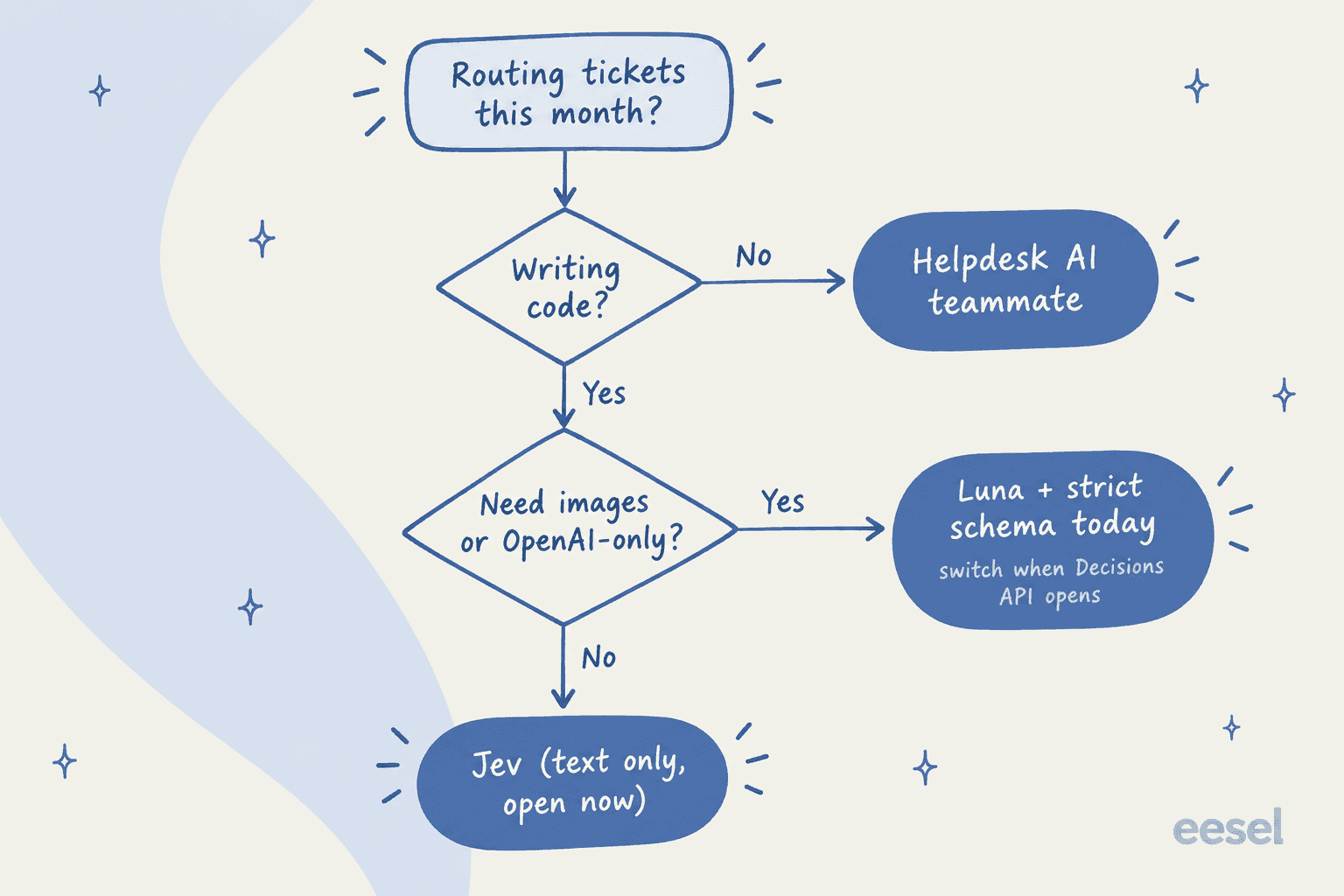
Not yet, unless you're in the preview. You can still build the same feature today and swap the endpoint in later on. This is how I'd decide it:
- You're writing code and staying on OpenAI. Ship Luna with a strict enum schema and reasoning set to
noneorlow. Keep the questions and the answer list in one place, then moving over to/v1/decisionsstays a small change. The Luna alternatives post covers other small models if you want a fallback, like Gemini 3.5 Flash-Lite. - You need sub-second answers on text. Test Jev now. It is open and priced, and it returns probabilities too. The Jev alternatives list covers the rest of that field.
- Your inputs are images. Stay with OpenAI. Luna takes images today, and per the API changelog OpenAI fixed an image-encoding bug on September 25 that had "degraded image understanding", so rerun any older image evals.
- You want routing inside Zendesk or Freshdesk, not an API. Then you can skip the endpoint question completely. Start with my guide on how to automate ticket triage, or the roundup of the best AI for ticket triage. Zendesk teams can also compare Zendesk Intelligent Triage.
On timing, the skeptics do have a point:
"It's another Jev copy, like we've seen so many over the last few weeks. But with no benchmarks or price comparison, which likely means it doesn't compare that well."
I'd be less harsh about it. A gated preview with no price is normal, and the image input is a real difference. Still, "no docs, no price, no benchmarks" is a good enough reason not to build a roadmap on it this week.
eesel for confident ticket routing
The Decisions API is infrastructure. It picks an answer from your list, and everything around that answer you still have to build yourself, like the helpdesk connection and the tags, the "send to a human" rule, and a log of what it did. eesel is the teammate that already does that job. Its AI helpdesk teammate joins your queue in Zendesk or Freshdesk, learns from your help center and past tickets, then routes, tags and replies, with escalation rules you write in plain English.

According to my test the part that matters most is the "safe to auto-reply" call, and that is where eesel puts its effort. Before it touches a live queue, eesel replays hundreds of your past tickets and scores its answers against what your team actually sent, so the risky calls show up for you before a customer sees them. Any ticket it isn't sure about goes to a person.
If you came here because you would rather build from code, the eesel CLI runs the same teammate and workspace from a terminal. eesel instructions edits the routing rules, eesel activity lists every ticket it touched, and eesel approvals lets a person sign off on an action before it happens. Every command prints JSON and supports --dry-run, so scripts and coding agents like Claude Code or Cursor can drive it, and each workspace also works as an MCP server.
Pricing is per ticket, not per token: a ticket or chat is one credit, plans start at $299 for 500 credits, and the free tier gives you 100 credits with no card. Try eesel on a slice of your queue, and see which of the tickets it's confident enough to take.
Frequently Asked Questions
What is the OpenAI Decisions API?
Is the OpenAI Decisions API available yet?
How much does the OpenAI Decisions API cost?
How is the Decisions API different from structured outputs?
Is the OpenAI Decisions API a copy of TypeSafe Jev?
Can I use the OpenAI Decisions API to route support tickets?
Does the Decisions API return a confidence score?


Article by
Kira
Kira is a writer at eesel AI with a Computer Science background and over a year of hands-on experience evaluating AI-powered customer service tools. She focuses on breaking down how helpdesk platforms and AI agents actually work so that support teams can make better buying decisions.