


The Gemini Decisions API is worth testing if your code makes the same closed-set call thousands of times a day: route this ticket, does this photo show damage, does this reply break a policy. Gemini Decision 1 answers up to 1,000 yes/no, choice and rubric questions in one pass and returns probabilities, not text, at $0.10 per million input tokens with zero output billed. Its edge over the other decision models is input: it reads audio, video and PDFs natively. Its gaps are no caching, no batch, and no Vertex AI yet. It sorts tickets but can't answer them, which is the job eesel's AI helpdesk teammate does inside your helpdesk. With the eesel CLI, a coding agent can upload your triage rules and help articles, then run test tickets before anything goes live.
What is the Gemini Decisions API?
The Gemini Decisions API is a new Gemini API endpoint for fast, closed-set decisions. Google launched it on November 11, 2026, alongside a new model called Gemini Decision 1 (gemini-decision-1). You send one shared input and a list of typed questions, and it sends back one answer per question with a calibrated probability and a confidence score.
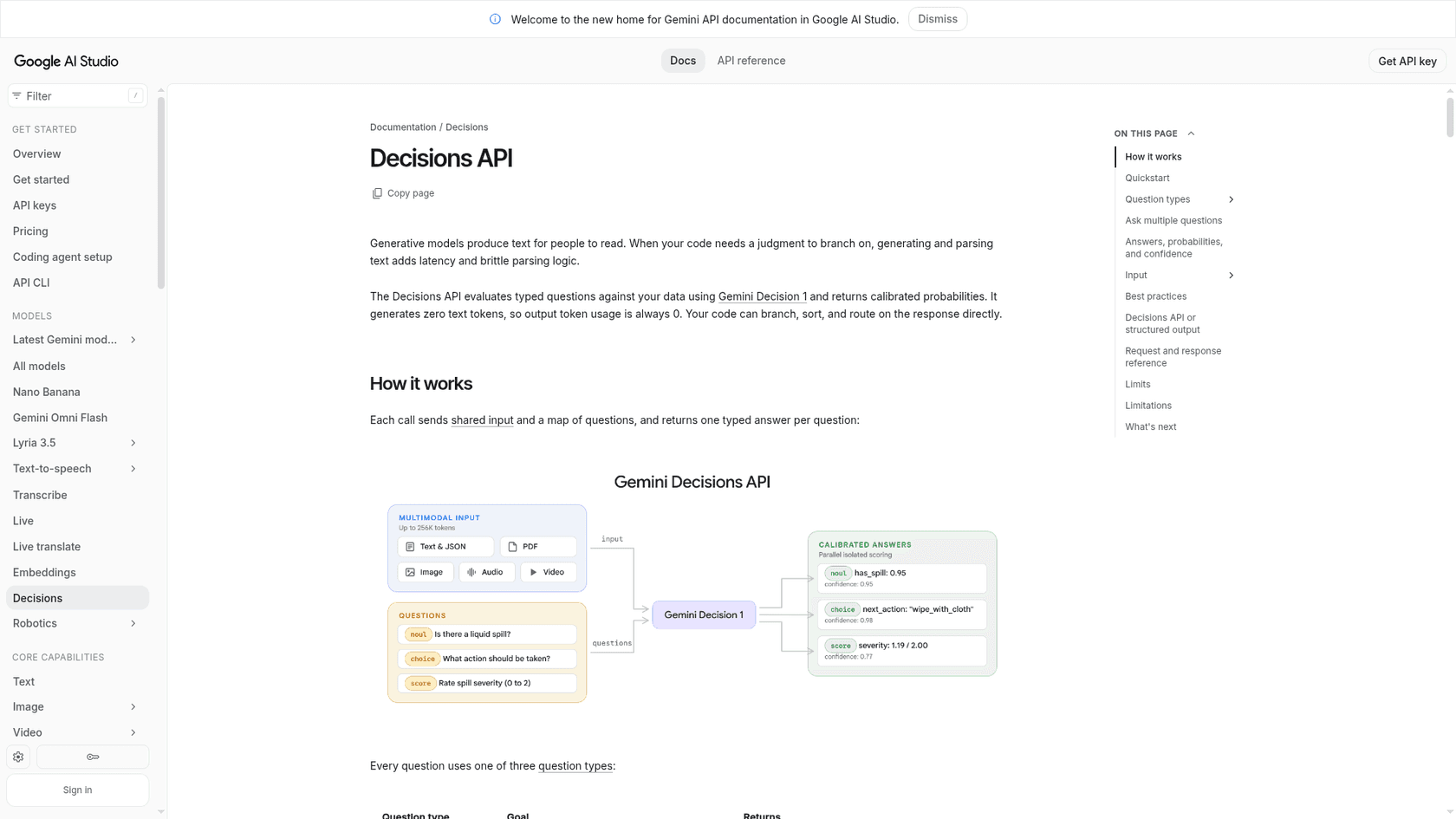
The key line in the Decisions API docs is that it "generates zero text tokens, so output token usage is always 0." Your code branches on a number instead of parsing a sentence.
I build integrations and APIs for eesel, and the part of that work I'd happily never write again is the glue around an LLM that's supposed to return one word. You ask for "billing" or "shipping", get back "Billing." with a period, or a polite paragraph, and write a parser plus a retry. A decision endpoint removes that whole layer. That's the real pitch here, more than the speed.
Here's what Google confirmed at launch:
| Spec | Gemini Decision 1 |
|---|---|
| Model ID | gemini-decision-1 |
| Inputs | Text, images, audio, video and PDFs, mixed in one request |
| Output | Probabilities and confidence scores, 0 output tokens |
| Question types | Yes/no (noul), choice, score |
| Questions per request | 1 to 1,000 |
| Context window | 262,144 tokens, shared input plus all questions |
| Latency (Google's figure) | 150 to 250 ms end to end |
| Price | $0.10 per 1M input tokens, free tier in AI Studio |
| Where it runs | Gemini Developer API (v1beta), OpenRouter. Google Cloud "coming soon" |
| Not supported | Text generation, thinking, function calling, caching, Batch API, Flex and Priority |
Google is late to this category, and openly so. TypeSafe Jev started it in September, and the OpenAI Decisions API went to public beta in early October. One Hacker News commenter put the timing plainly:
"It took OpenAI 2 weeks after Jev to release a decision end point, and now google does it 2 months later."

How does Gemini Decision 1 work?
Gemini Decision 1 reads your input once and scores every allowed answer in a single forward pass, instead of generating an answer token by token. That's why output is free and latency stays flat as you add questions. Google says median model compute is 50 to 100 ms, nearly flat from 1 to 100 questions per request, for inputs up to 16K tokens.
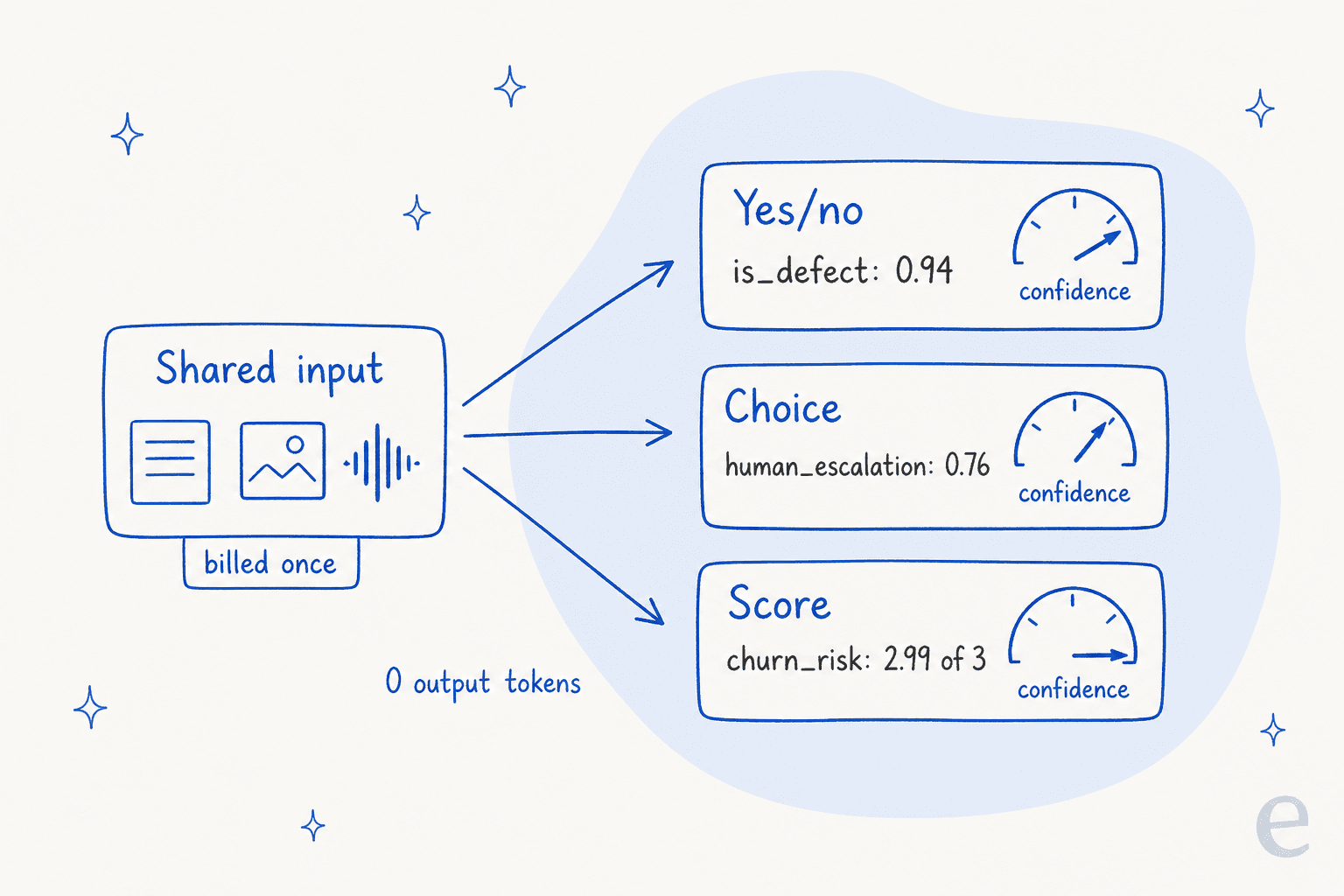
The numbers in that diagram come straight from Google's own support-ticket example in the docs, which is worth walking through.
The three question types
Every question is one of three types, and you can mix them in one call:
- Yes/no (
noul) returns the probability that a statement holds, from 0.01 to 0.99. You can add atrue_descriptionandfalse_descriptionwhen "yes" is ambiguous. The odd name follows Jev's API (HN commenters think it comes from "Bernoulli"), while OpenAI calls the same thing apredicate. - Choice picks one option from 2 to 255 and returns the winner plus a probability for every option, summing to 1.
- Score rates the input on an ordered rubric of 2 to 255 levels (Google recommends 2 to 10) and returns a probability-weighted average. A score of 1.12 means "mostly level 1, a bit of level 2".
A support example from Google's docs
Google's own multi-question example is a support ticket. The input is order data (headphones, $240, Gold tier) plus the message "Audio cuts out on the left earcup. Fix it today or I cancel my membership." Three questions run against it:
| Question | Type | Answer | Confidence |
|---|---|---|---|
| Is this a hardware defect? | Yes/no | 0.94 | 0.94 |
| Which resolution fits? | Choice | human_escalation (0.76), replacement 0.18 | 0.76 |
| How likely is churn? | Score, 0 to 3 | 2.99 ("threatens to cancel") | 0.99 |
The whole thing used 324 input tokens and 0 output tokens. Then the code does the composing: if the defect probability is above 0.9 and the choice confidence is above 0.6, take the action, otherwise send it to a person. Google calls this "atomic checks, composed in code", and it's the right way to use these models. Each question can't see the others, so adding one never changes the rest.
That's also how good ticket routing works in a helpdesk. You don't want one giant prompt deciding everything. You want small, testable checks (intent, urgency, sentiment) and a clear rule for when a person takes over. I covered the helpdesk side of this in my guides to AI ticket classification and routing tickets with intent detection.
Gotchas the docs call out
The docs have a few rules that will bite you if you skim them:
- Option keys are sorted alphabetically before scoring. A catch-all called
none_of_the_abovelands ahead ofshipping, so name itother. - Choice always spreads probability across your options, even when none fits. Check confidence, or add a separate yes/no scope check like "Is this message about an order?"
- The model never sees your question keys. Put the full question in
instructions. - Do the math in code. Compare dates, amounts and durations yourself, then pass the result in.
- Treat input as untrusted. Google warns that user text "can argue for its own classification", so keep a person or a second check on payouts and refunds. That's the same reasoning behind AI guardrails in any support setup.
What makes it different from Jev and OpenAI?
The input types. Gemini Decision 1 reads text, images, audio, video and PDFs in one request, with a 262K window. Most rivals are text-only, or text plus images, at 24K to 65K tokens.
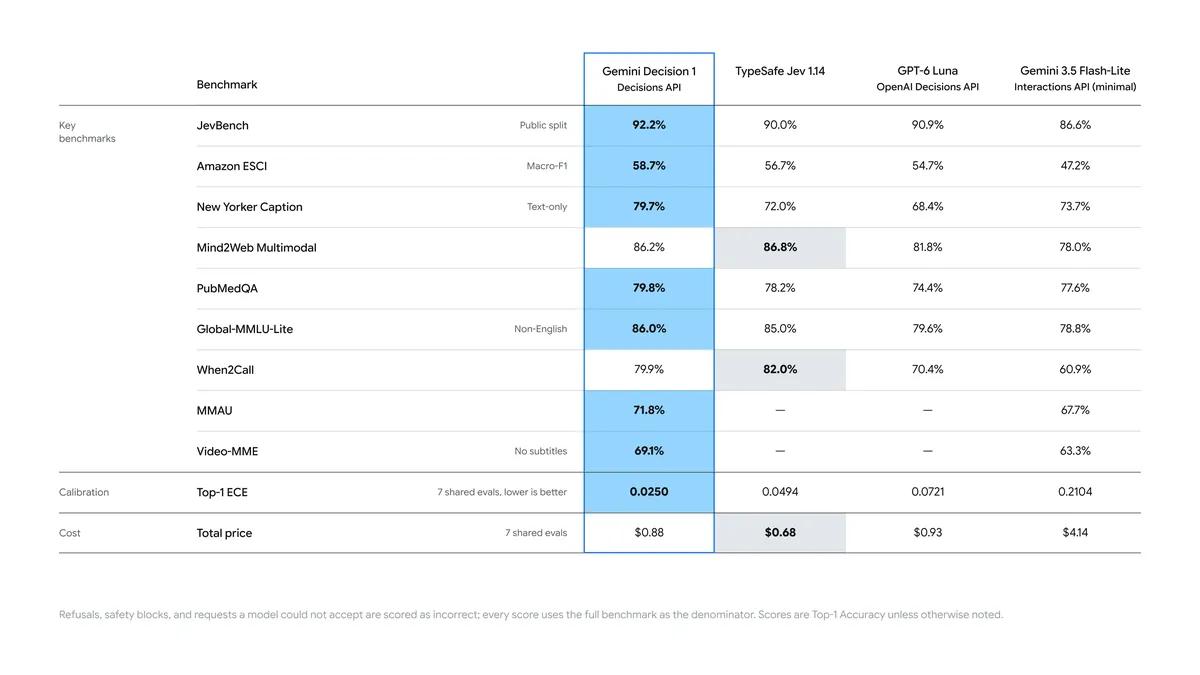
Google's launch post says Decision 1 "leads across the suite, with the lowest calibration error." Treat that as Google grading its own homework until an outside board runs it. Here's how the category looks on each vendor's own page:
| Model | Input price per 1M | Output | Context | Reads |
|---|---|---|---|---|
| Gemini Decision 1 | $0.10 | Free | 262,144 | Text, images, audio, video, PDFs |
| OpenAI Decisions API (GPT-6 Luna) | $0.10 | Free | Luna's window, 2x input past 272K | Text, inline images |
| TypeSafe Jev | $0.042 | Free | 32,000 | Text |
| Microsoft-Decision-1 | $0.042 | Free | 32,768 | Not stated |
| Cloudflare Clef | $0.24 | No output price | 65,536 | Text, JSON, images, video |
| Cloudflare Clef-flash | $0.038 | No output price | 24,576 | Text, JSON, images, video |
| Strands Decider 2B | Free (self-host) | Free | 3K to 4K run windows | Text |
Gemini figures checked November 12, 2026. Rival figures from each vendor's page as last checked on October 11, 2026.
Three things stand out:
- Gemini matches OpenAI's price exactly and costs about 2.4x Jev's per token. You're paying for multimodal input and the big window.
- Audio and PDFs are new for the category. Google's own examples pair "a call recording with account metadata or a scanned PDF claim with damage photos." No separate transcription or OCR charge.
- Hosting is narrower than it looks. No open weights, no self-hosting, and no Vertex AI yet. Jev is on Cloudflare, Microsoft's model is on Azure, and Strands runs anywhere.
The Hacker News launch thread landed in the same place on price versus input:
"Its bit more expensive than other other Decision Models in the same lane. However, it can accept Audio and Video as input as well and for those specific cases it can be extremely useful."
If your inputs are plain text tickets, Jev or Clef-flash will cost you less per decision. If your inputs are voicemails, call recordings, photos of broken products or PDF invoices, Gemini is the only hosted decision model I know of that takes all of them natively. For a broader look at the text-only options, see my Jev alternatives roundup.
How much does the Gemini Decisions API cost?
Gemini Decision 1 costs $0.10 per million input tokens on the paid tier, and output is always free because there isn't any. The free tier is "Free of charge" for prototyping, with Google allowed to use that data to improve its products (the paid tier isn't).
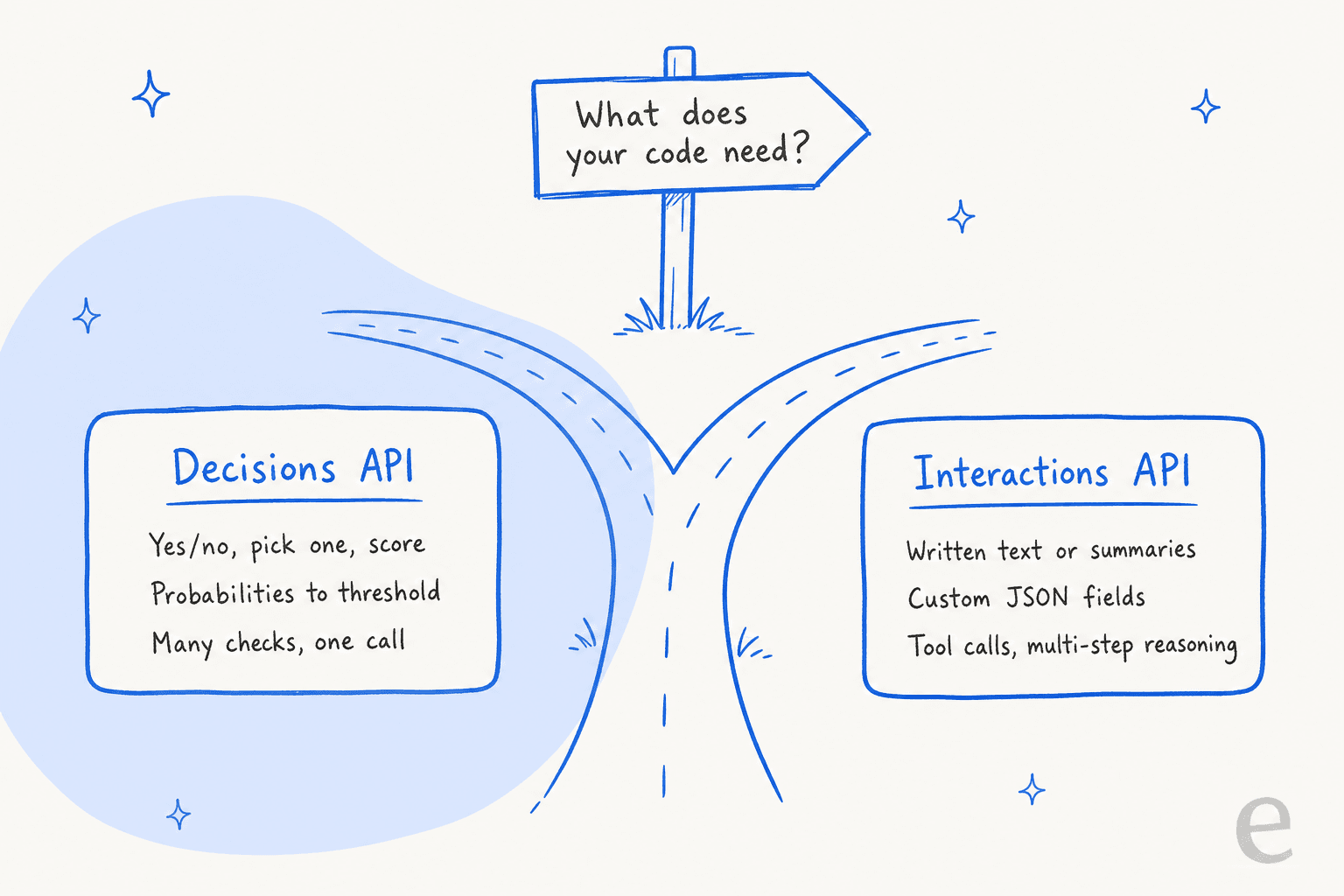
Two billing details matter more than the rate:
- Shared input is billed once per request, however many questions you ask. Each question only adds its own instruction and criteria tokens. So ten questions on one ticket cost far less than ten calls.
- Nothing is discounted. There's no context caching, no Batch API and no Flex tier, so the same system context sent on every request is billed in full every time. With a Gemini 3.5 Flash-Lite setup you'd at least get cached input at $0.03.
Google claims Decision 1 is "nearly 5x cheaper" than Flash-Lite on its benchmark suite. My own rough example agrees. Take 10,000 tickets a month, 600 tokens each, three questions at about 60 tokens each:
- Decision 1: 7.8M input tokens x $0.10 = about $0.78 a month.
- Flash-Lite with structured output: 7.8M x $0.30 = $2.34, plus about 600K output tokens x $2.50 = $1.50, so about $3.84, before any thinking tokens.
Either way, the model bill for triage is pocket change next to the cost of a person reading every ticket. Plug in your own numbers here:
What can you build with it?
Google lists four jobs: route a request to a model, queue, agent or tool; check inputs and outputs against many policy rules at once; decide which tools an agent needs, or whether to compact, escalate or stop; and filter or rank candidate results against a rubric. Its own teams already use it in production:
- Gemini Notebook routes each query to the right model tier and thinking level, which Google says serves everyday queries with up to 40% lower latency.
- Google Search uses it as a safety layer for MCP tools, catching adversarial content inside its latency budget.
- CC from Google Labs picks an emoji reaction from more than 200 options in a fraction of a second.
- Stitch uses it in a rapid canvas experiment that builds playable wireframes in seconds.
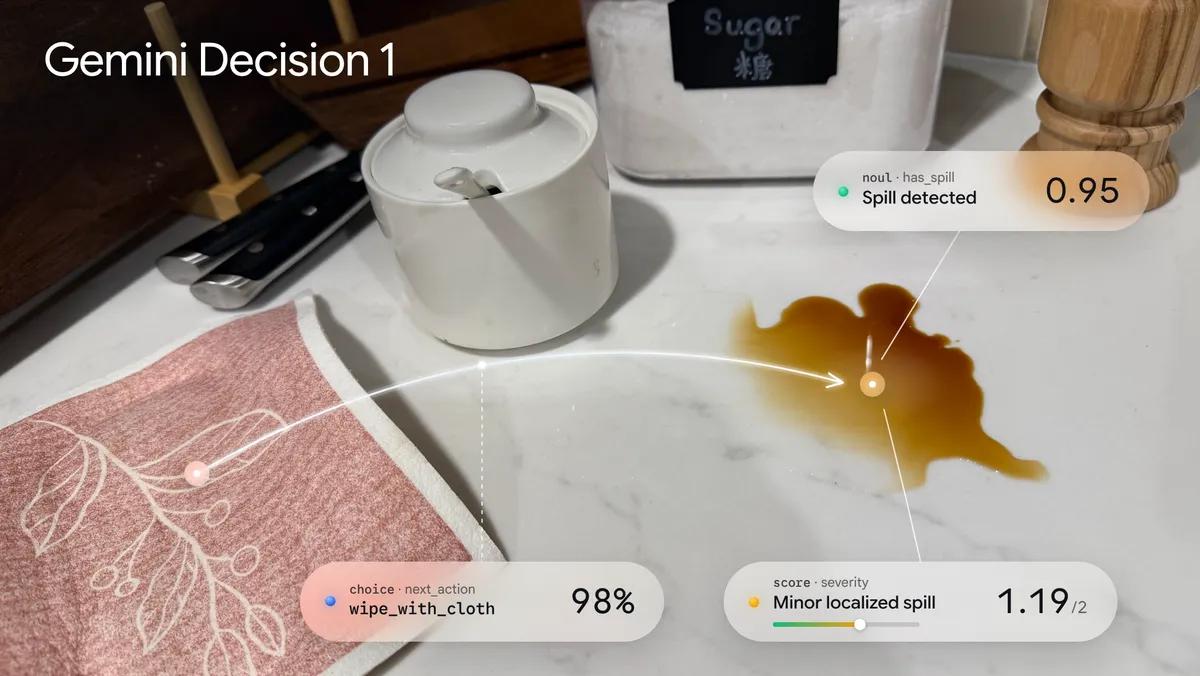
For support teams, the matches are obvious, and Google's own docs examples are mostly support tickets. Here's where I'd point it:
- Triage and routing. Department, priority and language in one call, before a person or an agent sees the ticket. That's classic auto-triage.
- Escalation checks. "Is the customer threatening to cancel?" and "Is this a legal or safety issue?" as yes/no questions with a hard threshold, feeding an escalation rule.
- Reply QA. Run a drafted reply against ten policy rules (no promised refunds, no competitor names, correct tone) before it sends. This is the cheap replacement for an LLM judging every draft.
- Voicemail and photo intake. Score a call recording for intent, or a customer's photo for visible damage, without a transcription step.
- Sentiment and churn scoring on a rubric, so a "2.99 out of 3" can bump a ticket up the queue.
What it won't do is write the answer. Every one of those jobs ends with "and then something replies to the customer". When someone in the launch thread asked where these models are useful, one reply summed it up as "Routing, classification, replacement for LLM-as-judge." That's the honest scope.
What does this mean for a support team?
For most support teams, the Gemini Decisions API is a building block, not a product. If you have engineers and want to wire triage into your own stack, it's a cheap, fast way to do it, and the confidence score gives you a clean place to hand off to a person. If you don't, you'd be building the routing rules, thresholds, testing harness and helpdesk writes yourself, and none of that comes in the box.
That surrounding layer is what eesel's AI helpdesk teammate is. It joins your existing queue in Zendesk, Freshdesk or HubSpot, makes the same categorise, route and escalate calls, and then does the part a decision model can't: it drafts or sends the reply from your own macros and help center. Before it touches a live ticket, it's simulated against your historical conversations, because a confident wrong label is still wrong.
Two eesel customers show what that looks like:
- smava, a German loan comparison site on Zendesk, is close to a textbook decision-model job. In one month eesel handled 27,000 tickets across two brands, categorised 14,600 of them (language, reply eligibility and category written into Zendesk fields) and prepared 15,300 draft replies from 820 synced macros and articles.
- MentorShow, a French online learning platform on HubSpot, gets every ticket analysed with a draft reply attached. In one month that was 1,200 conversations and tickets read and 432 drafts written in French, English or Spanish.
In both cases the labels are only useful because something acts on them. That's the gap between a decision API and a teammate.
Should you use the Gemini Decisions API?
Use it if you already write code around LLM calls that return one word, and especially if your inputs are audio, images or PDFs. The single-pass, many-questions model is a real improvement over parsing JSON out of a generative model, and $0.10 per million tokens with free output is hard to argue with.
Pick it if you need multimodal decisions, more than 32K of context, or dozens of checks on the same input, and you're fine on Google's Developer API. Pick something else if your inputs are plain text (Jev and Clef-flash are cheaper per token), you need Vertex AI or self-hosting today, or you lean on cached or batched input to keep costs down.
And if what you actually want is tickets sorted and answered, skip the plumbing. For a wider view, my best AI for ticket triage roundup compares the tools that do both.
Try eesel for triage that ends in a reply
A decision model can tell you a ticket is a billing defect with 0.94 confidence. eesel takes that ticket in Zendesk, Freshdesk or HubSpot, labels it, routes it, and drafts the answer your team would have written, tested on your own past tickets first. smava uses it to sort and draft 27,000 German Zendesk tickets a month. Check the pricing, or Try eesel free.
Frequently Asked Questions
What is the Gemini Decisions API?
The Gemini Decisions API is a Google endpoint, launched November 11, 2026, that answers closed-set questions (yes/no, pick one, or score on a rubric) about an input and returns calibrated probabilities instead of generated text. It runs on the Gemini Decision 1 model and belongs to the same decision models category as TypeSafe Jev.
How much does the Gemini Decisions API cost?
Gemini Decision 1 costs $0.10 per million input tokens on the paid tier, with zero output tokens billed, and the free tier is free of charge for prototyping. Shared input is billed once per request no matter how many questions you ask. For context, Gemini 3.5 Flash-Lite pricing is $0.30 input and $2.50 output per million tokens.
What model does the Gemini Decisions API use?
It uses gemini-decision-1, a specialized multimodal model that scores options in a single prefill pass. It has a 262,144-token input limit and an output limit of zero. It can't generate text, call tools or think, so it complements models like Gemini 4 Carbon rather than replacing them.
How is the Gemini Decisions API different from structured output?
Structured output makes a generative model write JSON that fits your schema, and you pay for every output token. The Gemini Decisions API never writes text: it returns a probability for each allowed answer, which you can threshold. Google says to use structured output when you need extracted values or custom objects, the same trade-off as OpenAI JSON mode versus a decision endpoint.
Is the Gemini Decisions API better than the OpenAI Decisions API?
They cost the same, $0.10 per million input tokens with free output. Gemini reads audio, video and PDFs as well as text and images, while the OpenAI Decisions API takes text and inline images. Google's benchmark chart puts Decision 1 ahead, but that is Google's own testing and hasn't been reproduced independently yet.
Can I use the Gemini Decisions API for support ticket triage?
Yes. Google's own docs use support examples: routing a ticket to billing or shipping, checking for a product defect, and scoring churn risk in one call. It's a strong fit for ticket triage, but it only makes the call. You still need a system that writes the reply, which is where a helpdesk agent comes in.
Is the Gemini Decisions API available on Vertex AI?
Not yet. As of November 12, 2026 it runs on the Gemini Developer API (v1beta) through Google AI Studio only, and Google says support for Gemini in Google Cloud is coming soon. It's also on OpenRouter. If you need it on Vertex today, look at Gemini alternatives or wait.
What are the limits of the Gemini Decisions API?
One request takes 1 to 1,000 questions, 2 to 255 options per choice question, and 2 to 255 levels per score question, all inside a 262,144-token window. There's no context caching, no Batch API and no Flex or Priority tiers, so repeated input is billed in full. Question instructions are text only, and inputs that trip the safety filters return an HTTP 400 instead of answers, so plan an escalation path.