8 best Level AI alternatives in 2026, compared on price and fit

Kurnia Kharisma

Katelin Teen
Last edited October 1, 2026
Why look for a Level AI alternative?
Level AI is a good product, I want to say this first. It holds 4.6 out of 5 from 220 G2 reviews, its AutoQA scores every call, chat and email instead of the 1% to 3% a human QA team samples, and its VistaPrint case study reports 80% less QA and coaching effort.
My full Level AI review goes through all the places where it shines.
I've spent two years on SEO, and from what I see the search "Level AI alternatives" almost always maps back to one of four buying questions. This is what pushes people to start looking:
- No public price. Level AI's pricing page returns a 404, and G2's pricing page shows no plans, an
8%average discount, and a perceived cost of$$$$$, the top of the scale. You only get to see a number after a demo. - A three-month setup. G2 reviewers average
3 monthsto implement and4 monthsto see a return. That is pretty normal for enterprise call center QA, but for a 40-person team it's a long wait. - AI score accuracy. "Inaccuracy" is the most-tagged complaint on G2, with
17mentions, and another11for translation accuracy. - It's built for calls. Level AI's virtual agent covers voice and chat, not helpdesk tickets, and a Zendesk Marketplace search for Level AI returns zero apps.
One mid-market reviewer said the accuracy point quite plainly:
"AI QA scores at times are not accurate, and they need to be more tailored towards our company's score sheets."

On its own, none of these is a dealbreaker. Put together though, they explain why a team that isn't a 300-seat phone operation starts shopping around.
How I picked these Level AI alternatives
Every tool on this list either does what Level AI does (score 100% of conversations, coach agents, assist live) or solves the same underlying problem for a different kind of queue. I checked each vendor's own pricing page and product pages, and also the trust center, on October 1, 2026, then pulled real reviews from G2 and Capterra, plus Reddit.
The things I compared:
- Starting price from the vendor or its own marketplace listing, never a third-party estimate.
- Billable unit, since per seat, per conversation or per credit all add up in very different ways.
- Channels, especially if it handles phone calls or tickets, or both.
- Helpdesk and phone-system integrations, because a QA tool that can't read your conversations is basically just a dashboard.
- Setup time from G2 reviewer data, plus security certifications.
I left out one large helpdesk vendor on purpose. Tools that only sell a single point feature, I skipped those too.
Level AI alternatives compared
Here is the side-by-side view. For prices, I used the lowest public figure I could trace back to the vendor itself.
| Tool | Best for | Starting price | Billing unit | Phone calls | Tickets and chat | Free plan or trial | Helpdesk integrations | Security | G2 rating |
|---|---|---|---|---|---|---|---|---|---|
| eesel | AI that answers tickets | $299/mo for 500 credits | Per ticket or chat handled | No | Yes | Free plan, 100 credits | Zendesk, Freshdesk, Gorgias, Front, Help Scout, HubSpot, Salesforce | SOC 2 Type II underway, data residency add-on | n/a |
| Cresta | Enterprise voice QA plus AI agents | $150,000/yr (Agent Assist, AWS) | Per assisted conversation | Yes | Chat | No | CCaaS-first, Salesforce | SOC 2, ISO 27001, ISO 42001, PCI, HIPAA | 4.3 (46) |
| Observe.AI | Regulated voice contact centers | $69/agent/mo (AWS) | Per agent, AI agents metered | Yes | Yes | No | Zendesk, Salesforce, ServiceNow, Freshdesk | SOC 2, ISO 42001, PCI, HIPAA | 4.6 (270) |
| Calabrio | QA plus scheduling in one suite | $41/user/mo (AWS) | Per user, 12-month term | Yes | Digital | No | CCaaS-first, none named | ISO 27001, ISO 42001, SOC 2, FedRAMP | 4.4 (444) |
| Balto | Live call guidance and compliance | Quote only | Per seat or concurrent | Yes | No | No (POC) | Dialers and CCaaS, no helpdesks | SOC 2 Type 2, HIPAA, PCI | 4.8 (596) |
| evaluagent | Coaching-heavy QA, UK and EU | $35/user/mo | Per user | Yes | Yes | No (POC) | Zendesk, Freshdesk, Salesforce, HubSpot | ISO 27001, SOC 2, GDPR, HIPAA | 4.5 (448) |
| Zendesk QA | QA for Zendesk teams | $35/agent/mo add-on | Per agent, paid yearly | Yes | Yes | Trial via sales | Zendesk first, others secondary | Zendesk platform certs | 4.9 (24, Capterra) |
| Rippit (MaestroQA) | Self-serve AI QA agents | Free, then $185/mo | Per agent run plus AI at cost | Via legacy connectors | Yes | Free plan | Zendesk (new product) | SOC 2 Type 2, ISO 27001, ISO 42001, PCI | 4.8 (325) |
| Level AI (for reference) | Mid-market and enterprise call QA | Quote only | Unpublished | Yes | Yes | No | 51 listed, 0 Zendesk apps | SOC 2, ISO 27001, HIPAA, HITRUST | 4.6 (220) |
1. eesel AI

Best for: support teams on a helpdesk who want AI to answer tickets and chats, not just grade the humans who do.
I'll be upfront here: eesel is not a call-center QA platform, so if your floor is 300 people on phones, skip ahead to Cresta. Still, a lot of the teams I see searching for Level AI alternatives run most of their volume through email and chat in a helpdesk. For them the question behind "we need QA" is usually "our agents can't keep up and quality slips." That's the one eesel answers directly.
eesel's AI helpdesk teammate joins your existing queue in Zendesk, Freshdesk or Gorgias. It learns from your past tickets and help center, plus your docs, and then it drafts or sends replies. For a QA buyer the part that matters is this one: before it answers a real customer, you run a simulation that replays hundreds of your past tickets and scores its answers against what your team actually sent.
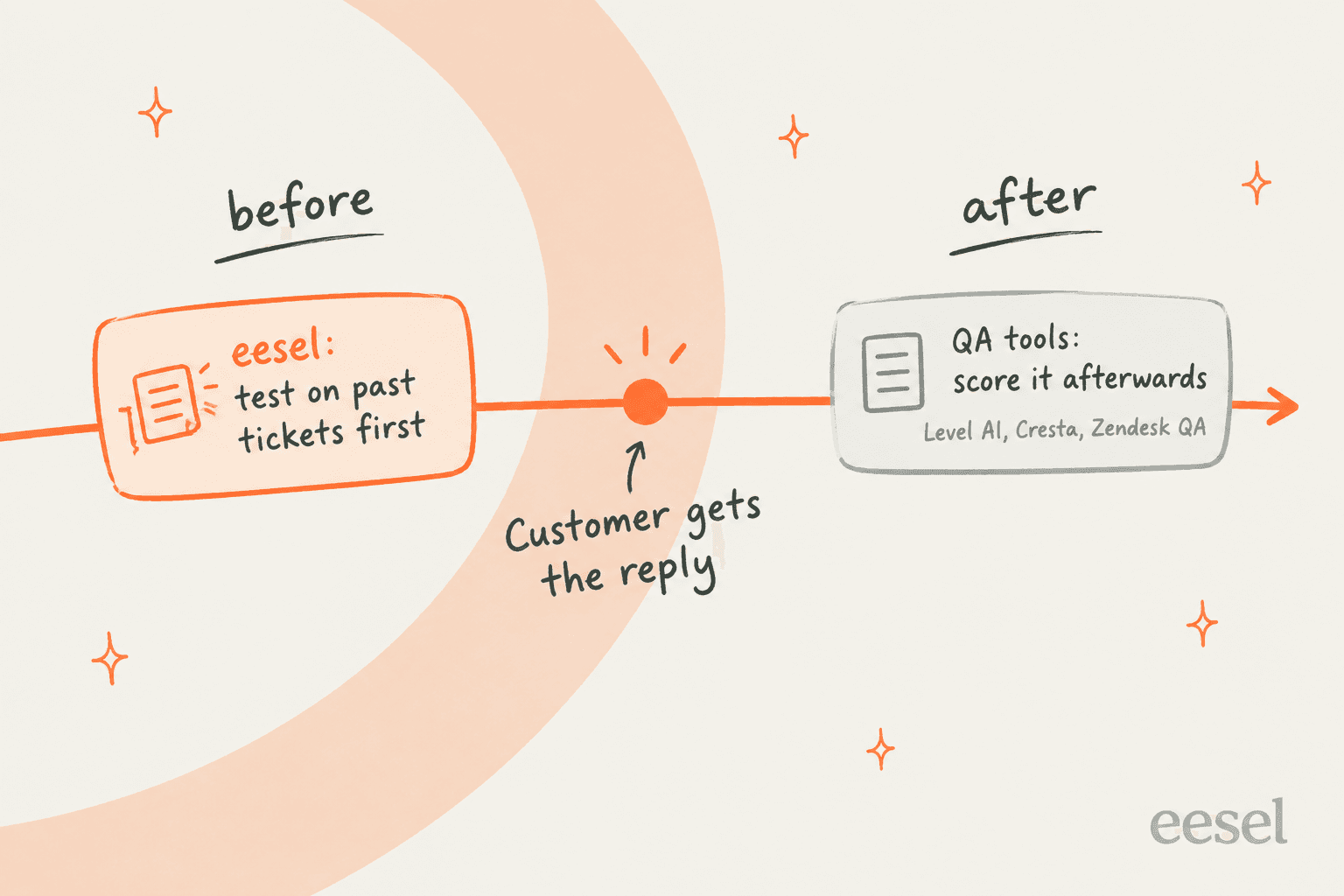
The timing, that is the real difference. Every other tool here scores a conversation after the customer has already got the reply. eesel has spent years putting AI on live support queues, and the lesson that stuck is that checking before the reply beats grading after it. One buyer on an eesel sales call said it well (I'm paraphrasing): their customers were not going to wait on a monthly QA report just to find out an answer was wrong.
Features
- Answers and drafts replies inside your helpdesk, with an approve, reject or pending review on each reply.
- Simulation on your past tickets before go-live, showing the gaps and the suggested instruction changes.
- Instructions you edit in plain English, by chatting with it, which works quite a lot like QA feedback for an agent.
- A CLI and API for teams that want to script it.
Pros
- Public pricing and a free plan, so testing it the same day is possible.
- Every feature on every plan, with unlimited seats.
- Fixes the cause of quality problems (an overloaded queue) instead of just measuring them.
Cons
- No phone channel, so it won't score or answer calls.
- It isn't a QA scorecard tool for grading human agents.
Pricing
eesel's pricing is a fixed monthly batch of credits: the free plan includes 100 credits, then $299 per month for 500 credits, $499 for 1,000, up to $1,899 for 5,000. Each ticket or chat handled counts as one credit, no matter if it gets resolved or not, and the optional overage is $0.80 per credit with a cap.
Verdict: Pick eesel if your QA pain is really a ticket-volume pain and you live in a helpdesk. Skip it if you need call scoring or a human-agent scorecard. For those, keep reading.
2. Cresta
Best for: large, voice-heavy enterprise contact centers that want QA, live coaching and a customer-facing AI agent on one platform.
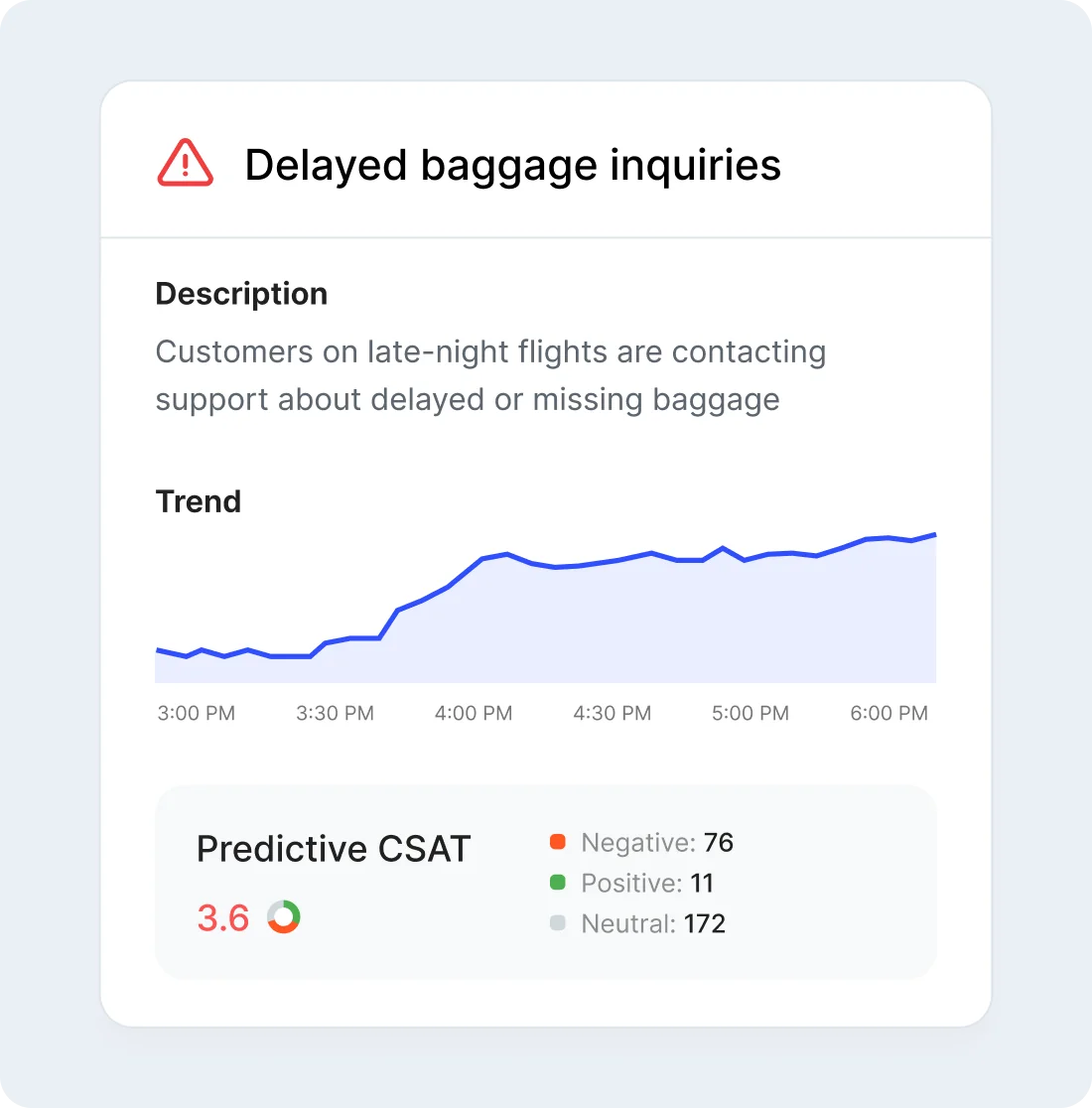
Cresta is the closest like-for-like Level AI alternative. There are three product lines running on one platform: an AI Agent for voice and chat and Agent Assist for live human reps, and then Conversation Intelligence, which auto-scores 100% of conversations (Cresta). Its customers include United Airlines and Marriott, also CVS, and it passed $100M in annual recurring revenue in April 2026.
Features
- Auto-QA on 100% of conversations, plus Coach and an AI Analyst, and predictive CSAT too.
- Real-time Agent Assist with behavioral guidance and AI summaries.
- AI Agent build and test tools launched this year: Synthetic Customers (May), Conductor (June), and a Training Simulator (July).
Pros
- Breadth: the AI agent and live assist and QA all sit on one shared data layer.
- A heavy compliance set on its Trust Center: SOC 2, ISO 27001, ISO 42001, PCI DSS, HIPAA and TISAX.
- On G2's head-to-head, Cresta scores higher on ease of use (9.1 vs 8.9).
Cons
- Setup is on the heavy side. G2 rates ease of setup at 8.2 against Level AI's 8.8.
- Fewer reviews: 46 on G2 versus Level AI's 220.
Reviewers seem to like what the live coaching does for mid-level reps:
"Cresta real-time coaching with representatives has improved productivity with the middle of the pack members. Representatives are getting prompts real-time to improve conversations without waiting for call reviews with a manager. Seen B players rising up the ranks."
The same reviewer also added the catch: "You have to have patience and really a dedicated person who is almost an AI linguist..."
Pricing
On its own site Cresta is quote-only. Its AWS Marketplace listing prices Agent Assist at $150,000 for 12 months, covering up to 100,000 calls or 125,000 chats, with overage at $1.50 per call and $1.20 per chat. That price is for Agent Assist only, while QA and the AI Agent get priced privately. There's more in my Cresta pricing breakdown.
Verdict: Pick Cresta if you're a Fortune 500-scale phone operation that wants one vendor for automation and QA. Skip it if you can't put staff on months of tuning. And if Cresta itself is on your shortlist, my Cresta alternatives post goes the other direction.
3. Observe.AI
Best for: regulated, voice-first contact centers in banking and healthcare, or insurance, that want QA plus customer-facing voice AI.
Observe.AI does almost everything Level AI does, then leans further into automation on top. Its Quality Agents score 100% of calls and chats against your rubric, with each score tied back to the transcript moment behind it (Auto QA). It sells VoiceAI and ChatAI agents too, and a Companion Agent for live assist (that one used to be called Real-Time AI).
Features
- Quality, Performance and Insights agents, including new Performance Agents that build coaching plans.
- CoBuilder, a plain-English agent builder with simulation and regression tests before release.
- Integrations with Zendesk, Salesforce, ServiceNow and Freshdesk, plus Five9, Genesys, NiCE and Talkdesk.
Pros
- Bring-your-own LLM keys, pre-model PII redaction, and data residency in the US, Canada, EU and Australia (Trust).
- Public per-agent price anchors on AWS, which Level AI doesn't have.
- G2 rating of 4.6 from 270 reviews.
Cons
- Accuracy gets the same complaint as Level AI does: "Accuracy Issues" (16) and "Inaccuracy" (15) are the top cons.
- Setup averages 3 months on G2, and with legacy phone systems it can take longer.
"Getting it properly integrated with our legacy phone system took longer than promised, and the onboarding assumed more technical sophistication on our side than we had. If you've got a smaller IT team, budget extra time."
Pricing
Observe.AI's own pricing page now returns a 404. Its AWS listing for Customer Interaction Intelligence (QA and coaching) is $828 per agent for 12 months, which comes out at about $69 a month. Real-Time AI costs another $828 per agent, and screen recording is $144. VoiceAI agents get metered on both minutes and interactions.
Verdict: Pick Observe.AI if you want Level AI's QA depth plus stronger data controls for a regulated industry. Skip it if what you want is a lighter tool your team can set up within a week.
4. Calabrio (Verint)
Best for: inbound contact centers that want QA and workforce scheduling, plus call recording, all from one vendor.
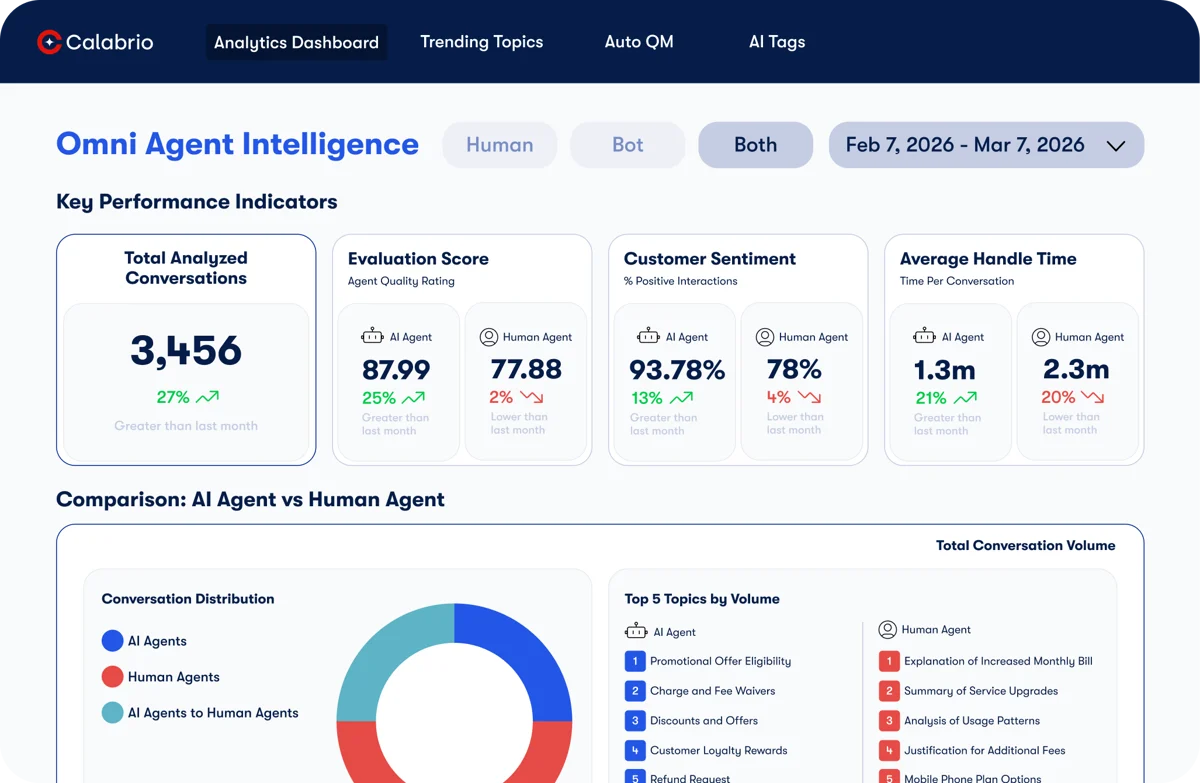
Quick heads-up for anyone who last looked at Calabrio a year ago: it's part of Verint now. On February 18, 2026 the combined company took the single name Verint, and the Calabrio name stays on as a product line. The QA module goes by the name Calabrio QM Intelligence now.
Level AI is QA-first, while Calabrio is a workforce suite in which QA is only one module. QM Intelligence scores up to 100% of calls, and Verint claims customers see "95% to 99% accuracy" in AI-generated scoring. It scores human and AI agents in the same view, also.
Features
- Auto QA with an expert question library, or your own questions and weighting.
- Workforce management: forecasting, scheduling, intraday changes and adherence.
- Conversation Intelligence with hourly trending topics and sentiment.
Pros
- One vendor for scheduling and quality, which is rare on this list.
- A public per-seat price for the QA module.
- ISO 42001 (AI management) listed on the Verint Trust Center, alongside ISO 27001, SOC 2 and FedRAMP.
Cons
- On G2 reporting is the top complaint, with 13 mentions each for poor and inadequate reporting.
- There are no helpdesk connectors named, like Zendesk or Freshdesk.
"Took my company a couple of years to untangle themselves from Verint and Cisco in favour of AWS and Calabrio - find it quite funny that we're technically back on Verint now."

Pricing
Verint's own pages say "Contact Sales," but the AWS Marketplace rate card lists Quality Management at $492 per user per year ($41 a month), workforce management at $468, analytics at $828, and the full Calabrio ONE suite at $1,500 per user per year. AI QA usage gets priced inside the private contract, and any order over 100 seats goes to sales.
Verdict: Pick Calabrio if staffing and quality live under the same leader and you're on Amazon Connect or Five9. Skip it if what you need most is reporting flexibility.
5. Balto
Best for: script- and compliance-driven phone teams in insurance sales and collections, or healthcare.
Balto started out as live call guidance and it still does that better than most of them. While an agent talks, it shows prompts and auto-checks a checklist, then raises compliance alerts when it's needed. It now bundles AI QA, coaching, notes, insights and a voice AI agent called Togo under one license (Balto). If agent coaching during the call is what you need most, Balto is the strongest fit here.
Features
- Real-time agent assist with AgentGPT, a resizable workspace and auto-ticking checklists.
- AI QA on 100% of calls with natural-language scorecards.
- 50+ integrations, with a heavy lean on dialers like VICIdial, Convoso and TCN.
Pros
- The biggest G2 footprint here: 4.8 from 596 reviews, though a lot of them are tagged as incentivized.
- About 2 months to implement on G2, faster than Level AI's 3.
Cons
- No helpdesk integrations at all, so for ticket teams it's out.
- Prompts can repeat or misfire on fast calls.
"My workplace has. It's called Balto. It's been a few months and still it seems mildly helpful. Moreso for new agents by bringing up the workflow or reference material."
Pricing
It's quote-only. Balto's note on G2 describes "flexible, unlimited-use pricing with per-seat and concurrent licensing options, free admin licenses, and POCs available." G2 reviewers put the mid-market cost at 13% above the category average, with an average 11% discount and payback in 12 months.
Verdict: Pick Balto if your problem is what happens during the call, especially for new agents on scripted calls. Skip it if you need deep post-call analytics, or any kind of ticket coverage.
6. evaluagent
Best for: coaching-led contact centers, especially in the UK and EU, that want a published seat price.
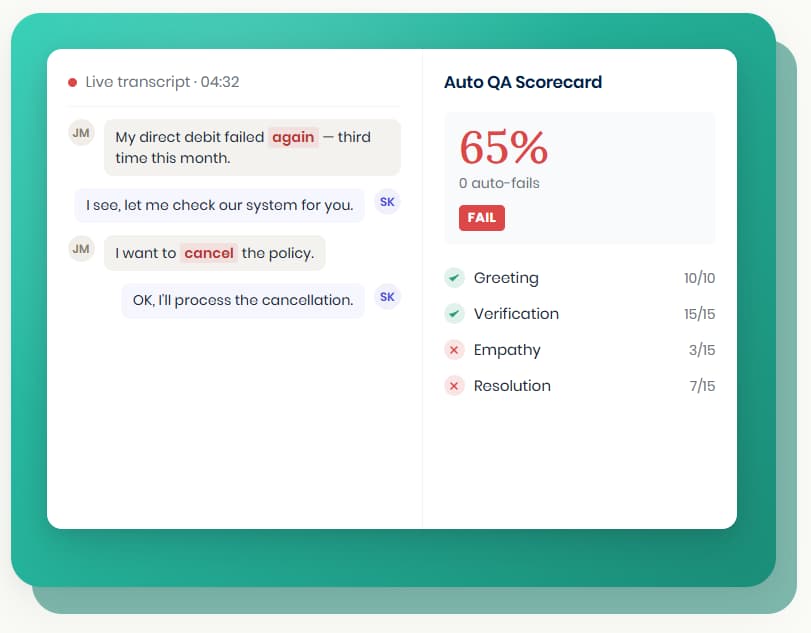
evaluagent is the most transparent pick on this list. It scores 100% of conversations with AutoQM, then turns those scores into coaching, so one-to-ones and performance plans, and also gamification. Its customers lean toward the UK (Jet2, Vitality, Capital on Tap), and recently it started grading bots from other vendors with the same engine it uses for humans (AI agents).
Features
- AutoQM with blended scorecards, random AutoWorkQueues, calibration and agent disputes.
- Conversation intelligence: reason for contact, predicted CSAT, sentiment and vulnerability detection.
- Helpdesk and CRM links to Zendesk, Freshdesk, Salesforce and HubSpot, plus Genesys, Five9 and Talkdesk.
Pros
- Public pricing.
- Customers pick EU, Australia or US hosting (Trust Centre), with ISO 27001, SOC 2, GDPR and HIPAA.
- Random call selection helps agents trust the process more.
Cons
- Transcription struggles with accents, according to reviewers.
- To some users the navigation and filters feel dated.
"I've often found that the navigation can feel clunky and outdated, with extra clicks needed to locate specific data or adjust date-range filters."
Pricing
From the pricing page: AutoQM and Improvement starts at $35 per user per month, and AutoQM plus Conversation Intelligence at $65. AI agent and high-volume work get priced per conversation, on request. There isn't a free trial, but after a demo you can get a proof of concept.
Verdict: Pick evaluagent if you're a mid-size contact center that wants published prices and a coaching culture. Skip it if most of your volume is accent-heavy calls.
7. Zendesk QA
Best for: support teams already on Zendesk who want 100% QA without a second platform.
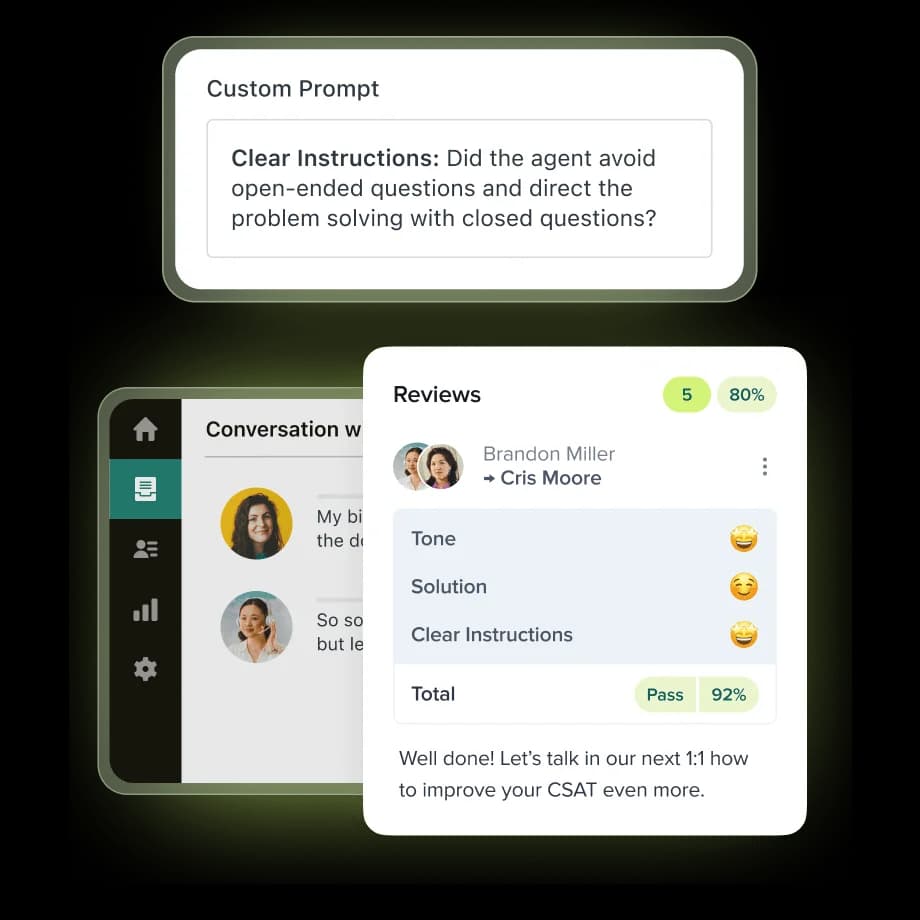
Zendesk QA started life as Klaus, which Zendesk bought in 2024. It now scores chats and emails, and calls too, inside Zendesk. It also auto-detects Zendesk AI agents and grades them with the same scorecards at no extra charge (Zendesk). Voice QA covers 100% of calls from Zendesk Talk or Aircall.
Features
- AutoQA with 8 system categories, including Tone, Empathy and Solution offered.
- Custom AI prompt-based categories with up to 2,000-character prompts.
- Spotlight flags churn risk and escalation requests, plus missing recording disclosures.
- Built-in AI agent scoring for Zendesk bots.
Pros
- The cheapest published QA price on this list for Zendesk teams.
- Agents don't have a new tool to learn.
- Capterra rating of 4.9 from 24 reviews.
Cons
- You need a Zendesk Support or Suite plan underneath, and QA isn't included in any of them.
- Other helpdesks connect only as secondary sources, which sync every 4 to 6 hours.
"+1 for Klaus, I never had any issues with them, support was amazing (not that it was needed a lot tbh). And they work with everything - so chats, emails, calls etc."
Pricing
The QA add-on is $35 per agent per month, paid yearly, per Zendesk's Employee Service pricing. On the Customer Service page there is a Workforce Engagement Bundle (QA plus scheduling) at $50 per agent per month instead. Add that to a Suite Professional seat at $115, and you're at $150 per agent per month. My guide to Zendesk AI pricing has the full stack.
Verdict: Pick Zendesk QA if Zendesk is home and you want to grade humans and bots in one place. Skip it if your phones are running through a contact center suite like Genesys or NiCE. For setup, see my guides to scorecard creation and agent feedback.
8. Rippit (formerly MaestroQA)
Best for: Zendesk-based support teams that want self-serve AI QA with a free starting point.
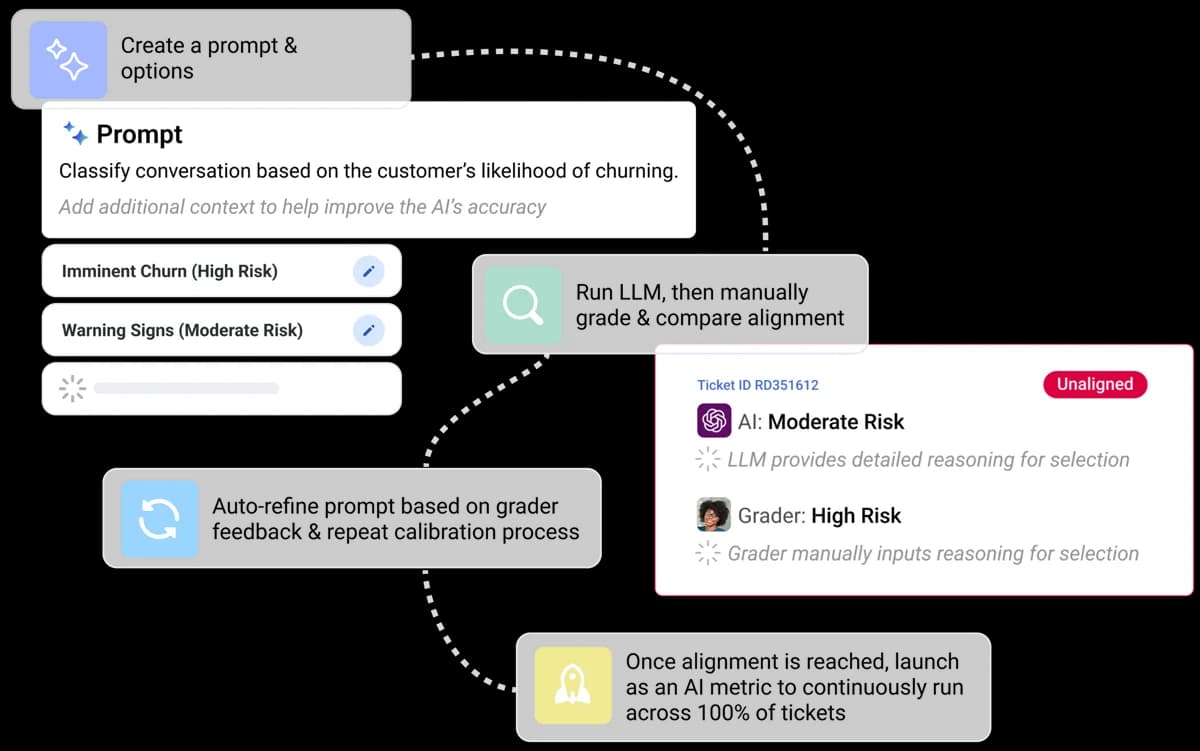
For years MaestroQA was the usual Zendesk QA tool, then in 2026 it became Rippit, rebuilt "from the ground up as an AI-first platform." QA is now one plain-language agent sitting next to churn and customer feedback agents, and chatbot-monitoring ones too. Old rubrics and scores, and the contracts as well, carry over unchanged.
The rename did split opinion. For me, the flow above is the part I like most: you test an AI metric side by side against a human grader's call until they agree, then run it on every ticket. That's the right kind of discipline for any AI support QA.
Features
- AutoQA on 100% of tickets with LLM, phrase-match and process metrics.
- Scorecard Builder with weighted sections, bonus and auto-fail questions.
- Agents for churn risk, product feedback, coaching and chatbot monitoring, that run on a schedule.
Pros
- A free plan and published prices, which is a big change from the old demo-only model.
- 4.8 out of 5 from 325 G2 reviews.
- Security covers SOC 2 Type 2, ISO 27001, ISO 42001 and PCI DSS Level 1 (Trust Center).
Cons
- So far the new product connects to only two helpdesks, Zendesk being the main one. The older 60+ connectors (Five9, Talkdesk, Gorgias, Salesforce) live on the legacy MaestroQA side.
- Some QA buyers didn't like the shift away from a pure QA brand.
"The rebrand of MaestroQA to Rippit shifted the focus away from a QA brand so we won't be renewing our contract."
Pricing
From Rippit's pricing page: Free at $0 (100 agent runs and $100 of AI credits), Starter at $185 per month (300 runs), Growth at $495 per month (1,000 runs), and a custom Enterprise plan with single sign-on. One agent run means one execution of a saved workflow, so coaching 20 agents every week works out to 20 runs a week. AI usage gets billed at cost, no markup.
Verdict: Pick Rippit if you're on Zendesk and want to try AI QA this afternoon without a sales call. Skip it if your conversations live in a phone system, or in a helpdesk the new product doesn't connect to yet.
How do Level AI alternatives compare on price?
Pricing is the most common reason people leave Level AI, so here is the whole transparency picture in one place.
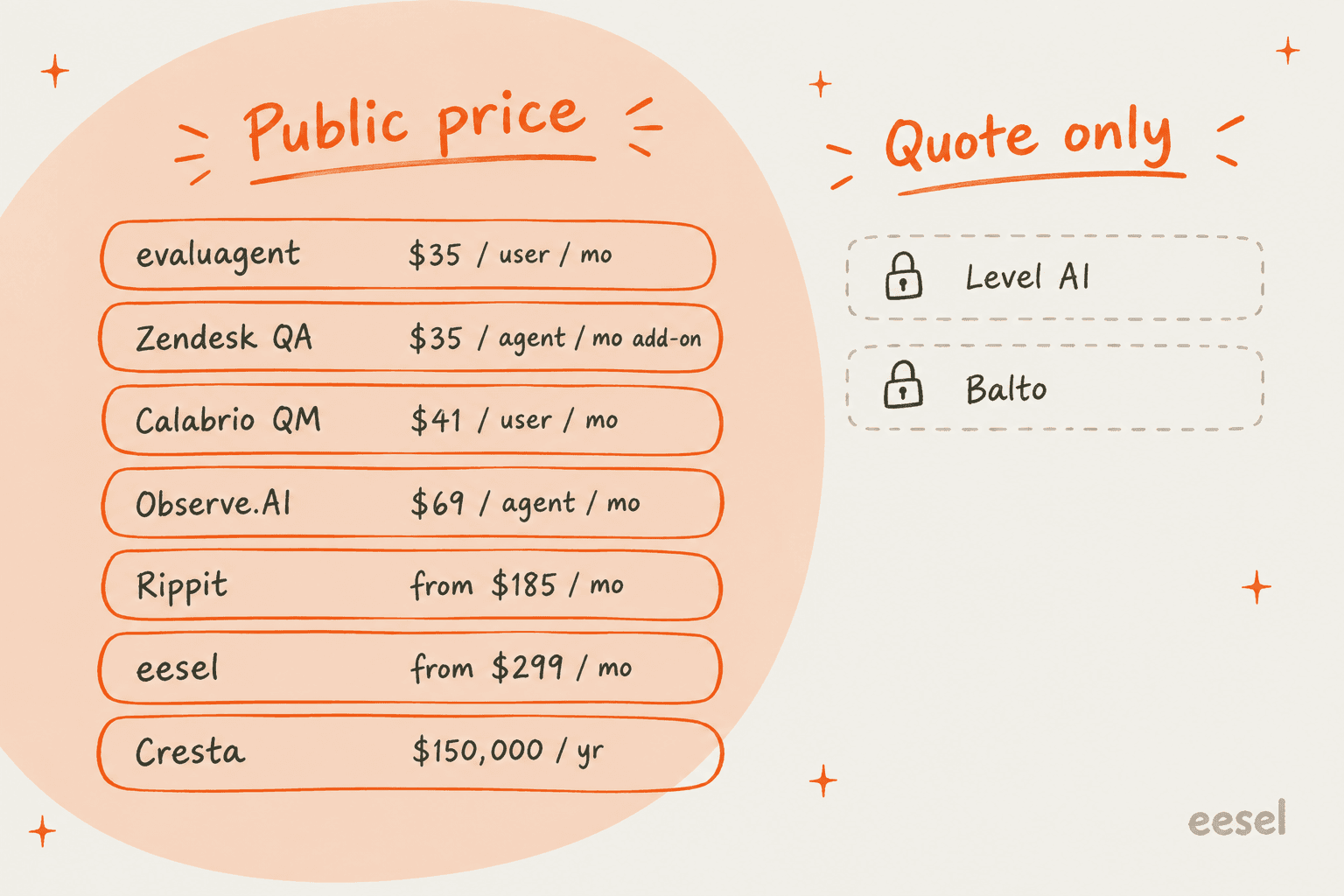
A few things that the sticker prices hide:
- The units differ. evaluagent, Calabrio, Observe.AI and Zendesk QA charge per seat. Cresta's Agent Assist bills per assisted conversation. Rippit bills per agent run, while eesel charges per ticket or chat handled. A 50-seat team on evaluagent's $35 plan pays $1,750 a month, while the same team on Zendesk QA pays $1,750 for QA plus its Zendesk seats.
- Marketplace prices are contracts. The Observe.AI, Calabrio and Cresta numbers come from their own AWS Marketplace listings on 12-month, non-refundable terms. Private quotes can come in lower than that.
- Setup time is a cost too. Three months to implement, which is what G2 reports for Level AI, Cresta and Observe.AI, means three months of paying before anyone trusts the scores.
If you want to sanity-check what you track once a tool is live, my guide to support metrics and the piece on AI CSAT are a good place to start.
Which Level AI alternative should you choose?
Here's how I would decide, starting from what your queue looks like.
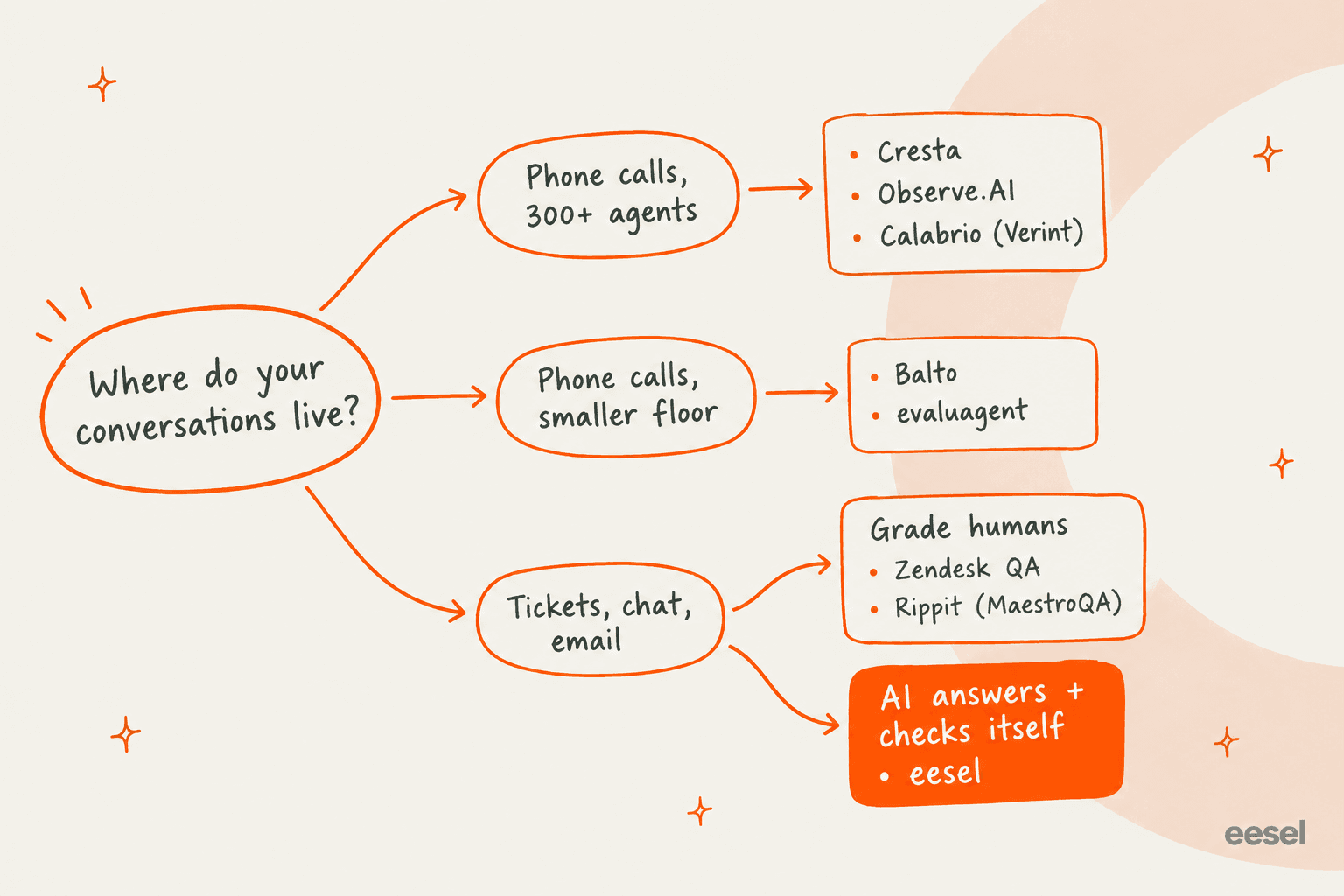
- 300+ agents on phones, and you want automation too: Cresta, or Observe.AI if you're in a regulated industry.
- You need scheduling and QA under one roof: Calabrio.
- New agents on scripted, compliance-heavy calls: Balto.
- A mid-size center that wants a published price and strong coaching: evaluagent.
- You're on Zendesk and want to grade humans and bots: Zendesk QA, or Rippit if you want to start free.
- Your volume is tickets and chat, and the queue is the real problem: eesel.
The most common mistake I see is buying a call-center QA platform for a team that mostly answers email. You end up paying for voice features and waiting months for setup, then the queue is still too long anyway. If that's you, the best AI helpdesk software or a broader look at support QA tools will serve you better than any of the call-center names above. And if you also run a phone line, my roundup of AI voice agents covers that side.
Try eesel for your ticket queue

If you started looking at Level AI because quality slips when your helpdesk queue gets long, eesel's AI helpdesk teammate goes after the cause. It plugs into Zendesk, Freshdesk or Gorgias in minutes and learns from your past tickets. Then you get to see how it would have answered hundreds of them, before it replies to even a single customer. When it gets something wrong you correct it in plain English, the way you would coach a new hire. The free plan covers 100 tickets, so you can run that test this week. Try eesel.
Frequently Asked Questions
What are the best Level AI alternatives?
For voice-heavy contact centers, Cresta and Observe.AI are the closest Level AI alternatives, and Calabrio fits if you also need scheduling. For a smaller phone floor, Balto and evaluagent are lighter. For ticket and chat queues, Zendesk QA grades your agents, and eesel's AI helpdesk teammate answers tickets itself.
Is there a cheaper alternative to Level AI?
Level AI is quote-only and G2 reviewers rate its cost at the top of the scale. evaluagent starts at $35 per user per month, the Zendesk QA add-on is $35 per agent per month on top of a Zendesk plan, and Calabrio's quality module lists at $41 per user per month on AWS Marketplace. See my support QA tools roundup for more options.
Does any Level AI alternative have a free plan?
Rippit (the new name for MaestroQA) has a free plan with 100 agent runs and $100 of AI credits. eesel has a free plan with 100 credits, where one ticket or chat is one credit. Cresta, Observe.AI, Balto and Level AI offer no free plan or self-serve trial, so you go through a demo.
Which Level AI alternative is best for Zendesk teams?
If you want to grade agents, Zendesk QA lives inside Zendesk and scores Zendesk AI agents at no extra charge. If you want AI to answer the tickets, eesel plugs into Zendesk as a helpdesk teammate. Read my guide to AI for Zendesk for the wider set.
What is the best Level AI alternative for real-time agent assist?
Cresta and Balto are built around the live call. Cresta's Agent Assist lists at $150,000 a year for up to 100,000 calls on AWS Marketplace, and Balto is quote-only with dialer-heavy integrations. My list of agent assist tools covers more.
How long does it take to switch from Level AI?
G2 reviewers report about 3 months to implement Level AI, Cresta, Observe.AI and MaestroQA, and about 2 months for Balto. Self-serve tools are faster: Rippit and eesel both let you start the same day. Budget extra time to rebuild scorecard criteria in any new QA tool.
Can a Level AI alternative score AI agents as well as humans?
Yes. Zendesk QA scores Zendesk AI agents with the same scorecards, evaluagent grades bots from other vendors, and Calabrio scores human and AI agents in one view. eesel works the other way round: it tests its own answers against your past tickets before go-live, which I cover in my guide to AI support QA.


Article by
Kurnia Kharisma
Kurnia is a software engineer and writer at eesel AI with two years of SEO experience, writing about AI tools, helpdesk software, and customer support. He pairs a developer's understanding of how these products are built with search-driven research into what actually ranks and resonates with the people searching for them.