Quriobot alternatives 2026: 6 chatbot tools I'd switch to

Riellvriany Indriawan

Katelin Teen
Last edited October 27, 2026

The best Quriobot alternative depends on what you need next. If you like building scripted flows, Landbot is the closest swap, at $88 a month billed yearly for 2,500 chats. If you're done with flows and want AI to answer from your own content, Chatbase is the simplest move, and Tidio or Crisp add a live chat inbox on top.
The real reason most teams leave is how Quriobot's AI works. It runs on your own OpenAI account and API key, and a paid bot simply disappears from your site when it hits the chat cap. Every tool below includes the AI in its own price, and most keep answering past the limit for an extra fee.
If your website chats end up as tickets in Zendesk or Freshdesk, eesel is the pick I'd make. It answers from your help center and past tickets, then hands the hard chats to your team inside the helpdesk. SamCart runs one eesel agent on its website chat and another on its Freshdesk tickets, both answering from the same 280 help center articles.
Why do people look for Quriobot alternatives?
Quriobot does a lot well for the price. It's a no-code builder from Hugo B.V. in Amsterdam, it has 20+ step types for quizzes, forms and bookings, and the Free plan covers 500 chats a month with unlimited team members. If you need a lead-capture bot on a small budget, it's hard to beat. My Quriobot review scored it 3.5 out of 5.
I work eesel's support queue every day, so I see the moment a scripted bot stops being enough. It's usually the third question in a chat: the visitor asked two things the flow covered, then something it didn't. That's where a Quriobot setup starts to pinch, for four reasons.
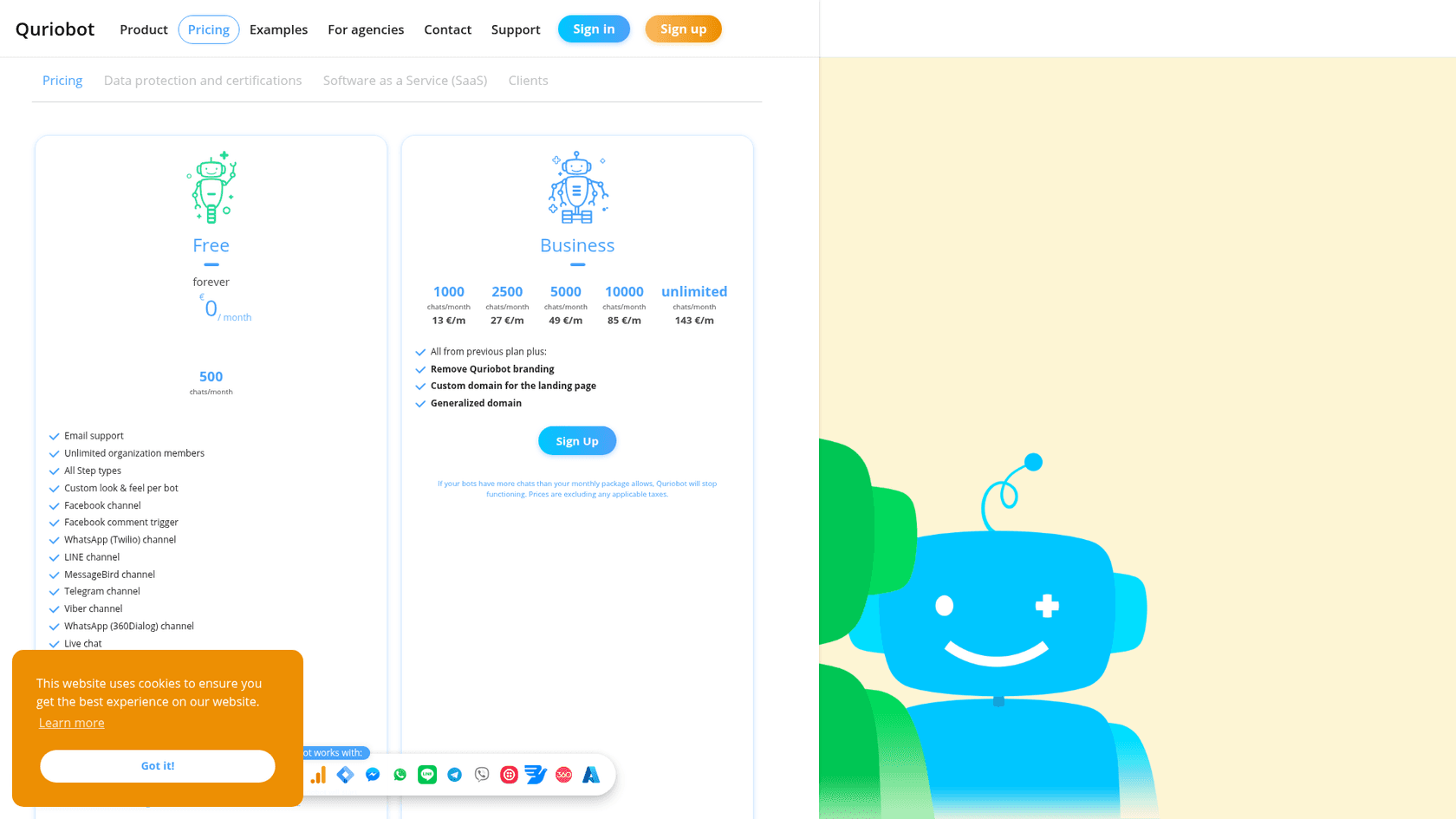
- The bot vanishes at the cap. The Quriobot pricing page says that if your bots have more chats than your package allows, Quriobot will stop functioning. On paid plans, the bot disappears from your site until the month resets.
- AI is a project, not a switch. AI answers use the OpenAI integration with your own API key, assistant and files, and OpenAI bills you separately. The default bot is a scripted flow.
- The learning curve is real. Capterra rates its ease of use 2.9 out of 5, and reviewers say the same thing in their own words.
- Helpdesk ties are thin. The Freshdesk integration imports chats and articles into Quriobot. Zendesk, HubSpot and LiveAgent connect as scripts that open their own chat widget when a visitor asks for a person.
"This a bit hard to master. It can take quite a bit of time on the learning curve but it is well worth it in the end."

None of these mean Quriobot is a bad tool. They mean it was built as a flow builder that added AI later, and many teams now want the reverse.
How did I pick these Quriobot alternatives?
I asked ChatGPT the way a buyer would: "We run a customer support chatbot on our website with Quriobot. What are the best alternatives?" It named Landbot, Crisp, Tidio, Zendesk and Chatbase, and it split its answer into two camps: tools that keep scripted flows, and tools that move you to an AI support agent. That split matches what I see, so I built the list around it.
Then I added Botpress, for teams that want flows and AI in a builder they control, and eesel, for teams whose chats already turn into tickets. For every tool I scraped the vendor's own pricing page on October 27, 2026, and took plan names, limits and prices only from there.
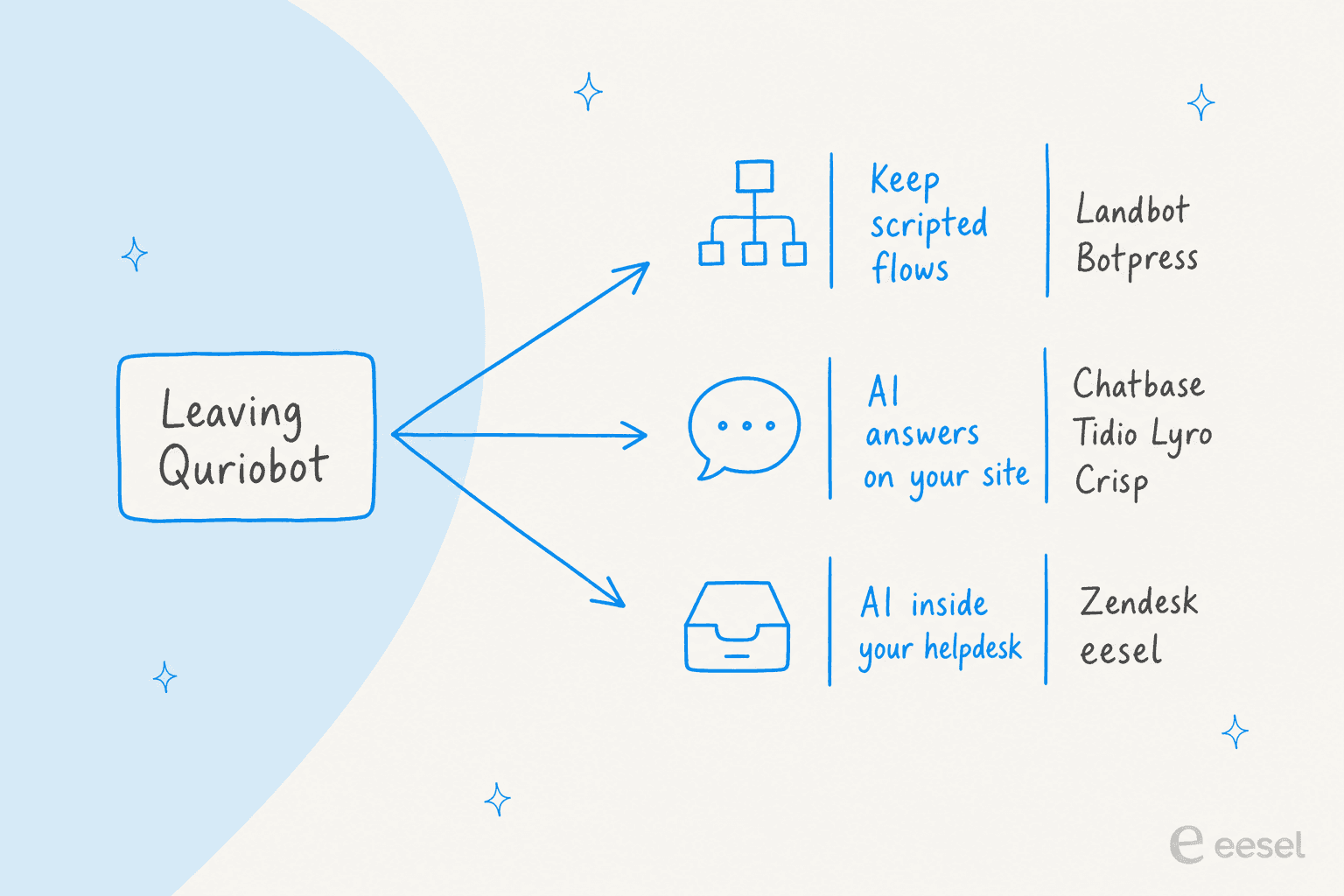
The test I'd run on each one is the same five chats ChatGPT suggested, which I cover at the end: a simple FAQ, a multi-step decision tree, a question the bot can't know, a handoff to a person, and a connection to your CRM or helpdesk. If you want background on the two camps first, my piece on AI agents vs rule-based chatbots lays out the trade.
Quriobot alternatives at a glance
| Tool | Best for | Builds flows | AI included | Free plan | Starting paid price | Live chat / human handoff | Helpdesk ties | Security listed | Billing unit |
|---|---|---|---|---|---|---|---|---|---|
| Quriobot (for reference) | Cheap lead capture and forms | Yes, 20+ step types | No, your own OpenAI key | 500 chats | €13/mo | Yes, native live chat | Freshdesk import, widget scripts | EU servers, ISO 27001 storage | Chats |
| Landbot | Keeping scripted flows | Yes, visual builder | 100 to 500 AI chats | 100 chats, no AI | $36/mo yearly | Yes, shared inbox | Webhooks, HubSpot from Professional | GDPR, SOC 2 | Chats + AI chats |
| Chatbase | AI answers without flows | Limited (AI actions) | Yes, message credits | No, 7-day trial | $32/mo yearly | Inbox from Basic | Zendesk, Freshdesk from Basic | SOC 2 Type II, HIPAA-eligible | Message credits |
| Tidio | AI plus live chat in one widget | Yes, Flows | Lyro, metered apart | 50 Lyro chats once | $24.17/mo yearly | Yes, every plan | Lyro add-on for Zendesk | Not on pricing page | Billable + Lyro conversations |
| Crisp | Flat-price shared inbox | Yes, from Essentials | AI credits per plan | 2 seats, no AI | $45/mo | Yes, shared inbox | 100+ integrations on Plus | Not on pricing page | Per workspace |
| eesel | Chats that turn into tickets | No, plain-English instructions | Yes | 100 credits | $299/mo | Hands off into your helpdesk | Zendesk, Freshdesk, Gorgias and more | SOC 2 Type II underway, EU/US residency | Credits (1 per chat) |
| Zendesk | A full support suite | Yes, flow builder | AI agents on every plan | Trial only | $19/agent/mo yearly | Yes, messaging and live chat | It is the helpdesk | Not on pricing page | Per agent + per resolution |
| Botpress | A custom agent you control | Yes, visual studio | $0.10 AI usage per conversation | 100 conversations | $150/mo yearly | Yes, Botpress Desk | Via integrations | SOC 2 Type 2, GDPR, HIPAA | Conversations |
What would 2,000 AI chats a month cost on each?
Per-chat, per-credit and per-agent prices can't be compared until they're priced for one buyer. So here's mine: one website with 2,000 AI-answered chats a month, about 3 AI replies per chat, and 2 people who take over now and then. Where a vendor lists a yearly price, I used it.
| Tool | Plan that fits | Monthly cost | The math |
|---|---|---|---|
| Quriobot | Business 2,500 | €27 + OpenAI bill | 2,000 chats fit the €27 tier; every AI answer is billed by OpenAI on top |
| Chatbase | Basic + auto-recharge | $200 | $120 for 4,000 credits, plus 2,000 more at $40 per 1,000, assuming 1 credit per AI reply |
| Landbot | Professional | $258 | $88 covers 2,500 chats and 300 AI chats; 1,700 extra AI chats at $0.10 add $170 |
| Crisp | Plus | $295 + extra | Plus covers about 1,350 automated conversations; the pricing page doesn't list the price of more AI credits |
| Zendesk | Suite Team, 2 agents | $110 + resolutions | $55 per agent, plus $1.50 (committed) or $2.00 (pay-as-you-go) per automated resolution past the plan's included amount |
| eesel | 2,000-credit plan | $849 | 2,000 chats is 2,000 credits, however many replies each chat takes |
| Botpress | Team + 5 packs | $1,000 | $750 for 1,500 conversations, plus 5 packs of 100 at $50 |
| Tidio | Starter + Lyro | Not published | The Lyro calculator stops at 1,000 conversations, then shows "More" |
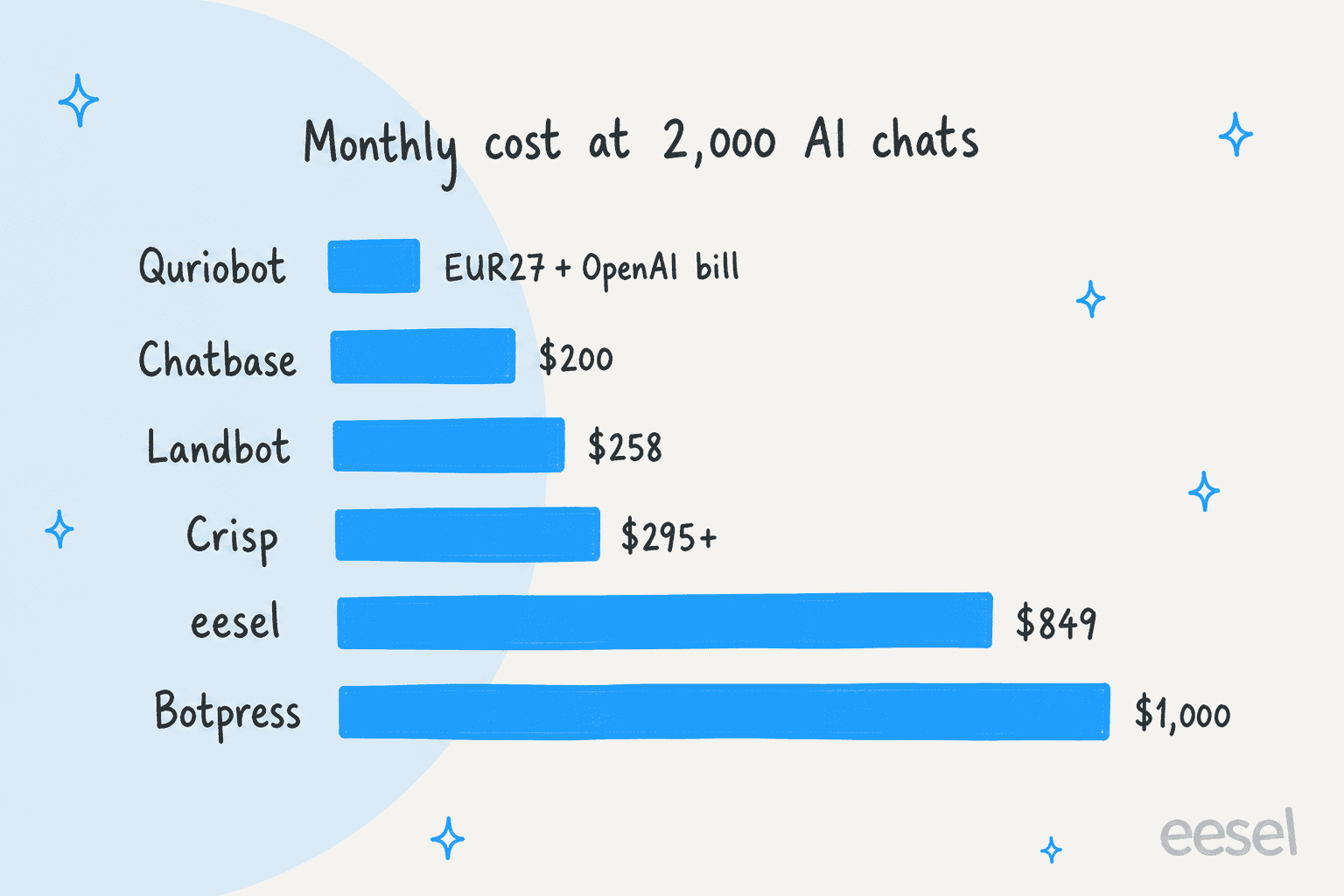
Two things stand out. First, Quriobot is still the cheapest sticker, so if price is your only complaint, check your OpenAI bill before switching. Second, the tools above $800 sell a different job. eesel and Botpress aren't a cheaper answer per message; they're an agent that works your queue or a bot you build to your own spec. My chatbot cost guide goes deeper on that trade.
1. Landbot
Best for: teams that like building scripted flows and want AI blocks inside them.
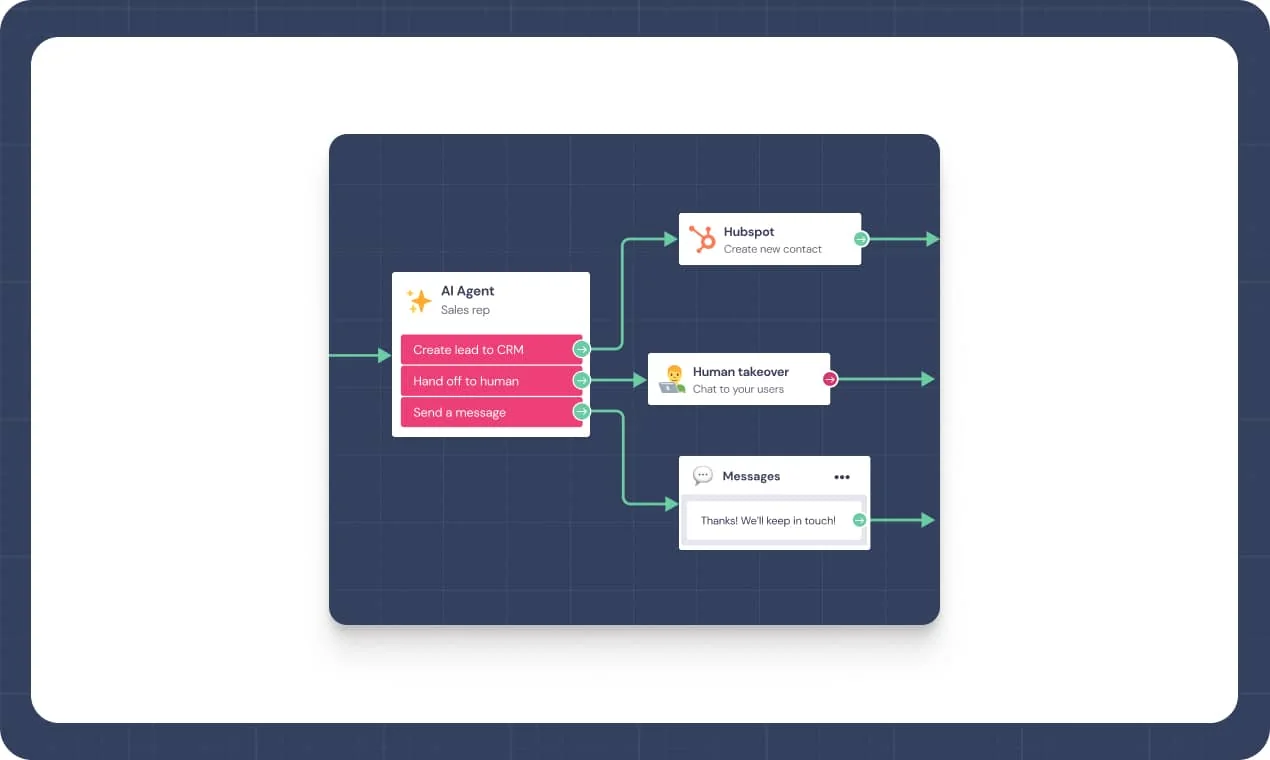
Landbot is the tool ChatGPT called closest to Quriobot, and I agree. It's a visual, no-code builder for branching conversations, forms, lead capture and WhatsApp bots, and it has been around long enough to feel finished. The Landbot pricing page claims 12,000+ teams and a 4.7 average across 680+ verified reviews.
What it does vs Quriobot
The building model is the same: you drag blocks onto a canvas and wire them together. The difference is the AI. In Landbot, an AI Agent block sits inside the flow, answers from a knowledge base you upload, and exits through outputs you define, like "hand off to human" or "create lead in CRM". You don't bring an OpenAI key; AI chats come out of your plan.
It's also a European platform. Landbot's pricing page lists GDPR, SOC 2 and a DPA on request, and says chats aren't used to train models. For a Quriobot team that picked an EU vendor on purpose, that matters.
"It was very easy and visually appealing for our team to work with while building the chatbot, mainly because we could clearly see the entire branching flow and test it as we went."

Pros and cons
- Pro: the closest builder to Quriobot, so your flow logic carries over in concept.
- Pro: AI is included, with a published $0.10 price per extra AI chat.
- Pro: goes past the limit for a fee instead of going dark: $0.05 per extra chat, billed in 500-chat packs of $25.
- Con: AI chats are a small slice of each plan, 100 on Starter and 300 on Professional.
- Con: branding removal and HubSpot start on Professional, and there's no native Zendesk or Freshdesk app.
Pricing
From Landbot's pricing page, billed yearly (monthly in brackets):
| Plan | Price | Chats/mo | AI chats/mo | Notable |
|---|---|---|---|---|
| Free | $0 | 100 | none | 1 seat, full builder |
| Starter | $36/mo ($45) | 500 | 100 | 2 seats, basic integrations |
| Professional | $88/mo ($110) | 2,500 | 300 | 3 seats, no branding, HubSpot, webhooks |
| Professional WA | $176/mo | 2,500 | 500 | adds 1 WhatsApp number |
| Business | custom | custom | custom | from 5 seats, uptime SLA |
Extra seats are $25 a month. My Landbot pricing guide works through more examples.
Verdict
Pick Landbot if you want to keep the Quriobot way of working, flows first, with AI added where it helps. Skip it if most of your chats are support questions, because 300 AI chats a month goes fast. More options are in my Landbot alternatives list.
2. Chatbase
Best for: a website chatbot that answers from your own content, with no flows to build.
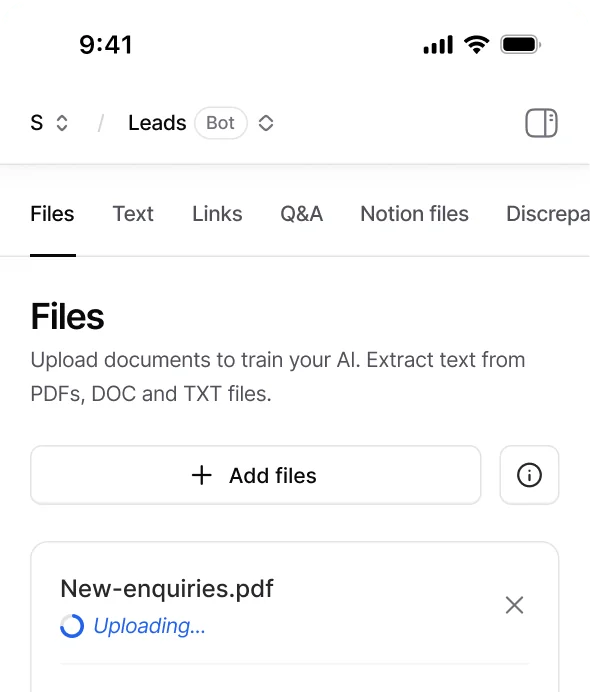
Chatbase is the opposite of Quriobot's starting point. Instead of building a conversation step by step, you train an AI agent on your files, text, links and Q&A, embed it, and it answers. If the AI part of Quriobot is what you were really after, this is the shortest path.
What it does vs Quriobot
With Quriobot, getting AI answers means creating an OpenAI assistant, attaching a vector store and adding a variable to a bot step. With Chatbase, the training screen above is the whole setup, and the model cost is inside your plan. Basic adds a helpdesk inbox, API access and integrations with Zendesk, Freshdesk, Gorgias and HubSpot. Business adds tickets as a source, the closest Chatbase gets to learning from past support replies.
The cap works differently too. On the Chatbase pricing page, auto-recharge adds credits at $40 per 1,000 when you drop below a threshold you set, so the agent doesn't go quiet. My Chatbase review covers the agent setup in detail.
Pros and cons
- Pro: AI answers from your content in minutes, with no OpenAI account to manage.
- Pro: auto-recharge keeps the bot answering through a busy month.
- Pro: SOC 2 Type II, with HIPAA-eligible plans on Enterprise.
- Con: no free plan, only a 7-day trial on paid plans.
- Con: removing "Powered By Chatbase" is a $1,188-a-year add-on, about 3x the Hobby plan's yearly price.
Pricing
From Chatbase's pricing page, billed yearly (monthly in brackets):
| Plan | Price | Message credits | Notable |
|---|---|---|---|
| Hobby | $32/mo ($40) | 700/mo | 1 agent, basic integrations |
| Basic | $120/mo ($150) | 4,000/mo | helpdesk inbox, API, Zendesk and Freshdesk |
| Business | $400/mo ($500) | 15,000/mo | tickets as a source, advanced analytics |
| Enterprise | custom | custom | SSO, white-labeling |
Extra agents are $300 per agent a year. The full breakdown is in my Chatbase pricing guide.
Verdict
Pick Chatbase if you want to drop flows entirely and let AI answer from your site. Skip it if you rely on Quriobot's forms and quizzes for lead capture, because Chatbase isn't a form builder. My Chatbase alternatives list has other AI-first picks.
3. Tidio
Best for: small businesses that want AI answers, flows and a live chat inbox in one widget.
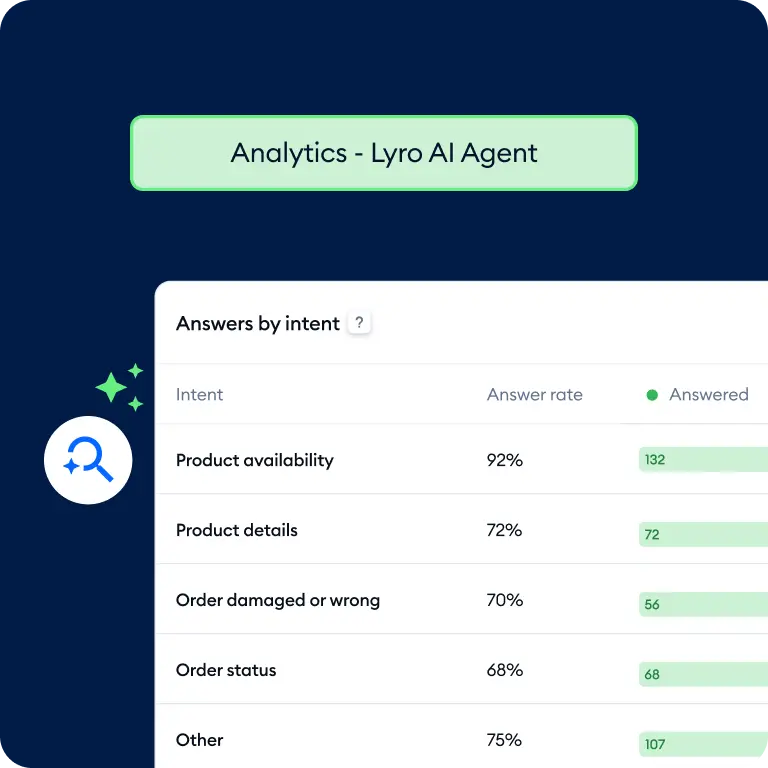
Tidio is the alternative I'd try if you use both halves of Quriobot today: some flows for lead capture, and live chat for the questions the flows can't answer. It has both, plus an AI agent, Lyro, that answers from your support content.
What it does vs Quriobot
Tidio's Flows cover the scripted side: no-code paths that trigger on visitor behavior, collect data or handle missed chats. Lyro covers the AI side without an OpenAI key, and it hands off to your team on rules you set. On billing, the Tidio pricing page says that even if Lyro replies "a dozen times or more" to solve a problem, it still counts as a single conversation. If you run Zendesk or Salesforce, Tidio also sells Lyro on its own as an add-on to that helpdesk.
"Just had a conversation with tidio, their pricing is so off and hidden, "free tier" is just a trap includes most services that are billed separatedly once you want to scale."

Pros and cons
- Pro: flows, AI and human chat in one inbox, and live chat is free to start.
- Pro: billed per AI conversation, not per reply, so long chats don't burn the allowance.
- Pro: Lyro can run inside Zendesk or Salesforce if you outgrow Tidio's own inbox.
- Con: three separate meters: billable conversations, Lyro conversations and Flows visitors.
- Con: the Lyro calculator stops at 1,000 conversations, and removing Tidio branding is a $16.67-a-month add-on below Plus.
Pricing
From Tidio's pricing page, billed yearly (2 months free):
| Plan | Price | What you get |
|---|---|---|
| Free | $0 | 50 billable conversations, 50 Lyro conversations once, 100 Flows visitors |
| Starter | $24.17/mo | 100 billable conversations |
| Growth | from $49.17/mo | from 250 billable conversations |
| Plus | from $300/mo + usage | premium features, priority support, lower usage rates |
| Premium | custom | guaranteed AI deployment help |
| Lyro AI Agent | from $32.50/mo | from 50 Lyro conversations a month |
| Flows | from $24.17/mo | from 2,000 visitors reached |
A billable conversation is one your team replies to or starts. My Tidio pricing guide has worked examples.
Verdict
Pick Tidio if you want the Quriobot mix of flows and live chat, with AI that works out of the box. Skip it if you'll run more than 1,000 AI chats a month and want a published price for that. My Tidio alternatives list covers the rest.
4. Crisp
Best for: a shared inbox at a flat price per workspace, with AI included on paid plans.
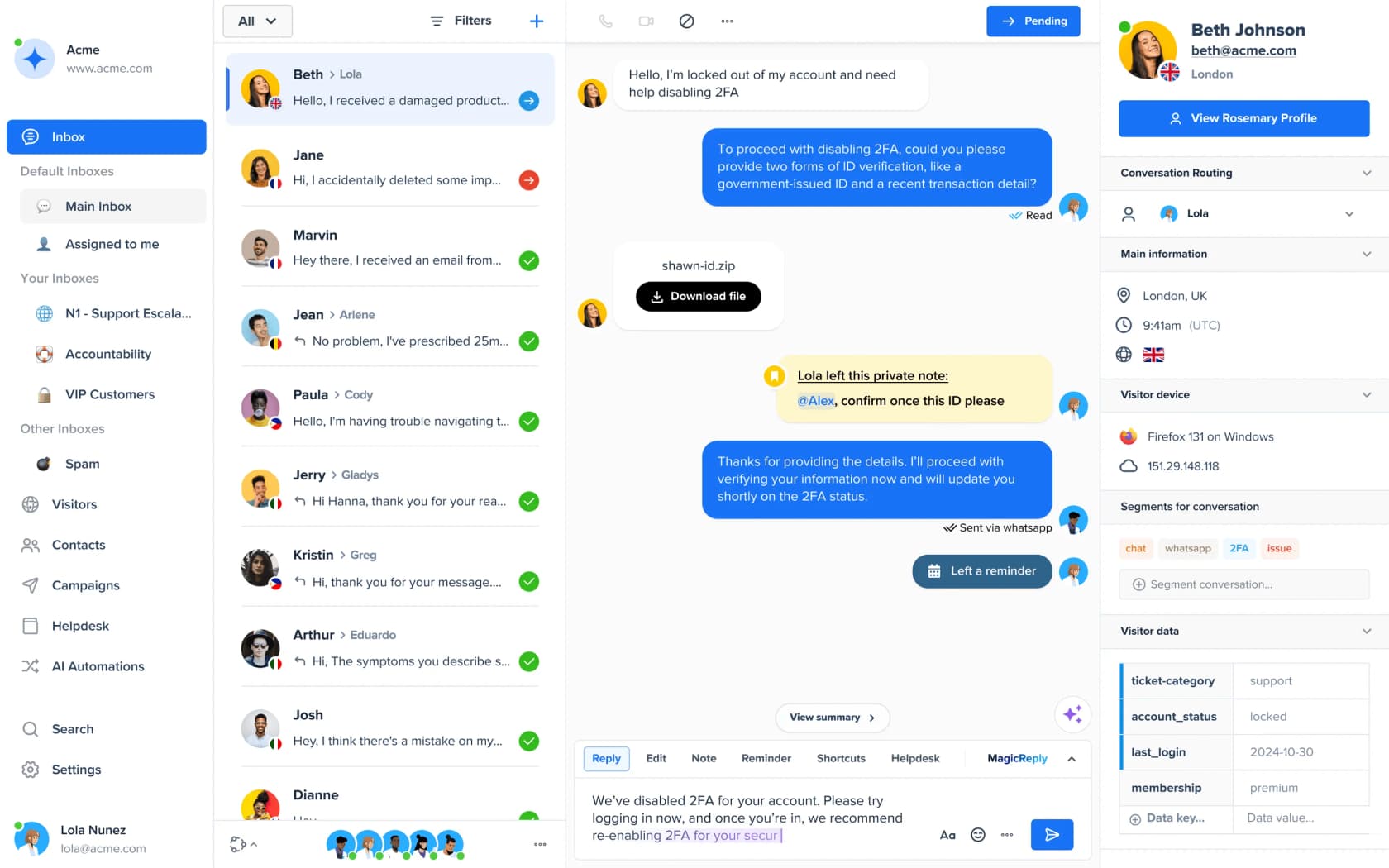
Crisp is a chat widget and shared inbox first, with an AI agent and a workflow builder on top. Its pitch is the opposite of Quriobot's chat tiers: one flat price per workspace, whatever your conversation count.
What it does vs Quriobot
Quriobot's paid tiers rise with chats; Crisp's rise with features and seats. On the Crisp pricing page, every paid plan includes AI credits that Crisp translates into automated conversations: about 90 on Mini, 450 on Essentials and 1,350 on Plus. Essentials adds the knowledge base, the no-code AI chatbot builder and an omnichannel inbox for WhatsApp, Instagram and SMS. Plus adds ticketing, 100+ integrations and white labelling. My take on Crisp AI covers how its agent answers.
Pros and cons
- Pro: flat pricing with seats included: 4 on Mini, 10 on Essentials, 20+ on Plus.
- Pro: a free plan with 2 seats of shared inbox, if a person answering is the main need.
- Pro: private notes, routing and visitor data in the inbox, which a flow builder doesn't give you.
- Con: the AI allowance is fixed per plan, and the pricing page doesn't list a price for more credits.
- Con: the visual workflow builder starts on Essentials at $95, and ticketing and white label only arrive on Plus.
Pricing
From Crisp's pricing page, per workspace, per month:
| Plan | Price | Seats | AI included |
|---|---|---|---|
| Free | $0 | 2 | none |
| Mini | $45 | 4 | $5 of AI credits, about 90 automated conversations |
| Essentials | $95 | 10 | $25, about 450 automated conversations |
| Plus | $295 | 20+ | $75, about 1,350 automated conversations |
| Enterprise | custom | custom | personalized SLA |
Every plan has a 14-day free trial. See my Crisp pricing guide for the details.
Verdict
Pick Crisp if your team wants one inbox for chat, email and WhatsApp at a predictable price. Skip it if you expect heavy AI volume, since the included credits cap out around 1,350 conversations on Plus. My Crisp alternatives list has more.
5. eesel
Best for: teams whose website chats end up as tickets in Zendesk, Freshdesk or another helpdesk.

eesel is an AI helpdesk teammate. It isn't a flow builder, so if your Quriobot bot is a quiz or a lead form, keep reading the list. But if your bot exists to answer support questions, eesel does that job without a single flow: it learns from your help center, your past tickets and your docs, answers on your website through the chat bubble, and works the ticket queue in the helpdesk you already run.
What it does vs Quriobot
The difference is where the chat goes when the bot is stuck. In Quriobot, a handoff opens a live chat or another vendor's widget. In eesel, the chat becomes a ticket in your helpdesk with the conversation attached, and the same agent can draft the reply on that ticket. The Activity view above shows website chats linked to their Zendesk ticket numbers.
On my side of the queue, the chats I'm glad to see are the clean handoffs: the bot answers two help-center questions, the visitor types "can I talk to a human?", and the ticket lands with everything I need. That's the flow eesel is built for. You set its behavior in plain-English instructions, and you can test it against hundreds of your past tickets before it answers a real customer.
SamCart runs two eesel agents, one on its Freshdesk tickets and one on its website chat, each with its own tone, both answering from 280 help center articles. Dutch lighting brand Innr has eesel draft Freshdesk replies in the language the customer wrote in: 180 drafts in one month, from 1,500 help center articles and past tickets. For a Quriobot team with a European audience, that multilingual piece is often the deciding factor.
Pros and cons
- Pro: no flows to build or OpenAI account to manage; it learns from what you already have.
- Pro: works inside Zendesk, Freshdesk, Gorgias, Front, Help Scout, HubSpot and Salesforce.
- Pro: one credit per chat however long it runs, EU or US data residency on every plan, unlimited seats.
- Con: no form, quiz or booking-step builder, so it doesn't replace Quriobot for lead capture.
- Con: no integration with Crisp, LiveAgent or Zoho Desk, and SOC 2 Type II is still underway.
Pricing
From eesel's pricing page:
| Plan | Price | What you get |
|---|---|---|
| Free | $0 | 100 credits to try every feature and integration, no card |
| Teammate | from $299/mo | 500 credits; 1,000 for $499, 2,000 for $849, up to 5,000 for $1,749 |
| Enterprise | custom | SSO and MFA, custom data residency, HIPAA with a signed BAA |
A ticket or a chat is 1 credit. Optional overage is $0.80 a credit with a monthly cap you set, and paying a year upfront gets two months free.
Verdict
Pick eesel if your Quriobot bot is really a support bot and your team lives in a helpdesk. Skip it if the bot's main job is collecting leads through forms; Landbot or Tidio fit that better.
6. Zendesk
Best for: teams ready to move their whole support operation onto one suite.

Zendesk is the biggest jump on this list. It isn't a chatbot tool; it's a full helpdesk with messaging, live chat, ticketing, a help center and AI agents. ChatGPT included it for teams with bigger support operations, and that's the right frame: you'd pick it to replace Quriobot and your inbox at the same time.
What it does vs Quriobot
Quriobot's live chat sits next to your helpdesk. Zendesk is the helpdesk. Its pricing page says AI agents are included in every Suite and Support plan, billed per automated resolution, which it defines as a request the AI resolved with no escalation to a person. Each plan includes a set number of resolutions, up to 10,000 a year depending on plan and agent count. Past that, committed resolutions are $1.50 each and pay-as-you-go is $2.00. My Zendesk AI guide covers what the agents do.
Pros and cons
- Pro: one system for chat, email, WhatsApp, phone and the help center.
- Pro: you pay for AI resolutions, not for every chat the AI touches.
- Pro: a large marketplace of apps, including AI tools like eesel that run inside it.
- Con: per-agent pricing adds up as the team grows, before any AI cost.
- Con: a much bigger setup than a website bot, and the Copilot add-on is another $50 per agent a month.
Pricing
From Zendesk's pricing page, per agent, billed yearly:
| Plan | Price | Notable |
|---|---|---|
| Support Team | $19/agent/mo | email and ticketing |
| Suite Team | $55/agent/mo | messaging, live chat, help center, AI agents |
| Suite Professional | $115/agent/mo | more routing, reporting and controls |
| Copilot add-on | $50/agent/mo | AI assistance for agents |
| Automated resolutions | $1.50 committed, $2.00 pay-as-you-go | past the plan's included amount |
My Zendesk pricing guide and the Zendesk AI pricing breakdown go deeper.
Verdict
Pick Zendesk if a website bot was only the first symptom and you need a real helpdesk. Skip it if you only want to replace the bot. If you're already weighing helpdesks, my Zendesk alternatives list is worth a look too.
7. Botpress
Best for: teams that want to build a custom AI agent, flows included, and never get cut off.
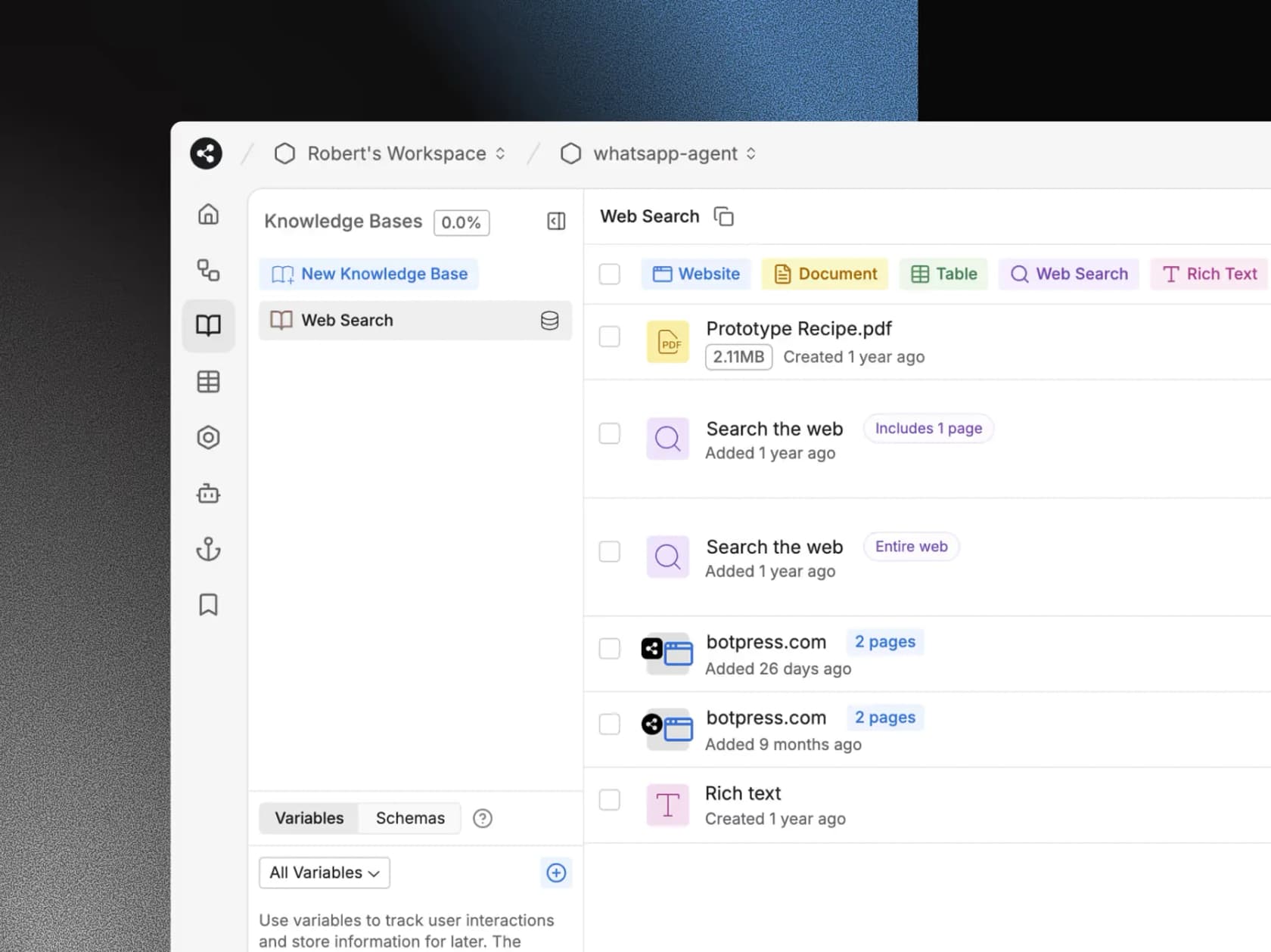
Botpress is what Quriobot might look like if it were built AI-first for developers. It's a visual studio where you design workflows, connect a knowledge base, and add code where you need it. It's more setup than anything else here, and more control.
What it does vs Quriobot
Botpress takes the opposite position on caps. Its pricing FAQ says "You never get cut off": at 95% of your quota it adds a pack of 100 conversations automatically, and it notifies you at 75% and 100%. Every conversation includes $0.10 of AI usage, so model costs are covered at normal use, instead of landing on a separate OpenAI bill like they do with Quriobot. My Botpress review covers the studio in depth.
"I'm using Botpress right now, and I find the studio really laggy. There's no timezone settings, and there seem to be too much going on."
Pros and cons
- Pro: the bot never goes quiet; overage packs keep it running.
- Pro: flows and AI in one builder, with unlimited AI agents from Plus.
- Pro: the free plan includes 100 conversations, 3 seats and 3 AI agents.
- Con: the flip side of never cutting off: a traffic spike costs money instead of going quiet.
- Con: it's a builder for technical teams, and the learning curve is steeper than Quriobot's.
Pricing
From Botpress's pricing page, billed yearly:
| Plan | Price | Conversations | Extra |
|---|---|---|---|
| Free | $0 | 100 | 3 seats, 3 AI agents |
| Plus | $150/mo | 250/mo | packs of 100 for $65, $25 AI usage included |
| Team | $750/mo | 1,500/mo | packs of 100 for $50, $150 AI usage, unlimited seats, routing |
| Enterprise | custom | custom | support engineer, custom volume |
My Botpress pricing guide works through more examples, and Botpress alternatives lists the other builders.
Verdict
Pick Botpress if you have someone technical and want an agent built exactly your way. Skip it if you chose Quriobot because it was simple; this is the least simple tool on the list.
Where does a person take over the chat?
This is the question I'd answer before picking anything, because it's where support bots succeed or fail. A bot that answers 70% of chats and fumbles the other 30% creates more work than it saves.
| Tool | Where the handoff lands | Who sees the history |
|---|---|---|
| Quriobot | Its own live chat, or another vendor's widget via script | The live chat agent |
| Landbot | A Human takeover block into Landbot's shared inbox | Your team in Landbot |
| Chatbase | The Chatbase inbox from Basic, or Zendesk/Freshdesk | Your team in either |
| Tidio | Tidio's live chat inbox, on rules you set | Your team in Tidio |
| Crisp | The Crisp shared inbox | Your team in Crisp |
| eesel | A ticket in Zendesk, Freshdesk or your other helpdesk | Your team, in the tool they already use |
| Zendesk | A Zendesk ticket or messaging conversation | Your team in Zendesk |
| Botpress | Botpress Desk or a connected tool | Your team in either |
The pattern: tools with their own inbox keep the handoff inside that inbox, which is fine if that inbox is where your team works. If your team already lives in a helpdesk, a handoff into a second inbox means two places to watch. My guide to human handoff covers what a clean one looks like, and AI chatbot vs live chat explains when you need both.
How do you test a Quriobot alternative before you switch?
Most of these tools have a free plan or a trial, so test on your own content before you commit. I'd run the same five chats on each shortlisted tool, the ones ChatGPT suggested and the ones I'd pick from the queue anyway:
- A simple FAQ. Ask your top question, like shipping times or a refund policy. The answer should match your help center word for word on the facts.
- A multi-step decision tree. Run the flow your Quriobot bot handles today, like a product finder or a booking. If the tool can't do it, decide whether you still need it.
- A question it can't know. Ask something not in your content. A good bot says it doesn't know and offers a person; a bad one makes something up.
- A handoff to a person. Type "can I talk to a human?" and check where the chat lands and whether the history comes with it.
- A connection to your stack. Check that a lead reaches your CRM or a ticket reaches your helpdesk, with the right fields.
Keep your Quriobot bot live while you test, with soft-start on so only clicked chats count. My chatbot analytics guide lists what to measure in the first month.
eesel for website chats that end up in your helpdesk
If your Quriobot bot mostly answers support questions, eesel replaces the flows with an AI teammate that already knows your help center and past tickets. It answers on your website, hands the hard chats to your team as tickets in Zendesk or Freshdesk, and drafts the reply on that ticket too. Cape Coffee Beans uses it inside Zendesk to pull up a product, an order or a past ticket whenever the team asks.

You can start with 100 free credits and no card, connect your help center, and test it on your past tickets before it talks to a single visitor. Try eesel and see how it handles your real questions. For a wider view of the category, my roundup of the best customer service chatbots compares more tools.
Frequently Asked Questions
What is the best Quriobot alternative?
It depends on the job. Landbot is the closest Quriobot alternative if you want to keep building scripted flows. Chatbase is the simplest swap if you want AI answers on your site without flows. eesel fits when website chats end up as tickets in Zendesk or Freshdesk. My best AI chatbots roundup covers more options.
Is there a free Quriobot alternative?
Yes, with limits. Landbot Free includes 100 chats a month but no AI chats, Botpress Free includes 100 conversations, Tidio Free includes 50 Lyro AI conversations once, and Crisp Free gives 2 seats of shared inbox without AI credits. eesel starts with 100 free credits and no card. See my guide to the best free AI chatbot tools.
Which Quriobot alternative is closest for building flows?
Landbot. Like Quriobot, it is a visual, no-code builder for branching conversations, forms and lead capture, and it adds an AI Agent block you can drop into a flow. It is a European platform with GDPR and SOC 2. My Landbot review goes deeper on the builder.
Do Quriobot alternatives need my own OpenAI key?
Most don't. Quriobot's AI runs through your own OpenAI account, but Chatbase, Tidio Lyro, Crisp, Botpress, Zendesk and eesel include the AI in their own pricing. Botpress, for example, includes $0.10 of AI usage in every conversation. My AI knowledge base chatbot guide explains the setup difference.
What happens when a Quriobot alternative hits its chat limit?
It varies. A paid Quriobot bot stops working at the plan limit. Landbot charges $0.05 per extra chat and $0.10 per extra AI chat, Botpress adds a pack of 100 conversations at 95% of quota, and Chatbase can auto-recharge credits. eesel has optional overage at $0.80 a credit with a cap you set. Read my chatbot cost guide for more.
How much do Quriobot alternatives cost?
For one site with 2,000 AI chats a month, I priced Chatbase at about $200, Landbot at $258, Crisp from $295, eesel at $849 and Botpress at $1,000. Quriobot itself is €27 plus your OpenAI bill. Tidio doesn't publish Lyro prices past 1,000 conversations. My AI customer service cost guide has the wider picture.
Which Quriobot alternative works with Zendesk or Freshdesk?
eesel works inside both, as a website chat that hands off into the ticket queue and as an agent on the tickets themselves. Chatbase connects to Zendesk and Freshdesk from its Basic plan, and Tidio sells Lyro as an add-on for Zendesk. See eesel for Zendesk and eesel for Freshdesk.
Is there a GDPR-friendly Quriobot alternative in the EU?
Landbot is a European platform with GDPR and SOC 2, and eesel includes EU or US data residency on every plan. Quriobot stores data on EU servers. My guide to GDPR for support chatbots lists what to ask any vendor.