
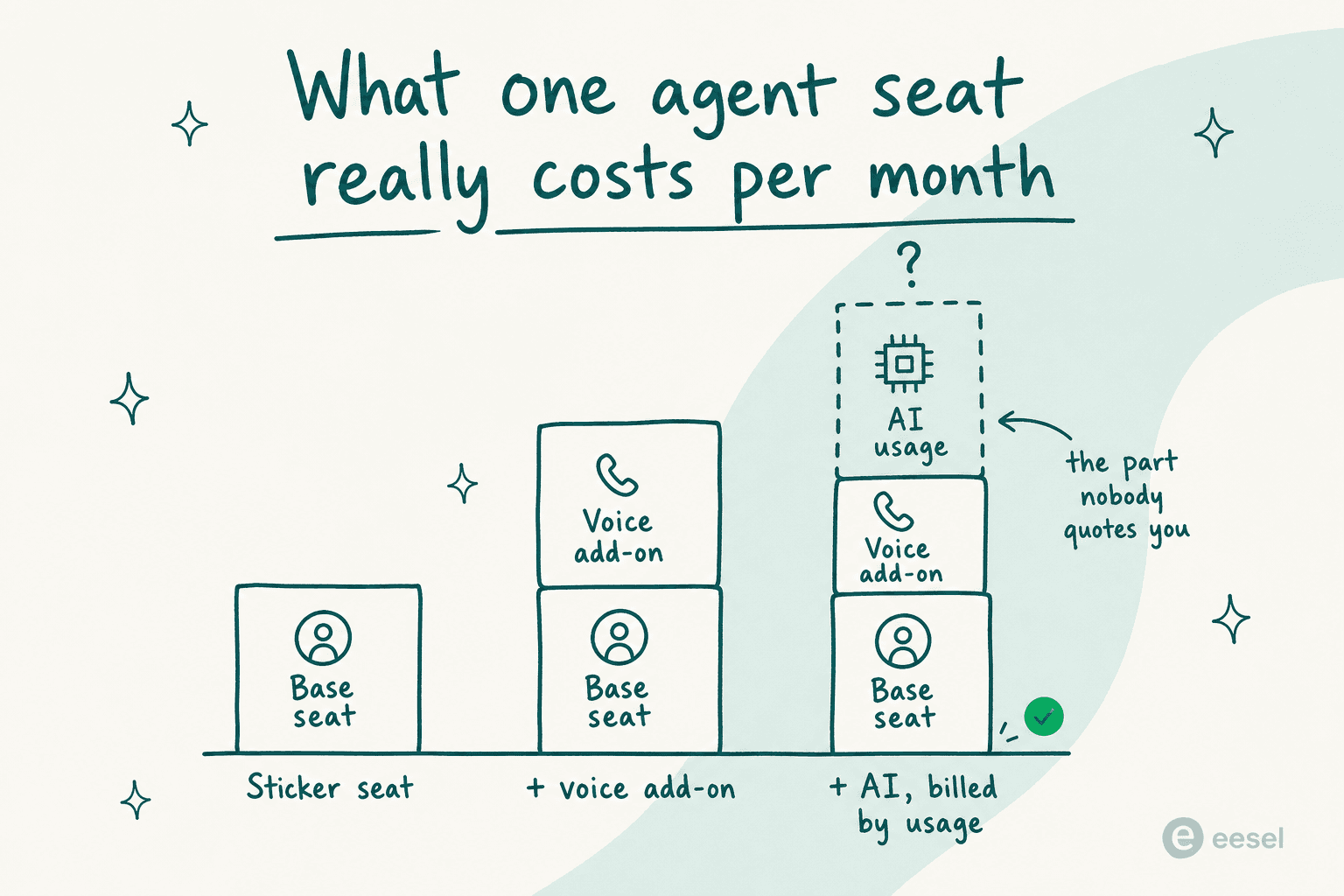
Every platform here got priced on 27 July 2026. Here is what that exercise turned up: the seat price is the part they publish, and the AI price is the part that decides your bill. Genesys seats run $75 to $240. NiCE, $110 to $249. Talkdesk sits at $85 to $225, and Five9 asks $119 to $159 with a 50-seat floor underneath it. All four meter the AI separately, and only two of them, NiCE and Freshdesk, will print a per-unit rate in public.
Second thing, and it is the one worth knowing before you shop at all. Most teams searching for customer service call center software do not have a telephony problem. What they have is a volume problem. So if phone is a minority channel for you, replacing the whole platform is six to nine months spent fixing the wrong thing. Layering AI onto the help desk you already run takes a few days.
That is where I would start. It is also what I build, so weigh it accordingly. eesel plugs into Zendesk, Freshdesk, Gorgias, Front and roughly a hundred other tools, then learns from the tickets your team has already solved instead of only the help center. Billing is one fixed monthly price from $299 for 500 credits (1 credit per ticket or chat), no seat fees. One customer, a gig-economy driver-analytics app running Zendesk, had 73% of tier-1 requests resolved in the first month, and the results showed up inside a seven-day trial.
How I picked these, and what I am actually qualified to say
For the last three-plus years I have been putting AI agents onto live support queues at eesel. Customers on the small end run maybe 1,000 tickets a month; on the other end sits smava, whose fully automated German-language Zendesk agent handles 100,000+ tickets a month. That is the lens I am reading these products through. I have also watched a confident-sounding bot quietly hand a real customer the wrong answer, which is the reason every rollout we do now gets simulated against historical tickets first, before it touches anything live.
What I did for this roundup: I pulled every vendor's own pricing page on 27 July 2026, read the plan footnotes, and wrote down the exact billing unit for both the seat and the AI. Where a vendor hides the AI rate behind sales, I say so instead of guessing. Review scores come from G2 and Capterra directly. I am judging these as an operator would, on cost per contact and time to value, not on feature-checklist length, and the same lens I use for agent productivity and quality assurance applies here.
What I am not claiming: I have not run a 500-seat Genesys deployment for a year. For the contact center platforms I read their docs, pricing and review base carefully, and I have sat on the other side of plenty of migrations off them. Take the pricing analysis as researched and the deflection analysis as lived.
The comparison table
Prices are per user or agent per month on annual billing, captured 27 July 2026.
| Tool | Best for | Entry price | Top published tier | AI billing unit | Published AI rate | Seat minimum | Free tier | Review score |
|---|---|---|---|---|---|---|---|---|
| eesel | AI on the helpdesk you already run | $0 seats | Plans from $299/mo | Credit (1 per ticket or chat) | From $299/mo for 500 credits | None | 100 free credits | n/a |
| Zendesk | Voice inside a ticketing system | $19 | $115 + $83 voice | Automated resolution | Not published | None | 14-day trial | 4.3/5 |
| Five9 | Mid-market to enterprise voice | $119 | $159 published | Minutes + usage | 3,000 min/seat, then usage | 50 concurrent | No | 4.1/5 (611) |
| Genesys Cloud CX | Enterprise omnichannel | $75 | $240 | AI Experience tokens | Token allowance only | None published | No | 4.3/5 |
| NiCE CXone | Large WFM-heavy centers | $110 | $249 | Per session | $0.25/session | Not disclosed | No | 4.3/5 (1,730) |
| Talkdesk | Vertical-specific centers | $85 | $225 | Autopilot, quote-gated | Not published | Not disclosed | No | 4.4/5 |
| Dialpad | AI-native voice | Quote | Quote | Per AI conversation | Credit pool, no rate | Not disclosed | Trial | 4.3/5 |
| Aircall | Small teams that need a phone system | $30 | $50 | Per minute | $0.49/min PAYG | 3 licences | No | 4.4/5 (1,371) |
| Freshdesk | Budget ticketing with bundled AI | $19 | $89 | Per session | $0.49/session | None | 14-day trial | 4.4/5 |
| Zoho Desk | Cheapest seats | $7 | $40 | Bundled per tier | No separate SKU | None | Free for 3 users | 4.4/5 |
Two things fall out of that table. The first: the four true contact center platforms all published a seat price and hid the AI price. The second is quieter but it costs more, the cheapest per-unit AI rates belong to the vendors who are not selling you telephony in the first place.
The AI line, priced
This is the part I could not find anywhere else, so I built it instead. Put your monthly AI conversation volume in, and the published rates do the rest. Vendors who publish nothing are shown as exactly that, since it is the only honest answer available.
At 2,000 conversations a month, the spread between the cheapest published rate and the dearest is about two to one. And the platforms that will not quote a number at all happen to be the ones charging the most per seat. I do not think that is a coincidence. It is also the single best reason to get the AI rate in writing before anything gets signed.
1. eesel
Best for: teams whose real problem is tier-1 volume, not telephony.
I built this one, so read it with that in mind. I will keep the claims to things you can go and check. eesel is an AI layer that sits on top of the help desk you already have, rather than replacing any of it. It connects to Zendesk, Freshdesk, Gorgias, Front, Salesforce, Slack and around 100 other tools, learns from your solved tickets, macros and help center, then drafts or sends replies with confidence-based routing so low-confidence answers become drafts instead of live responses.

The feature I would point at first is simulation. Before anything goes live, you run the agent against your historical tickets and see coverage by theme, which topics it would have answered, which it would have fumbled. That is the step that separates an AI rollout from an AI hallucination incident. If you are still deciding what this category even covers, I broke down AI help desk in plain terms.
Pricing: one fixed monthly price on the Teammate plan, with no seat fees and no platform fee. 1 credit covers a ticket or chat, however long. Dashboard lookups are mostly free, a blog draft is $4.00. Pay a year upfront and you get two months free. SSO and MFA are add-ons from $199/month, and HIPAA is talk to us. New accounts get 100 free credits with no card.
| Monthly credits | Price |
|---|---|
| 500 | $299/mo |
| 1,000 | $499/mo |
| 2,500 | $999/mo |
| 5,000 | $1,899/mo |
Pros: live in days rather than months, no migration, billed on outcomes, 80+ languages out of the box, and every correction you make trains the next answer.
Cons: it is not a phone system. If you need IVR trees, a predictive dialer or workforce scheduling, eesel does not replace that, it sits next to it. Very small teams with almost no ticket history get less benefit, since the whole model leans on your past resolutions.
Verdict: pick eesel when the queue is drowning in repetitive contacts and the helpdesk underneath is fine. Skip it when what you actually need is telephony infrastructure.
2. Zendesk
Best for: teams that want voice inside the ticketing system they already know.
Zendesk is the default answer here, and for a decent reason. Its voice product, Zendesk Talk, lives in the same agent workspace as email and chat, so nobody has to leave the ticket to take a call. The IVR and voicemail configuration is solid once set up, and I have written a separate walkthrough of greetings and IVR setup because that part trips people up.
Pricing: Support Team $19, Suite Team $55, Suite Professional $115, and Suite Enterprise + Copilot is quote-only. Serious voice means the Contact Center add-on at $83/agent/month, and agent-side AI means Copilot at another $50. A Suite Professional seat with Copilot is $165 before you have added voice.
Pros: the deepest app ecosystem in the category, mature routing, and the AI agent is included in every Suite plan rather than sold as a bolt-on tier.
Cons: the automated resolution rate is not published anywhere on the pricing page, so the AI portion of your bill is unknowable until sales quotes it. Users are blunt about that:
"No, it's just terrible and a rip off. You can't even export the data on like what people ask the bot so you can sort it or manipulate it how you want. We stopped using it because ARs are a rip off, and it's a rushed product to get into the AI hype."

The other recurring complaint is that answer quality is gated by help-center hygiene rather than by the model, which matches what I see: bots trained only on published articles have nothing to say about the 60% of tickets your articles never covered. If that is your situation, look at Zendesk AI alternatives before upgrading a tier.
Verdict: buy Zendesk for the platform, then treat the AI question as a separate decision. Right base, middling AI purchase.
3. Five9
Best for: mid-market and enterprise voice operations that need real CCaaS depth.
Five9 is a proper contact center platform. ACD, IVR, dialer, queue management, geo redundancy, workforce engagement, the lot of it. Its own Forrester TEI study claims 212% ROI over three years, $14.5M NPV and 120 seconds saved per call, which is vendor-commissioned but at least specific.
Pricing: Digital $119/seat/month, Core $159, and Plus, Pro and Enterprise are all "contact sales for flexible pricing". Two details matter more than the numbers. Prices are per concurrent user, not per named agent, and there is a 50-seat minimum, so the smallest real Five9 invoice is around $5,950 a month. AI is metered at 3,000 minutes per bundled seat plus usage, and workforce engagement is billed on named agents, so headcount above your concurrency gets charged twice.
Pros: deep telephony, strong CRM adapters for Salesforce, ServiceNow, Dynamics and Zendesk, and a choice of workforce vendors rather than a forced bundle. The outbound dialer is the reason most sales-heavy teams land here rather than on a customer service automation platform.
Cons: G2 rates it 4.1/5 across 611 reviews and Capterra 4.2/5 across 484, but Trustpilot sits near 3.4, and the gap is contract and billing experience rather than product. Setup is a project, not a weekend: one reviewer counts thousands of settings scattered across the admin.
Verdict: the right pick above roughly 50 seats when outbound is heavy. Below that, the seat minimum makes the decision on your behalf.
4. Genesys Cloud CX
Best for: enterprises running omnichannel at scale who want one platform for everything.
Of the enterprise platforms, Genesys is the most transparent about how it charges. It is also the only one that lets you pick the licence shape. Named, concurrent, or hourly interacting, where the bill covers only the time actually spent handling interactions. For a center carrying heavy part-time or seasonal staffing, that last option is worth real money.
Pricing: Genesys pricing puts Cloud CX 1 at $75, CX 2 is $115, CX 3 is $155 and CX 4 is $240 per user per month billed annually. AI runs on Experience tokens, with 250 named or 350 concurrent tokens per org per month included, and CX 4 adds 30 named tokens per agent per month.
Pros: the licence flexibility is real, and unusual, the AI token allowance is at least quantified rather than hidden, and the platform covers voice, digital, workforce engagement and journey management in one place, which is the omnichannel promise actually delivered rather than four products with shared billing.
Cons: a token is not a resolution or a session, it is an internal consumption unit, so translating tokens into "how many customer questions can my AI answer" takes a spreadsheet and a sales call. And CX 4 at $240 a seat means a 100-seat center is $288,000 a year before AI overage.
Verdict: the strongest enterprise pick when licensing flexibility matters to you. Under about 50 agents it is both overkill and overpriced.
5. NiCE CXone
Best for: large centers where workforce management is as important as the calls.
NiCE CXone does one thing the rest of the enterprise field refuses to do. It publishes list prices. Five suites, plainly printed on the page. That alone earns it a look.
Pricing: NiCE's price table lists Omnichannel Suite at $110, Essential $135, Core $169, Complete $209, and Ultimate $249 per agent per month. Ultimate is dual-unit, $249 per agent plus $0.25 per session, and that per-session rate is the only published AI consumption price anywhere in enterprise CCaaS. The catch: all three Copilots are Ultimate-only, and the $110 entry suite includes nothing from the workforce empowerment pillar.
Pros: the WFM and quality management depth is the best in the category, which shows in the review base, and the pricing transparency deserves credit. If scorecards and call scoring are the reason you are shopping, this and AI for support QA are the two places to look.
Cons: G2 gives it 4.3/5 across 1,730 reviews, but read where those reviews sit: 1,355 in Contact Center, 853 in Contact Center Workforce, and just 15 in AI Customer Support Agents. This is a telephony and workforce base being repositioned as an AI platform. The recurring complaints are operational:
"I don't like that the calls on NiCE CXone sometimes break down or drop randomly. It's frustrating because it's not just me; other agents experience this as well, so I'm sure it's not a network issue. The app also doesn't work well with VDI sessions."

Developers are harsher about the tooling, flagging laggy Studio script nodes and no public case-generation portal.
Verdict: buy it for workforce management and for telephony at scale. Do not buy it on the strength of the AI story, at least not yet.
6. Talkdesk
Best for: regulated verticals that want a pre-built industry configuration.
Talkdesk sells much the same core CCaaS as its rivals. What it adds are Industry Experience Clouds, for healthcare, financial services and retail, shipping with the vertical workflows already configured. If compliance requirements are the reason your last rollout took a year, that packaging is worth paying for.
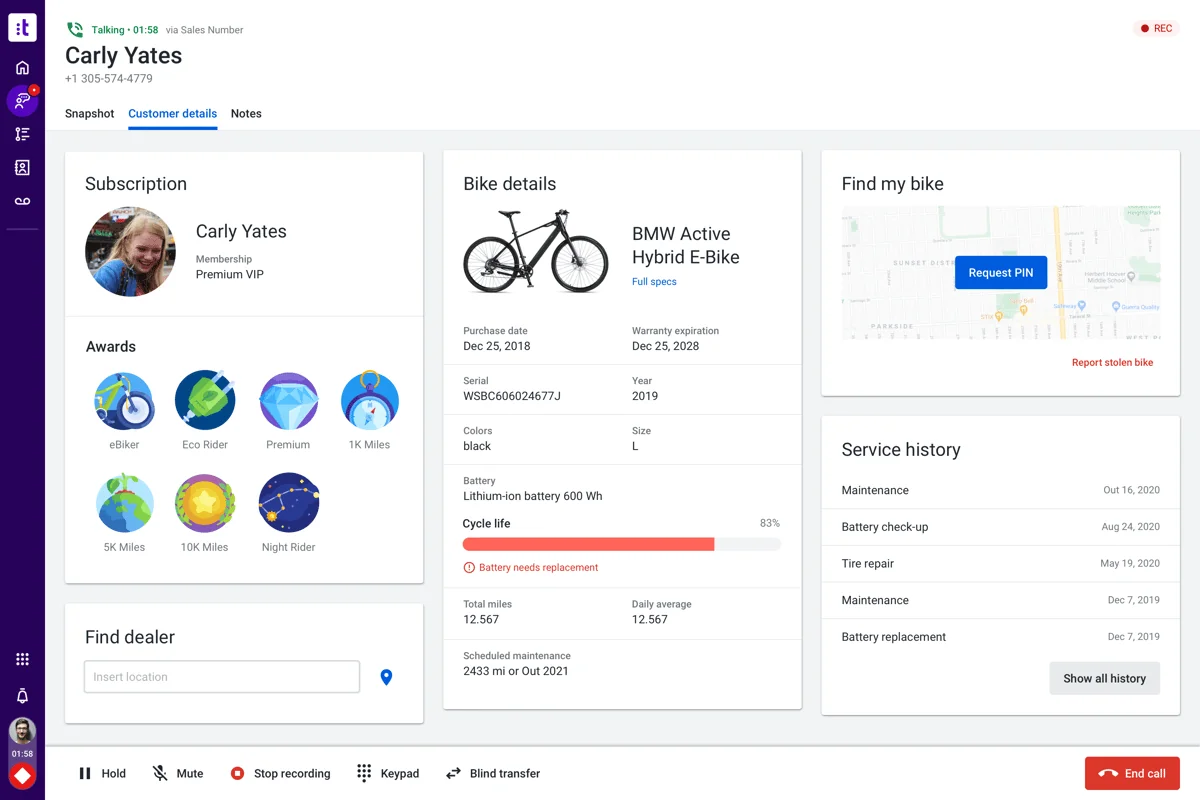
Pricing: Digital Essentials $85 on the Talkdesk pricing page, Voice Essentials $105, Elite $165, and Industry Experience Clouds $225 per user per month. Every AI product, Copilot, Autopilot, Navigator, Interaction and Quality Analytics, and Identity, is listed with features and no price at all.
Pros: the agent workspace is one of the better ones in the category, pulling customer context, order history and account details into the call screen without tab-switching. The vertical clouds are a real shortcut, particularly for teams whose queue is half product troubleshooting and half compliance, the pattern I describe in AI tech support.
Cons: the AI pricing opacity is total. You can price a Talkdesk seat to the dollar and have no idea what Autopilot costs until you are in a sales cycle. Voice Essentials at $105 is also a jump over Genesys CX 1 at $75 for a comparable voice-first tier.
Verdict: shortlist it when you sit in healthcare, financial services or insurance. Otherwise Genesys hands you more licence flexibility for less money.
7. Dialpad
Best for: teams that want AI-native voice rather than AI bolted onto legacy telephony.
Dialpad built its transcription and analytics stack in-house from the beginning, and the reporting shows it. AI-predicted CSAT on calls that never got a survey back is a useful trick, particularly when your CSAT measurement currently rests on a 25% response rate.
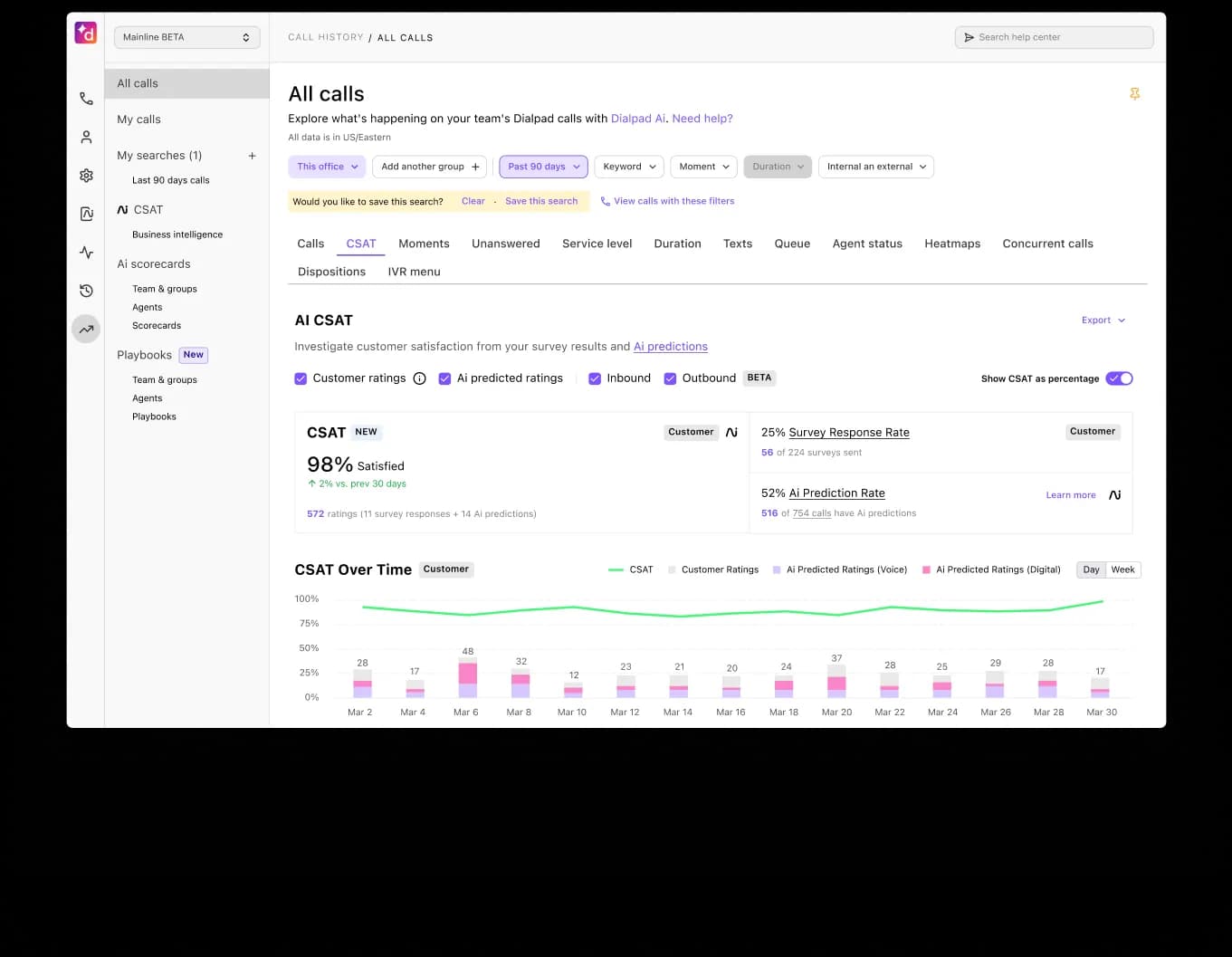
Pricing: the pricing page is now built around AI Agent credits. You buy a pool, and a conversation is billable only when the AI retrieves information or executes a real action like scheduling, routing or an order lookup. No dollar figure per credit is published, so the model is elegant and the rate is a sales conversation.
Pros: the "only bill when work happens" principle is the fairest framing in the category, and the native analytics are ahead of most competitors' bolt-ons.
Cons: no published rate means no ability to model your bill, and Dialpad's contact center depth still trails Genesys and NiCE on workforce management.
Verdict: worth a demo when voice quality and analytics matter more to you than WFM depth. Get the per-credit rate in writing on the first call, though.
8. Aircall
Best for: small teams who need a real phone system next week, not a platform.
For a team of 5 to 25 people, Aircall is the honest answer. A cloud phone system with proper routing, recording and CRM integrations, and it never pretends to be a contact center suite.
Pricing: Essentials is $30 per licence per month on Aircall's annual pricing, or $40 monthly, Professional $50 or $70, Custom by quote. The three-licence minimum means the real entry invoice is $90 a month, not $30, and Custom jumps to a 25-licence floor. AI is unbundled: AI Assist is $9 per licence and free on Professional, AI Assist Pro is $49, extra numbers are $6.
The voice agent is where the maths gets interesting. It bills per minute, not per resolution: 50 free minutes a month, then $0.49/min pay as you go under 2,500 minutes, $0.39 above, with bundles at $175 for 500 minutes and $725 for 2,500, dropping toward $0.19/min past 10,000. A five-minute call costs you $2.45 whether or not the customer got an answer.
Pros: cheapest credible voice entry point, fast setup, strong CRM integrations for a tool at this price. It is the phone layer I would put behind a small ecommerce call center without a second thought.
Cons: G2 sits near 4.4/5 across 1,371 reviews while Trustpilot sits near 3.0 across 1,025, and the gap is billing and auto-renewal complaints rather than call quality. Per-minute AI billing also punishes exactly the calls you most want automated, the long ones.
Verdict: the right call for a small team that needs phones on Monday. Pair it with outcome-billed AI instead of paying $0.49 a minute for an attempt.
9. Freshdesk
Best for: budget-conscious teams who want AI included rather than quoted.
Freshdesk undercuts Zendesk at the top of its range, and it includes a meaningful AI allowance on every tier, which almost nobody else bothers to do. Voice sits in a separate SKU (Freshdesk Omni and Freshcaller). So treat this as ticketing-first with telephony available, not as a native contact center.

Pricing: Growth $19, Pro $55, Enterprise $89 on the Freshdesk pricing page per agent per month annually. Freddy AI Agent includes the first 500 sessions on every plan, then $49 per 100 sessions, which is $0.49 a session. Freddy AI Copilot is $29 per agent and only available on Pro and Enterprise.
Pros: publishing the AI rate at all puts Freshdesk ahead of most of this list, the 500 included sessions make trials actually free, and Enterprise at $89 undercuts Zendesk's equivalent by a wide margin.
Cons: a session is an attempt, not a resolution, so a bot that fails and escalates still bills you. And the Growth plan cannot buy Copilot at all, so agent-side AI starts at $55 + $29 = $84 a seat. If chat is your main channel, compare Freshchat pricing too.
Verdict: the best value ticketing platform on this list, with one caveat worth repeating, you are buying attempts and not outcomes.
10. Zoho Desk
Best for: the cheapest workable seats, and teams already inside the Zoho suite.
Next to everything above it, Zoho Desk is absurdly cheap. It is also not a toy. Blueprint process automation, multi-channel ticketing, telephony integrations, all present.

Pricing: Zoho Desk pricing starts free for 3 users, Express $7, Standard $14, Professional $23, Enterprise $40 per user per month annually. Light users are $6, and Enterprise includes 50 of them free. Zia AI is now a Professional-tier line item rather than an Enterprise-only feature, and there is no separately priced AI SKU at all.
Pros: the price is unbeatable, the free tier is usable for a three-person team, and bundling Zia instead of metering it removes a whole category of budget surprise. Blueprint also handles the boring half of the job, tagging and classifying tickets, without an extra SKU.
Cons: the interface is the recurring complaint. Reviewers describe it as feature-rich and cluttered:
"If I am being honest, what I dislike so far is the sheer number of settings and options. I have a feeling that this [would take weeks to master]."
Bundled AI also means capped AI. You cannot buy more Zia when volume spikes, which is the flip side of not being metered. My longer Zoho Desk AI review goes into where its accuracy holds up.
Verdict: the value pick for small teams, and for shops already inside the Zoho suite. When ticket volume is the actual problem, though, that bundled AI ceiling will find you.
The decision nobody frames properly
Every vendor above wants the conversation to be "which platform". For most teams, the real fork sits earlier than that.
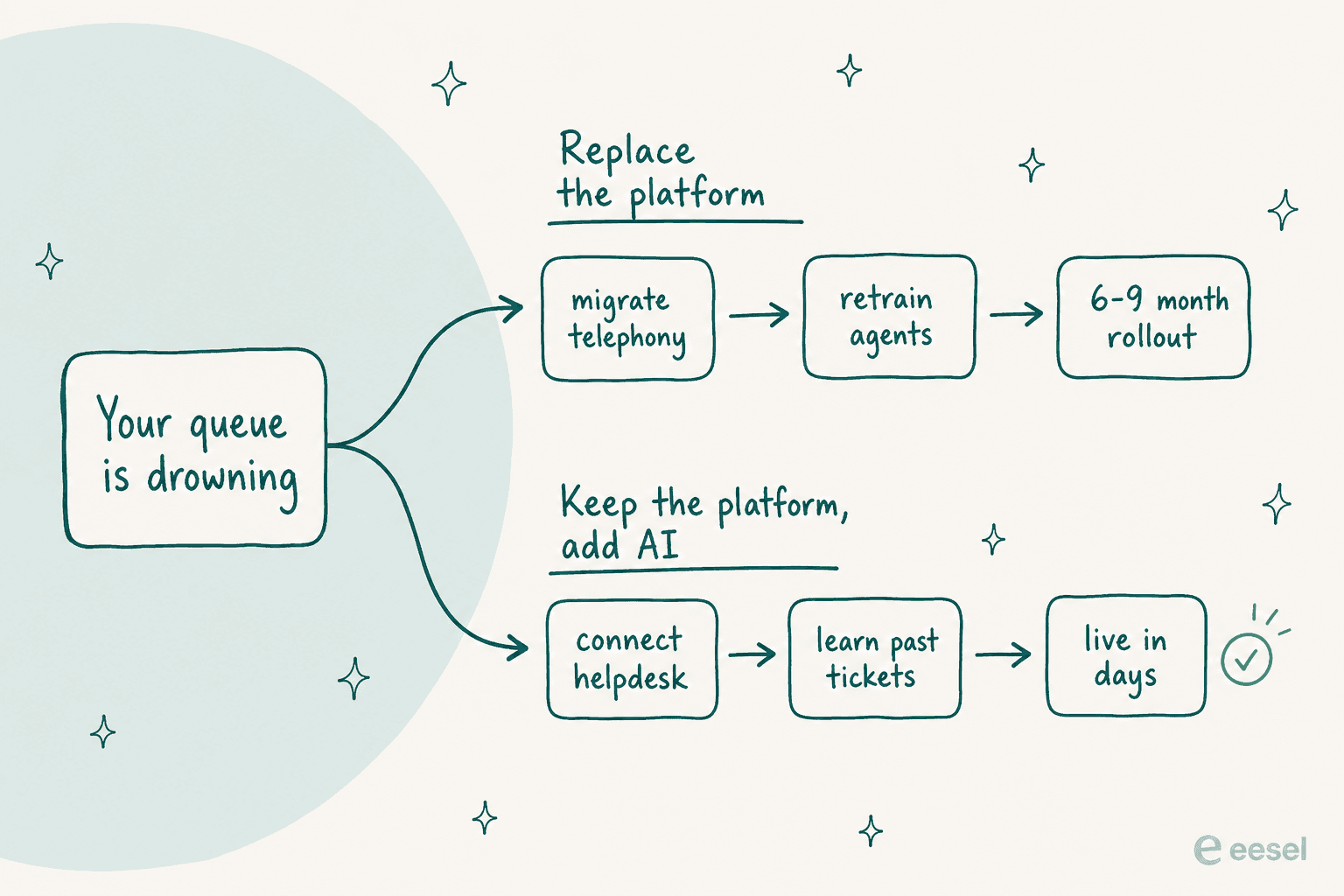
Replace the platform when phone really is your primary channel, when you need dialers, IVR trees and workforce scheduling, or when your current system physically cannot do something you need. That is a real project: number porting, routing rebuilds, agent retraining, and typically six to nine months before anyone feels better. Internal service desks face the same fork, which is why automated IT ticketing usually starts with a layer rather than a rebuild.
For teams comparing a cloud phone system, Retell’s guide covers the available options.
Keep the platform and add AI when your contacts are mostly email, chat and messaging, when your agents are drowning in repeat questions, and when your helpdesk itself is fine. That path is measured in days, and it attacks the thing that actually hurts. There is more on the mechanics in my guides to ticket deflection and call center automation.
One caveat from watching this go wrong: an AI layer inherits your escalation rules, it does not invent them. If your current handoff path is a mess, sort that first, because a bot escalating into chaos is worse than no bot. My notes on AI escalation and routing rules cover the setup I would want in place before day one.
Watch the billing unit, not the price
The most expensive mistake I see is people comparing numbers that were never the same kind of number.
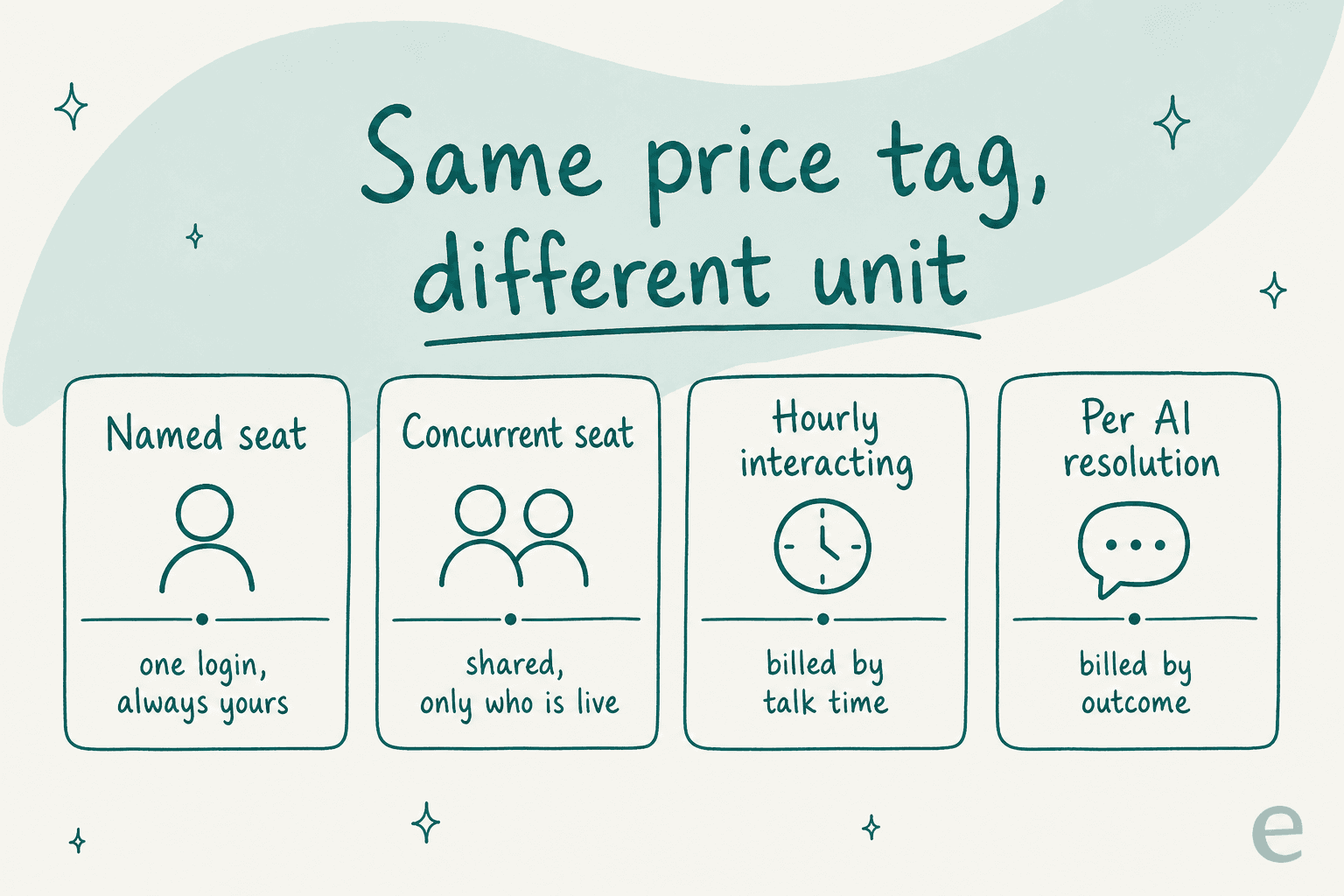
A named seat is one login that belongs to one person, even if they work two days a week. A concurrent seat is shared across whoever is live, which is why Five9's $159 is not comparable to Zendesk's $115. Hourly interacting, which only Genesys offers, bills for handling time. And on the AI side, a session or a minute is an attempt, while a resolution is an outcome, a gap I unpack in AI resolution rate.
That last distinction is the one to press on. Bill per session, and your invoice goes up precisely when the bot fails and escalates. Bill per resolution, and a failure costs you nothing beyond the escalation you were already paying an agent to handle. So ask every vendor on the shortlist one question: what happens to my bill when the AI gets it wrong? The answers vary far more than the prices do.
Try eesel for your call center queue
When the call center problem is volume and not telephony, eesel is the fastest thing you can put in front of it. It plugs into Zendesk, Freshdesk, Gorgias, Front, Salesforce and around 100 other tools. It trains on the tickets your team already resolved, not only the help center articles. And you can simulate the whole thing against your ticket history before a single customer sees a reply.
The billing matches that promise. One fixed monthly price from $299 for 500 credits, no seat fees, no platform fee, and 100 free credits to start with. Gridwise got 73% of tier-1 requests resolved in its first month, with the results visible during a seven-day trial. If you would rather watch it run against your own tickets than read one more comparison table, try eesel or book a demo.