Start with the metrics, because most call centers measure the wrong things
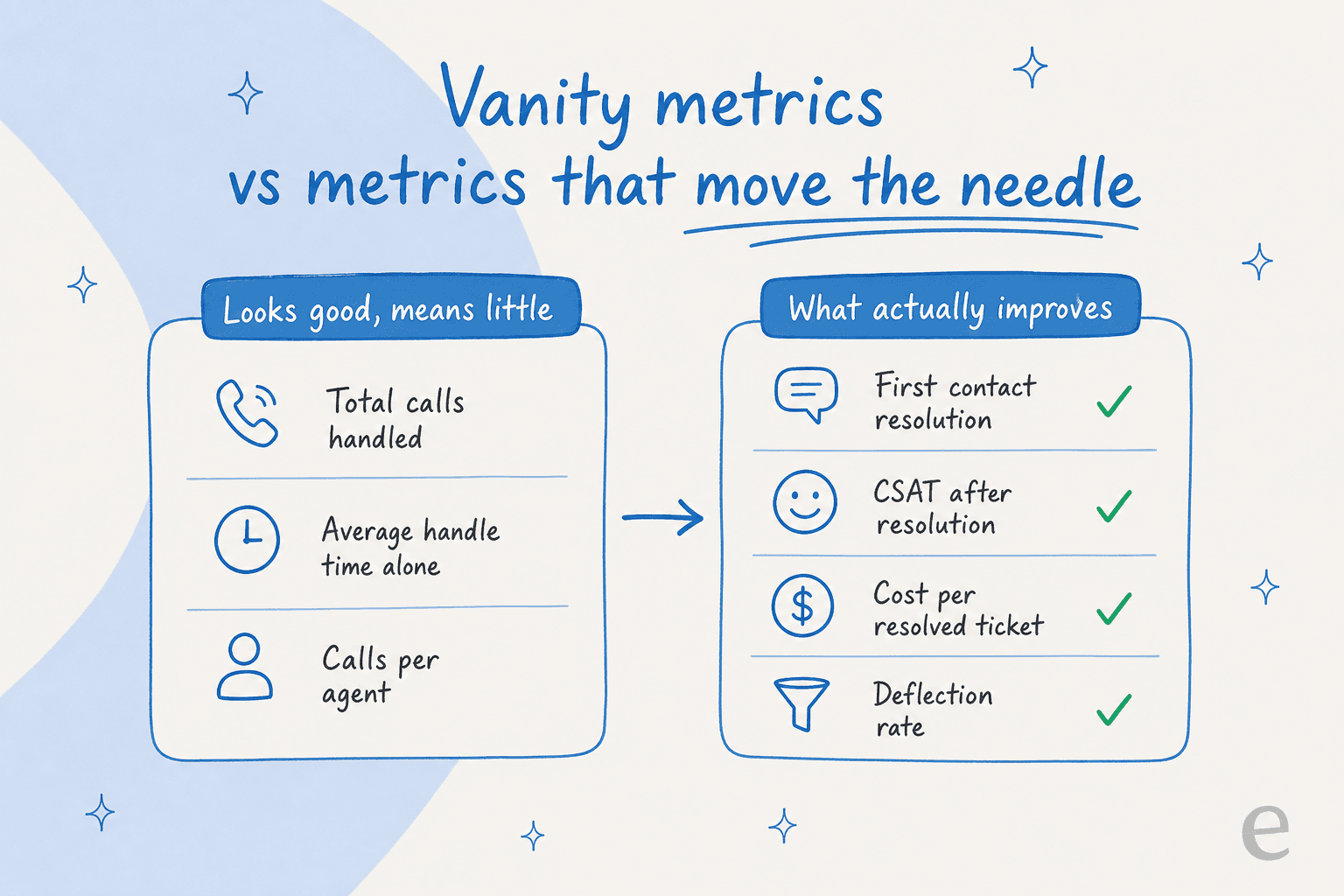
Before any strategy, a hard truth: you can't improve what you're measuring badly, and most call centers are. If your dashboard leads with total calls handled and average handle time, you're optimising for throughput when customers care about resolution. An agent who closes a ticket in 90 seconds by telling the customer to "try again later" scores great on handle time and terribly on whether the problem got fixed.
1. Track first contact resolution over handle time
First contact resolution is the single most honest number in a call center. It tells you what share of customers got their problem solved without calling back, and it correlates with satisfaction far better than speed does. Make it your headline metric, then watch handle time as a secondary signal rather than a target. When you flip the priority, agents stop rushing people off the line and start actually closing loops.
2. Measure CSAT after resolution, and cost per resolved ticket
A satisfaction survey fired mid-conversation measures politeness, not outcome. Send it after the issue is closed. Pair it with cost per resolved ticket (not cost per contact), which is the number that tells you whether a strategy is paying for itself. If you're evaluating automation, my AI support ROI framework walks through the exact math, and the companion guide on deflection rate shows how to separate genuine AI deflection from tickets that were never going to reach a human anyway.
3. Read your transcripts, don't just count them
Numbers tell you that something is wrong; transcripts tell you what. Once a week, read a sample of your longest and lowest-rated conversations. Patterns jump out fast: a policy nobody understands, a product bug generating the same complaint, a help article written for the wrong audience. One support manager I talked to realised his entire knowledge base was written for administrators while every ticket came from end-users, which is the kind of thing no metric surfaces but every transcript does.
Cut the volume before you add capacity
The fastest way to improve a call center is to stop tickets from arriving. Every repetitive contact you deflect is capacity you didn't have to buy.
4. Deflect the repetitive questions with real self-service
Support volume is more repetitive than most leaders admit. Across the teams I hear from, refund requests, order tracking, and "how do I reset this" dominate the queue. A multi-brand e-commerce operator handling 500+ tickets a day told me refunds, unsubscribes, and order-tracking questions made up the bulk of theirs. That's not work that needs a human; it's work that needs a good answer available at 2am. Point those questions at a self-service layer, whether that's a better help center, a live chat deflection flow, or an AI chat bubble that actually reads your docs. The goal is to reduce support tickets reaching an agent in the first place.
5. Put an AI agent on tier-1, but simulate it first
This is the big lever, and also the one people get wrong by rushing. An AI helpdesk agent can handle the repetitive tier-1 volume end to end, learning from your past tickets and help docs so it answers in your voice, not a generic bot script. The trick is to not point it at live customers on day one.
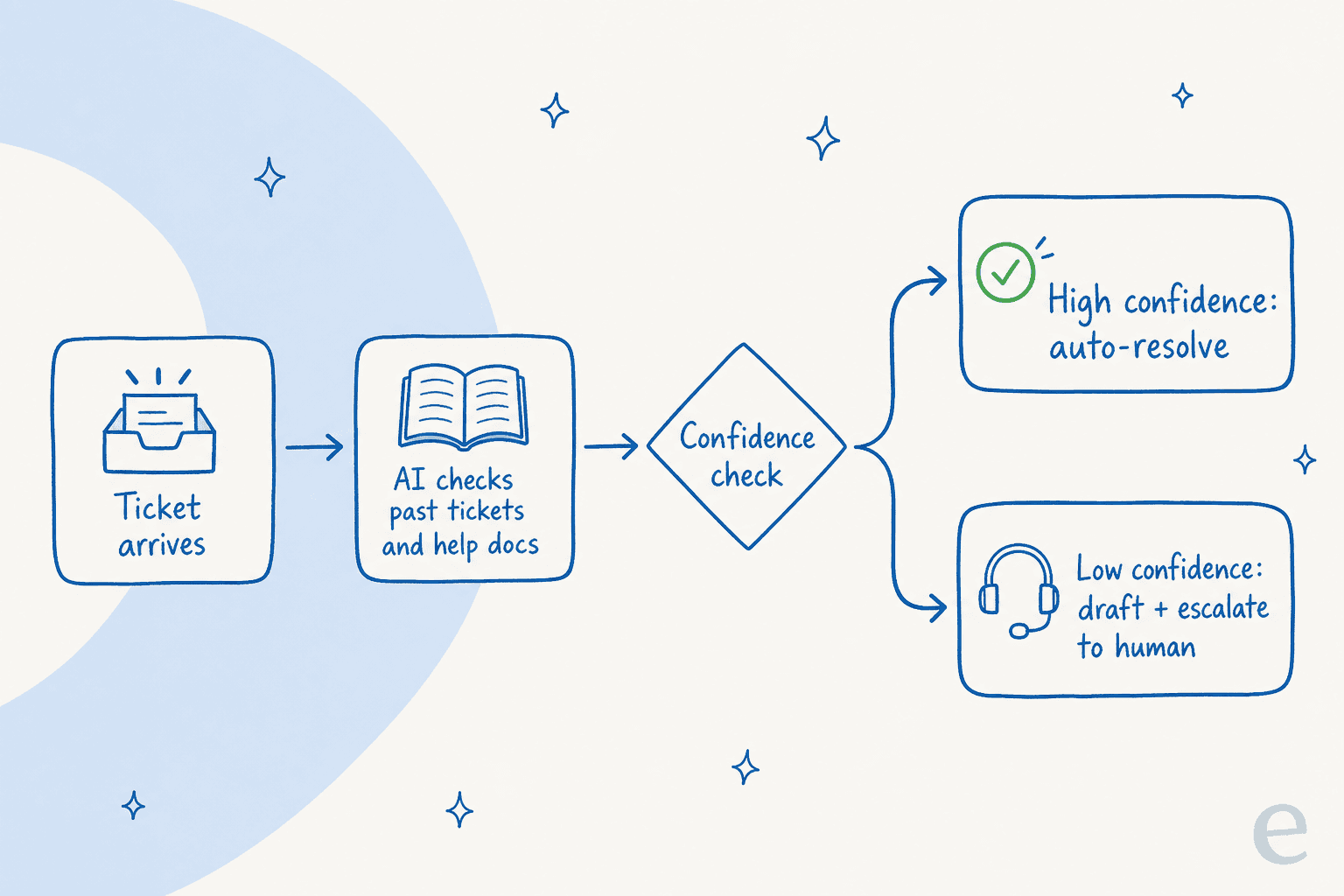
I've watched confident-sounding bots quietly give wrong answers, which is exactly why eesel simulates every rollout against thousands of historical tickets before it goes live. You see coverage by theme, find the gaps, fill them, and re-run, all before a single customer is affected. A support manager at a bus-tracking service put the ambition perfectly: he wanted an agent that could "handle 60% of the incoming tickets and know when to pull a real person in." That "know when to pull a real person in" part is the whole game, and it's what a simulation-first rollout with confidence-based routing actually delivers.
6. Use confidence-based routing so AI never guesses in public
The fear that stops most call centers from automating is hallucination: the bot confidently telling a customer something false. The fix isn't to avoid AI, it's to gate it. With confidence-based routing, the agent only auto-resolves when it's sure; anything below the threshold becomes a draft for a human or a clean handover. A CX lead at a healthcare platform told me they'd found their native helpdesk AI "largely inadequate and overpriced" precisely because it lacked this kind of control. Automation you can throttle is automation you can trust.
Route and prioritise like you mean it
Once volume is under control, the next win is making sure the tickets that do reach agents land in the right place, fast.
7. Triage and tag automatically
Manual triage is a tax every agent pays before doing real work. Automated ticket triage reads each incoming ticket, classifies it by intent, and routes it to the right queue or person. Pair it with automatic ticket tagging so your reporting stays clean without anyone hand-labelling. This is unglamorous and enormously high-leverage: it shrinks the time between "ticket arrives" and "right person is working on it."
8. Prioritise by urgency and intent, not arrival order
First-in-first-out is the default and it's rarely right. A furious customer threatening to churn and a "when do you open?" question don't deserve the same place in line. Smart ticket routing scores tickets by urgency, sentiment, and intent, then surfaces the ones that matter. Your best agents spend their time where it counts instead of digging through a flat queue.
9. Set escalation paths before you need them
Nothing burns a customer faster than being bounced between agents who each ask them to re-explain. Define clean escalation paths up front: who takes what, what context travels with the ticket, and when the AI hands off. A good handover carries the full conversation and a suggested next step so the human picks up warm, not cold.
Make your agents faster and better
Deflection and routing handle the volume. These strategies raise the ceiling on the conversations that still need a person.
10. Give agents an AI copilot for instant answers
The slowest part of most conversations is the agent hunting for an answer across scattered docs, wikis, and old tickets. An AI copilot that drafts replies and surfaces the right answer inline collapses that. A chief innovation officer at a payments company using AI over their Confluence reported up to 80% time savings finding answers and onboarding new staff. That's not the AI replacing the agent; it's the AI doing the fetching so the agent does the judging.

11. Coach from real transcripts, not spot checks
QA that reviews three random calls a month per agent is theatre. Modern coaching reads every conversation, flags the ones worth a manager's attention, and spots trends across the team, so feedback is grounded in what actually happened. When two senior agents were about to leave a public-sector IT firm, the team's plan was to capture their knowledge "into AI" before they walked out the door. Transcripts are that institutional memory; mining them systematically turns your best agents' habits into everyone's baseline.
12. Onboard new agents against your own history
Ramp time is a hidden cost center. New agents are slow because they don't know your product, your policies, or your edge cases yet, and the people who do are too busy answering tickets to teach. Feeding your ticket history and docs into an assistant new hires can query turns years of tribal knowledge into something answerable on day one. One team reported onboarding "much faster" once staff had instant access to sourced answers instead of interrupting a manager.
Go proactive and multichannel
The last tier of improvement is about meeting customers before they're frustrated, and wherever they are.
13. Get ahead of the contact with proactive support
The best ticket is the one that never happens because you reached the customer first. Proactive chat triggered on a stuck checkout, a status-page update during an outage, or a heads-up before a known issue spreads, all cut inbound volume while making customers feel looked after. It's the difference between proactive and reactive support, and it compounds: every problem you head off is a call you never staff.
And do it across channels. Customers move between email, live chat, WhatsApp, and phone without thinking about it, so your knowledge and your AI should too. A team running conversational AI across 80+ languages and every channel from one brain beats a stack of disconnected point tools every time. If you're still choosing infrastructure, my guides to ticket automation and the best ticketing system for small teams are good starting points.
The mistakes that quietly sink these strategies
A few things I see teams get wrong, over and over:
- Automating before simulating. Pointing an AI at live customers without testing it on past tickets is how you end up with a public hallucination and a support leader who never trusts AI again.
- Buying on sticker price, not resolution cost. Per-resolution pricing can balloon as you scale. Always model AI vs human agent cost at your real volume before signing.
- Ripping and replacing. You don't need to swap helpdesks to improve one. The fastest wins layer on top of what you already run.
- Treating the knowledge base as done. Docs rot. If your AI and your agents are answering from stale articles, every downstream metric suffers. Keep a loop that spots uncovered topics and drafts articles to fill them.
Try eesel for your call center
If you want most of these strategies in one place, that's what I work on. eesel is an AI teammate that plugs into your existing helpdesk (Zendesk, Freshdesk, Gorgias, HubSpot, Front and 100+ integrations), learns from your past tickets and help docs on day one, and handles tier-1 volume with confidence-based routing so it escalates anything it isn't sure about.
The part support leaders actually care about: you can run it in simulation against thousands of your real historical tickets before it ever touches a customer, so you know your coverage and cost up front. One customer resolved 73% of tier-1 requests in their first month; pricing is usage-based at $0.40 per resolved ticket with no per-seat or platform fees, so it tracks the volume you actually deflect. You can try it free and have it live in minutes, not a quarter.

Frequently Asked Questions
What are the most effective call center improvement strategies?
How do I improve call center performance without hiring more agents?
Which call center metrics should I actually track?
How does AI help improve a call center?
How much do AI call center tools cost?
Is it safe to let AI answer customer questions in a call center?


Article by
Riellvriany Indriawan
Riell is a designer and writer at eesel AI with about two years of experience researching CX platforms, AI chatbots, and helpdesk software. She combines her design background with a sharp eye for how these tools actually look and feel in practice — making her comparisons unusually visual and user-focused.