BigCommerce Awaiting Payment status: what it means and what to tell shoppers

Kira

Katelin Teen
Last edited November 6, 2026

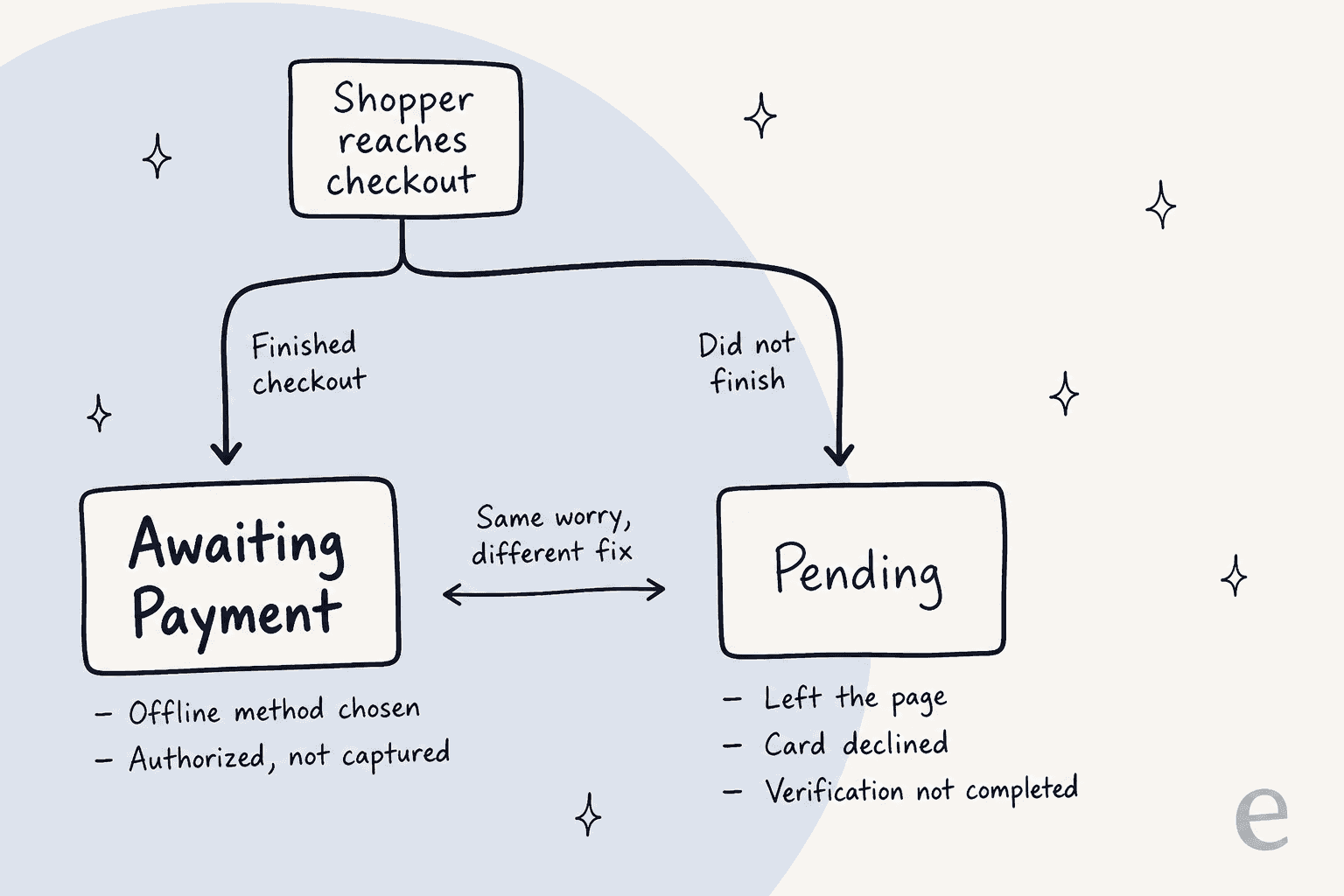
In BigCommerce, Awaiting Payment means the shopper finished checkout but the payment is not confirmed yet, and it is the expected status for offline methods like bank deposit and check, and for card payments that were authorized but not captured. It is not the same as Pending, which means checkout never completed. The support move is to read the payment method first, then decide who acts. eesel's BigCommerce integration reads the order's status, items and payment live, so an AI agent for BigCommerce can explain the status while a person confirms the money.
What does Awaiting Payment mean in BigCommerce?
It means checkout is done and payment is not. BigCommerce's order statuses guide defines it as "Customer has completed the checkout process, but payment has yet to be confirmed", and says authorize-only transactions that aren't captured yet carry it too.
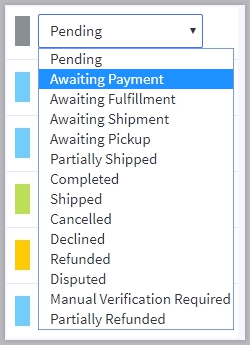
Developers see it as a number. In the Orders API status list, status_id 7 is Awaiting Payment, 1 is Pending, 0 is Incomplete and 11 is Awaiting Fulfillment. The help center folds incomplete orders into Pending, while the API keeps both IDs, so if a developer says "status 0" and your helpdesk says "Pending", they are describing the same family of problem.
One more detail helps with tax and reporting questions. BigCommerce counts Awaiting Payment, Pending and Declined as unpaid, and Awaiting Fulfillment, Awaiting Shipment, Completed and the other later statuses as paid. If a store uses an automatic tax provider, moving an order from a paid status back to an unpaid one can affect tax document submission, so I'd tell agents never to move an order backwards to "fix" a label.
Why do orders sit in Awaiting Payment?
Two paths lead there, and they need different answers. The first is an offline payment method, and the second is a card payment that was authorized but not captured.
Offline methods. BigCommerce's offline payment methods guide lists bank deposit, cash on delivery, check, money order and pay in store. Collecting payment "is not immediate" with these, so orders are placed in Awaiting Payment, and after the money arrives the store owner sets the order to Awaiting Fulfillment or another status by hand. The guide also notes you can name an offline method "Purchase Order" to give B2B buyers a PO option.
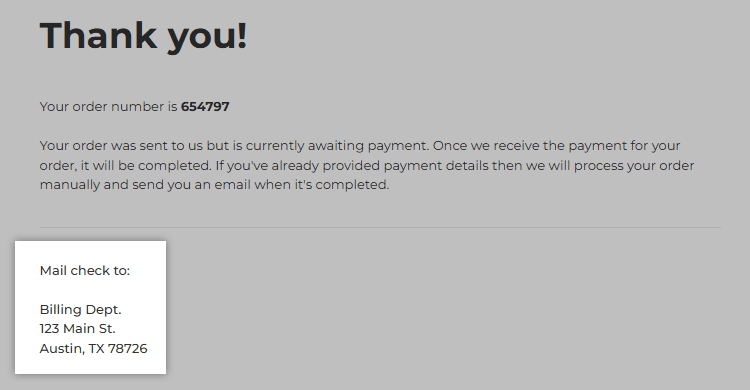
The shopper sees this at checkout. After ordering they get the instructions you configured on the confirmation page and in the email invoice, and the sample confirmation page in the guide even says the order "is currently awaiting payment".
Authorize-only card payments. With authorize-only turned on at the gateway, the gateway checks the card and holds the funds, and nothing is charged until someone captures them. The order stays in Awaiting Payment until the capture is fully processed, then moves to Awaiting Shipment or Awaiting Fulfillment depending on the gateway. A capture that is declined reverts the payment to Authorized.
Two details matter for support. BigCommerce says authorizations expire after a time set by the gateway, and an expired one means re-authorizing or creating a new order. And if a gateway does not support capture inside the control panel, the store has to capture in the gateway's own dashboard. A shopper who "paid" and a merchant who "didn't capture" are both telling the truth.
Is it Awaiting Payment, Pending or Incomplete?
Awaiting Payment is a finished checkout. Pending is the opposite. BigCommerce defines Pending as "The checkout process was not fully completed", and its FAQ lists the causes: a failed payment attempt such as a declined card, the shopper leaving the payment page, never returning from a hosted gateway, never completing 3D Secure verification, or a communication problem between BigCommerce and the gateway.
| Status | What happened at checkout | Typical shopper line | First check |
|---|---|---|---|
| Awaiting Payment | Checkout finished, payment unconfirmed | "I ordered and chose bank transfer" | Payment method on the order |
| Pending | Checkout did not complete | "My card was charged but I got nothing" | Gateway dashboard for captured funds |
| Declined | Seller marked the order declined | "You cancelled my order?" | Order history and notes |
| Awaiting Fulfillment | Payment confirmed | "Where is my order?" | Fulfilment and tracking |
The Pending row is the dangerous one. BigCommerce warns that a gateway may have recorded the payment even though the completion never reached the store, which leaves the order Pending, and it recommends checking the gateway's dashboard for captured funds before fulfilling. Its checkout errors guide describes the "Payment is on an additional step" log notice that goes with these orders. The API even describes Declined as marked "for lack of manual payment", which is where an offline order ends up if the money never arrives.
Is stock reserved while an order is Awaiting Payment?
That depends on one store setting, and support cannot see it from the order. In Inventory Tracking, the Update stock levels setting has two choices: when an order is placed, or when the status changes to Completed or Shipped.
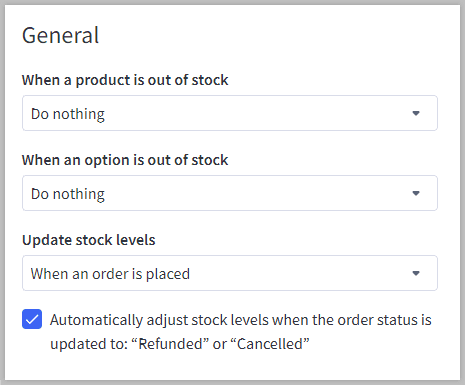
With the first choice, stock drops when the shopper checks out, so an unpaid bank-transfer order holds units. With the second, it doesn't, and the same product can sell to someone else while the first buyer is still sending money. BigCommerce's docs don't spell out Awaiting Payment as its own case, so this is my reading of "successfully placed", and I'd have the store confirm it before an agent promises "we're holding it for you".
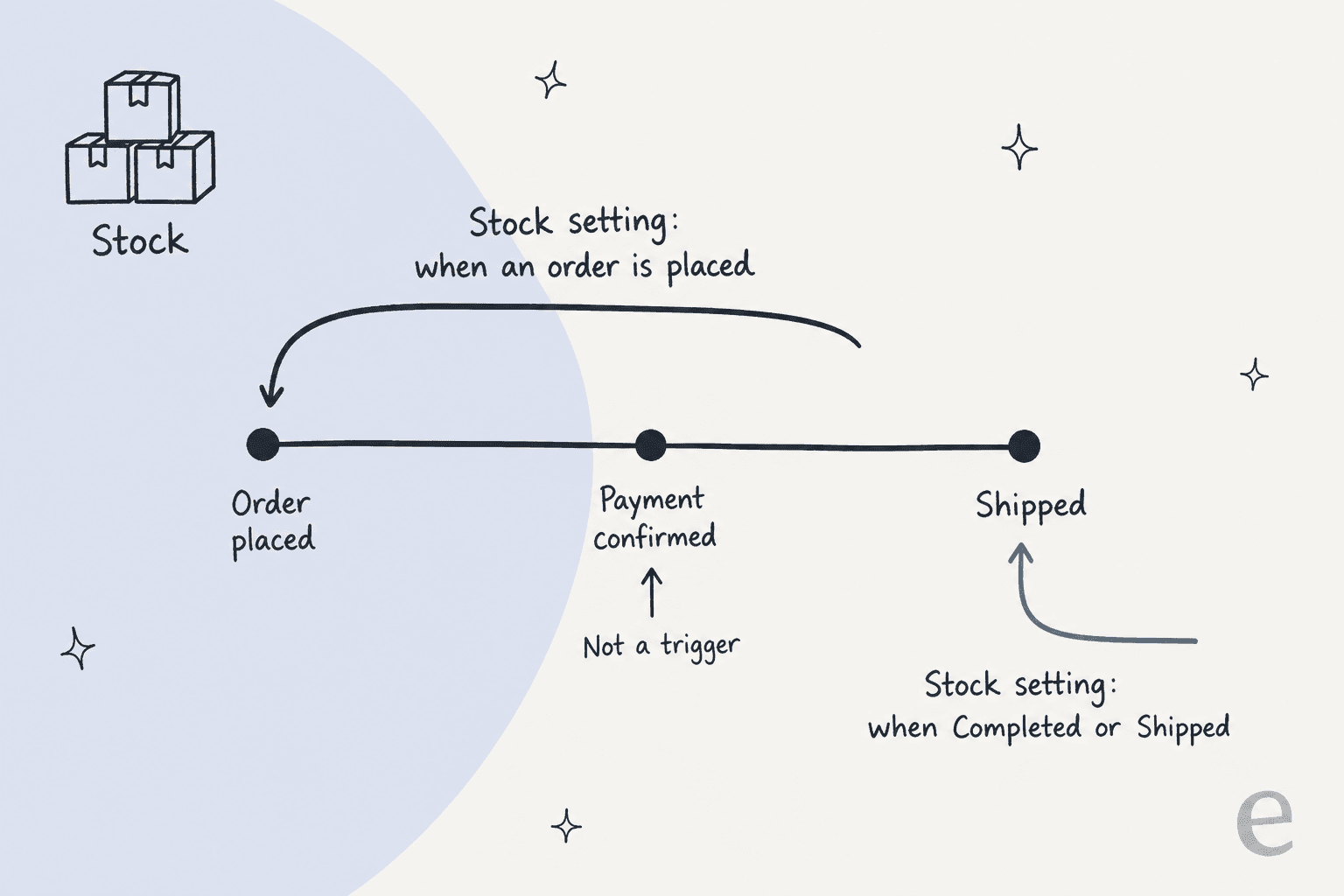
The same article says stock can adjust back automatically when an order goes to Refunded or Cancelled. Declined isn't named, so after a Declined order I'd check the product count by hand. Cancelling, BigCommerce adds, doesn't refund anything. For how stock behaves per variant, see my BigCommerce variant inventory guide, and for a related status quirk, the pre-order availability post, since BigCommerce says pre-orders reuse these same statuses.
Did the customer get an email?
Usually the order confirmation, and sometimes nothing after that. BigCommerce's customer order notifications guide says the confirmation (invoice) email goes out when an order is placed and is on by default. It is a separate setting from status change emails, which only send for the statuses a store ticked under Settings, Order notifications. Orders created through the API skip the confirmation but do trigger status update emails.
So a shopper who writes "I never heard anything" might have had an offline order whose instructions were in an email that was disabled, or a store that never ticked the Awaiting Fulfillment notification. A store can also rename a status label under Settings, Statuses, so the shopper may see wording that differs from the default. BigCommerce says analytics keep using the original name, and a label over 30 characters is trimmed in the control panel but shown in full to customers.
How should support answer "I paid but it says Awaiting Payment"?
Start with the payment method, because the answer to the two paths is different. This decoder shows the likely cause and who acts for the five lines I'd expect to see most.
Awaiting Payment ticket decoder
What did the shopper say?
Pick one above to see the likely cause, the fix, and who acts.
Likely cause: an offline method. Awaiting Payment is the expected status until the store confirms the money.
Fix: point to the instructions in the confirmation email, then have the store check its bank or mail.
Who acts: AI explains the status. A person moves the order to Awaiting Fulfillment.
Likely cause: the gateway is set to authorize only, and the funds are held but not captured, or the capture is still processing.
Fix: check the gateway and capture the funds. Avoid saying the card was charged.
Who acts: AI reads the payment method. A person captures.
Likely cause: Pending means checkout did not complete, and the gateway may still hold a payment BigCommerce never heard about.
Fix: look for captured funds in the gateway dashboard before fulfilling or asking the shopper to pay again.
Who acts: a person, with the AI handing over what it found.
Likely cause: the Update stock levels setting may adjust stock when the order is placed, or only at Completed or Shipped.
Fix: confirm the setting once, then record it in your knowledge base.
Who acts: AI quotes the rule once it is written down.
Likely cause: confirmation emails and status emails are separate settings, and API-created orders skip the confirmation.
Fix: use Resend invoice from the order actions, or check Settings, Order notifications.
Who acts: a person resends. AI explains why it happened.
The reply I'd send for the bank-transfer case is short: the order is placed, it shows Awaiting Payment until the store confirms the transfer, here is the reference to put on it, and you'll get an email when it moves on. Offline methods can even add the order number to bank deposit instructions with the %%OrderID%% variable, which saves a "what reference do I use?" ticket. For the card case, I'd avoid the word "charged" until someone has looked at the gateway.
Which parts can an AI agent handle?
Reading and explaining, yes. Confirming that money arrived, no. The pattern is the one I use for order tracking and where is my order tickets: reading the status and explaining the rule is safe to hand off, and moving an order between paid and unpaid is not. Payment mix-ups can also slide into a billing dispute or a payment dispute, which is another reason to keep money decisions with a person.
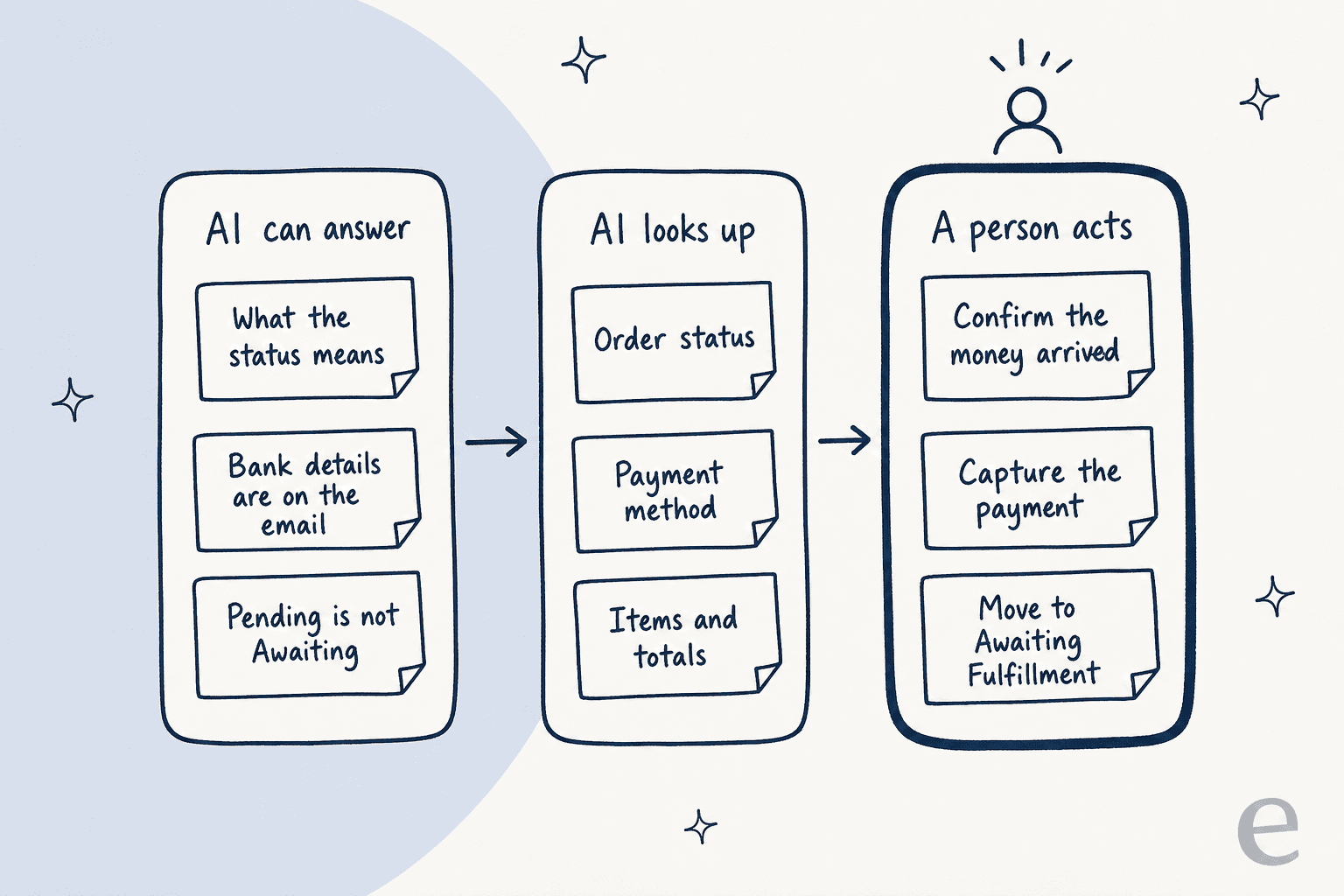
Here is what I verified for eesel in its BigCommerce docs. Other helpdesk tools on BigCommerce, such as Gorgias, Freshdesk and Zendesk, have their own guides, and the best AI for BigCommerce support roundup compares the field. I haven't checked how each of those displays payment details, so I won't claim it.
| Question | What eesel can do on BigCommerce |
|---|---|
| What is the order status and what is in it? | Yes. It finds orders by number, email or phone and reads "its status, items, payment and tracking" |
| Which payment method was used? | Payment is listed among what it reads. Test that it names the method on your own past orders |
| Move an order to Awaiting Fulfillment? | Not in the documented actions. Write actions are cancel, refund and address fixes |
| Capture an authorized payment? | Not in the documented action list |
| Refund or cancel an order? | Yes, with your approval. Write actions need approval by default |
| Is the stock setting visible? | Not listed. Write the rule into the knowledge base |
Three limits from the docs apply here. Orders are read live and not copied. The App Marketplace install is read-only for orders and products, and cancels or refunds need an API account with Orders set to modify. And nothing in BigCommerce triggers a run, so a ticket, a Slack mention or the chat bubble does.
Paste your store's real wording into the knowledge base: which offline methods you accept, how long you wait for a transfer, and your stock setting. Then test answers on past tickets with simulation testing before shoppers see them. An agent shouldn't invent a payment status, the same discipline as hallucination prevention.
The eesel CLI helps with that loop. An AI coding agent can upload your approved payment policy, such as the offline instructions, the capture window and the "Pending is not Awaiting Payment" wording, then ask the eesel agent test questions and check the answers before anything goes live. Connecting the store itself still needs someone to create the BigCommerce API account.
Write actions belong behind approval workflows, and when the agent isn't sure, a clean handoff to a human beats a guess. If the case ends in a credit rather than money back, my store credit guide covers the limits.
Does it work in practice? Order lookups before answers
I can't point to a BigCommerce store, since none of eesel's published customer stories runs on it, so I'll use the closest match. Question Beauty runs eesel on Gorgias and Shopify. Between 8 August and 8 September 2026 eesel handled about 990 Gorgias tickets for them, looked up about 290 Shopify orders before answering a delivery or order question, and closed about 280 tickets without a person.
The detail I'd borrow is the split. Refund and return decisions, complaints and chargebacks go to a person with a note on what eesel found. Order status gets checked first, then explained. That is the same shape I'd want for Awaiting Payment: the agent reads the order, says what the status means, and a teammate handles the money. It is a different platform, so treat it as the shape of the workflow and not a BigCommerce result. A launch or sale can pile these up quickly, like other seasonal spikes, and the same lookup-first habit helps with pre-purchase questions and returns.
Try eesel for BigCommerce order status questions
eesel is an AI teammate platform, and the one that fits this post is the helpdesk teammate. On BigCommerce it reads orders, status, items and payment live, answers in your storefront chat (see the AI chatbot for BigCommerce guide), Gorgias, Zendesk or Slack, and waits for approval before it cancels or refunds. Try eesel. A ticket or chat is one credit, with a free plan of 100 credits and paid plans from $299 a month for 500 credits, per the pricing page.