


What Automation Anywhere actually publishes
I went looking for a pricing page and there isn't one. On automationanywhere.com you get a Contact Us page and a demo booking flow, plus a free Community Edition, and that is the whole purchase path on the main site. So I widened the net to every surface where a real figure could legally end up, which is the docs, the press room, the marketplaces, then also the review sites.
Four numbers came back out of it.
| Number | What it covers | Where it lives | How much to trust it |
|---|---|---|---|
| $126,000.00 / 12 months | One dimension, "Agentic Process Automation System Sample Solution" | AWS Marketplace listing | Vendor-published, then vendor-disclaimed as "for reference only". Unit undefined. |
| $750 / month | Cloud Starter Pack: 1 Bot Creator, 1 Control Room, 1 unattended Bot Runner | May 2020 press release | Real when published. Six years and three months old. |
| $9,000 / year, "Usage Based" | Basic plan | Capterra pricing tab | Exactly 12 x $750. Almost certainly the 2020 number, annualised. |
| $0.001 per credit | AI usage in Enterprise Knowledge Base | EKB credits docs | Live, precise, per-model across 26 models. The only real rate card. |
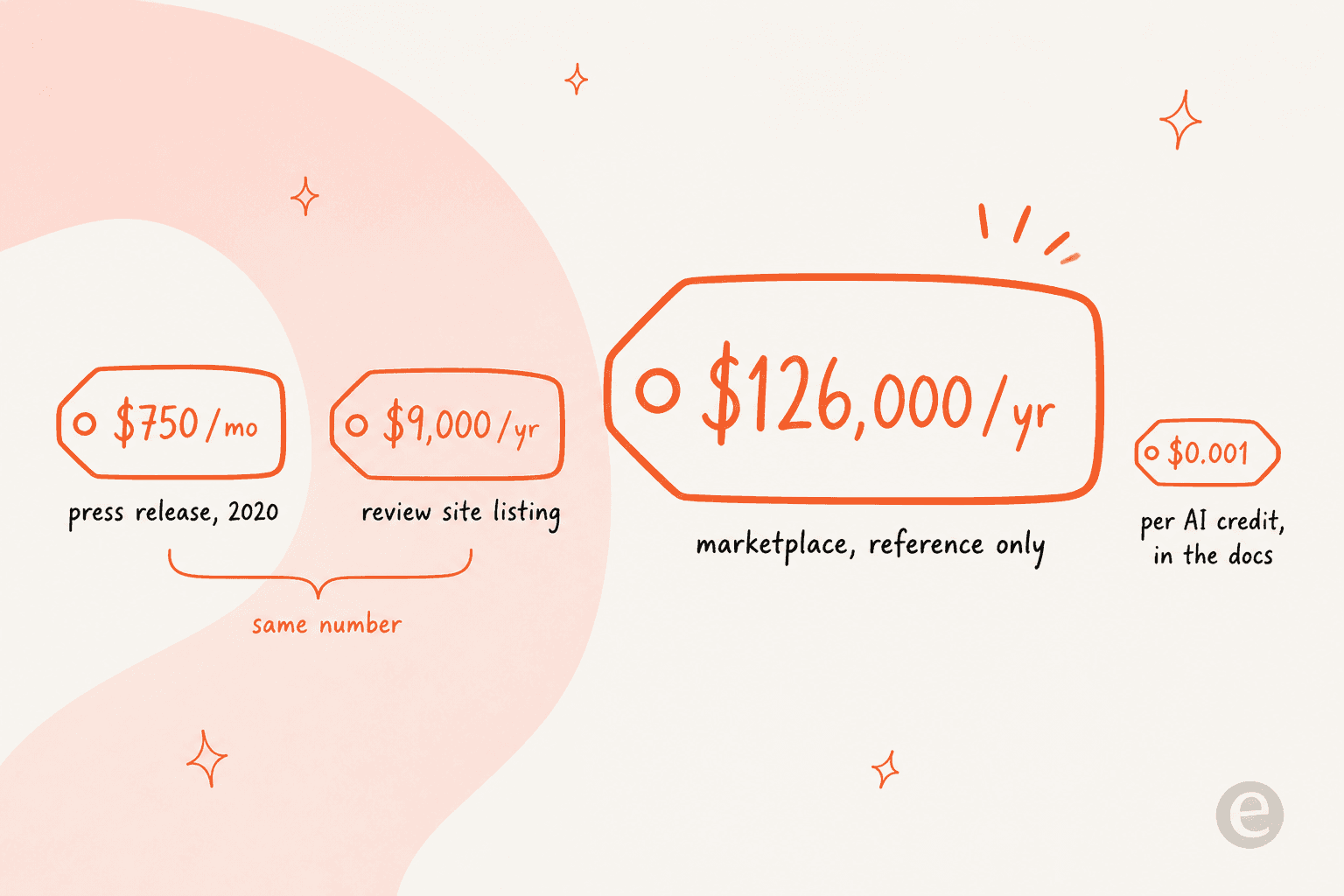
Notice what the third row does to the second one. $750 x 12 is $9,000. The two platform-scale prices in public are the same 2020 figure wearing different hats, while the third one sits fourteen times higher and gets disowned by the vendor on sight. This is the actual state of Automation Anywhere pricing in 2026, and it is worth knowing before you walk into a discovery call thinking you have a benchmark.
To be fair to the company, at the top of the enterprise automation market this is just normal. ServiceNow pricing works the same way, and so does Aisera pricing, which matters here because Automation Anywhere acquired Aisera on 4 November 2025. The unusual part is the gap: how precisely one meter is priced, and how completely the others are not.
The $126,000 that isn't a price
The AWS Marketplace listing is the closest thing that exists to a published Automation Anywhere price, and in the same paragraph the vendor invalidates it. The exact wording, still live on the page:
"Automation Anywhere achieved Agentic AI, Generative AI and Conversational AI Competencies and transacts solely through Private Offer. The pricing is quoted based on software customization. Pricing stated in this listing is for reference only."
Underneath that sits a pricing table with one row only. One contract term, twelve months. One dimension, it is labelled Automation 360. One description, "Agentic Process Automation System Sample Solution". And one figure, $126,000.00, sitting in a column headed Cost/12 months.
Beneath the table AWS auto-generates a "Dimensions summary" panel, and its attempt at explaining the unit is the most honest thing on the whole page. It says the dimension is "billed in Units", then when it asks itself what one Unit measures, the answer it produces is "A Unit is the measured quantity of automation capacity you consume against the platform." Which is circular. The listing names a price and a term but never says how many Units the price buys.
Three other details from the listing are worth carrying into a negotiation. Twelve months is the only contract duration on offer, so a monthly on-ramp does not exist. The listing has no free trial either. And the vendor refund policy renders as the literal value disabled. AWS also flags that additional infrastructure costs sit on top of the $126,000, and that is the kind of line which turns a budget number into a range.
One thing the listing does give you for free, and that is scale: 4.5 stars across 5,863 ratings. Whatever the price turns out to be in the end, plenty of people have already paid it.
The 2020 rate card nobody replaced
The last time that Automation Anywhere published a real rate card was 12 May 2020, inside a press release about COVID-era cloud packages. It is still up. And it stays the only place where the company itself names a per-month figure.
| Package | Price | What it includes |
|---|---|---|
| Community Edition | Free | RPA, AI and analytics. No component counts given. |
| Cloud Starter Pack | $750 / month | 1 Bot Creator, 1 Control Room, 1 unattended Bot Runner |
| Extra unattended Bot Runner | +$500 / month per user | Adds unattended capacity |
| Extra attended Bot Runner | +$125 / month per user | Adds attended capacity |
| Advanced Pack | Not published | Quote only, no component counts |
Two things stand out from that table. First, an unattended runner costs four times an attended one, $500 against $125, which tells you exactly where the value sits inside this licensing model: the ability to run with no human at the keyboard. Second, the arithmetic here is simple enough to become dangerous. A Starter Pack plus a second unattended runner comes to $1,250 a month on 2020 rates, and what that maps to in 2026 I have no idea, because nothing has replaced it.
I would treat these figures as archaeology and not as a benchmark. The product that they describe was called Enterprise A2019 and is now Automation 360, and since then the company rebuilt its positioning around AI agents instead of bots. Quoting a 2020 press release back at a sales rep is not going to go well.
The one meter with a real rate card
Now the good part. There is one place where Automation Anywhere is unusually transparent, and it deserves the credit for that.
The Enterprise Knowledge Base credits documentation publishes a full AI rate card. The conversion is stated there in plain English: 3,000 credits per million input tokens is described as $3, and 15,000 credits per million output tokens as $15. That fixes 1,000 credits at $1, so one credit is a tenth of a cent. After that it lists rates for 26 models by name, with the version strings and deprecation dates.
The flat platform charges, those are the easy half:
| Action | Credits | At $0.001 per credit |
|---|---|---|
| User sends a chat message | 1 | $0.001 |
| Tool call invoked | 1 per call | $0.001 |
| Workflow execution | 1, regardless of step count | $0.001 |
| Knowledge-base upload | 10 per 10,000 words | $0.01 per 10,000 words |
| Platform chunking | Free | $0 |
Then come the model rates, and this is where the money actually moves. A sample out of the published table, in credits per million tokens:
| Model | Provider | Input | Output |
|---|---|---|---|
| GPT 5 Nano | OpenAI | 50 | 400 |
| Llama 4 Scout | Groq | 80 | 300 |
| GPT 4o Mini | OpenAI | 150 | 600 |
| Gemini 3.1 Flash-Lite | Google AI | 250 | 1,500 |
| Haiku 4.5 | Anthropic | 1,000 | 5,000 |
| Sonnet 5 | Anthropic | 2,000 | 10,000 |
| Sonnet 4.5 | Anthropic | 3,000 | 15,000 |
| GPT 5.5 | OpenAI | 5,000 | 30,000 |
The spread is the story here. On the list the cheapest input rate is 100 times cheaper than the most expensive one, and output runs from 280 credits up to 30,000, so a 107-fold range. Model choice, not usage volume, is the single biggest lever on this bill.
What one billed question actually looks like
In its own docs Automation Anywhere works a full example, and the shape of it teaches more than the total does. A user asks "Explain the attached document." The bill comes out to 177 credits, so about 18 cents.
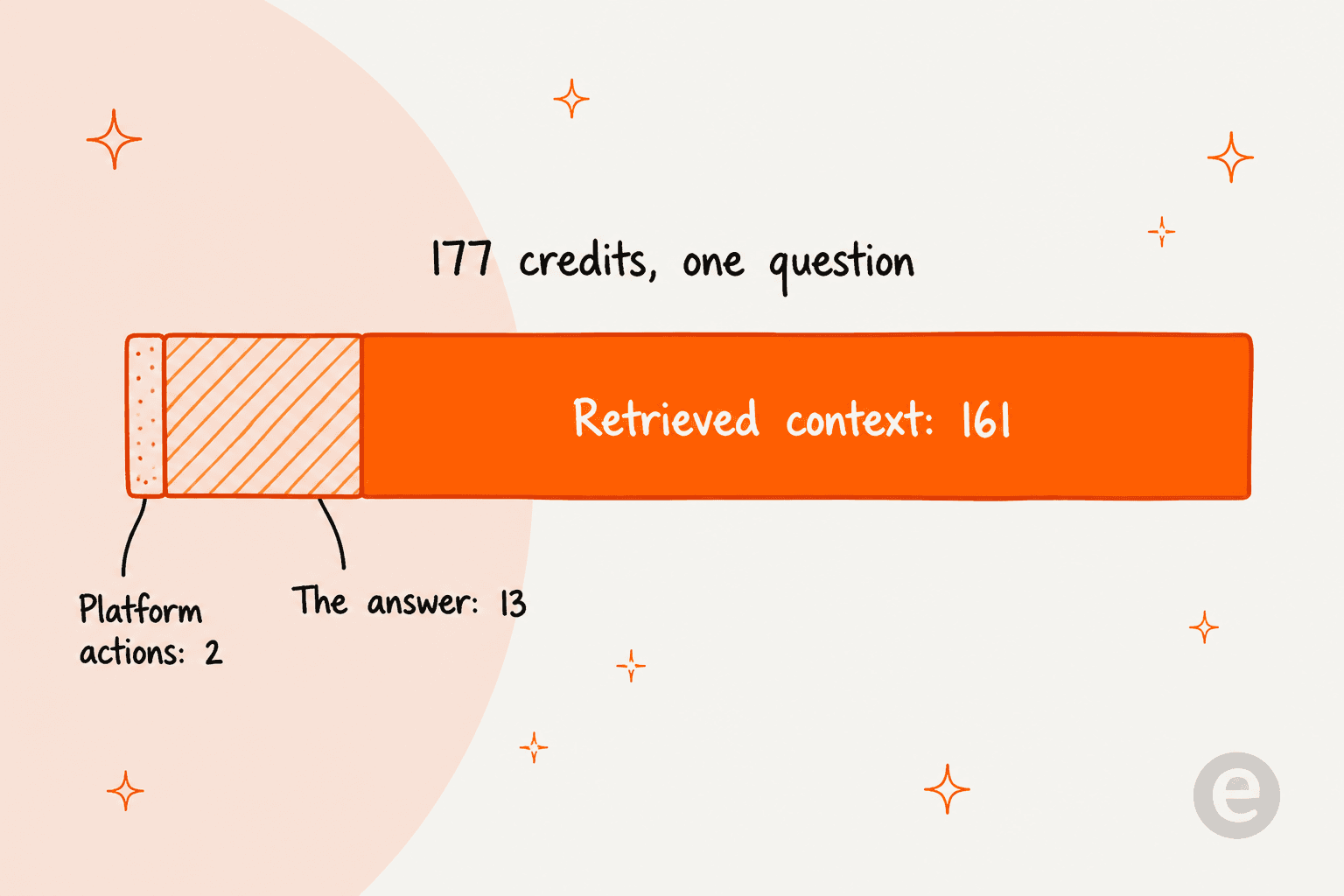
Two of those credits are platform actions. Around 13 of them are the answer which the user reads. The remaining 161 credits are retrieved context, 53,634 input tokens of document that the system pulled into the prompt before writing a single word. So you are billed overwhelmingly for whatever the retrieval layer decides to fetch, and not for what the AI says.
This has a practical consequence. Your credit bill is set by how your knowledge base is chunked and how much of it gets injected per question, which makes it a configuration decision rather than a usage one. Anybody who spent time on knowledge base training will recognise the trap.
A second trap is buried in the ingestion section. The optional Chunk Enrichment stage, on a 100,000-word document, is documented as generating roughly 140,000 output tokens out of about 133,000 input tokens. It writes out more text than the document contained in the first place, and output bills at four times input on gpt-4o-mini. Switching the optional stages on takes ingestion from 100 credits to about 204.
One more thing to watch, if you are already a customer. A banner on the credits page says the UI representation of credits has been increased tenfold to show "k units", and the rollout is happening team by team. In that transition two tenants can see different numbers for identical usage. The docs note as well that model pricing is configurable in Super Admin, so the rates above are defaults and not a guarantee.
Price the meter you can actually see
Since this is the one meter which has published rates, the arithmetic you can do yourself. Plug in your own volumes:
On 2,000 conversations a month with 12,000 input tokens on each, running Sonnet 5, the published meter comes to $64.25 a month. The marketplace reference line, annualised back down to a month, is $10,500. That is a 163-fold gap, meaning about 0.6% of that bill is priceable from public information. The rest of it is a conversation with a rep. Swap the model and the same volumes run from $5.93 on GPT 5 Nano up to $160.25 on GPT 5.5, and that 27-fold swing is sitting inside the one meter you can actually see.
Four meters, one rate card
On structure the docs are good, which makes the pricing silence stand out even more. The Automation 360 licenses overview sorts every licence into four categories, and for me this was the clearest way to understand what you are actually buying.
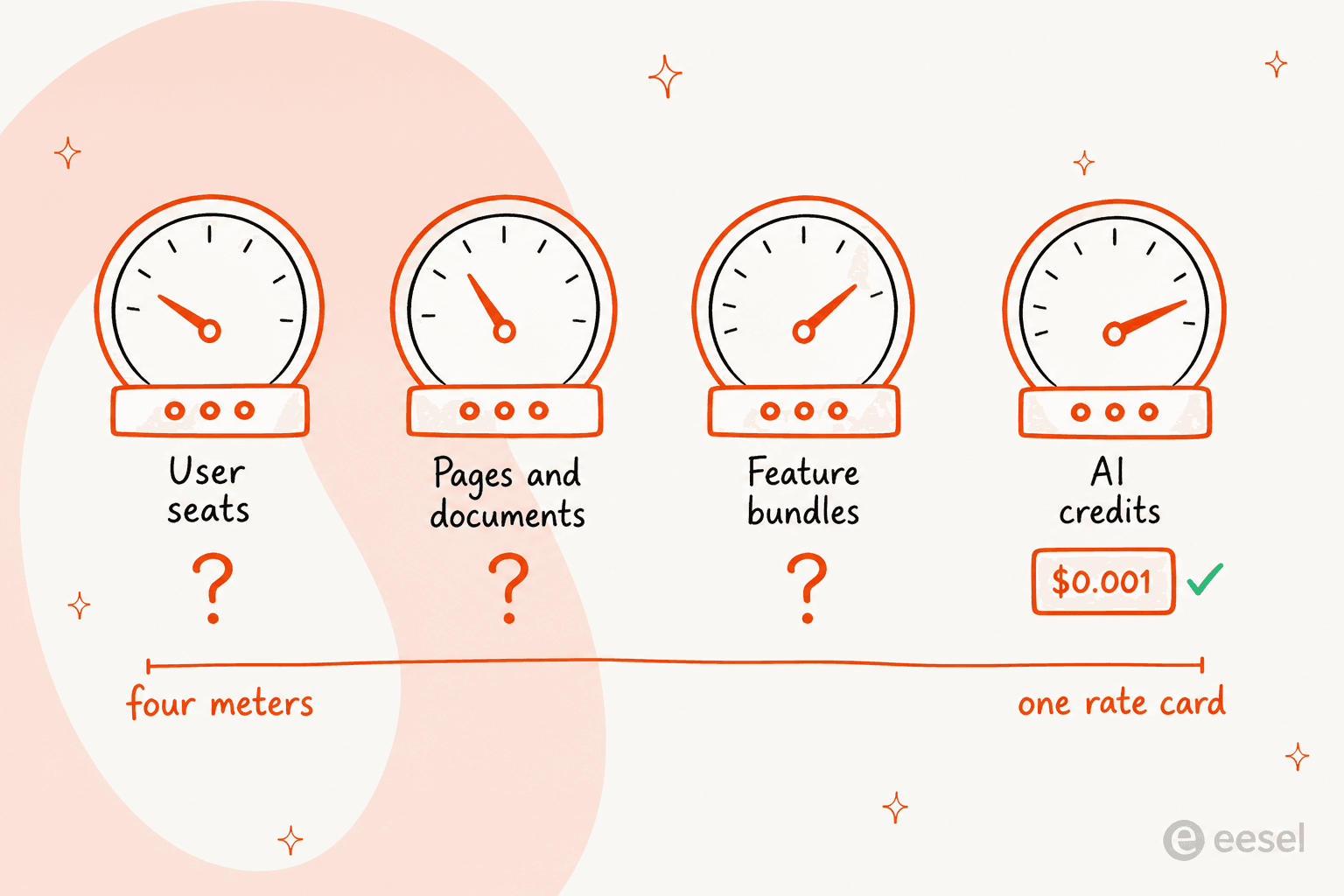
| Category | What it meters | Example licences | Published rate |
|---|---|---|---|
| User-based | Named people | Bot Creator, Attended Bot Runner, Unattended Bot Runner, Citizen Developer, Bot Insight (per user) | None |
| Volume-based, consumable | Units burned on use | Document Automation pages, API calls, AI recommendations | None |
| Volume-based, limit | Maximum concurrency, not consumed | API Task concurrency | None |
| Feature-based | Capability bundles | Enterprise Platform, Automator AI Base | None |
| Automation credits | Cross-service spend | Automation credits (Automation 360), EKB credits | Only EKB is published |
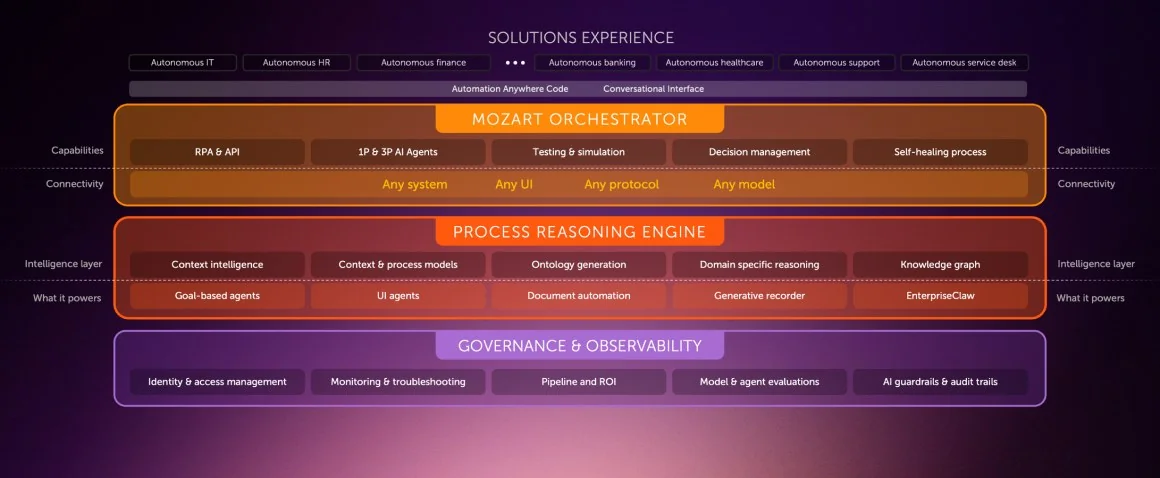
Every tile inside that diagram is a thing which somebody has to licence, and the licence names matter more than they look. An Unattended Bot Runner is the only licence that can run event triggers on a device in a Disconnected state, and that is the difference between automation running overnight and automation which needs somebody logged in. An Attended Bot Runner cannot schedule bots at all. A Citizen Developer is scoped only to their own registered devices. Each one of those distinctions becomes a line item on your quote, and not a single one of them can be priced from the docs.
The only hard entitlement numbers on the whole page belong to API Tasks. Every Cloud customer gets 100 API Task executions per Control Room with 2 concurrent executions, and once you go past 100% of your entitlement the exhausted licences expire within 24 hours. Two licences get named as separate purchases with no rate attached to them at all, Enterprise Platform and Automator AI Base.
One correction is worth making here, because I have seen it wrong in other write-ups: AI Agent Studio does not appear on that licence page. On the Automator side the generative-AI entitlement is Automator AI Base, and its meter is recommendations purchased versus consumed. The AI Agent Studio product page publishes no price, no tier, and not any credit language either. It is also strictly bring-your-own-model. Automation Anywhere answers its own FAQ with "No, AI Agent Studio doesn't host its own models," connecting out instead to Amazon Bedrock, Google Vertex AI, Azure OpenAI and OpenAI. So on that side of the platform, your model spend lands on a hyperscaler bill, not an Automation Anywhere one. Whether this is good news or not depends on if your finance team prefers one invoice or two.
The page meters stop, they do not overflow
This is the part which I would want to know before signing, and finding it took a docs deep-dive.
Document processing gets metered in pages and documents, and the consumption-limits page describes every purchased cap as "Up to X number of pages a year", without publishing an X anywhere. Seven licence types share that same shape, Document Automation and Standard Forms among them, plus Document Classifier and Google Document AI.
What the page does publish is the behaviour at the limit, and that behaviour is a hard stop:
- Notifications start firing at 80%, 90%, 95%, 99% and 100% consumed.
- At 100% the notification then repeats every week until you buy more.
- On exhaustion or on expiry, the extraction just fails with the message "License expired or not available. Obtain the necessary license."
- Standard Forms in addition loses its Create Model button.
- Consumption counts on the licences page are refreshing hourly.
There is no published overage rate anywhere. You do not spill over into a higher price band, you simply stop working until procurement moves. For a team which runs automated ticket resolution or invoice processing on a monthly cycle, this is an operational risk first and a billing one second.
If you are sizing a cap, the per-action decrement rules are worth memorising. On a 30-page document a Classify action decrements 30 pages, while Classify documents decrements 1 document, and Train Classifier decrements 0. For the Google Document AI licence the conversion is 10 pages to 1 document. And flipping bring-your-own-key on moves consumption off the provider pool, which counts in documents, onto Document Workspace, which counts in pages. That is a unit change most people will not notice until the first invoice arrives.
The free tier, and a clause that argues with itself
Community Edition is free and carries no published expiry, and in the docs they call it "a completely free automation platform available to anyone." More generous than most enterprise vendors manage, and as a way to learn the product it is a real one.
What it is not, is a way to run anything.
| Limit | Value |
|---|---|
| Bot Creator | 1 |
| Attended Bot Runner | 1 |
| Unattended Bot Runner | None |
| Concurrent runs | 1, on one device at a time |
| Triggers | Manual only, no scheduling |
| Control Room admin settings | Locked |
| Support | Community forum only |
| Commercial use | Capped at 5 machines and 100 Document Automation pages a month |
Document Automation and the generative-AI features are both included, which came as a nice surprise. But with no unattended runner and no scheduling in there, the thing which actually justifies the licence is the one thing you cannot test.
The commercial-use clause has a real drafting problem in it. Eligibility gets stated as fewer than 250 machines, fewer than 250 users, or under $5M revenue, and then the very next sentence says that exceeding any one of those disqualifies you. The two readings are incompatible. A 300-person company under $5M in revenue gets two different answers from the same paragraph. Worth an email to legal before you build anything on top of it.
Separately, the 30-day free trial works as the opposite instrument. The Free Trial Agreement licenses Enterprise and Document Automation for thirty calendar days "solely for non-production, internal, non-commercial evaluation use." So the free tier permits a limited commercial use and it never expires, while the trial bans commercial use and does expire. Which is the reverse of what most buyers assume.
Five support tiers, and no prices
Support gets sold separately, across five tiers: Orange, Silver, Gold, Platinum and Titanium. From Silver upwards it is branded Premium Support, and that is what unlocks the phone.
| Tier | Sev 1 response | Named contacts | Services discount | Enterprise Architect hours |
|---|---|---|---|---|
| Orange | 1 business day | 2 | None | None |
| Silver | Under 2 hours, 24x7 | 10 | 5% | 10 |
| Gold | Under 1 hour, 24x7 | 20 | 10% | 40 |
| Platinum | Under 15 min, 24x7 | 50 | 15% | 80 |
| Titanium | Under 15 min, 24x7 | 100 | 15% | Dedicated |
Two observations on that table. First, Severity 3 and Severity 4 stay 8x5 on every tier including Titanium, so the round-the-clock coverage never gets below Sev 2, whatever you end up paying. Second, on SLAs and discounts and the conference passes, Platinum and Titanium are identical; where they differ is contact count, a dedicated TAM, then Enterprise Architect hours.
On the support tiers page there are no prices at all. Upgrades route you to a mailto address. So that is a fifth unpriced meter, sitting on top of the four in the licence taxonomy.
What buyers actually pay, according to buyers
Since the vendor will not price it, then the buyers will. Automation Anywhere holds 4.5 out of 5 across 5,637 reviews on G2 and 4.4 across 195 reviews on Capterra, with Value for Money sitting at 4.3. Those are good scores, and clearly the product is doing real work for plenty of large companies.
But G2's own auto-generated pros-and-cons panel ranks "Expensive" as the number one con, so ahead of the learning curve and ahead of missing features and bugs, and it is backed by 28 tagged mentions. The summary sentence on G2 says users find the pricing model "expensive and complex."
The pattern inside the reviews is unusually tidy. At enterprise scale almost nobody disputes the value, and below that scale almost everybody flags the price.
"Licensing can be confusing and expensive, especially for smaller teams or proof-of-concept automation projects."

That "proof-of-concept" clause is the sharp end of it. The cost bites the hardest before you have any proof, and this is exactly backwards from how anybody wants to buy AI agents.
"Also, even though this was covered by Jabil, the license costs are founf to be higher than other (less effective but do the job) apps."
The typo there is in the original. What makes the quote useful is that parenthesis, an enterprise reviewer conceding cheaper tools are less capable and still sufficient anyway.
Over on the r/rpa side, a developer with seven years on the platform posted in January 2026 that "the pricing they're asking for the full agentic features on AA is extremely high" and that with "the recent price increases (which seem quite aggressive), we're seriously considering migrating away." One reply then went further:
"We ve started to shift away from them. License cost is thru the roof and their package deal is more of a blackmail at this point."

The temperature of that thread I would take with a grain of salt, since renewal frustration always reads hot. More useful are the practitioner-reported figures across those threads: a $15,000 Document Automation package in late 2024, then a $10,000 a year starter bundle of one Control Room, three Creators and one Runner, and programme-level budgets in the $20,000 to $50,000 range for something bare-bones, going up to $50,000 to $250,000-plus for an established practice. None of these are vendor-published, and the most concrete ones are already two to six years old.
And for balance, a counterweight does exist, and it is not a small one:
"Tool is costly compared to the other RPA tools available in the market but the great part is the features it provides which are making it a market leader. So yes its expensive but its worth the investment if you are looking from a strategic perspective."

That reviewer prices the objection up and then overrules it by himself, which is the most honest position in the whole review set. Capterra does flag the review as incentivised, so weight it accordingly.
What Automation Anywhere sells a support team
If you landed here from the support or the IT side rather than from the RPA side, the reason is the Aisera acquisition. aisera.com/products/conversational-ai/ now redirects onto Automation Anywhere's contact-centre page, and the company sells an AI Service Desk plus a Next-Gen ITSM product into exactly the territory that AI ITSM tools covers. Same territory as internal helpdesk software, in other words.
The connectors are real and they are named. Zendesk, Freshdesk, Freshservice, ServiceNow, Salesforce and Jira Service Management all appear as Aisera integrations. Zoho Desk does not appear there, so do not assume it out of a generic FAQ mention.
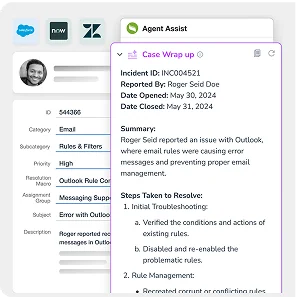
Here is the seam which I would push on in a demo. Every auto-resolution percentage that Automation Anywhere publishes is an internal IT number and not a customer-support one. The headline 84% auto-resolution rate belongs to BDO Canada, and alongside it sits Denver at 81%, NJ Transit at 80%, a Big 5 firm at 64%. That "more than 80%" figure in the May 2026 release is specifically about employee service requests. The customer-facing support page, meanwhile, publishes no resolution rate at all, only resolution time down "up to 87%", 6.7x ROI and 69% fewer escalations.
This is not a knock on the product, it is a scoping fact. If you are buying it for handling external customer tickets, the published proof is thinner there than the ITSM proof is, so ask for a containment rate out of a customer-support deployment instead of accepting the ITSM figure.
There is also a pricing tension which is worth naming out loud. Automation Anywhere's own executive commentary on the acquisition says the company "charges for work done rather than underutilized seats", and that customers need "up to 40% fewer ITSM seats". The position itself I like. It just sits awkwardly beside a licence taxonomy whose first category is named "User-based license", and whose marketplace listing prices exactly one undefined Unit. Outcome-based pricing is easy to say and hard to publish, and so far Automation Anywhere has done the first part.
How to judge the quote you get
What you are going to get is a quote and not a price, so here is what I would do with it. This is the checklist I would run before signing anything, and it applies just the same to Salesforce agentic AI pricing. On Freshservice AI pricing it works too.
- Get the licence line items separated. Ask for Bot Creators, attended runners, unattended runners, page caps, feature bundles and the support tier as individual numbers. One single blended figure is not a quote, it is only a total.
- Get the page and document caps in writing, as numbers. The docs publish the hard-stop behaviour but never the quantity itself. So get the quantity, and get what happens at 100% written into the contract, since no overage rate is published.
- Ask which credit system applies. Automation 360 has "Automation credits", Enterprise Knowledge Base carries its own credits with a published rate, and then the AI Agent Studio side runs off your hyperscaler bill. Three different meters, and your quote may well touch all three of them.
- Price the model as well as the platform. A 100-fold input spread across the published model table means that your model choice moves the AI bill more than your volume ever does.
- Demand a dry run on your own data. The single best predictor for whether an automation programme pays back is whether it works on your actual tickets, and no quote will tell you that. Ask for a simulation against historical volume before committing to a term.
The last one is the one I would refuse to skip. I have watched a confident-sounding AI agent hand out wrong answers in production, which is the reason every eesel rollout is now simulated against historical tickets first, and also the reason I would not let anybody sell me a twelve-month automation contract with no dry run against real work.
Cheaper places to look first
Half of the people who price an RPA platform do not actually need one. If the underlying job is tickets and queues and answers, rather than driving some legacy desktop software, then these cost an order of magnitude less, and you can price them straight off a public page.
- The queue is IT and employee requests. Start from best AI for ITSM. Then price Jira Service Management pricing up against your seat count.
- The queue is customer support. AI service desk platforms will cover it. The usual baseline to beat is Zendesk pricing.
- You already own the Microsoft stack. Then check Copilot pricing first, before you add on a platform.
- You mostly need connectors, not bots. Make vs n8n sits down at the $30-a-month end of automation. A wider list is in Make.com alternatives.
- You are comparing enterprise agent suites. The closest peer set is Aisera competitors. Salesforce pricing is the other big quote-only motion, and the rest gets covered in Agentforce alternatives.
- You want the ROI framework first. AI vs human cost hands you the per-ticket baseline. AI support cost savings shows where the money actually comes from. After that, judge the quote against your own deflection rate.
Try eesel for support and IT tickets
If you came here wanting a number and got a calendar link instead, that is the exact problem eesel is built around. eesel charges one fixed monthly price, from $299 for 500 credits, with one credit per ticket or chat session handled and no per-seat or platform fee. Pricing your own deployment takes about as long as matching your monthly ticket count to a published plan size, which is roughly the opposite of a private-offer motion.
Two mechanisms are worth pointing at specifically, because they answer things which this post found inside the Automation Anywhere docs. First, the unit is a ticket or a chat session handled. One eesel credit is one ticket or chat, however many replies it takes, so there is no conversion maths like the 1,000 credits to $1 scheme above. Second, where a metered document licence hard-stops on you, eesel lets you turn on overage with a monthly cap that you set yourself, at $0.80 per extra credit. The ceiling is a budget you chose, not a wall the vendor put there.

It connects into the same helpdesks that Automation Anywhere lists, and the first agent goes live in about thirty minutes instead of a three-to-six-month deployment. Kim Simpson at Gridwise resolved 73% of tier-1 requests inside the first month. Jason Loyola, Head of IT at InDebted, hit 15% deflection on an internal IT helpdesk while on the way to a 55% target. And Karel at GENERAL BYTES put the build-versus-buy question the way that most RPA buyers eventually do:
"We could try to write our own LLM application but we didn't want to invest our time into that. We wanted something that we would not have to maintain."
Karel, GENERAL BYTES
To be straight about the fit. If what you actually need is a bot which drives a legacy Windows desktop application overnight, eesel is not that thing, and an RPA platform is the right tool for it. eesel is for the ticket, the chat, and the knowledge work sitting around them. But if the job is ticket triage plus answering out of your own docs, the way it goes in tier-1 deflection work, then you can start on the free plan of 100 credits with no credit card, prove it on live tickets, and know the price before anybody books a call. Try eesel.