AI for exchange requests: swap before it ships, return after

Riellvriany Indriawan

Katelin Teen
Last edited November 25, 2026

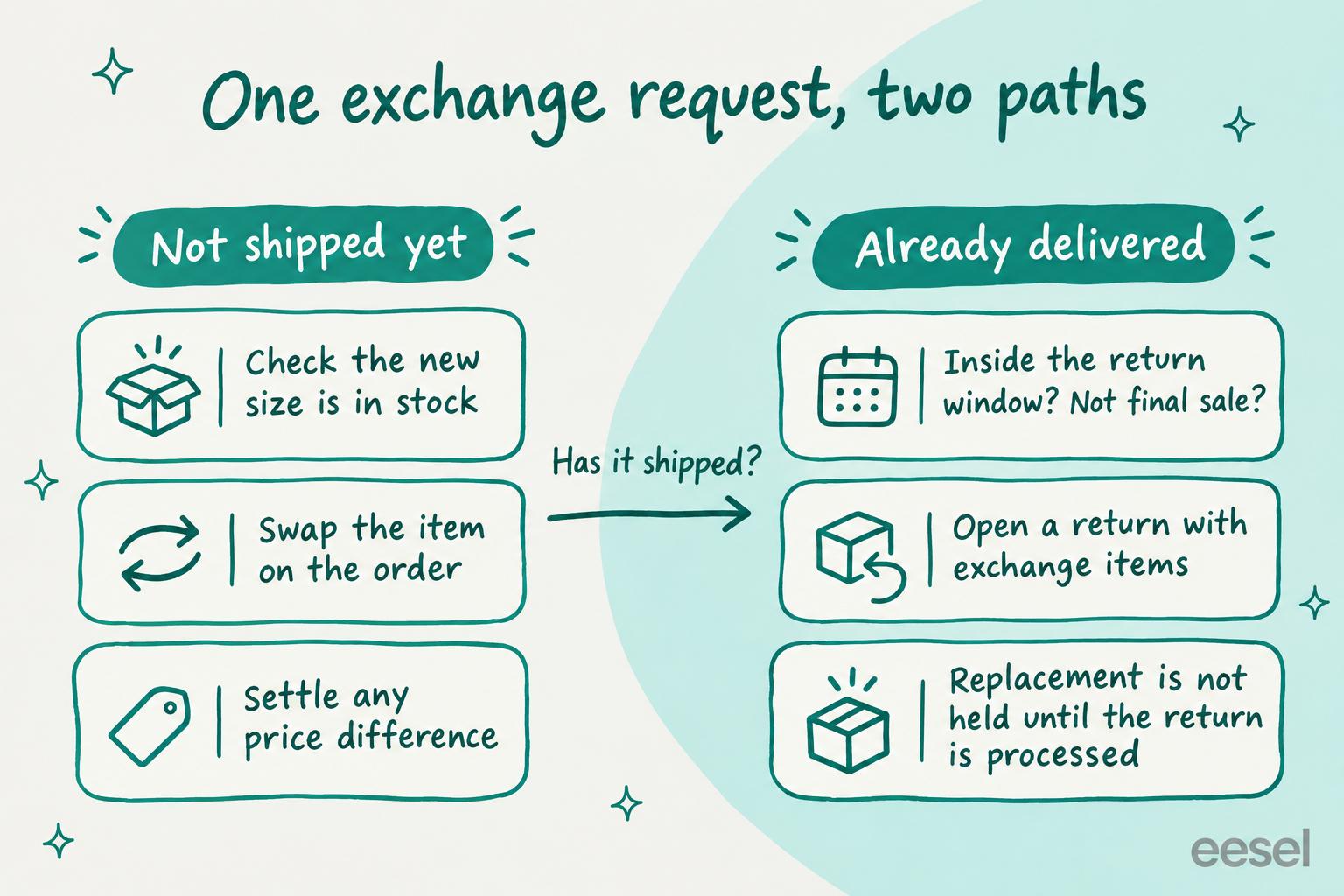
AI for exchange requests starts with one fact, whether the item has shipped: before fulfillment an exchange is an order edit (swap the variant, settle any price difference), and once it has shipped it's a return with exchange items. In Shopify, only staff can add the exchange, because shoppers can't request exchanges through self-serve returns.
That second point is why exchange tickets land in your inbox at all. A shopper who wants a medium instead of a small can start a return in their customer account, but they can't pick the new size there, so they write in. The AI's job on that ticket is the lookup and the wording: is the order shipped, is it inside your return window, is the item final sale, is the new size in stock, and who owes whom once the swap is done.
My take, from eesel's support team: let the AI do every one of those checks and tell the shopper exactly what happens next, and put the changes that move stock or money (editing the order, opening the return, refunding a difference) behind your team's yes until you trust it. That's how eesel works on Shopify: it can read the order and the variant's live stock while it works the ticket, and any action you set to ask first waits for a person. If you use a coding agent such as Claude Code, it can use the eesel CLI to load your exchange policy and macros and run test questions before anything goes live; connecting your store or helpdesk still needs an admin's approval.
What is an exchange request?
An exchange request is a shopper asking to swap something they ordered for something else instead of getting their money back: a different size or colour of the same product, or a different product altogether. Shopify's own returns and exchanges docs define it the same way: sending the customer an alternative item as part of a return.
It looks like a refund request with a happier ending, and most of the policy is shared with returns management. The difference is that an exchange has two items in play. The one going back has to qualify under your return rules, and the one going out has to exist in stock at the moment someone ships it. Most of the mistakes I see on exchange tickets come from checking only one of the two.
Why do exchange requests end up as tickets?
Because the shopper can't finish one alone. Shopify's self-serve returns setup guide says it plainly: "Exchanges can't be requested in self-serve returns and you can't have exchange-specific return rules." A shopper can ask to return an item from their account, and the store decides on the request, but choosing the replacement isn't part of that flow.
Merchants have noticed. This is from a thread in Shopify's own community:
"I love the self-service feature for returns! But what about exchanges? Customers must initiate the return and email me saying they'd like an exchange."

So the exchange arrives as an email, a chat or a helpdesk ticket, often with the return request already open in Shopify. That's good news for an AI: the ticket is the one place where someone can ask "which size do you want instead?" and check the answer against live stock. On a chat bubble it's also a live chat question, answered while the shopper is still deciding.
What should an AI check on an exchange request?
Five things, in this order, and each one is a lookup rather than a judgement call:
- Has the item shipped? This decides the whole path. Shopify lets you edit unfulfilled items in an order, but you "can't remove fulfilled items or adjust their quantity." Once it's out the door, it's a return.
- Is it inside your return window? Shopify's return rules offer windows of 14, 30 or 90 days, unlimited, no returns or a custom number of days, counted from the item's delivery or the delivery of the last item in the order. Overrides can give a collection a shorter or longer window, and if an item sits in two overrides, the shortest wins.
- Is it final sale? Final sale items can't be returned at all under your rules, even when an override covers them. A shopper asking to exchange a clearance item needs that answer early, not after they've posted it back.
- Is the new variant in stock? Check the exact size and colour, not the product. A product with plenty of mediums and no larges is out of stock for this ticket. WooCommerce stores have the same trap with variation stock.
- Who owes whom? Compare the price of the new item with what was paid for the old one, after any return fees.
The answers to all five sit in data an AI with store access can read: the order's fulfillment status and delivery date, your return rules, the product's variants and stock. What it shouldn't do is guess any of them from the shopper's message. "I got it last week" is not a delivery date, and the carrier's scans are a lookup away, as in order tracking tickets.
How do you handle an exchange before the order ships?
You edit the order: remove the item they don't want and add the one they do. Shopify's guide to editing products in an order is direct about it: "If you want to swap items, then you need to remove the unwanted item and add a new item." There's no single "change size" button; it's two edits, and the order total updates to show whether a refund is owed or a balance is due.
This is the best case for everyone. Nothing goes back in the post, nothing new has to ship separately, and the shopper gets what they meant to order in the first place. It's also the case worth answering fast, because every hour the ticket waits is an hour the warehouse might pick and pack the wrong size. If the size they want is only coming later, it's really a backorder question.
A few limits to know before you let an AI promise a swap:
- Shipping isn't recalculated. Shopify's editing considerations say shipping rates aren't recalculated when you edit an order, though you can add a custom shipping charge if the swap makes the parcel heavier.
- Some orders can't be edited. Orders with local delivery, orders paid with Shop Pay Installments, and orders an app imported into Shopify can't be edited in your admin. Shopify's answer for Shop Pay Installments is to refund the original order and create a new one.
- Fulfillment services may not see the edit. Shopify warns that some fulfillment apps don't recognise order edits, so "you can accidentally ship an item that was removed from the order and not paid for." If a 3PL ships your orders, check it handles edits before anyone automates them. A Shopify Flow that tags edited orders for a second look is one cheap safeguard.
- Personalisation may not carry over. A merchant reports that if the size or engraving came from an app's custom options, removing the item removes them too.
That last one is a real trap for brands that sell personalised products:
"So if they added engraving, personalization, or other items, they are no longer there when i add the new item in the new size."
For those products, I'd have the AI collect the personalisation details again and leave the edit to a person.
How do you handle an exchange after it ships?
You create a return and add exchange items to it. Shopify's guide to creating returns and exchanges walks through it: open the order, click Return, pick the items and a reason, then add the replacement under Exchange items. When the original comes back, you process the return, settle the money, and fulfil the exchange items like any other order. eesel's guide to automating Shopify returns covers the rules and apps around that flow, and some stores build the replacement as a draft order instead.
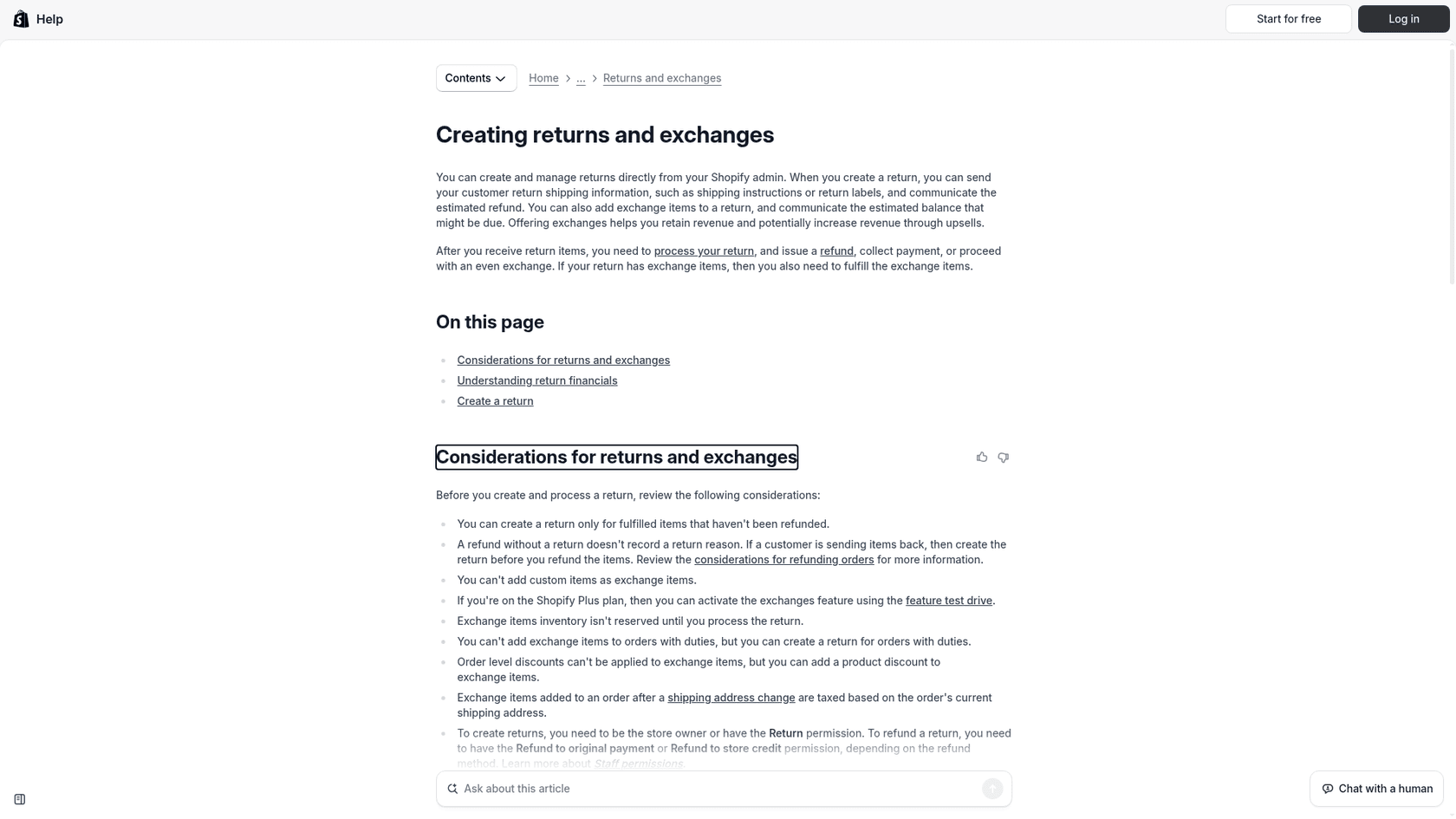
The considerations on that page are where exchange tickets go wrong, so they're worth reading as a list of things your AI should say out loud:
- "Exchange items inventory isn't reserved until you process the return." If the shopper wants the last large in stock, it can sell to someone else while their parcel is in the post. An AI that says "your large is on its way" before the return is processed is promising something Shopify hasn't held.
- Order discounts don't follow. Order-level discounts can't be applied to exchange items, though you can add a product discount to them. A shopper who used a 20% code may see the new item at full price unless someone adds that discount, which turns an exchange into a discount code question.
- No custom items. You can't add custom items as exchange items, so a made-to-order swap has to go another way.
- Orders with duties can't take exchange items. You can still create a return for them.
- Labels from Shopify are US and Canada only. Creating a return label in Shopify needs a location in the same country as the customer's shipping address, and that country has to be the United States or Canada. Everyone else gets an uploaded label or instructions.
Two more details from Shopify's return rules matter for the reply. An exchanged item gets its own return window, starting from its own delivery date, so a shopper whose replacement doesn't fit either isn't out of time. And if you sell into the European Union, Shopify tells you to set a window of at least 14 days counted from delivery of the last item, so customers can use their right of withdrawal.
Who pays the difference on an exchange?
Whoever ends up behind once the return fees and the new item are counted. Shopify works it out when you create the return: return fees and exchange items are set against the returned items to decide whether a refund is due or payment needs collecting. Its return financials table has three cases:
| The new item | What happens |
|---|---|
| Costs less than the returned one | Process the return and refund the difference, now or later |
| Costs the same | Even exchange; the money paid for the old item covers the new one |
| Costs more (including fees) | Process the return, then send an invoice, capture payment or mark the order paid |
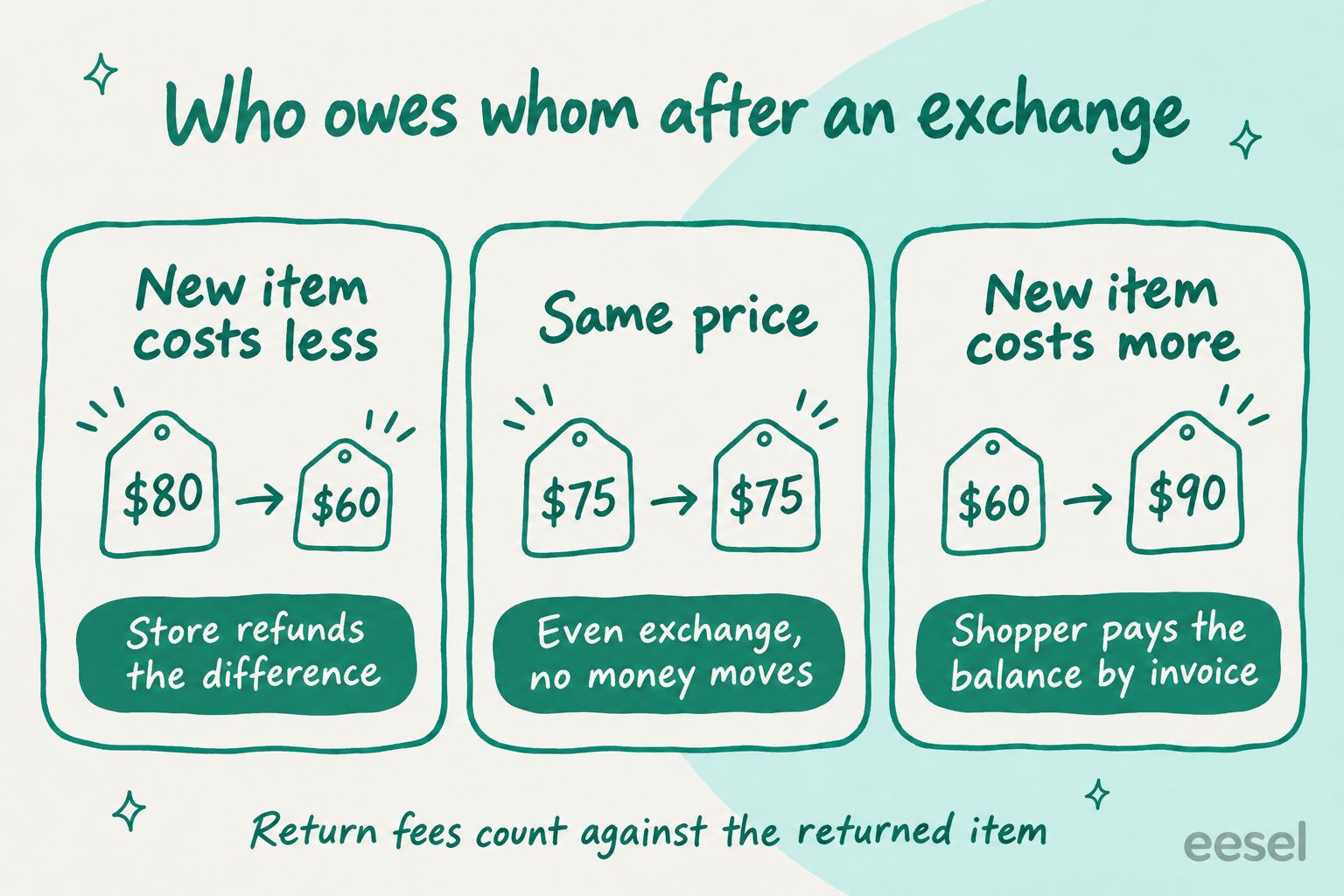
The shopper should hear which case they're in before they post anything. "You'll owe $30, and we'll send you a payment link once your return arrives" is a better first reply than a cheerful "Sure, we can swap that!" followed by an invoice they didn't expect. If you use flat-rate return shipping or a restocking fee, those count against the returned item too. Shopify notes that partial processing changes the maths: processing only the exchange might need a payment even when processing everything would end in a refund.
What about WooCommerce exchanges?
WooCommerce has no exchange step in its core order screen, so an exchange is a refund plus a new order unless you add an extension. WooCommerce's guide to the single order page says orders with the Processing status or later (order statuses explained) "are no longer editable", and that because WooCommerce accepts only one payment per order, you create a new order when a paid customer needs extra items. Its refunds documentation covers sending money back automatically through a compatible gateway or recording a manual refund.
So the core-only flow is: refund the item being returned (or the difference), create a new order for the replacement, and send an invoice with a payment link if the new item costs more. eesel's guide to automating WooCommerce returns goes through that flow step by step.
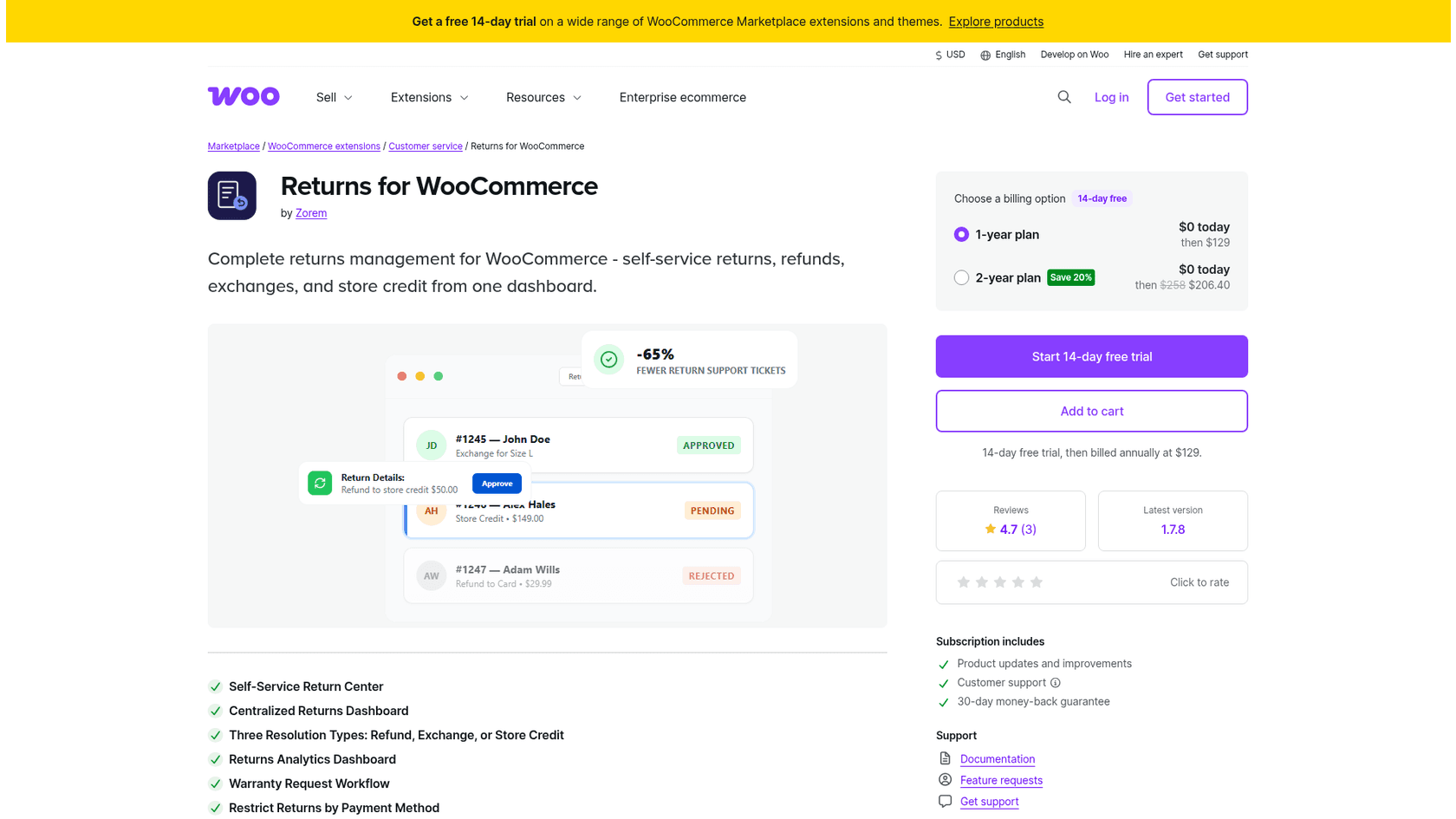
If exchanges are a big share of your returns, I'd add one. Returns for WooCommerce, sold on the WooCommerce Marketplace, costs $129 for a 1-year plan after a 14-day free trial, and lets customers pick a replacement product, same or different variant, from a return portal. The questions the AI has to answer don't change: is the item eligible, is the replacement in stock, and who pays the difference. If you're comparing tools for the whole returns queue, see the list of the best AI for returns.
Check an exchange request
Pick the facts of a ticket to see which path it's on, what the AI can tell the shopper on its own, and what should wait for your team.
Set the five facts from a real ticket to see the path, what to tell the shopper, and what waits for a person.
How do you set up an AI for exchange requests?
Give it read access to the store, write your exchange policy as rules it can check, and decide which changes it may make alone. In order:
- Connect the store with order access. The AI needs the order's fulfillment status, delivery date and line items, and each variant's live stock. A storefront crawl isn't enough, because stock on a cached page is already wrong. The guide to connecting Shopify order data goes through the options.
- Write the policy as checks, not prose. Your window and when it starts, final sale collections, whether you allow exchanges for a different product or only a different size or colour, who pays return shipping, and what happens to discounts. If it's in your Shopify return rules, make the policy say the same thing.
- Say what to offer when the new variant is out of stock. Another variant, store credit, a refund, or a back-in-stock note. Without this, the AI will either stall or invent an option.
- Set each action to act alone or ask first. Reading orders and stock can run on its own. Editing an order, opening a return and refunding a difference are the ones I'd start on ask first, the way most approval workflows do, and loosen once the drafts are consistently right. That's human-in-the-loop in practice, and the same thinking as refund guardrails for AI agents.
- Test on last month's exchange tickets. Run it against real tickets before it touches a live one, and read where it would have promised a size you didn't have.
For the replies themselves, macro templates for exchanges are a decent starting point. If your team works in Gorgias, there's a separate guide to getting Gorgias AI to tell refund from exchange intent.
What are the common mistakes with exchange requests?
- Promising the replacement before checking its stock. "No problem, I'll send a large" is a promise. Check the variant first, and remember Shopify doesn't hold exchange stock until the return is processed.
- Treating a shipped order like an unshipped one. You can't edit fulfilled items in Shopify. Once it's shipped, the answer is a return, with a window and a parcel going back.
- Leaving the price difference for later. The shopper should know in the first reply whether they'll get money back or owe some.
- Losing the discount. Order-level discounts don't carry onto exchange items in Shopify. Decide whether you honour the original discount, and tell the AI.
- Forgetting personalised options. Swapping an item with app-based custom options can remove those options. Collect them again.
- Handling an exchange as a refund and a new order without telling anyone. It works on WooCommerce core, but the shopper sees a refund and a new charge. Say so in the reply so they don't think they've been billed twice.
How eesel handles exchange requests on Shopify
eesel joins your helpdesk or your storefront chat and reads your Shopify store live while it works the ticket. Its Shopify integration gives it the pieces an exchange needs. An order lookup returns the order's payment and fulfillment state, items, totals and discount codes, and on request where each return stands. Get Product Variants returns each variant's size, colour, price and stock, and Get Stock by Location splits stock by location (a warehouse, shop or fulfillment partner) and says whether that location ships online orders.
For the change itself, eesel has Edit Order Items, which removes an item from an unfulfilled order or adds one, for example to swap a size. It moves no money, so a price difference is a separate refund or invoice. A store connected before 9 November 2026 reconnects Shopify once to pick up editing an order's items and stock by location. Once the item has shipped, Create Return opens the return in Shopify with a reason from Shopify's list, and a person can finish it in your Shopify admin. Create Draft Order builds a draft from what the shopper asked for, left for a person to confirm. Any of these can be set to ask first, and nothing happens in Shopify until someone approves it.
ClutchLoop draws a similar line with its agent, Loopy, on Gorgias and Shopify: the agent answers what it can answer well and sends the rest where it belongs. Return, refund and replacement requests from US customers get an immediate reply pointing them to ClutchLoop's returns portal, and product questions get answers from live Shopify data. In a month, Loopy handled about 230 Gorgias tickets, sent about 180 replies directly, and made 76 live product lookups in Shopify, for prices, colours and stock.
Try eesel on your exchange tickets
If exchange requests are piling up because your returns flow can't take them, eesel can work them from the helpdesk you already use, whether that's Gorgias, Zendesk or Freshdesk: it checks the order, your return policy and the live stock of the size they want, tells the shopper which path they're on and what it costs, and leaves the order edit or the return for your team's yes until you're happy to let it act. The useful part is the first reply: it's specific, so you don't get a follow-up asking "so is my large coming or not?"
eesel has a 7-day free trial with 100 credits, then plans start at $299 a month for 500 credits, where a ticket or chat is 1 credit however many replies it takes (pricing). Try eesel on last month's exchange tickets before it answers a live one.