Zendesk knowledge connectors: sources, plans, limits, setup 2026

Rama Adi

Katelin Teen
Last edited November 12, 2026
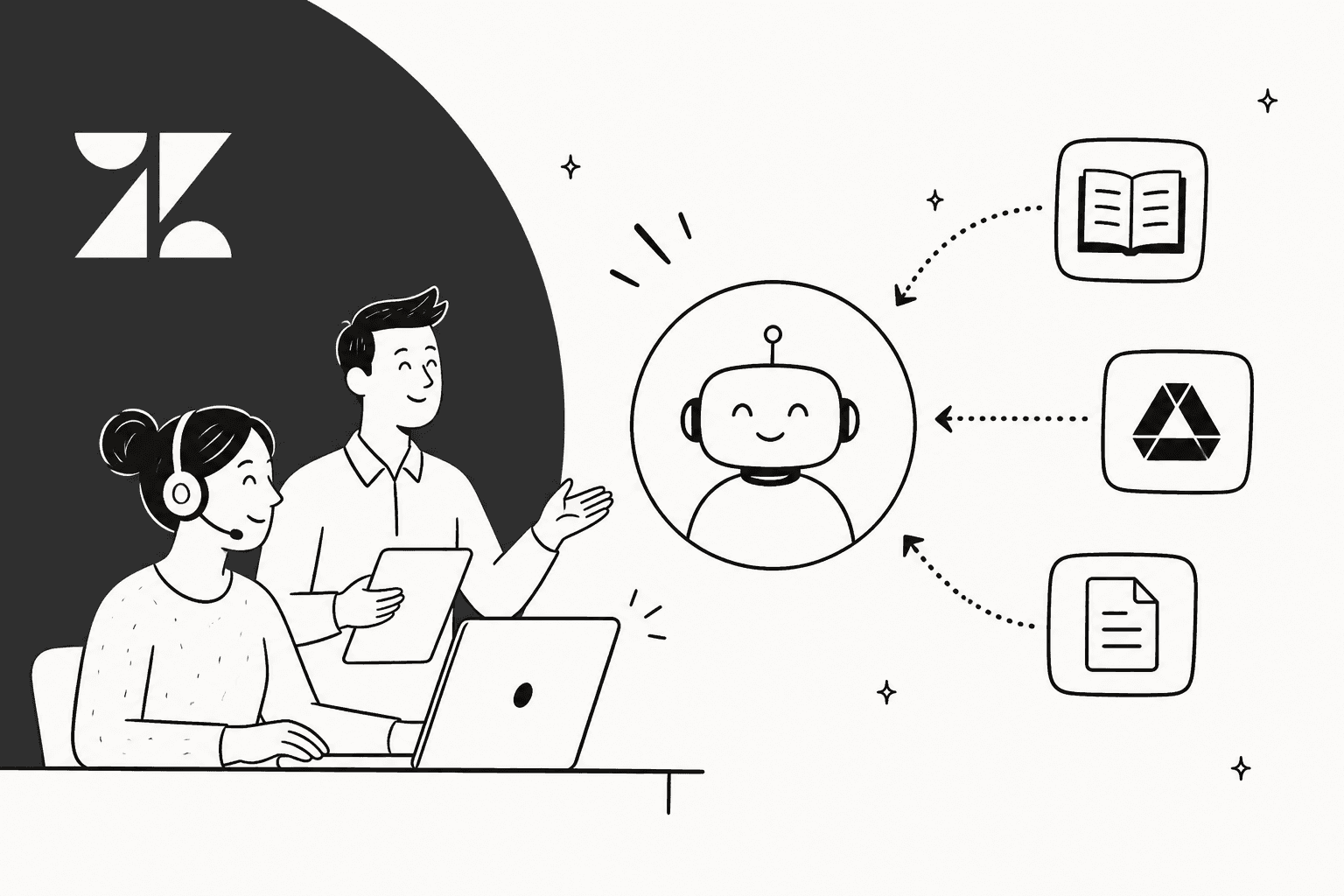
Zendesk knowledge connectors copy content from tools like Confluence, SharePoint, Google Drive and Notion into Zendesk Knowledge, so AI agents, help center search and Copilot can answer from it. Expect a copy refreshed about every 24 hours, not a live link, and set each connection to Visible to everyone or AI agents will not use it. On the pricing page, Suite Team ($55 per agent per month) and up list the feature. eesel covers the same documents and adds your past tickets and macros.
What are Zendesk knowledge connectors?
They are the part of Zendesk Knowledge that brings outside content in. Zendesk's overview article splits external content into two kinds: websites, indexed by a web crawler or an API call, and knowledge connectors, which sign in to a specific tool and sync what they find. Once content lands, Zendesk makes it available in four places: help center search, quick answers in Agent Workspace, AI agent responses, and (Copilot add-on only) sources for auto assist.
I ship integrations at eesel, and the first question I ask about any Zendesk AI setup is where the real answers live. They are rarely in the help center alone. They sit in a Confluence space, a shared drive, a Notion page. Connectors exist for exactly that gap, and the way they work is simple once you see the pipe.
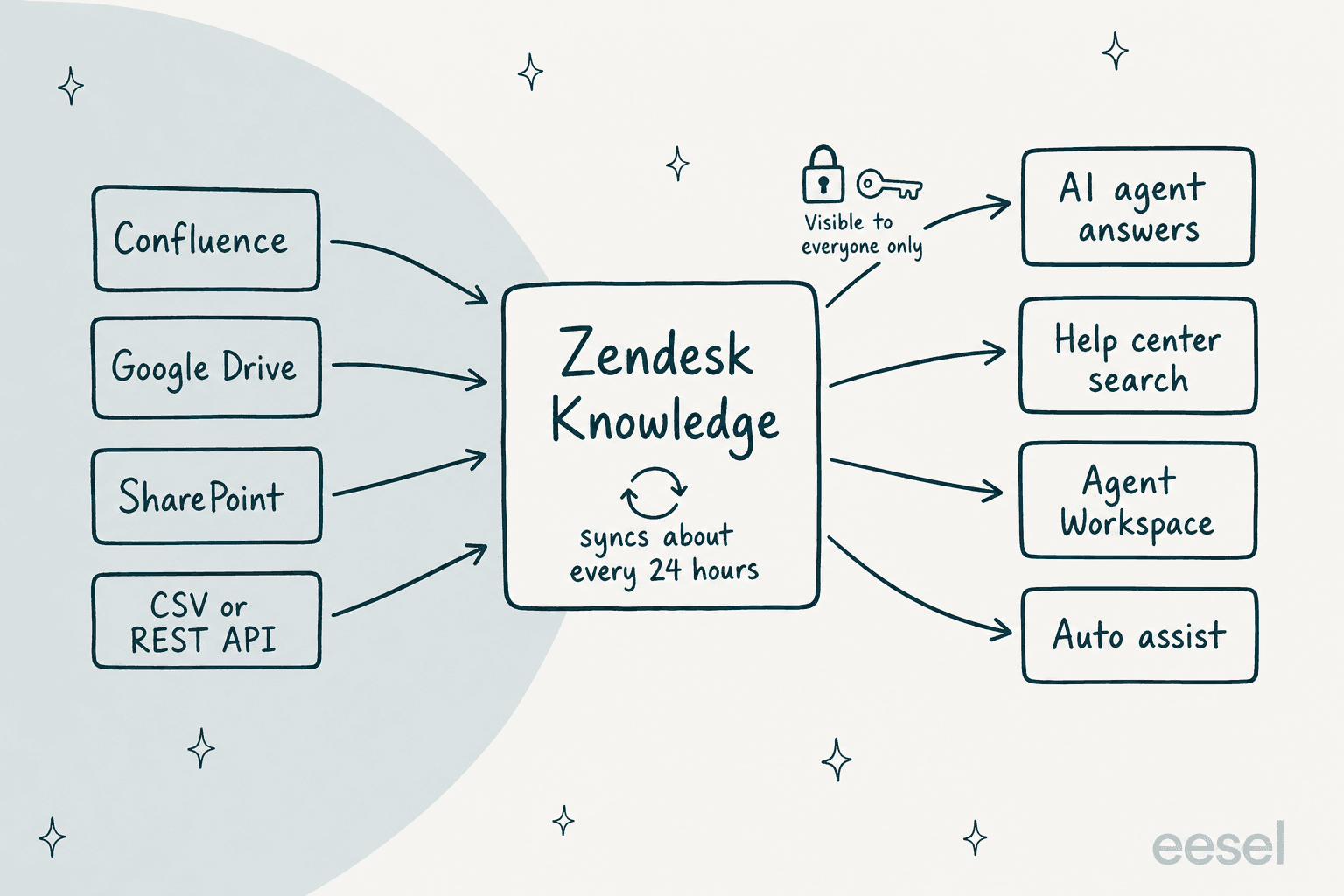
One detail changes how you plan: the data is a copy. Zendesk's knowledge sources article says an AI agent searching a help center sees the content as it is at that moment, while an external source is searched as of the last sync, which usually happens every 24 hours. Edit a policy in Drive at 9am and the AI agent may still quote the old one that afternoon.
Which sources can Zendesk connect?
Zendesk's authentication reference lists 39 dedicated connectors, and the list of outside sources AI agents can use is longer still. Dedicated connectors show as tiles on the Connections page. If your tool is not a tile, there are two fallbacks. The Other tile is the universal connector, which pulls from any REST API that returns JSON. Upload files takes CSV.
| Type | Examples from Zendesk's docs | Notable limits |
|---|---|---|
| Wikis and docs | Confluence, Notion, Document360, Guru, ReadMe | Confluence: personal spaces not permitted; Notion: one connection per account |
| File storage | Google Drive, SharePoint, Box, Dropbox, Amazon S3 | Drive: shared drives only, Docs and Sheets; SharePoint: docx, xlsx, md |
| Helpdesks and CRM | Freshdesk, Salesforce, Zendesk, Front, Kustomer, HubSpot | Freshdesk: default locale only; HubSpot: published blog posts |
| Work tools | Jira, Linear, Airtable, ServiceNow, Shopify | Jira: issue fields and comments sync |
| Anything else | Universal connector, CSV upload | CSV: 10 files per upload, 20 MB each |
Three recent additions show how fast this list moves. SharePoint went generally available on April 30, 2026. The universal connector followed on September 2, 2026. Helpjuice, WordPress and ReadMe came in the October 2026 roundup. PDFs are still an early access program: Zendesk's PDF ingestion article caps files at 10 MB and 100 PDFs per account, skips encrypted files, and extracts text only.
If your content is mostly a Notion workspace or a policy folder, I would start with the matching dedicated connector. If it is a Confluence space with PDFs inside, read the PDF limits before you promise anyone full coverage. One reader asked Zendesk exactly this in the article comments:
"So if a confluence space includes PDFs, and Word docs, are those documents synced and accessible to the AI?"
I found no reply to it. The honest answer today is that Word and Excel have named support on some connectors, while PDFs sit behind the early access program.
Which Zendesk plans include knowledge connectors, and what do they cost?
The help center says connecting external content is available for all plans, with storage limits that vary. Zendesk's pricing page is stricter: its compare table shows a dash for Knowledge connectors on Support Team, and no dash on Suite Team or Suite Professional. Enterprise is quote-only.
I found no separate connector fee. What you pay for is the plan and, when an AI agent answers from the content, the resolution.
| Item | Amount | Source |
|---|---|---|
| Support Team, per agent per month, billed yearly | $19 (connectors shown as not included) | Pricing page |
| Suite Team | $55 | Pricing page |
| Suite Professional | $115 | Pricing page |
| Included automated resolutions | 5 per agent per month (Team), 10 (Professional) | Pricing page |
| Extra resolution, committed / pay-as-you-go | $1.50 / $2.00 | Pricing page |
A worked example: a Suite Team with 10 agents pays $550 a month in seats. If its AI agent resolves 400 conversations from connected Confluence and Drive content, 50 are included, and the other 350 cost $525 at the committed rate ($700 pay-as-you-go). That is $1,075 to $1,250 a month before add-ons. My Zendesk outcome-based pricing post explains what counts as a resolution, and the resolution metrics guide shows how to track it.
The SharePoint announcement adds one more fence: you need the AI agents Advanced add-on to build an advanced AI agent, but you can create a SharePoint connection on any Suite or Knowledge plan. Compare tiers in Advanced vs Essential.
How do I set up a Zendesk knowledge connector?
You must be a Knowledge admin. The steps come from Zendesk's setup article and its AI agent article. You work across Knowledge admin and the AI agents workspace, so keep Admin Center roles in mind.
- In Knowledge admin, open Content, then External content, then Connections.
- Under Available sources, click Connect on the tile you want.
- Review the message and click Continue.
- Sign in to the source with an account that can see the content you want synced. Fields differ by connector: an API token for Freshdesk, a site and up to 20 listed spaces for Confluence, a root folder for Box.
- Click Sync. The connection appears on the Connections page and starts syncing.
- Set Viewing permissions on the connection (more on that below).
- In the AI agents workspace, open your agent, go to Build, then Knowledge, then Knowledge sources, click Edit sources, choose External content, tick the source and click Save.
Skip step 7 and nothing happens. Zendesk also warns that a Generative replies block with no connected knowledge source throws a technical error, so connect at least one before you test the flow.
One gotcha from the comments. When you import a Zendesk help center with an API token, the URL format matters:
"I created the API token to import private articles and was getting a bottom-left red callout with the error 'Data source import failed
invalid KB configs'... it worked when I added just https://subdomain.zendesk.com."Pedro, Zendesk help center comment
Zendesk's own Zendesk-to-Zendesk connector is how you connect another account's help center, or a production help center into a sandbox.
What are the limits of Zendesk knowledge connectors?
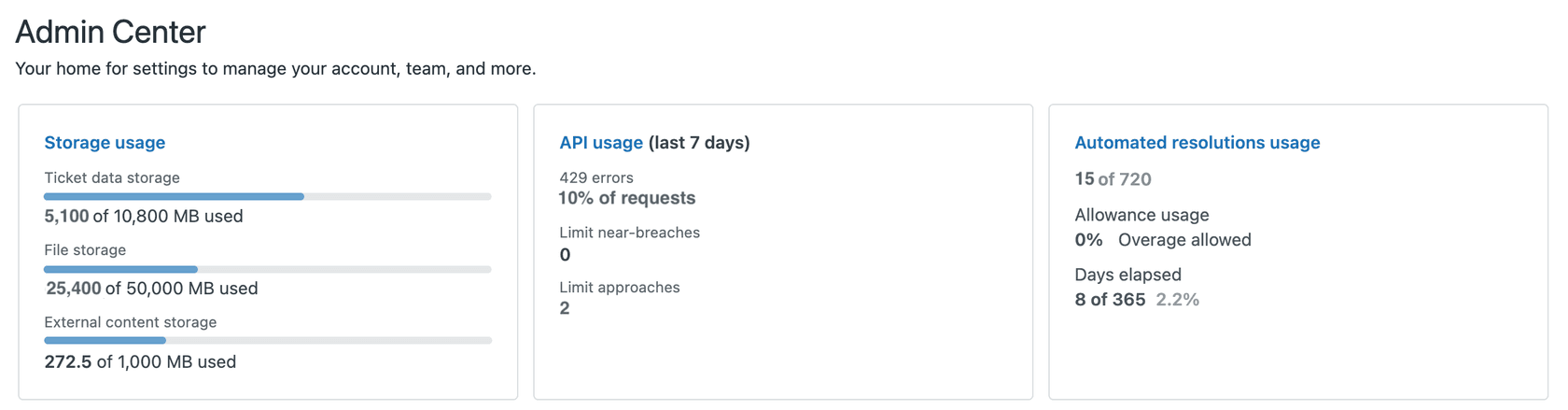
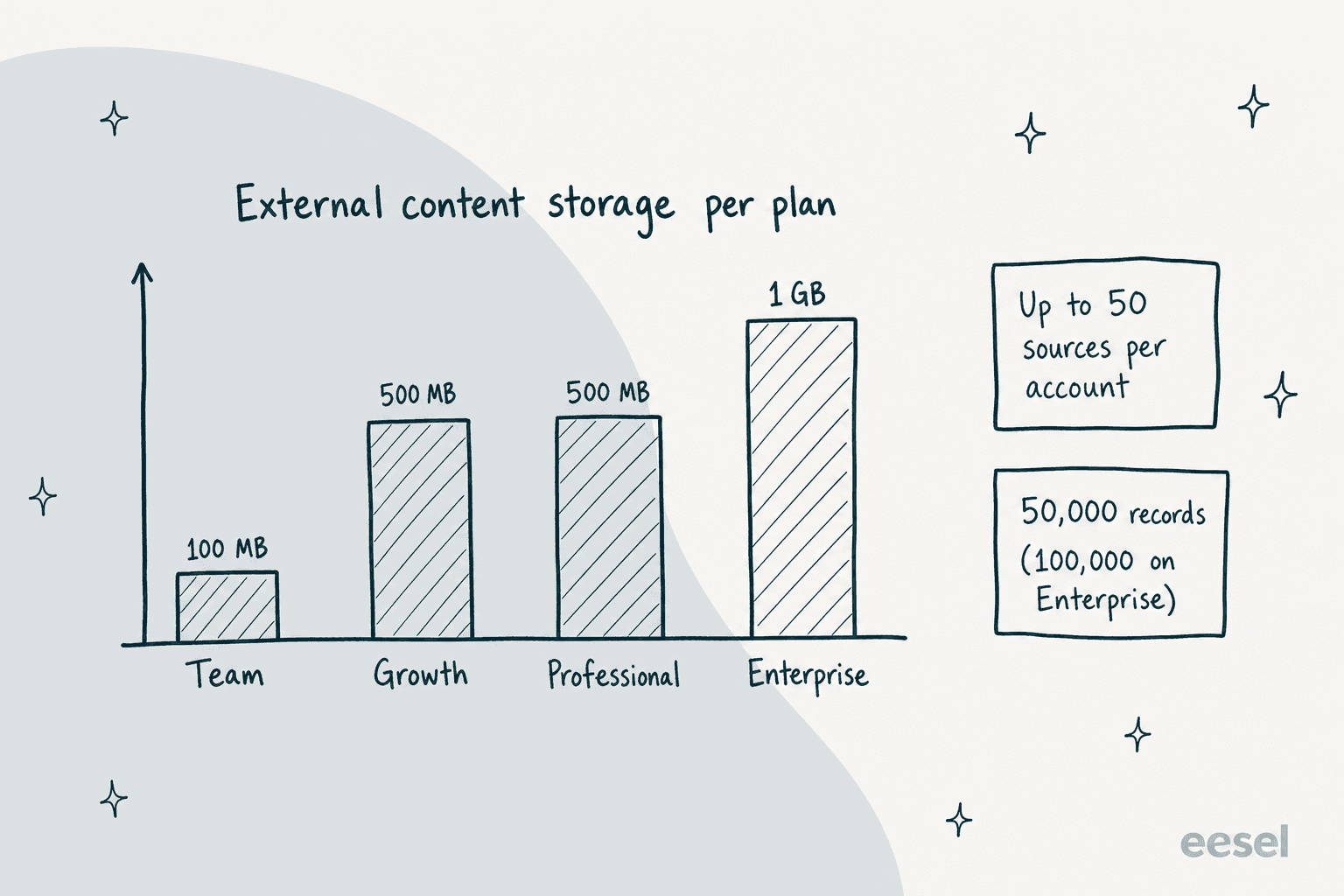
The numbers that bite are storage, source count and the sync clock. Zendesk's storage article gives external content its own allowance by plan, and your Admin Center home shows live usage.
| Limit | What Zendesk says | Source |
|---|---|---|
| Sources per account | Up to 50 external content sources | Overview article |
| Sync cycle | Every 24 hours; manual Sync again; Contentful up to 6 hours | Manage article |
| External storage | 100 MB Team, 500 MB Growth and Professional, 1 GB Enterprise | Storage article |
| Record count (CSV) | 50,000, or 100,000 on Enterprise, shared across sources | CSV article |
| Sources per AI agent | No hard cap, but too many can reduce accuracy and add latency | AI agent article |
| Removing a connection | All its content is removed with it | Manage article |
The line I would underline is in the AI agent article: more sources is not more accuracy. Zendesk itself recommends keeping the number reasonable, and a narrow, curated set beats everything you own. Run a knowledge audit before you connect a whole wiki, and use gap analysis to see which questions still go unanswered.
Who can see synced content?
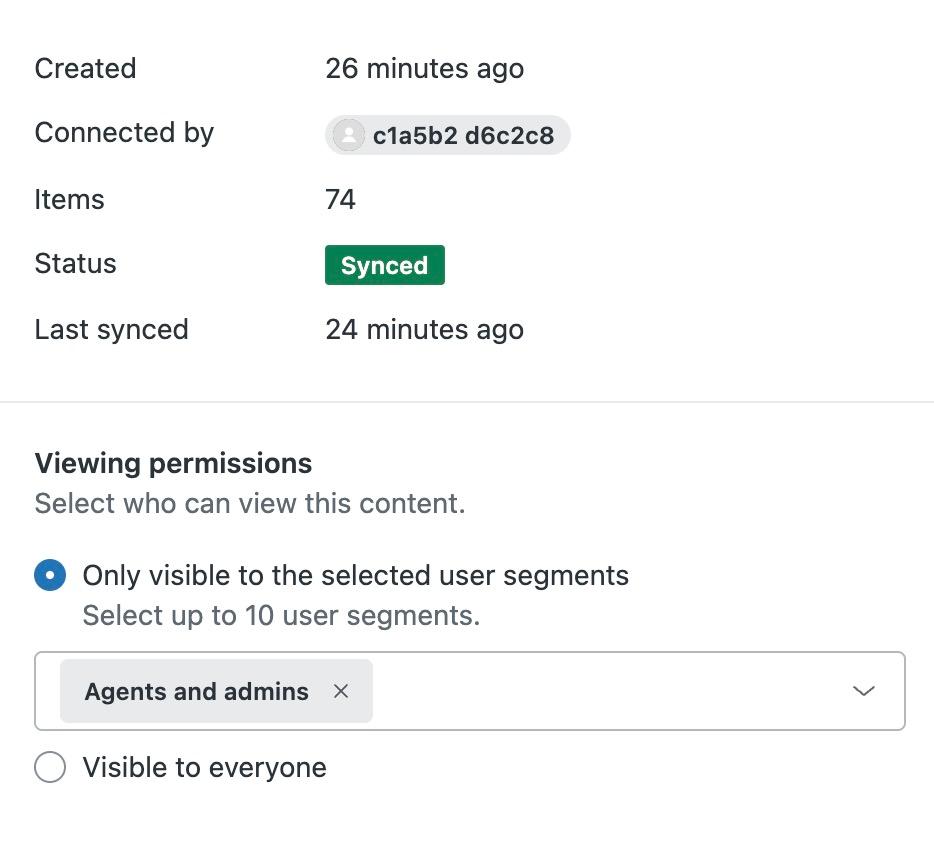
This is the biggest surprise in the docs. Zendesk's manage article says you set viewing permissions on each connection in Zendesk: up to 10 user segments (multiple segments need Enterprise), such as signed-in users, agents and admins, or a custom segment. Then comes this line: to make content visible to AI agents, you must select Visible to everyone.
Read that again. Permissions are set per connection inside Zendesk, not carried over from the Confluence space or the Drive folder. A restricted internal runbook that you sync and set to Visible to everyone becomes usable by an AI agent talking to any customer. Compare that with a connected help center, where article view permissions are respected: signed-in customers can get answers from restricted articles, and anonymous ones only from public articles. For anything sensitive, sync a curated folder, not the whole drive. Read Zendesk's notes on AI agent data privacy and GDPR compliance before you do.
Where do Zendesk's own pages disagree?
Four conflicts I found, so you can check before you buy or plan a rollout:
- Plan access. The connector article says external content is available for all plans, but the pricing page shows a dash for Knowledge connectors on Support Team, and the article's own plan table says Support needs Knowledge Professional or Enterprise.
- Storage. The storage article lists 100 MB for Team, but the pricing page shows 100 MB, 500 MB and 500 MB across Support Team, Suite Team and Suite Professional. A Suite Team buyer should confirm which number applies.
- One help center or many. The legacy article says an agent must have exactly one connected help center, and that this functionality ends on December 10, 2026. The migration notice says connecting multiple help centers is now possible. I trust the newer one.
- Universal connector sign-in. The announcement says you connect with an API key, while the how-to article says API key or OAuth 2.0.
If your account bought AI agents Advanced before March 10, 2026, it follows a migration schedule that runs through the end of 2026. Connector authentication for Salesforce and Freshdesk does not carry over, so you must re-authenticate or those sources stop refreshing. Web crawlers also change: crawl depth, page limits and proxy settings are no longer configurable yet.
How does eesel compare with Zendesk knowledge connectors?
Connectors solve the document half of the problem. They do not read your past tickets, and they do not draft a reply from your macros. That is where eesel sits, working inside Zendesk rather than replacing it.
I will say plainly what the native route does well. It stays inside one vendor, the admin stays in Knowledge, and for a company whose answers live in a handful of clean docs it is a sound choice. I would reach for it first if you already pay for Suite Professional and your content is tidy.
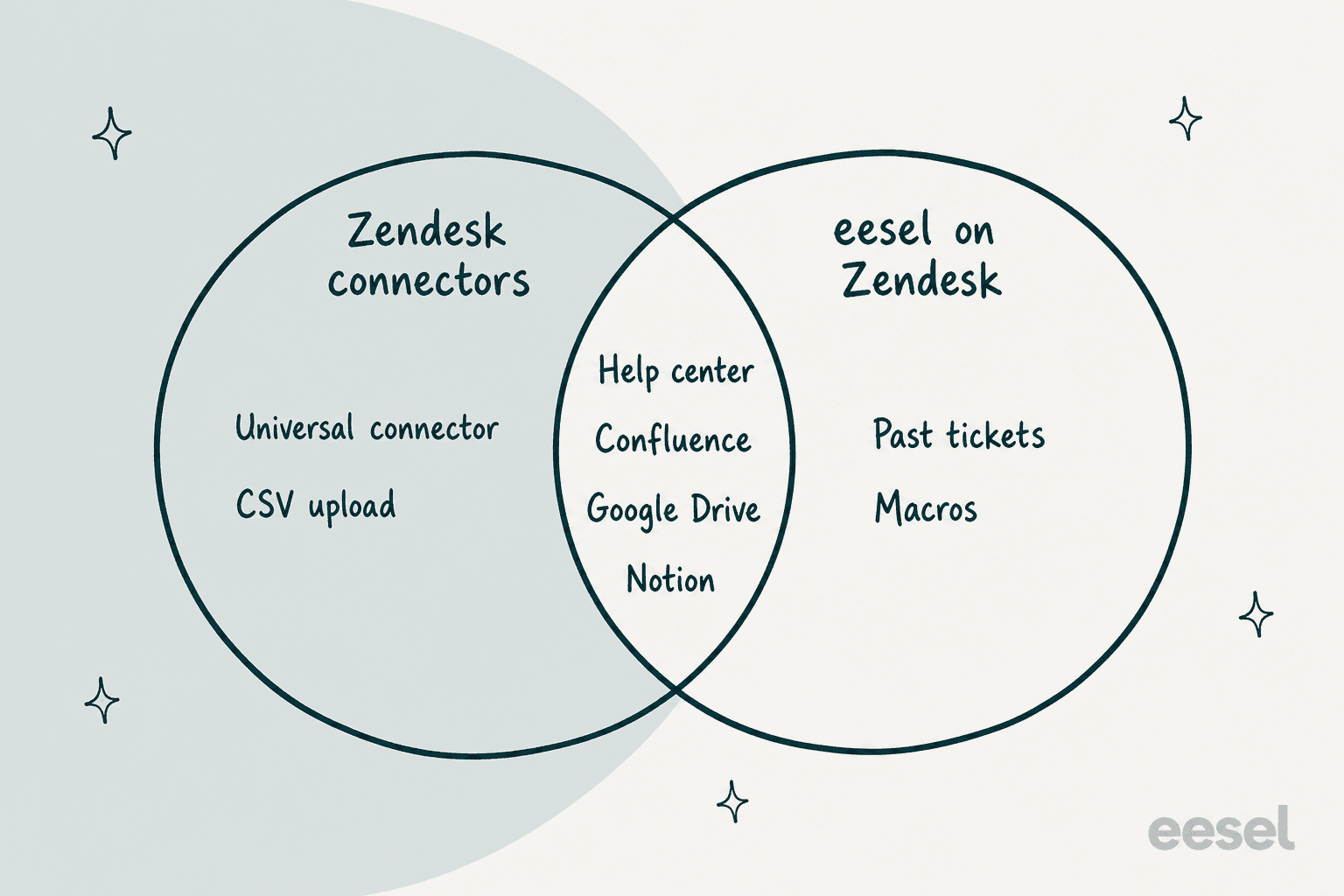
eesel connects to Zendesk and learns from the help center, macros and tickets, plus Confluence, Google Docs and Notion. Beautek, a B2B equipment supplier in Germany, connected Zendesk, Notion, Google Drive and its website, so eesel answers from about 6,700 pages and documents. In a month it drafted replies on about 110 Zendesk tickets for the team, who approve before anything is sent. Cape Coffee Beans runs eesel on Zendesk, Shopify and Google Drive, and the team @mentions it in a ticket to pull up a product, a past ticket or an order. smava drafts from about 820 macros and help center articles, kept apart by brand. I wrote about that ticket-history approach in my comparison, and the Notion and Confluence posts cover the source side.
A bus-tracking support team told eesel on a sales call that their manuals lived in Google Drive, written for administrators, with around 200 to 250 tickets a month. A native connector could ingest those manuals. What it cannot do is learn how the team already phrased the answers.
With the eesel CLI, an AI coding agent can upload approved knowledge, like exported Confluence pages or policy documents, adjust instructions, then ask test questions and check the answers before anything goes live. A person with admin access still approves the Zendesk connection itself, and uploaded documents are not ready until the test answers look right.
My two honest limits. eesel is not a no-code setting inside Zendesk Admin Center, so if you want everything under one vendor contract, the connectors win. And a document-fed answer is only as good as the document: if a policy is outdated in Confluence, both routes will repeat it. For more routes, see my Zendesk AI alternatives roundup, Zendesk AI search and generative replies, and for the other direction read Claude for Zendesk.
Try eesel on your Zendesk
If your Zendesk answers live in Confluence, Drive or Notion, and you also want them to come from the tickets your team already solved, eesel plugs into Zendesk and learns from all of it. Start with one queue, check the drafts against your own past tickets, and see eesel pricing before you scale.
Frequently Asked Questions
What are Zendesk knowledge connectors?
They are Zendesk Knowledge connections that copy content from outside tools, such as Confluence, SharePoint, Google Drive or Notion, into your account. Once synced, that content can feed AI agents, help center search and auto assist. Zendesk describes them in its connector setup article.
Which sources do Zendesk knowledge connectors support?
Zendesk's authentication table lists close to 40 dedicated connectors, including Confluence, Google Drive, SharePoint, Notion, Box, Dropbox, Jira, Salesforce, Freshdesk and Zammad. Anything else can come in through the universal REST connector or a CSV upload. If you mainly use Confluence, my Zendesk AI Confluence guide covers both routes.
How often do Zendesk knowledge connectors sync?
Zendesk says syncs run automatically every 24 hours, and you can trigger one by hand with Sync again. Contentful is the stated exception, where changes can take up to 6 hours to appear. My Zendesk Google Drive guide shows what that lag means for edited documents.
Do Zendesk knowledge connectors cost extra?
I found no separate connector fee in Zendesk's docs. You pay your plan, which the pricing page lists at $55 per agent per month for Suite Team and $115 for Suite Professional (billed yearly), plus $1.50 to $2.00 per automated resolution. See Zendesk AI pricing and Zendesk Suite pricing for the full maths.
Can Zendesk AI agents see my restricted Confluence or Drive pages?
Not through permissions that follow the source. Zendesk lets you set viewing permissions on each connection, and says that to make content visible to AI agents you must choose Visible to everyone. Plan what you sync accordingly, and read Zendesk's notes on security and compliance first.
What is the difference between Zendesk knowledge connectors and a web crawler?
A web crawler indexes public or logged-in website pages, while a connector signs in to a specific tool and syncs its spaces, folders or articles. Zendesk groups both as external content sources and caps the total at 50 per account. For ticket answers built from your helpdesk history, compare eesel vs Zendesk AI.
Is there a way to use Zendesk with Confluence and Notion without connector limits?
Yes. eesel connects to Zendesk and learns from Confluence, Google Docs, Notion, macros and past tickets, then drafts replies your team approves. It is worth a look if you want an AI for Zendesk that does not depend on one 24-hour sync cycle.