Zendesk natural language procedures: setup, plans, limits, and cost in 2026

Kira

Katelin Teen
Last edited November 12, 2026
Zendesk natural language procedures are plain-language, step-by-step instructions that an AI feature follows, and there are three kinds: generative procedures for customer-facing AI agents, custom agent procedures run from action flows, and auto assist procedures that coach your human agents. Write short, specific steps with explicit "if, then" conditions. Expect $1.50 or $2.00 per automated resolution on top of your plan. eesel takes the other route: it learns from your past tickets and macros, so there is no procedure map to maintain.
What are Zendesk natural language procedures?
A procedure is a set of written steps that a Zendesk AI follows to solve a request. You describe how you would train a new hire, and the AI turns it into behavior. Zendesk's generative procedures article calls them flexible conversation flows that use agentic AI, and the pricing page describes the AI agent builder as a way to create agents "from natural-language procedure descriptions."
I build agents for a living, so the part I care about is the mechanism. A scripted dialogue fixes every branch in advance. A procedure gives the AI a goal and a route, and the AI can jump around when the customer wanders. Zendesk's overview article says that if a customer asks where to find a tracking number, the agent can explain, then return to the step. That flexibility is why the writing matters more than the clicking. If you are new to the platform, read my Zendesk AI agent review and the Advanced vs Essential comparison first.
Which kind of Zendesk procedure do I need?
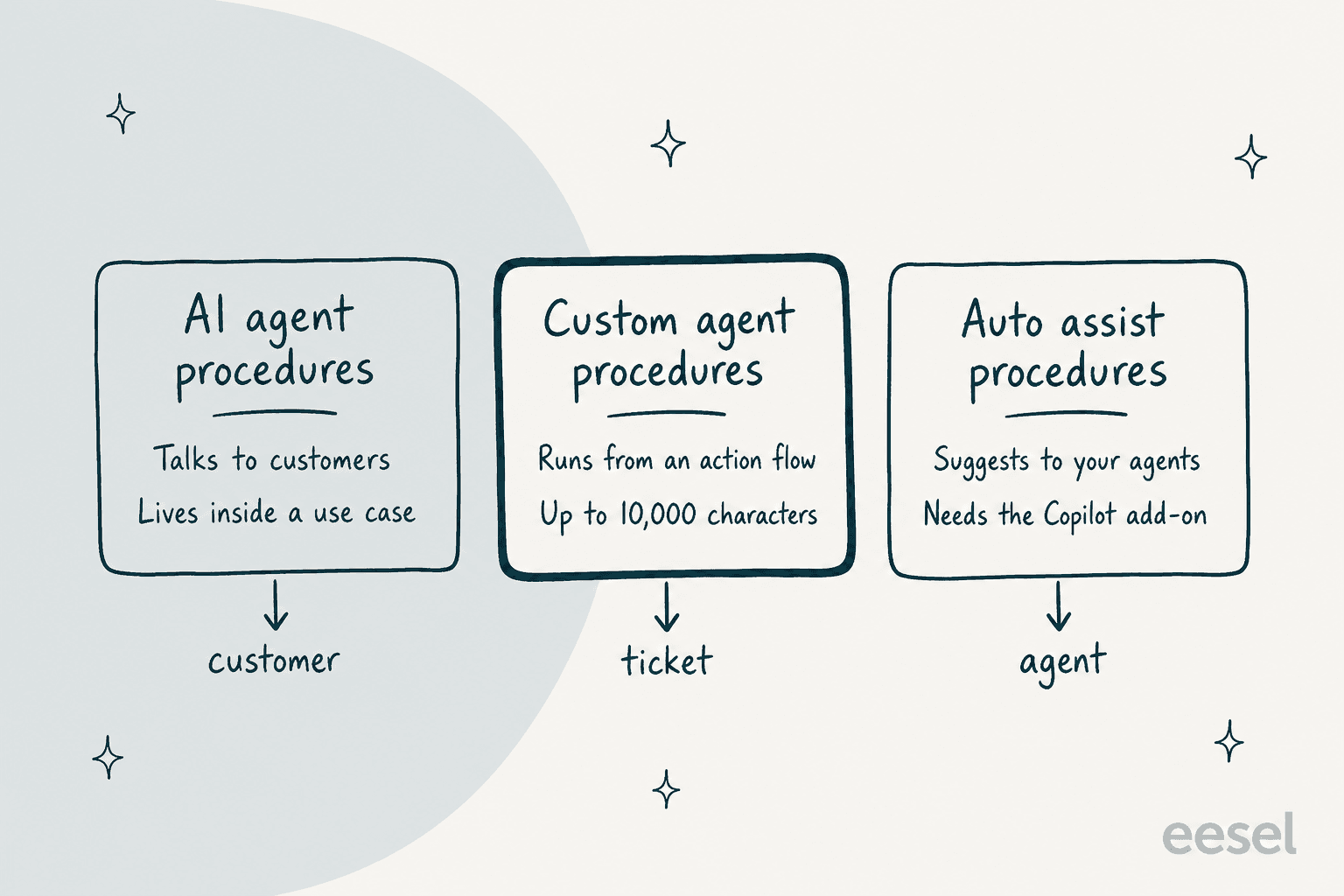
Zendesk uses the word "procedure" for three different things, and the help center pages sit under different menus. Picking the wrong one is the first mistake I see.
| Type | Who it talks to | Where you write it | Source |
|---|---|---|---|
| Generative procedure | Your customer, in a conversation | AI agents workspace, Build, Knowledge, Use cases | Zendesk |
| Custom agent procedure | A ticket, from an action flow | Admin Center, AI, Agent builder, Custom agents | Zendesk |
| Auto assist procedure | Your human agent, inside a ticket | Knowledge admin, Procedures | Zendesk |
Pick the first when the AI should reply to customers. Pick the second when you want a background worker to read a ticket and update it. Pick the third when you want suggestions for agents, which needs the Copilot add-on. The rest of this post follows that order.
How do I write a generative procedure for an AI agent?
Client admins and client editors can create one from inside a use case. These steps come from Zendesk's create article:
- In the AI agents workspace, select the AI agent.
- Click Build, then Knowledge, then Use cases, and open the use case.
- Under Reply method, choose "Use procedure when use case is triggered."
- On the Procedure tab, click Create procedure.
- Enter a free-text description of how the agent should solve the issue.
- Click Generate procedure and read the summary and procedure map.
- Fix gaps with the free-text box and click Update procedure, then Publish procedure.
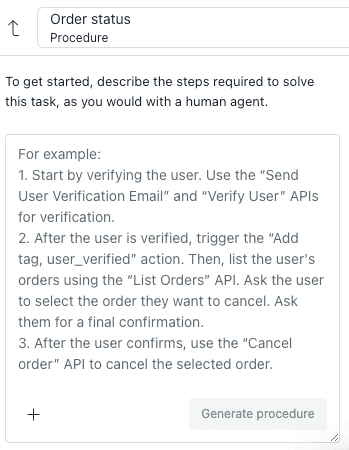
Inside the description you can tell the agent to search a knowledge source, even with a rule like "Search only in the English help center," set phrasing such as "Always include {{brandName}}," and type / or click + to insert actions, API integrations, parameters, search rules or links to other procedures.
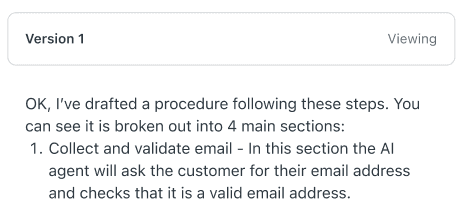
Two habits help. Adjust, don't rewrite: Zendesk says to tell the builder to add, change or delete a part, not to retype the whole thing. And read the output. The builder replies with a summary of each change, and the map shows the exact logic the agent will follow.
What does the procedure map contain?
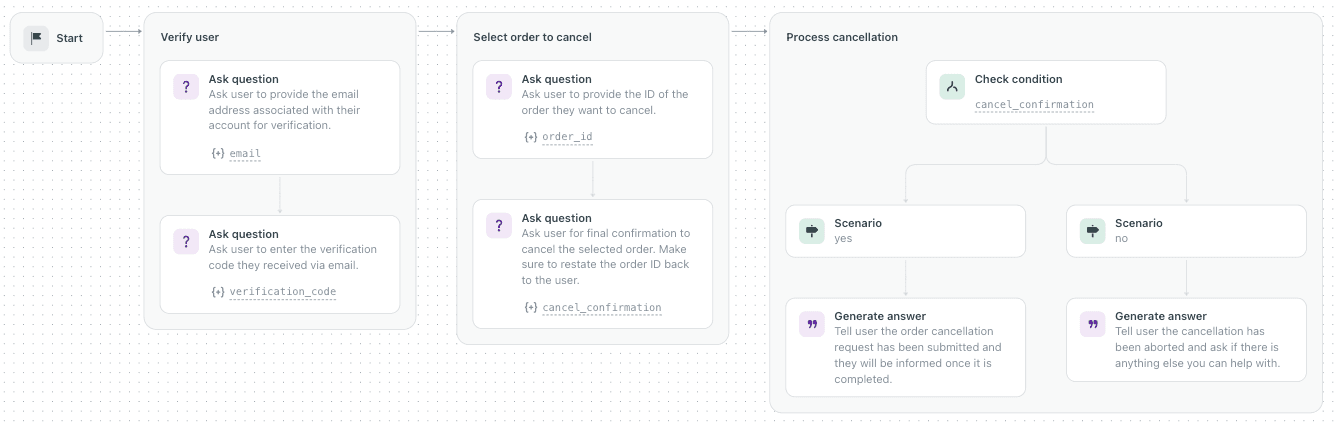
The map is built from blocks, per Zendesk's overview: Generate answer, Ask question, Collect parameter, Check condition, Run integration, Perform action, Search for knowledge, Answer with knowledge, Link to, Run template and Escalate to. Knowing the names helps you write steps that map cleanly. "Ask the customer for a 5-digit order number" becomes an Ask question block, and "if the order is delayed, escalate" becomes a Check condition and an Escalate to block. Pair this with sensible escalation rules and transfer to human settings.
What does a good Zendesk procedure look like?
Zendesk's best practices article lists twelve habits. These are the ones I would enforce on a team:
- Use clear, specific language. "Ask the customer to provide their 10-digit account number" beats "Request account info from the user."
- One action per step. Split "verify identity and check balance and process payment" into three steps.
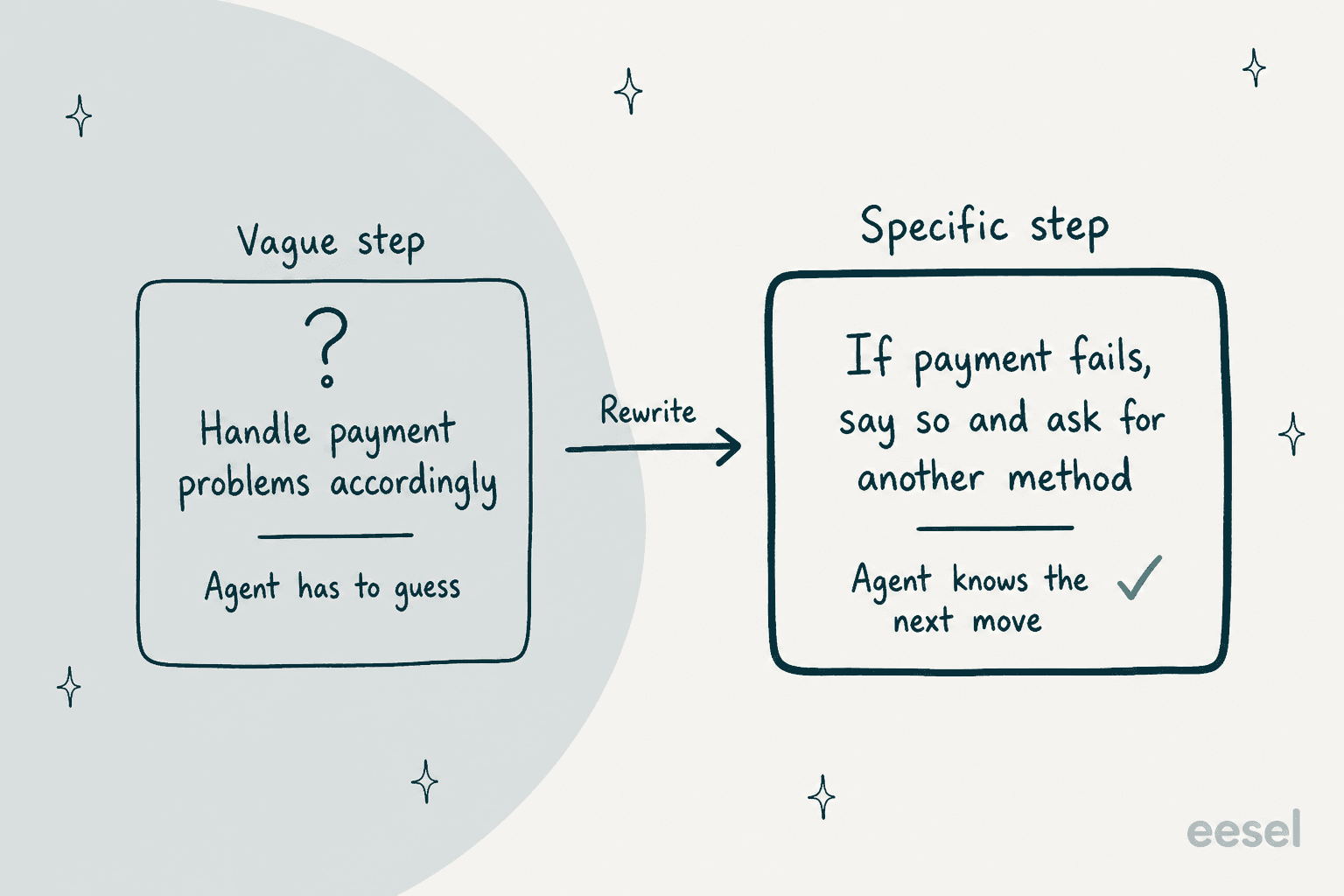
- Explicit conditions. Write "If the payment can't be processed, then tell the user and ask for a different payment method."
- Consistent names. Always say "Premium Plan," never "Gold Plan" for the same thing.
- Handle errors. "If API returns timeout, retry up to 2 times, then escalate."
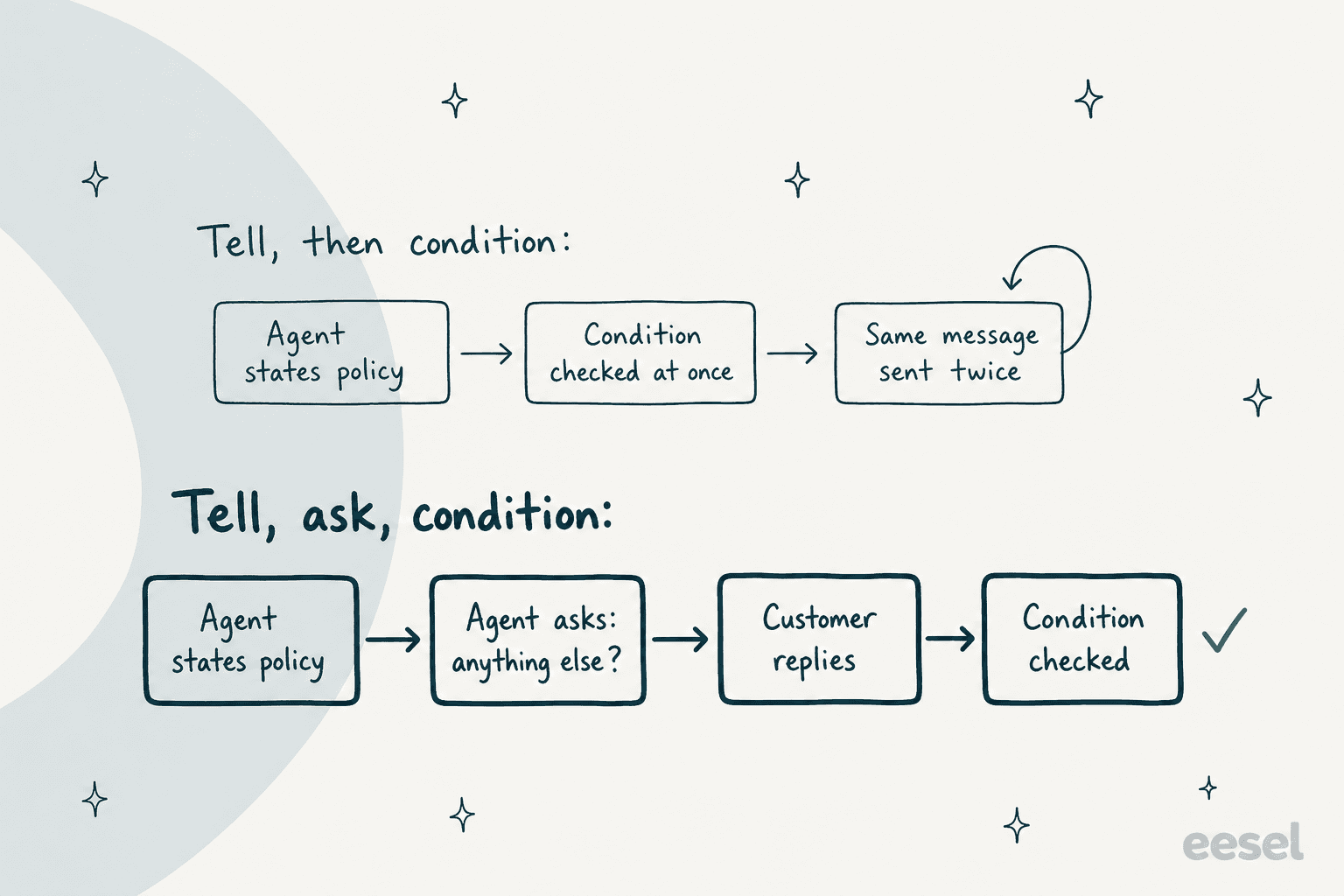
The one that surprised me is the "Tell, Ask, Conditional" rule. Zendesk says that if a step states something and the next step is a conditional, the agent may evaluate the condition at once, find nothing to match and resend the last message. The fix is to end the first step with a question, such as "Did that answer your question?"
Zendesk's examples article shows the style. Its order status procedure says: "IF the order number is provided in an incorrect format twice, ALWAYS escalate to a human agent." Capital letters on the critical step are a documented tip. For session data, the same example saves values with /orderNumber and /email, and calls actions like /checkOrderStatus. If your agent also captures details, see my notes on data capture.
How do I test, edit and roll back a procedure?
Zendesk's management article covers the loop:
- Test procedure opens a chat widget and always tests your latest draft, not the published version. Set a session parameter to test one branch.
- Testing limits. Only messaging AI agents can test a procedure individually. Email and voice need their own test flows. A reader comment on the help article from March 5, 2026 says the test features did not work for them, so confirm in a sandbox first.
- Direct map edits. You can edit existing blocks, but you can't add, reorder or delete blocks.
- Version history. Restore any prior version, or add a note to a version.
- Natural language preview. Zendesk says procedures are "transitioning from visual procedure maps to natural language text," and only procedures published after September 3, 2026 have a read-only text version.
After launch, filter conversation logs to test conversations, then watch analytics and the automated resolution metrics.
How do custom agent and auto assist procedures differ?
Custom agents are background workers. Per the custom agents article, you go to Admin Center, AI, Agent builder, Custom agents, name the agent, describe its task, and write procedures in everyday language. Limits: 100 custom agents per account and 10,000 characters of procedures per agent. Every agent needs at least a Ticket ID input, and agents run only when an action flow hands off to them. Zendesk's tip is to write as if briefing a human agent, name actions explicitly ("Use the Update ticket action to set the priority"), and keep approved articles few. If you chain these agents into advanced action flows, keep each agent's output small and typed, as Zendesk advises.
Auto assist procedures coach people. The auto assist article says you can link actions, macros, agent instructions, public help center articles, other procedures and certain ticket fields, with availability by brand, group or tag. You can insert up to four pieces of help center content per procedure. Zendesk can also draft procedures: per the AI-generated procedures article, it may generate up to three drafts per brand each week, capped at 20 unreviewed drafts, from top ticket topics, solved tickets from the last 90 days and knowledge articles. You publish them before auto assist uses them. My auto assist actions guide has more.
Which plans include them, and what do they cost?
| Item | What Zendesk says | Source |
|---|---|---|
| Generative procedures | Suite Team to Enterprise Plus, Support Team to Enterprise | Help center |
| Custom agents | All Suites; free until January 31, 2027, then charged | Help center |
| Auto assist procedures | Copilot add-on, $50 per agent per month billed yearly | Pricing |
| Committed automated resolution | $1.50 | Pricing |
| Pay-as-you-go resolution | $2.00 | Pricing |
| Suite Team / Professional, per agent per month, billed yearly | $55 / $115 | Pricing |
Writing procedures is not billed on its own, as far as I can find. The bill comes from what the agent resolves. As a worked example, 1,000 resolutions a month beyond allowance cost $1,500 committed or $2,000 pay-as-you-go. My Zendesk AI pricing, Suite pricing and outcome-based pricing posts go deeper.
Where do Zendesk's own pages disagree?
Four conflicts I found, so you can check before you plan a rollout:
- Plan names. The help center lists Suite Growth and Enterprise Plus, but the pricing page sells Suite Team, Professional and Enterprise, with no Growth tier.
- Plan scope. Generative procedures list Support plans too, while the custom agents article lists only Suites.
- Language advice. The best-practices article says writing in English "helps optimize flows," then says performance is the same in all major languages.
- Maps versus text. The create article describes a visual procedure map, while the management article says procedures are moving to natural language text.
How does eesel compare with Zendesk procedures?
I work on the product side at eesel, so my bias is plain. Zendesk's procedures are a strong fit when you want to script exactly how an agent handles a topic and keep that logic inside Zendesk. The cost is upkeep: every use case needs its own procedure, and a policy change means editing text and maps.
eesel starts from your history instead. It connects to Zendesk, learns from help center articles, macros and past tickets, and drafts replies your team approves. smava runs three eesel agents on one Zendesk shared by two brands, and in a month it handled about 27,000 tickets with people approving drafts. SE Ranking puts three product agents on three Zendesk connections so each chat reaches the right one. For a comparison, see eesel vs Zendesk AI and my take on Zendesk AI alternatives.
With the eesel CLI, an AI coding agent can upload approved knowledge such as exported macros and policies, adjust the agent's instructions, and ask test questions to check answers before going live. A person with admin access still approves the Zendesk connection itself.
Two honest limits. eesel doesn't replace Zendesk's custom agents if you want a no-code worker inside Zendesk's action builder, and a procedure is still the right tool when a step must run the same way every time.
Try eesel on your Zendesk
Want an AI for Zendesk that learns from your own tickets instead of a blank procedure? eesel plugs into Zendesk, reads your help center and macros, and drafts replies your team approves. Start with one queue and check eesel pricing.
Frequently Asked Questions
What are Zendesk natural language procedures?
They are step-by-step instructions an admin writes in everyday language, which a Zendesk AI feature then follows. Zendesk uses them in three places: AI agents, custom agents and auto assist. My agentic AI guide covers the reasoning side.
How do I write a procedure for a Zendesk AI agent?
Open the AI agent, go to Build, then Knowledge, then Use cases, pick a use case and click Create procedure. Describe the steps in free text, click Generate procedure, review the map and publish. See the conversation flow builder guide for the older dialogue approach.
How long can a Zendesk custom agent procedure be?
Zendesk's custom agents article says procedures for each agent shouldn't exceed 10,000 characters, and an account can hold up to 100 custom agents. Custom agents run only from action flows, so read my action flows post too.
How much do Zendesk procedures cost?
I found no separate fee for writing procedures. AI agents bill per automated resolution, $1.50 committed or $2.00 pay-as-you-go on the pricing page. Custom agents are free until January 31, 2027, and auto assist needs the $50 Copilot add-on. See Zendesk AI pricing for the math.
Can I test a Zendesk procedure before publishing?
Yes, for messaging AI agents. Click Test procedure, set a session parameter if you want to test one branch, and chat with the agent. Email and voice procedures can't be tested individually. Review the conversation logs afterward.
What is the difference between a Zendesk procedure and a macro?
A macro is a fixed reply or set of ticket changes an agent applies. A procedure tells an AI how to solve a request, and auto assist can link macros inside it. My AI agent vs Copilot comparison shows where each fits.
Do Zendesk procedures work in languages other than English?
Yes. Zendesk says you write a generative procedure once, in one language, and it serves every language the AI agent supports. Its best-practices article adds that English helps, but performance is the same in all major languages. Check fallback messages per language.
Is there an alternative that needs no procedure maps?
Yes. eesel connects to Zendesk and learns from your past tickets, macros and help center, so you start from your real answers instead of a blank procedure. It is worth a look as an AI for Zendesk that your team approves before it goes live.