WPBot alternatives 2026: 7 AI chatbots that answer more on their own

Rama Adi

Katelin Teen
Last edited October 22, 2026
Why do people look for WPBot alternatives?
WPBot is a lot of plugin for the money. QuantumCloud's WordPress.org listing shows 5,000+ active installs, a 4.7 rating from 124 reviews and version 8.8.6 shipped on October 19, 2026. It can run as a button-menu bot with no AI at all, or answer in natural language on OpenAI, Gemini, OpenRouter or DialogFlow through your own API key. Chat sessions stay in your own WordPress database, per WPBot's data privacy doc. One Reddit commenter put its position well:
"WPBot is the closest to a middle ground - free core, OpenAI integration, works in any language, can train on your pages and documents, and has proper multilingual support in the Pro tier."

So the reasons people leave are specific. Here are the four I see most, all from WPBot's own pages.
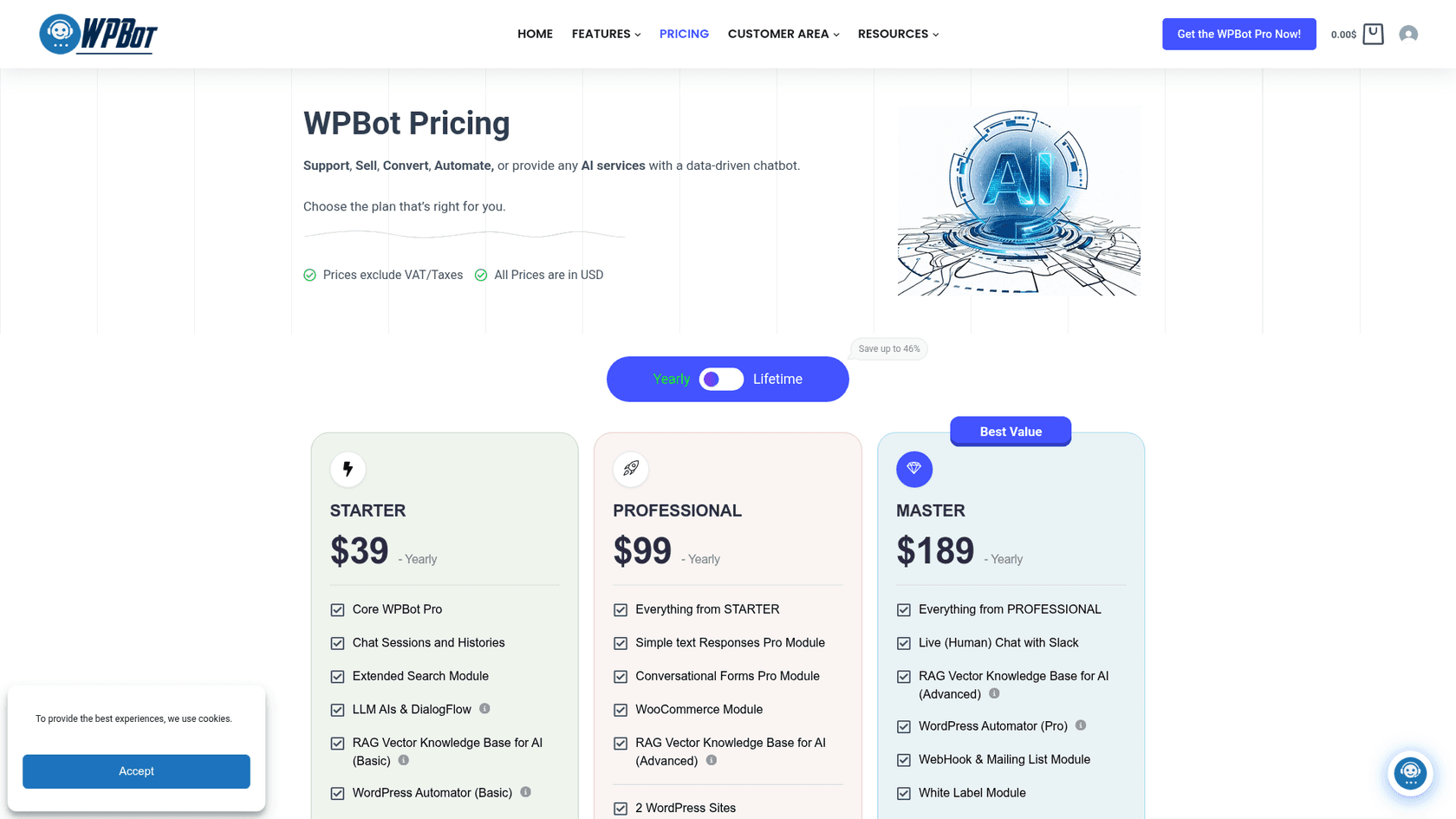
1. The support features sit in the top tier. Per the pricing page, Starter is $39 a year for 1 site, Professional $99 for 2 and Master $189 for 5, with lifetime licences at $149, $279 and $369. Live (human) chat with Slack, WhatsApp, Messenger, Telegram and the new AI support ticket module are all Master-only. The WooCommerce module starts at Professional. A store that wants handoff and order questions is on Master from day one.
2. Two bills, one of them open-ended. WPBot doesn't include an AI model. The Starter AI doc says you bring your own key and pay the provider for usage, and the AI cost doc estimates about $2 per 1,000 responses on small models. Cheap, but it moves with traffic and model choice. My WPBot pricing guide does the full math.
3. Matching answers vs resolving questions. WPBot is strongest when it matches a visitor to a saved answer, a page or a form. Its cost-saving guide is built on that: when a Simple Text Response matches, the bot doesn't call the AI at all. That is great for FAQs. It is a different job from an agent that looks up an order or decides to escalate.
4. A Slack thread is not a queue. Master's handoff sends the chat to Slack. That works when one person watches the channel. It gets messy when you also run a helpdesk, because the chat history sits in Slack and the customer's emails sit somewhere else.
None of these is a reason to leave if WPBot answers your visitors well. They are reasons to look at a tool built for the next step up.
What does "handle more questions on its own" really mean?
When I ask what people want from a WPBot replacement, the answer is almost always "handle more on its own." That phrase hides four different jobs, and most tools only cover the bottom two.
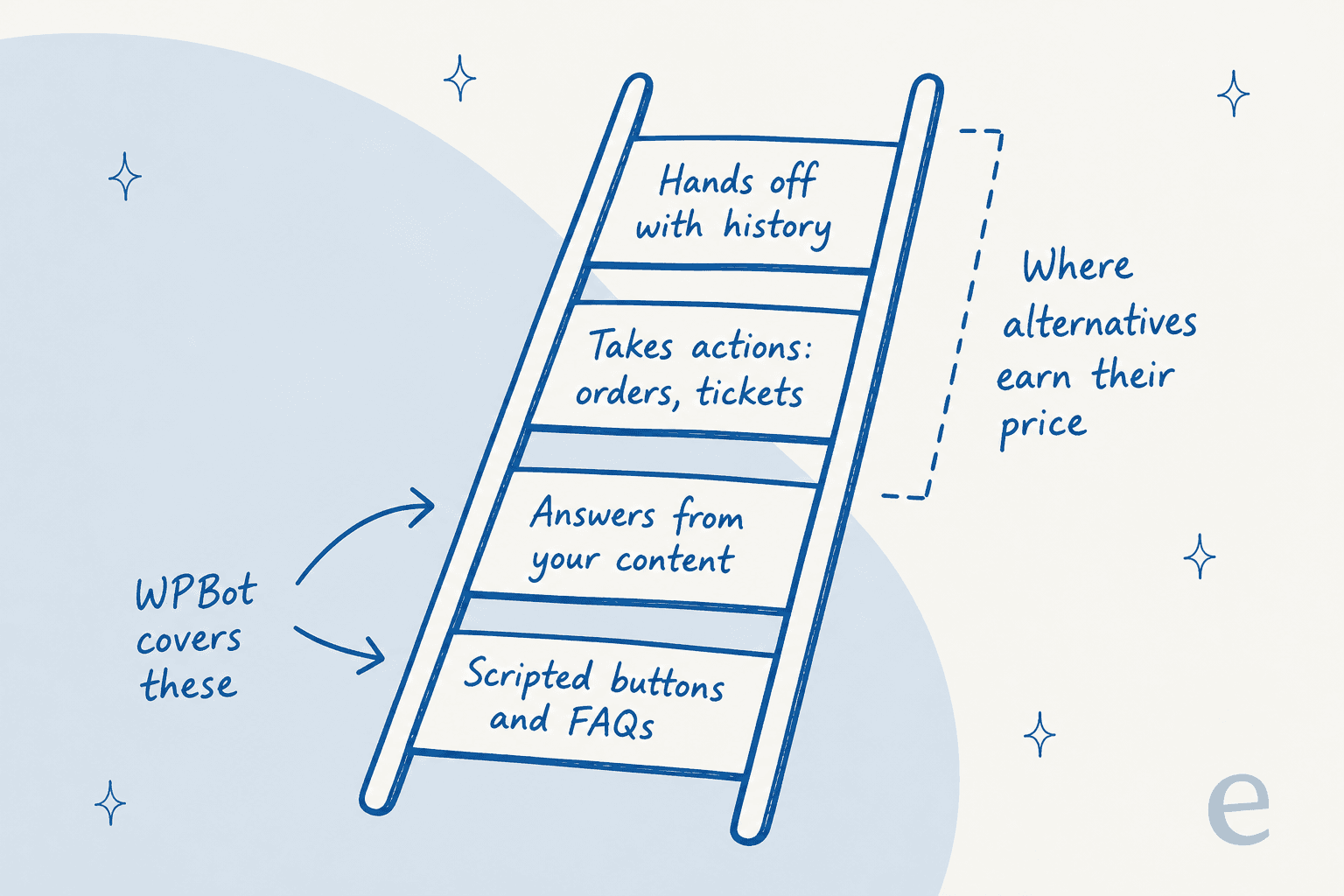
- Scripted buttons and FAQs. Menus and saved answers. WPBot does this well, free.
- Answers from your content. The bot reads your pages and documents and writes a reply. WPBot's AI mode, AI Engine, AI Puffer and Chatbase all do this.
- Takes actions. It looks up an order, checks stock or creates a ticket. This is where a bot stops deflecting and starts resolving, and it is the line my guide to deflection vs resolution draws.
- Hands off with history. When it can't help, a person gets the chat with the context attached, in a place they already work.
A CX lead at a direct-to-consumer brand handling about 7,000 tickets a month put the bar for rung 4 better than I can, on a sales call with eesel:
"I need an AI who is only handling the tickets that it's confident to handle and all the other ones, leave them alone."
That is the bar I use in the list below: does the tool know when to stop, and where does the visitor go next?
The 7 WPBot alternatives at a glance
Prices come from each vendor's own pricing page and installs from WordPress.org, checked October 22, 2026. WPBot is the first row so you can compare against it.
| Tool | Runs where | Own API key | Highest rung | Human handoff | Free tier | Entry paid price | Billing unit | WordPress install | WordPress.org installs, rating | Security extras (per vendor) |
|---|---|---|---|---|---|---|---|---|---|---|
| WPBot (baseline) | WordPress plugin | Yes | Answers from content | Slack live chat (Master) | Free core plugin | $39/year, 1 site | Licence + AI tokens | Plugin | 5,000+, 4.7 (124) | Chats stay in your WP database |
| Tidio | Hosted + plugin | No | Actions + handoff | Tidio inbox and tickets | 50 conversations | $24.17/month, yearly | Conversations (human and Lyro) | Plugin | 70,000+, 4.8 (395) | SSO on Premium |
| Chatbase | Hosted + plugin | No | Actions (5 per agent on Hobby) | Helpdesk inbox (Standard+) | None, 7-day trial | $32/month, yearly | Message credits | Plugin | 5,000+, 3.4 (13) | SSO, HIPAA-eligible on Enterprise |
| Botpress | Hosted | No | Actions + handoff | Botpress Desk, or Zendesk | 100 conversations | $150/month, yearly | Conversations + AI spend | Embed code | No official plugin | Security review, uptime SLA on Enterprise |
| Zendesk AI | Hosted helpdesk | No | Actions + handoff | Zendesk agent, same ticket | 14-day trial | $55/agent/month, yearly (Suite Team) | Seats + automated resolutions | Web Widget snippet | Official plugin last updated 2023 | Advanced security on Enterprise |
| AI Engine | WordPress plugin | Yes | Answers from content | None found in docs | Free plugin | $69/year, 1 site | Licence + AI tokens | Plugin | 90,000+, 4.9 (872) | Self-hosted on your site |
| AI Puffer | WordPress plugin | Optional | Answers from content | Rules to webhook or Slack (Pro) | 2,000 actions, 25 credits | $9.99/month | Website actions + AI credits | Plugin | 10,000+, 4.6 (166) | Self-hosted on your site |
| eesel | Hosted, script tag | No | Actions + handoff | Ticket in your own helpdesk | 100 credits | $299/month, 500 credits | 1 credit per chat | Script tag | Not a plugin | SSO, MFA, HIPAA BAA on Enterprise |
Two columns do most of the sorting: whether you manage an AI key yourself, and where a visitor goes when they need a person.
Which WPBot alternative fits your budget?
Budget is one of the follow-ups ChatGPT offers when a WPBot user asks it for alternatives, and it is the right filter. Pick a monthly budget and the job you need done.
Where should you go after WPBot?
Pick a monthly budget and a job. Both choices matter.
Prices from each vendor's pricing page, checked October 22, 2026.
Pick a budget and a job to see my starting point and the catch to check.
1. Tidio: live chat, inbox and an AI agent in one install
Best for: a small site or store that wants a human inbox and an AI agent from one WordPress plugin.
ChatGPT put Tidio first for small sites, and the numbers back that up: its WordPress plugin has 70,000+ active installs and a 4.8 rating from 395 reviews. Its Lyro AI agent answers from your site and knowledge base, Flows automate lead capture, and your team picks up from the same inbox. That inbox is the piece WPBot only reaches on Master, through Slack. Tidio says its customers average a 75% resolution rate with Lyro, so measure that against your own questions before you count on it.
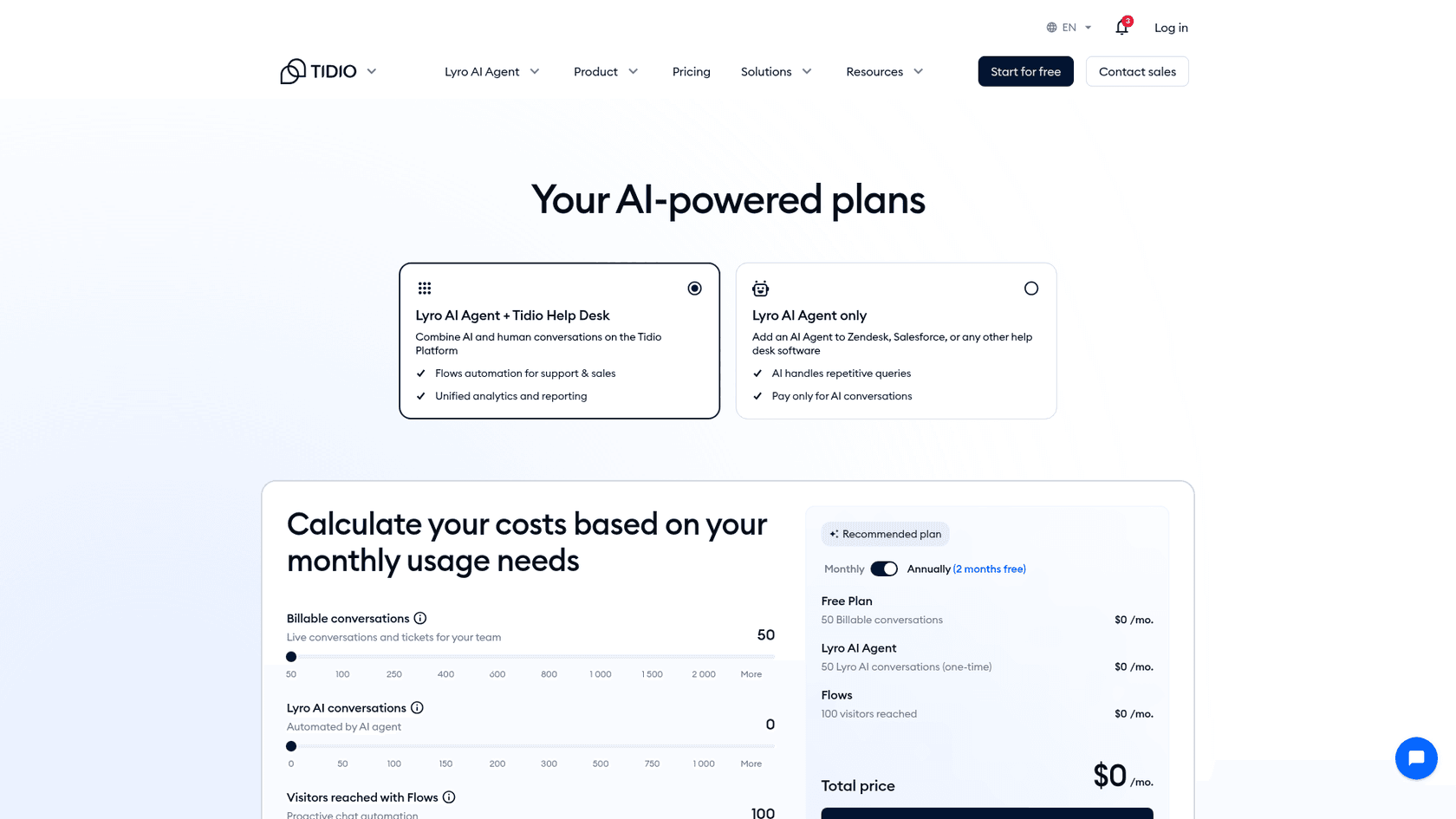
Pricing (per Tidio's pricing page, billed yearly with 2 months free):
| Plan | Price | What's included |
|---|---|---|
| Free | $0 | 50 billable conversations, 50 Lyro conversations (one-time), 100 Flows visitors |
| Starter | $24.17/month | 100 billable conversations, live chat and ticketing |
| Growth | From $49.17/month | From 250 billable conversations, automatic assignment, macros |
| Plus | From $300/month + usage | Custom conversations, dedicated success manager |
| Premium | Custom | From 3,000 Lyro conversations, pay-per-resolution billing, SSO |
| Lyro AI Agent | From $32.50/month | From 50 Lyro conversations, sold on its own too |
A billable conversation is one your team handles, and Lyro conversations are counted separately. My Tidio AI pricing guide breaks down both meters.
Pros:
- A real live chat inbox and tickets behind the bot, from the cheapest paid plan.
- Lyro lists human handoff and also works on top of another helpdesk.
- A free plan and a 7-day trial to test on your own site.
Cons:
- Three meters (human conversations, Lyro conversations, Flows visitors) make the bill harder to predict.
- Lyro is priced on top of the help desk plan.
A Reddit user who set it up described the AI side plainly:
"And to my knowledge, it’s actual AI. It scraped my site and can answer questions based on the knowledge it got from my site."
Verdict: pick Tidio if you want chat, a team inbox and AI together on a small shop. Skip it if you want one flat number on the bill. My Tidio alternatives list goes wider.
2. Chatbase: the fastest hosted bot from your URLs
Best for: a site owner who wants a hosted agent that answers from their pages and files this week.
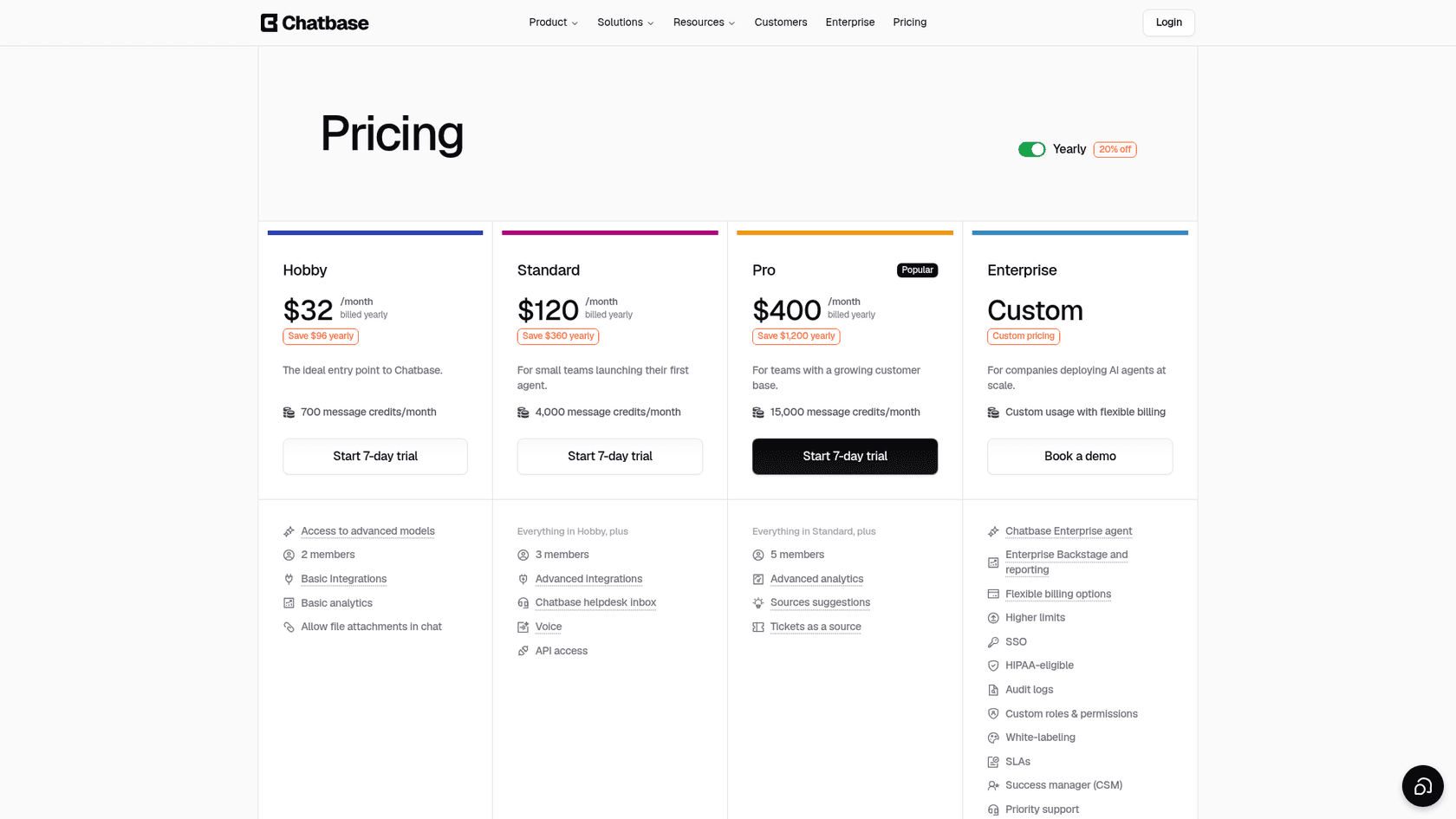
Chatbase builds an agent from files and URLs and deploys it as a widget or through its official plugin. It is the quickest path here from "paste my site" to a working bot, with no API key to manage. Paid plans include AI Actions (5 per agent on Hobby), a helpdesk inbox arrives on Standard, and Pro can use past tickets as a source. Compared with WPBot, you trade the yearly licence for a monthly plan and get the model bill folded in.
Pricing (per the pricing page):
| Plan | Per month, billed yearly | Billed monthly | Message credits | Members |
|---|---|---|---|---|
| Hobby | $32 | $40 | 700 | 2 |
| Standard | $120 | $150 | 4,000 | 3 |
| Pro | $400 | $500 | 15,000 | 5 |
| Enterprise | Custom | Custom | Custom | Custom |
Extra credits are $40 per 1,000, an extra agent $300 a year, and removing "Powered by Chatbase" $1,188 a year. Each paid plan has a 7-day trial. My Chatbase pricing guide covers the add-ons.
Pros:
- Setup measured in minutes from a URL.
- AI Actions on every plan, so it can do more than answer.
- SSO and HIPAA-eligible deployments on Enterprise.
Cons:
- No free plan, only a 7-day trial.
- The WordPress plugin averages 3.4 from 13 ratings and was last updated in March 2025, so the embed code is the safer route.
- The human inbox starts at $120 a month billed yearly.
One Reddit user's advice for a WordPress FAQ bot:
"For straight up FAQs with site crawling, Chatbase is probably the easiest starting point. You literally paste in your website URL, it reads the content, and the bot starts answering questions based on what's already on your site."
Verdict: pick Chatbase for a fast hosted bot with the model cost built in. Skip it if you need a free tier or already run a helpdesk your team likes. See my Chatbase alternatives for others in this lane.
3. Botpress: custom workflows and a helpdesk of its own
Best for: a team that wants the bot to run multi-step tasks (refunds, account checks) and is happy to build them.
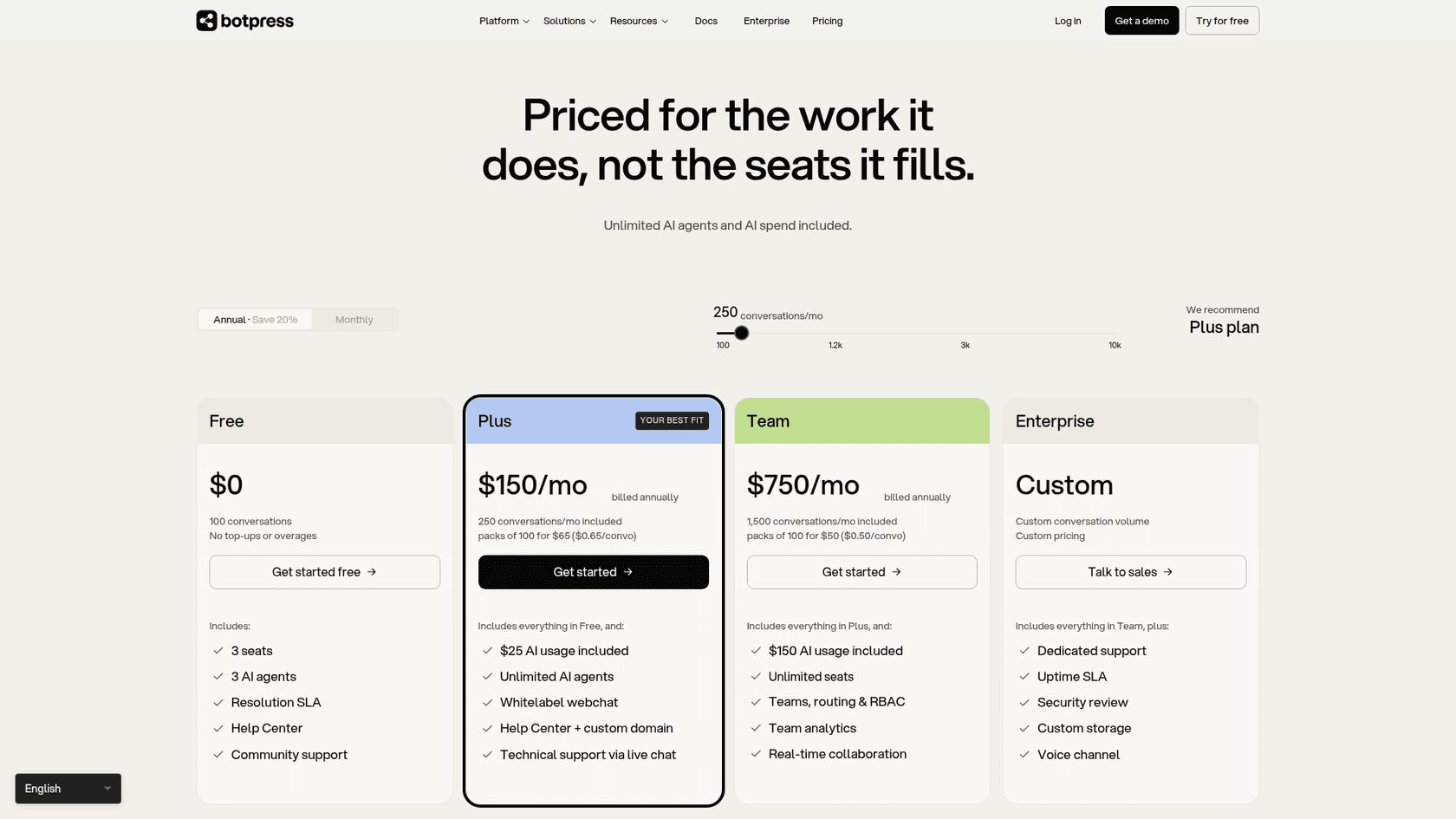
Botpress is the builder in this list. Its Studio and code-first ADK let you wire an agent into your own systems, and Botpress Desk is its AI helpdesk where escalated conversations land, with routing, macros and channels for webchat, email, WhatsApp and voice. Desk can also connect to an existing Zendesk. On WordPress there is no official plugin: you paste the Webchat embed code into your site's head, as the WordPress webchat docs describe.
Pricing (per Botpress pricing, billed annually):
| Plan | Price | Conversations included | Extra conversations | AI usage included | Seats |
|---|---|---|---|---|---|
| Free | $0 | 100 | None, hard cap | Not listed | 3 |
| Plus | $150/month | 250/month | $65 per 100 | $25 | 3 |
| Team | $750/month | 1,500/month | $50 per 100 | $150 | Unlimited |
| Enterprise | Custom | Custom | Custom | Custom | Unlimited |
A conversation is any exchange with at least two messages from the end user in a month, and AI-only and human-assisted conversations count the same. Packs of 100 are added automatically at 95% of your quota, and Botpress's FAQ says auto-recharge can't be turned off. My Botpress pricing guide walks through it.
Pros:
- The most room to build: actions, workflows and your own code.
- A built-in helpdesk, so handoff has somewhere to land.
- Per-conversation pricing with no per-seat charge for the bot.
Cons:
- The jump from Free to $150 a month is steep for a small WordPress site.
- You design the workflows, so the first weeks are a build project.
- Overage packs can't be switched off, only planned for.
One Reddit user comparing it with a simpler builder drew the line I'd draw:
"Voiceflow is quite user friendly, but not as good with more complex workflows. So if you're just using the agent to answer FAQs, then this is great, but if you're looking to integrate with many tools, or you want an AI agent that does more, like troubleshoot, qualify leads, etc., then I'd go with Botpress."
Verdict: pick Botpress if "handle more on its own" means custom actions and you have someone to build them. Skip it if you want a bot running by Friday. My Botpress alternatives list covers lighter options.
4. Zendesk AI: AI agents inside a full helpdesk
Best for: a team that already runs support in Zendesk, or is ready to move into a full helpdesk.
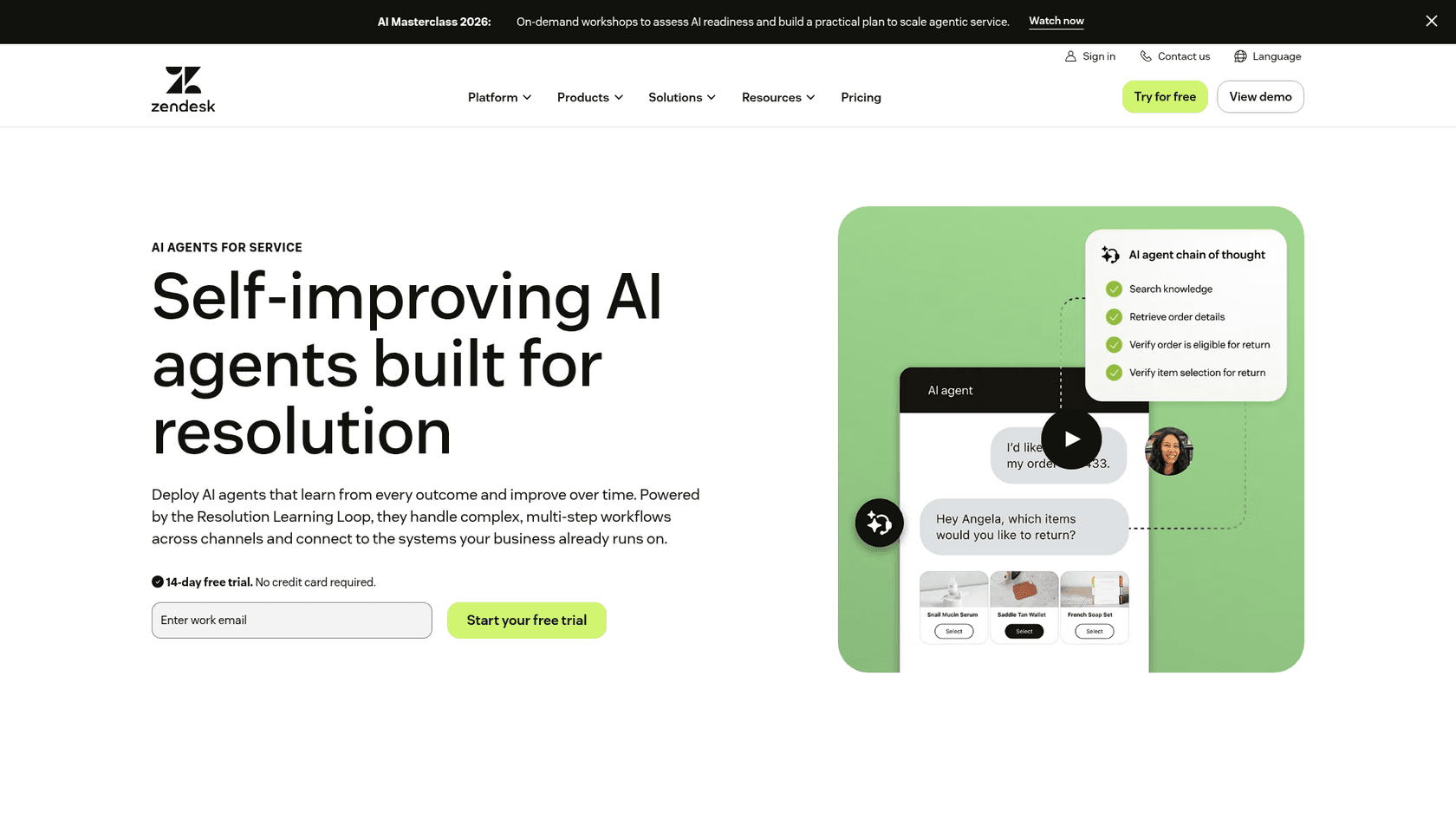
Zendesk AI is the "structured support at scale" pick from ChatGPT's list. AI agents are included in every Suite and Support plan, and on the website they run through the Web Widget, which you add to WordPress by pasting a snippet before the closing body tag, per the Web Widget doc. The older Zendesk Support for WordPress plugin was last updated in September 2023, so the snippet is the route. When the AI agent escalates, the conversation lands with an agent in the same Zendesk workspace.
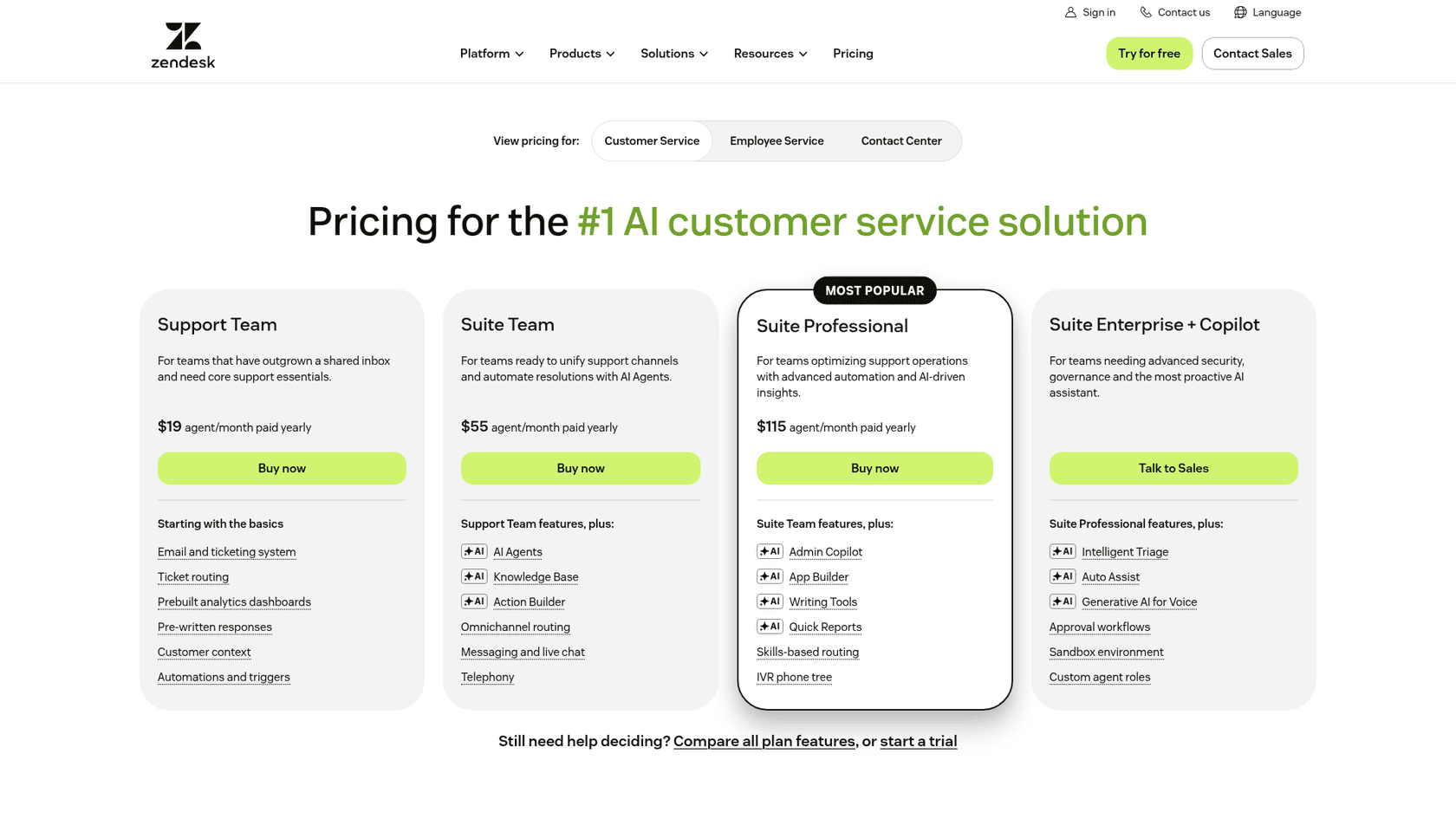
Pricing (per Zendesk's pricing page, per agent a month):
| Plan | Paid yearly | Paid monthly | Included automated resolutions | AI agents on web chat |
|---|---|---|---|---|
| Support Team | $19 | $25 | 5 per agent a month | Requires messaging |
| Suite Team | $55 | $69 | 5 per agent a month | Included |
| Suite Professional | $115 | $149 | 10 per agent a month | Included |
| Suite Enterprise + Copilot | Contact sales | Contact sales | Contact sales | Included |
Resolutions past the allowance cost $1.50 each committed or $2.00 pay-as-you-go. Per Zendesk's automated resolutions doc, you are charged only when the issue is resolved without human help, an LLM verifies each one, and escalated conversations are not counted. Copilot for agents is a $50 per agent add-on from Professional. My Zendesk AI pricing guide has worked examples.
Pros:
- AI agents, ticketing, a help center and live chat in one product.
- You pay for resolutions, not for every chat the bot touches.
- A 14-day trial of Suite Professional with no card.
Cons:
- Per-agent seats plus resolutions is a big step up from a $39 plugin licence.
- A small team only gets 5 to 10 included resolutions per agent a month.
- Moving support into Zendesk is a project of its own if you don't run it today.
Verdict: pick Zendesk AI if your team already works in Zendesk or wants a full helpdesk anyway. Skip it if you only need a smarter website bot. My Zendesk alternatives list helps if the helpdesk is the question.
5. AI Engine: the closest like-for-like plugin
Best for: WPBot users who want to stay inside WordPress on their own key, with a much bigger community.
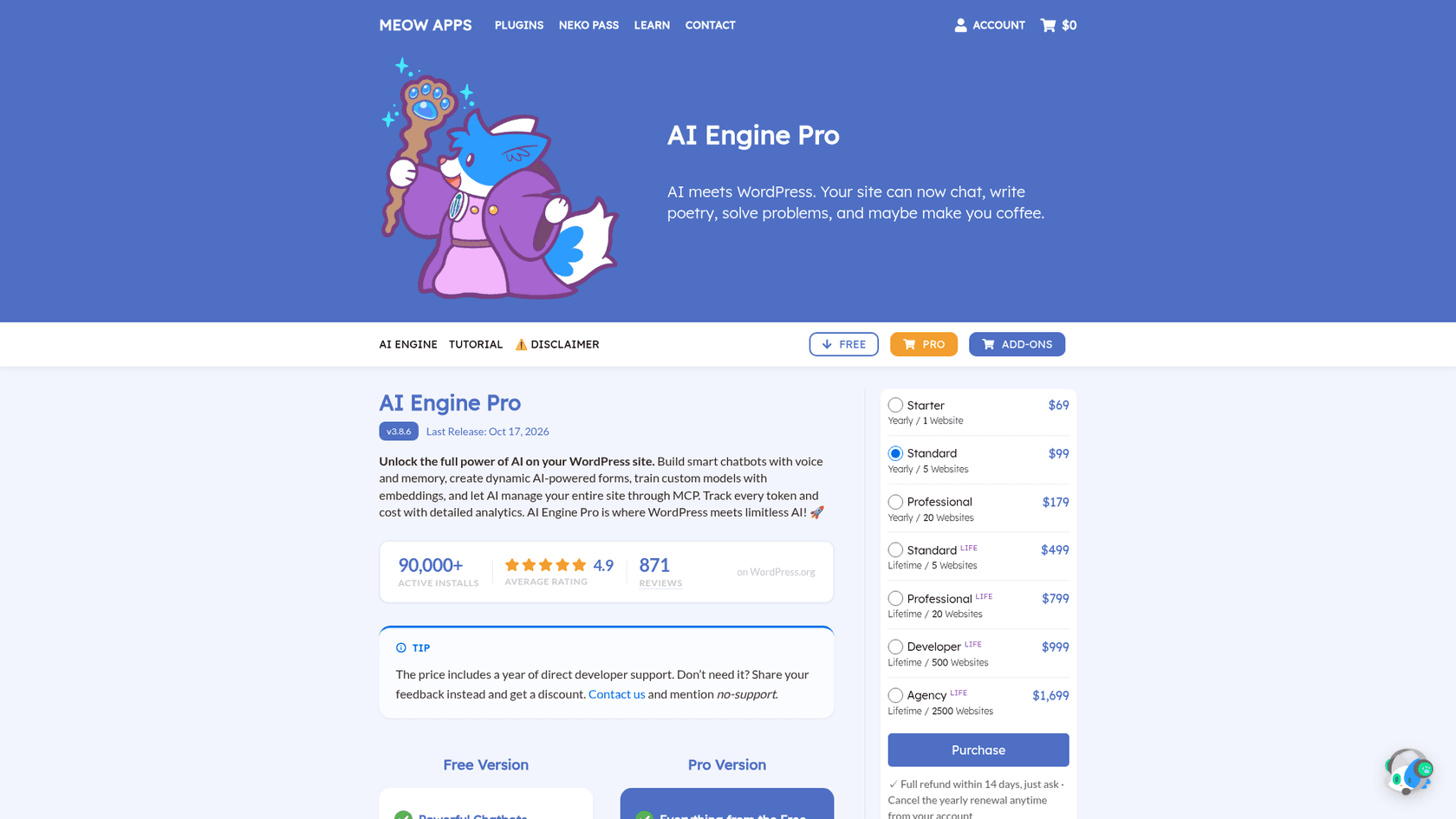
AI Engine by Meow Apps is the most installed AI plugin in this list, with 90,000+ active installs and a 4.9 rating from 872 reviews on its WordPress.org listing, and version 3.8.6 released October 17, 2026. It covers chatbots with voice and memory, AI forms, content tools and an MCP server that lets ChatGPT or Claude manage your site. Like WPBot, every chat runs on your OpenAI, Claude or other provider key. Pro adds embeddings so the bot answers from your posts and PDFs, and cross-site chatbots for non-WordPress pages.
Pricing (per the AI Engine Pro page): the plugin is free. Pro is $69 a year for 1 site, $99 for 5 and $179 for 20. Lifetime is $499 for 5 sites, $799 for 20, $999 for 500 and $1,699 for 2,500. Refunds are given within 14 days on request. My AI Engine pricing guide has the full table.
Pros:
- The biggest install base and review count of any plugin here.
- An MCP server in the free plugin.
- One licence and one provider bill, same as WPBot today.
Cons:
- I couldn't find a ticket queue or human handoff in its docs.
- Your provider bills every token, so cost tracks traffic.
Verdict: pick AI Engine if you like WPBot's plugin model and want stronger AI answers from your own content. Skip it if you're leaving WPBot to stop managing an API key. My AI Engine alternatives list covers the same field.
6. AI Puffer: a WordPress plugin with its own AI credits
Best for: a site owner who wants a plugin but would rather not set up an AI provider account.
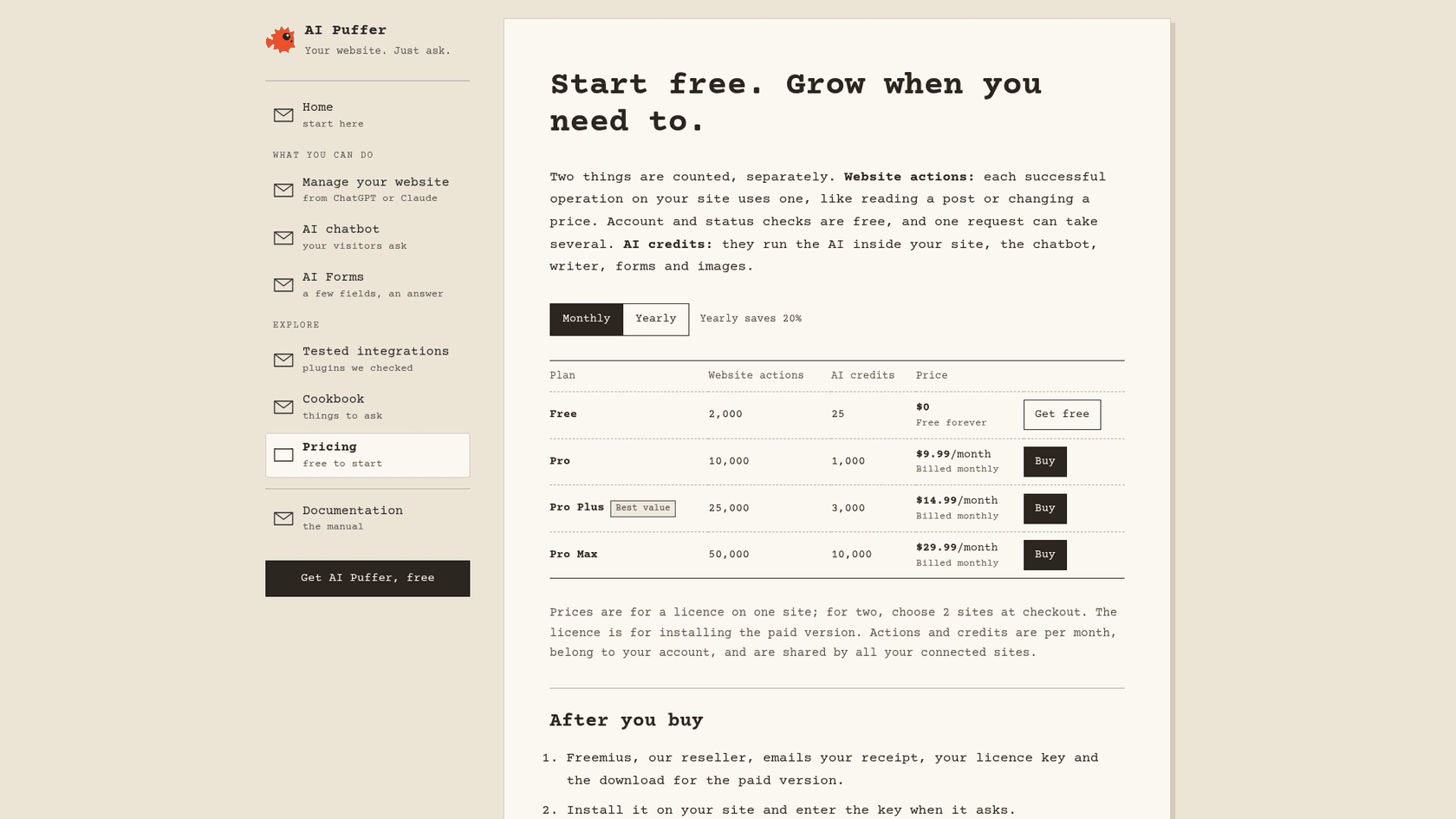
AI Puffer (formerly AI Power) has 10,000+ active installs and a 4.6 rating from 166 reviews on its WordPress.org listing. It bundles a chatbot, a content writer, AI forms and an MCP server for ChatGPT or Claude. The difference from WPBot and AI Engine is billing: you can bring your own key, or run the chatbot on AI Puffer's own AI credits and skip the provider account. On paid plans, chatbot rules can collect contact details and send a chat to a webhook, Slack, HubSpot or another connected app.
Pricing (per AI Puffer's pricing page, billed monthly, yearly saves 20%):
| Plan | Price | Website actions per month | AI credits per month |
|---|---|---|---|
| Free | $0 | 2,000 | 25 |
| Pro | $9.99/month | 10,000 | 1,000 |
| Pro Plus | $14.99/month | 25,000 | 3,000 |
| Pro Max | $29.99/month | 50,000 | 10,000 |
Prices are for one site, and allowances are shared by every site on the account. A credit is not one message, so check your usage in the first week. My AI Puffer pricing guide explains both meters.
Pros:
- The cheapest paid entry in this list, with AI included if you want it.
- Fast-moving development: version 2.5.14 shipped October 20, 2026.
- Rules can pass a lead or chat to Slack or a webhook.
Cons:
- Two meters (actions and credits) to watch.
- No inbox or ticket queue behind the bot.
- Built by one developer, so fast change also lands on your live site quickly.
Verdict: pick AI Puffer if you want a low-cost plugin with the AI bill handled for you. Skip it if a person needs to catch the chats. My AI Puffer alternatives list compares it with WPBot directly.
7. eesel: an AI teammate that resolves and hands off to your helpdesk
Best for: a WordPress or WooCommerce site where the chat is now a real support channel.
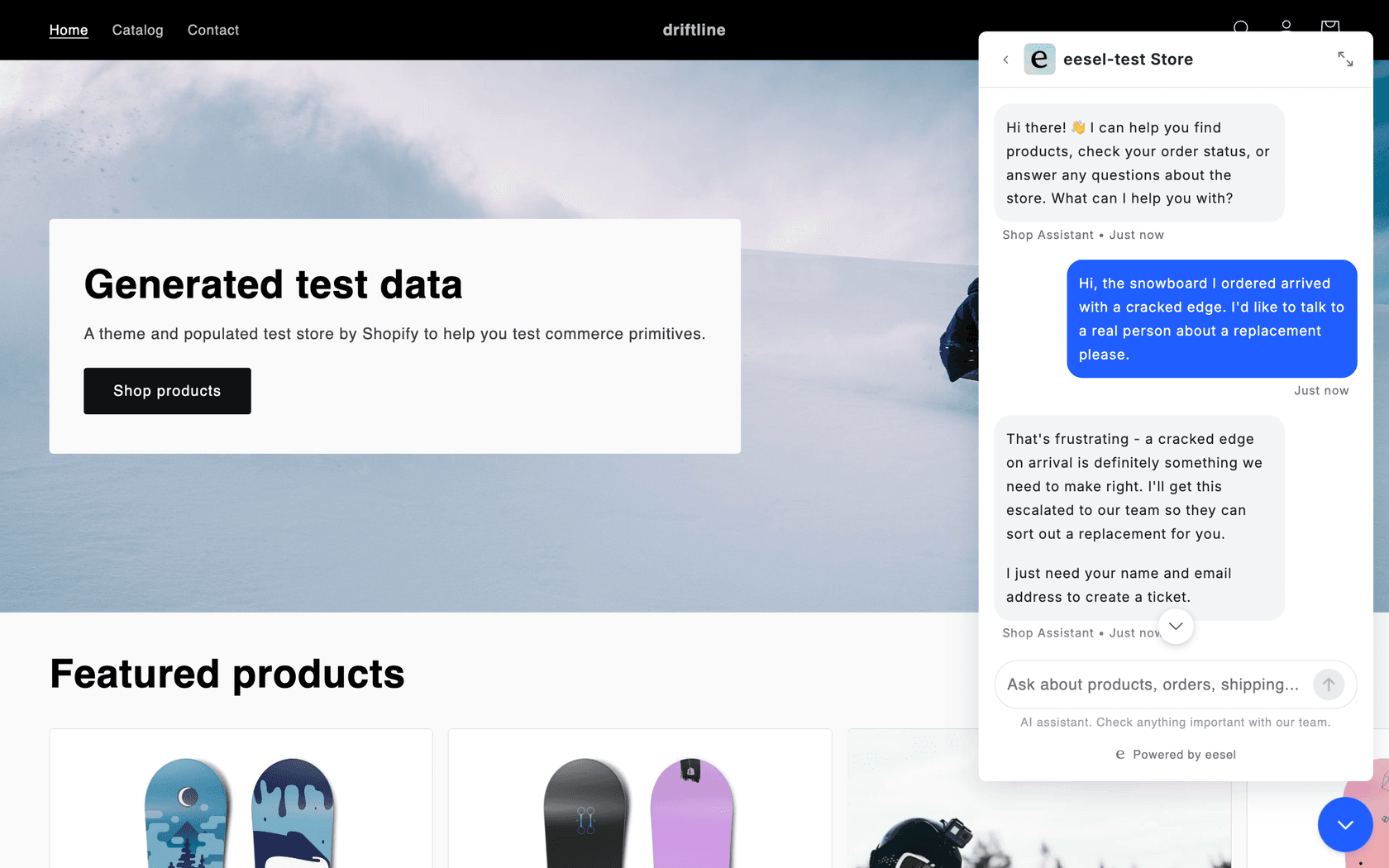
eesel is an AI teammate you hire for a job, and its AI helpdesk teammate runs the chat bubble on your site. It is not a WordPress.org plugin: you paste one script tag into your theme footer or a custom code setting. It answers from your pages, help center, past tickets, Google Drive or Notion, and with WooCommerce connected it looks up products and orders. When it can't help, it collects a name and email and opens a ticket in Zendesk or whichever helpdesk you run, with the chat attached. That covers rungs 3 and 4 of the ladder above.
Two customer stories show what that looks like on a website:
- Norden-Frisia answers ferry questions in German from 346 knowledge items (Zendesk FAQs, macros and past tickets) across its website chat bubble, a public chat link and Zendesk. Chats it can't close become Zendesk tickets, and the plan scales up to a planned 10,000 interactions a month in high season.
- IC Intracom runs one agent per brand on its Intellinet and Manhattan web stores, answering from 2,100 product records. In one early month its 34 website chats made 41 product lookups, and sales or technical questions go to the right team with the transcript.
Since I build eesel's integrations, one more thing: if your current WordPress setup leans on scripts and terminals, the eesel CLI gives you the same agent from the command line. npx @eesel/cli init chat-bubble --site https://your-site.com creates the agent, starts reading your site and prints the embed snippet. Every command prints JSON, so Claude Code, Cursor or Codex can run the setup and test it with eesel chat, and what they set up shows in the dashboard too.
Pricing (per eesel's pricing page):
| Plan | Price | What's included |
|---|---|---|
| Free | $0 | 100 credits to try every feature and integration, no card |
| Teammate | $299/month for 500 credits, up to $1,749 for 5,000 | A ticket or chat is 1 credit however long it runs; every channel; unlimited agents and seats |
| Enterprise | Custom | SSO and MFA, HIPAA with a signed BAA, a dedicated person |
Paying yearly gets two months free, and optional overage is $0.80 a credit under a cap you set.
Pros:
- Model costs are inside the price, at one credit per chat.
- Handoff creates a ticket in your own helpdesk, next to that customer's emails.
- The same agent can work your helpdesk tickets too, so the chat and the inbox learn from one source.
Cons:
- Not a WordPress.org plugin.
- $299 a month is far above WPBot plus an API key.
- Built for support, so it is more than a brochure site needs.
Verdict: pick eesel if resolving and handing off matter more than the lowest price. Skip it if you want a free plugin for a small blog.
What does each tool really bill you for?
The sticker price is the least useful number in this list, because every tool meters something different.
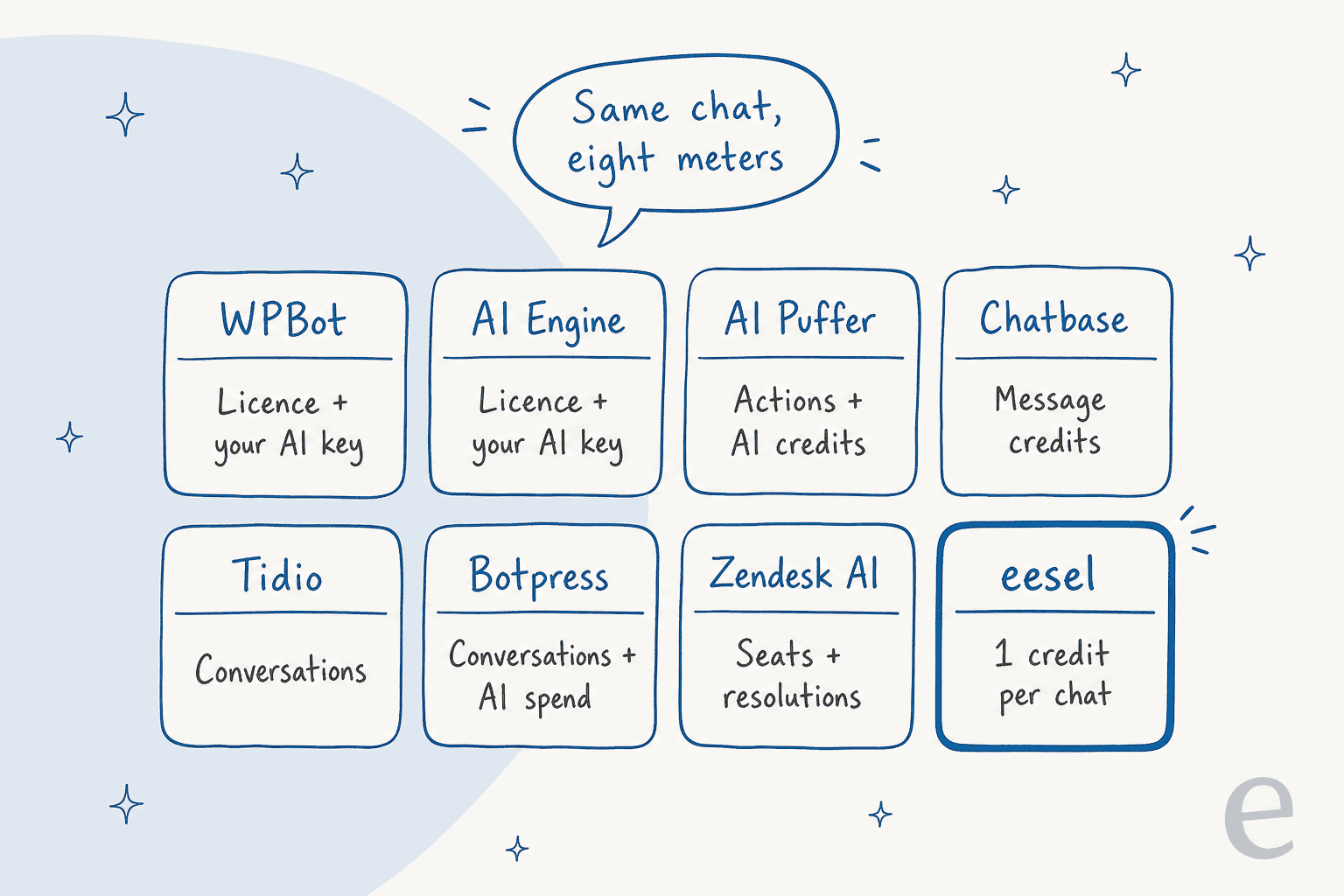
Here is roughly what 300 AI-handled chats a month costs on each, using only the vendor's published prices. It is a rough guide, not a quote.
| Tool | Plan that fits 300 chats | Monthly cost | How I got there |
|---|---|---|---|
| WPBot | Professional, yearly | About $9 | $99 a year is $8.25 a month, plus about $0.60 of AI at WPBot's $2 per 1,000 replies |
| AI Engine | Pro Starter, yearly | About $6 + tokens | $69 a year is $5.75 a month, plus your provider bill |
| AI Puffer | Pro | $9.99 | 1,000 AI credits, if your model and reply size keep you inside them |
| Chatbase | Hobby, yearly | $32 | 700 message credits, if each chat stays within about 2 credits |
| Botpress | Plus, yearly | $215 | $150 for 250 conversations, plus one $65 pack of 100 |
| Zendesk AI | Suite Team, 1 agent, yearly | $55 + up to $442.50 | 5 included resolutions, then $1.50 for each further one the AI resolves |
| eesel | Teammate | $299 | 500 credits covers 300 chats with 200 to spare |
The plugins win on price at this volume by a mile. What you pay for with the hosted tools is the top of the ladder: actions, a fallback that knows when to stop, and a person on the other end. My guides to AI customer service cost and OpenAI API pricing help you price your real volume.
Where does a chat go when the bot can't answer?
This is the question I'd settle before price. Every tool here answers questions. They differ on what happens to the visitor who needs a person.
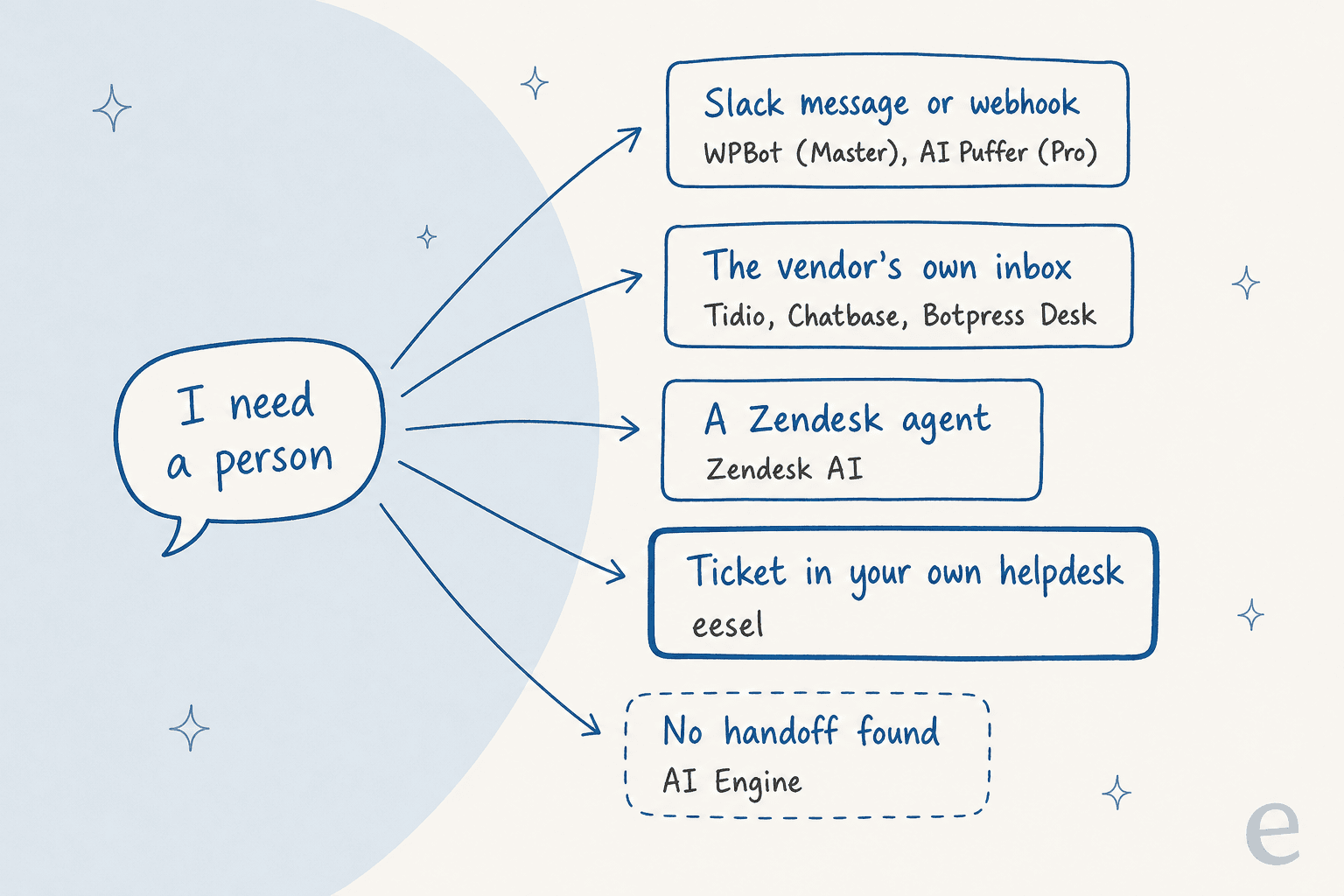
A Slack message is fine when one person watches the channel. A vendor inbox works if you're happy to run support inside the chat tool. A ticket in your own helpdesk matters when you already have one, because the chat lands next to that customer's emails and order history. My guides to human handoff in chat and AI chatbot vs live chat go further.
How do you test a WPBot alternative before you switch?
Back to the lost deal from the top: that buyer's 67-question test was the right move, and it caught a real problem. You don't need 67. Twenty to thirty real questions are enough to see the difference between tools.
- Pull real questions from WPBot. Chat sessions and histories are in the Starter plan and up, so export the 20 to 30 questions visitors ask most, including two or three you know the bot gets wrong.
- Rebuild the sources, not the prompts. Add the same pages, FAQs and documents to the new tool so the comparison is fair.
- Score four things per question: right answer, no made-up claims, speed, and what happens when it doesn't know. My guide to preventing AI hallucinations covers the second one.
- Test the handoff on purpose. Ask for a person and check where the chat lands and whether the history came with it.
- Run it on staging, then a slice of live traffic. Keep WPBot live until the replacement passes. My notes on running an AI support pilot and testing an AI agent have a fuller scorecard.
If you're still weighing a plugin against a hosted tool, my build vs buy guide frames the trade.
Try eesel on your WordPress site
If your WPBot chat has started fielding "where is my order" and "can I talk to someone", that is the job eesel's helpdesk teammate was built for. It answers from your own pages and WooCommerce orders, says so when it doesn't know, and turns the visitor who needs a person into a ticket in the helpdesk your team already uses. Paste the chat bubble snippet into your theme and run your 20 to 30 real WPBot questions through it on the 100 free credits before you pay anything.

Frequently Asked Questions
What are the best WPBot alternatives in 2026?
For a hosted bot with a team inbox, start with Tidio (from $24.17 a month) or Chatbase (from $32 a month billed yearly). Botpress suits custom workflows, Zendesk AI suits teams already on Zendesk, and AI Engine or AI Puffer keep you inside WordPress. If the chat is your support front door, eesel's chat bubble hands visitors to your helpdesk. My AI WordPress plugins list covers the wider field.
Is there a free alternative to WPBot?
Yes. AI Engine and AI Puffer have free plugins, Tidio and Botpress have free plans, and eesel gives 100 free credits to test. Free rarely covers real volume: plugins still need your own AI key, and hosted tools cap conversations. My guide to chatbot cost shows where the bill really comes from.
Which WPBot alternative can handle more customer questions on its own?
Look for three things past answering from your content: actions such as order lookups, a clear fallback when it does not know, and a handoff with the chat history attached. Botpress, Zendesk AI and eesel are built for that, and Tidio's Lyro adds human handoff. My guide on deflection vs resolution explains how to measure it.
How much does a WPBot alternative cost compared to WPBot?
WPBot Pro is $39 to $189 a year plus your AI provider bill, which WPBot's docs put at about $2 per 1,000 replies on small models. Hosted tools fold the AI in and charge per conversation, credit or resolution, from $24.17 a month for Tidio to $299 a month for eesel's 500 chats. My WPBot pricing breakdown has the full math.
Is Tidio better than WPBot?
Tidio is better if you want a team inbox and a hosted AI agent in one install, with 70,000+ active WordPress installs. WPBot is cheaper and keeps chat data in your own WordPress database. My Tidio review and WPBot review compare them in depth.
Which WPBot alternative works best for WooCommerce?
Tidio is built for small stores, AI Engine and AI Puffer stay inside WordPress, and eesel connects to WooCommerce for order and product questions. WPBot itself needs the Professional plan for its WooCommerce module. My guide to an AI chatbot for WooCommerce compares the options.
Can I move my WPBot setup to another chatbot?
Not directly. Each tool indexes content its own way, so you re-add your pages, FAQs and documents in the new tool. Pull your 20 to 30 most common questions from WPBot's chat history first and use them to test the replacement. My notes on an AI knowledge base chatbot help you check answers.
Should I switch away from WPBot at all?
Stay if WPBot answers your visitors well and nobody needs a person behind the bot. Switch if you need actions like order lookups, a real queue for handoffs, or one predictable bill instead of a licence plus an AI key. My guide to testing an AI agent shows how to check a replacement first.