AI Puffer alternatives 2026: 8 WordPress AI chatbots compared

Kira

Katelin Teen
Last edited October 21, 2026

Why do people look for AI Puffer alternatives?
AI Puffer (formerly AI Power) does a lot for a free plugin. Its WordPress.org listing shows 10,000+ active installs and a 4.6 rating from 166 reviews, and every review posted in 2026 so far is five stars. It bundles a chatbot, a content writer, AI forms, automations and an MCP server that lets ChatGPT or Claude manage your site. One reviewer running a service business put the chatbot case well:
"For a service website this plugin is awesome. The knowledge base you can feed it is technically unlimited and the personality/behavior tweakable to the nth degree."
So the reasons people leave are narrow, and they map to four things buyers keep raising.
1. Answers that drift past your content. The chatbot docs say it answers from your pages when it finds a good match, but the model can still use general knowledge or make mistakes, so you write instructions for what to do when nothing matches. That is honest, and it is also the gap my TL;DR story is about. My guide to preventing AI hallucinations covers how to test for it.
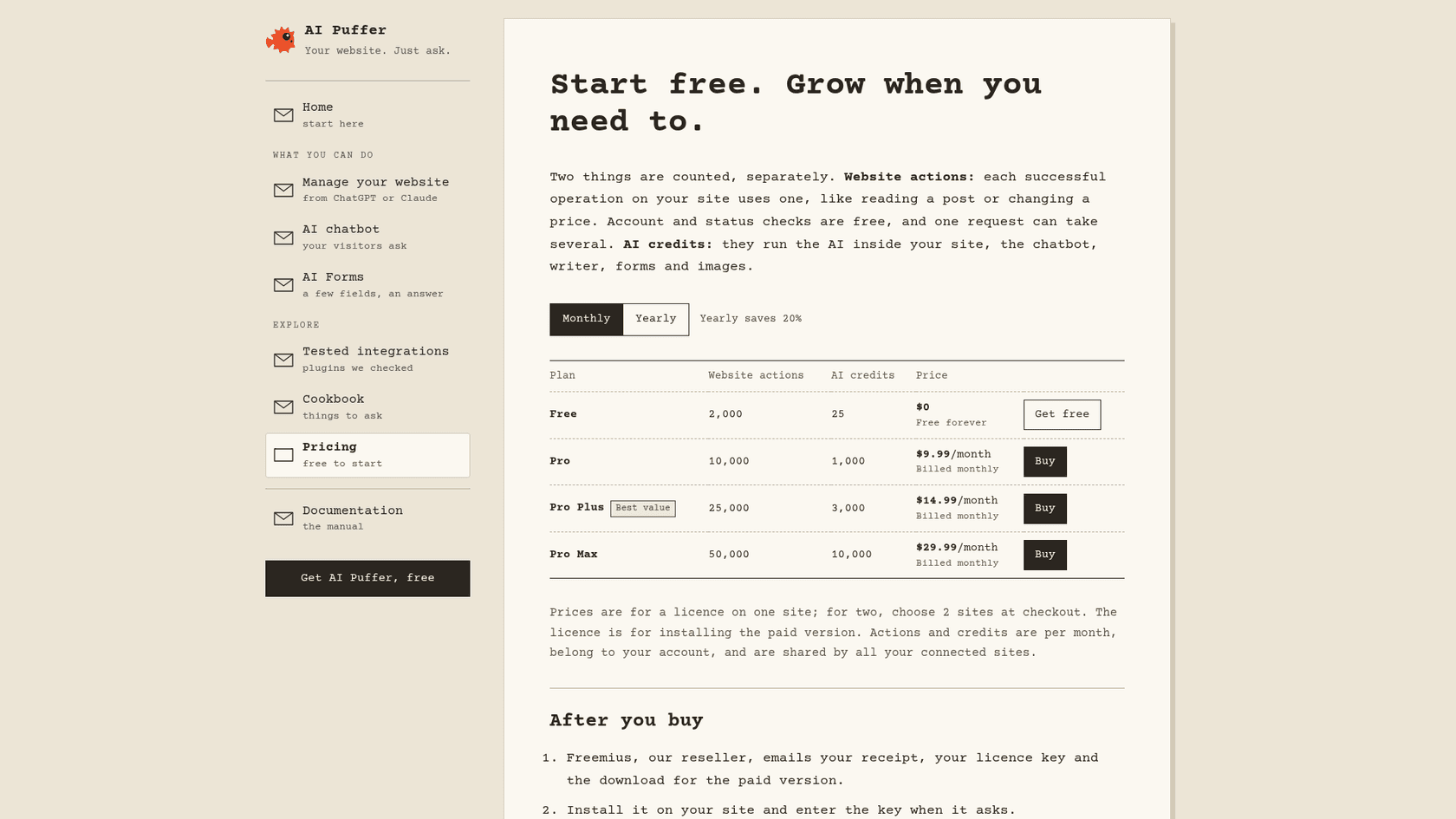
2. Two meters that are hard to predict. The plans page counts website actions and AI credits separately: Free gives 2,000 actions and 25 credits, Pro is $9.99 a month for 10,000 and 1,000, Pro Plus $14.99 for 25,000 and 3,000, and Pro Max $29.99 for 50,000 and 10,000 ($7.99, $11.99 and $23.99 a month paid yearly). A credit is not one message: the cost depends on the model and request size. Bring your own OpenAI or Claude key instead and your provider bills you directly.
3. Upkeep on a fast-moving plugin. AI Puffer is built by one developer, and the changelog shows website management arriving in 2.4.99 on 14 October 2026, with the plugin already on 2.5.14 by 20 October. Fast fixes are a plus. They also mean change lands on your live site quickly, and one reviewer felt it:
"This plugin no longer works and has completely broken all the work on customising it from the old version."
4. No queue behind the bot. Paid plans add Rules that can collect contact details and send the chat to a webhook, Slack, HubSpot or another connected app. I could not find live takeover, assignment or a ticket queue in the docs. For a brochure site that is fine. For a store fielding "where is my order", someone has to catch those chats.
None of these is a reason to leave if your bot answers well and the bill makes sense. They are reasons to look at a different shape of tool.
What does a WordPress chatbot really cost?
The sticker price is the smallest part of the comparison. AI Puffer, AI Engine, MxChat and WPBot charge a licence, then your AI provider bills every token, embedding your content into a searchable index uses tokens too, and you spend time on updates. Hosted tools fold the AI into one plan and meter something else: Tidio counts conversations, Chatbase and Quickchat count credits, Crisp counts a dollar allowance, and eesel counts one credit per chat.
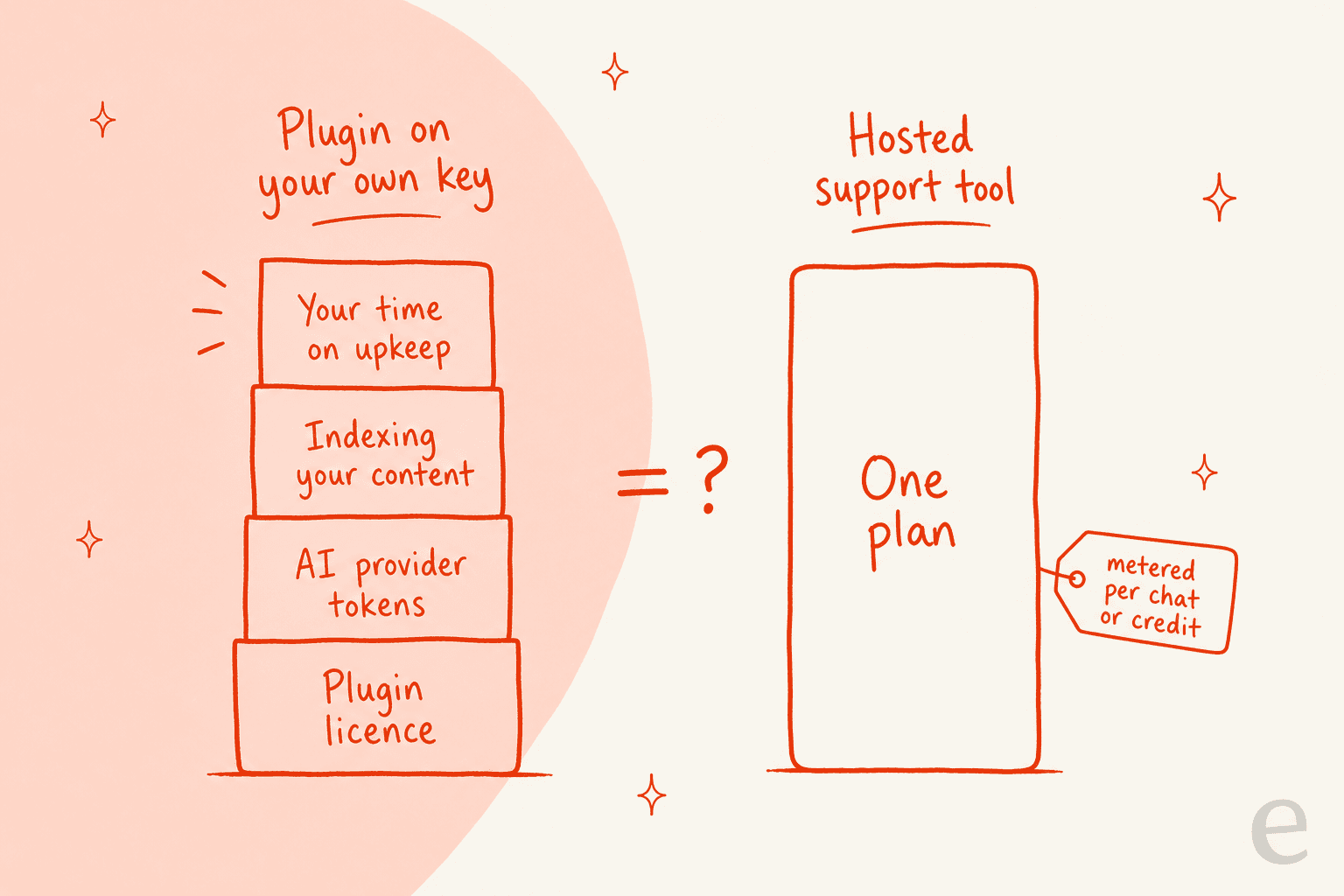
Neither shape is cheaper by default. A small site on a cheap model like GPT-6 Luna or Claude Haiku 5.5 can run a plugin for very little, and my OpenAI API pricing and Anthropic API pricing guides show the per-token math. A busy store pays for predictability. Price one month of your real chat volume in both shapes before you pick.
The 8 AI Puffer alternatives at a glance
Prices come from each vendor's own pricing page and installs from WordPress.org, checked October 21, 2026. AI Puffer is the first row so you can compare against it.
| Tool | Runs where | Own API key | Answers from your content | Human handoff | Ticket or inbox | Free tier | Entry paid price | Pricing unit | WordPress.org installs, rating |
|---|---|---|---|---|---|---|---|---|---|
| AI Puffer (baseline) | WordPress plugin | Optional, or AI Puffer Cloud credits | Pages, posts, products, Q&A; files on Pro | Rules to webhook, Slack, HubSpot (Pro) | None found | 2,000 actions, 25 AI credits | $9.99/month | Website actions + AI credits | 10,000+, 4.6 (166) |
| AI Engine | WordPress plugin | Yes | Posts, PDFs via embeddings (Pro) | None found in docs | None | Free plugin | $69/year, 1 site | Licence + provider tokens | 90,000+, 4.9 (871) |
| MxChat | WordPress plugin | Yes | Site, sitemaps, PDFs, URLs, YouTube | Slack | None | Free plugin | $69.97 once, 1 site | One-time licence + tokens | 2,000+, 5.0 (30) |
| WPBot | WordPress plugin | Yes | Pages, documents, RAG knowledge base | Live chat with Slack (Master) | None | Free core plugin | $39/year, 1 site | Licence + tokens | 5,000+, 4.7 (124) |
| Tidio | Hosted + plugin | No | Site content, knowledge base | Live chat inbox | Inbox and tickets | 50 billable conversations | $24.17/month, billed yearly | Billable + Lyro conversations | 70,000+, 4.8 (395) |
| Chatbase | Hosted + plugin | No | Files, URLs | Helpdesk inbox (Standard and up) | Inbox from Standard | None, 7-day trial | $32/month, billed yearly | Message credits | 5,000+, 3.4 (13) |
| Crisp | Hosted + plugin | No | Knowledge base | Shared inbox | Inbox; ticketing on Plus | 2 seats, no AI credits | $45/month per workspace | Flat plan + USD AI credits | 20,000+, 4.6 (73) |
| Quickchat AI | Hosted + plugin | No | Knowledge Base articles, URLs | Rules-based human handoff | Inbox | 50 credits, non-commercial | $9/month | AI credits, 1 to 4 per reply | 10+, no ratings yet |
| eesel | Hosted, script tag | No | Pages, help center, helpdesk, Drive, Notion | Ticket in your helpdesk | Your existing helpdesk | 100 credits | $299/month, 500 credits | 1 credit per chat | Not a plugin |
Two axes split this table cleanly: where the bot runs, and whether a person sits behind it.
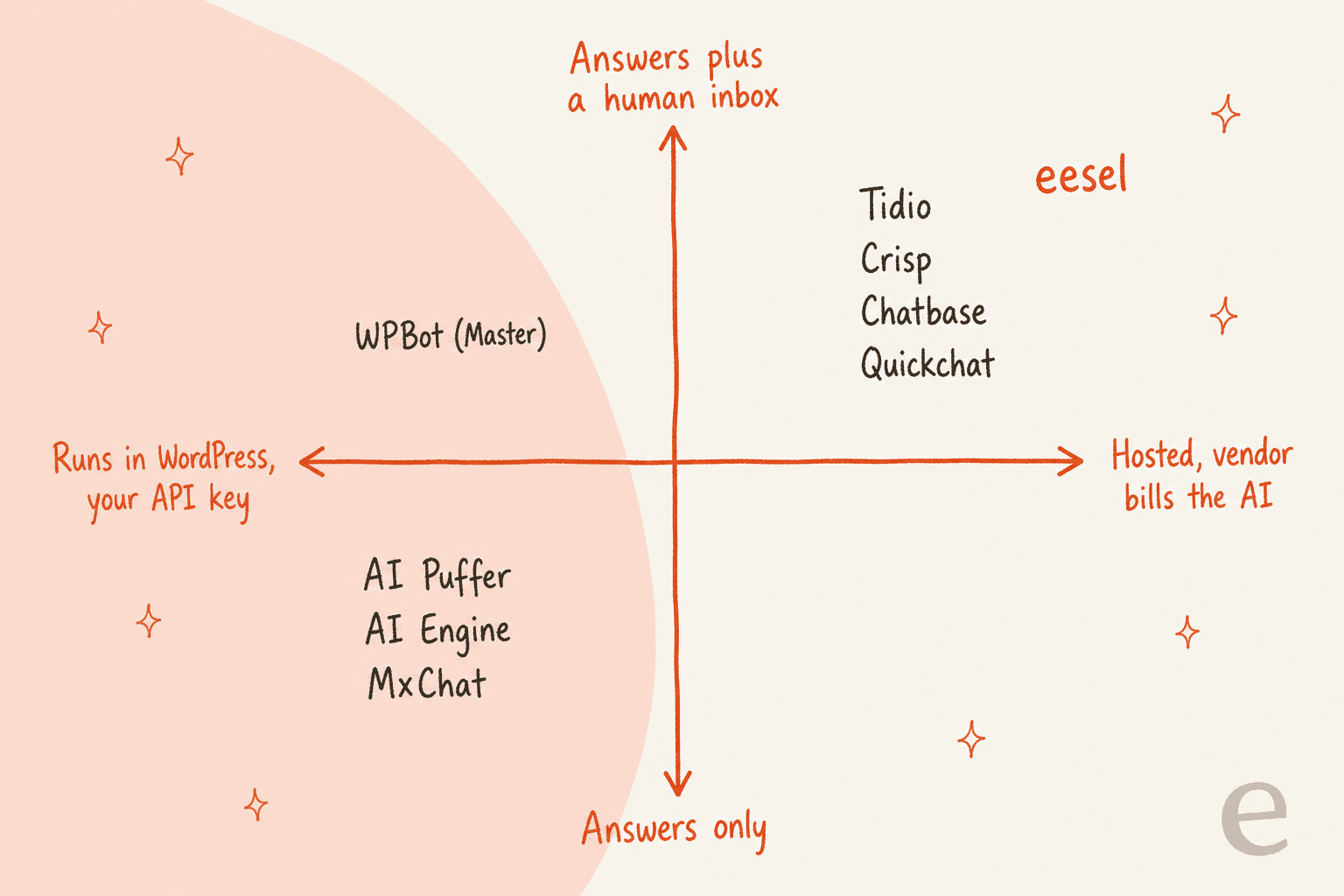
AI Puffer sits slightly apart from its neighbours, because it can also run on its own Cloud credits with no key. The quadrant still holds where it counts: it runs inside wp-admin and has no inbox behind it.
Which AI Puffer alternative fits you?
Pick the job you need done and where you want the bot to run. The widget points at where I would start.
Where should you go after AI Puffer?
Pick one job and one setup. Both choices matter.
Prices from each vendor's pricing page, checked October 21, 2026.
Pick a job and a setup to see my starting point and the catch to check.
1. AI Engine: the closest like-for-like plugin
Best for: AI Puffer users who want the same do-it-all plugin with a bigger community.
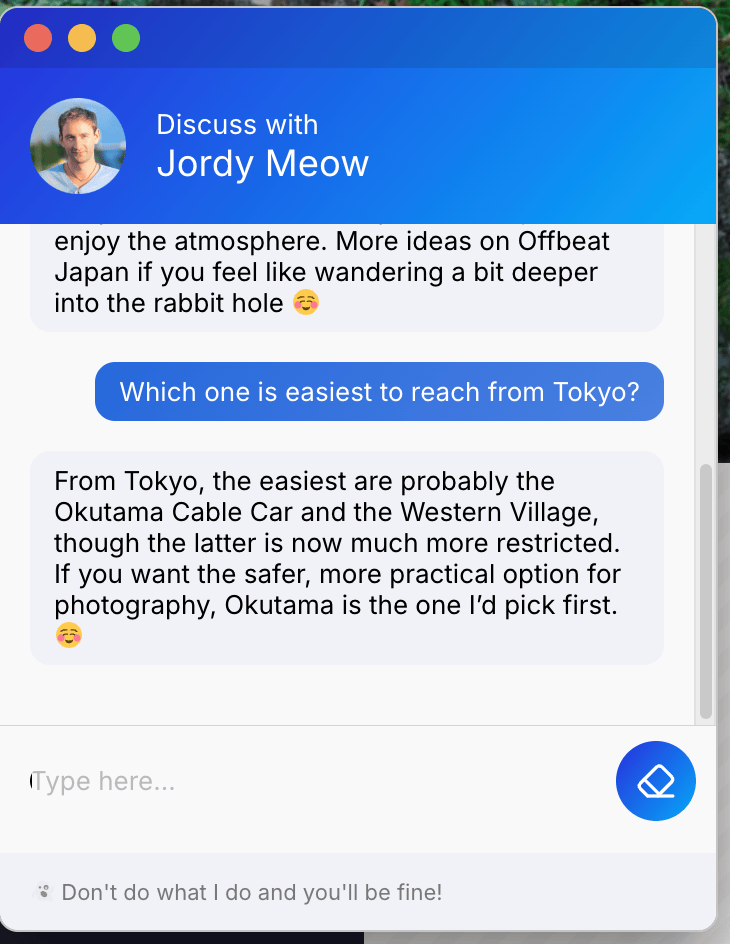
AI Engine by Meow Apps is the most installed AI plugin in this group, with 90,000+ active installs and a 4.9 rating from 871 reviews. Like AI Puffer, it covers chatbots, content generation, AI forms and a WordPress MCP server that lets ChatGPT or Claude manage your site, and the MCP server is in the free version. The difference that matters most is billing: AI Engine has no credits of its own, so every chat runs on your OpenAI, Claude or other provider key. I covered the product in my AI Engine review.
Pricing: the plugin is free. AI Engine Pro is $69 a year for 1 site, $99 for 5 and $179 for 20, with lifetime plans from $499. Knowledge (embeddings from your posts and PDFs), Function Calling and AI Forms are Pro features. There is no trial, and refunds are given on request within 2 weeks. My AI Engine pricing guide has the full table.
Pros:
- The largest install base and review count of any plugin here.
- An MCP server in the free plugin, so the ChatGPT or Claude site-management side of AI Puffer carries over.
- One licence and one provider bill, with no second allowance to track.
Cons:
- Your provider bills every token, so cost tracks traffic directly.
- I could not find a ticket queue or human handoff in the docs.
- Pro is yearly, and the site count is tied to the tier.
A Pro user running it for clients described it this way:
"I use AI Engine Pro to run a client-facing coaching chatbot, and it does the job extremely well. The real standout is support."
Verdict: pick AI Engine if you like AI Puffer's all-in-one shape and want a larger, longer-running project. Skip it if you wanted to stop managing an API key. My AI Engine alternatives list covers the same field from the other side.
2. MxChat: a one-time licence for a content-aware bot
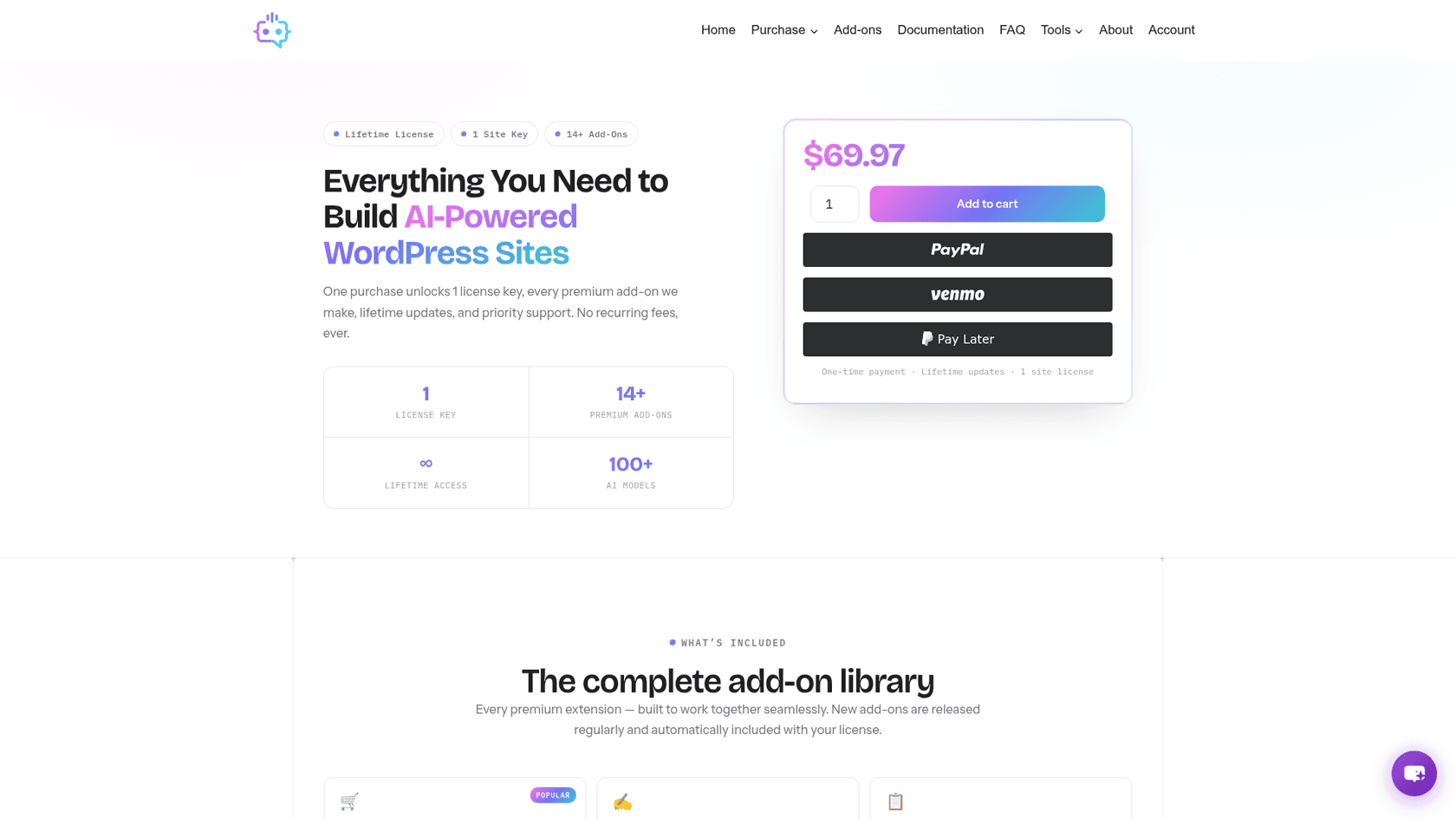
Best for: a site owner who wants a plugin on their own key and hates subscriptions.
MxChat trains on your site, sitemaps, PDFs, URLs, YouTube videos and manual entries, and connects to OpenAI, Claude, Gemini, Grok and DeepSeek plus 100+ models through OpenRouter. Its Pro licence includes every add-on: WooCommerce (product cards, cart and order tracking), smart forms, multi-bot, a theme customizer and MxChat Anywhere, which puts the same bot on a non-WordPress site with one script tag. Handoff goes to Slack.
Pricing: the plugin is free on WordPress.org. MxChat Pro is $69.97 one time for 1 site, with lifetime updates and 14+ add-ons. Model usage is billed by your provider.
Pros:
- No recurring fee, which is the cleanest answer to AI Puffer's two meters.
- Every add-on in one price, including WooCommerce and forms.
- A 5.0 rating from 30 reviews, updated October 17, 2026.
Cons:
- About 2,000 active installs, a much smaller community than AI Engine.
- One licence key per site, so agencies pay per site.
- Handoff is a Slack message, not an inbox with history.
A Reddit user comparing it to WPBot zeroed in on that licence:
"On another note, I'm seeing MxChat having a lifetime pass for 50€, while WPBot is on a per year basis. Wouldn't you think MxChat would be a better fit?"

The vendor's page lists $69.97 today, so check the current price before you buy.
Verdict: pick MxChat if you want to pay once and keep the bot inside WordPress. Skip it if you need a team inbox.
3. WPBot: scripted flows, forms and AI in one plugin
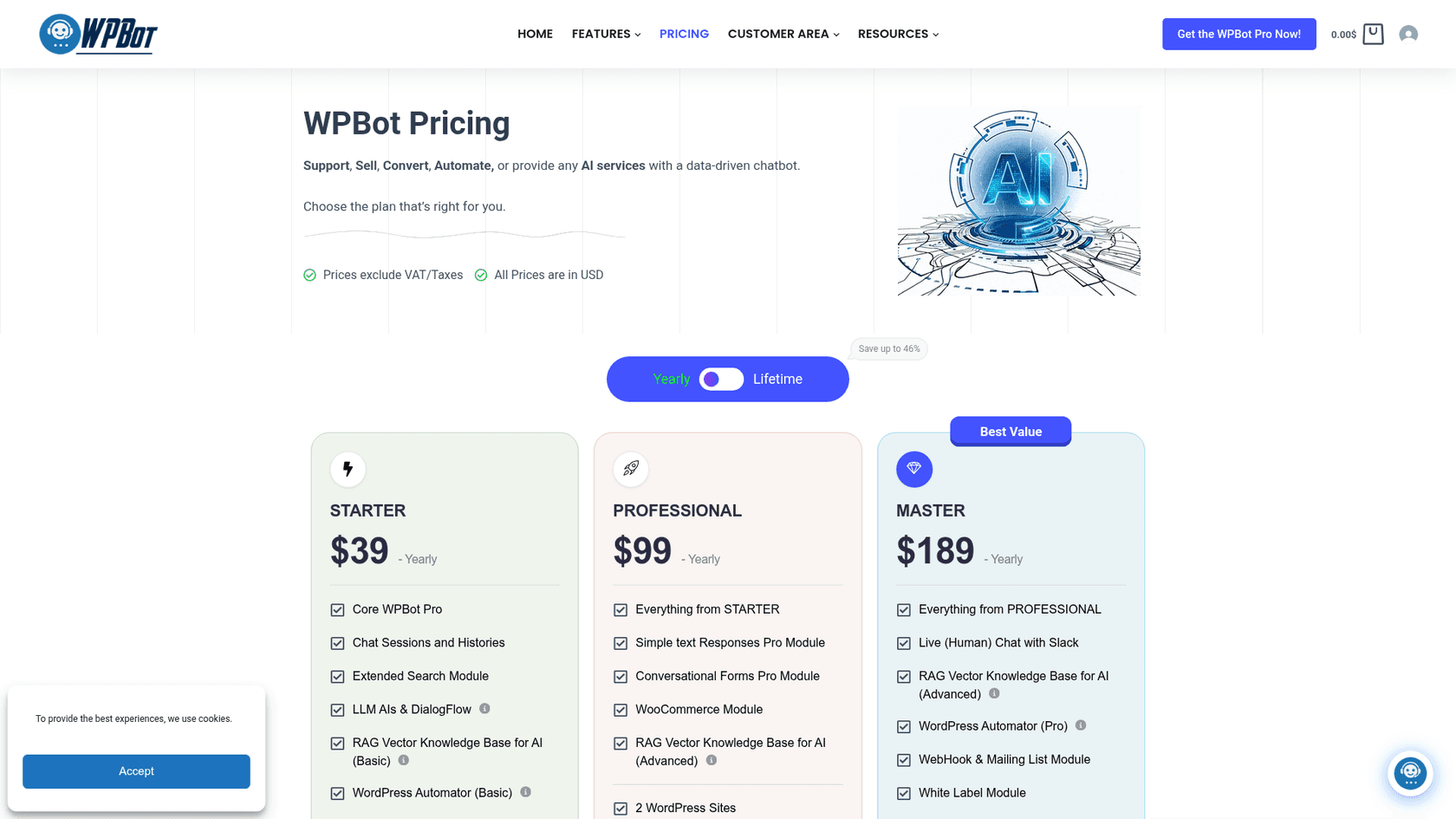
Best for: sites that want button menus, lead forms and an AI mode together.
WPBot can run as a button-menu bot with no AI at all, or in natural-language mode on OpenAI, Gemini, OpenRouter or DialogFlow. The Starter plan adds chat histories and a basic RAG knowledge base, Professional adds conversational forms, a WooCommerce module and an advanced knowledge base, and Master adds live (human) chat with Slack, webhooks and white labelling. If AI Puffer's AI forms were what you used most, this is the closest match.
Pricing: the core plugin is free. WPBot Pro yearly is Starter $39 (1 site), Professional $99 (2 sites) and Master $189 (5 sites). Lifetime is $149, $279 and $369. There is a 14-day money-back guarantee, and AI usage is billed by your provider.
Pros:
- Scripted flows keep working when the AI is off, which suits lead capture.
- A 4.7 rating from 124 reviews and 5,000+ active installs.
- Lifetime tiers that suit agencies with many sites.
Cons:
- Features are spread over three tiers, so handoff needs Master.
- Live chat runs through Slack rather than a support inbox.
One Reddit commenter summed up where it sits:
"WPBot is the closest to a middle ground - free core, OpenAI integration, works in any language, can train on your pages and documents, and has proper multilingual support in the Pro tier."
Verdict: pick WPBot if forms and flows matter as much as AI answers. Skip it if you only want a clean knowledge chatbot.
4. Tidio: live chat, inbox and AI in one install
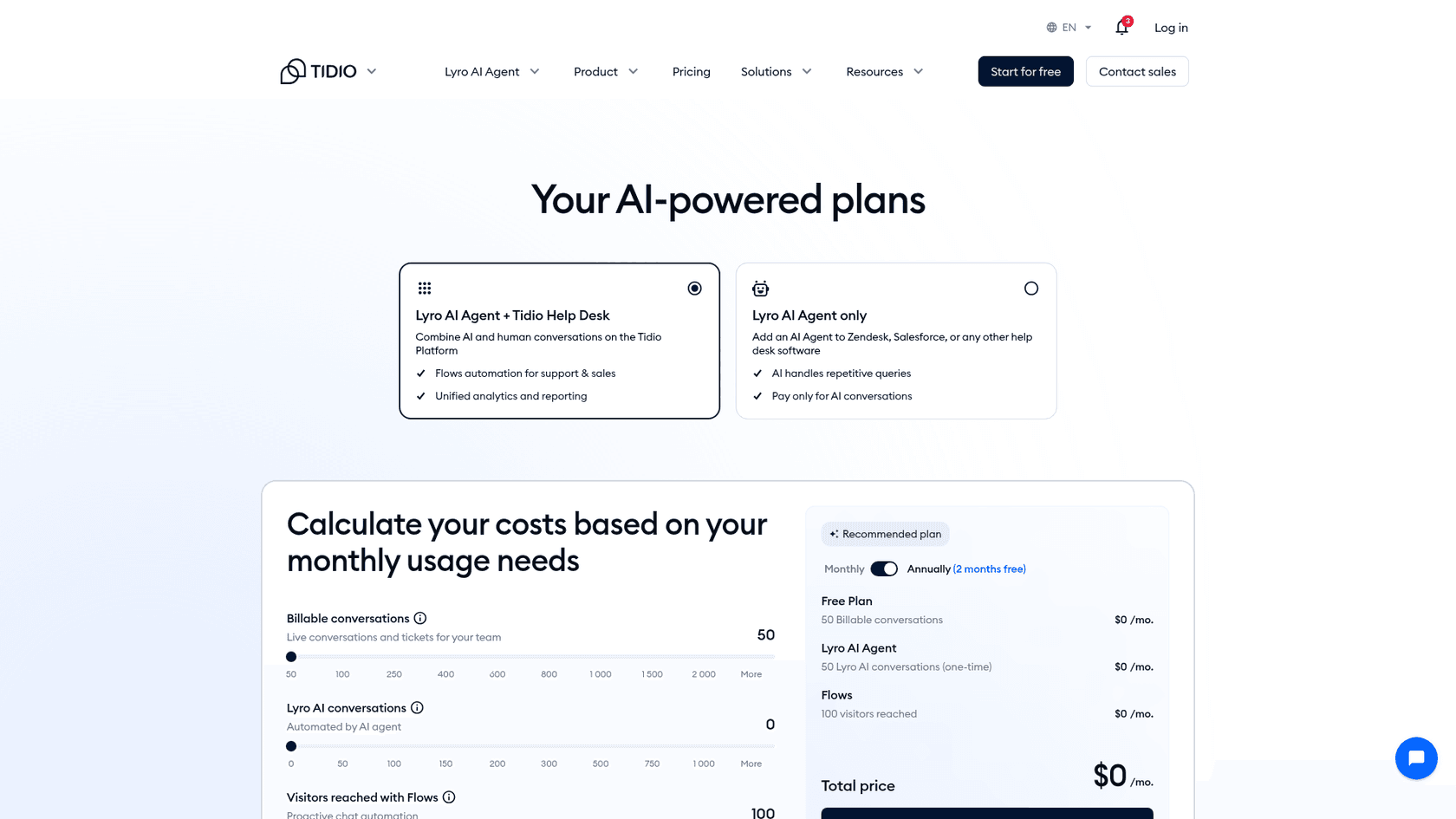
Best for: a small store that wants a human inbox and an AI agent from one plugin.
Tidio pairs its Lyro AI agent with live chat, tickets and Flows automation, and its WordPress plugin has 70,000+ active installs and a 4.8 rating from 395 reviews. Lyro answers from your site and knowledge base, and your team steps in from the same inbox. That inbox is the piece AI Puffer does not have. My Tidio review covers the rest.
Pricing (per Tidio's pricing page, annual rates, 2 months free):
| Plan | Price | What's included |
|---|---|---|
| Free | $0 | 50 billable conversations, 50 Lyro conversations (one-time), 100 Flows visitors |
| Starter | $24.17/month | 100 billable conversations |
| Growth | From $49.17/month | From 250 billable conversations |
| Plus | From $300/month + usage | Custom conversations, dedicated success manager |
| Lyro AI Agent | From $32.50/month | From 50 Lyro conversations, also sold on its own |
A billable conversation is one where a person on your team replies, and Lyro conversations are counted separately. My Tidio AI pricing guide breaks down the meters.
Pros:
- A real live chat inbox with tickets behind the bot.
- A free tier and a 7-day trial to test on your own site.
- The largest WordPress install base among the hosted tools here.
Cons:
- Three meters (human conversations, Lyro conversations, Flows visitors) make the bill harder to predict.
- Lyro is priced on top of the help desk plan.
A Reddit user who set it up described the AI part plainly:
"And to my knowledge, it’s actual AI. It scraped my site and can answer questions based on the knowledge it got from my site."
Verdict: pick Tidio if you want chat, a team inbox and AI together on a small shop. Skip it if you want one flat bill. My Tidio alternatives list has more options.
5. Chatbase: the fastest hosted bot from your URLs
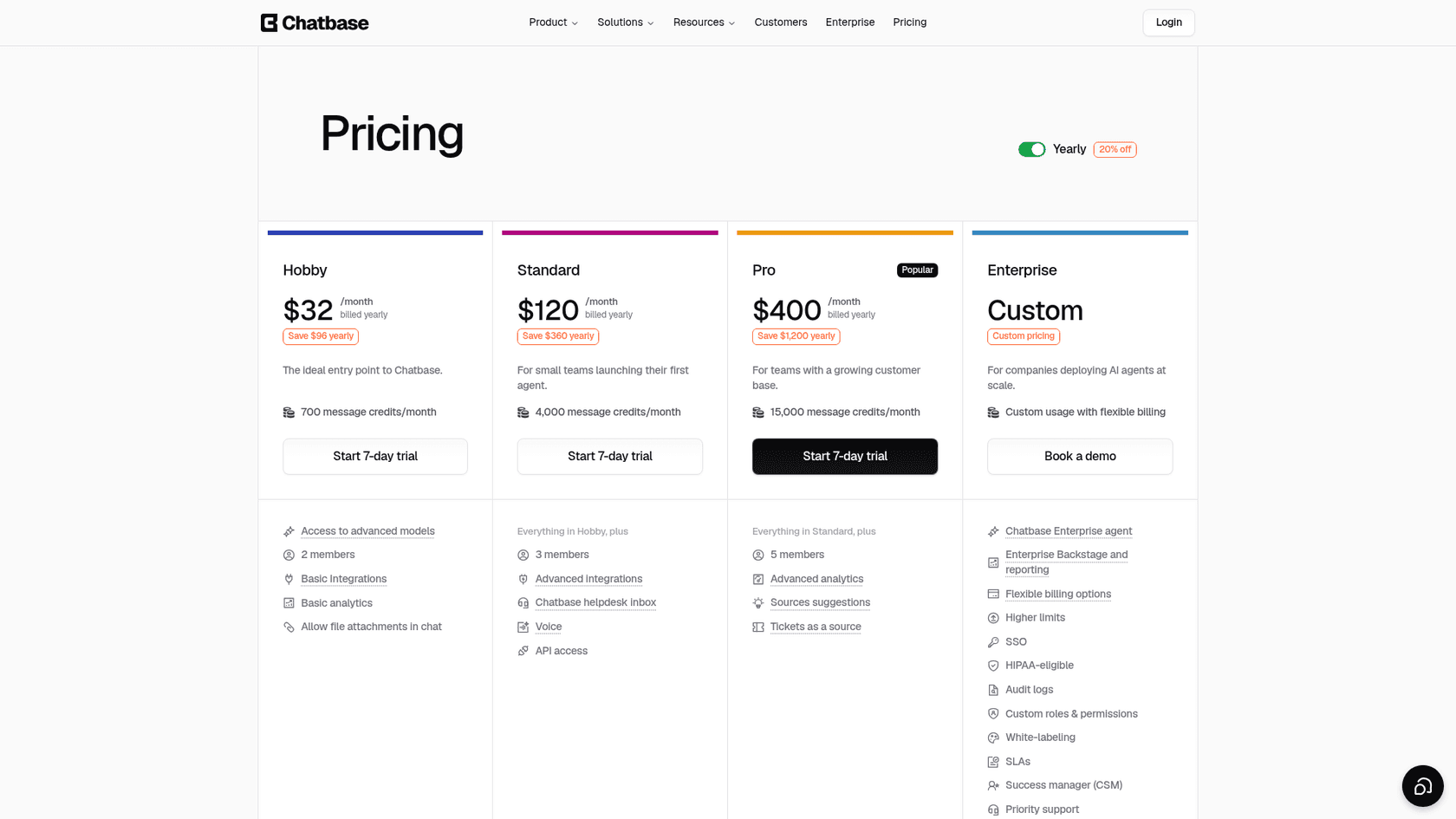
Best for: a site owner who wants a hosted FAQ bot built from a URL and a few files today.
Chatbase builds an agent from files and URLs and deploys it as a widget or through its official plugin. It is the quickest path here from "paste my site" to a working bot, and the AI bill is inside the plan. A helpdesk inbox arrives on the Standard plan. My Chatbase review goes through the setup.
Pricing (per the pricing page):
| Plan | Per month, billed yearly | Billed monthly | Message credits | Members |
|---|---|---|---|---|
| Hobby | $32 | $40 | 700 | 2 |
| Standard | $120 | $150 | 4,000 | 3 |
| Pro | $400 | $500 | 15,000 | 5 |
| Enterprise | Custom | Custom | Custom | Custom |
Extra credits cost $40 per 1,000, an extra agent $300 a year, and removing "Powered by Chatbase" $1,188 a year. Each paid plan has a 7-day trial. My Chatbase pricing guide covers the add-ons.
Pros:
- Setup measured in minutes from a URL.
- No API key to manage, and credits auto-recharge if you allow it.
- A helpdesk inbox, voice and API access from Standard.
Cons:
- No free plan, only a 7-day trial.
- The WordPress plugin averages 3.4 from 13 ratings and was last updated in March 2025.
- The human inbox starts at $120 a month billed yearly.
One Reddit user's advice for a WordPress FAQ bot:
"For straight up FAQs with site crawling, Chatbase is probably the easiest starting point. You literally paste in your website URL, it reads the content, and the bot starts answering questions based on what's already on your site."
Verdict: pick Chatbase for a fast hosted FAQ bot with the model cost built in. Skip it if you want a free tier. See my Chatbase alternatives for others in this lane.
6. Crisp: a shared inbox first, AI second
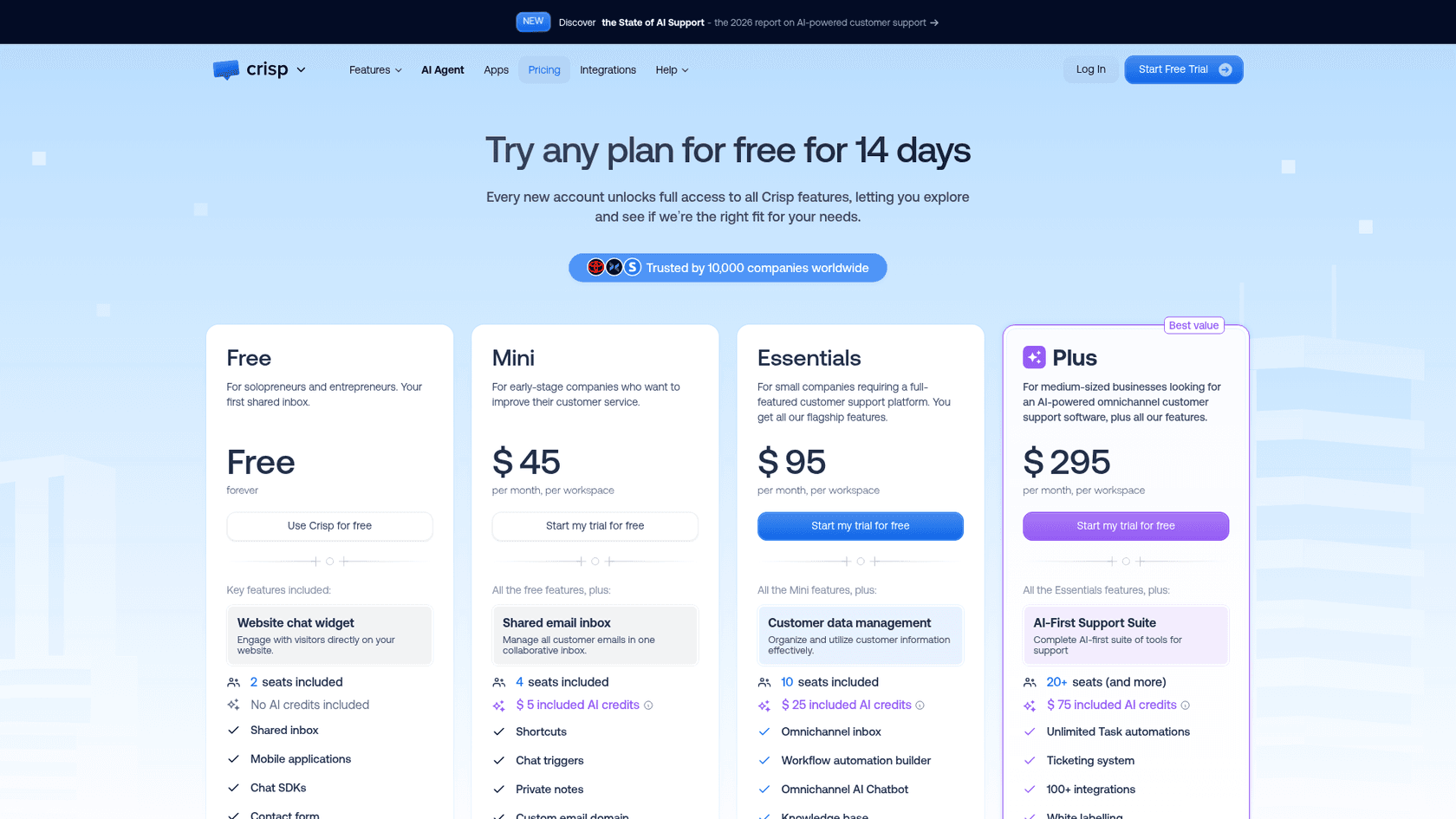
Best for: a team that wants people answering chats, with an AI agent to take the routine ones.
Crisp charges a flat rate per workspace, not per seat, and its AI agent Hugo is included from the Mini plan. Its WordPress plugin has 20,000+ active installs and a 4.6 rating from 73 reviews. If you already like AI Puffer's bot and only need a human inbox, Crisp is also the tool one Trustpilot reviewer paired with a separate bot:
"I already have a chatbot connected to claude ai but I needed the live chat part so that staff could easily respond when they are available."

Pricing (per Crisp's pricing page and its Hugo billing article):
| Plan | Per month, per workspace | Seats included | Included AI credits |
|---|---|---|---|
| Free | $0 | 2 | None |
| Mini | $45 | 4 | $5 (around 90 automated conversations) |
| Essentials | $95 | 10 | $25 (around 450) |
| Plus | $295 | 20+ | $75 (around 1,350) |
Plus adds extra seats at $10 a month each, and every plan has a 14-day free trial with no card. My Crisp pricing guide explains the credit math.
Pros:
- A native shared inbox, with ticketing on Plus.
- Seats come bundled in each plan instead of priced per agent.
- A free plan for live chat alone.
Cons:
- AI credits are a dollar allowance, so the number of answered chats depends on length and model.
- The free plan has no AI credits.
Verdict: pick Crisp when people answering chats is the priority and AI is the helper. Skip it if you only want a bot. My Crisp AI alternatives list compares its AI side.
7. Quickchat AI: the cheapest hosted start
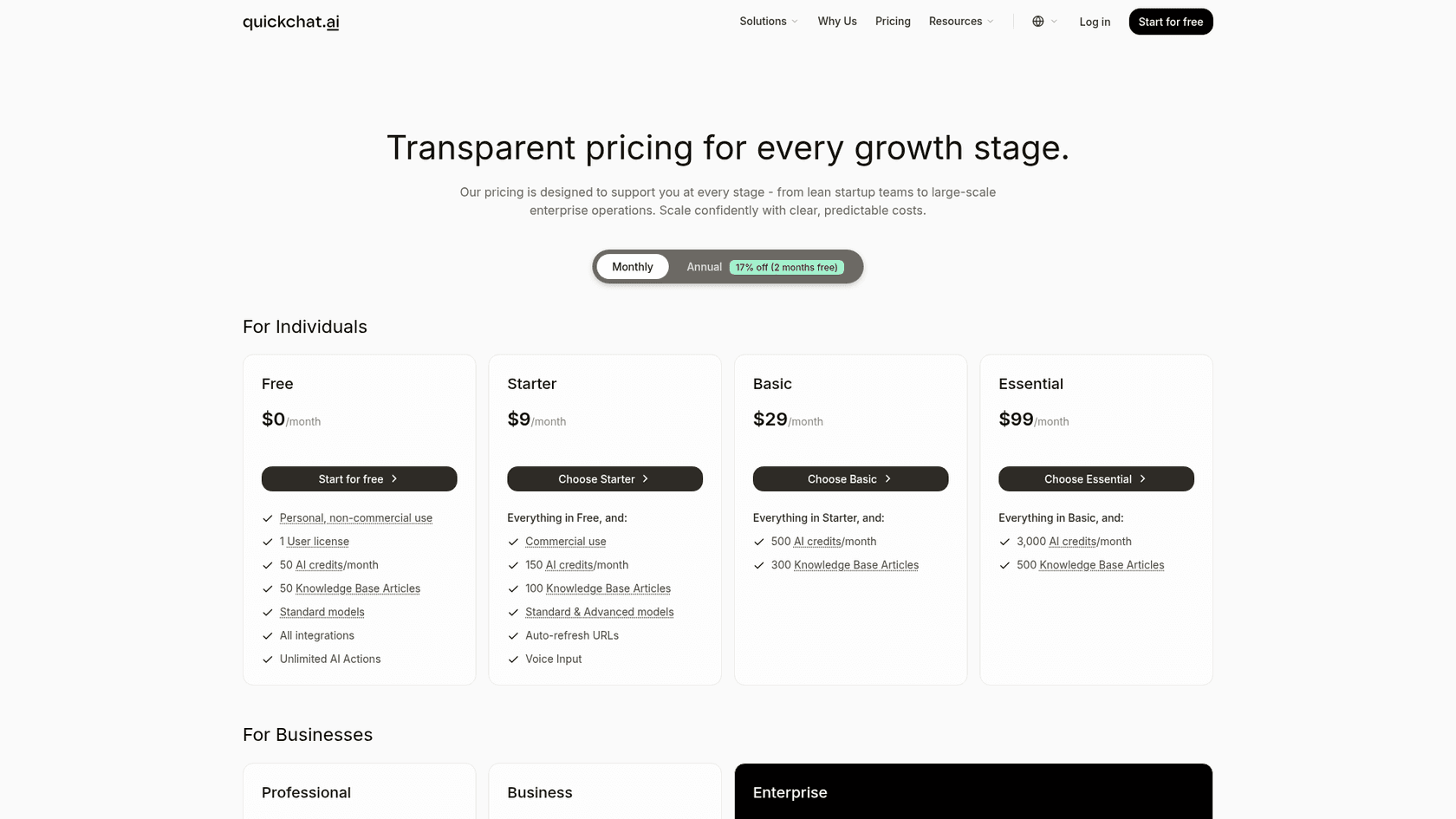
Best for: a small business that wants a hosted agent with handoff for under $30 a month.
Quickchat's WordPress page pairs an official plugin with an app where you manage the Knowledge Base, behaviour and look. Every plan, including Free, lists rules-based human handoff with working hours, an inbox with AI summaries, and all integrations. That makes it the cheapest tool here with a person behind the bot.
Pricing (per Quickchat's pricing page):
| Plan | Monthly | Yearly | AI credits per month | Knowledge Base articles |
|---|---|---|---|---|
| Free (personal, non-commercial) | $0 | $0 | 50 | 50 |
| Starter | $9 | $90 | 150 | 100 |
| Basic | $29 | $290 | 500 | 300 |
| Essential | $99 | $990 | 3,000 | 500 |
| Professional | $299 | $2,990 | 9,000 | 1,000 |
| Business | $999 | $9,990 | 30,000 | 2,000 |
| Enterprise | From $0.50 per resolution | Custom | Custom | Custom |
A reply on GPT-5.1 or GPT-5.6 Luna uses 1 credit, GPT-5.4 or GPT-5.6 Terra uses 2, and GPT-5.5 or GPT-5.6 Sol uses 4.
Pros:
- $9 a month is the lowest commercial entry on this list.
- Human handoff and an inbox on every plan.
- A per-resolution price exists at the top end.
Cons:
- The free plan is for personal, non-commercial use only.
- Credits per reply change with the model, so a plan lasts a different number of chats.
- The WordPress plugin is new: version 1.0.0, 10+ active installs and no ratings yet.
Verdict: pick Quickchat for a low-cost hosted agent with a human fallback. Skip it if you want a long WordPress.org track record.
8. eesel: an AI teammate that hands off to your helpdesk
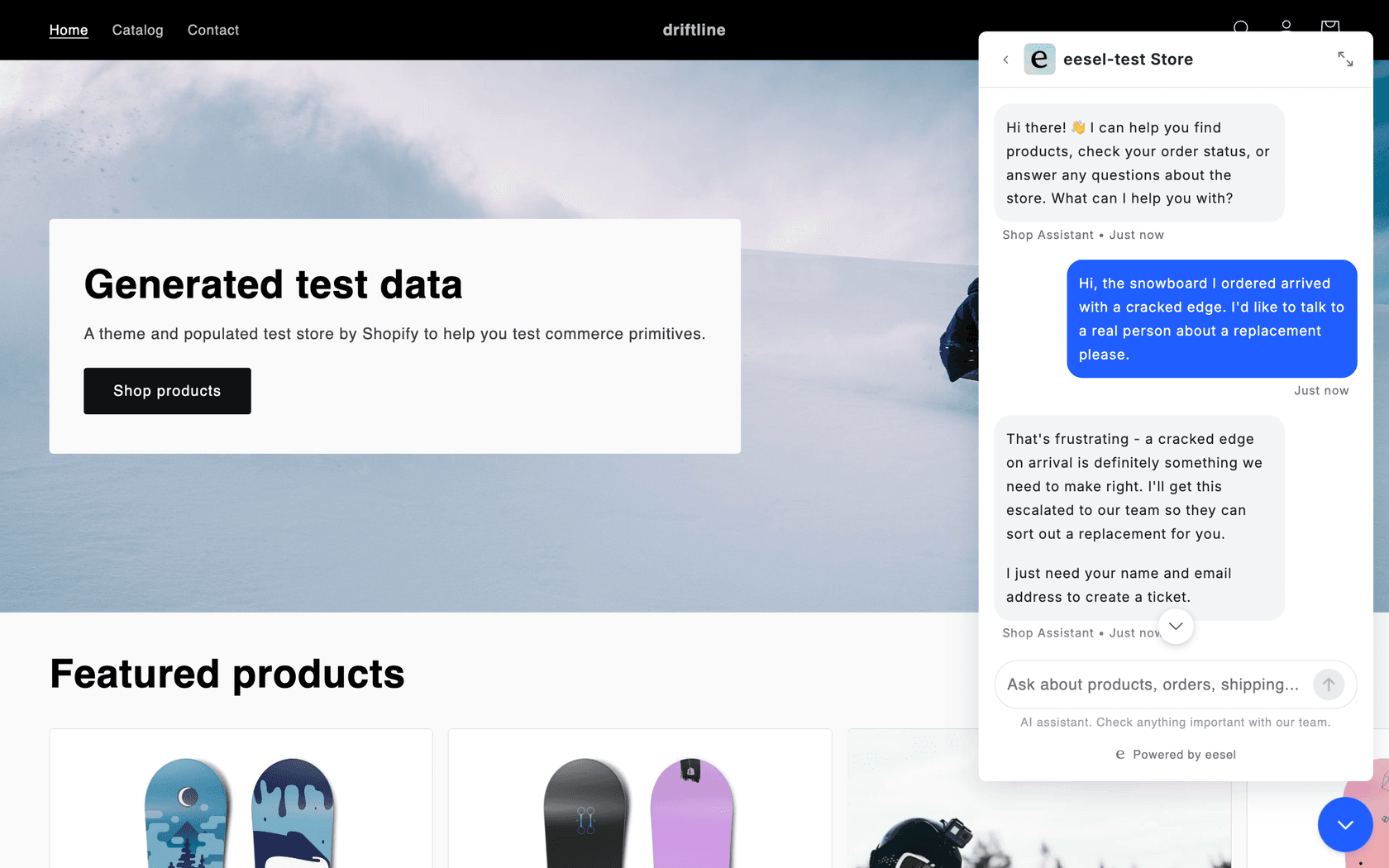
Best for: a WordPress or WooCommerce site where the chatbot now handles real support.
eesel is an AI teammate you hire for a job, and its helpdesk teammate runs the chat bubble on your site. It is not a WordPress.org plugin: you paste one script tag into your theme footer or a custom code setting. It answers from your pages, help center, past tickets, Google Drive or Notion, and with WooCommerce connected it can look up products and orders. When a visitor asks for a person, it collects a name and email and opens a ticket in Zendesk, Gorgias or the helpdesk you run, with the chat attached. That is the gap I flagged in AI Puffer: a queue behind the bot.
The customer stories show what that looks like. BEAUTEK answers from 6,700 pages and documents in German and turns quote requests into Zendesk tickets tagged for sales. ClutchLoop runs its bubble in the customer's own language next to Gorgias, where it handled about 230 tickets in a month and sent about 180 replies itself. Nordbutiker runs a separate bot per brand across 4 countries, each answering from its own store's pages.
If you used AI Puffer to let Claude or ChatGPT work on your site, the eesel CLI gives you the same kind of terminal access to your support agent. Run npx @eesel/cli init chat-bubble --site https://your-site.com and it creates the agent, starts reading your site and prints the embed snippet. Every command prints JSON, so Claude Code, Cursor or Codex can run the setup and test it with eesel chat, and anything set up there shows in the dashboard too.
Pricing (per eesel's pricing page):
| Plan | Price | What's included |
|---|---|---|
| Free | $0 | 100 credits, every integration and channel, unlimited agents and seats |
| Teammate | $299/month for 500 credits, up to $1,749 for 5,000 | A ticket or chat is 1 credit however long it runs |
| Enterprise | Custom | SSO and MFA, HIPAA with a signed BAA, a dedicated person |
Pros:
- Model costs are inside the price, at one credit per chat.
- Handoff creates a ticket in your own helpdesk with the conversation attached.
- 80+ languages out of the box, per eesel's chat bubble page.
Cons:
- Not a WordPress.org plugin, and $299 a month is far above a plugin plus an API key.
- SOC 2 Type II is underway, not complete.
- Built for support, so it is more than a brochure site needs.
Verdict: pick eesel if handoff and a real queue matter more than the lowest price. Skip it if you want a free plugin for a small site.
Where does each chat go when the bot can't answer?
This is the question I would settle before price. Every tool here answers questions. They differ on what happens to the visitor who needs a person.
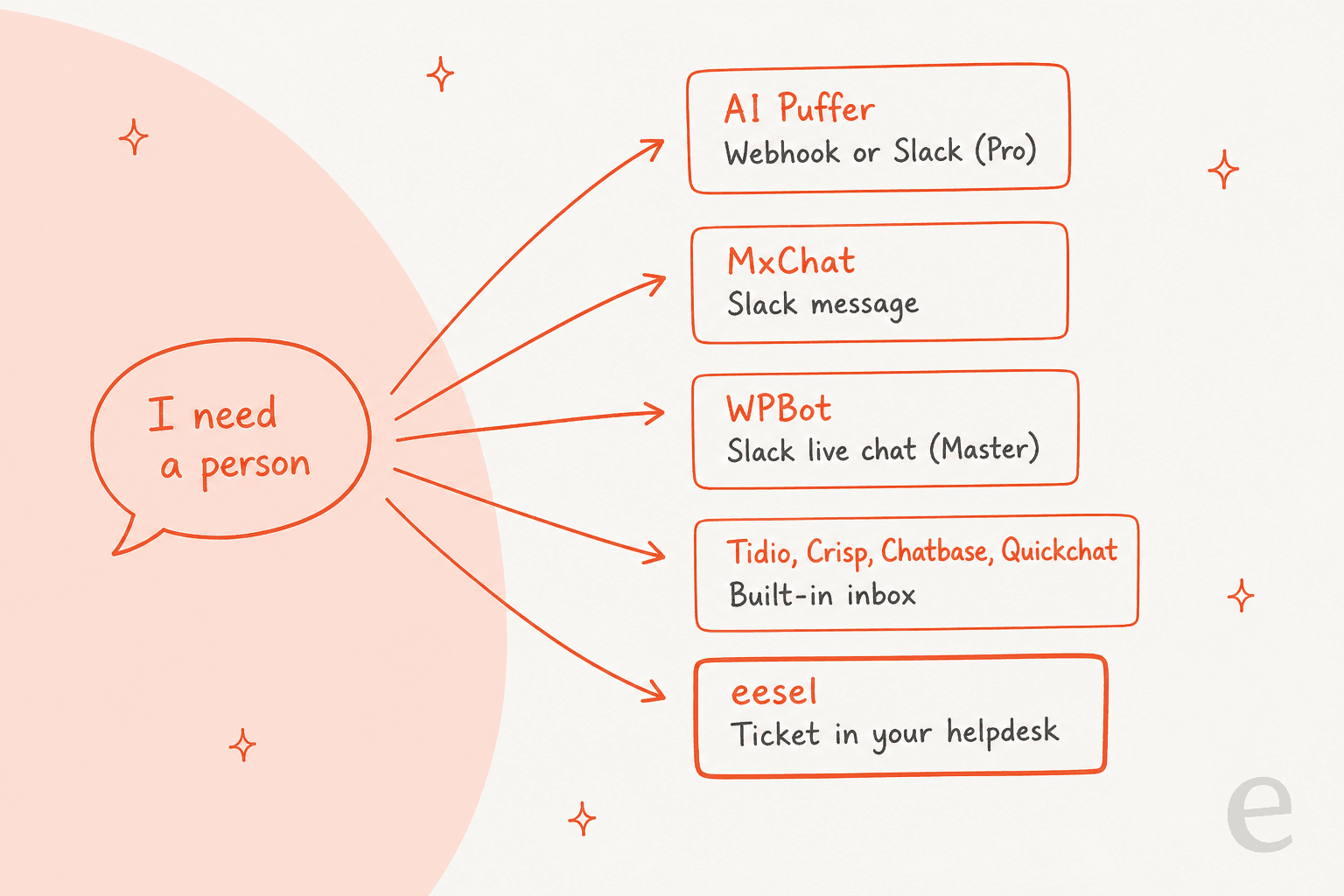
A Slack message is fine when one person watches the channel. A built-in inbox works if you are happy to run support inside the chat tool. A ticket in your own helpdesk matters when you already have one, because the chat lands next to the emails from the same customer. My guides to human handoff in chat and AI chatbot vs live chat go further.
How do you switch from AI Puffer without breaking the chatbot?
- Export your conversations from AI Puffer (JSON or CSV) and pull the 20 to 30 questions visitors really ask.
- List the sources behind your bot: which pages, posts, products and files sit in its knowledge stores.
- Rebuild those sources in the new tool, then run the 20 to 30 questions and score accuracy, speed and what happens when it doesn't know. My guide to testing an AI agent has a fuller scorecard.
- Keep AI Puffer active on staging until the replacement passes, then switch the live widget.
- Watch the first week of chats for answers your content did not support, and fix the content rather than the prompt. My notes on running an AI support pilot cover what to measure.
If you are still weighing a plugin against a hosted tool, my build vs buy guide frames the trade.
Try eesel on your WordPress site
If your AI Puffer bot has started fielding order questions and complaints, eesel works as an AI helpdesk teammate for exactly that: it answers from your own pages and turns the visitor who needs a person into a ticket in your helpdesk. Paste the chat bubble snippet into your theme and run your 20 to 30 real questions through it on the 100 free credits before you pay anything.

Frequently Asked Questions
What are the best AI Puffer alternatives for WordPress?
For a like-for-like plugin, start with AI Engine (Pro from $69 a year) or MxChat ($69.97 once). For forms and button flows, WPBot. For a hosted tool where the AI bill sits in the plan, Tidio, Chatbase, Crisp or Quickchat. If the chatbot now handles support, eesel's chat bubble hands visitors to your helpdesk. My list of AI WordPress plugins covers the wider field.
Is there a free alternative to AI Puffer?
Yes. AI Engine, MxChat and WPBot all have free plugins on WordPress.org, and Tidio, Crisp and eesel have free tiers. Free rarely covers the model: plugins need your own API key, and hosted tools meter credits or conversations. My guide to chatbot cost shows where the real bill comes from.
Is AI Engine better than AI Puffer?
It is the closest swap, not a clear upgrade. AI Engine has 90,000+ active installs against AI Puffer's 10,000+, and both include an MCP server for ChatGPT or Claude. AI Engine runs on your own API key, while AI Puffer also sells its own AI credits. My AI Engine review and AI Puffer review go deeper.
Which AI Puffer alternative has human handoff?
Tidio, Crisp and Quickchat put a human inbox behind the bot on every plan, and Chatbase adds one from its Standard plan. MxChat and WPBot hand off over Slack. eesel creates a ticket in the helpdesk you already run. My guide to AI agent handoff lists what a good handoff carries over.
How much does an AI Puffer alternative really cost?
Add up four things: the licence or plan, AI usage, indexing your content, and any per-conversation limits. A $69 plugin on your own key and a $299 hosted plan are not the same kind of bill, so compare a month of your real traffic. My AI customer service cost guide walks through it.
Can I keep my AI Puffer knowledge base when I switch?
Not directly. Each tool indexes content its own way, so you re-add your pages, posts and files in the new tool. Keep AI Puffer running until the replacement passes your test questions. My notes on testing an AI knowledge base chatbot help you check the answers.
Which AI Puffer alternative works best for WooCommerce?
MxChat's Pro licence includes a WooCommerce add-on, WPBot puts a WooCommerce module in its Professional plan, and eesel connects to WooCommerce for product and order questions. My guide to an AI chatbot for WooCommerce compares the options.
Should I switch away from AI Puffer at all?
Only if one of four things is true: wrong answers reach visitors, the bill is hard to predict, updates keep breaking your setup, or visitors need a person and there is no queue to catch them. If none applies, stay. My guide to testing an AI agent shows how to check a replacement first.