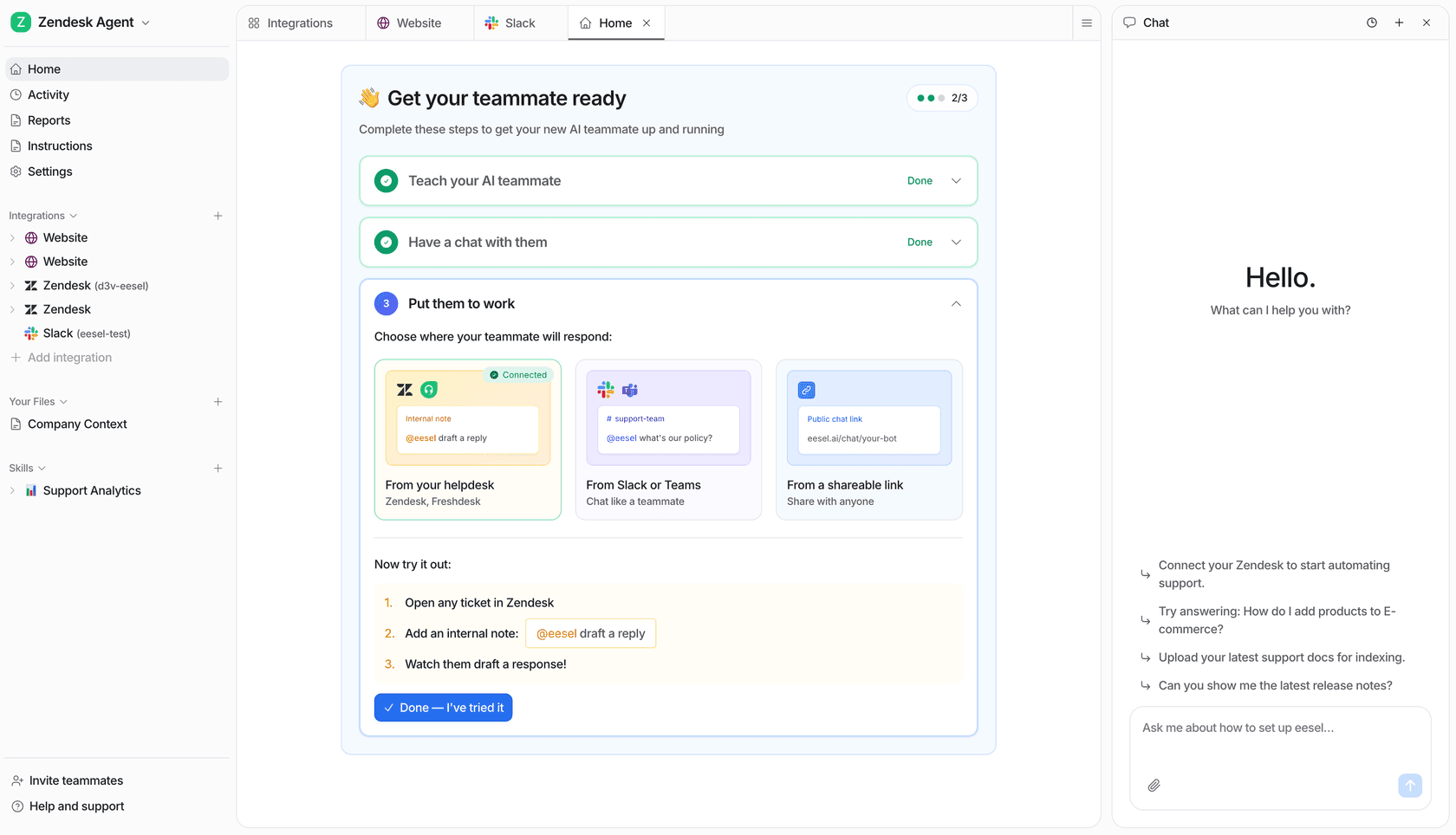

Ternary Bonsai 2.5 27B is worth trying if you need a capable agent model in roughly 6 GB of memory, and worth skipping if you can already run Qwen3.8 27B at 4-bit. On PrismML's own tests it averages 77.2 on tool calling against 77.7 for the 53.8 GB full-precision model, but its agentic coding average is 54.2 against 60.5. Nothing independent had scored it when I wrote this. For a customer-facing queue I would treat it as infrastructure: it is the engine, and an AI helpdesk teammate like eesel's is the employee. With the eesel CLI, an AI coding agent can upload approved knowledge, like exported help articles and macros, then ask test questions and check the answers before anything goes live. Connecting the helpdesk itself still needs someone with admin access to approve it.
What is Ternary Bonsai 2.5?
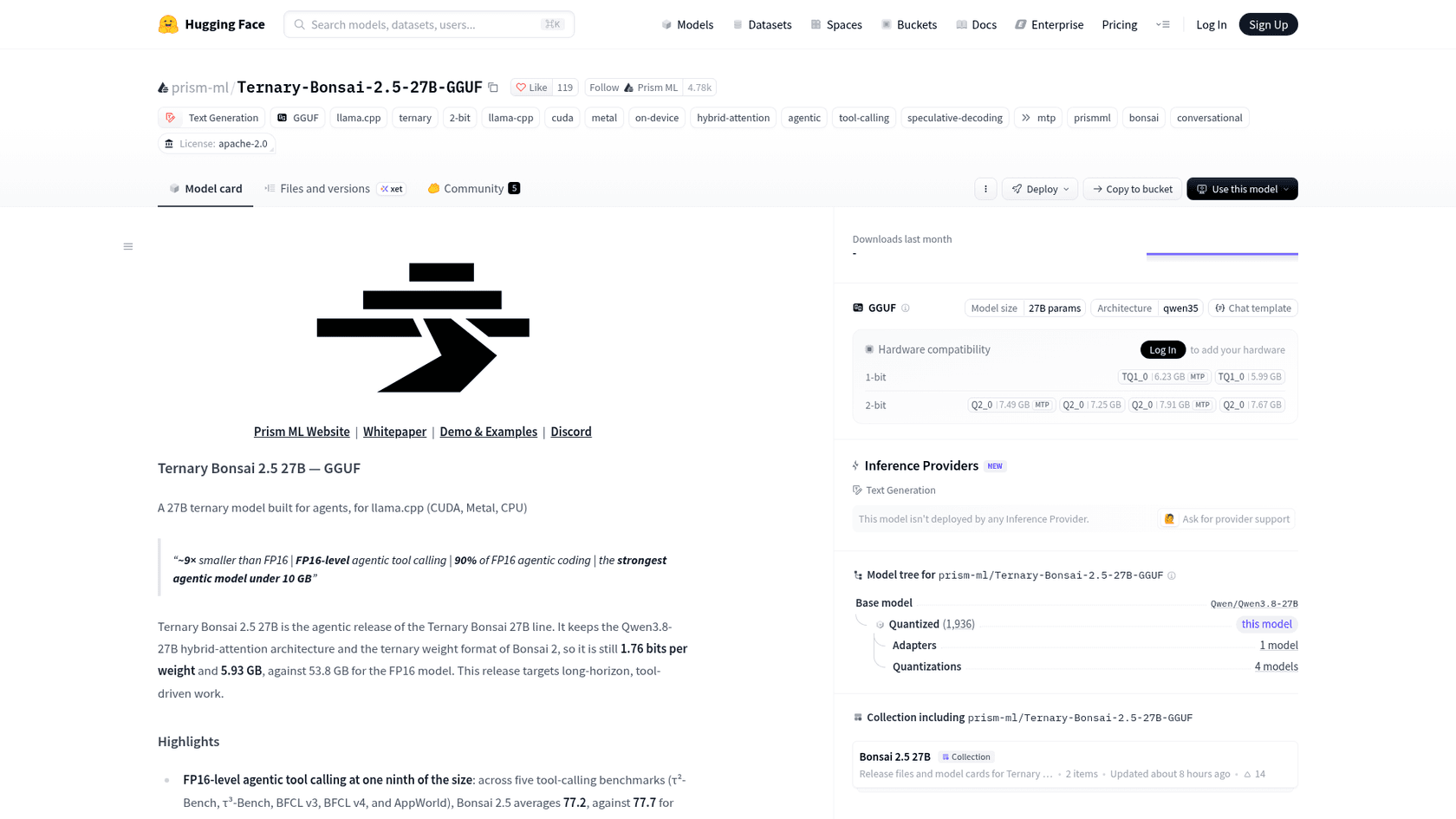
Ternary Bonsai 2.5 27B is an open-weight model that PrismML released November 24. It is an upgrade to Bonsai 2 27B from September, built on Qwen3.8 27B, and it keeps the same 5.9 GB footprint while targeting multi-turn tool use and coding. PrismML says it emerged from Caltech researchers and lists Khosla Ventures, Cerberus, Google and Samsung as backers.
The card gives the spec: 27.36B parameters in total, a hybrid-attention design (about 75% linear and 25% full attention), a 262K-token context, and Apache 2.0 licensing. It reasons by default at an xhigh effort setting, and the low setting is not supported. It also takes image input through a separate vision file.
I have not run this model myself. What follows comes from the model card, the vendor's announcement post and whitepaper, and what early users reported on the day. Where a number is PrismML's own, I say so.
What does ternary actually buy you?
It buys memory. Each weight in an ordinary model is a 16-bit number. In Ternary Bonsai every weight is one of three values, -1, 0 or +1, with one shared 16-bit scale for each group of 128 weights, which works out to 1.76 bits per weight. That is the whole trick behind 5.93 GB instead of 53.8 GB.
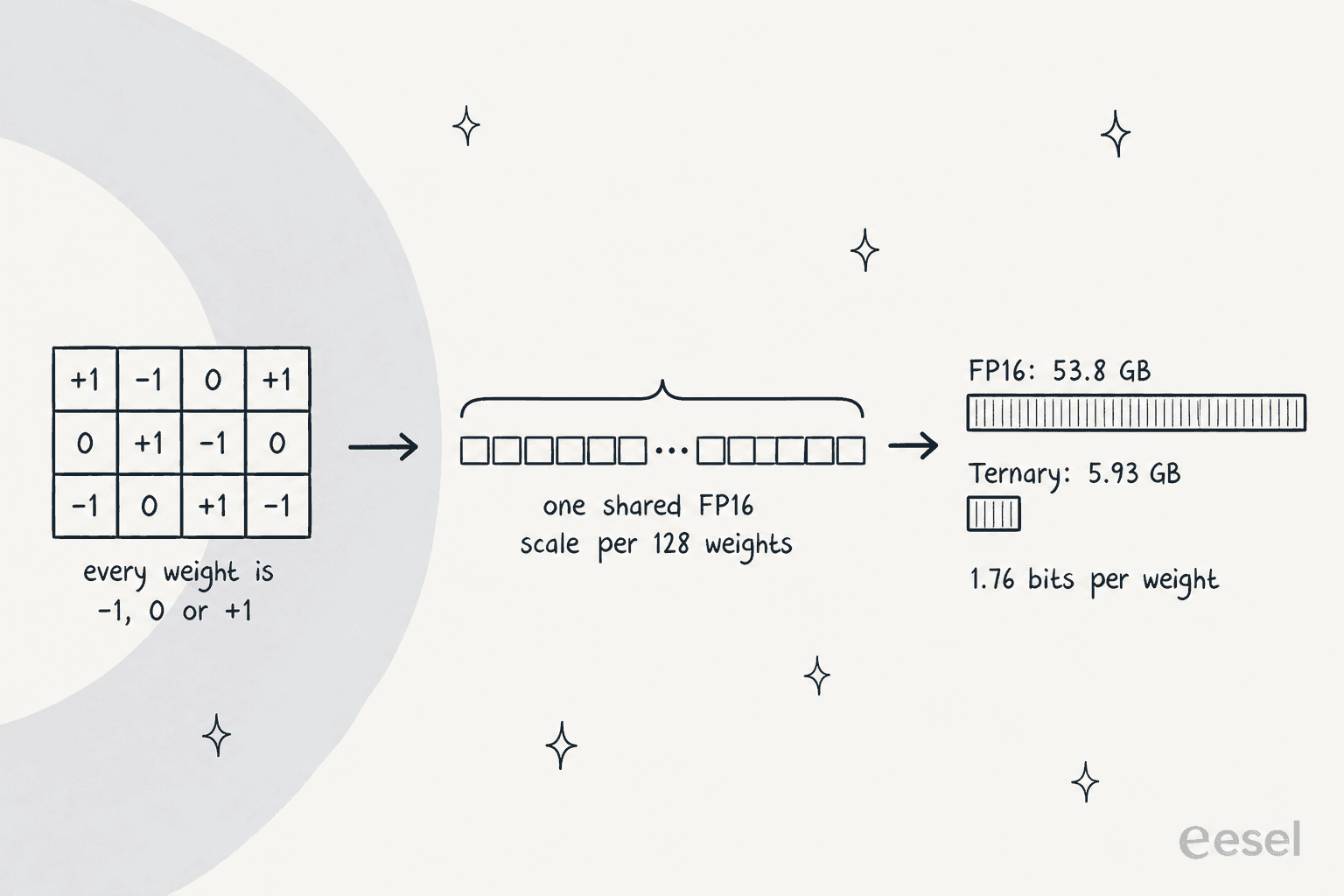
Memory is usually the limit for running a model locally, so this is what lets a 27B model fit on a laptop or a single consumer GPU. Smaller files also read faster from memory, which is why decoding speed rises too, measured in tokens per second. The cost is accuracy, and the rest of this review is about how much of it comes back.
How good are the benchmark scores?
On tool calling, the scores are close to full precision. Across five benchmarks, PrismML reports 77.2 for Bonsai 2.5 and 77.7 for the Qwen3.8 FP16 model, and it beats every conventional low-bit build in its comparison.
| Tool-calling benchmark | Qwen3.8 FP16 (53.8 GB) | GSQ-RCO IQ3_XXS (10.1 GB) | Bonsai 2 27B (5.93 GB) | Bonsai 2.5 27B (5.93 GB) |
|---|---|---|---|---|
| τ²-Bench | 80.6 | 77.7 | 80.2 | 82.0 |
| τ³-Bench | 72.8 | 70.7 | 69.1 | 73.9 |
| BFCL v3 (native) | 71.2 | 71.6 | 70.3 | 72.6 |
| BFCL v4 | 70.8 | 70.6 | 64.4 | 67.2 |
| AppWorld | 93.2 | 86.1 | 51.2 | 90.5 |
| Average of five | 77.7 | 75.3 | 67.0 | 77.2 |
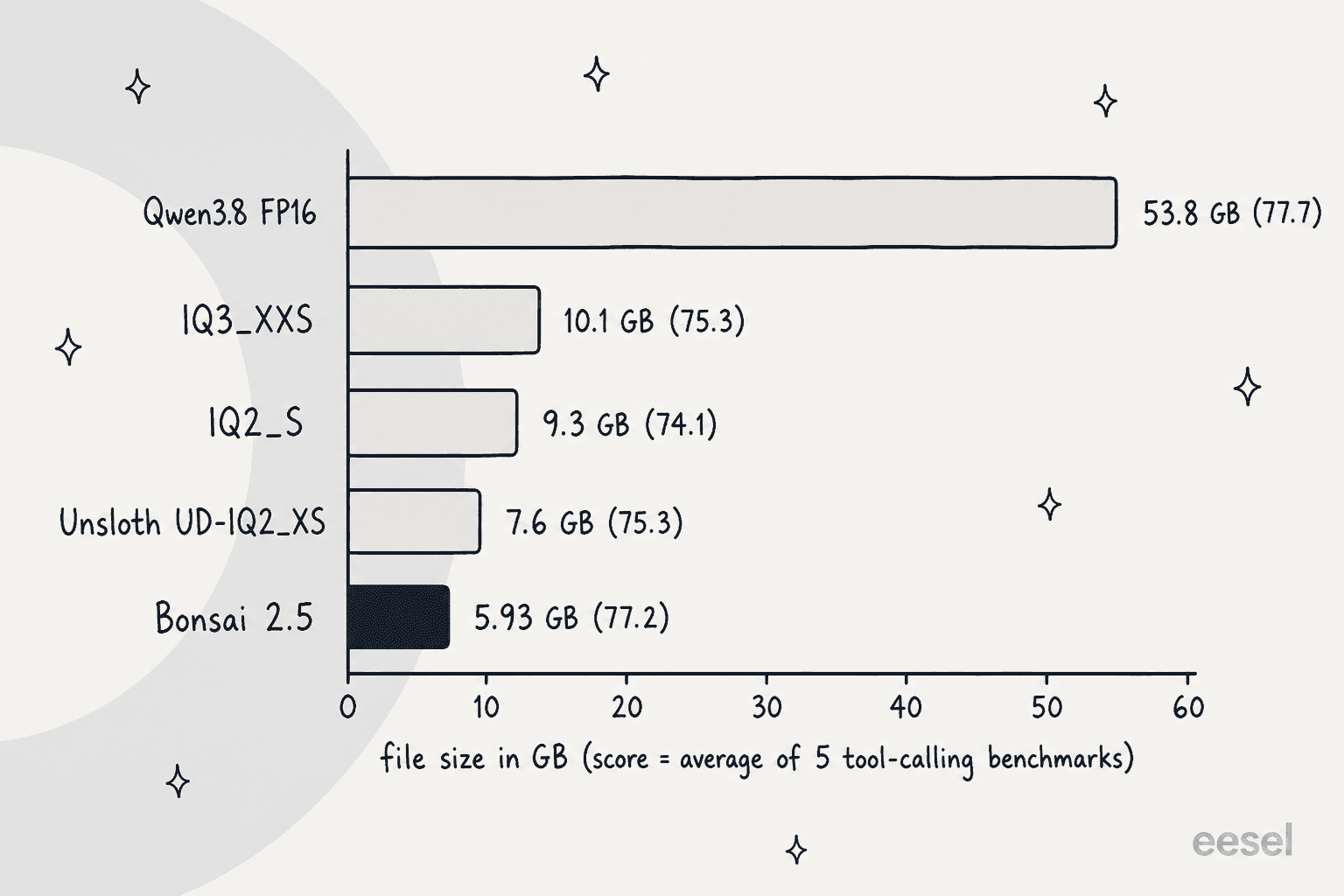
Two details make me trust the table more than the headline. First, BFCL v4 is a miss: Bonsai 2.5 trails full precision by 3.6 points there, and PrismML says so. Second, the card documents how a bigger low-bit build can fail in a way its other scores hide: GSQ-RCO IQ2_XS, which is 1.4 times the size, scores 79.5 on τ²-Bench but 46.5 on AppWorld, because in about one task in five it writes a script that guesses every API call and declares success before seeing any output. That is the failure that would hurt an AI agent in production, and Bonsai 2.5's 90.5 on AppWorld is the number I would watch. For a deeper look at testing agents, see my guide to AI support agent testing.
Did agentic coding really jump?
It jumped, and it is still the weak spot. Bonsai 2 kept 63% of the full-precision coding score and solved no DeepSWE task at all. Bonsai 2.5 keeps 90% on the card's three coding benchmarks.
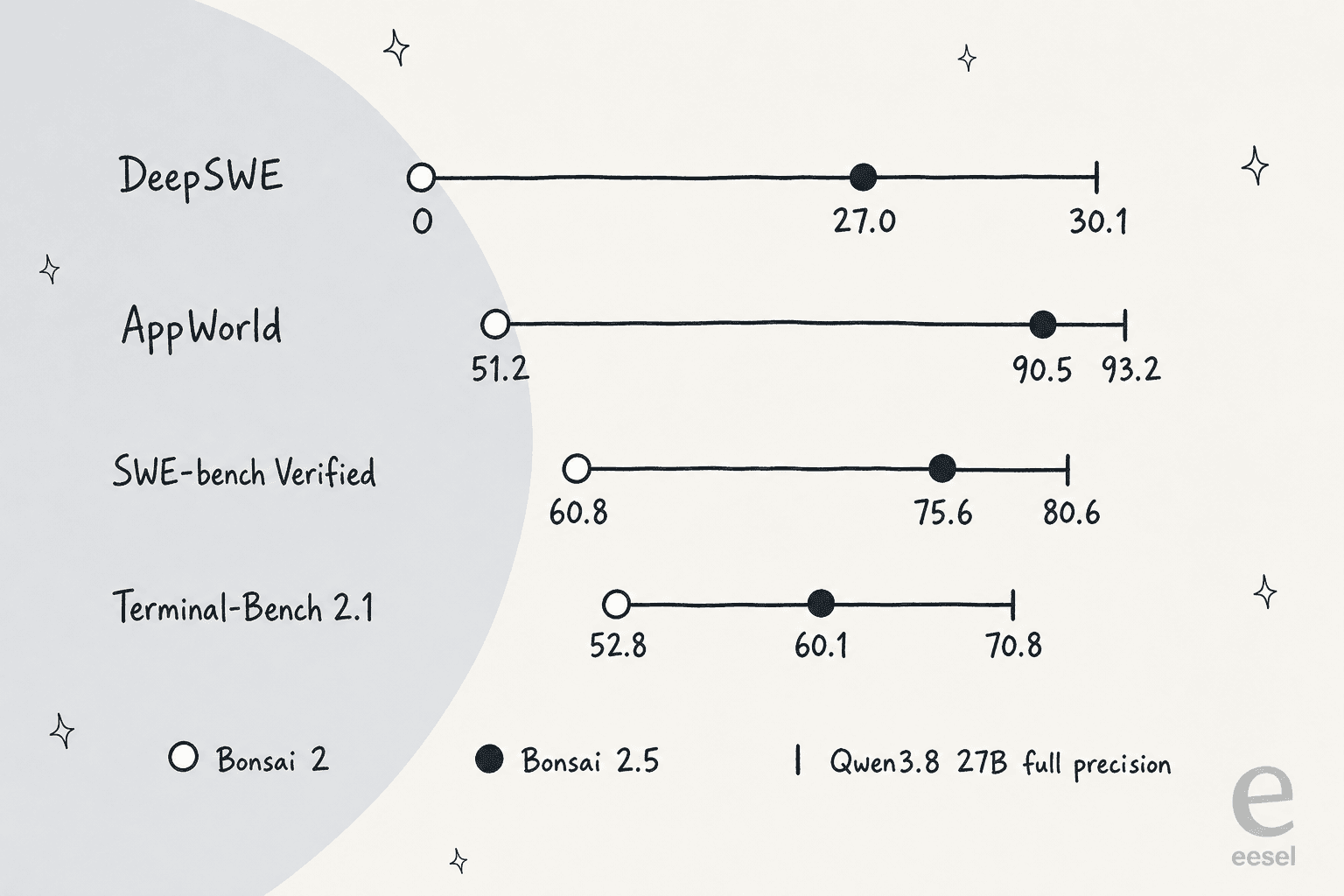
Each row is on its own scale. Numbers are from PrismML's announcement.
| Agentic coding benchmark | Qwen3.8 FP16 | GSQ-RCO IQ3_XXS (10.1 GB) | Bonsai 2 | Bonsai 2.5 |
|---|---|---|---|---|
| SWE-bench Verified | 80.6 | 73.2 | 60.8 | 75.6 |
| Terminal-Bench 2.1 | 70.8 | 66.3 | 52.8 | 60.1 |
| DeepSWE | 30.1 | 27.0 | 0.0 | 27.0 |
| Average of three | 60.5 | 55.5 | 37.9 | 54.2 |
Notice the last column pair. A conventional build that is 1.7 times larger still has the higher coding average, on the strength of Terminal-Bench. So the honest summary is that Bonsai 2.5 is the best of the builds under 10 GB, as PrismML claims, but it is not free of a quality cost. If you run agentic coding jobs that are long and unforgiving, that 10.7-point Terminal-Bench gap to full precision is where a bad step derails the run.
General capability holds up better. Averaged over 16 benchmarks in five categories it scores 82.1 against 84.3 for full precision, with its largest gap, 3.1 points, in math.
How fast is it, and on what hardware?
Fast enough on a GPU, workable on a laptop. PrismML's speed tables separate plain decoding from its multi-token prediction (MTP) draft head, which guesses the next few tokens and lets the full model check them in one pass.
| Device | Plain decode (tok/s) | With MTP | MTP plus kernels in testing |
|---|---|---|---|
| NVIDIA H100 | 184 | 282 | 291 |
| NVIDIA H200 | 194 | 296 | 306 |
| RTX 5090 | 174 | 305 | 312 |
| RTX 4090 | 111 | 204 | 204 |
| Apple M4 Pro | 22.9 | 25.3 | 29.2 |
| Core Ultra laptop (integrated GPU) | 11.1 | 23.1 | 24.5 |
| Galaxy S26 Ultra (NPU) | 6.34 | 8.79 | not available |
These are vendor measurements on 36 real prompts, and the card calls the MTP table something to read on its own, not against the plain-decoding table. Two caveats matter if you plan to copy them. The fastest file, PTQ1_0, needs PrismML's llama.cpp fork, while the stock-compatible Q2_0 file decoded at 109 tokens per second on an H200 against 150 on the fork. And the phone result relies on a fix that is not yet released.
What do early users say?
The first hours of feedback are mixed in a useful way. Bonsai 2 had a rough reputation, and one Hacker News user said so on launch day.
"I tried the V2 and it was unfortunately really bad. It ran but it got stuck in loops and the output was comparatively poor."

A reply in the same thread pointed out that many Bonsai runtimes default to a temperature of 0, which can cause loops, and that greedy decoding suits speed demos better than real work. PrismML's card says the same thing in its sampling section: use temperature 1.0 in thinking mode and pass --min-p 0. Another user reported the new version was a step up.
"Actually “useful” compared to the older version 2. The agentic calls have been solid."
One commenter's own long-horizon test on a Mac had both versions passing 5 of 8 steps, with 17% fewer steps and 29% less time for 2.5 (76 minutes against 107), per that comment. It is one person's benchmark, so I read it as a direction, not a result. Another user measured 22.3 tokens per second on a Mac Mini M5 Pro, and had the stock Q2_0 file fix a simple bug in his own test suite. The sharpest practical advice came from a reader who answered the "why not just use Qwen" question:
"If you have the memory to run a less-quantized version of Qwen, you’ll get better output doing that. This model is deliberately trying to crunch things down to a minimum size."
I agree with that, and I think it is the right frame for the whole model.
Where does it fall short?
Four limits stand out from the card and the launch-day threads.
- Quality is still below full precision. Full precision is still ahead on every agentic coding benchmark above. The gap shrank from 37% to about 10%, it did not close.
- The headline size needs a custom runtime. The 5.93 GB file runs on PrismML's fork. The Q2_0 files that work on stock llama.cpp are listed at 7.25 to 7.91 GB, and stock builds older than b11556 produce garbage without warning.
- Memory use can surprise you. In automatic mode the server can start four request slots that share a cache. A community report on a 10 GB RTX 3080 found about 9.5 GB in use before adding
-np 1and 7.8 GB after, per the card's known issues. - The evidence is all new and mostly vendor-run. The benchmarks come from PrismML's whitepaper. I did not find an independent leaderboard entry on launch day, so treat every number as a claim to check on your own hardware.
It also reasons at length by default, so a small output cap ends generation mid-thought. The card recommends leaving room for roughly 16K tokens.
Who should run it, and who should skip it?
Run it if memory is the constraint you cannot move. That means a laptop or single GPU with about 8 GB free, a prompt that must stay on the device, or a batch job where 20 to 30 tokens per second is acceptable. For private drafting, summarising local files or a local coding agent on a repo you cannot upload, the privacy argument is real, and it matches PrismML's own use cases. The same logic drives interest in open-source agents generally.
Skip it if you already have 16 GB or more to spare, because a 4-bit build of the full model will likely give better output. Skip it too if you need the strongest coding agent available. Hosted models such as Claude Haiku 5.5, Kimi K3 or DeepSeek V4 Flash cost money per token but ask nothing of your hardware. If you want a bigger local model for comparison, my Qwen 3.8 Max review and Inkling review cover other trade-offs.
Should you put it behind a support queue?
A model that scores well on tau-bench is not yet a support agent. The benchmark simulates a customer over many turns, which is a good sign. A real queue adds what the benchmark leaves out: permissions, refunds that need approval, a rule for when to stop and hand over, and a way to see why an answer was given.
eesel has spent years putting AI on live support queues, and the lesson that keeps repeating is that a confident answer is not a correct one. That is why every rollout is simulated against historical tickets before it replies to a customer. SamCart shows the shape of the job: it runs one eesel agent on Freshdesk tickets and a separate one on its website chat, both answering from about 280 help center articles. When a seller asks for a person, or the question goes past the help center, the ticket is tagged for handoff and the agent stops. None of that comes from the model. It comes from permissions, refund guardrails, observability and handoff design.
So my read is this. A 6 GB model that holds up on tool calling is good news for anyone who wants private, local assistance, and I will keep an eye on independent scores as they arrive. But "this is infrastructure; eesel is the employee" is how I would split the decision: choose the model for your hardware and your data rules, and choose the AI teammate for the job it does. If you already run a helpdesk, the cheaper path is an AI layer on your helpdesk, such as the one covered in my Freshdesk AI agent guide. A cost comparison against human agents and the wider savings picture is worth running before you build anything. Judge any tool with a pilot scorecard, and read the best AI customer support agents for context. Where a local model touches customer data, review your data residency and security answers first.
Try eesel
If your real goal is fewer tickets on your desk and not a faster local model, Try eesel. It is an AI helpdesk teammate that joins the queue you already run, learns from your help center and past tickets, and hands off to your team under rules you set. eesel also works with Model Context Protocol tooling, so MCP servers can be part of the setup.