Saner.AI alternatives: the 10 best picks for 2026

Kurnia Kharisma

Katelin Teen
Last edited August 16, 2026

Why people go looking for Saner.AI alternatives
I should say up front what Saner.AI gets right, because it is not nothing.
Among AI personal assistants, it is one of very few that took ADHD seriously as a design brief rather than a marketing tag. The founders say one of them has ADHD, and it shows in the small decisions: a Chrome extension so capture never costs you a context switch, a Focus Box that floats a single task above everything else, a slash menu with speech to text. It won #1 Launch of the Day on Product Hunt on February 25th 2024 with 680 upvotes, and co-founder Austin Ngo posted in July 2026 that the product had crossed 150,000 users, 100,000 of them in the preceding seven months, with no paid ads. That is real traction.
"We just crossed 150,000 users! 100,000 of them showed up in the last 7 months."
The founders answer reviews personally, on Product Hunt and in Discord. For a two-year-old product, the care is visible.
So why the search traffic on "Saner.AI alternatives"? Because of one architectural decision that almost nobody notices until they have paid for a month.
Skai reads in. It does not write out.
I have spent the last few years building AI that reads a company's own knowledge and answers from it, so this is the part of the product I went looking at first, and Saner's own documentation is admirably blunt about it. The help centre article on what Skai cannot do is a flat list of "cannot" statements. Skai cannot browse the web. It cannot analyse spreadsheets or CSVs. It "cannot send emails or messages via third-party tools (e.g. Gmail, Slack)". And the line that matters most: "changes only happen when you explicitly apply them."
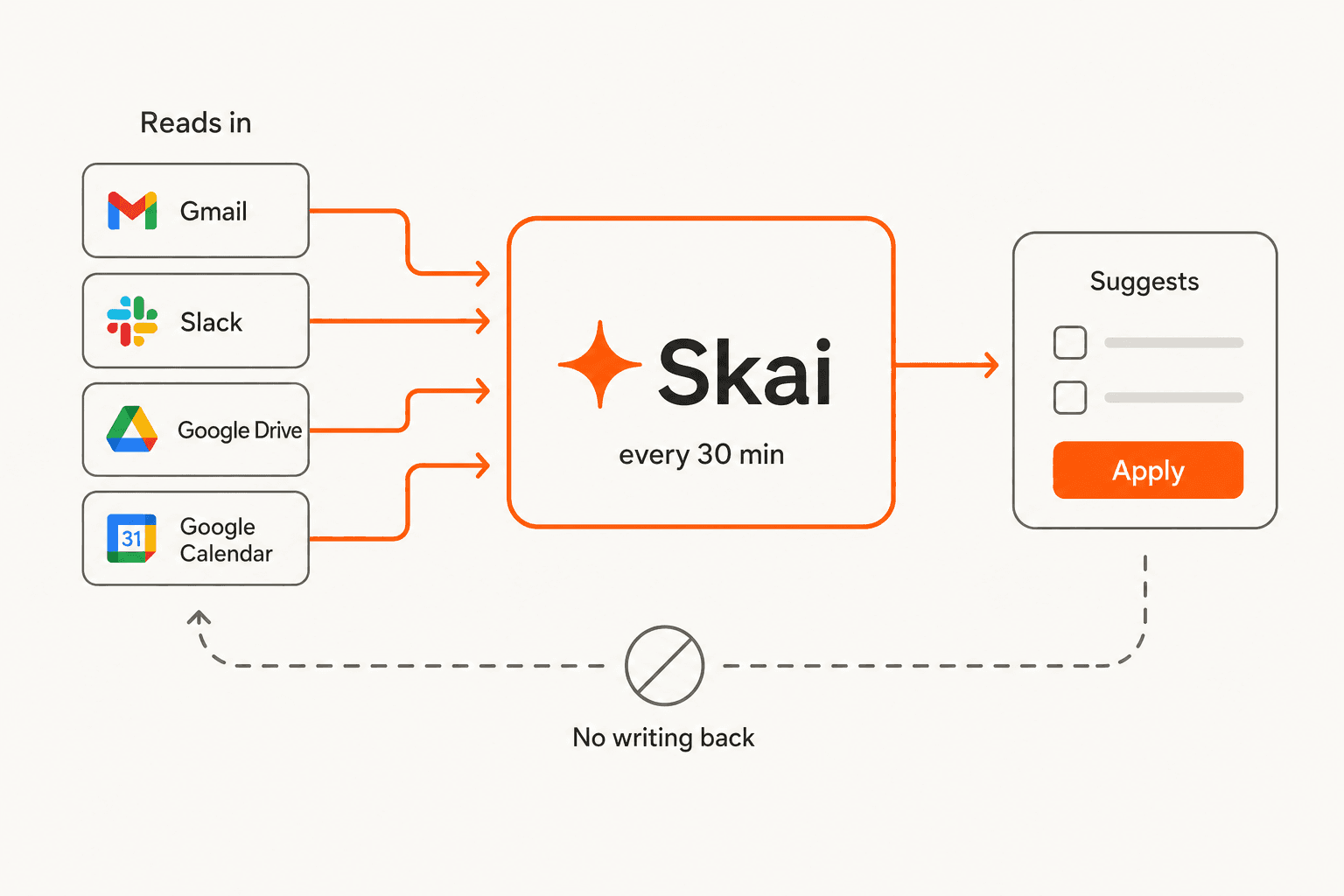
The connector documentation fills in the rest. There are exactly six connectors: Google Drive (Google Docs only, no Sheets, no Word), Gmail, Google Calendar, Slack (marked beta), Outlook Mail and Outlook Calendar. Continuous sync runs every 30 minutes and pulls a maximum of 1,000 items per cycle. There is no API, no webhooks, no Zapier and no MCP anywhere in the docs, which rules out the kind of AI documentation search pipeline you might otherwise bolt on. Calendar sync is one direction per connector, so "two-way" means configuring two.
Here is what that looks like in the product. Every Skai suggestion arrives as a checklist with an apply button:
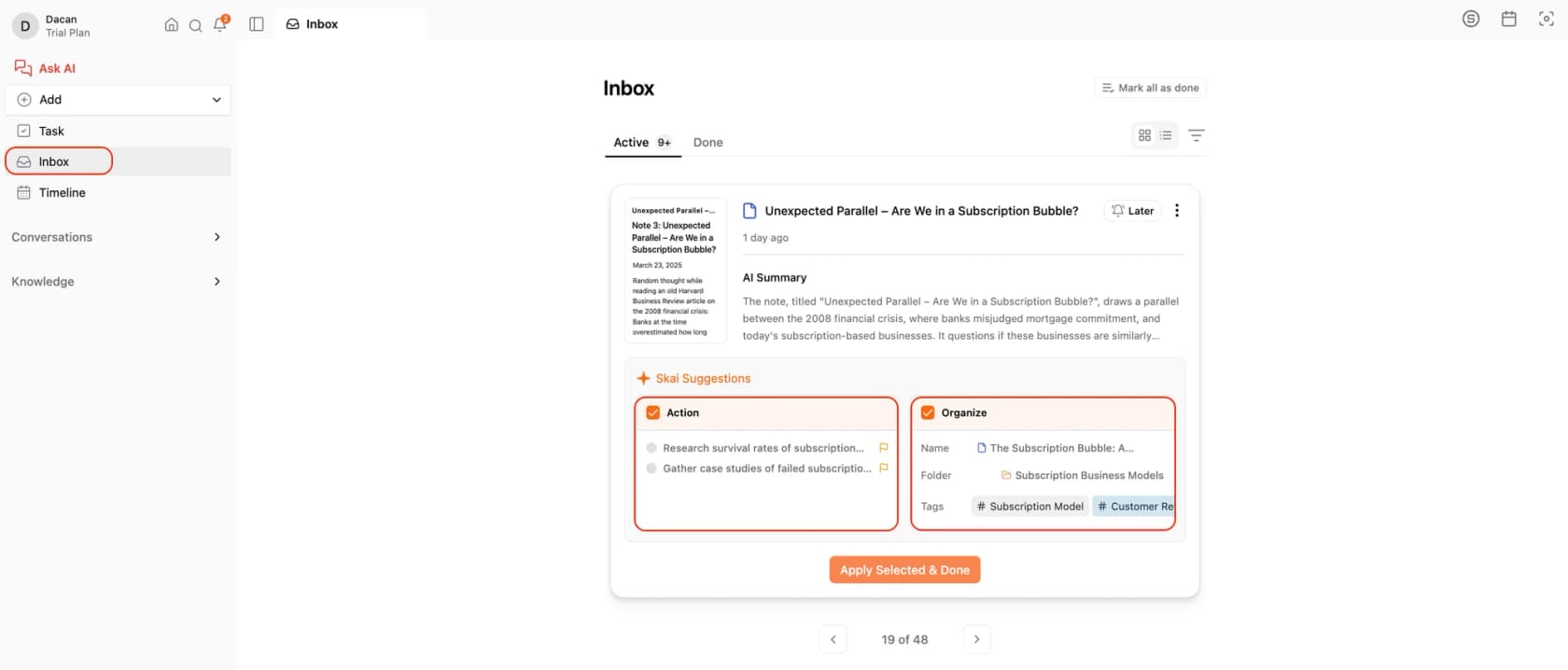
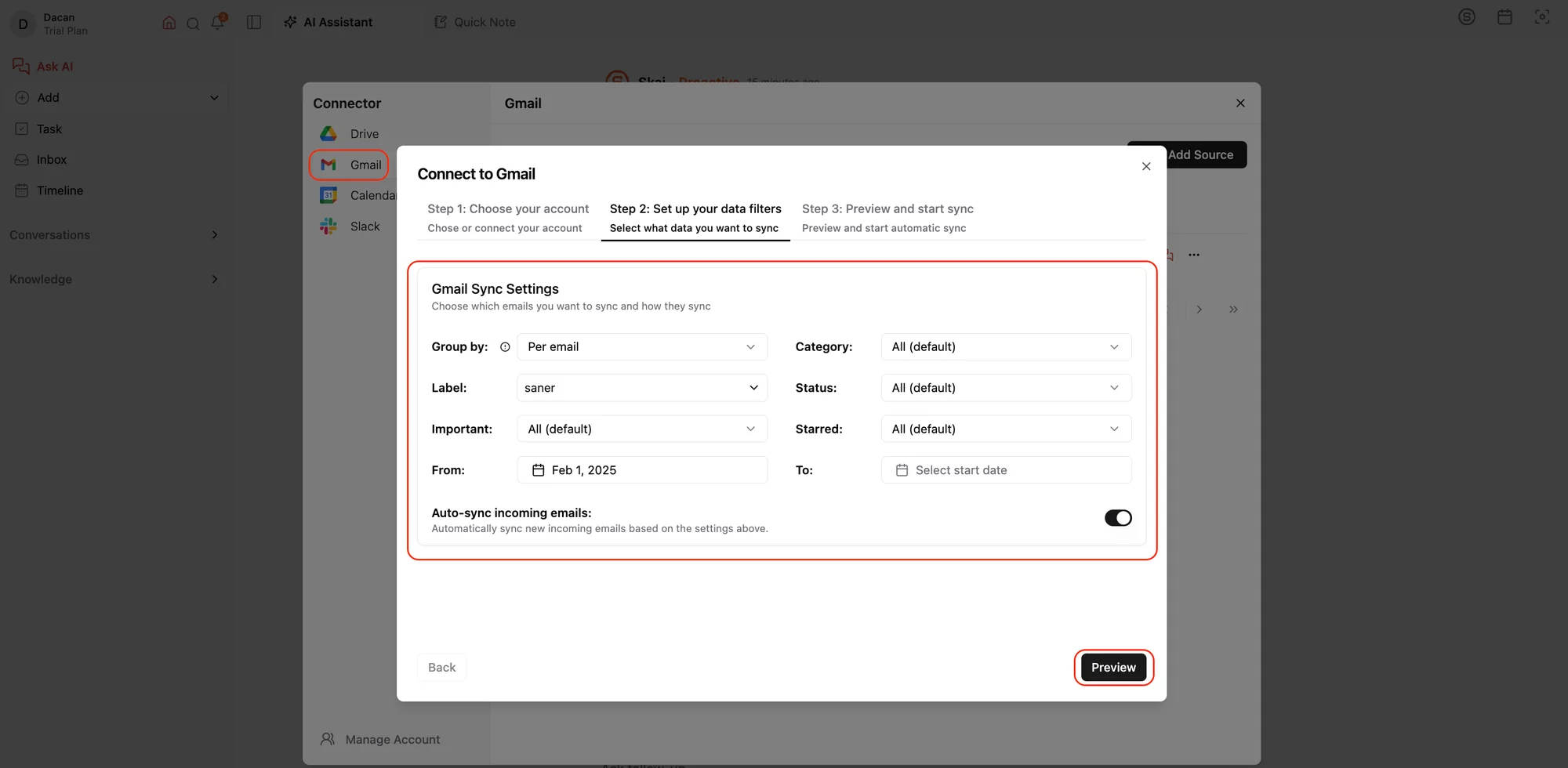
And the email side is narrower than the marketing implies. Connecting Gmail is not "connect your inbox", it is "choose a label":
I want to be fair about this, because the read-only design is defensible. An assistant that silently edits your notes and fires off emails is how you get a very fast, very confident mistake. We learned that the hard way on the support side: the whole reason our own AI agents route low-confidence answers to a draft instead of sending them is that we watched confident-sounding automation get things wrong in front of real customers. It is the same reason we train on past tickets before anything goes live. Saner's "you apply it" gate is the same instinct.
The problem is that the marketing sells a Jarvis and the architecture ships a librarian, and users find out at the point of payment.
What people actually say
The r/PKMS thread literally titled "saner ai alternatives" is the clearest artefact. The original poster is not angry, just deflated:
"I've started using Saner AI and I'm a bit disappointed - it is pretty slow at joining the dots, and also it can't change notes that it's created... which means that instead of discussing with the AI and it keeping my to do list and knowledge system up-to-date it just falls short."

Others in the thread land on the same point, one of them after paying:
"Yeah it sort of rendered it a bit pointless for me. Unfortunately only realised after I paid for a month."
There is a second, sharper complaint that gets less attention: you burn your paid message quota learning what the tool cannot do. One paying user with ADHD wrote a long post-mortem that ends with the best line in the whole corpus:
"Saner.ai is like a half baked cake that has potential to be amazing and delicious but right now it's just hot slimy mush in the oven."
To be balanced, the founder responds to this criticism in-thread rather than ignoring it, and plenty of Product Hunt reviewers describe exactly the workflow Saner is aiming at:
"I used to use Notion, Google Docs, and Obsidian. But now it is Saner.AI. The app helps me to do all of the things I hate to do when writing/storing information."
One caution before you go reading reviews yourself. There is a public accusation on r/ProductivityApps that some Reddit accounts recommending Saner are the company's own, which is an unverified user allegation rather than a proven fact, but it is worth knowing when you weigh the positive threads.
The rating spread is the real signal
Here is the thing that surprised me most. Depending on which door you walk in, Saner.AI is either one of the best products you will use this year or one of the worst.
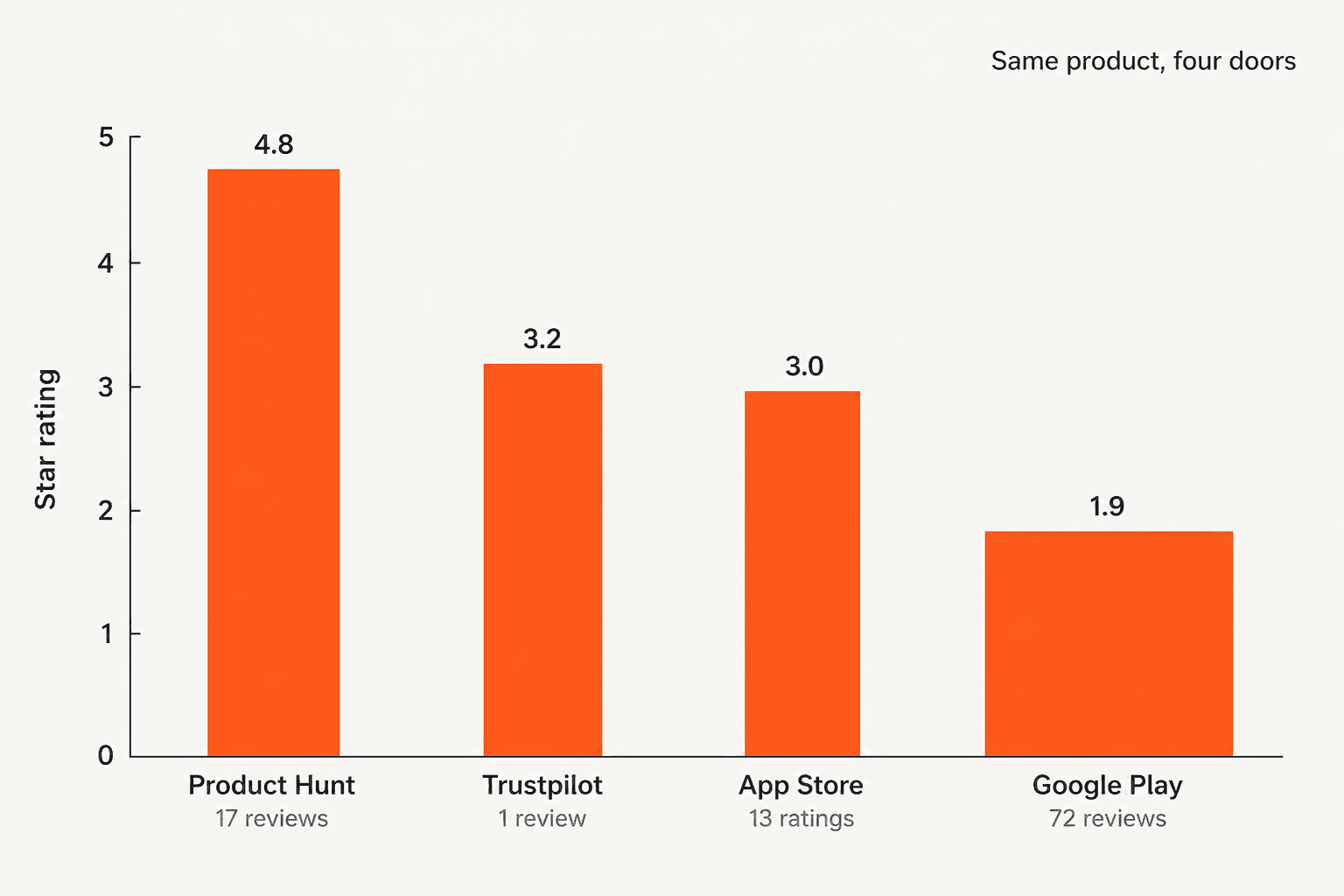
The 4.8 on Product Hunt is 17 reviews from an early-adopter crowd. The 1.9 on Google Play is 72, and it is the largest sample of the four. The App Store sits at 3.0 from 13 ratings, and Trustpilot's 3.2 comes from a single review on a profile that is miscategorised as a psychology practice in Anguilla. G2 has none at all, and its seller blurb mistakenly describes the company as a cybersecurity vendor.
One trap while you are comparison shopping: the 4.5-star, 29-review "Saner" listing you will find on Capterra is Saner CVEM, SecPod's vulnerability management product. Different company entirely.
The Android reviews are specific rather than vague, which is what makes them credible:
"Too slow, not organizing like I expected it to. This morning I asked it to add 2 or 3 more important tasks to my list for this morning and it's still 'thinking' 7 minutes later."
None of this makes Saner.AI a bad product. It makes it a young one, still labelled beta, doing three hard jobs at once with a small team. That is exactly why the fix is usually to stop asking one tool to do all three.
What Saner.AI actually costs
Worth pinning down before you compare, because the pricing page defaults to the yearly toggle and the headline number is the annual one.
| Plan | Billed monthly | Billed yearly | AI messages | AI requests | Notes | Storage | PDF per file |
|---|---|---|---|---|---|---|---|
| Free | $0 | $0 | 30/month | 30/month | 100 | 100 MB | 1 MB |
| Starter | $12 | $8/mo | 30/day | 30/day | 1,000 | 5 GB | 5 MB |
| Standard | $20 | $16/mo | Unlimited* | 100/day | Unlimited | 100 GB | 10 MB |
*The asterisk is Saner's own: "Usage must be reasonable and comply with our policies."
Three things the table hides. First, the metering unit flips between Free and paid, from per month to per day, which makes Free far tighter than it looks. Second, external AI models such as GPT and Claude are billed separately per token on top of the subscription, or you bring your own key, so the subscription is not your total cost. Third, the site's "−20%" annual label is only true for Standard: Starter drops from $12 to $8, which is 33%.
Notably, the paywall is a volume wall, not a feature wall. Connectors, OCR, the Chrome extension, the task system and the mobile app are all on Free. You are paying for headroom, not capability, which is unusual next to most AI assistant pricing.
How I picked these ten
I read every vendor's own pricing page, help centre and docs rather than their marketing copy, and where prices were rendered client-side I pulled them out of the page bundles so the figures below are exact rather than approximated from a review site. I then weighted for three things:
- Does it fix a specific Saner job, rather than being another all-in-one that will hit the same wall.
- Is the price real and published, with the billing unit named. Quote-gated tools did not make it.
- Do actual users name it when Saner comes up in r/PKMS and r/ProductivityApps threads, rather than only appearing in affiliate roundups. The same filter we use when we build any AI tools comparison.
One naming note that trips people up: tana.inc is no longer the outliner. Tana split into an agentic meeting platform at tana.inc and the supertags outliner at outliner.tana.inc. Everything written about "Tana the note tool" refers to the second one, which is what I have covered.
The 10 best Saner.AI alternatives in 2026, at a glance
| Tool | Best for | Entry price | Free tier | Notes | Calendar | Writes back? | AI model | Platforms | Team plan | |
|---|---|---|---|---|---|---|---|---|---|---|
| Obsidian | Owning your files | Free | Yes, unlimited | Yes | No | No | Via agent CLI | None first-party | Mac, Win, Linux, iOS, Android | $50/user/yr commercial |
| Reflect | Fast private capture | $10/mo yearly | No, 14-day trial | Yes | No | Read only | No | GPT-4 + Whisper | Web, iOS, Chrome, Safari | No |
| Tana Outliner | Structured knowledge | Free, $8/mo yearly | Yes, 500 credits | Yes | No | Yes | Within Tana | Credit-metered | Web, desktop, mobile | No |
| mymind | Zero-effort recall | $4.99/mo | No | Capture only | No | No | No | Auto-tagging | Extension, iOS, Android | No, by design |
| Notion | Shared workspace | Free, $10/member/mo | Yes | Yes | Gmail connector | Yes | Yes, via agents | Claude, GPT, Gemini, Grok | All | Yes |
| Mem | Proactive assistant | Free, $12/mo | Yes, 25 notes/mo | Yes | Yes | Yes | Yes on Proactive | Undisclosed | Web, iOS | No, removed |
| Reclaim.ai | Defending focus time | Free, $10/mo yearly | Yes | No | No | Google + Outlook | Yes | AI Agents meter | Web, mobile | Yes, per seat |
| Motion | Auto-scheduling | $29/mo yearly solo | No | Yes | Gmail, Outlook | Yes | Yes | OpenAI + Anthropic | iOS, Android, desktop, web | Yes, $19/seat yearly |
| Sunsama | Deliberate planning | $17/mo yearly | No, 14-day trial | Light | Gmail | Yes | Yes | Bundled, no meter | Web, desktop | Per seat |
| Akiflow | Task consolidation | $19/mo yearly | No, 7-day trial | Light | Gmail | Google + Outlook | Yes, on 4 tools | Light AI | Mac, Win, iOS, Android, web | Sales-gated |
Prices are the cheapest published paid entry point per tool, in USD, checked 17 August 2026.
1. Obsidian: best for owning your data outright
Best for: anyone whose actual complaint was that an AI could not edit their notes.
What it does
Obsidian stores every note as a plain markdown file on your own disk. No database, no proprietary format, no account required. The company publishes an exact number for its ecosystem, which most vendors will not: 6,706 community plugins and 696 themes.
Here is the part that matters for this post, and it is counterintuitive. Obsidian ships no first-party AI at all. The word does not appear on its homepage, pricing, sync or download pages. And in 2026 that turned out to be a feature, because the top-voted answer on r/ChatGPTPro to "What's the best AI second brain?" is not a product:
"Move your notes to Obsidian, then fire up a local AI model inside a CLI tool like Mistral Vibe or Claude code right at the root of your vault. I just switched to this and am really enjoying it."
Because the notes are files, an agent with filesystem access can actually rewrite them, which is the precise thing Saner cannot do. Community plugins like Vault Assistant and Claudian wire this up inside the app if you would rather not live in a terminal, and there is a healthy field of open-source AI agents to point at a vault.
Pros
- Free for personal use, work included. The commercial licence is explicitly voluntary.
- Files outlive the app. Markdown on disk is not a lock-in story.
- Every platform: Mac, Windows, Linux, iOS, Android, plus a headless server build. v1.13.7 shipped 12 August 2026.
Cons
- You bring the AI, the key and the setup. There is no out-of-box assistant.
- Sync's cheaper tier is thinner than the homepage suggests, see below.
- It will not read your email or touch your calendar, ever.
Pricing
| Product | Monthly | Yearly | What you get |
|---|---|---|---|
| Obsidian app | Free | Free | No sign-up, personal and work use |
| Sync Standard | $5 | $4/mo | 1 vault, 1 GB, 5 MB max file, 1 month history |
| Sync Plus | $10 | $8/mo | 10 vaults, 10 GB (to 100 GB), 200 MB files, 12 month history |
| Publish | $10 | $8/mo per site | Public site hosting |
| Commercial | n/a | $50/user/yr | Voluntary, for business use |
One trap: the homepage advertises "one year of version history" as a flat Sync benefit. That is the Plus figure. Standard gives you one month. There is a 40% education and nonprofit discount and a 7-day refund window on Sync and Publish.
Our take: if the thing that broke was "the AI created a note and then abandoned it", this is the honest answer, and it costs nothing to test. Skip it if you want something that works the day you install it, because assembling the AI layer is a weekend, not an afternoon. Worth reading alongside our Obsidian pricing breakdown, a wider list of Obsidian alternatives, or the Evernote vs Obsidian head-to-head if you are still picking a base app.
2. Reflect: best for fast, private notes with AI on top
Best for: the person who wanted Saner's quick capture without the beta feel.
What it does
Reflect is a networked note-taker with backlinks, built for speed. It is one of the few tools in this roundup that names its models outright rather than saying "powered by AI": GPT-4 for text, Whisper for speech. There is no model picker and no bring-your-own-key.
Its headline claim is end-to-end encryption, phrased as "No one else can read them (not even us)", paired with export and an API so you are not trapped. Integrations are Zapier, Readwise, Google or Outlook, Chrome and Safari extensions, plus Kindle sync.
One precision point that matters if you are replacing Saner's email handling: the Google and Outlook integration is contacts and calendar, not your mailbox. Reflect does not read your inbox.
Pros
- Very fast, which is the whole pitch and the thing ADHD users mention most. Its semantic search is the part people keep.
- Whisper transcription is first-class rather than bolted on, good if you think out loud.
- End-to-end encryption is rare in this category.
Cons
- No free tier at all, and no month-to-month option published.
- No Android app anywhere on the site. iOS only.
- No SOC 2, ISO 27001, GDPR or HIPAA badge published despite the encryption claim.
- Whether AI is included in the $10 is not clear: it is not listed among the plan's features despite the "our AI integration just landed" banner.
Pricing
One plan, $10/month billed annually, with a 14-day trial. Reflect does not print an annual total. No usage caps, token allowances or transcription limits are published anywhere, which is either generous or unspecified depending on your temperament.
Our take: the best pick if speed and privacy were what you actually wanted, and you accept it is a notes app rather than an assistant. Skip it if you are on Android or you need to try before you pay.
3. Tana Outliner: best for structure the AI can reason over
Best for: people who suspect their notes were too unstructured for any AI to help with.
What it does
Remember the naming split: Tana Outliner is the supertags product, while tana.inc is now an agentic meeting platform. Tana's own copy confirms that anything written about "Tana the PKM app" means the outliner.
Everything in Tana is a node, and supertags turn nodes into typed objects with fields. Tag something #book and it inherits an author field, a status field, whatever you defined. Voice Memos capture speech and route it into that structure automatically.
The trade-off is honest and worth stating plainly: you author the structure, Tana automates the capture. You write the supertags, the fields, the search nodes, the per-supertag AI instructions and the agent prompts. Tana handles transcription, routing and field autofill. The voice memo flow makes it clearest, because step two asks you to choose a destination supertag before you start speaking.
Pros
- The most powerful AI-over-your-own-data setup here, because the data is typed.
- Free tier is real: 500 AI credits, no waitlist, self-serve signup.
- Calendar and meeting notes are native rather than an add-on, including conversation summarisation.
Cons
- The steepest learning curve of the ten, and Tana's own site never acknowledges it. Every admission of difficulty is routed through a testimonial.
- No team or enterprise tier on the outliner.
- SOC 2 and HIPAA are not held, both footnoted as "in progress, expected Q3 2026". GDPR only.
- Tana's FAQ and its pricing cards disagree on image-generation counts.
Pricing
| Plan | Monthly | Yearly | AI credits |
|---|---|---|---|
| Free | $0 | $0 | 500 |
| Plus | $10 | $8/mo | 2,000 |
| Pro | $18 | $14/mo | 5,000 |
Our take: if Saner's semantic search impressed you but its output felt shapeless, this is the upgrade. Skip it if you were drawn to Saner because it required no setup, since Tana is the opposite bet.
4. mymind: best for capture with zero organising
Best for: the reader whose real diagnosis is that every organising system eventually becomes another chore.
What it does
mymind is the most philosophically committed product in this roundup. The positioning line is "Remember everything. Organize nothing," and it means it: "You don't need to file it, label or even tag it". You save images, articles, quotes, products, colours and notes; the AI tags and categorises them; you search.
Its manifesto lists what it promises never to build, and collaboration is on that list alongside social features, vanity metrics and ads. There is no multi-seat purchase path anywhere.
Be clear about the scope before you switch: mymind does nothing with email or calendar. The nearest thing is a right-click Text Clipping that copies from a page already on your screen. It has no inbound channel, no reminders and no due dates. A mymind API shipped in 2026, the first programmatic surface the product has had. If you want the recall without the price, our Evernote alternatives list covers the cheaper end.
Pros
- The lowest-friction capture in the category, full stop.
- A hard privacy stance, no tracking, no ads.
- Only one published usage limit in the whole product (500 MB per video on Mastermind), so no credit anxiety.
Cons
- Replaces roughly a third of Saner. No tasks, no email, no calendar.
- No free tier. Every plan is paid, and the "sign up for free" button does not correspond to a published trial length.
- "Student of Life" is not verified student pricing; there is no .edu gate, so it is really just the cheaper AI tier.
Pricing
| Plan | Monthly | Yearly | Notes |
|---|---|---|---|
| The Bookmarker | $4.99 | Monthly only | "No fancy AI features" |
| Student of Life | $7.99 | $79/yr | Full AI |
| Mastermind | $12.99 | $129/yr | 500 MB per video |
| Newton | n/a | $299/yr | Priced but not purchasable yet |
Our take: the sharpest pick if Saner's value to you was "throw it in, find it later" and everything else was noise. Skip it if you needed the calendar or the inbox, because it will not touch either.
5. Notion: best if your notes are becoming your team's notes
Best for: the moment other people start needing to read what you wrote.
What it does
Notion needs less introduction than the rest. What has changed is that Notion AI is now five shipping features rather than a writing toy: Notion Agent, Custom Agents that run on a schedule or trigger, Enterprise Search, AI Meeting Notes and Research Mode.
Its connector list is the widest here, and worth reading next to our Notion AI breakdown: Slack, Google Drive, Gmail, GitHub, Jira, Linear, Microsoft Teams, SharePoint, Outlook, Google Calendar, Notion Mail and Notion Calendar, with Box, Salesforce and Asana in beta. Two caveats. Connecting any third-party app requires Business or Enterprise. And Slack is the only connector that can act, posting, replying and reacting, which makes Notion less write-capable than its agent branding suggests. Notion names its models in its own docs: Claude Fable 5 on Business and Enterprise, Claude Sonnet 5, current GPT models, Gemini and Grok.
The real cost is setup. Notion AI's quality is downstream of how well you already structured Notion, and Custom Agents "use your existing docs and databases as context". There is no ingestion of past conversations and no dry-run mode, so tuning an agent is hand-written instructions plus iteration. Our Notion review goes further on where that bites.
Pros
- The only pick here that scales from one person to a company without a migration.
- AI is bundled into Business and Enterprise rather than sold as a separate seat.
- The broadest connector coverage in this list.
Cons
- The setup tax is real, and it is the exact opposite of Saner's "no learning curve" pitch.
- A second meter sits on top of the subscription: Notion credits at $10 per 1,000 monthly credits, Business and Enterprise only. Run dry and your agents auto-pause.
- There is no "unlimited". Business and Enterprise carry usage allowances across a six-hour rolling window and a monthly one, and Notion deliberately does not publish their size.
- Zero data retention and HIPAA are Enterprise-only. Business sits on 30-day LLM-provider retention, same as Free.
Pricing
| Plan | Price (annual billing) | AI |
|---|---|---|
| Free | $0 | Limited complimentary responses |
| Plus | $10/member/mo | Limited complimentary responses |
| Business | $20/member/mo | Notion AI included, credits available |
| Enterprise | Custom | Adds ZDR, HIPAA, Enterprise Search |
Those are annual-billed rates. Notion does not publish its monthly figures in plain text on the pricing page. For a fuller breakdown, see our Notion pricing analysis and the Notion AI review, or a wider set of Notion alternatives.
Our take: the right call if your second brain has quietly become a team resource. Skip it if you left Notion for Saner because the structure was the problem, because it will be the problem again.
6. Mem: best for an assistant that comes to you first
Best for: people whose complaint was that Saner waits to be asked.
What it does
Check your assumptions here, because Mem has repositioned hard. It is no longer sold as an AI note-taking app. The homepage H1 is now "Your AI chief of staff", and the product splits into Mem Workspace (the notes half) and Mem Agent (a proactive assistant). Its own help centre still uses the older "AI Thought Partner" line, which tells you how recent the pivot is.
The tiering is behavioural rather than volumetric, and this is the cleanest answer in the roundup to Saner's read-only gap. Per Mem's own sub-headline, the agent on every tier "answers when you ask". Only Proactive's "comes to you": unprompted reminders, catching commitments you did not track, and the agent reaching you in Slack, iMessage or WhatsApp.
Pros
- The only tool here that will contact you first without being asked.
- Free tier lets you evaluate the real thing, 25 notes and 25 agent messages a month, which is more than most AI business assistants offer.
- 7-day trial on Proactive plus a 30-day money-back guarantee.
Cons
- The proactive behaviour is $99/month, roughly six times Saner's Standard tier.
- Pro caps the agent at 250 messages a month, and "unlimited" there covers notes and templates, not conversation. No overage price is published.
- Google-only login, no SSO, no email and password.
- No Android app and no published timeline. Not end-to-end encrypted, which Mem states plainly. No compliance certifications published.
- The Teams and per-seat plan has been removed entirely. No annual pricing is published anywhere.
Pricing
| Plan | Price | Caps |
|---|---|---|
| Free | $0 | 25 notes, 25 agent messages, 25 PDF pages per month |
| Mem Pro | $12/mo | 250 agent messages/month, unlimited notes |
| Mem Proactive | $99/mo | Adds unprompted agent in Slack, iMessage, WhatsApp |
Third-party pages still quoting "$8.33/mo billed yearly", "$15/mo" or a Teams plan are out of date.
Our take: the honest upgrade path if you wanted an assistant rather than a search box, priced accordingly. Note that one Reddit user in 2024 called it buggy, so use the free tier before the $99 tier.
7. Reclaim.ai: best free calendar defence
Best for: the reader whose only real loss was Saner's calendar view.
What it does
Reclaim.ai is now "Reclaim.ai from Dropbox" following its acquisition announced August 2024, but it is still sold standalone with self-serve signup and four live tiers. The H1 is "#1 AI calendar for work."
It does the thing Saner cannot: it writes to your calendar. It defends focus time, auto-schedules recurring habits, adds buffer time around meetings and reschedules automatically when something moves. Both Google and Outlook are supported on every tier including free, which is more than several paid tools here manage.
Nice touch worth flagging: Reclaim publishes a machine-readable pricing file explicitly labelled for AI agents, stamped with a last-updated date. More vendors should do this.
Pros
- The free Lite tier is usable on its own rather than a demo.
- 600,000+ users and 70,000 companies, 4.8 on G2.
- Google and Outlook on every tier, plus a decent AI scheduling assistant on the free plan.
Cons
- Calendar only. It does nothing with your notes, which is two thirds of what Saner did.
- Two meters to watch: AI Agents per seat, and Attendee Users for 3+ person Smart Meetings, with add-on packs from $8 to $72/month.
- Free is capped at a one-week scheduling horizon and limited integrations. Todoist, Asana, ClickUp, Jira and Linear start at Starter; only Google Tasks is on Lite.
Pricing
| Plan | Yearly | Monthly | AI Agents |
|---|---|---|---|
| Lite | Free | Free | 5 |
| Starter | $10 | $12 | 10/seat |
| Business | $15 | $18 | 100/seat |
| Enterprise | $22 | Not available | Unlimited |
Our take: the best value in this entire roundup if calendar was the job. Skip it if what you actually miss is the note recall, because Reclaim has none. Compare against the field in our AI scheduling assistants roundup.
8. Motion: best for rebuilding the day automatically
Best for: people who never finish the plan they made this morning.
What it does
Motion sells auto-scheduling. Its signature framing is "Do Date ≠ Due Date": you tell it when work is due, it decides when you will actually do it, and rebuilds the schedule when you fall behind. Motion is explicit that this is an "optimization algorithm combined with AI", distinct from the LLM layer, and it names OpenAI and Anthropic as its model providers.
Integrations cover Gmail, Outlook, Slack, Zoom, Google Meet, Siri, HubSpot, Salesforce, Teams, Zapier and a public API, so it slots into most Slack AI setups. It runs on iOS, Android, desktop and web on both tiers.
I will note the honest counterweight, because it comes up repeatedly when Saner is discussed:
"Same opinion on Motion. Overwhelming and underwhelming."
Pros
- The most aggressive automation of the day here, and it does rewrite your calendar.
- Every AI capability ships on the entry tier. The Pro to Business gap is management features, not AI.
- SOC 2 Type 2 and GDPR.
Cons
- The advertised $19 is Teams, annual, per seat. A solo user paying monthly pays $49, which is 2.6x the headline.
- AI credits are a real meter: 7,500/seat/month on Pro AI with 25 cents per 100 credits overage. Motion's own tooltip puts a typical workflow at around 5 credits.
- No free plan, and no trial length is published anywhere on the site.
- Its outcome claims (137% more work, 32% faster projects) carry no methodology.
Pricing
| Plan | Individuals monthly | Individuals annual | Teams monthly | Teams annual |
|---|---|---|---|---|
| Pro AI | $49/mo | $29/mo | $29/seat | $19/seat |
| Business AI | $69/mo | $39/mo | $49/seat | $29/seat |
Our take: worth it if your calendar is the real bottleneck and you will use the automation daily. Skip it if you are price-sensitive, because the real solo entry point is $29/month annual, not $19.
9. Sunsama: best for the daily planning ritual
Best for: the reader who did not need more automation, they needed a stopping point.
What it does
Sunsama is the anti-Motion. Where Motion schedules for you, Sunsama walks you through planning the day yourself, then makes you close it. The hero line is "Start Calm. Stay Focused. End Confident," and the shutdown is a real booked calendar block rather than a suggestion.
It pulls tasks from an unusually long list: Asana, Trello, Jira, Todoist, Gmail, Notion, Linear, ClickUp, GitHub, Monday, Google Tasks, Microsoft To Do, Slack, Teams, Outlook and Zapier. If those are your tools, our Asana alternatives roundup is useful company. AI is barely mentioned on the homepage despite a Wirecutter "Best AI scheduling app" badge; the real commitment is a pricing bullet reading "AI + MCP + Zapier", included in base Pro with no add-on and no usage meter.
Pros
- The ritual is the product, and for ADHD readers a forced daily stop is often more useful than more automation.
- No AI usage meter at all, which is increasingly rare.
- 14-day trial with full feature access and no credit card up front.
- SOC 2 is not Enterprise-gated.
Cons
- The most expensive per-seat entry here after Motion, at $204/year.
- No free tier, and Sunsama says it will never build one.
- Its own pricing page contradicts itself: the plan card says $22/$17 while the FAQ lower on the same page still says $25/$20.
- Platform availability is not stated on either page. Web is confirmed; a desktop client is implied but not named.
Pricing
Pro: $22/month billed monthly, $17/month billed yearly ($204/year), per seat. Enterprise is quote-only by email and gates SSO, SAML, SCIM and audit logs. Seats auto-add and prorate; there is no volume discount.
Our take: the pick if your problem was decision fatigue rather than capability. Skip it if you want the AI to make the calls, because Sunsama deliberately makes you make them.
10. Akiflow: best for one inbox across every tool
Best for: people whose tasks live in six places and keep falling between them.
What it does
Akiflow consolidates tasks from every tool you use into one inbox, then makes you time-block them onto a calendar. It is keyboard-first, built around a command bar, and it is the tool a paying Saner user in r/PKMS actually moved to.
Here is why it belongs in this list specifically. Akiflow really does write back, which is the exact gap Saner leaves. For Todoist, Jira, Asana and Notion, the title, planned date, deadline and done status all propagate to the source. Tick something off in Akiflow and you get a popup offering to mark it complete in Todoist as well, and it remembers your choice. Notion goes deepest, with configurable rules in both directions on a 5-minute sync.
Two honest limits on that, both documented rather than hidden. Slack is read-in only: Akiflow states that "due to April 23 Slack API change, Akiflow can't remove messages from the Later section for you," so it cannot clear a saved Slack message on your behalf. And deletion never propagates on any connector, with five separate help articles using near-identical wording: nothing happens to the source task.
The integration count is understated rather than inflated, which is unusual. The homepage says "10+ Native Integrations" while the integrations page lists 16 plus Zapier and IFTTT. All of them are task, calendar, chat or issue trackers. There is no CRM and no helpdesk, and only two calendar backends, Google and Outlook. For the ClickUp crowd specifically, our ClickUp AI alternatives list is closer to the mark.
Pros
- Real two-way sync on four major task tools, not just a mirrored view.
- Keyboard-driven capture through a command bar, which keeps friction near zero.
- Proper desktop apps rather than a browser tab.
Cons
- The most expensive entry point in this roundup at $34/month if you pay monthly.
- No free tier at all. A 7-day trial is the only way in.
- No Linux build. macOS and Windows only, and both mobile apps are gated behind "please download the desktop app first."
- It is a task and calendar tool, not a knowledge base. Your notes are not the point here.
- The site contradicts itself on scale, claiming "100.000+" users on the homepage and "10.000+" elsewhere, so treat either figure with caution.
Pricing
| Plan | Price | Notes |
|---|---|---|
| Pro, monthly | $34/mo | Feature-identical to yearly |
| Pro, yearly | $19/mo billed yearly | Badged "Save 44% yearly" |
Watch for a client-side coupon overlay advertising $16 on a countdown timer. The standing yearly rate is $19, which is the figure Akiflow's own ROI calculator uses. Team pricing is a Calendly booking rather than a published number, and the student discount is email-gated.
Our take: the practical choice if the specific failure was tasks going stale across tools, and the only pick here that closes Saner's write-back gap on your existing stack. Skip it if you want to try before paying, or if you are on Linux. One user who left Saner put it plainly:
"I'm using Akiflow now and it's way better. More expensive but have not had any frustrating experiences, was super intuitive for me to pick up and I think it's worth the $."
What the market actually looks like now
Line up the entry prices and something becomes obvious that no single product page will tell you.
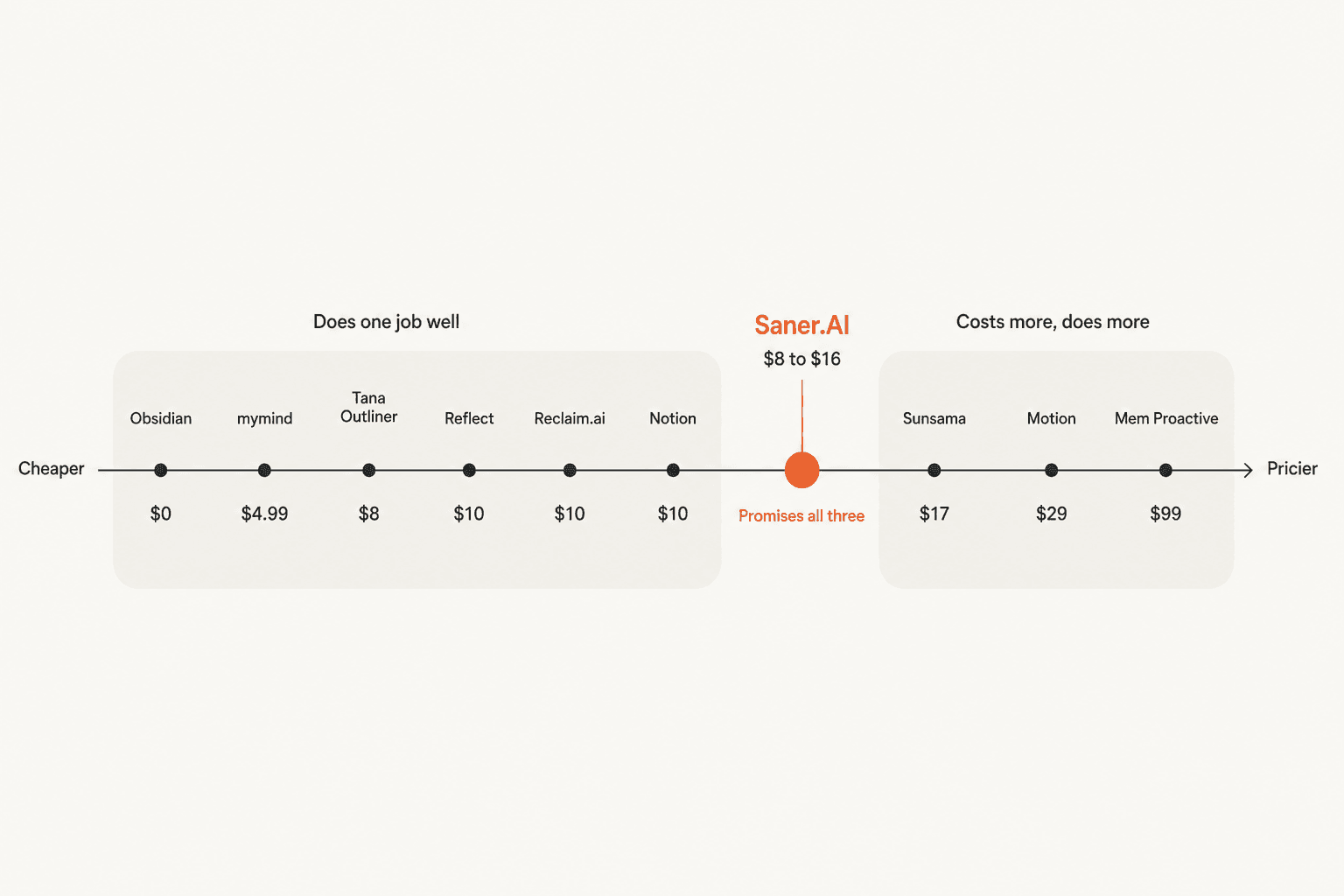
There are two clusters and a gap. On the left, tools that do one job and charge $0 to $10 for it. On the right, tools that cost $17 to $99 because they are trying to act on your behalf, and the closer you get to genuine autonomy the steeper it gets. Saner sits in the thin middle, charging $8 to $16 while promising all three jobs.
That is a hard place to stand. It also explains the review spread: at $8 the expectations are modest, and at $16 people expect the assistant the marketing described.
The second thing worth naming is the one nobody sells you. In the r/PKMS thread, the top-voted reply to "is something like that out there, or is it too much to ask?" was four words:
"As of 2025, it's too much to ask."
And the person who had done the shopping agreed:
"After researching a dozen options, this was my conclusion too. Absolutely baffling because if you take the marketing at face value, you'd think that AI was capable of this with both hands tied behind its back."
I think they are right about consumer products, and I would rather say so than sell you a tenth tool that does not exist yet. The closest anyone gets today is Obsidian plus an agent with filesystem access, and Mem Proactive at $99. Everything else is a very good tool for one third of the problem, and buying it deliberately as one third is how you stop being disappointed. The same pattern shows up in every AI agents roundup we run.
Where this stops being a notes problem
There is one failure mode none of these tools fix, and it is worth checking whether it is yours.
At eesel we have spent years putting AI on live support queues, and the request I hear most often has nothing to do with note-taking software. A French IT services firm running about 3,000 tickets a month told us their two most senior agents were leaving that year, and they wanted to capture what those people knew before they walked out the door. That is the same instinct behind every second brain, aimed at the wrong container. The knowledge was not in anyone's notes app. It was in years of resolved tickets and in two people's heads.
If the questions your notes answer are increasingly other people's questions, a personal assistant is the wrong shape no matter how good it is. You need an internal knowledge base with permissions and an audit trail, plus something that can actually reply. The case for an AI knowledge base starts where personal notes end. That is a different product category, and none of the ten tools above are built for it.
Try eesel
I will be straight about the boundary: eesel is not a personal second brain. If you want an AI that organises your own notes and defends your own calendar, buy one of the ten above and ignore this section.
But if your notes have turned into your team's knowledge, and the same questions keep landing in a shared inbox, that is the exact problem eesel was built for. It learns from your existing help docs and your past resolved tickets rather than asking you to build a knowledge base first, and it does the thing Saner deliberately does not: it drafts and sends real replies, with confidence-based routing so the ones it is unsure about come to a human instead. You can simulate it against your historical tickets before it touches anything live, which is the closest thing to a dry run that exists in this space.

Gridwise saw it resolve 73% of tier-1 requests in the first month, with results showing inside a 7-day trial. Pricing is usage-based at $0.40 per ticket, with no per-seat fee and no platform fee, so a quiet month costs you less rather than the same.
Try eesel free.
If you would rather read first, start with how AI knowledge management differs from a personal notes app, then what it does for agent productivity.
The short version
If you take one thing from this: stop looking for a Saner.AI replacement and start looking for a replacement for the one job that broke.
- It would not maintain what it created → Obsidian with an agent CLI. Tana Outliner if you want typed structure.
- Tasks going stale across tools → Akiflow, the only pick here with real two-way sync.
- The calendar → Reclaim.ai, free tier first.
- Capture and recall → mymind if organising was the enemy. Reflect if raw speed was.
- You wanted it to act → Mem Proactive at $99/month, and go in knowing that is the price of proactive.
- It became a team thing → not a notes problem. See above.
And keep the free tiers in mind while you shop. Obsidian, Reclaim.ai, Notion, Tana Outliner and Mem all let you test the real product without a card, which is more than Saner's paid tiers give you once the per-day quotas kick in. Given how much of this category is still being figured out in public, paying last is a reasonable strategy. If the shortlist still feels wrong, widen it with our roundup of AI personal assistants.
Frequently Asked Questions
What are the best Saner.AI alternatives in 2026?
How much does Saner.AI cost?
Is there a free Saner.AI alternative?
Why can't Saner.AI edit the notes it creates?
What is the best AI second brain for ADHD?
What happens if I outgrow a personal AI assistant?
Is Saner.AI's 4.8 star rating accurate?
Which Saner.AI alternative is best for email?


Article by
Kurnia Kharisma
Kurnia is a software engineer and writer at eesel AI with two years of SEO experience, writing about AI tools, helpdesk software, and customer support. He pairs a developer's understanding of how these products are built with search-driven research into what actually ranks and resonates with the people searching for them.