


Kimi K3.1 Pro costs $2 per million input tokens and $10 per million output tokens on the Kimi API, with cached input at $0.20. The Highspeed version is exactly double at $4 / $20. If you would rather pay a flat fee, it is included on Kimi's plans from $19 a month (Plus) to $199 (Ultra), with Highspeed starting at the $39 Pro plan.
The sticker says it is a third cheaper than Kimi K3. The bill says otherwise: K3.1 Pro thinks and writes a lot, so an average agent task costs $2.11 against $2.00 for K3 on Artificial Analysis. You are paying about the same for a much better model, not less for the same one. Against Claude it is a real saving, at under half the per-task cost of Sonnet 5.5 or Opus 5.5 on max effort.
Two gotchas decide most bills: output and reasoning tokens make up most of the cost, and the subscription plans have a rolling 5-hour limit that early buyers hit in under an hour. If what you actually want is AI answering support tickets, I've spent years at eesel running AI on live helpdesk queues, and the token bill is the small line. SE Ranking handles about 4,650 conversations a month across three products on Zendesk without ever picking a model.
How much does Kimi K3.1 Pro cost on the API?
Kimi K3.1 Pro costs $2.00 input, $0.20 cached input and $10.00 output per million tokens on the Kimi API pricing page. Moonshot launched it on October 23, 2026 without any promotional rate, which means this looks to be the standard price and not some launch discount.
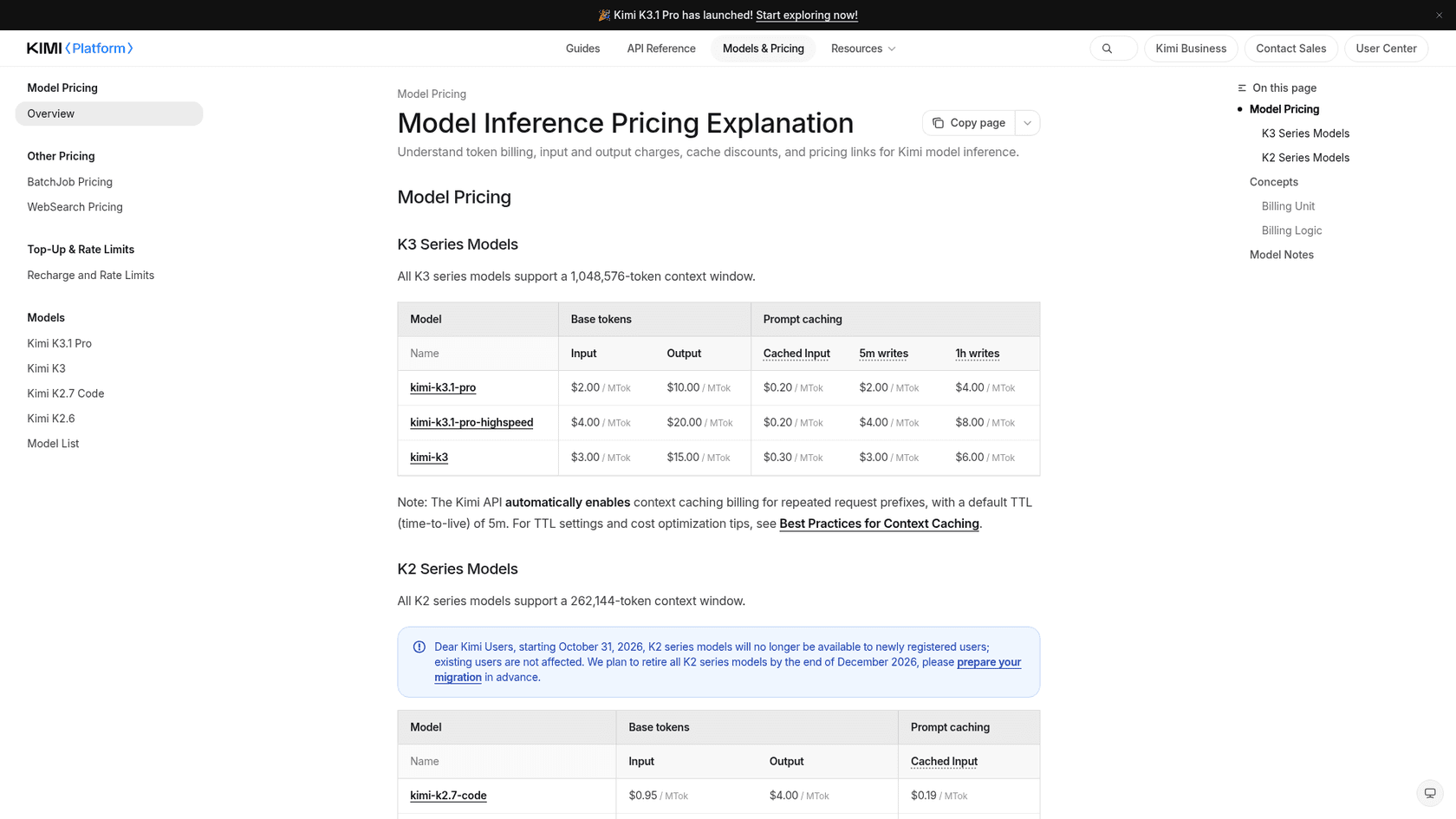
Here is the full rate card of the K3 series, per million tokens:
| Model ID | Input (cache miss) | Cached input (cache hit) | Output | Cache write, 5 min | Cache write, 1 hour |
|---|---|---|---|---|---|
kimi-k3.1-pro | $2.00 | $0.20 | $10.00 | $2.00 | $4.00 |
kimi-k3.1-pro-highspeed | $4.00 | $0.20 | $20.00 | $4.00 | $8.00 |
kimi-k3 | $3.00 | $0.30 | $15.00 | $3.00 | $6.00 |
A few things on that card are worth to slow down for:
- No long-context surcharge. Both K3.1 Pro models take a
1,048,576-token context, and the K3.1 Pro quickstart says it "uses flat pay-as-you-go pricing" with no tiering by context length. This matters a lot in case you feed it whole codebases. - The cache-hit price does not double on Highspeed. Everything else does double, but cached input stays at
$0.20, so if your requests reuse a long prompt then Highspeed ends up less than 2x the cost in practice. - K3 is still on sale at the old price.
kimi-k3stays at $3 / $15, and the docs now call it the "previous-generation flagship". I can't think of a new project where staying on the K3 makes sense, unless you need its open weights today.
What counts as a billable token?
Every token in and every token out, including reasoning. K3.1 Pro is a reasoning model with thinking always on, and reasoning_effort defaults to max per Moonshot's API key guide. Those thinking tokens are billed at the $10 output rate, even though you never get to see them in reply.
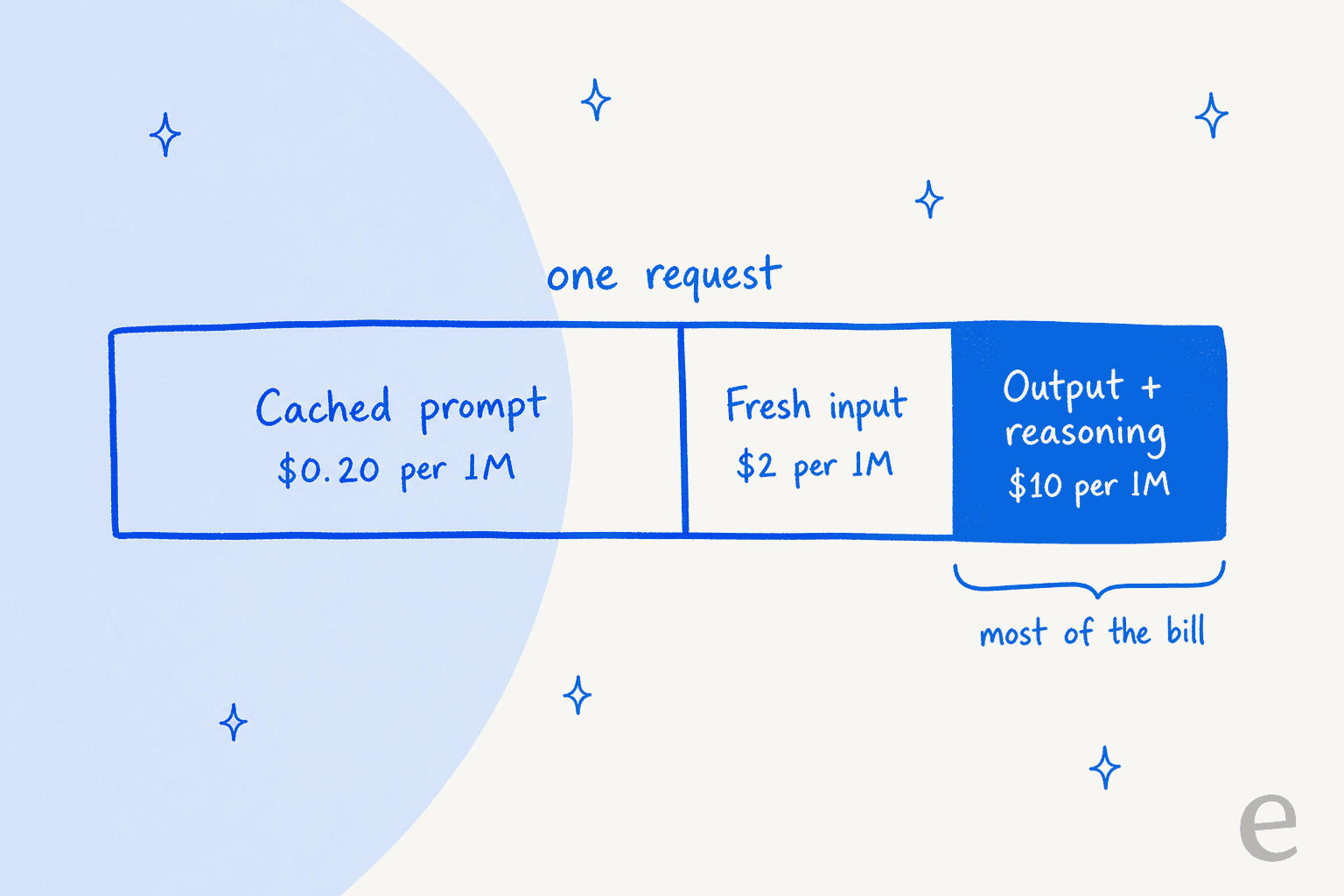
That is the single biggest lever in terms of your bill. On Artificial Analysis' benchmark runs, an average task produced 55,195 output tokens, of which 34,883 were reasoning (AA model page). At $10 per million, that comes to about 55 cents of output per task, and this is before you count a single input token.
How does Kimi's prompt caching work?
Caching happens automatically for repeated prompt prefixes, with a default 5-minute time-to-live. A cache hit costs $0.20, 90% less than fresh input. Writing to the cache gets billed separately, depending on how long you keep it: $2.00 per million for the 5-minute tier and $4.00 for the 1-hour tier, which you pick with prompt_cache_options.ttl (quickstart).
There are two details that trip people up. Partial cache blocks bill as cache misses, so a prompt that changes near the top loses most of its discount. The 1-hour tier also only pays off when traffic is too sparse for keeping a 5-minute cache warm, which for a busy agent means the default is usually the cheaper choice.
Rate limits depend on your top-up
K3.1 Pro unlocks after a successful top-up of at least $1, and your total top-ups set your rate-limit tier (Recharge and Rate Limits):
| Tier | Total top-ups | Concurrency | Requests/min | Tokens/min | Tokens/day |
|---|---|---|---|---|---|
| Tier0 | $1 | 1 | 3 | 500,000 | 1,500,000 |
| Tier1 | $10 | 15 | 100 | 2,000,000 | Unlimited |
| Tier2 | $20 | 40 | 100 | 3,000,000 | Unlimited |
| Tier3 | $100 | 50 | 200 | 3,000,000 | Unlimited |
| Tier4 | $1,000 | 60 | 200 | 4,000,000 | Unlimited |
| Tier5 | $3,000 | 100 | 300 | 5,000,000 | Unlimited |
The $1 tier is more of a test drive than a production setup. At 1,500,000 tokens a day, fewer than 30 average agent tasks would use it all up, but once you put in $10 the daily cap goes away. If you've wrestled with OpenAI rate limits before, this ladder will feel familiar, only the thresholds are much lower.
No batch discount yet
Kimi's Batch API charges 60% of the standard price, but it only supports kimi-k2.7-code and kimi-k2.6. K3.1 Pro is not on that list. Those K2 models close to new users on October 31, 2026 and retire by the end of December, which means overnight jobs that relied on Kimi K2.7 Code pricing are soon going to pay full K3.1 rates.
What does Kimi K3.1 Pro cost per task?
On Artificial Analysis, an average task on its Intelligence Index costs $2.11 with K3.1 Pro, and running the whole index cost $3,117 (AA model page). That's the number I'd anchor on, since it already has inside it the long reasoning that the per-token price hides.
AA rates K3.1 Pro "very verbose". It used about 150M output tokens to run the index against a median of 87M for models in its price group. So the third-off sticker shrinks quite fast once the model starts thinking.
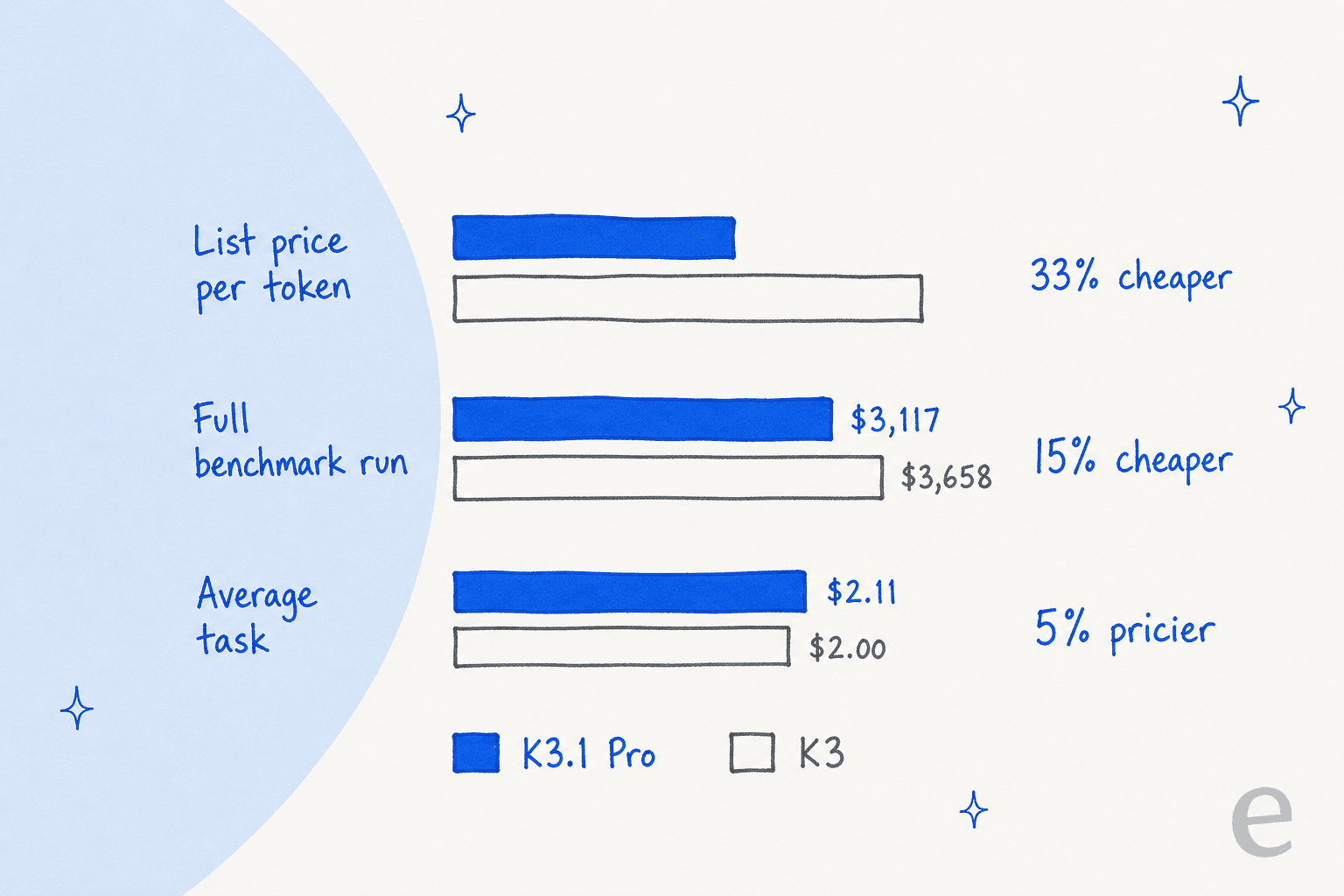
The three numbers don't contradict each other, they just measure different things. The full run is weighted toward the big tasks, which is where K3.1 Pro's efficiency gains show up. The average-task figure is a flat mean, where its extra writing on small tasks pulls it slightly above K3. Either way, the honest summary is that you get an 11.5-point smarter model for roughly the same money, not the same model for a third less.
Nathan Lambert, a researcher at Ai2, already called it on the launch day:
"K3.1 is also cheaper than K3 per token, but some benchmarks in the blog show it uses meaningfully more tokens per answer, so it may be about the same price."
How it compares with other frontier models
Here's how it lands against the models people are cross-shopping it with, all from the same Artificial Analysis page:
| Model | List price (in / out) | Intelligence Index | Cost per task | Cost to run the index | Output speed |
|---|---|---|---|---|---|
| Claude Opus 5.5 (Max) | $4 / $20 | 57.6 | $5.98 | $8,708 | 98.1 t/s |
| Claude Sonnet 5.5 (Max) | $2 / $10 | 56.0 | $5.46 | $7,260 | 141.3 t/s |
| Kimi K3.1 Pro | $2 / $10 | 55.1 | $2.11 | $3,117 | 49.7 t/s |
| Claude Fable 5.1 (Max) | $10 / $50 | 53.4 | $7.63 | $13,129 | 69.8 t/s |
| GPT-6 Astra (Max) | $10 / $50 | 52.7 | $3.26 | $5,324 | 66.7 t/s |
| Gemini 4 Argon (High) | $2 / $10 | 52.6 | $1.62 | $2,101 | 79.7 t/s |
| GPT-6.1 Sol (Max) | $2 / $10 | 51.8 | $0.72 | $1,082 | 65.9 t/s |
| DeepSeek V4.1 Flash 1017 (Max) | $0.30 / $1.20 | 45.1 | $0.26 | $445 | 169.3 t/s |
| Kimi K3 (Max) | $3 / $15 | 43.6 | $2.00 | $3,658 | 54.5 t/s |
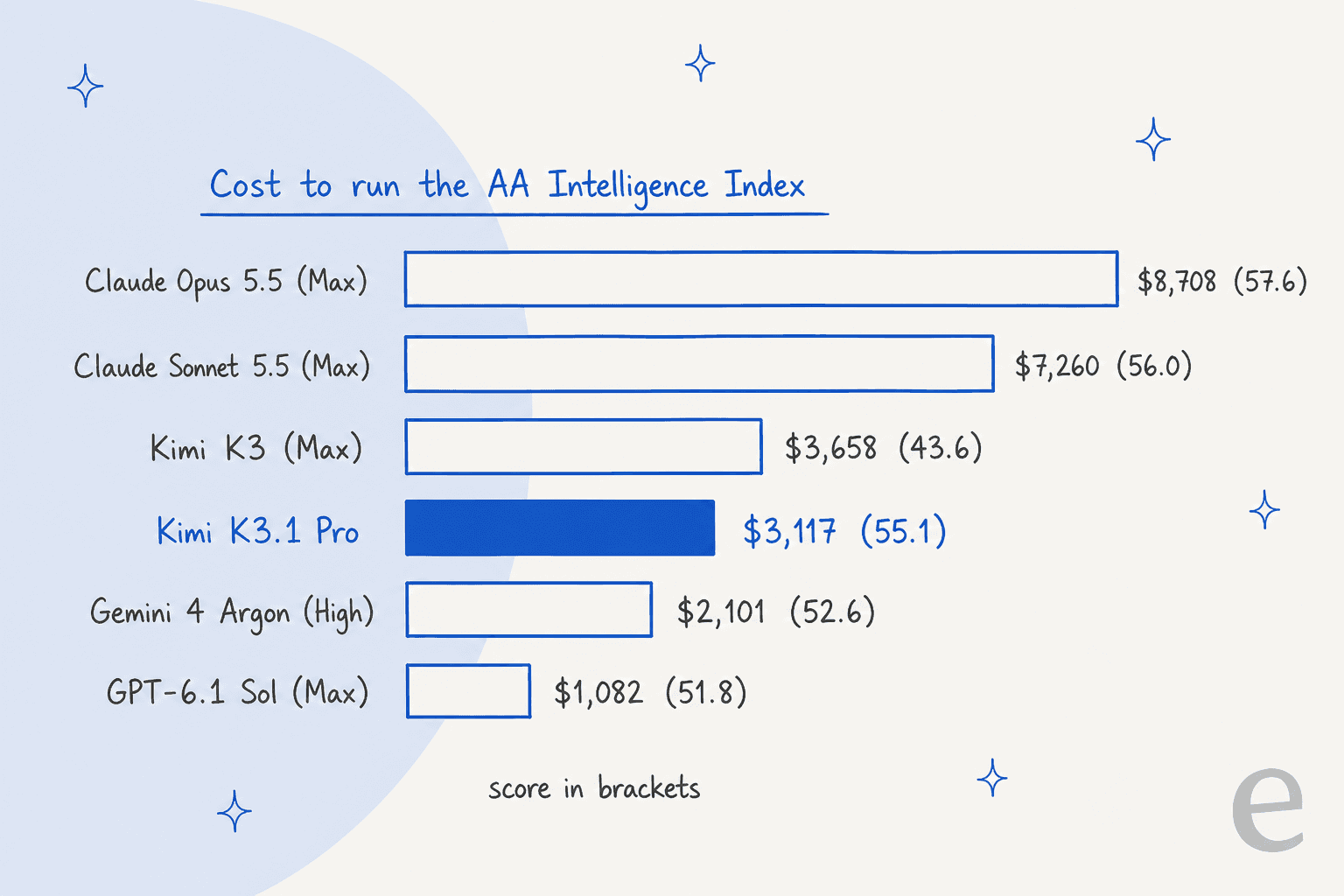
My read on that table:
- Against Claude, it's the clear value pick. It has the same sticker as Sonnet 5.5, but Sonnet at max effort burned
416Moutput tokens on the index, while K3.1 Pro gets within a point of it for well under half the cost per task. - Against the cheaper $2 / $10 models, it isn't the bargain. GPT-6.1 Sol and Gemini 4 Argon finish an average task for
$0.72and$1.62, about 3 and 2.5 points lower on the index. If cost per job matters to you more than the last few points, those come out ahead. - Speed is the hidden price. At
49.7tokens per second it ranks#165of 182 models. An average index task took about 17 minutes, which you won't see on an invoice, but for whoever is waiting on it, it's very noticeable.
Moonshot's own chart is making the Claude case on Terminal-Bench, where it puts K3.1 Pro at roughly $5 per task against about $14 for Opus 5.5:
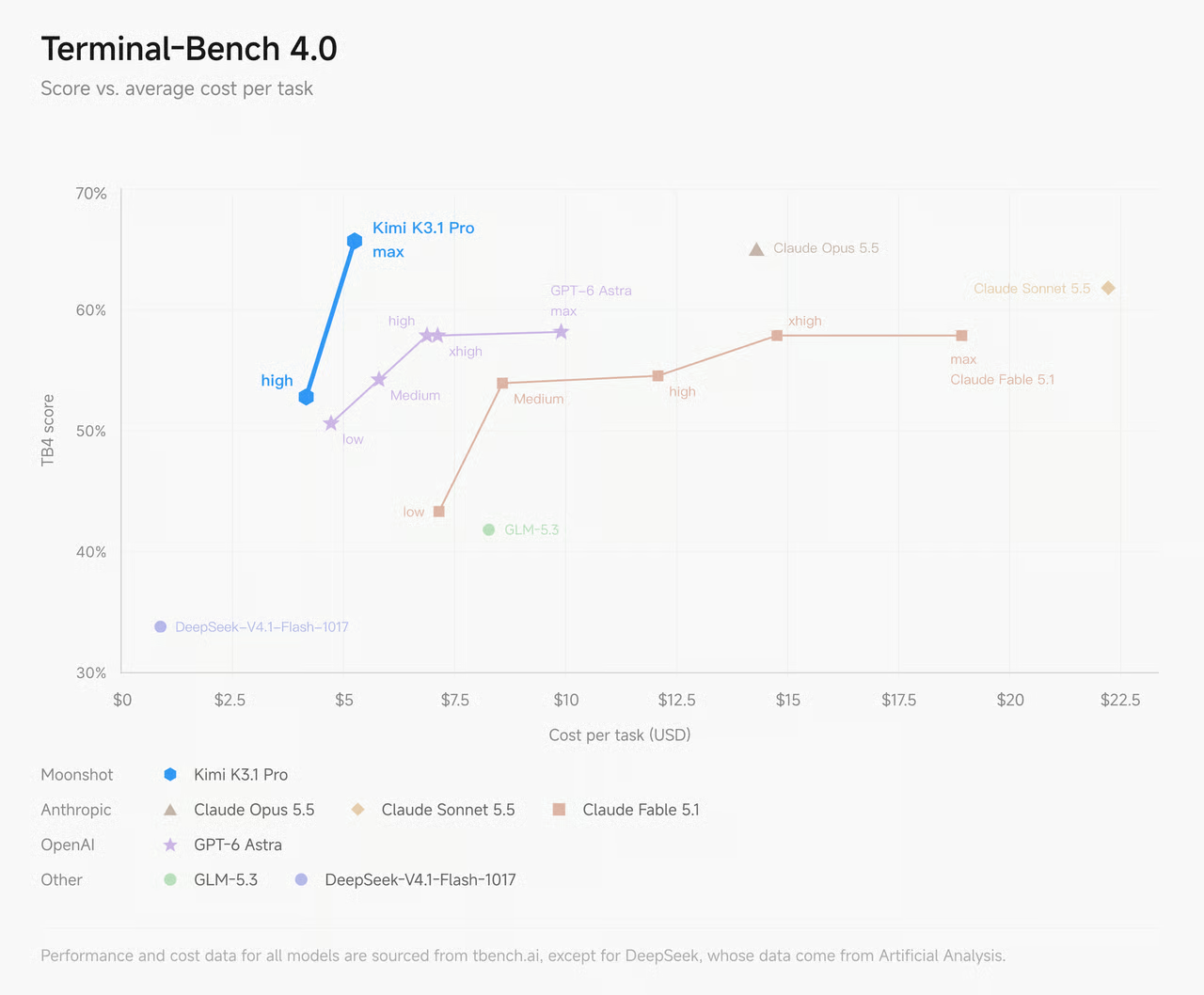
One independent tester saw the same kind of gap on a smaller job:
"Kimi K3.1 Pro ties Sonnet 5.5 at 93, for $0.68 and 11 min vs Sonnet's $1.61 and 14 min."

Is Kimi K3.1 Pro Highspeed worth double?
Only when a person is waiting on the reply. Highspeed is the same model served "about 2-3× the speed" at exactly twice the input and output price (API key guide). The quality is identical, so what you're buying is time and not smarts.
For overnight jobs and background agents, or anything where nobody's watching the cursor, standard K3.1 Pro is the obvious choice. For live chat or tight coding loops, the base model's 49.7 tokens per second does feel slow and Highspeed is the fix for it. Not everyone was impressed by the upgrade, though:
"I'll wait for the openweight... btw double the price for 67 TPS... Hardly 'nitro'."
There is no independent speed measurement for Highspeed yet, Artificial Analysis doesn't list it, so I'd treat Moonshot's 2-3x as a claim until somebody benchmarks it.
How much are the Kimi plans that include K3.1 Pro?
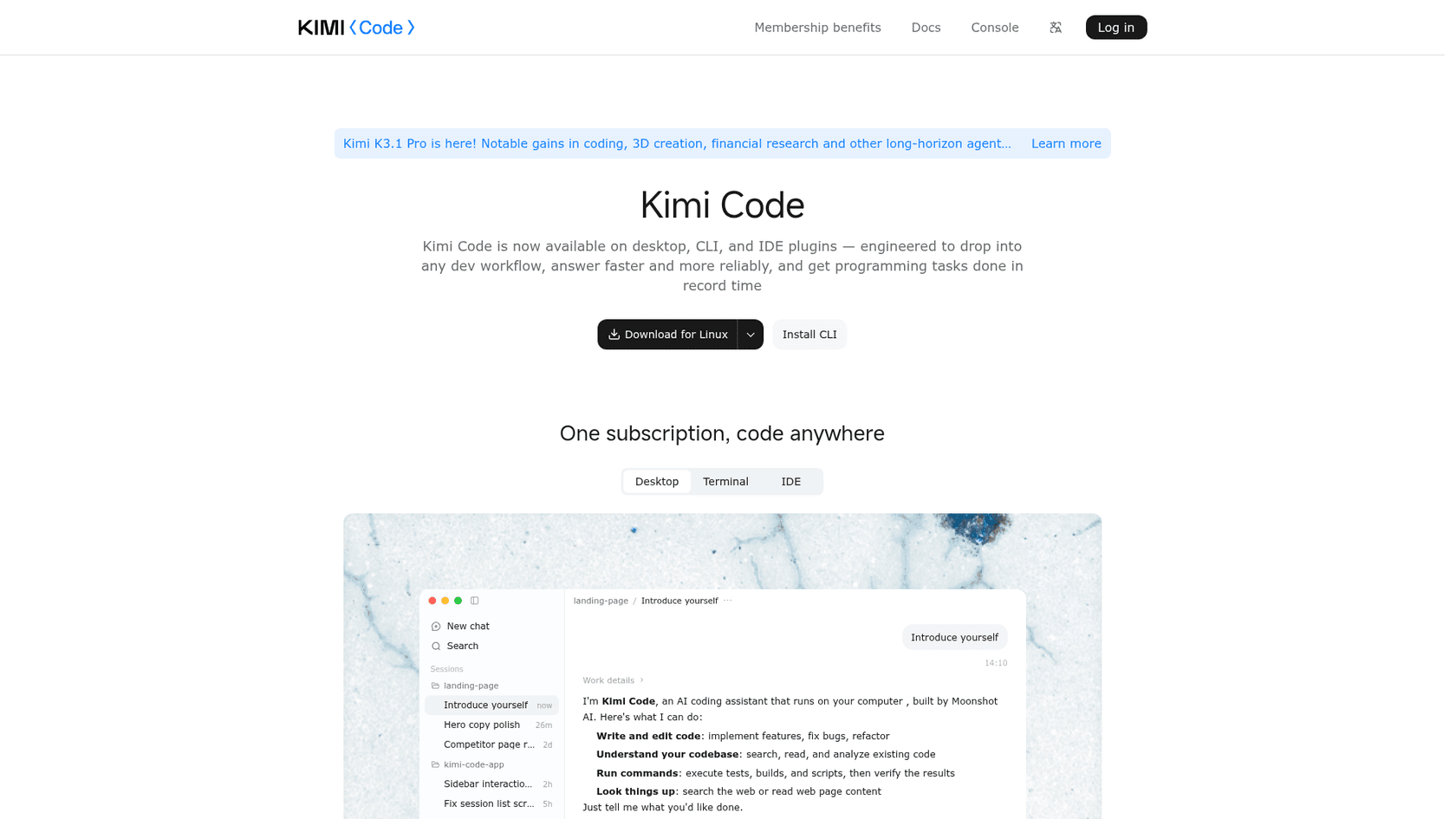
Kimi's membership plans run from $19 to $199 a month and include K3.1 Pro in the Kimi app and Kimi Work, plus Kimi Code, Moonshot's coding agent. The prices below come from the Kimi Code page:
| Plan | Monthly | Billed yearly (per month) | Billed yearly (total) | K3.1 Pro access |
|---|---|---|---|---|
| Plus | $19 | $15 | $180 | Standard |
| Pro | $39 | $31 | $372 | Standard and Highspeed |
| Max | $99 | $79 | $948 | Standard and Highspeed |
| Ultra | $199 | $159 | $1,908 | Standard and Highspeed |
Highspeed on a plan uses "2× credit usage". Kimi also renamed its plans recently, "with pricing unchanged" per its Kimi Code benefits page, and existing subscribers can keep the old names (Moderato, Allegretto and so on). The new plans dropped the weekly Kimi Code limit, but they kept the rolling 5-hour window, and also a monthly credit pool that is shared across Kimi and Kimi Code.
In China the same ladder is priced in yuan, from a ¥49 Go plan (no Kimi Code) up to ¥1,399 a month for Ultra, per Kimi's membership pricing help page.
What happens when you hit the limit?
You can buy Extra Usage, a pay-as-you-go top-up shared between Kimi and Kimi Code, with a minimum of ¥25 per top-up. Kimi says it's priced "close to the official API pricing", so in effect it is the API with a different checkout.
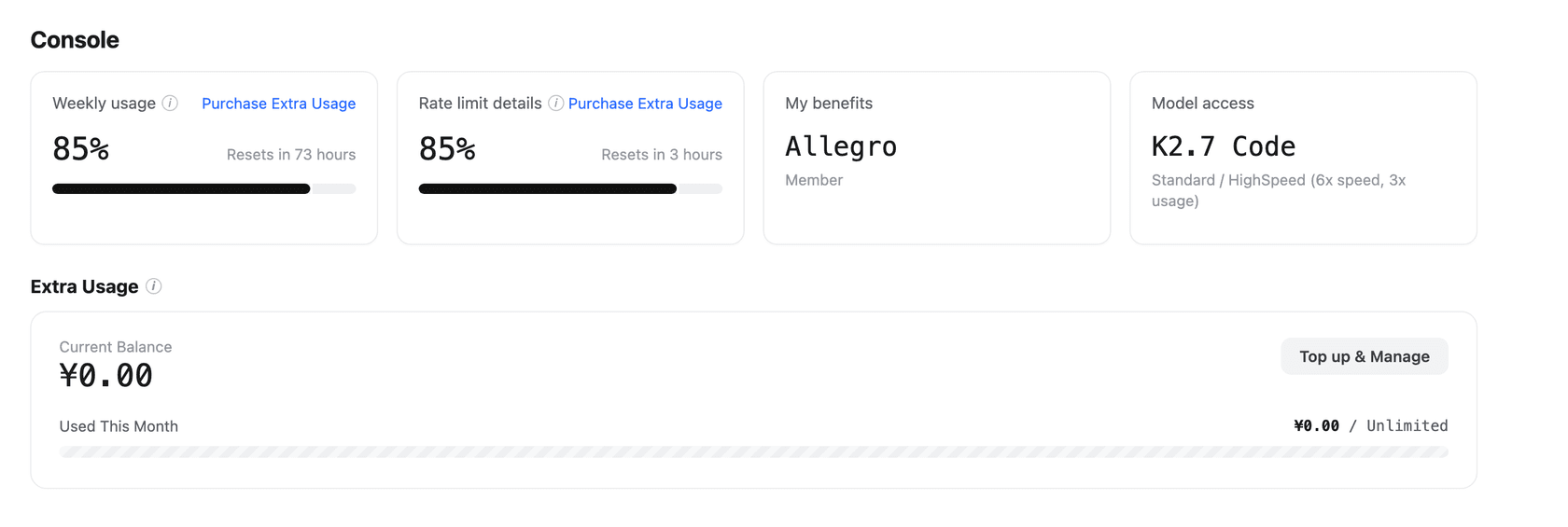
That matters, because the 5-hour limit is so far the loudest complaint about K3.1 Pro. In the 674-comment launch thread on Hacker News, quota came up more often than the model quality:
"If you are expecting any sort of usable limits on their subscription plan I suggest adjusting your expectations. I subscribed to $99 a month plan and within 47 minutes with one session (not asking for swarms or anything) was limited by 5-hour quota."
To be fair to Moonshot, the default max effort is a big part of this, and another user in the same thread reported running for 8 hours on 22% of their weekly quota by pairing K3.1 Pro with a lighter model for subagents. The plans do work, they just don't stretch the way some rival coding plans do on day one.
Should you use the API or a Kimi plan?
Pick based on who is calling the model. If your app or agent calls it, use the API: you pay per token, and after a $10 top-up there's no daily cap. If you're the one calling it, from Kimi Code or the Kimi app, a plan is almost always cheaper, as long as you can live together with the 5-hour window.
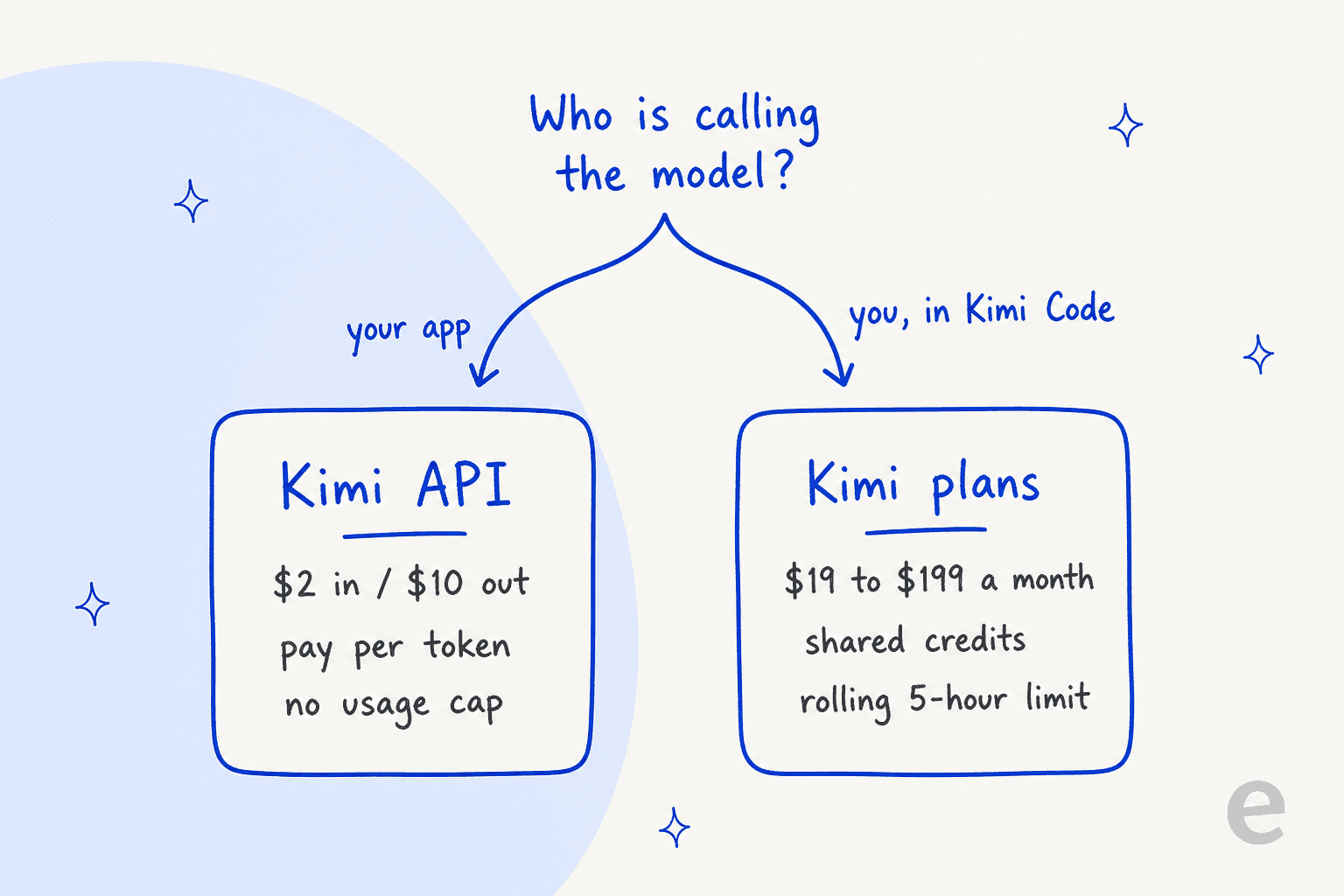
The maths here shows the reason. A developer running 20 agent tasks a working day, at Artificial Analysis' average of $2.11 a task, would spend about $928 a month on the API (20 × 22 × $2.11). The $99 Max plan is a steal by comparison, which is also exactly why Moonshot rations it with the rolling limit. If you're comparing coding plans, my Claude Code pricing breakdown and list of AI coding assistants cover the other side.
How much would Kimi K3.1 Pro cost for my workload?
Plug in your own numbers. The calculator below uses the official Kimi API rates and assumes your cached share stays warm (no cache-write charges), so it's better to treat the result as a floor.
To give you some feel for the real shapes, here's what three common workloads cost on standard K3.1 Pro, using the official rates:
| Workload | Per request | Monthly volume | K3.1 Pro | Highspeed | Kimi K3 |
|---|---|---|---|---|---|
| Support replies | 6,000 cached + 2,000 fresh input, 1,500 output | 10,000 | $202 | $392 | $303 |
| Document Q&A over long files | 200,000 fresh input, 3,000 output | 500 | $215 | $430 | $323 |
| Agentic coding | AA average task ($2.11) | 440 | ~$928 | n/a | ~$880 |
The pattern holds across all three: input caching takes care of itself on repeat prompts, and the output side is the place where to look for savings. Lowering reasoning_effort from the default max to high or low is the first knob I'd turn. On K3, AA measured the low-effort setting at $1.15 a task against $2.00 at max, at a big cost in score, so test it on your own tasks before you commit to it. If you're tracking spend across several models, an LLM tracking tool helps catch a runaway agent before the invoice does.
Is Kimi K3.1 Pro worth the price?
For agentic coding and long, multi-step work, yes. It's one of the highest-scoring models you can buy and costs well under half of Claude per task at max effort. The weights are also promised "by Nov 4", which should bring more hosts. Just for scale, Kimi K3 is served by 20 providers on Artificial Analysis, against 5 for K3.1 Pro today.
It's a weaker deal in three cases:
- You want the cheapest finished job. GPT-6.1 Sol and Gemini 4 Argon do the average task for less. For pure cost, DeepSeek V4.1 Flash is in another league at
$0.26a task. - A person waits on every reply. At 50 tokens per second you'll end up on Highspeed, at which point the price advantage over Sonnet 5.5 gets smaller.
- You plan to live in a Kimi plan. The 5-hour window is tight at max effort. Budget some Extra Usage, or wait a few weeks to see if Moonshot loosens it.
If you're weighing it against the wider field, my Kimi K3 alternatives list and Qwen 3.8 Max pricing still hold.
For the open-model angle I compared Qwen 3.8 Max and K3 head to head, and the full breakdown of the model is in my Kimi K3.1 Pro post.
What a model's price doesn't tell a support team
A lot of the people pricing models like this one are really asking whether to build a support agent on top of it. As someone who works on eesel's integrations, I'd say the per-token number is the easy part. Using the support example above, $202 a month buys you tokens, not an agent. You'd still have to connect your helpdesk, sync your help center and past tickets, write the handoff rules, and test it all before a customer sees an answer. That build is where most of the time and risk goes, and it's why every eesel rollout is simulated against a team's own historical tickets first.
eesel skips that build entirely. You hire a ready-to-work AI helpdesk teammate that joins your existing queue in Zendesk, Freshdesk or Gorgias and learns from your docs and past tickets, then it follows handoff rules you write in plain English. Pricing is fixed credit plans instead of per-token billing, so the bill doesn't swing when a model decides to think harder. If you want to see how the costs compare in overall, my guide to cost per resolution runs the numbers, and the best support AI model post compares the engines underneath.

SE Ranking is a good picture of how that looks in production. It runs three products (SE Ranking, Planable and SE Visible) from one Zendesk team, with one eesel agent per product. Each agent searches about 16,800 pages of help center and website content, replies to live chat in the customer's language, and hands refunds, trial extensions and Tier 2 questions to a person with the details attached. Between August 8 and September 8, 2026, it handled about 4,650 conversations, and none of it depended on which model topped a leaderboard that week.
If you like Kimi's terminal-first style, the eesel CLI brings the same thing over to support. You can review the teammate's recent work with eesel activity and approve or deny pending actions with eesel approvals, also edit its standing rules with eesel instructions. Output is JSON and write commands support --dry-run, so scripts and coding agents like Claude Code can drive it safely.
There's an MCP server too, and I cover the wider pattern in my guide to the AI agent CLI.
Try eesel
If you're pricing Kimi K3.1 Pro to power support, try the version where someone else already did the build. eesel puts a ready-to-work AI teammate on your helpdesk in minutes and trains it on your past tickets, and it lets you test against last week's queue before it replies to anyone. Try eesel free, or compare the field in my list of best AI teammates first.
Frequently Asked Questions
How much does Kimi K3.1 Pro cost?
On the Kimi API, Kimi K3.1 Pro costs $2 per million input tokens, $0.20 per million cached input tokens and $10 per million output tokens. There is no long-context surcharge across the full 1M-token window. My Kimi K3.1 Pro overview covers the model itself.
How much does Kimi K3.1 Pro Highspeed cost?
Kimi K3.1 Pro Highspeed costs $4 input and $20 output per million tokens, exactly double the standard model, for about 2 to 3 times the speed. Cached input stays at $0.20. On Kimi's consumer plans, Highspeed needs the Pro plan or higher and burns credits twice as fast.
Is Kimi K3.1 Pro cheaper than Kimi K3?
Per token, yes: K3.1 Pro is $2/$10 against $3/$15 for Kimi K3 pricing, a third less. Per task it is close to even, because K3.1 Pro writes more. Artificial Analysis puts it at $2.11 per average task against $2.00 for K3, while scoring 11.5 points higher.
What Kimi plan do I need for Kimi K3.1 Pro?
The standard Kimi K3.1 Pro model is on the Plus plan ($19/month) and up, and Highspeed needs Pro ($39/month) or higher. Kimi Code shares the same quota as the rest of the membership. Compare it with Claude Code pricing if you are choosing a coding plan.
Does Kimi K3.1 Pro have a free tier or batch discount?
No. The API unlocks after a minimum $1 top-up, and the 60% Batch API discount only covers older K2 models for now. If you need a no-cost way to experiment, my roundup of free AI APIs lists the current options.
Is Kimi K3.1 Pro cheaper than Claude?
At list price it matches Claude Sonnet 5.5 pricing at $2/$10 and is half of Claude Opus 5.5 pricing. Per task it is far cheaper than both at max effort: $2.11 against $5.46 for Sonnet 5.5 and $5.98 for Opus 5.5 on Artificial Analysis.
What does Kimi K3.1 Pro cost for a customer support bot?
For 10,000 replies a month with a cached 6,000-token prompt, 2,000 fresh input tokens and 1,500 output tokens each, Kimi K3.1 Pro pricing works out to about $202 a month in tokens. The helpdesk connection, testing and handoff rules are on top. A ready-made AI customer support teammate like eesel includes that layer.