


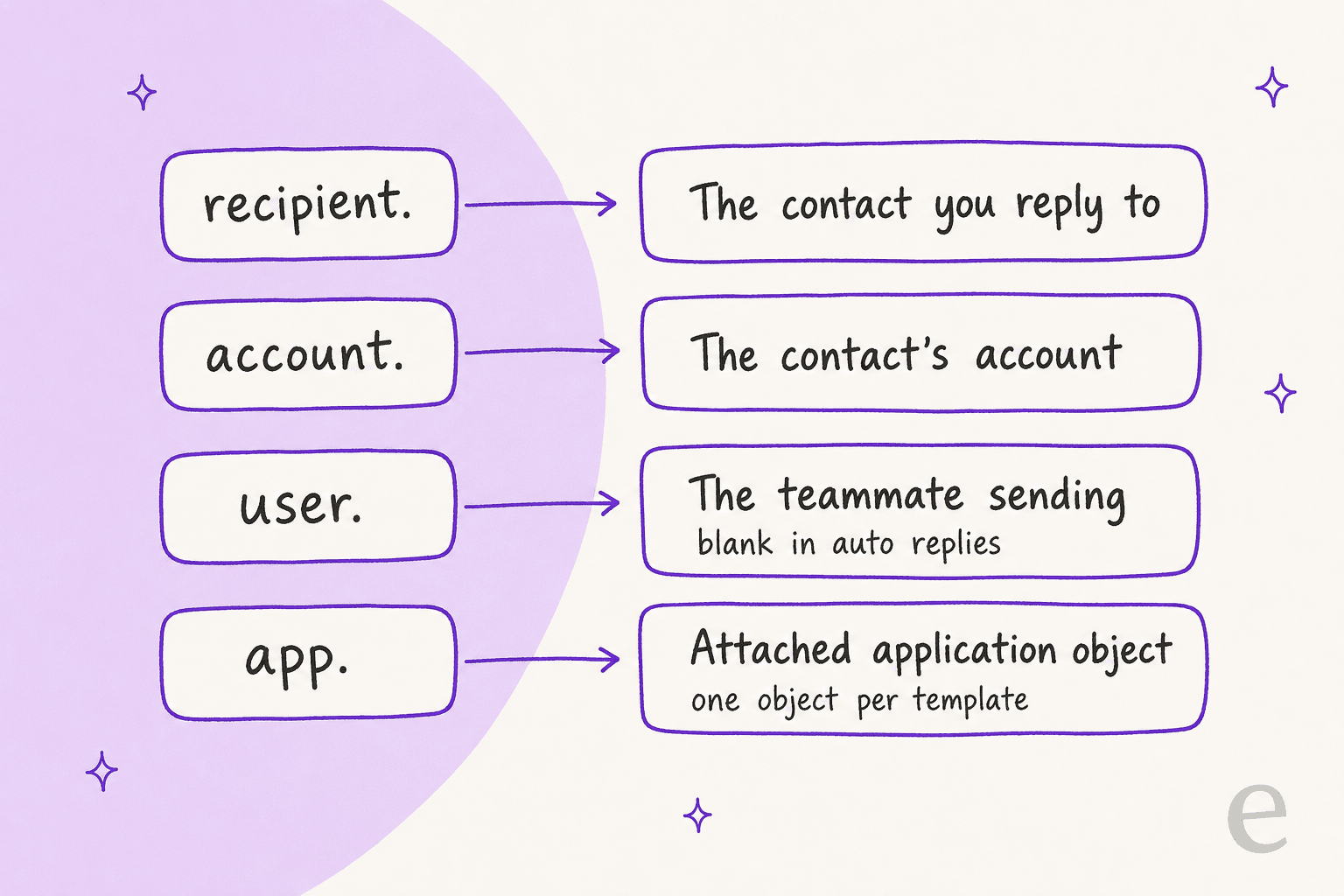
Front message template variables are placeholders you type as {{recipient.first_name}} that fill in from the contact you are replying to, their account, and the teammate sending. Add a fallback in single quotes, such as {{recipient.first_name | 'there'}}, or a missing name leaves the variable unpopulated. They fill in for the first recipient only, the user variables go blank in automatic replies, and templates are on every plan while application object variables need Professional or above.
eesel does not insert Front templates, but it can draft the replies your templates do not cover as an internal comment. With the eesel CLI, a coding agent can upload approved knowledge, such as your template text pulled through Front's API, and test its answers on a sample question before anything goes live. Approving the Front connection still needs someone with admin rights.
What are Front message template variables?
They are placeholder text in a message template or signature that Front fills in when the template is used. Front's help center describes them as dynamically filled "based on information you've provided", pulled from the saved details of your recipient or from custom field data.
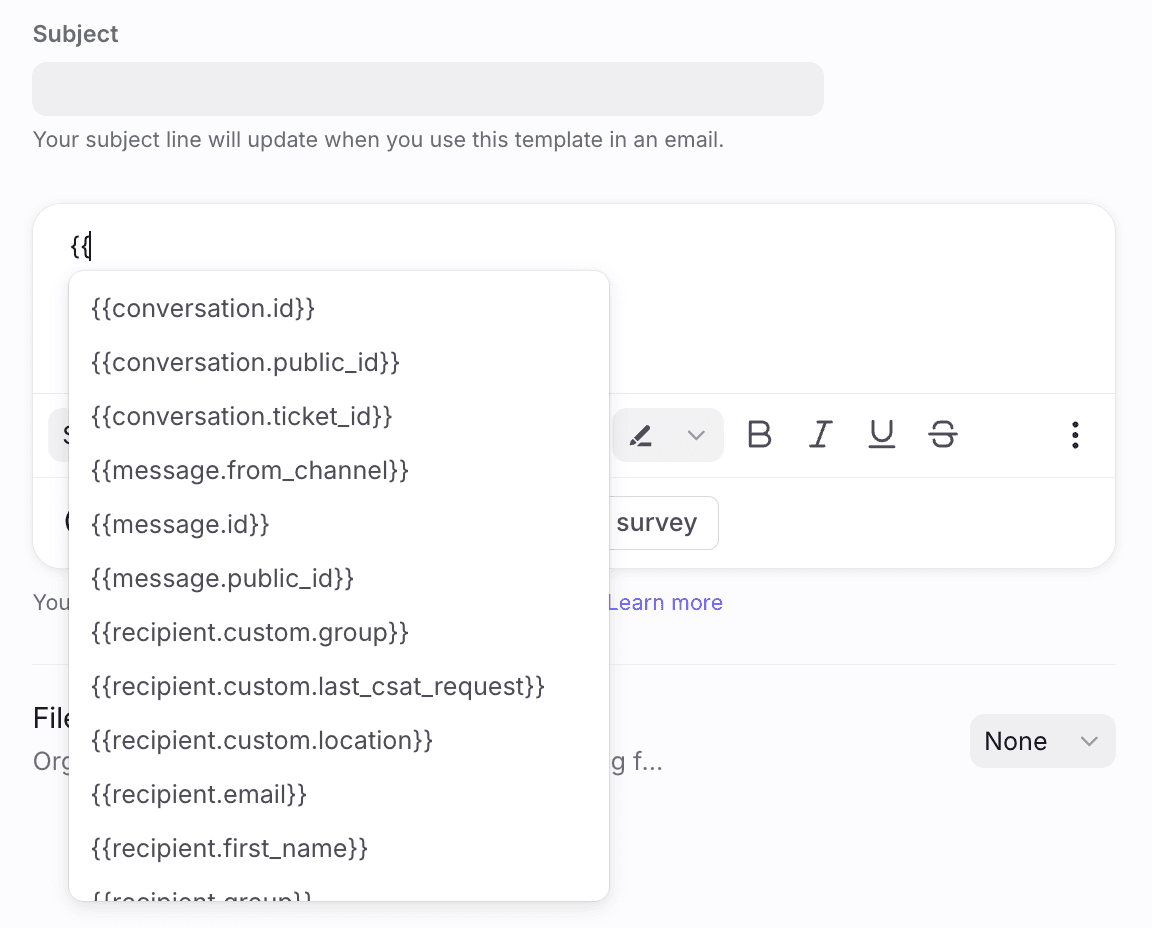
I build helpdesk integrations at eesel, Front's included, and the variable list is the part of a template that quietly decides whether a reply sounds personal or like a form letter. The mechanics are simple. Type {{ in the template editor, a list opens, and you pick a variable. Front inserts it in double curly brackets, and the value appears when a teammate (or a rule) uses the template.
Message templates themselves are Front's version of canned responses. Per the templates article, a template can be private to you or shared with teammates, and shared ones can be limited to chosen inboxes. If you also use macros in other helpdesks, my Freshdesk canned responses guide shows how the same idea is built elsewhere.
Which variables does Front give you?
Four families, named by prefix: recipient, account, user and app, plus a few IDs. The ones below are the default list from Front's variables article, which says they populate from saved Contacts.
| Variable | What it fills in | Note from the docs |
|---|---|---|
recipient.first_name | First part of the contact's name | Split on the first space; with a comma, everything after the comma |
recipient.last_name | The rest of the name | With a comma, everything before it |
recipient.name | Contact's full name | |
recipient.email, recipient.phone, recipient.twitter | Contact details | twitter is the X handle |
recipient.handle | The contact's handle for this channel | Depends on message type |
recipient.link | The contact's link attribute | |
account.name | Name of the account the contact is tied to | |
conversation.id, conversation.public_id, conversation.ticket_id | Numeric ID, public ID (like cnv_123abc), ticket ID | |
message.id, message.public_id | Numeric and public message ID | |
user.name, user.first_name, user.last_name, user.email, user.id | The teammate sending | Blank in automatic replies |
survey | Inserts Front's CSAT survey |
The name-splitting rule is worth reading twice. Front's example: a contact saved as "Sophia Marie Carpenter" gives first_name "Sophia" and last_name "Marie Carpenter", while "Carpenter, Sophia Marie" gives "Sophia Marie" and "Carpenter". If your contacts are imported as "Last, First", Front reads the comma and still gets the order right.
One mismatch to know about: the editor screenshot in that same article also lists message.from_channel and recipient.group, which the written list leaves out. The dropdown in your own workspace is the source of truth, so scroll it before assuming something does not exist. The survey item ties into CSAT surveys, and my AI CSAT post covers the measurement side.
How do custom field variables work?
Front lets you add your own fields to contacts, accounts and teammates, and each one becomes a variable. Type {{ followed by the family name to see them. Per the docs, a contact field called Customer ID shows up as recipient.custom.customer_id, an account field called Account Manager as account.custom.account_manager, and a teammate field called Job Title as user.custom.job_title.
Two rules keep these from misfiring:
- Account data comes from the To field. Front fills custom account variables for the recipient in the composer's To field, and that recipient must exist in your Contact Manager and be connected to an account.
- Application objects are separate. For third-party data attached to a conversation (an order, a subscription), type
{{app.and filter by application or object name. These work in the composer and message templates only, so you cannot use them in a signature.
Application objects have their own limits. Front's docs say a template can use variables from only one application object at a time, and Front fills them from the object attached to the conversation. If there is none, you get a warning. If there are several, Front picks the first and lets you choose another.
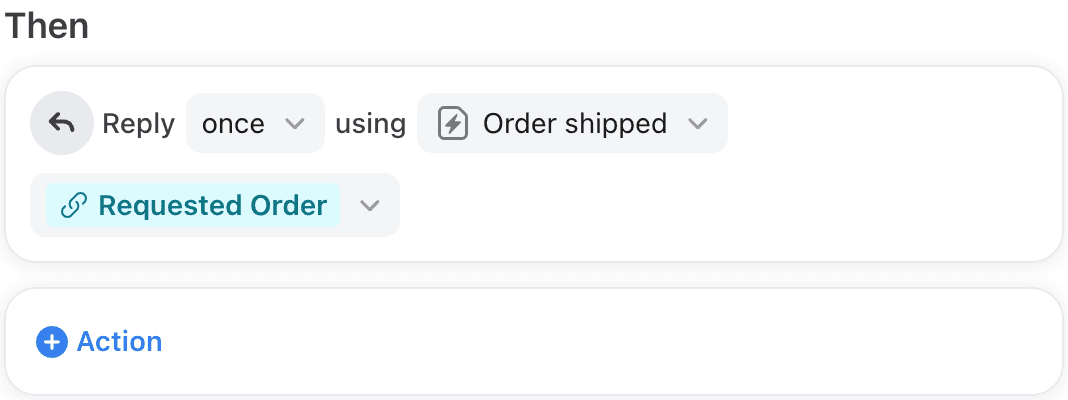
That screenshot is the automatic-reply case: a rule sends the "Order shipped" template and names which object to read. Choosing the object that way is done with dynamic variables, covered below.
What happens when a value is missing?
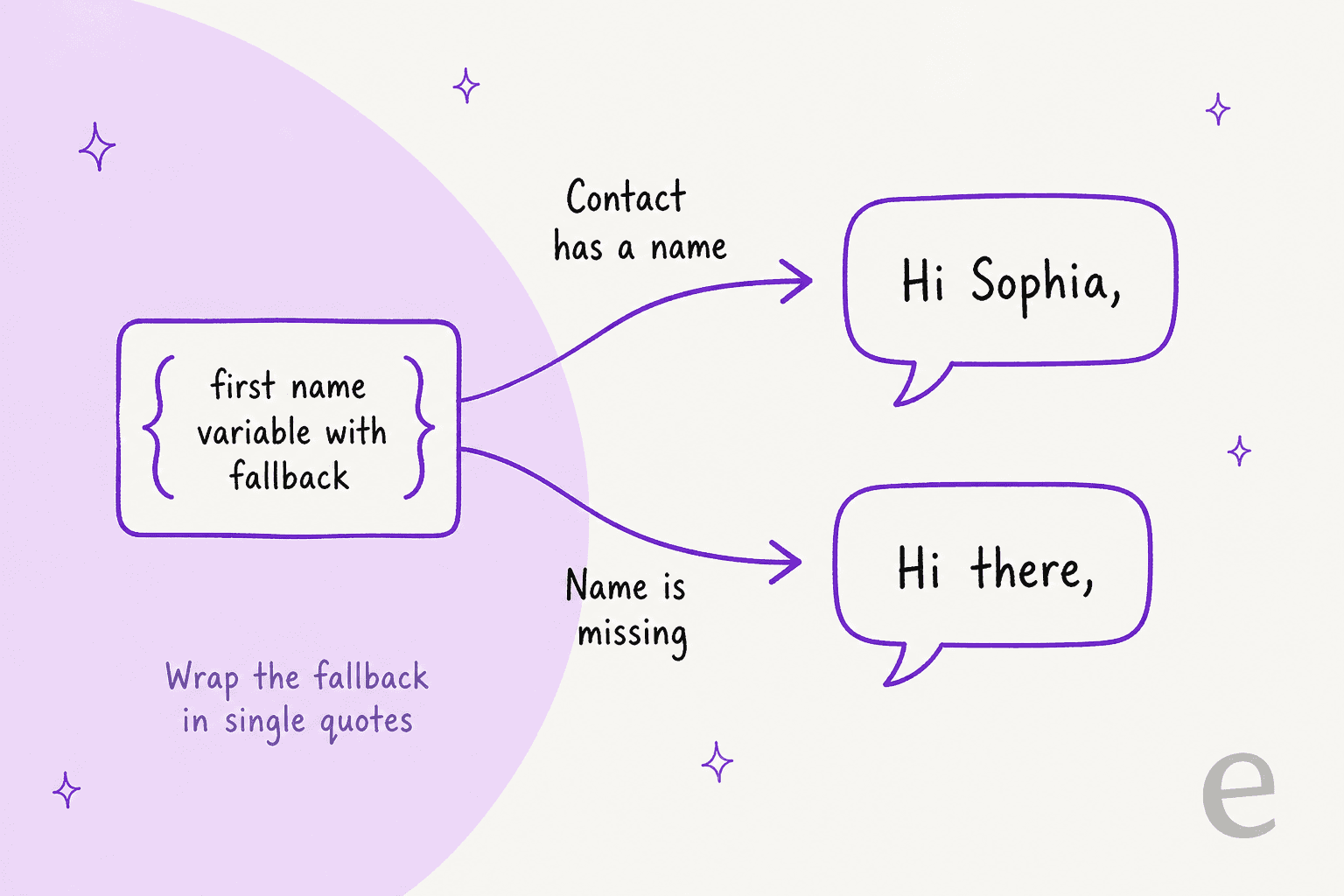
The variable does not populate, and Front tells you to define a fallback. From the variables FAQ: if the recipient name does not exist in your Contacts Manager, the variable will not populate, so you write the fallback after a pipe and wrap it in single quotes:
{{recipient.first_name | 'there'}}
I would put a fallback on every variable that can be empty, not only names. A customer service email template that opens "Hi ," is exactly the kind of small slip that reads as careless, and it is the failure that tone of voice work cannot fix after the fact.
Front's docs do not say what a template shows when a variable has no value and no fallback: blank text or the raw braces. They also do not say whether a fallback applies to custom fields the same way. Test both in a message to yourself before a rule sends the template to customers. One G2 reviewer, describing why templates matter to a team that shares an inbox, put the stakes plainly:
"It would result in 2 different prices being sent sometimes, which could hurt the revenue and make us look bad."

That reviewer was talking about two people answering the same request, which shared inboxes and templates help prevent. My Front shared inbox ownership guide covers the ownership side.
Where do Front template variables work?
In more places than the template editor, with different rules in each. Pick a place to see what Front's docs say fills in.
The sequence row matters if you send outbound mail. Front's Sequences article works like a mail merge from a CSV, so the same {{ habit carries over, but the variable list is narrower. If you are comparing it with tools built around email personalization, that narrowness is the difference to weigh.
How do I build a template with variables?
Write the message, drop in variables, and save it where the right people can find it. Front's steps, in short:
- Click the gear icon, pick workspace or personal settings, and select Templates, then the Messages tab.
- Click Create, then fill in a name, an optional subject, and the text box. Type
{{for variables. - Optionally file it under a folder (you can nest up to 5 layers) and, for shared templates, choose which shared inboxes can use it.
- Click Create. Teammates insert it from the template icon in the composer or by typing
/templateor a forward slash and the template name.
You can also write a draft in the composer first and use New from draft in the template menu. Front's tip is to highlight the text a teammate should edit before sending, so personal touches do not get skipped.
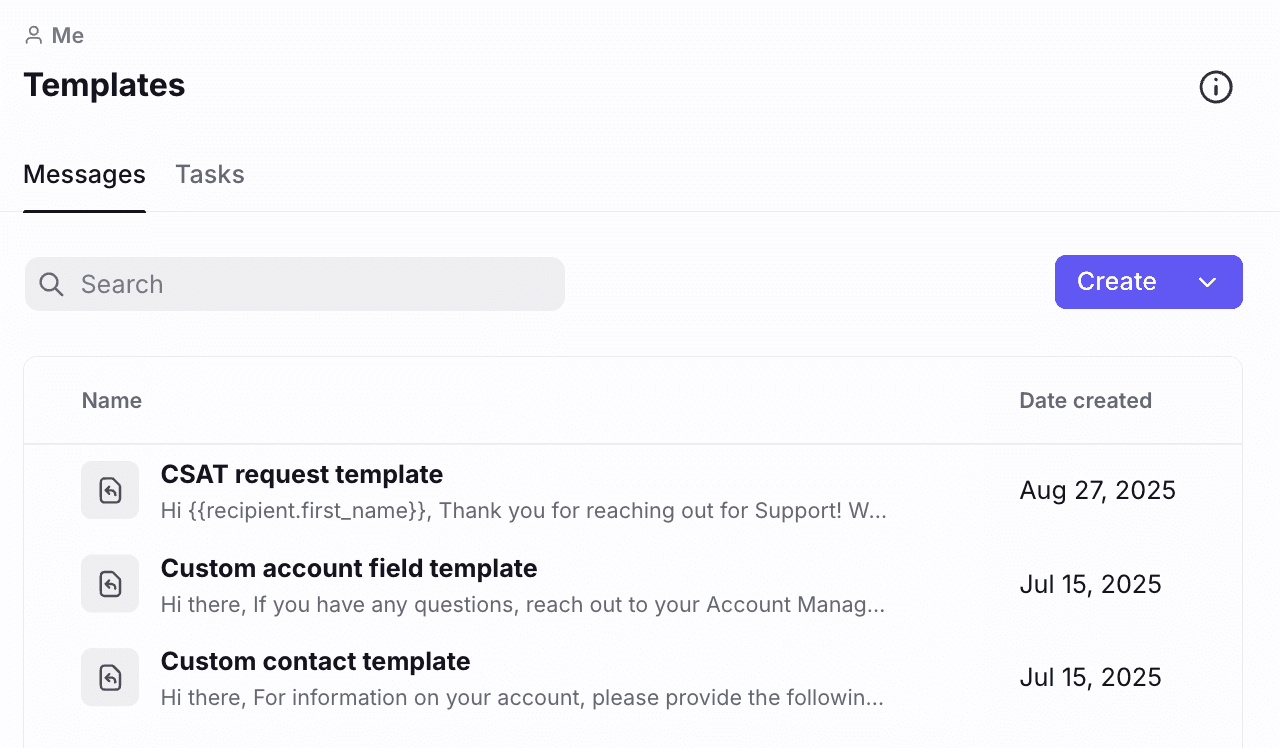
A few limits from the same article decide how you organize things:
- No hard cap on the number of templates, but Front recommends folders for large sets.
- Private and shared are fixed. You cannot convert one into the other. Copy the content and recreate it.
- No moving across workspaces. Templates cannot be copied or moved from one workspace to another, and shared templates are set up per workspace.
- No bulk access changes. Inbox availability is set one template at a time.
- No default sender. A template has no From field, so the teammate's choice in the composer stands.
Someone with the Templates - Create and edit permission can see all shared templates in workspace settings, even for inboxes they cannot open. If that matters to you, a custom permission set can remove it. If you ever migrate, my macro templates and managing macros posts help you audit what you have first.
Are these the same as Front's dynamic variables?
No, and the naming trips people up. The variables in this article are placeholders in text. Front's dynamic variables are a separate tool used inside Smart Rules, chatbots and macros. They pull and transform data (text, email, URL, number, teammate, inbox, tag, boolean, date, and lists of those) so that one rule or macro can replace several hardcoded ones.
The link between the two is the Order shipped screenshot above. A dynamic variable can pick which application object an automatic reply reads. Per Front's dynamic variables article, they are available on the Enterprise plan or with the Autopilot add-on, and they include a Build with AI option that turns a plain-English description into a variable. Front's macros guide adds that a dynamic variable built for one macro cannot be reused in another.
Which Front plan do I need?
Templates and their variables need no upgrade. The extras sit higher up:
| Feature | Plan, per Front's docs |
|---|---|
| Message templates and folders | All plans |
| Rules that send or draft from a template | All plans; Starter up to 10 rules, Professional up to 20 |
Application objects (app. variables) | Latest Professional or above |
| Sequences with CSV variables | Professional or above |
| Dynamic variables | Enterprise or Autopilot add-on |
| AI Compose on email drafts | Starter, Professional, Enterprise; 200 requests per teammate per day |
Front's pricing page lists Starter at $25, Professional at $65 and Enterprise at $105 per seat per month, billed annually, with Autopilot at $0.39 per conversation and Copilot at $20 per seat per month. Check it before you plan, since my Front pricing and Front review posts can lag behind a plan change.
What do Front's docs not say?
A few things I went looking for and did not find. I would test each before building a customer-facing rule on it.
- Unfilled variables with no fallback. Blank or raw braces is not stated.
- Variable names that do not exist. The docs do not describe what happens if you type a name by hand that is not in the list.
- The full list. As noted, the screenshot shows two variables the written list omits, so the text may lag the product.
- API behavior. Front's message template API shows templates as a name, subject and HTML body, and the create call takes that body with inline CSS. It does not say whether
{{ }}variables in an API-created body are resolved the same way, so confirm by creating one and inserting it. - Translation. The docs for AI Compose (translate between 18 languages) do not say how a template with variables behaves when you translate the draft afterward.
None of this is a flaw so much as an edge. The template system is small and predictable, and that is mostly the appeal.
Where does AI fit next to message templates?
Templates fix the questions you have already answered. AI fills in what is left. Front's own AI Compose edits an existing draft, with spelling, tone, length and translation options, and Front AI Copilot drafts with custom prompts for the add-on or Enterprise customers. They work on a draft you or a template started. If you want the bigger picture, my Front AI overview compares the field.
The gap templates leave is the long tail. A team usually has templates for returns, billing and password resets, and then a queue of questions nobody wrote a template for. That is where a drafting agent earns its place, and where it can go wrong. An AI hallucination in a customer reply is worse than a blank box, which is why I test drafts against old conversations before enabling anything. My notes on AI first response automation and AI escalation cover when to stop automating.
smava shows the template-first pattern well, on a different helpdesk. It runs eesel on Zendesk, where one agent searches the macro library and drafts the matching macro word for word with the placeholders filled, from about 820 macros and help center articles. The draft lands on the ticket with Approve and Reject buttons, and eesel never sends it. The same shape would suit a Front team: your own template wording stays the source of truth, and a person decides what goes out. I have not seen eesel documentation for reading Front templates directly, so on Front the practical route is to upload the approved template text as knowledge.
If your Front inbox also uses Front AI email triage, my load balancing post covers what happens before the reply is written. For staffing and queue questions, read AI for support staffing.
Try eesel in your Front inbox
If your templates already handle the repeat questions but everything else starts from a blank reply box, eesel is built for that gap in Front. It reads your help center and past Front conversations, then drafts a reply as an internal comment on each new conversation, so a teammate starts with something to edit instead of typing from scratch. You can begin with drafts only and expand from there, keeping your template wording as the approved source.
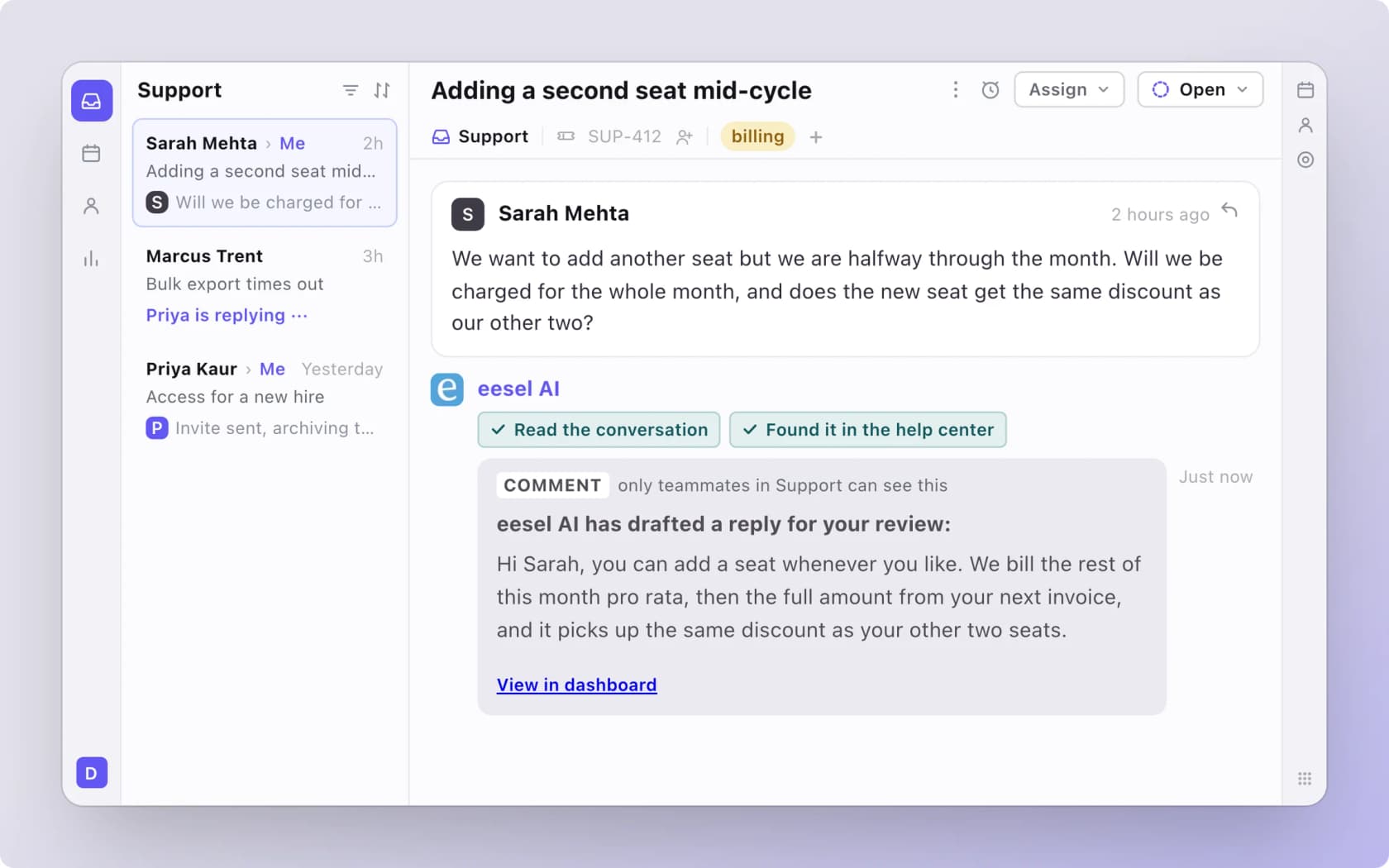
For the setup steps, see my guide to adding AI to Front and the Front vs eesel comparison. Try eesel on a few real conversations before deciding.
Frequently Asked Questions
How do I add variables to a Front message template?
{{, in the template editor and pick a variable from the list that appears. Front's help center says the list fills from saved contact details and custom field data. Save the template from the composer with New from draft or from Templates in settings. For the wider setup, see my AI canned responses guide.What is the Front message template variable for the customer's first name?
{{recipient.first_name}}. Front splits the saved contact name on the first space, so "Sophia Marie Carpenter" gives "Sophia". If the name has a comma, first name is everything after it. Add a fallback such as {{recipient.first_name | 'there'}} for contacts with no name. Compare how Freshdesk canned response fields handle the same job.What happens if a Front template variable has no value?
Do Front message template variables work in automatic replies?
user variables, which stand for the sending teammate, are blank because no teammate is tied to an automatic reply. Application object variables need dynamic variables to pick the object, which Front lists as Enterprise or Autopilot add-on only. See Front AI auto reply for the AI side.