Best helpdesk for WooCommerce in 2026: 6 options compared

Rama Adi

Katelin Teen
Last edited November 24, 2026

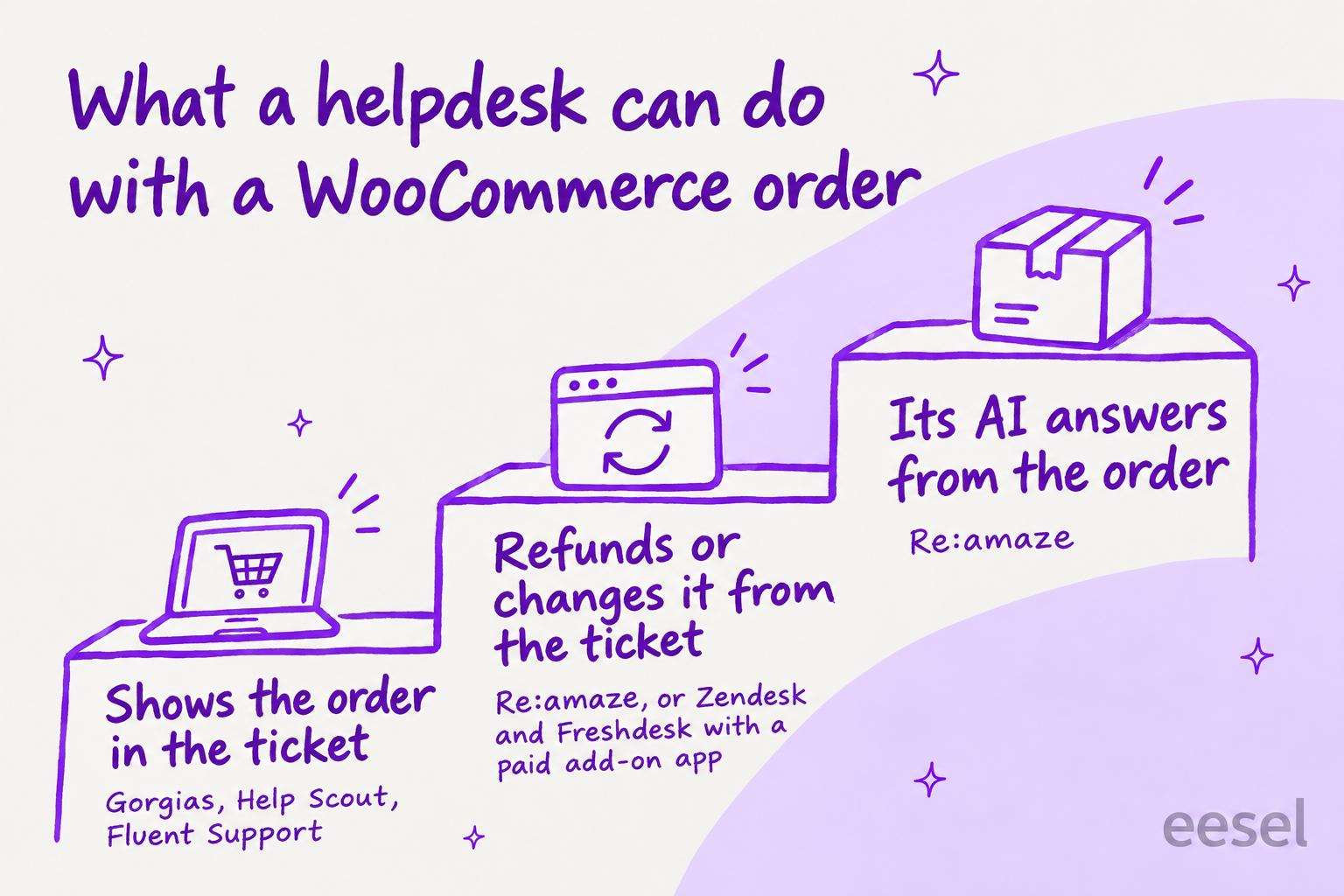
The best helpdesk for most WooCommerce stores is Re:amaze: its WooCommerce integration is native, agents can refund orders and change their status from the conversation, and its AI Agent reads WooCommerce orders, from $29 per user a month or $59 a month flat on Starter.
The thing that separates the six options here isn't the inbox. It's what happens to a WooCommerce order once it's in the ticket. Most helpdesks build their store app for Shopify first. Gorgias, the default ecommerce pick, is read-only on WooCommerce and its AI Agent doesn't run on WooCommerce stores at all. Zendesk and Freshdesk build free Shopify apps and leave WooCommerce to third-party add-ons.
If you already have a hosted helpdesk you like, keep it: eesel is an AI teammate that joins it, looks up WooCommerce orders, and refunds or updates them, with refunds and status changes held for your approval by default. An AI coding agent can set much of it up for you with the eesel CLI, from uploading your return policy to asking test questions before it goes live, though connecting the helpdesk still needs an admin's approval.
What makes a helpdesk right for a WooCommerce store?
A helpdesk is right for a WooCommerce store when your team can answer an order question without opening WordPress in another tab. That sounds like a low bar. It isn't, because WooCommerce support is mostly order support: where is my order, a refund that hasn't shown up, an order status that confuses a customer, an address that needs changing before it ships. A helpdesk that only shows the order still sends your agent into the WordPress admin to do anything about it.
I build integrations at eesel, so I read every helpdesk's store app the way I'd read our own: what data comes across, what it can write back, and who maintains it when WooCommerce changes. Three questions decide it:
- Who builds the WooCommerce app? A helpdesk's own app gets fixed when WooCommerce changes. A third-party app is a second vendor, a second bill, and sometimes a second support queue when it breaks.
- Can it act, or only show? Refunds, cancellations, status changes and order notes from inside the ticket are what save the tab-switching.
- Does the helpdesk's AI work on WooCommerce? Gorgias and Freshdesk sell AI agents that can work with Shopify orders out of the box but not WooCommerce ones.
How I chose these six
I started from the helpdesks WooCommerce stores ask about most (our wider ecommerce helpdesk roundup covers more) and read each one's own pricing page, help centre and WooCommerce app listing on 24 Nov 2026. Each made the list because it does something well for a store owner, not because it ticks every box. Prices are in US dollars, and per-agent prices are per month.
I left out helpdesks whose WooCommerce support I couldn't confirm from their own docs, and Shopify-only tools.
The six at a glance
| Helpdesk | Entry price | Billed by | WooCommerce app | Refund from the ticket | AI reads Woo orders | Free trial |
|---|---|---|---|---|---|---|
| Re:amaze | $29/user, or $59 flat (Starter) | User, or conversations | Native | Yes | Yes (AI Agent) | 14 days |
| Zendesk | $19/agent (Support Team, yearly) | Agent | Third-party, from $10 a month | With the Zenplates app | Only with a custom API build | 14 days |
| Gorgias | $10 (50 tickets) | Tickets | Native | No | No, AI Agent is Shopify-only | 7 days |
| Freshdesk | $19/agent (Growth, yearly) | Agent | Third-party, paid | With the MorfDev app | No ready-made workflow | 14 days |
| Help Scout | $0 (Free, 5 users) | User | Third-party, $99 a year | No | No ("Apps" source coming soon) | 15 days |
| Fluent Support | $129 a year per site (Pro) | Site licence | Built in (Pro) | No | Only through its MCP server | Free plugin |
The 6 best helpdesks for WooCommerce
1. Re:amaze
Best for: small and mid-sized WooCommerce stores that want order actions and AI on the same plan, without add-ons.
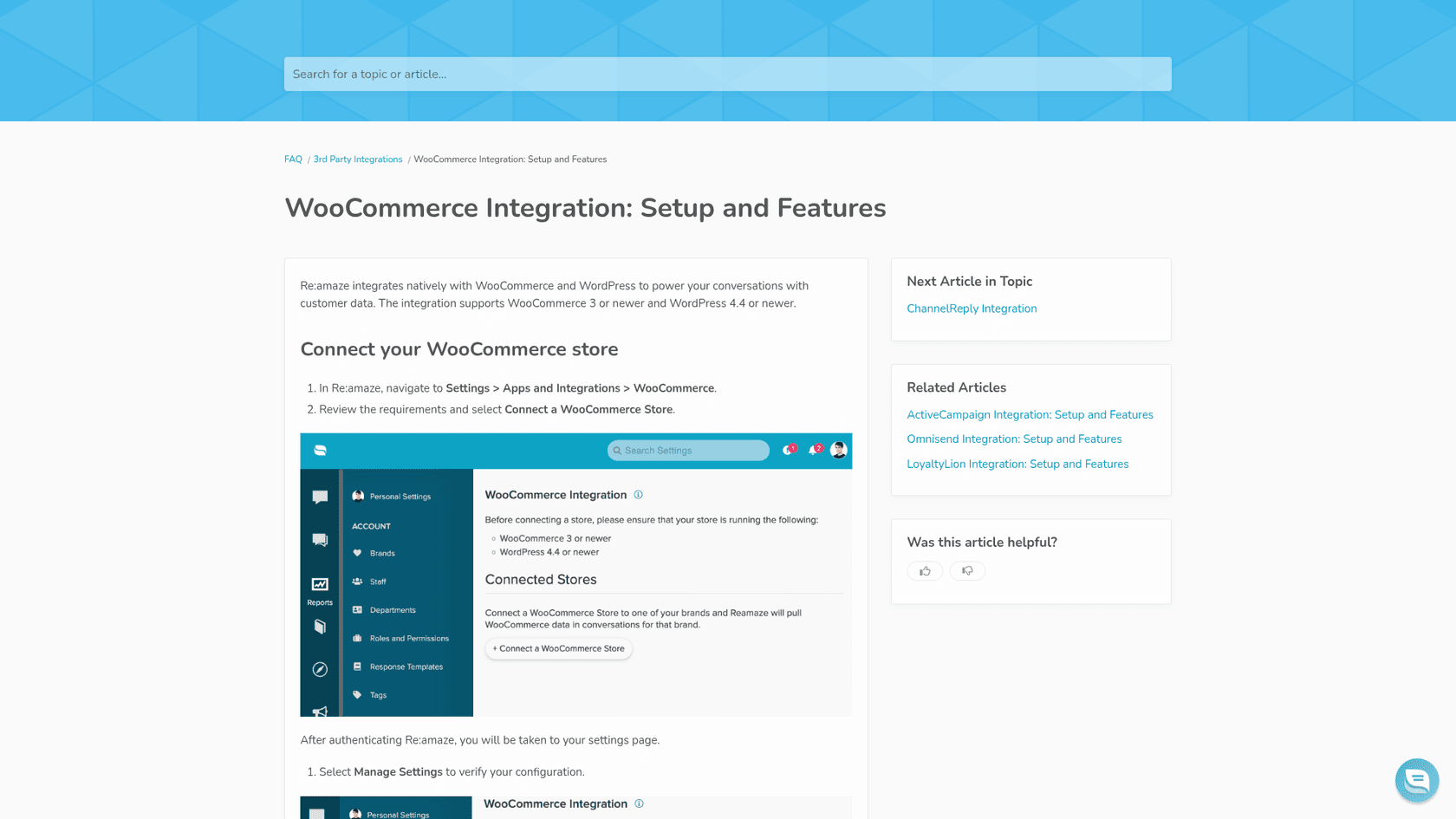
What it does well. Re:amaze is the only helpdesk here that does all three things on WooCommerce out of the box. Its WooCommerce setup article says it "integrates natively with WooCommerce and WordPress", and lists what agents can do from the conversation: process refunds, update order and payment status, add order notes, and see shipping and tracking. The sidebar shows total orders, total spend, line items and both addresses (integration page), and you can connect several stores to one helpdesk.
The part that sets it apart is the AI. Re:amaze's AI Agent setup doc names "WooCommerce products/orders" as a knowledge source right next to Shopify's, on chat, email and SMS. Its rule-based Order Bot also works on WooCommerce (pre-built chatbots).
The WooCommerce gap. The AI answers from orders; Re:amaze documents the refund and status actions for human agents, not for the AI. Connecting stores for more than one brand needs Pro, since Basic covers one brand (pricing).
Pricing. Basic is $29, Pro $49 and Plus $69 per user a month, or $26.10, $44.10 and $62.10 billed yearly (pricing). Starter is a flat $59 a month for unlimited users and 500 conversations, with extra conversations at $15 per 100 (Re:amaze's app listing). The AI Agent includes 5, 10 or 20 resolutions per user a month on Basic, Pro and Plus, then $0.85 per resolution (AI billing doc).
For a three-person team handling 600 conversations a month: Starter is $59 + $15 = $74 a month, against $87 on Basic (3 × $29).
Where it falls short. SMS and voice need Pro (pricing), Starter has no yearly option, and the volume plans above Starter don't publish prices (billing doc).
My take: pick Re:amaze if you run WooCommerce only and want refunds and AI order answers without stitching vendors together. Skip it if you have dozens of agents and need enterprise routing. The deciding factor is the native integration: it's the one WooCommerce app here that the helpdesk itself builds and that writes back to the order.
2. Zendesk
Best for: larger support teams, or stores already on Zendesk, that are happy to add a third-party WooCommerce app.
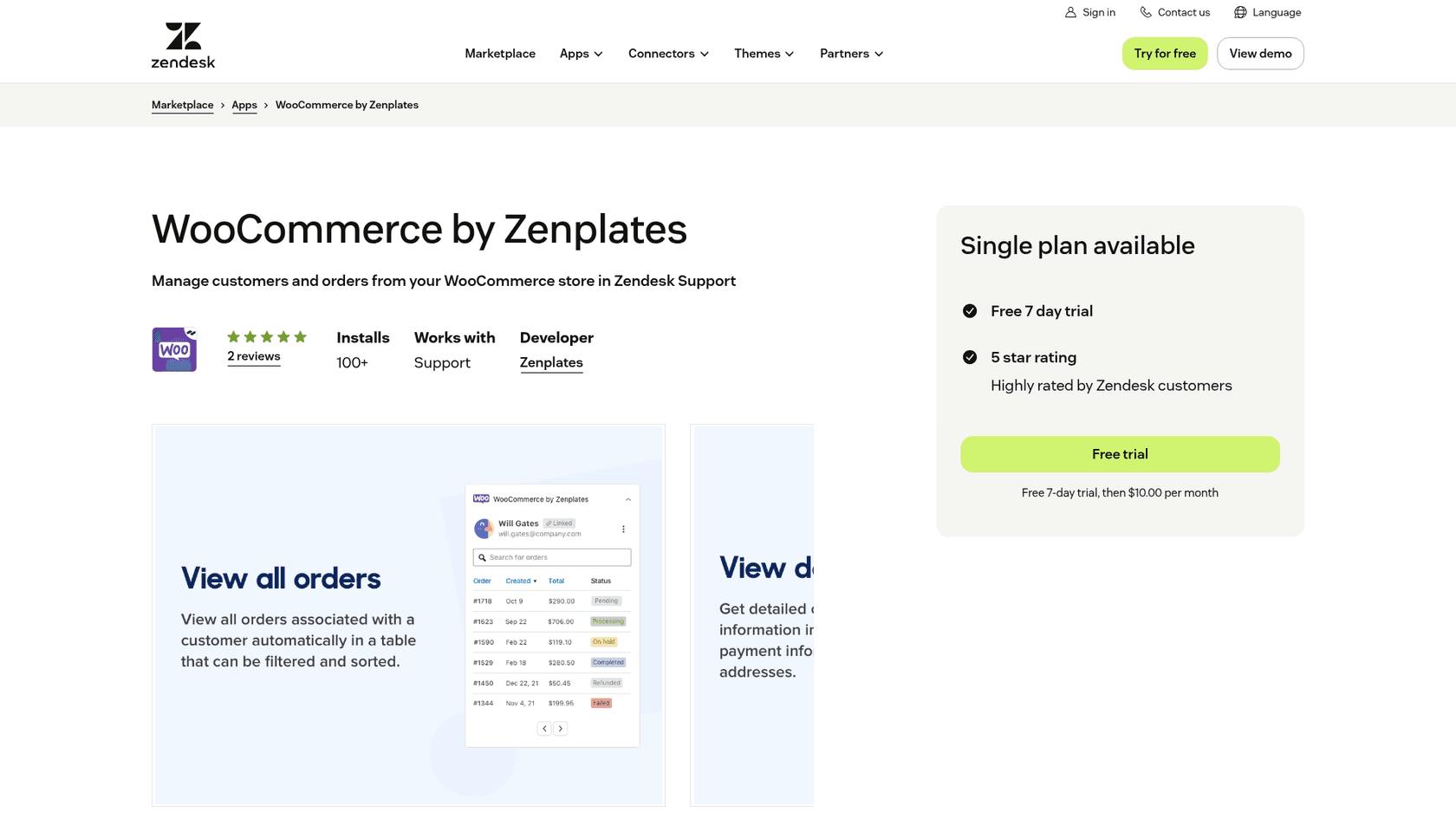
What it does well. Zendesk is the deepest helpdesk on this list (our Zendesk review): routing, reporting, a help centre, messaging and voice, and a large app marketplace. For WooCommerce, the strongest app is WooCommerce by Zenplates: $10 a month after a 7-day trial, and agents can change order status, update addresses, refund part or all of an order and apply coupons, using WooCommerce REST API keys.
The WooCommerce gap. Zendesk doesn't build a WooCommerce app. It builds a free Shopify app with 16,500+ installs that refunds and cancels from the ticket. Every WooCommerce app in its marketplace is third-party, and two of the three (WooCommerce Orders at $10 a month and AMS at $9.95 per agent a month) can't refund or cancel. For the AI agent, Zendesk's own article on linking AI agents to orders says to "Develop a custom script that makes an API request", and none of the WooCommerce apps say they connect to it.
Pricing. Support Team is $19 per agent a month billed yearly ($25 monthly); Suite Team, which adds messaging and live chat, is $55 ($69); Suite Professional is $115 ($149) (pricing). AI agents are billed per automated resolution, with 5, 10 or 15 included per agent a month by plan (Zendesk help); Zendesk doesn't publish the price per extra resolution. Copilot is $50 per agent a month billed yearly, on Professional and up. The full plan list is in our Zendesk pricing guide.
Three agents on Suite Team with the Zenplates app: 3 × $69 + $10 = $217 a month, or $175 billed yearly.
Where it falls short. You're paying Zendesk prices and still depending on a small third-party developer for the store connection. The Zenplates app has two reviews.
"I absolutely love the WooCommerce Integration for Zendesk! It has made managing customer messages so much easier. No more manual searching for order details - the app seamlessly pulls up the customer's last order and all their previous orders with just one click."
My take: pick Zendesk if your team is big enough to use what it does beyond the inbox, or you're on it already. Skip it if you're a three-person shop, because you'd pay about three times Re:amaze and get less on the WooCommerce side. The deciding factor is whether you need Zendesk's routing and reporting more than a native store app.
3. Gorgias
Best for: brands that sell on Shopify and WooCommerce together, or plan to move to Shopify.
What it does well. Gorgias is built for ecommerce support (Gorgias review): ticket-based pricing that doesn't charge per agent, email, chat, social and a help centre on every plan, and a strong Shopify product. Its WooCommerce app is its own, on every plan, connects in a few clicks, handles multiple stores, and shows the customer's contact details, total order value and payment status in the ticket.
The WooCommerce gap. Gorgias's own WooCommerce doc lists the limits plainly: "You can't initiate any actions on WooCommerce orders (create, edit, cancel, refund)", WooCommerce data can't be used in Rules, and Automate features don't work with it. And its AI Agent setup doc says "AI Agent is not supported on stores that use BigCommerce, Magento or WooCommerce". So a WooCommerce store on Gorgias gets the helpdesk and a read-only sidebar.
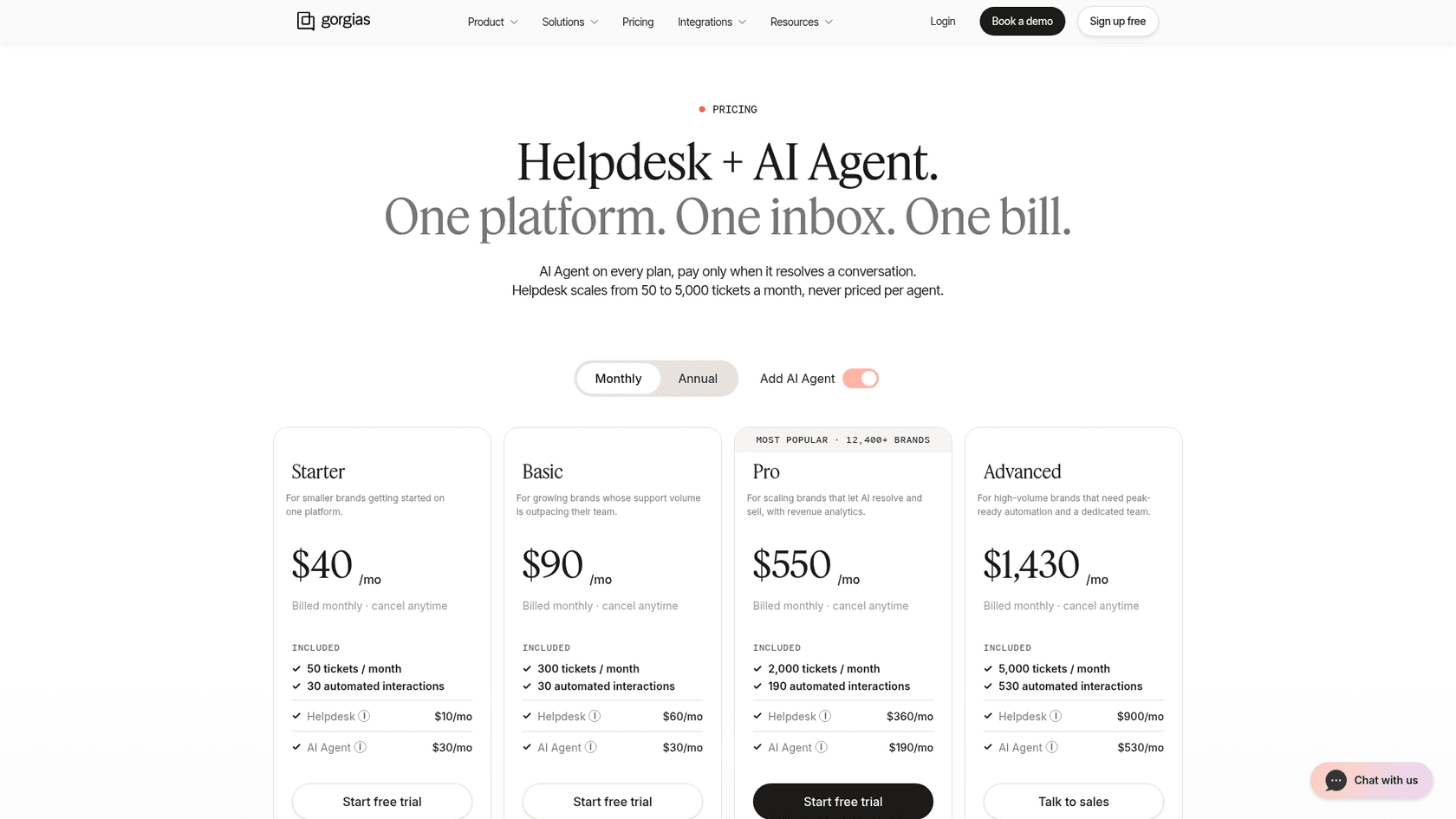
Pricing. Helpdesk-only plans are $10 (50 tickets, 3 seats), $60 (300 tickets), $360 (2,000) and $900 (5,000) a month (pricing); Gorgias bills a ticket once it gets a reply (billing doc). Extra tickets cost $0.40 each on Starter, $40 per 100 on Basic and $36 per 100 on Pro and Advanced. Turn the "Add AI Agent" toggle off for a WooCommerce store. If you're weighing a move, see our Gorgias alternatives.
At 600 tickets a month: Basic is $60 + 300 extra at $0.40 = $180 a month, with as many agents as you like.
Where it falls short. You pay for a platform whose best parts (AI Agent, Automate, order actions) don't work on WooCommerce. If you're WooCommerce-only, most of what makes Gorgias Gorgias isn't there.
My take: pick Gorgias if Shopify is your main store and WooCommerce is a second one, so one inbox covers both. Skip it if you're WooCommerce-only. The deciding factor is Gorgias's own line in its LLM fact file: "AI Agent is available only for Shopify stores." Our Gorgias WooCommerce guide covers ways around it.
4. Freshdesk
Best for: email-first teams on a budget that want a free start and are fine adding a third-party store app.
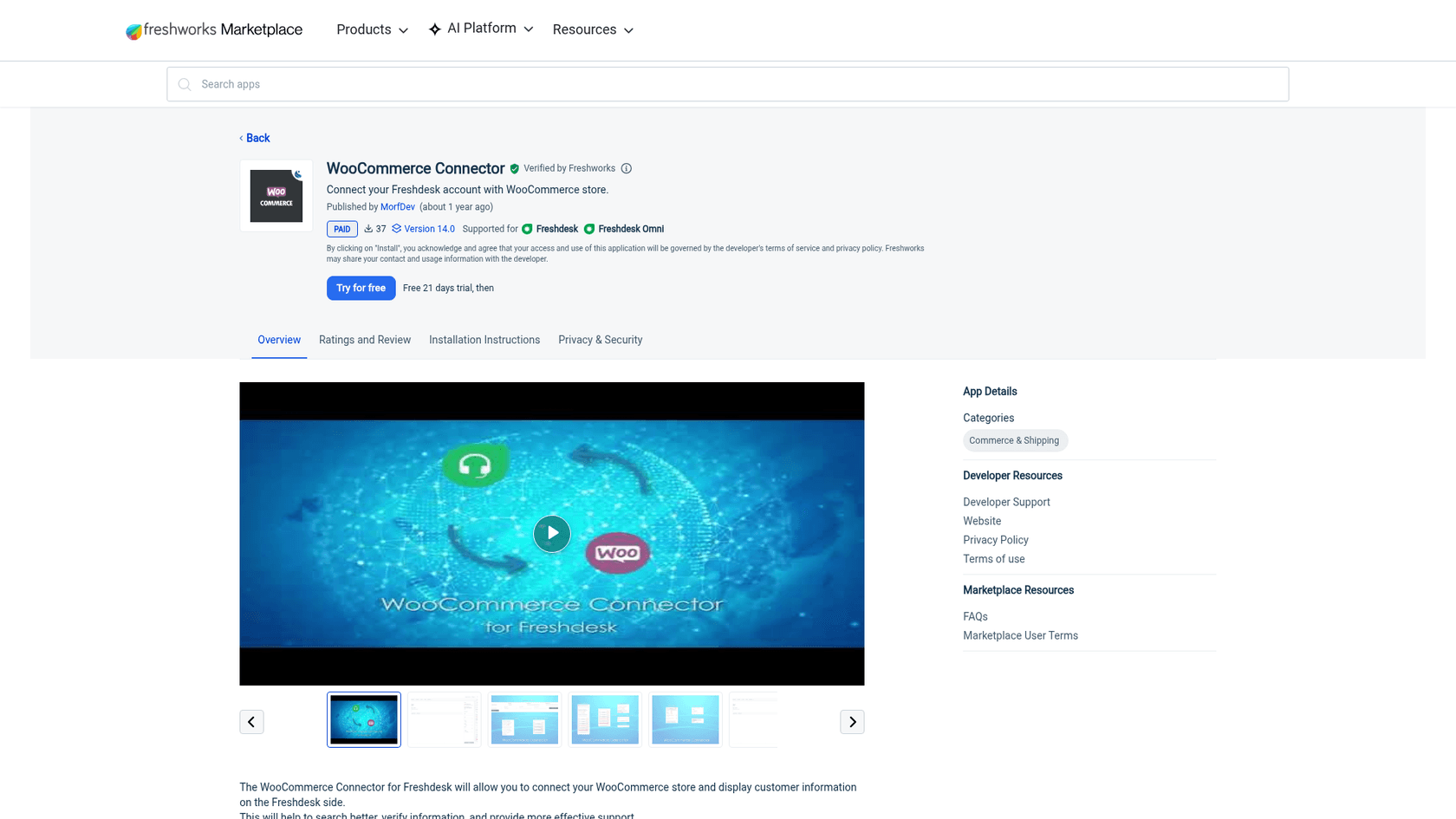
What it does well. Freshdesk is a capable ticketing system at or below Zendesk's per-agent price, with a free program for 2 agents for 6 months. For WooCommerce, MorfDev's WooCommerce Connector carries a "Verified by Freshworks" badge and lets agents issue full and partial refunds, cancel orders and edit the shipping address, across more than one store.
The WooCommerce gap. Freshworks publishes its own free Shopify app, plus a Shopify for AI Agents app that lets Freddy AI Agent refund and cancel orders. Nothing like that exists for WooCommerce, and the pre-built AI workflows cover Shopify, Magento and BigCommerce only (workflow library). Both WooCommerce apps on its marketplace are third-party, and neither lists its price after the trial.
Pricing. Freshdesk is $19, $55 and $89 per agent a month billed yearly for Growth, Pro and Enterprise ($23, $66 and $107 monthly) (pricing). Freshdesk is email-first; live chat needs Freshdesk Omni at $29, $79 and $119 billed yearly (Omni pricing). Freddy AI Agent includes 500 sessions once per account, then $49 per 100 sessions; Freddy AI Copilot is $29 per agent a month on Pro and Enterprise (Freshdesk pricing has every add-on).
Three agents on Omni Growth, billed monthly: 3 × $35 = $105 a month, plus the connector.
Where it falls short. You can't price the WooCommerce connector until you've started its trial, and with 37 installs you're betting on a small developer.
My take: pick Freshdesk if email is your main channel and the budget is tight. Skip it if you want AI to handle order questions, since Freddy's order workflows stop at Shopify, Magento and BigCommerce. The deciding factor is whether a third-party connector is good enough for your refunds.
5. Help Scout
Best for: small teams that live in email and want the friendliest inbox, and don't mind refunding in WooCommerce itself.
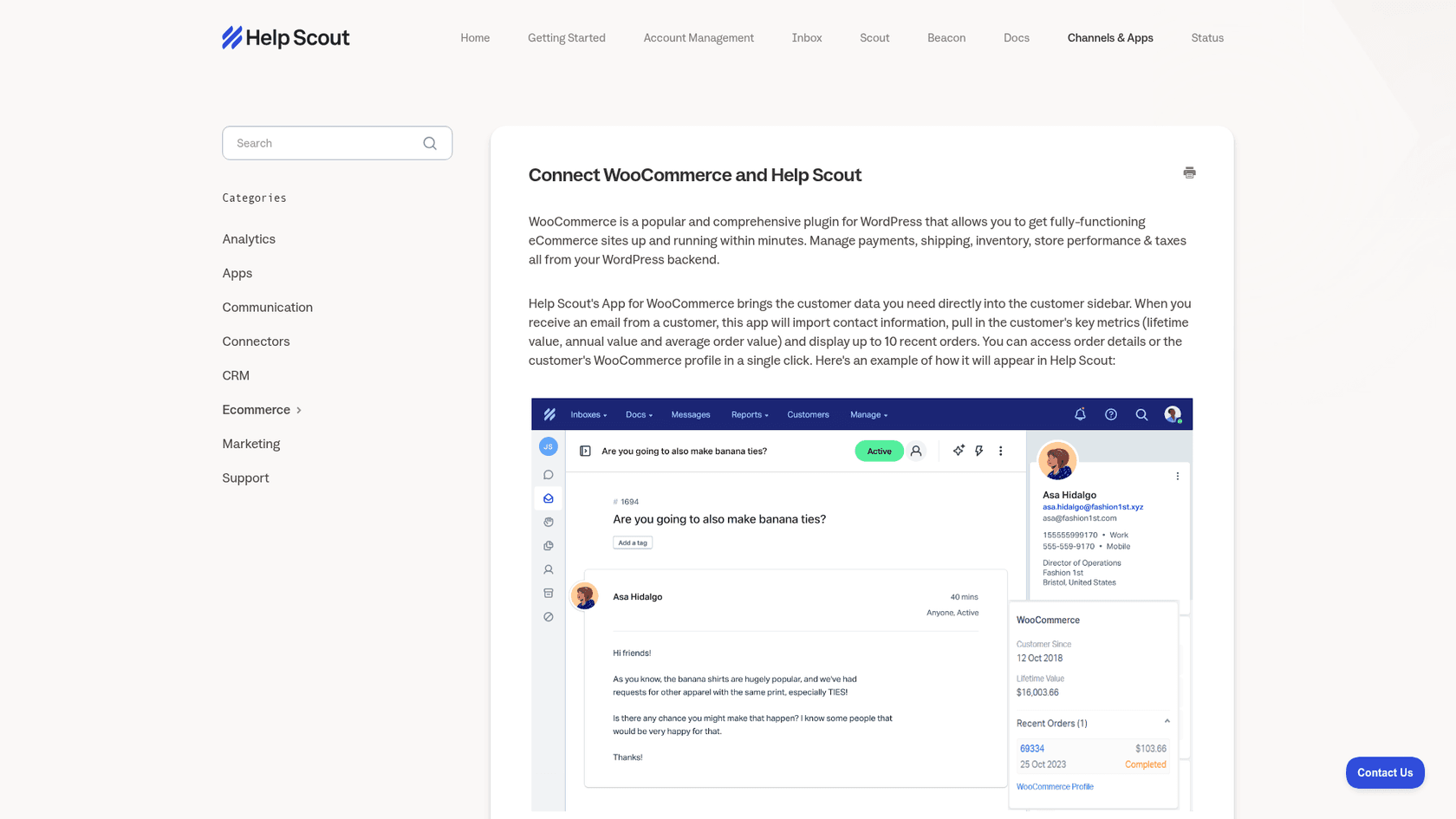
What it does well. Help Scout is the easiest shared inbox here to learn, with a free plan for up to 5 users. Its WooCommerce sidebar shows lifetime value, annual value, average order value and up to 10 recent orders, one click from the order in WooCommerce (Help Scout docs). The connector also puts a Get Help button on orders in the customer's My Account page.
The WooCommerce gap. The connector is Help Scout Integration for WooCommerce by OPMC, sold on the WooCommerce Marketplace for $99 a year and rated 2.7 out of 5 from 11 reviews. It shows orders; nothing in its docs or Help Scout's covers refunding or editing one from Help Scout. Help Scout's own Shopify app, by contrast, refunds, cancels and edits orders in the sidebar. Its AI agent, Scout, can't look up a store order yet: "Apps" is marked coming soon on the Envoy page.
"It seems like this plugin has been abandoned. They claim it works with HPOS, but it doesn't...at least not with guest orders."
Pricing. Standard is $25, Plus $45 and Pro $75 per user a month billed yearly ($30, $54 and $90 monthly), and Pro has a 10-user minimum (pricing). Scout costs $0.75 per resolution on any paid plan (AI resolutions pricing); our Help Scout pricing guide has the rest.
Three users on Standard, billed monthly, with the connector: 3 × $30 + $8.25 = $98.25 a month.
Where it falls short. Two vendors' setup guides disagree: Help Scout's article still asks for WooCommerce's Legacy REST API, while OPMC's says it isn't needed. That's the kind of drift you sort out yourself.
My take: pick Help Scout if your team is small, email is most of the work, and you're happy to refund in WooCommerce. Skip it if you want AI to answer order questions today, or look at our best AI for Help Scout picks. The deciding factor is the connector's 2.7 rating against Help Scout's otherwise polished inbox.
6. Fluent Support
Best for: stores that want the helpdesk inside WordPress, with every ticket in their own database.
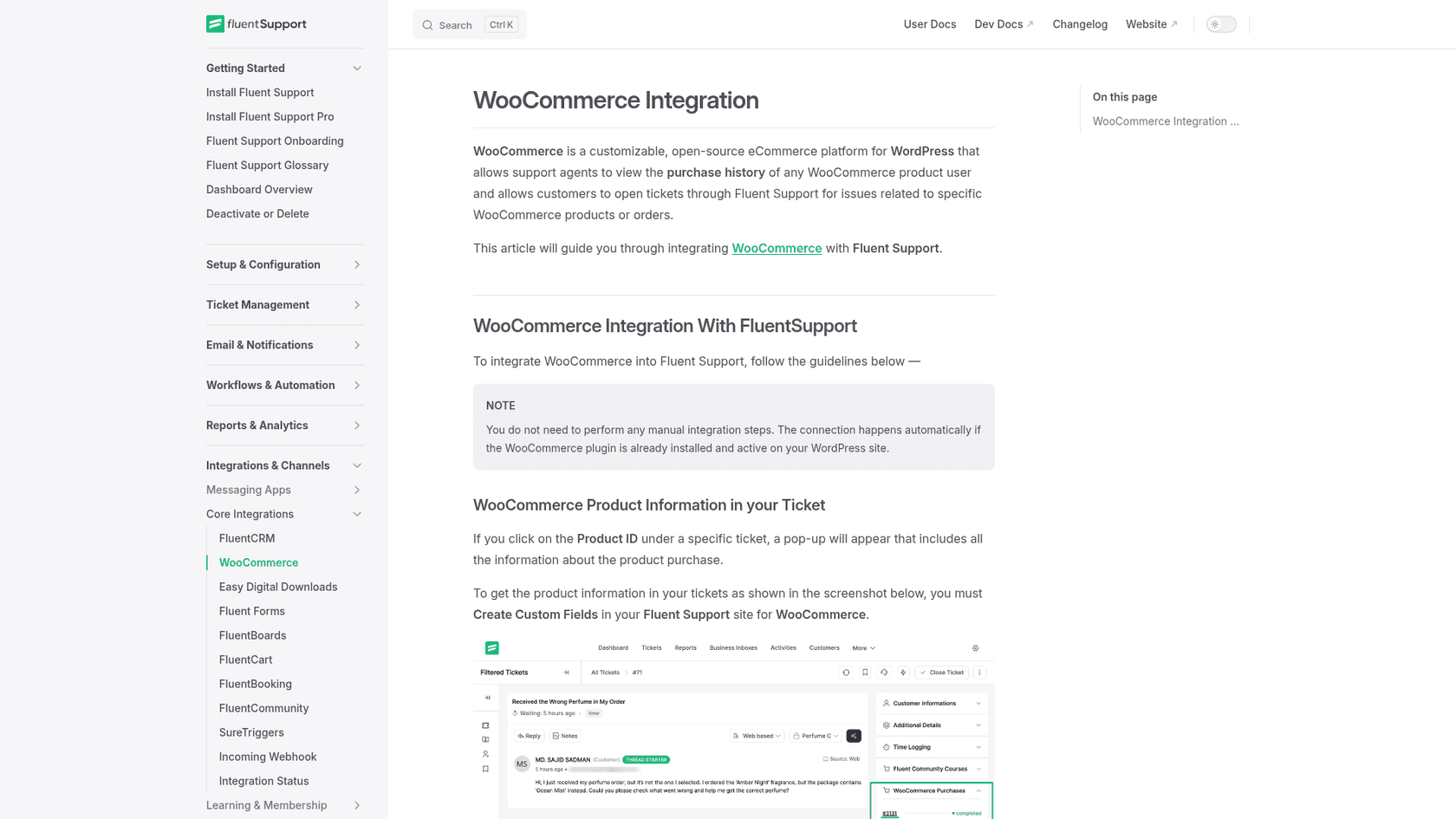
What it does well. Fluent Support runs as a plugin on your own WordPress site and stores tickets "in custom database tables" there (WordPress.org), with 10,000+ active installs and a 4.6 rating from 69 reviews. Because it sits next to WooCommerce, there's nothing to connect: its WooCommerce doc says "The connection happens automatically if the WooCommerce plugin is already installed and active". Agents see purchase history in the ticket, and customers can open a ticket against a specific order. Agents and tickets are unlimited, even on the free plugin.
The WooCommerce gap. The WooCommerce integration is a Pro feature, and it reads only: there's no refund or status change from a ticket. Its built-in AI isn't documented as reading WooCommerce orders; only its MCP server gives an outside AI tool purchase history.
Pricing. The core plugin is free. WooCommerce, email piping, saved replies, workflows and AI are in Pro (free vs Pro): $129 a year for one site, $249 for 5 and $399 for 50 (pricing), on sale at 40% off the first year as I write this. The AI drafts replies and summarises tickets using your own OpenAI, Gemini or Claude key, billed by the provider (AI setup).
For any team size on one store: $129 a year, about $10.75 a month.
Where it falls short. There's no live chat in its feature table and no AI that answers customers on its own. And your helpdesk now shares your store's hosting.
"We are using the paid version and it worked correctly. With the help of Fluent Support we were able to create a support system that worked with our Microsoft 365 account with several emails."
My take: pick Fluent Support if you want ticketing at plugin prices and your data on your own server. Skip it if live chat or AI that answers customers matters. The deciding factor is whether you'd rather own the helpdesk or rent one.
What does each helpdesk really cost a WooCommerce store?
Per-agent, per-ticket, per-conversation and per-site prices can't be compared until you put your own numbers in. This calculator uses each helpdesk's cheapest plan with WooCommerce order data in the ticket and live chat where it has it, plus the WooCommerce app it needs, from the prices above. It leaves out AI, which each vendor bills differently.
Set your team size and monthly conversations to see each helpdesk's monthly bill for a WooCommerce store.
Two things jump out once you move the sliders. Gorgias gets cheaper per agent the bigger your team, because it never charges per seat, while Zendesk and Help Scout climb with every hire. And Re:amaze's flat Starter plan beats its own per-user plans for teams of three or more.
Why the store app matters more than the inbox
Four of the six build a better app for Shopify than for WooCommerce; Re:amaze is the exception, and Fluent Support lives inside WordPress. Zendesk, Freshworks and Help Scout each publish their own Shopify app that refunds and cancels from the ticket; for WooCommerce they rely on someone else. Gorgias builds both, but only the Shopify side gets its AI Agent.
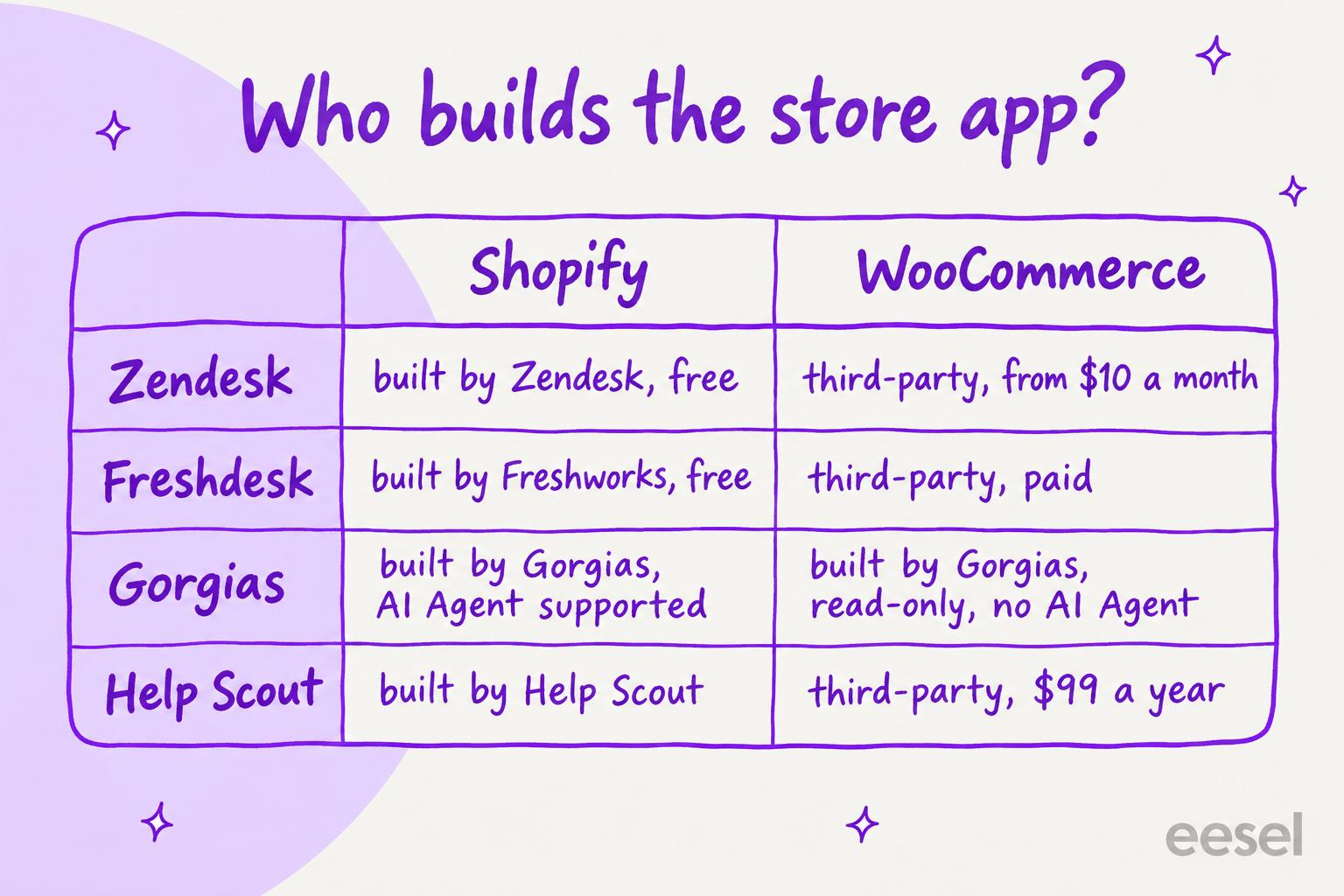
That matters for two reasons. A third-party app can fall behind when WooCommerce changes (the low reviews of Help Scout's connector include complaints about exactly that). And the AI features these vendors sell hardest are tied to the store app their AI was built against, which is Shopify's. If you plan to let AI take refund requests, this is the first thing to check. Before you sign, open the helpdesk's WooCommerce doc, not its ecommerce landing page, and look for the words refund and AI.
Add AI that acts on WooCommerce orders in the helpdesk you pick
If you've picked a helpdesk for its inbox and its AI stops at Shopify, you don't have to switch. eesel is an AI teammate that joins the helpdesk you already use (Zendesk, Gorgias, Freshdesk, Help Scout and Re:amaze among them, though not Fluent Support), learns from your past tickets, and works in the store too. Its WooCommerce integration looks up orders, order notes (where shipping plugins keep tracking numbers), customers, products and subscriptions, and can add order notes, change order status, update an address or create a refund.
It's the same idea as our AI for WooCommerce guide, done inside your helpdesk. You decide how far it goes. Each action can run on its own, wait for a person's yes, or stay off, and what it may do depends on who is asking: the support lead in Slack, a verified customer, or an anonymous visitor (actions and approvals). The free eesel AI plugin connects your store without copying API keys, and holds refunds and order status changes for your approval by default.
The closest published result is on Gorgias with Shopify rather than WooCommerce: Question Beauty had eesel handle about 990 Gorgias tickets in a month, sending about 960 replies itself and looking up about 290 orders before answering.
Try eesel next to your WooCommerce helpdesk
The cheapest way to find out whether AI can take your order questions is to test it on the ones you already answered. eesel connects to your helpdesk and your WooCommerce store, drafts answers against your past tickets before anything reaches a customer, and keeps refunds waiting for your yes until you trust it, the way our refund guardrails post describes. Pricing starts with 100 free credits for 7 days, no card, then one fixed monthly price where a ticket or chat is one credit (pricing).

Try eesel on your WooCommerce store, or read how eesel works with WooCommerce first.