Recharge fixed amount discounts: setup, limits and what support must know

Rama Adi

Katelin Teen
Last edited November 9, 2026
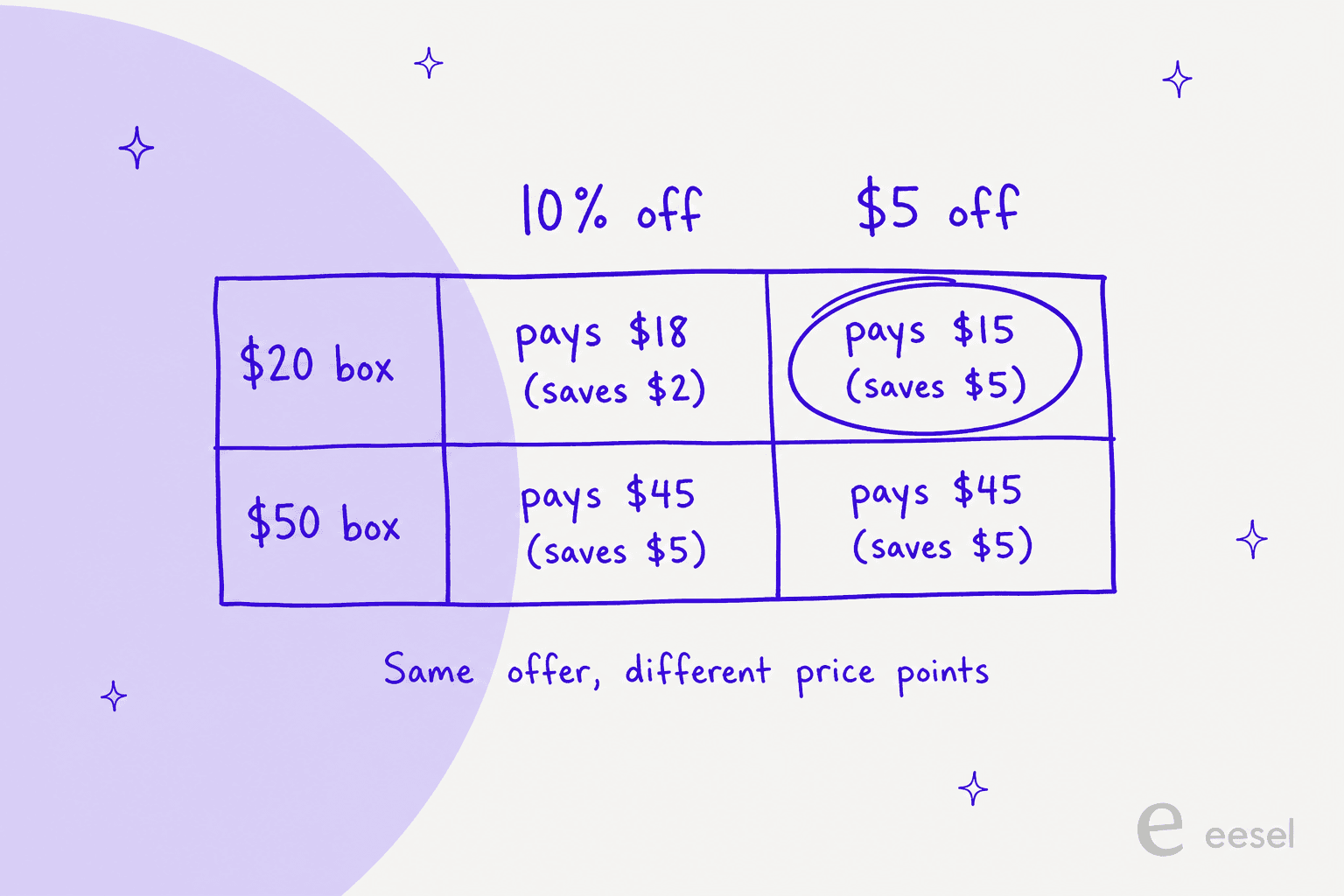
Since 29 September 2026, Recharge Subscribe and Save plans can take a flat amount off, such as $10 off every order, instead of a percentage. A fixed amount stays the same whatever the product costs, so $5 off is a 25% cut on a $20 box and only 10% on a $50 one. The support risk is the gap between the price promised at checkout and what a subscriber sees after a swap, a frequency change or a prepaid renewal. An AI helpdesk teammate such as eesel can read the subscription in Recharge and explain that gap, but it cannot create or change a discount.
With the eesel CLI, an AI coding agent can upload approved knowledge, like your exported discount macros and Recharge help articles, then ask test questions and check the answers before anything goes live. Connecting Recharge itself still needs a person to paste an API token in the browser.
What changed on 29 September 2026?
Recharge's changelog says fixed amount discounts for Subscribe and Save plans are now generally available, as an alternative to percentage discounts. Its own example is "$10 off every order", and the point is that a merchant no longer has to work out which percentage lands on a target saving. I checked the live changelog and help center on 9 November 2026, and the entry lists seven places the discount now works.
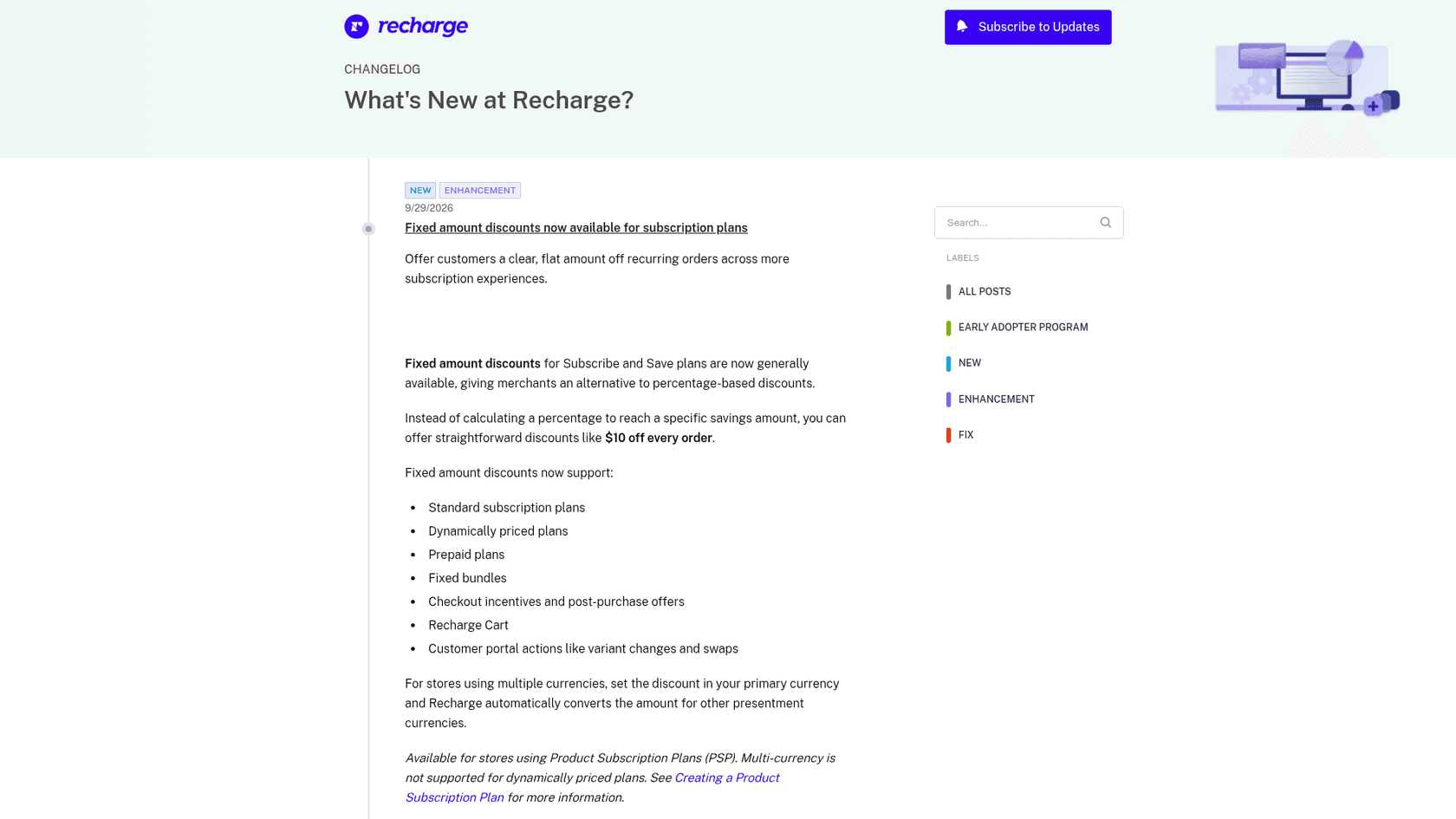
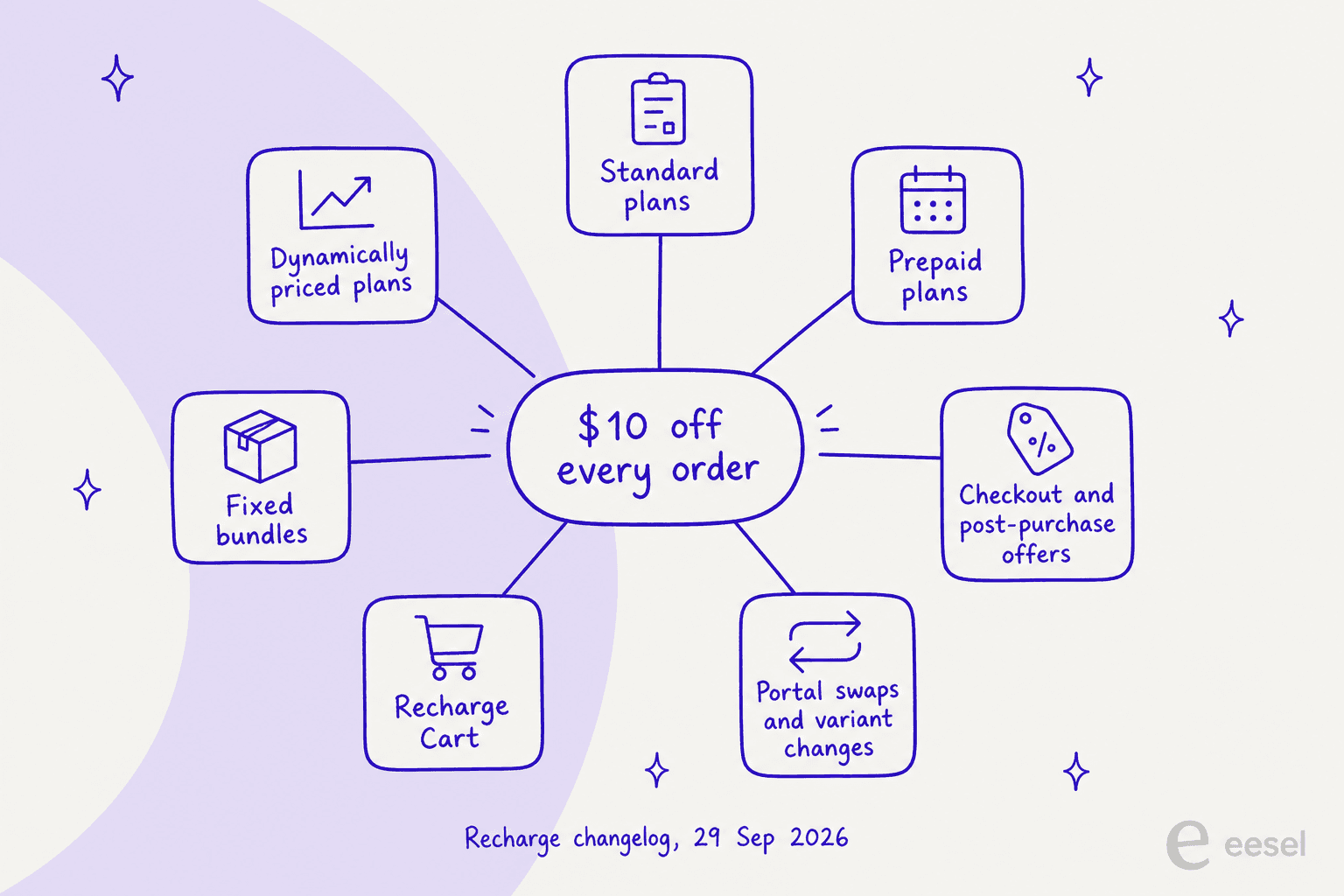
Two details in the same note matter for support. For stores that sell in several currencies, the merchant sets the discount in the primary currency and Recharge converts it for other presentment currencies automatically. And the feature is available for stores on Product Subscription Plans, with multi-currency not supported for dynamically priced plans. The last item on the list, portal swaps and variant changes, is the one I would watch first, because that is where a subscriber compares a new price to the old one. If access is the other pain point, my portal login guide covers it.
How do fixed amount discounts work on a plan?
Recharge's Product Subscription Plan guide now has a discount type dropdown on each plan, with two choices. Percent off reduces the subscription price by a percentage, such as 10%. Amount off reduces it by a fixed amount, such as $5, and Recharge warns that the amount stays the same regardless of product price, so you should review your pricing before applying the same discount to products at different prices.
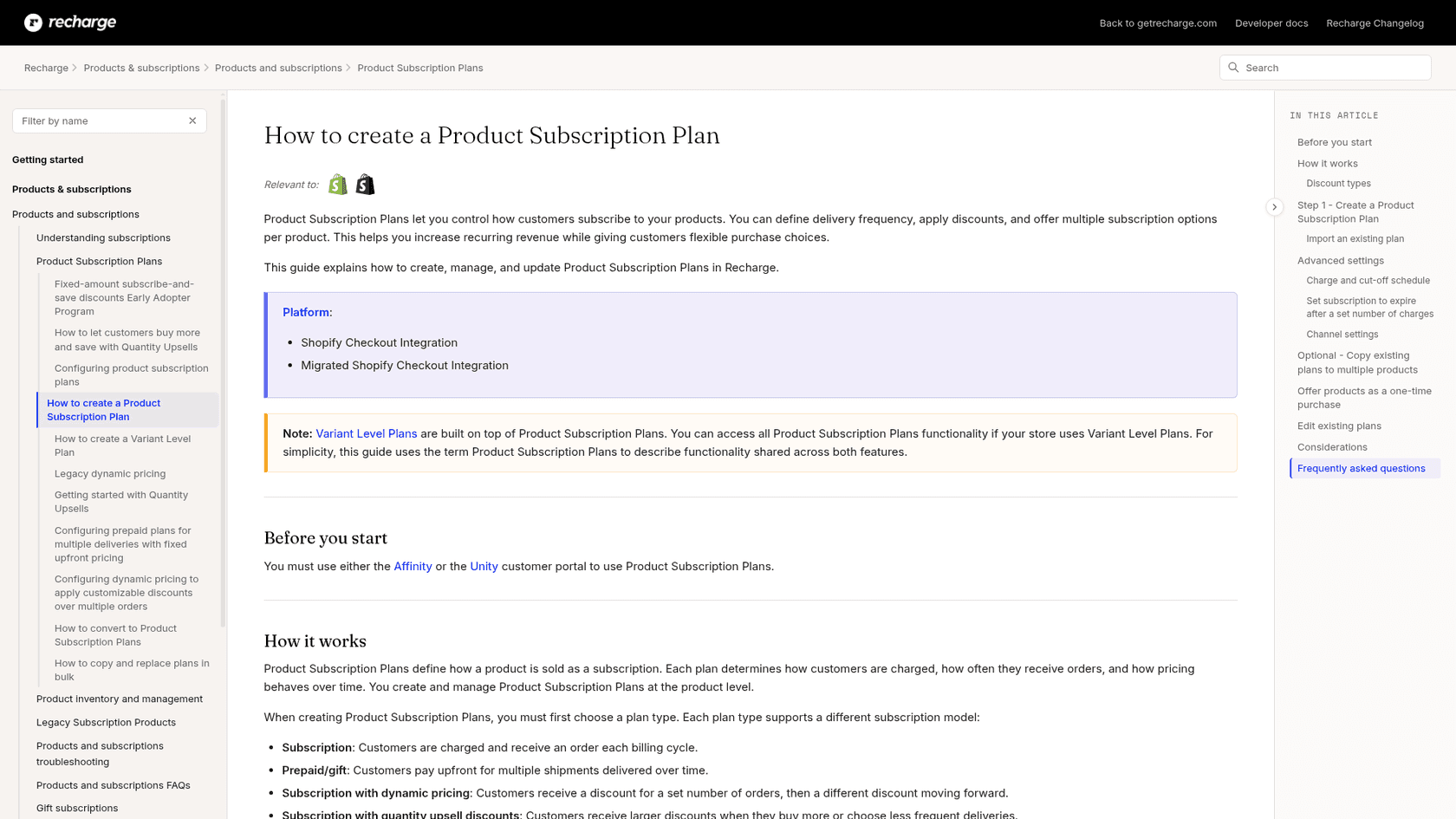
The setup is short, and I am following the guide's own steps:
- In the merchant portal, open Products and pick the product.
- Click Add subscription plan, choose a plan type, and set the frequency and plan name. Daily intervals are not supported.
- Enter a discount, choose Percent off or Amount off in the dropdown, and type the value.
- Click Save.
The discount applies at checkout and in the customer portal, and shoppers on the Affinity or Unity portal see the discounted price with the original crossed out. You can also give two plans on the same product different discount types, for example a "Save $5" plan beside a percentage plan, which is the cleanest way to test which one converts. If your plan lets customers pick any frequency, the guide says they keep their original discount, percentage or dollar amount, whichever frequency they choose. That sentence will save you a ticket or two.
Should you offer a percentage or a fixed amount?
It comes down to how uniform your prices are. A percentage scales with the price, so it is the safer default for a catalog that runs from $12 refills to $90 kits. A fixed amount gives a clean, easy-to-read promise, but it is a different share of every price.
Here is the same arithmetic as a widget, so you can try your own price points before it reaches your order management routine. It is plain math, not a Recharge calculator, and the note under it says where I would test before trusting it.
What does a discount really cost per order?
Pick a subscription price and an offer. The result is plain arithmetic, not a Recharge calculator.
Assumes one item per order and no shipping, tax or other discounts. Recharge documents $5 off as a reduction of the subscription price; test quantity above 1 and prepaid plans before you promise a customer a number.
My rule of thumb: use a fixed amount when every plan sits in a narrow price band or when "$10 off" is the headline of the campaign, and use a percentage when prices vary a lot. A fixed amount is also generous on cheap items, and a $5 cut on a $15 refill is 33% off, so check the margin before you roll it out store-wide. If you plan to use a flat amount as a save offer at cancellation, my churn prevention guide covers the support side.
What are the limits of fixed amount discounts?
Most of these come from the considerations in Recharge's own guide, and one of them contradicts the changelog.
| Limit | What Recharge says | Ticket it creates |
|---|---|---|
| Product Subscription Plans only | The feature is for stores on Product Subscription Plans, which need the Affinity or Unity portal | "Why can't I see the discount in my old portal?" |
| No way back | Once a store opts into Product Subscription Plans it cannot revert, and Prima and Novum themes are not compatible | A migration decision, not a ticket, but it shapes everything else |
| Bundles | The changelog lists fixed bundles, but the guide's considerations table still says Amount off is not available for bundles or legacy plans | "Is my bundle discounted?" |
| Dynamically priced plans | Supported, but not with multi-currency | Wrong amount for a non-primary currency shopper |
| Existing subscribers | Plan edits apply to new subscriptions only, unless you update existing ones manually or in bulk | "A newer subscriber got $10 off and I did not" |
| Widget | Recharge recommends the new subscription widget, and says the legacy widget may work but is not supported | A discount that shows on one product page and not another |
| Custom storefronts | Custom widgets, carts and portals are outside Recharge's support scope | An answer your team has to find alone |
I would test two things before announcing a flat-amount offer. The first is the bundle contradiction: the changelog and the guide disagree, and the guide was updated on 4 November, after the changelog went out. The second is prepaid. Recharge's prepaid guide says it multiplies the product price by the number of deliveries and then applies the discount, but I could not find a sentence saying whether a fixed amount comes off once per charge or once per delivery. For a three-delivery prepaid plan that is the difference between $10 and $30 off, so run a test order. My prepaid deliveries guide and the post on fixed-price prepaid bundles cover the shipment side.
Recharge's docs also do not say how a fixed amount behaves when a subscriber raises the quantity above one. The percent-off description and the fixed-amount description both talk about reducing the "subscription price", so I would test quantity two before telling a customer a number. One Capterra reviewer was already asking for better discount handling before this shipped:
"Certain workflows (like ongoing discounts or custom shipping rules) require workarounds that should really be native by now."

That review predates the September update, so I read it as the backlog this release is working through, not as a verdict on it.
How is this different from a discount code?
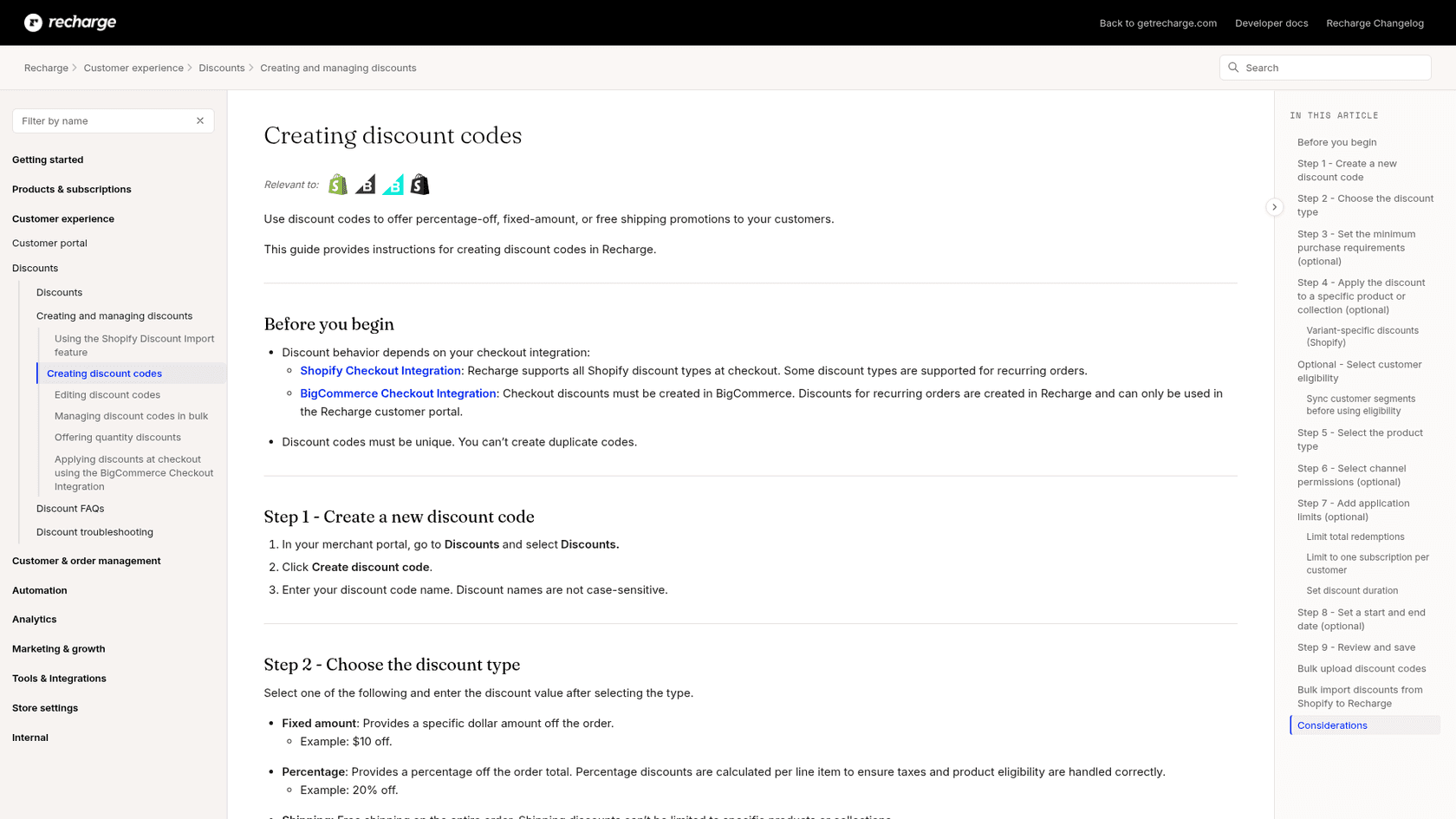
They are two separate systems, and subscribers mix them up. A plan discount belongs to the subscription plan and applies to every order of that plan. A discount code is something the shopper enters, and Recharge's discount codes guide lets you choose fixed amount, percentage or free shipping, set a minimum purchase, limit it to a product or collection, and set a duration of one charge, all charges or a specific number of charges.
Two Recharge changelog entries sit next to this one. On 19 October 2026 Recharge added Remi, its AI assistant, which creates a discount from a plain-language request such as "15% off the first order for new subscribers" and leaves the form for the merchant to review. And on 2 November 2026 the Recharge SDK began supporting tiered discount offers in guest sessions, so shoppers can see progress toward the next reward before logging in.
If you also use my subscription box support guide, the same rule holds, and flat offers also pair with AI upselling ideas: separate "what the plan promises" from "what the code did" in every reply.
What will subscribers ask, and what should you reply?
Flat amounts turn a percentage question into a dollar question. The first column is what a customer actually writes, and the answers follow Recharge's docs.
| Customer says | What is true | Suggested reply |
|---|---|---|
| "Why is my saving only $5 now?" | Fixed amount stays the same whatever the price | Show the plan's amount and the order total, not a percentage |
| "I swapped my product and the discount changed" | Fixed amounts now work on portal swaps and variant changes | Check the new product's plan, then say which discount it carries |
| "New customers get more than me" | Plan edits apply to new subscriptions only | Offer a manual or bulk update through your team |
| "I see a different amount in euros" | The amount is set in the primary currency and converted | Explain the conversion and quote the presented price |
| "My prepaid price looks wrong" | Recharge calculates the price first, then applies the discount | Test the order and confirm before you promise a number |
| "Is there a code on top?" | Plan discounts and discount codes are separate | Check code duration and any minimum purchase |
Pair these with clear human handoff rules, and keep the skip order guide nearby for the tickets around a renewal.
My macro templates guide shows how to word the billing ones, the refund approval matrix shows where a person should sign off.
The pause date and payment method errors posts cover the next two renewal tickets.
Can an AI teammate answer discount tickets?
For the lookup and explain part, yes, and I would rather say where it stops. eesel is an AI teammate platform whose helpdesk teammate joins the queue you already run, and its Recharge integration reads a subscriber's subscriptions, queued orders and next charge date live. eesel has spent more than three years putting AI agents on live support queues, and in my experience billing questions go wrong when the agent answers from policy instead of from the record. That is why the useful move here is a lookup first and an explanation second.
The limits are concrete. eesel's Recharge docs list actions to look up customers, orders and subscriptions, skip a charge, change quantity or frequency, cancel, reactivate, create a subscription, cancel a queued prepaid order and update an address. None of them creates, edits or removes a discount, so a request to add a fixed amount, or to fix one that was wrong, goes to your team. The docs also do not say whether the subscription it reads includes the discount fields, so I would not promise customers a dollar figure from the agent until you have tested it on your own store. And changing frequency or quantity can change what a fixed amount means, so keep those behind an approval workflow. Recharge has no event that wakes the agent either, so it works in conversations it already handles in your helpdesk, in Slack or on your site.
Named stories show the working pattern even though neither runs on Recharge. Question Beauty runs eesel on Gorgias and Shopify, and in the month from 8 August to 8 September 2026 it handled 990 tickets, looked up 290 Shopify orders before answering delivery questions, and closed 280 without a person. Anything touching money or a complaint went to a teammate with a note attached. STIL Classics uses the other mode: eesel checks the order and leaves a draft reply as an internal note, and a person sends it. A discount ticket suits either, because the answer depends on a record and the risky step needs a sign-off. My Gorgias and Recharge guide goes through that stack.
I would start in draft mode, add ticket tagging so discount tickets are easy to find, run the questions in the table through a simulation test, and only then let it reply on its own for read-only lookups.
Try eesel for Recharge
If your Recharge store is moving from percentage offers to "$10 off every order", eesel is the teammate that answers "what am I paying and why did it change?" with the live subscription open, then hands anything that changes money to your team for approval. It connects to Recharge with an API token and works alongside Shopify, and the Question Beauty story shows what order-aware replies look like in a real inbox. Try eesel on your own queue, free to start.