


I rate Kimi K3.1 Pro 3.5 out of 5: it thinks almost as well as Claude Opus 5.5, scoring 55.1 on the Artificial Analysis Intelligence Index (#4 of 215), at $2 input and $10 output per million tokens. For long, unattended agent work you can leave running, it is the best value near the top of the leaderboard right now.
It loses points for how it works, not how smart it is. It's slow at about 50 tokens per second, it writes long answers that eat into the low price, the open weights are promised "by Nov 4" but not out, and Kimi Code subscribers report burning a 5-hour limit in under an hour. Buy it through the API for patient jobs; skip it for anything a person waits on.
If you came here picking a model for a support agent, the model is the smaller half of the decision. I build eesel's integrations and APIs, and in years of running AI on live helpdesk queues the thing that decides quality is the setup around the model. SamCart runs eesel on Freshdesk tickets and website chat, answering from 280 help center articles, without ever caring which model topped a leaderboard that week.
What is Kimi K3.1 Pro?
Kimi K3.1 Pro is Moonshot AI's flagship model, launched on October 23, 2026. Moonshot calls it "a post-trained version of Kimi K3, with substantially larger post-training compute" in its launch blog, so it's the same 2.8T-parameter base as Kimi K3 (104B active, mixture of experts) with much more training on top, plus a 1M-token context window.
It's live in the Kimi app, Kimi Work, Kimi Code and the Kimi API, and it is now the default model in the chat box on kimi.com. If you want the full launch rundown (benchmarks, the K3 comparison, access routes), my Kimi K3.1 Pro overview covers it. This post is the verdict, in the same format as my earlier Kimi K3 review.
How did I test and score Kimi K3.1 Pro?
I read Moonshot's launch blog, the API quickstart and the pricing page, then went through Artificial Analysis's independent results and the first wave of hands-on tests, including the 674-comment Hacker News thread. The model is four days old, so I'm not going to pretend I've run it in production for months. What I can do is score it on the things that decide whether it's worth building on.
| Category | Score | Why |
|---|---|---|
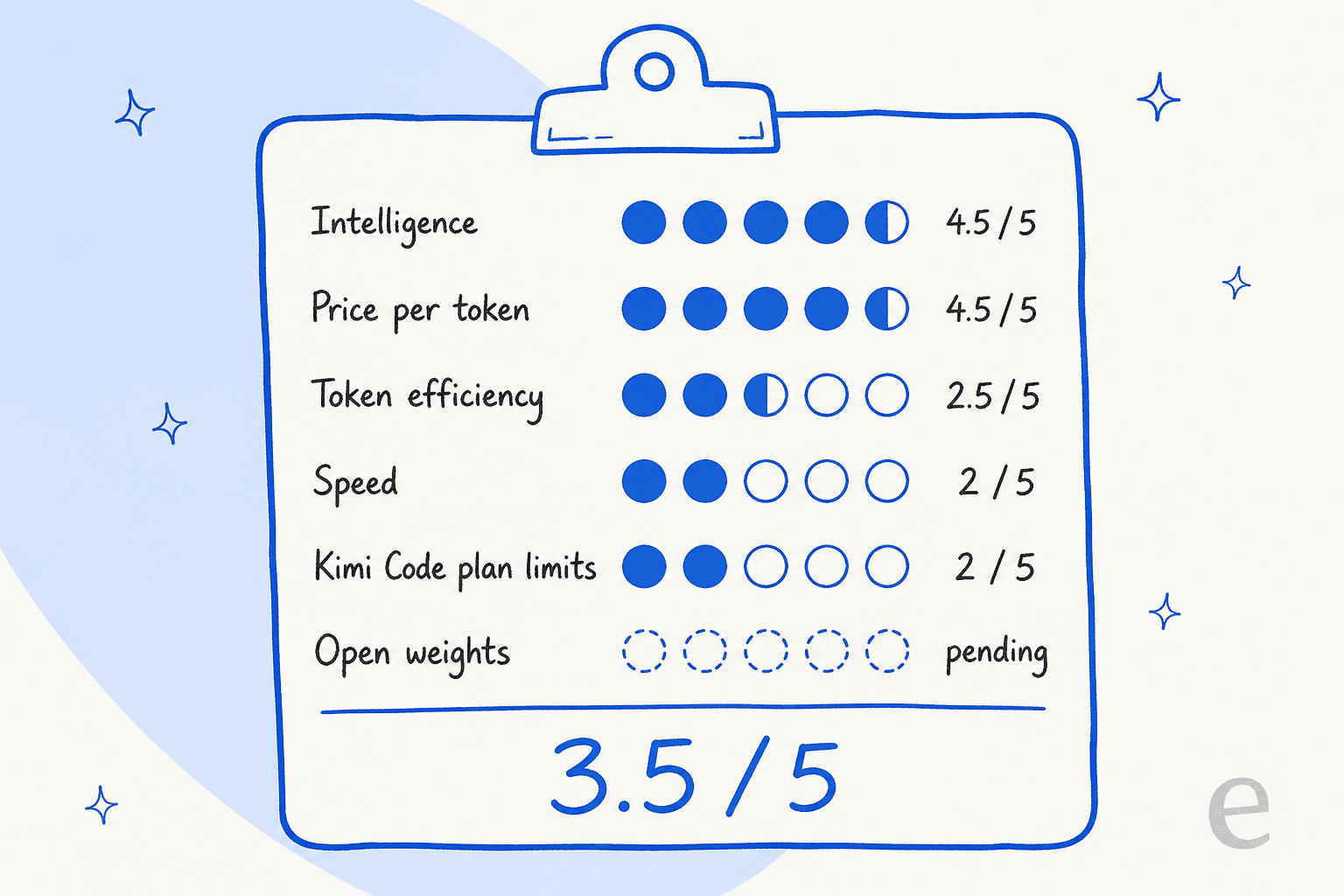
| Intelligence | 4.5/5 | 55.1 on the AA index, 2.5 points behind Opus 5.5 (Max) |
| Price per token | 4.5/5 | $2 / $10, a third cheaper than K3, no long-context surcharge |
| Token efficiency | 2.5/5 | 150M output tokens to run the AA index vs an 87M peer median |
| Speed | 2/5 | 49.7 tokens per second, rank 165 of 182 |
| Kimi Code plan limits | 2/5 | Multiple subscribers report hitting the 5-hour cap in under an hour |
| Open weights | Pending | Promised by November 4, not published on October 27 |
| Overall | 3.5/5 | Strong engine, rough edges in how you get to use it |
Where is Kimi K3.1 Pro strong?
The short version: it's the closest a non-US lab has come to the top of the leaderboard, at a mid-tier price. Here's where that shows up.
Near-frontier reasoning for $2 and $10
On Artificial Analysis, K3.1 Pro scores 55.1, against 57.6 for Claude Opus 5.5 (Max) and 56.0 for Claude Sonnet 5.5 (Max). It sits above GPT-6 Astra (Max) at 52.7 and Gemini 4 Argon (High) at 52.6. On the same index version, Kimi K3 scores 43.6, so this release is a jump of more than 11 points from the same base model.
The price is what makes that interesting. K3.1 Pro lists at $2 input, $0.20 cached input and $10 output per million tokens on the Kimi API, which is one third less than Kimi K3 pricing and the same list price as Sonnet 5.5. It ran the full Artificial Analysis index for $3,117, against $8,708 for Opus 5.5 (Max).
Long agent jobs and office work
This is where the extra training shows. Artificial Analysis measured 67.2% on Terminal-Bench 4.0, the highest of every model plotted on its K3.1 Pro page, up from 12.6% for K3. In Moonshot's own tests it leads on SWE Marathon (51.7 vs 46.3 for Opus 5.5) and on OfficeQA Pro v2 (64.4 vs 62.2), a finance and office-document benchmark.
It also makes fewer things up than K3 did. On Moonshot's internal Hallu Bench, the claim-level hallucination rate on hard questions with tools fell from 23.4% to 8.3%. That's Moonshot's own test, so I weigh it lightly, but the independent number points the same way: AA's hallucination rate is 43.9% for K3.1 Pro against 53.2% for K3 and 58.6% for Opus 5.5 (Max).
The early hands-on reports match this. One developer moved straight over from K3:
"Using it now via API (3.1 Pro on Open Router) in a HITL setup (Cline in VSCode). Off-hand it's quite good. I've been using K3 for the past few months almost exclusively for coding work and have been stunned by how good it is. Excited to see how far 3.1 Pro can be pushed."

A 1M context window with flat pricing
The quickstart says K3.1 Pro has flat pay-as-you-go pricing with no tiering by context length, so a 900,000-token prompt costs the same per token as a short one. Cached input is billed at $0.20 per million, a 90% discount, with a default 5-minute cache and an optional 1-hour tier. For agents that re-read a big codebase or a long contract on every turn, that adds up to a real saving.
Where does Kimi K3.1 Pro fall short?
Everything that cost it points sits around the model, not in it. These are the five issues that would change whether I'd build on it today.
It is slow
Artificial Analysis measured 49.7 output tokens per second on Moonshot's own API, rank 165 of 182, and called it "notably slow". The average task in its benchmark index took 1,011 seconds, about 17 minutes. Moonshot's fix is Kimi K3.1 Pro Highspeed, which it says runs "2-3× the speed" at exactly double the price ($4 / $20).
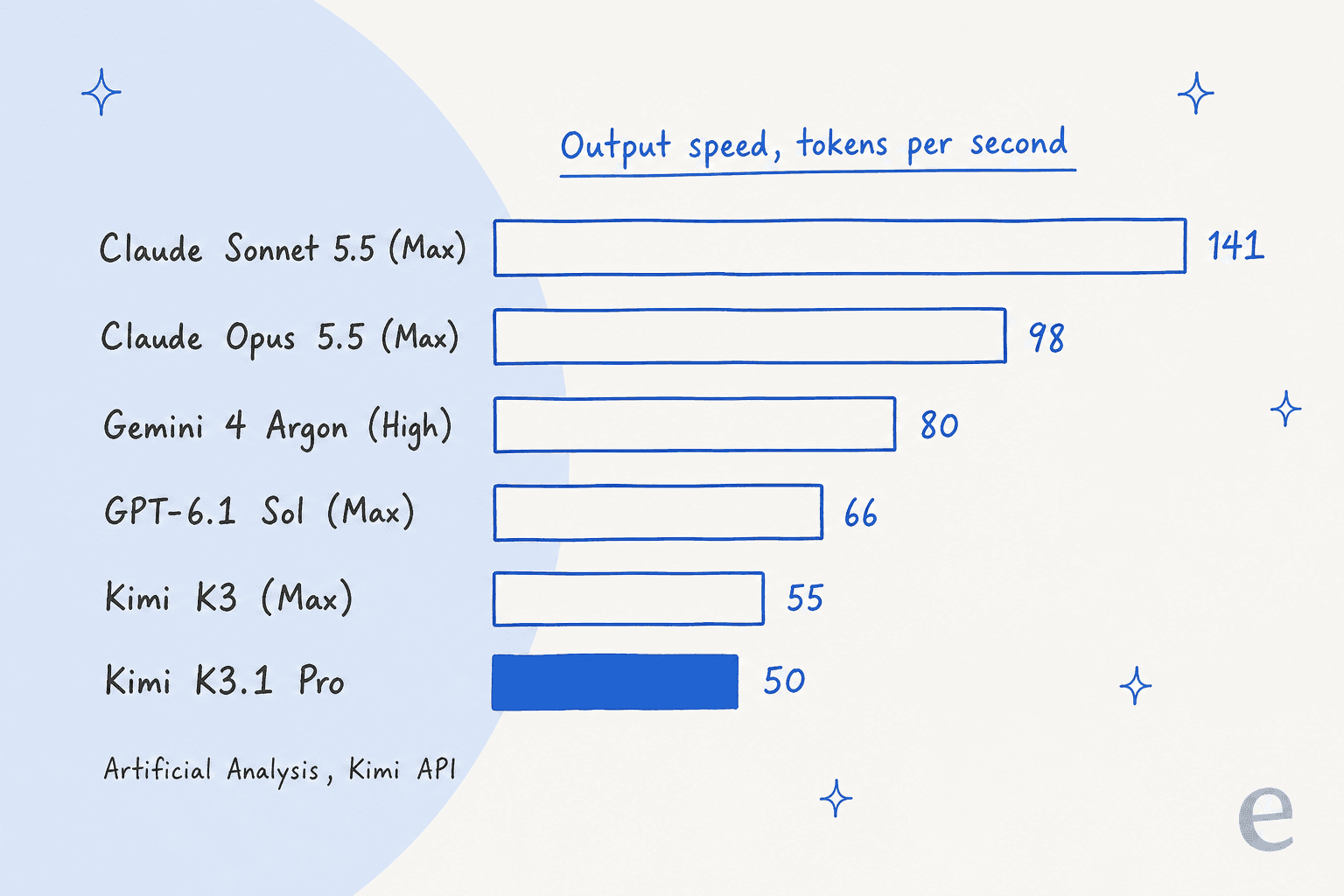
Sonnet 5.5 costs the same per token and streams nearly three times faster. For a batch job running overnight, 50 tokens per second doesn't matter. For a chat window with a person staring at it, it does.
It writes a lot
K3.1 Pro used 150M output tokens to run the Artificial Analysis index, against a peer median of 87M. Most of that is reasoning: 34,883 reasoning tokens per task on average. So the per-token discount doesn't fully carry through to the bill. Per task, it averaged $2.11 against $2.00 for K3, even though K3 lists at $3 / $15. I break down that maths in the Kimi K3.1 Pro pricing post.
"So their base price is 1/5th of Opus 5.5 per token, but if you want "highspeed" it's 2x that and then I guess it generates 2x the number of tokens as well? That might suggest that Opus is competitively priced after all."
The lever you have is reasoning_effort. The API supports low, high and max, and the API key page lists max as the default. Every benchmark number above was run at max, so drop the effort and you trade score for tokens.
Kimi Code limits burn fast
The loudest complaint in the launch thread isn't quality, it's quota. Kimi's Kimi Code page lists Plus at $19, Pro at $39, Max at $99 and Ultra at $199 a month, and Highspeed needs Pro or above and uses twice the credits. The new plans keep a rolling 5-hour window plus a monthly credit pool shared with the Kimi app.
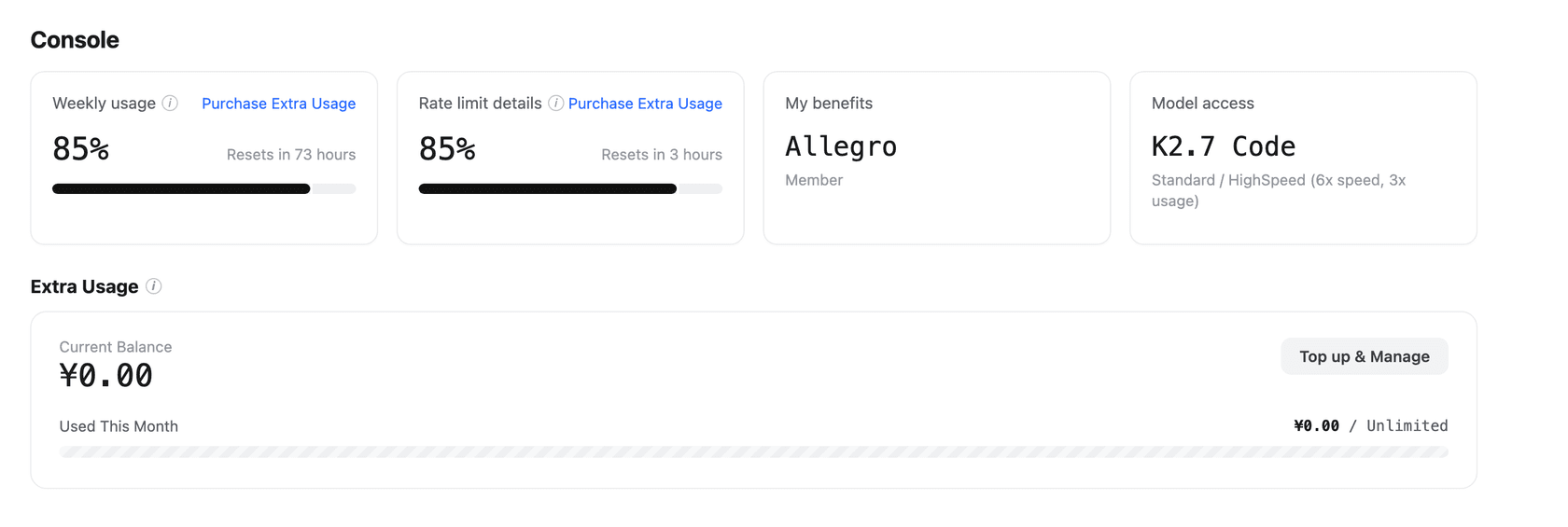
"If you are expecting any sort of usable limits on their subscription plan I suggest adjusting your expectations. I subscribed to $99 a month plan and within 47 minutes with one session (not asking for swarms or anything) was limited by 5-hour quota."
Not everyone hit the wall, and default max effort is part of the story, since it burns tokens faster. Still, if you're coming from Claude Code and expect the same headroom per dollar, test a week on the monthly plan before you pay for a year.
The weights aren't out yet
Moonshot calls K3.1 Pro its "most capable 3T-class open-weight model", and both the blog and the quickstart say the full weights will be released by November 4. On October 27, the Hugging Face models API returned no K3.1 repo under Moonshot's account, and Artificial Analysis lists the license as proprietary for now.
That matters for two reasons. You can't self-host it or fine-tune it yet, and only Moonshot serves it: the OpenRouter listing shows two endpoints, both Moonshot's own. Artificial Analysis counts 5 API providers for K3.1 Pro against 20 for K3. Even when the weights land, a 2.8T-parameter model needs a server cluster, not a workstation.
Some headline benchmarks are in-house
Several of Moonshot's strongest claims come from internal tests: Kimi Code Bench, Hallu Bench, the finance benchmarks and the cyber evaluation. Its coding benchmarks were run in the Claude Code harness, which one well-followed X account questioned on launch day. The independent Artificial Analysis numbers are still strong, so I don't think the benchmarks are hollow. I'd just trust the independent ones first.
How does Kimi K3.1 Pro compare with Claude, GPT and Gemini?
All numbers below come from the Artificial Analysis K3.1 Pro page, measured on each maker's own API, so they line up like for like.
| Model | AA index | Price in / out (per 1M) | Speed (tokens/s) | Cost per task | Cost to run index | Terminal-Bench 4.0 |
|---|---|---|---|---|---|---|
| Claude Opus 5.5 (Max) | 57.6 | $4 / $20 | 98.1 | $5.98 | $8,708 | 59.6% |
| Claude Sonnet 5.5 (Max) | 56.0 | $2 / $10 | 141.3 | $5.46 | $7,260 | 63.6% |
| Kimi K3.1 Pro | 55.1 | $2 / $10 | 49.7 | $2.11 | $3,117 | 67.2% |
| Claude Fable 5.1 (Max) | 53.4 | $10 / $50 | 69.8 | $7.63 | $13,129 | 52.0% |
| GPT-6 Astra (Max) | 52.7 | $10 / $50 | 66.7 | $3.26 | $5,324 | 59.1% |
| Gemini 4 Argon (High) | 52.6 | $2 / $10 | 79.7 | $1.62 | $2,101 | 57.1% |
| GPT-6.1 Sol (Max) | 51.8 | $2 / $10 | 65.9 | $0.72 | $1,082 | 56.1% |
| DeepSeek V4.1 Flash 1017 (Max) | 45.1 | $0.30 / $1.20 | 169.3 | $0.26 | $445 | 33.8% |
| Kimi K3 (Max) | 43.6 | $3 / $15 | 54.5 | $2.00 | $3,658 | 12.6% |
Two things jump out. First, among models scoring 55 or more, K3.1 Pro is by far the cheapest to run. Second, it isn't the cheapest smart model overall: GPT-6.1 Sol and Gemini 4 Argon land within three or four points for a fraction of the cost per task. K3.1 Pro's sweet spot is "nearly Claude-level, at a third of the Claude bill", not "cheapest that works".
On feel, the hands-on testers mostly agree that Opus still has an edge the benchmarks don't capture:
"I feel Opus still nails the subtle details better, like in the tractor example below. But I wonder if it matters when you can run Kimi 3x before it costs the same as one Opus?"
"TLDR: Kimi is a good model, especially for visual work, but I still find Opus 5.5 more useful for general-purpose tasks and white-collar work."
If you're weighing it against other open models specifically, my Qwen 3.8 Max vs K3 and DeepSeek V4 Flash vs K3 comparisons still describe the wider field, and the Kimi K3 alternatives list is a good starting shortlist.
What is the Kimi K3.1 Pro API like to build on?
From the integration side, which is the part I spend my days in, it's a clean API with a few gotchas. The model IDs are kimi-k3.1-pro and kimi-k3.1-pro-highspeed, and the docs cover streaming, vision input, tool calls, structured output and a "Dynamic tool loading" feature.
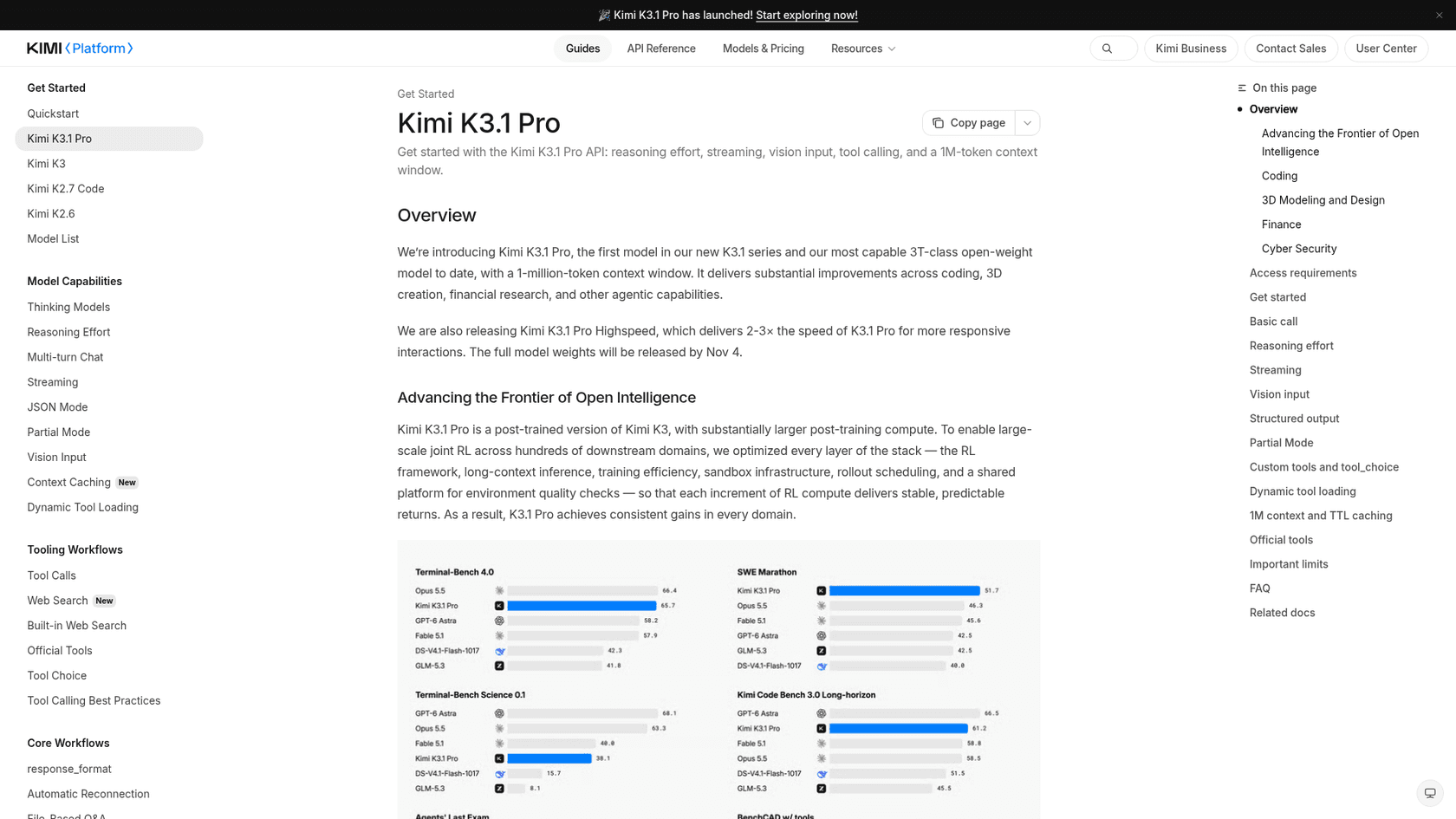
The things I'd want to know before writing a line of code:
- Access unlocks after a $1 top-up, and your rate limit depends on how much you've topped up in total. At the $1 tier you get
3requests per minute; you need$10cumulative to reach100RPM, per the rate limits page. - There's no batch discount for K3.1 Pro. Kimi's batch API is 60% of the standard price, but it only covers K2-series models.
- Reasoning is always on, and
max_completion_tokensdefaults to131,072. Budget for long answers. - Zero Data Retention is available for API customers, according to the launch blog.
- The K2 models are being retired. New users lose K2 access from October 31, 2026, and all K2 models are planned to shut down by the end of December, so if you're on Kimi K2.7 Code you'll be moving anyway.
If you mainly want a capable model to prototype with for little money, my roundup of free AI APIs is worth a look before you top up anywhere.
Who should use Kimi K3.1 Pro?
Pick it if you run long, unattended jobs where quality matters and nobody's waiting: agentic coding runs, research reports, spreadsheet-heavy finance work, document processing across huge contexts. You get close to Opus quality for about a third of the run cost, with no long-context surcharge.
Skip it if a person waits on every response. At 50 tokens per second, live chat and quick back-and-forth coding feel sluggish, and Highspeed doubles the price to fix it. Skip it too if you're cost-first: GPT-6.1 Sol and Gemini 4 Argon finish the same benchmark tasks for less. And if you need weights you can run yourself today, stay on K3 until November 4 proves Moonshot keeps its promise.
The deciding factor is patience. K3.1 Pro is built for work you start and walk away from.
Should a support team run its AI agent on Kimi K3.1 Pro?
This question comes up every time a new model tops a chart, and I think it's the wrong first question. Kimi K3.1 Pro is infrastructure. To answer a single ticket with it, you'd still need to connect it to your helpdesk, sync your help center and past tickets, decide what it does alone and what it hands to a person, and test it before a customer sees an answer. eesel is the employee that sits on top of models like this one.
The speed problem also hits support harder than most uses. A customer in a chat bubble won't wait while a model writes 35,000 reasoning tokens. For support, a fast model with good retrieval usually beats a smarter, slower one.
And wrong answers in support mostly don't come from the model. One example from eesel's own sales calls: a vehicle-telematics support team on Zendesk saw their bot tell customers "yes, we support your car model" for brands they didn't support, because their knowledge base said "we support all models". No leaderboard jump fixes that. What fixes it is stopping hallucinations at the knowledge layer and simulating the agent on real past tickets before launch, which is why eesel runs every rollout against a team's historical tickets first.
That's the layer eesel's AI helpdesk teammate takes care of. SamCart shows what that looks like in practice. It runs eesel on its Freshdesk tickets and on its website chat, with a separate agent for each channel, both answering from the same 280 articles on its help center. On Freshdesk, the agent sends the first reply only while no person is assigned, steps back the moment a teammate picks the ticket up, and tags the ticket for handoff when a seller asks for a human. The workspace now runs 4 agents, including one for a second product SamCart launched in 2026.
If the agent-first, terminal-first style of tools like Kimi Code is what appeals to you, the eesel CLI brings that to support. You run the same teammate from a terminal: eesel activity to review what it did, eesel approvals to approve or deny pending actions, eesel instructions to edit its standing rules. The commands print JSON and write commands support --dry-run, so scripts and coding agents can drive it safely, and there's an MCP server as well. I go deeper in my guide to the AI agent CLI.
Try eesel
If you're shopping for a model because you want AI answering your helpdesk, skip a step. eesel's AI helpdesk teammate plugs into Freshdesk, Zendesk or Gorgias, learns from your help center and past tickets, and shows you how it would have answered last month's tickets before it touches a live one.
Try eesel free on your own queue, or compare it with the other best AI teammates first. If you're still deciding between hiring an AI or building one, my AI employee explainer lays out the difference.
Frequently Asked Questions
Is Kimi K3.1 Pro good?
Yes, for the right job. In my Kimi K3.1 Pro review I give it 3.5 out of 5: it scores 55.1 on the Artificial Analysis Intelligence Index, close to Claude Opus 5.5, at $2/$10 per million tokens. It loses points for slow output, long answers and plan limits in Kimi Code. The Kimi K3.1 Pro overview covers the launch in full.
Is Kimi K3.1 Pro better than Claude Opus 5.5?
Not overall. Opus 5.5 (Max) scores 57.6 on Artificial Analysis against 55.1, and it runs at about twice the speed. Kimi K3.1 Pro wins on cost: it ran the full benchmark index for $3,117 against $8,708 for Opus 5.5 (Max). My Claude Opus 5.5 review has the other side of that comparison.
How much does Kimi K3.1 Pro cost?
On the Kimi API it costs $2 per million input tokens, $0.20 for cached input and $10 per million output tokens. The Highspeed version is $4 and $20. Kimi app plans run from $19 to $199 a month. The full breakdown is in my Kimi K3.1 Pro pricing guide.
Why is Kimi K3.1 Pro so slow?
Artificial Analysis measured 49.7 output tokens per second on the Kimi API, rank 165 of 182, and it also writes long reasoning before it answers. An average benchmark task took about 17 minutes. Kimi K3.1 Pro Highspeed is 2-3x faster at twice the price. If speed matters most, Claude Sonnet 5.5 runs at 141 tokens per second for the same list price.
Is Kimi K3.1 Pro open source?
Not yet. Moonshot says the full weights will be released by November 4, 2026, but on October 27 there was no Hugging Face repo and no license. Kimi K3 is the open model you can download today, and my list of open-source AI agents covers other options.
Is Kimi K3.1 Pro worth it for coding?
For long, unattended coding jobs, yes: it scored 67.2% on Terminal-Bench 4.0 on Artificial Analysis and 51.7 on SWE Marathon in Moonshot's tests. For live pair programming the slow output gets in the way, and Kimi Code users report hitting the 5-hour limit fast. Compare it with Claude Code before you subscribe.
Can I use Kimi K3.1 Pro for a customer support AI agent?
You can, but the model is the small part of the job. You still need a helpdesk connection, handoff rules and testing on past tickets, and at 50 tokens per second live chat replies would feel slow. A ready-made AI helpdesk agent like eesel handles that layer for you, which is how SamCart runs first replies on Freshdesk.