

What integrating an AI agent into your stack actually means
I work on eesel's product, which mostly means building the connectors that let an AI teammate work inside other people's tools. The most useful thing I've learned from that work is that the AI is rarely the weak link. The plumbing is. In one real-traffic trial on an e-commerce inbox running Zendesk and Shopify (about 1,000 tickets a month), roughly 65% of the edits agents made to AI drafts were about tone and length, and only about 5% were the AI being factually wrong. About 20% of the edits were because the answer needed data from a system the agent wasn't connected to yet, like the ERP or the logistics provider. Better prompting doesn't fix that 20%. More integration does.
So when a support lead asks me how to "plug AI into our stack", I split the question into three parts. eesel's docs describe every integration the same way, as a mix of sources, triggers and actions, and that model works for any vendor you evaluate:
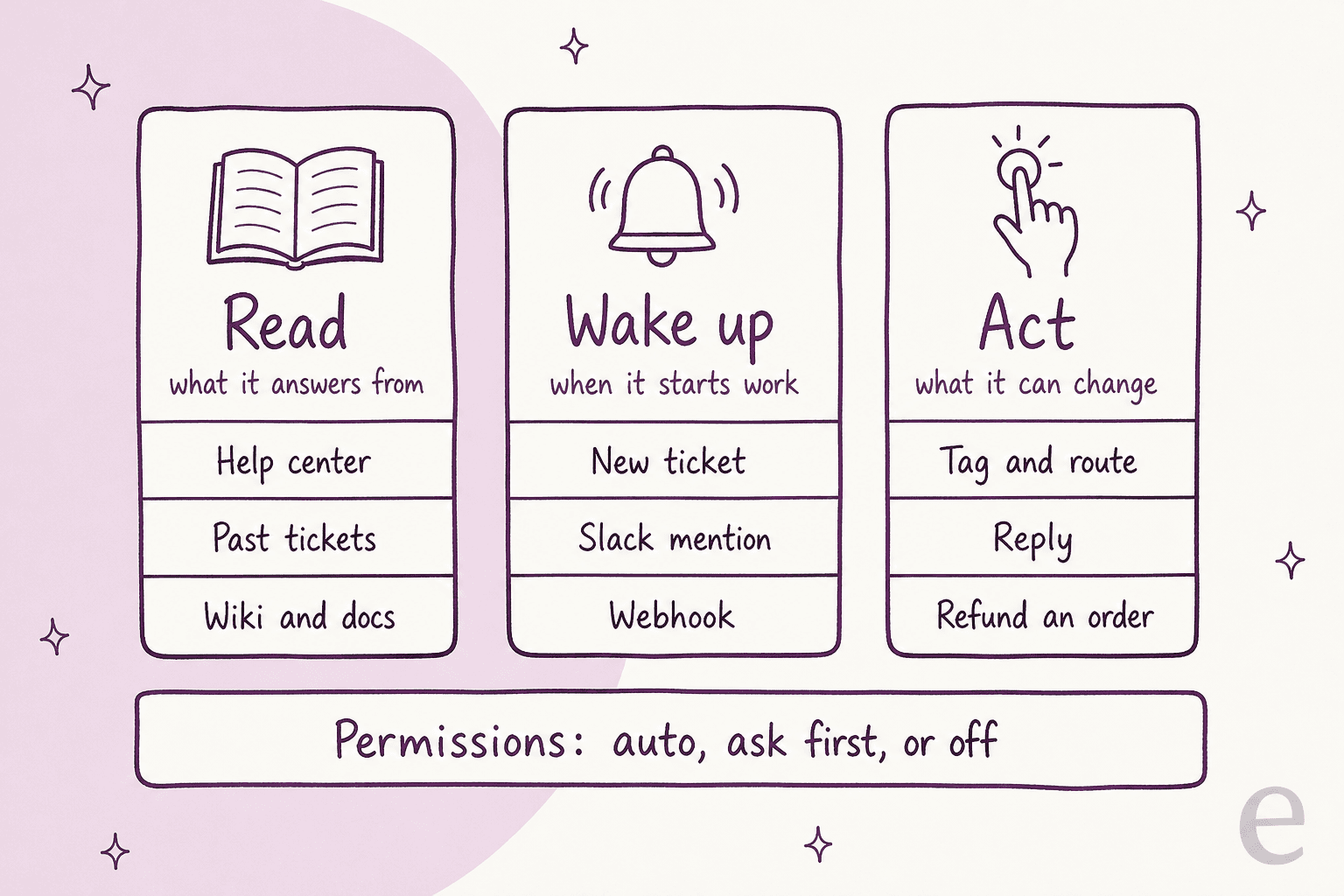
- Read. The knowledge it answers from. Help center articles, past tickets and macros, internal wikis, product docs, policies.
- Wake up. The events that start work. A new ticket, a customer message, an @mention in Slack, a webhook from your warehouse system, a schedule.
- Act. What it can change. Tag and route a ticket, leave an internal note, send a reply, look up an order, start a return, issue a refund.
Some tools do all three. A helpdesk like Zendesk is a source (tickets, macros, help center), a trigger (new ticket) and an action surface (reply, tag, assign). Others are sources only: Confluence, Notion and Google Drive get read, never written to. Your own order database is usually actions only. Sorting your stack this way tells you which connections are low-risk (reads) and which need real guardrails (writes).
If you want the broader picture of agents and business tools first, my colleagues wrote a primer on AI agents and business tools. This post is the hands-on version for a support or ops lead.
Step 1: Map your stack before you connect anything
Before touching a settings page, write one row per system the agent will need. It takes 20 minutes and it saves you from the most common failure I see: connecting the helpdesk, getting decent answers, and then discovering the questions customers ask most ("where's my order?", "why was I charged twice?") need data that lives somewhere else.
| System | Job for the agent | What it needs | Who has to approve the connection |
|---|---|---|---|
| Helpdesk (Zendesk, Freshdesk, Gorgias) | Read, wake up, act | Past tickets, macros, triggers, reply and tag actions | A helpdesk admin, once, in the browser |
| Help center | Read | Public articles | Nobody, if it's public |
| Wiki (Confluence, Notion, Google Drive) | Read | The specific spaces, pages or folders you trust | A space admin or page owner |
| Team chat (Slack, Teams) | Wake up, act | Channels it may join, permission to post | A workspace admin |
| Store (Shopify, BigCommerce) | Act | Order lookups, then returns, address changes, refunds | Store owner or staff with app permissions |
| Billing (Stripe, your billing system) | Act | A narrow key: read charges, maybe refund | Finance or engineering |
| CRM (Salesforce, HubSpot) | Read, act | Account and plan context, case updates | A CRM admin |
| Your own APIs (order DB, warehouse) | Act | One allowlisted domain and an auth header | Engineering |
Then mark each row with what breaks if the agent gets it wrong. A bad answer from the wiki costs you a correction. A refund to the wrong order costs you money. That's the order you'll connect them in.
I built the planner below so you can tick what's in your stack and get the order I'd connect it in, with the permission gotcha for each system pulled from that vendor's own docs.
Integration planner
What's in your stack?
Tick each system your support team uses. The plan below lists them in the order I'd connect them, lowest risk first, with the permission trap to check on each.
Wiki or docs (Confluence, Notion, Google Drive)
Read-only. Pick the spaces, pages or folders you trust, not the whole workspace.
Trap: a new Notion connection sees no pages until you add it to each one, and a Confluence app never sees more than the user who authorized it.
Helpdesk (Zendesk, Freshdesk, Gorgias)
Connect with OAuth, import past tickets and macros, and start with replies as internal notes only.
Trap: Zendesk API tokens are deprecated and can impersonate admins; a Freshdesk API key can only do what that one agent's role allows.
Slack
Approvals and internal questions in threads. Let it join only the channels you name.
Trap: since May 2025, a new non-Marketplace Slack app gets 1 history call a minute and 15 messages per call.
CRM (Salesforce, HubSpot)
Read-only account and plan lookups first. Case or ticket updates later, behind approval.
Trap: HubSpot's daily API cap is shared by every private app in the account; a Salesforce integration runs as whatever "Run As" user you pick.
Shopify store
Order and tracking lookups on auto. Returns, address changes, cancels and refunds on ask first.
Trap: read_orders covers only the last 60 days unless Shopify approves read_all_orders, and an order cancel can't be reversed.
Stripe or billing
A restricted key with Read on what it needs to look up and Write only on refunds, if at all.
Trap: never hand an agent your secret key. Stripe recommends restricted keys for AI agents, and an agent-tagged key gets approval rules on refunds by default.
Your own API (order DB, warehouse, ERP)
Allowlist one domain, store the auth header server-side, and start with GET requests.
Trap: if the model can see the key, so can anyone who gets it to repeat its instructions. Keep credentials out of prompts entirely.
Limits and scopes from each vendor's own developer docs, checked October 2026. Plans and rate limits change, so re-check the page linked in this post before you build on a number.
Step 2: Connect the knowledge it reads, and only the knowledge you trust
Knowledge is the safest layer to start with because every connection here is read-only. It's also where quality is decided. The AI will repeat whatever you feed it, faster than any human could:
"I've seen a bot confidently give wrong answers because the knowledge base hadn't been updated in 8 months. Customers didn't just get bad answers. They got bad answers instantly."

Three sources matter more than the rest:
- Past tickets and macros. This is how your team actually answers, including the edge cases nobody wrote an article for. If a vendor's agent can't learn from resolved tickets, it's working from your best-case documentation only. There's more on that in my colleague's guide to knowledge base training.
- The help center. Public, structured, usually the most current. Fine as a starting point, thin on its own.
- Internal wikis and docs. Confluence, Notion, Google Drive, SharePoint. This is where refund exceptions and escalation rules live.
Each wiki tool has its own permission model, and they all default to "less than you think":
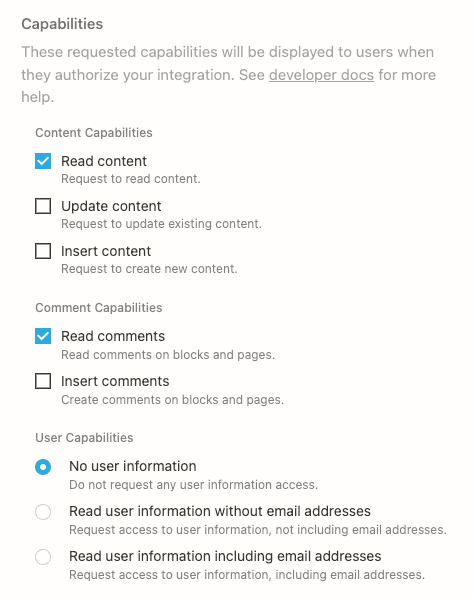
- Notion calls integrations "connections" now. A connection only sees pages that were shared with it: "If the page is not shared, any API requests made will respond with an error" (Notion authorization docs). Read, update and insert are separate capabilities, so you can grant read-only.
- Confluence Cloud apps act on a user's behalf, and "the permissions held by the user an app is acting for always constrain the app, regardless of the app's scopes" (Atlassian OAuth docs). Restricted spaces need the app added explicitly.
- Google Drive has a broad
drive.readonlyscope that Google classifies as restricted, and storing that data on a server triggers a security assessment (Drive scope docs). That's why most tools ask you to pick files and folders instead.
On the eesel side, the Confluence connector is read-only by design, and the Notion connector only reads unless you switch on its one general-purpose write action, which is off by default.
The second lesson here is about sync. Knowledge connectors are usually a copy taken at a point in time, not a live feed, and they fail quietly. I've watched a customer churn over this: their core data source was an order-status spreadsheet in Google Drive that changed every day, the sync failed silently three times, and they left for a cheaper tool. Ask every vendor how new files arrive and how you'd know a sync broke. In eesel's case the answers differ per tool, and the docs say so plainly: Confluence pages re-index when you edit them and the app reconciles about once an hour (Confluence docs), while a new Google Drive file needs re-selecting in the picker and a workspace can sync up to 2,500 files a day (Google Drive docs).
Also check the formats your team actually uses. A DTC supplements brand on an eesel sales call (about 7,000 Gorgias tickets a month) kept its real procedures in ClickUp SOPs and Loom videos, with a pile of outdated macros on top. None of that is readable by a text connector until someone writes it down. If that's you, the AI knowledge base work comes before the integration work.
Step 3: Plug it into the helpdesk where tickets already live
The helpdesk is the integration that matters most, because it's all three jobs at once. My strong opinion: put the agent inside the helpdesk your team already uses rather than routing tickets out to a separate AI inbox. Your agents keep their views, macros and SLAs, and the AI's work shows up as notes and replies on the same ticket. This is what an AI helpdesk integration should look like.
What changes per helpdesk is how an outside app authenticates, whose identity it acts as, and how much it's allowed to call. Here's what each vendor's developer docs say:
| Helpdesk | How an outside app connects | Whose identity it acts as | API rate limit | Public reply vs note |
|---|---|---|---|---|
| Zendesk | OAuth (API tokens are marked deprecated) | API tokens "can be used to impersonate anyone in the account, including admins" | 200/min on Team up to 2,500/min on Enterprise Plus | public: false makes an internal note |
| Freshdesk | Personal API key | That agent's role: a view-only role can't reply via API | 100/min Growth, 400 Pro, 700 Enterprise | Separate reply and note endpoints; notes are private by default |
| Gorgias | API key (private) or OAuth2 (required for public apps) | The account that made the key, with "full access" to account data | 40 requests per 20s on API keys, 80 on OAuth | internal-note channel |
| HubSpot | Private app token (super admin only) or OAuth app | The app, limited to its scopes | 100 to 190 per 10s, plus a daily cap shared by all apps | Not confirmed in HubSpot's public docs |
| Salesforce | Connected app, OAuth client credentials | The "Run As" user you pick; Salesforce suggests an API Only user | 100,000 calls/day plus 1,000 per license (Enterprise) | CaseComment.IsPublished |
Three things in that table change how I'd set it up:
- Use OAuth, not a person's API token. Zendesk says vendors serving many customers "must use global OAuth access tokens" (Zendesk auth docs). A token tied to a person also breaks the day that person leaves. If your helpdesk only offers personal keys, create a dedicated agent seat with a narrow role for the AI and generate the key from that seat.
- Rate limits are shared. On Zendesk's Team plan, 200 requests a minute covers your AI, your CRM sync and every other app. Zendesk also caps updates to any one ticket at 30 per 10 minutes per user (rate limits). An agent that tags, notes and replies in separate calls burns through that faster than you'd expect. My colleague's breakdown of Zendesk API rate limits goes deeper.
- Start with internal notes. Every helpdesk above can post a private note. That's your safest first week: the AI drafts, a human reads and sends, and nothing reaches a customer by accident.
You'll also need to decide between the helpdesk's built-in AI and a layer that plugs into it. Built-in agents like Zendesk AI, Freddy AI Agent or Agentforce are the least setup, but their reach outside the helpdesk is often narrower than the demo suggests. One reviewer put it this way about Gorgias:
"The AI Agent follows the same pattern, offering full functionality only for Shopify and requiring an awkward email-per-store setup that doesn't fit every business."

That's a fair point from a 5-star reviewer, and it's the right question to ask any vendor: do the actions work on my stack, or only on the stack in the demo? I've been on the losing side of it too. Earlier this year eesel lost mid-market deals because there was no native Salesforce or HubSpot helpdesk connector. Both exist now (Salesforce, HubSpot), but the lesson stands. The connector list is a hard filter, so check it first.
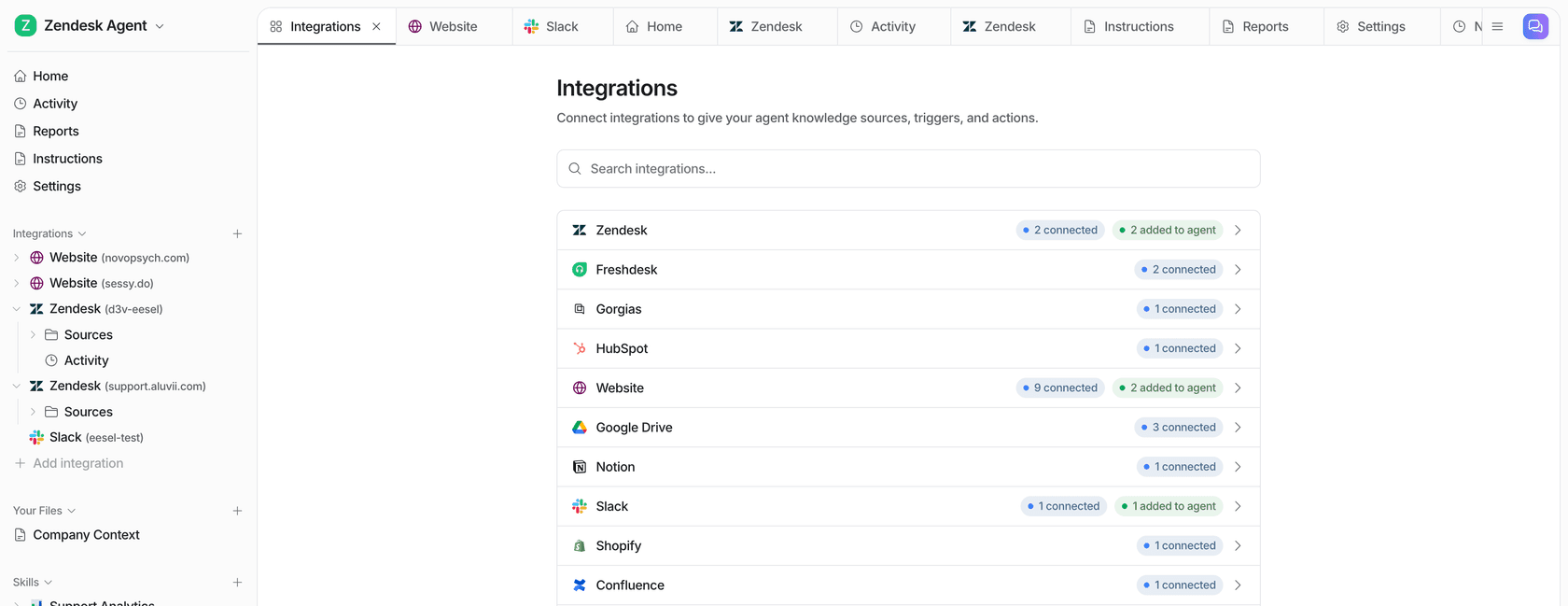
Here's what a full Zendesk connection looks like on the eesel side: help center, macros and past tickets as three separate sources, each with its own toggle, so you can leave one out.
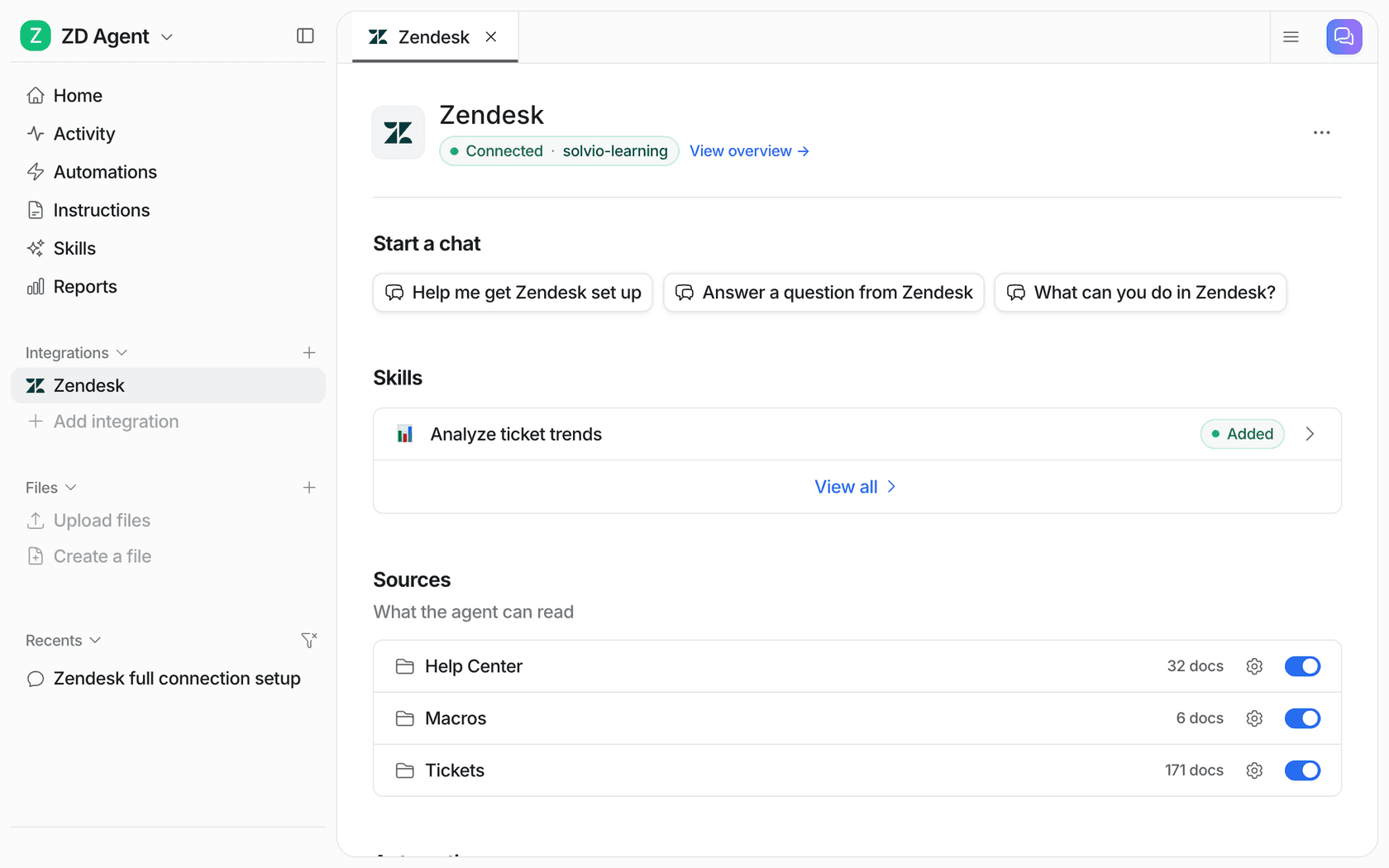
eesel's helpdesk docs make one point I wish every vendor made: "Connecting only lets your agent read your helpdesk. It does nothing on tickets until you create an automation." (helpdesk docs). Connecting and going live are two separate steps, and you want them separate.
Step 4: Wire actions to your store, billing and internal systems
This is the layer that turns an answer bot into something that closes tickets. It's also where a mistake costs money. Most "where is my order", "change my address" and "refund me" tickets need a lookup or a write in a system that isn't your helpdesk.
Shopify and other stores
Shopify is the most common one I see, and its access scopes have two traps worth knowing before you connect:
read_ordersandwrite_orders"cover orders created within the last 60 days. For older orders, addread_all_orders, which you must request access to" (Shopify access scopes). An agent that can't find a three-month-old order will tell the customer it doesn't exist.- Cancelling needs
write_orders, and Shopify's own docs say oforderCancel: "This action cannot be reversed" (orderCancel). Customer name, email, phone and address are also Level 2 protected data, which needs extra review for apps (protected customer data).
eesel's Shopify integration splits its actions into a read group (get an order, order history, fulfillment and tracking) and a write group (create a return, update a shipping address, refund, cancel). The docs also note that it now requests Shopify's read-all-orders permission, but a store connected before that change keeps the 60-day cap until someone reconnects it (eesel Shopify docs). That's precisely the sort of detail to check in your own setup. For a deeper walk-through, see connecting Shopify order data to a support agent.
Billing and payments
Never give an AI agent your secret payment key. Stripe's own guidance is direct: "RAKs are the recommended type of key for API keys you give to AI agents" (Stripe restricted keys). A restricted key sets Read, Write or None per resource, so a support agent can read charges and invoices without being able to touch payouts. Stripe also lets you tag a key as an agent key, and tagged keys get approval rules on payouts, refunds and account changes by default (Stripe API keys).
Your own systems (order database, warehouse, ERP)
For anything without a ready-made connector, the pattern is an allowlisted API call. You tell the agent which domain it may call and which auth header to send, and the platform attaches the credential server-side so the model never sees it. In eesel this is Network Access: requests to any domain you haven't added are refused, it supports GET, POST, PATCH and DELETE, and "the credentials stay in your settings and are attached to each request by eesel, so the AI never sees them."
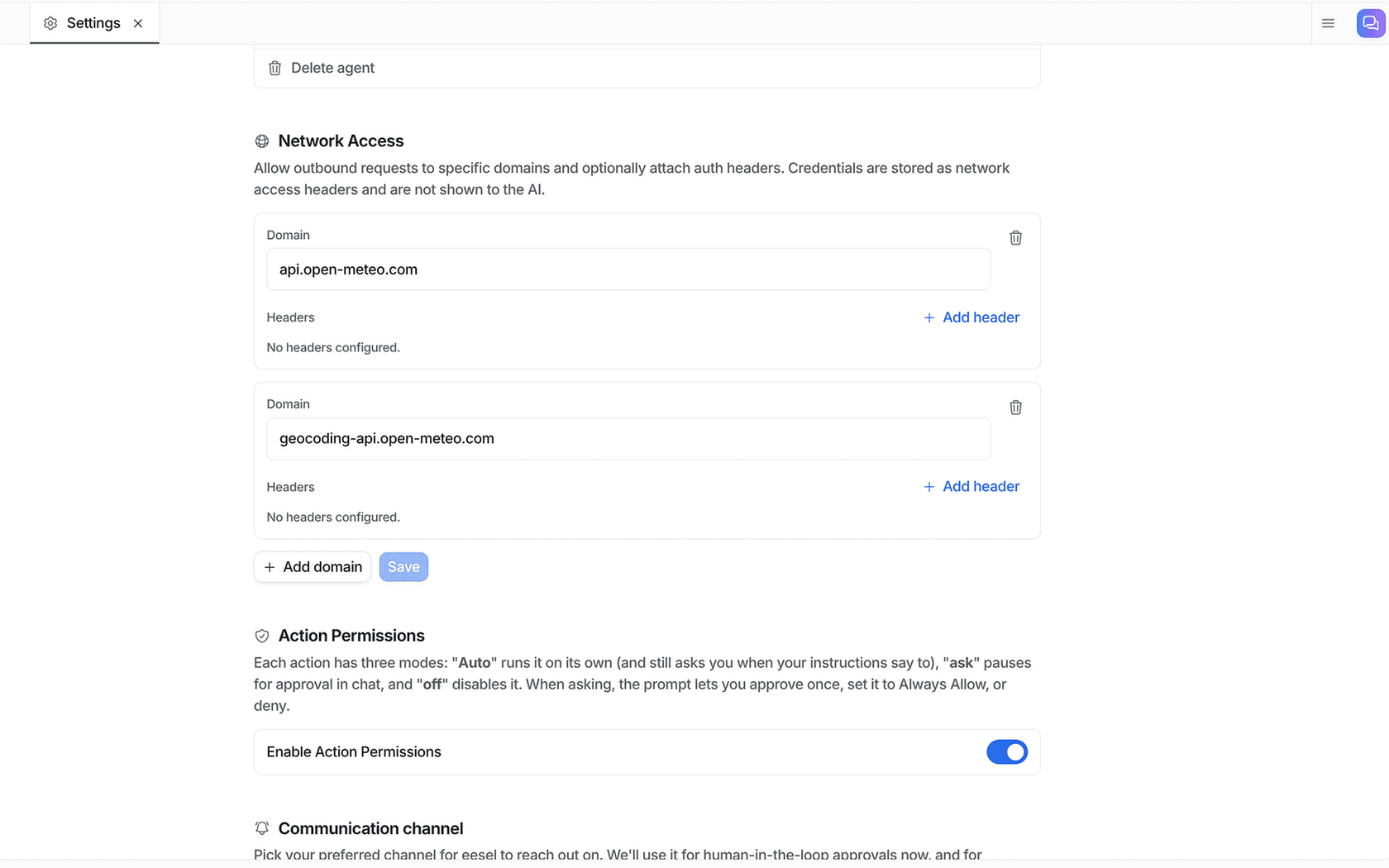
Whatever tool you use, test that an action actually works before you let the agent talk about it. A model that has read your refund policy will happily offer refunds it has no way to process. One Ada reviewer on G2 saw exactly this, with the agent offering to cancel orders it couldn't cancel:
"At times, Ada has provided responses or commitments that weren't part of its original training ... Fortunately, these issues have been easy to correct with additional coaching and updates, and its accuracy has continued to improve over time."

The fix is in the instructions as much as the integration: tell the agent which actions exist, and what to say when a customer asks for one that doesn't. My colleague's guide to automating refunds with AI covers the policy side.
Step 5: Set permissions before you set triggers
Here's the mental model I use. An AI agent never sees "your stack". It sees the overlap of four limits, and each one is set by a different person:
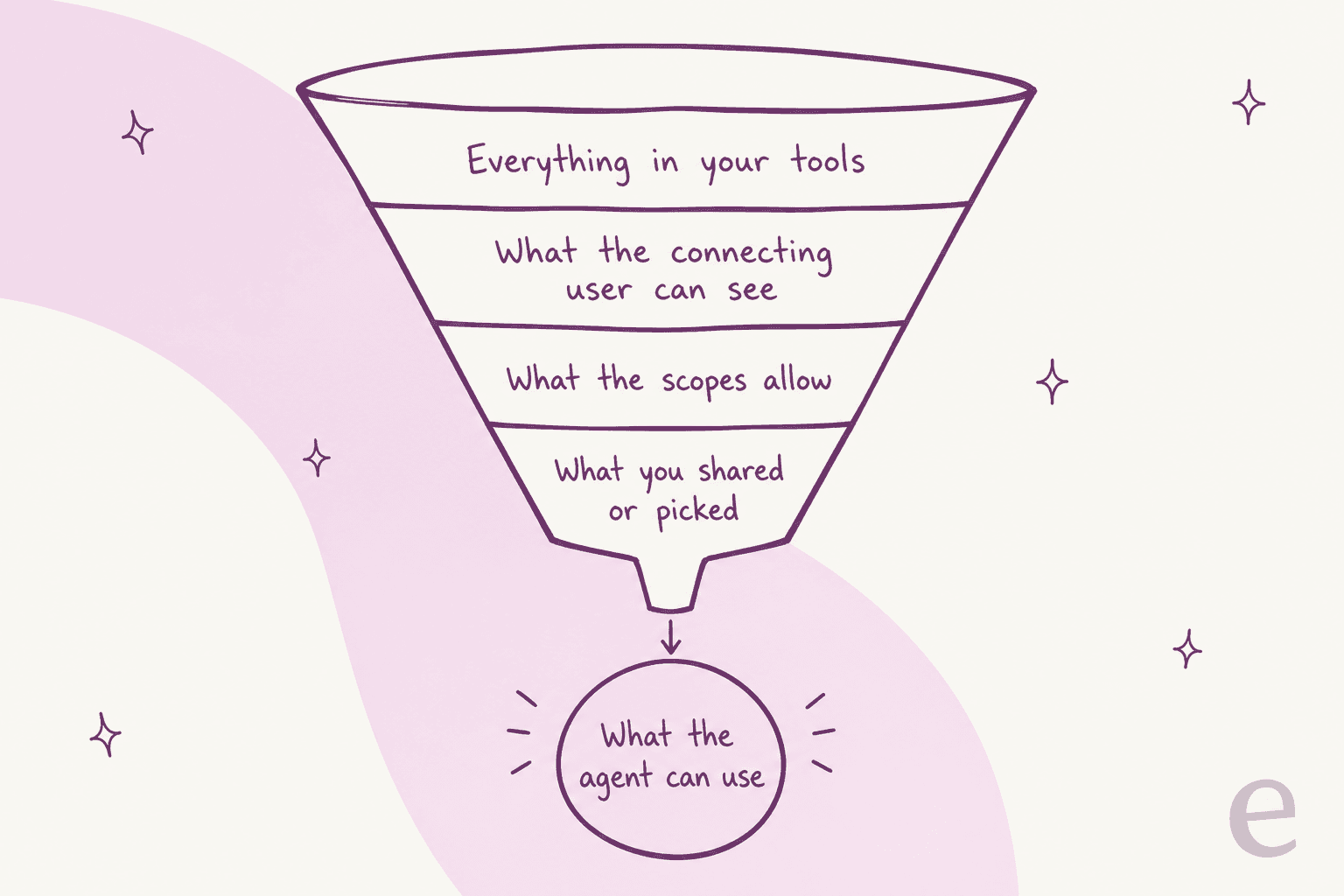
- The connecting user. Confluence apps are capped by the authorizing user, a Freshdesk key by that agent's role, a Salesforce connected app by its Run As user. Whoever clicks "Allow" defines the ceiling.
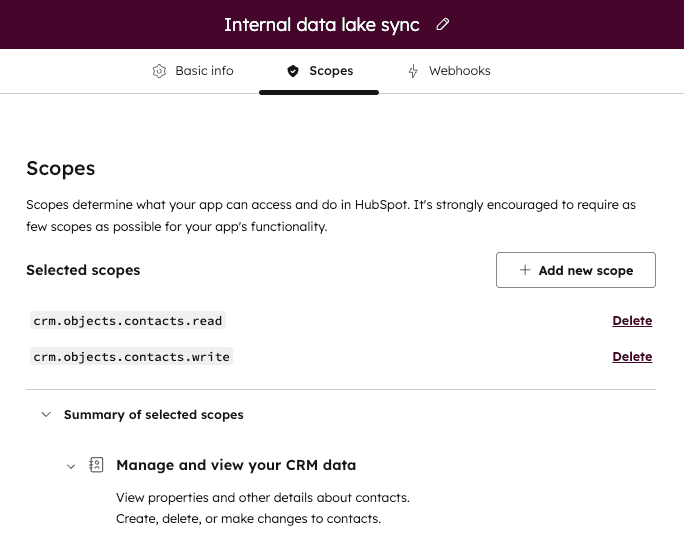
- The scopes. What the app asked for at install. HubSpot's own scope screen says it plainly: require as few scopes as possible.
- What you shared or picked. Notion pages added to the connection, Drive folders in the picker, Slack channels it joined.
- What the agent is allowed to do with it. The per-action settings inside the AI tool itself.
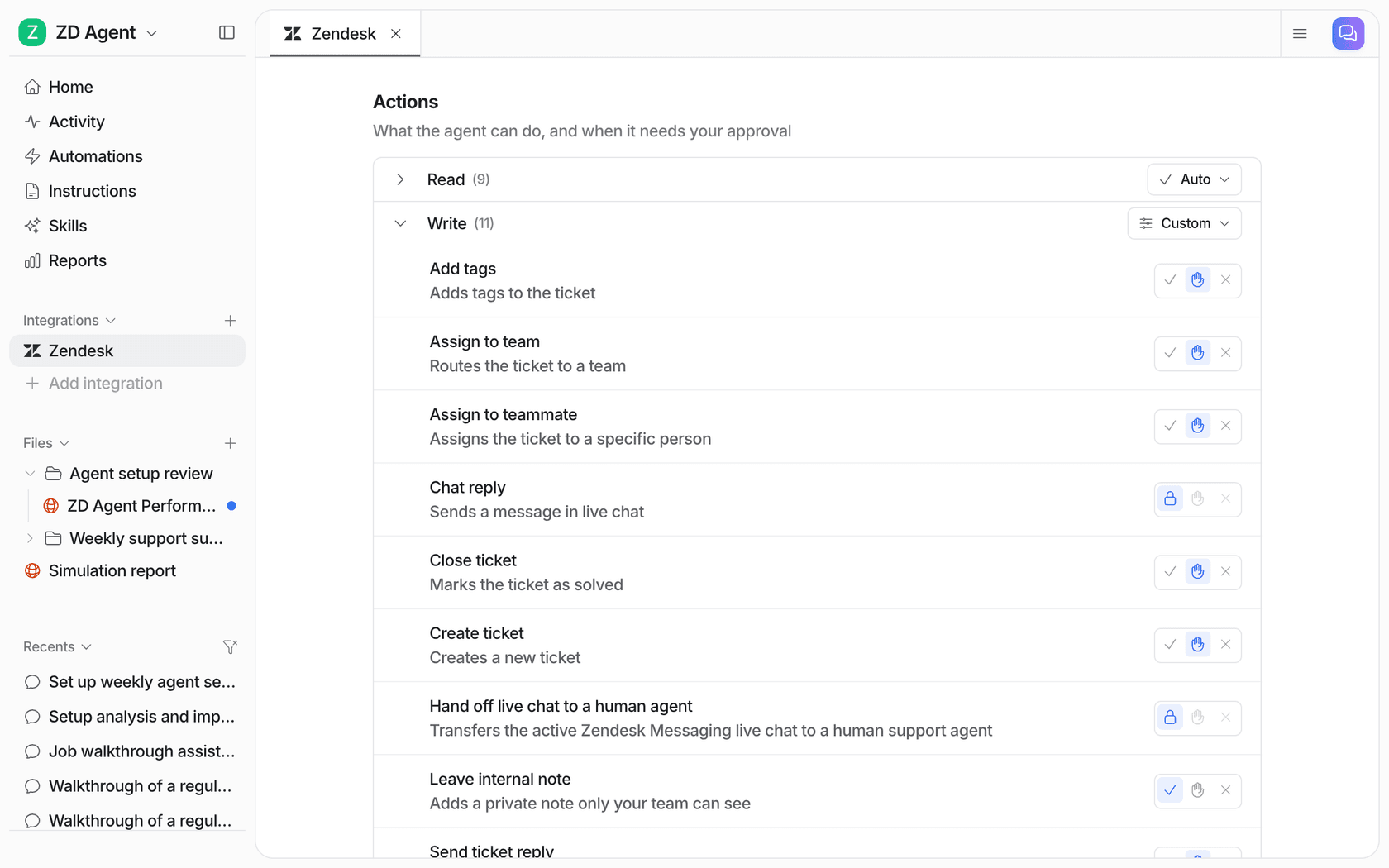
The fourth limit is the one you control day to day, and it's where I'd spend the most care. In eesel, every action is set to Auto, Needs approval or Disabled, per agent, and an action you haven't turned on "isn't available to the model at all, whatever it's asked to do" (eesel security docs). The guidance in the actions and approvals docs is the setup I'd copy anywhere: keep replies and anything irreversible on approval at first, and keep "refunds, cancellations and anything that costs money behind an approval."
The scariest integration bug isn't a wrong answer. It's a right-looking answer built on the wrong customer's data:
"the biggest failure i've seen was an agent that kept pulling data from the wrong user's account because the session token wasn't being passed correctly to the api call, the text responses looked perfect so nobody caught it until a customer complained about seeing someone else's balance"
Salesforce flags the same risk in its Agentforce security guide: when a service agent invokes an action, "the identity of the agent is used", so your own code has to check which customer the data belongs to (Salesforce docs). Whatever platform you're on, look up order and account data by the identity on the ticket, and test with two customers who have similar names. If you handle regulated data, read up on SOC 2 and GDPR for support AI too.
Step 6: Decide what wakes the agent up
Once it can read and act, the agent needs a reason to start. There are three kinds of trigger, and most stacks use all of them.
Helpdesk events. A new ticket, a customer reply, an @mention in an internal note. These come from the helpdesk integration. Watch the delivery rules: Gorgias HTTP integrations time out after 5 seconds, don't retry a 429 or 500, and switch off after 500 failures in a row (Gorgias HTTP integrations). More on that in the Gorgias webhooks guide. HubSpot webhooks also time out at 5 seconds, and Zendesk custom actions at 10. A slow AI backend has to acknowledge first and do the work after, or events get dropped. There's a full guide to Zendesk webhooks if you're building your own.
Chat mentions. Slack is where approvals and internal questions tend to land, and eesel's Slack integration asks before joining any channel. One limit to know if you're building your own bot: since May 29, 2025, new commercially distributed apps that aren't on the Slack Marketplace get "1 request per minute" and "a maximum of 15 objects per request" on conversations.history and conversations.replies (Slack changelog). Internal custom apps keep 50+ requests a minute. Slack's stated reason was to stop bulk data exfiltration, so don't plan an architecture that copies your whole Slack history into an AI.
Webhooks from your own systems. This is the trigger people forget. A warehouse delay, a failed payment or a new sign-up can wake the agent with data attached. In eesel, a webhook automation gives you a private URL that any system (Zapier, Make, your backend) can POST JSON to. Send an X-Eesel-Event-Id header and retries are processed exactly once. A workspace takes 60 deliveries a minute, and a delivery your instructions filter out isn't billed.
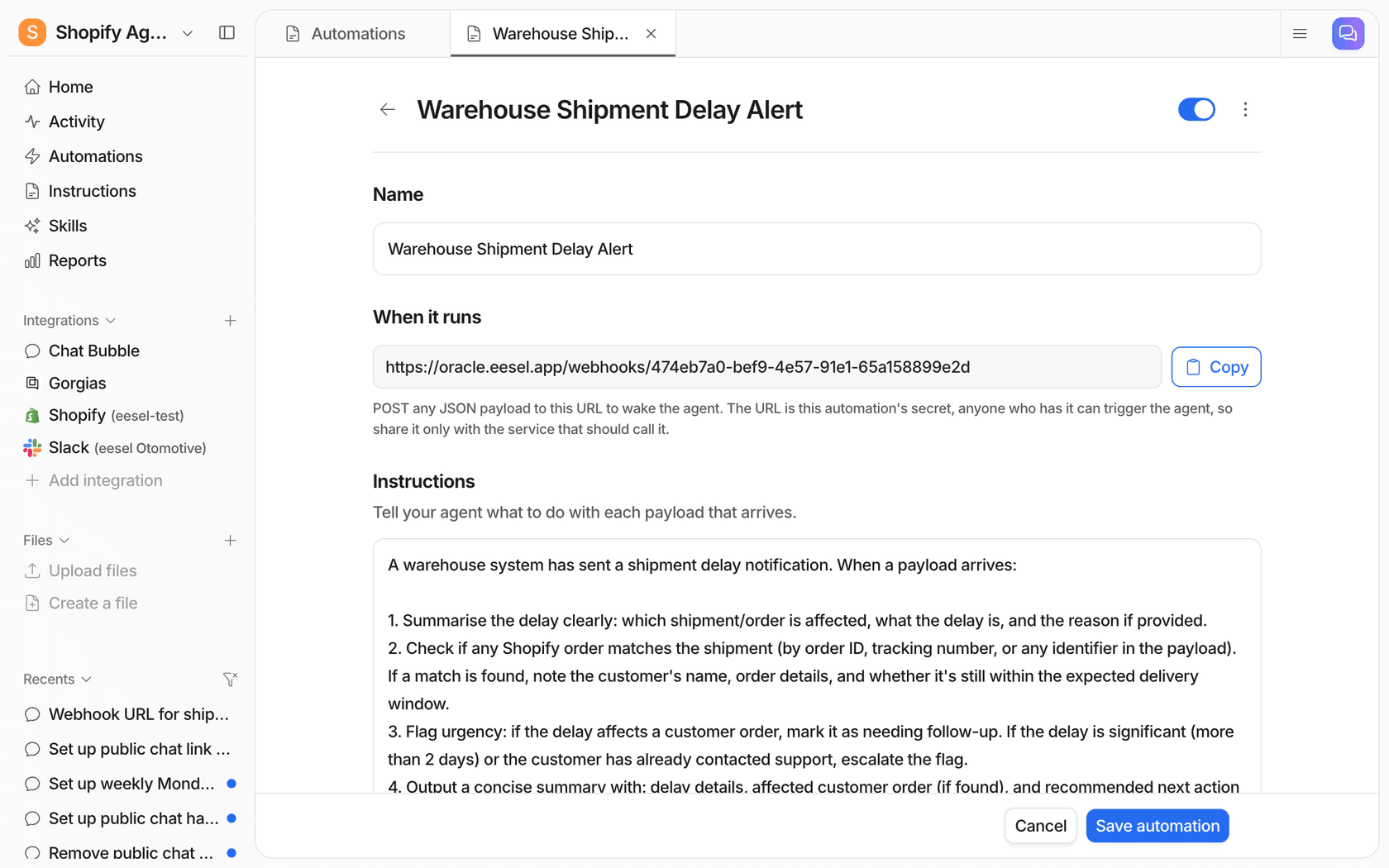
In the docs' example, a shipment-delay payload arrives, the agent looks for the matching Shopify order, can't find it, and opens a tagged Gorgias ticket for the team. That's three systems in one run, with no human copying data between tabs.
Step 7: Test on your own past tickets before going live
Integration testing for an AI agent isn't "does the API return 200". It's "does the agent give the answer my team would have given, using the data it can now reach". The best test data you have is last month's resolved tickets. I won't repeat the full method here, since there's a whole post on choosing an AI support agent that covers it, but three checks are integration-specific:
- Sample tickets that need each system. If 30% of your tickets are order status, 30% of your test set should be too. Otherwise you're only testing the help center.
- Assert the actions, not just the words. Check which lookups and writes the agent tried, and against which record. A perfect reply built on the wrong order is a failure.
- Score the gap per topic. In eesel, the Simulation skill replays resolved tickets and compares each answer to what your team actually sent. The docs' example run sampled 20 tickets and 17 matched, with a ranked list of fixes for the rest (helpdesk docs). The misses usually point straight at a missing integration.
Step 8: Roll out one layer at a time
Turn things on in the same order you connected them, and only widen access once the previous layer has run cleanly for a while.
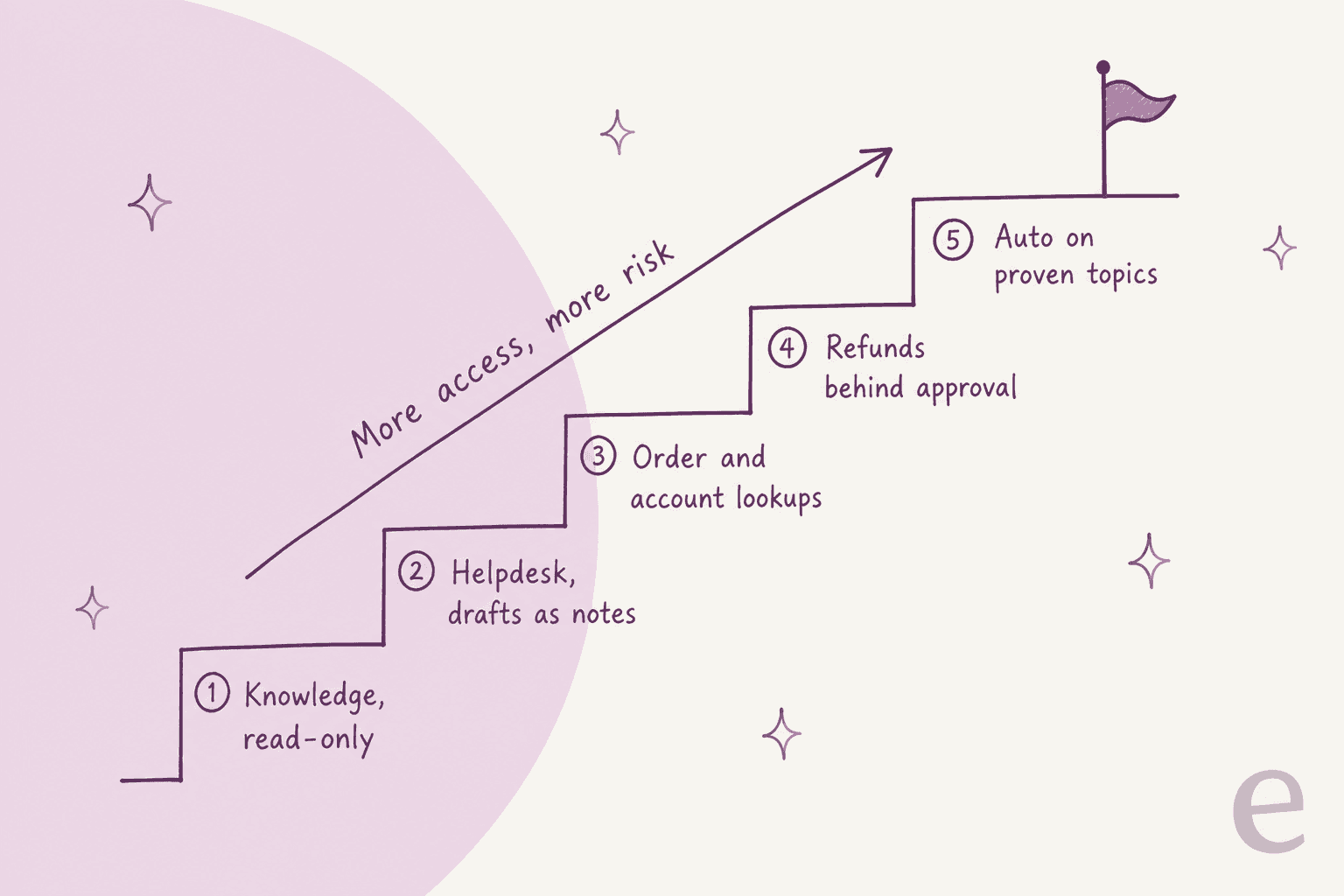
- Knowledge, read-only. Ask it questions internally. No customer sees anything.
- Helpdesk, drafts as internal notes. Agents read, edit and send.
- Order and account lookups. Drafts now include real order status and tracking.
- Refunds and changes behind approval. The agent prepares the action, a human clicks approve. In eesel that approval can happen in the dashboard, in a Slack thread, or from the terminal with
eesel approvals. - Auto on proven topics. Only for ticket types where the drafts have been sent as-is for weeks.
This matches what experienced operators recommend:
"The safest rollout I have seen is: let the agent draft, tag confidence plus reason, require approval for refunds or account changes, and review every reopened conversation for the first month. That review log is usually where the real automation boundary shows up."
Plan the handoff at the same time. When the agent passes a ticket to a human, the human should get a summary of what it already looked up, not a raw transcript. The AI agent handoff guide has patterns for that, and the automation guide covers which ticket types to automate first.
Where MCP, APIs and CLIs fit in
You'll hear "just use MCP" a lot right now, so here's the plain version. MCP, the Model Context Protocol, is "an open-source standard for connecting AI applications to external systems" (modelcontextprotocol.io). An MCP server exposes tools (actions an AI can call) and resources (data it can read) in one standard shape, so any MCP-aware client can use them. It's a cleaner way to wire the "read" and "act" layers, not a replacement for the permission thinking above. The latest spec even says "Authorization is OPTIONAL for MCP implementations" (MCP authorization spec), so check how each server you connect handles it.
Vendors are moving fast here. Atlassian's Rovo MCP server covers Jira, Confluence and more, uses OAuth 2.1 and respects users' existing permissions (Atlassian docs). Shopify has already moved its storefront cart and catalog MCP tools to a new Universal Commerce Protocol endpoint (Shopify Storefront MCP). Expect the endpoints to keep shifting, and prefer a platform that maintains them for you over hand-wiring each one. There's a longer explainer on MCP for customer support.
MCP also works in the other direction: your support agent can be an MCP server that other AI tools talk to. That's how eesel works, and it's why the eesel CLI exists.
Setting up the whole integration from a terminal
The eesel CLI puts the same AI teammate in your terminal. It isn't a separate product or a copy: "Anything you set up in the CLI shows up in the dashboard, and the other way round." That matters for integration work, because the setup in this post becomes a script you can review, re-run, and hand to a coding agent. A helpdesk-plus-store setup looks like this:
npx @eesel/cli login                       # or: npm install -g @eesel/cli
eesel integrations connect zendesk         # prints an approval link for a Zendesk admin
eesel integrations connect shopify         # a store owner approves the app install
eesel integrations download start          # copy past tickets, macros and pages into knowledge
eesel integrations zendesk actions         # every action, with its auto / ask / off setting
eesel integrations api check               # custom API access for your own systems
eesel automations                          # what wakes the agent, and the instructions it follows
eesel approvals                            # held actions waiting on a human
eesel activity                             # what the agent actually did, newest first
A few details make it work well for automation. Every command prints JSON. Errors come back as one JSON line with a hint saying what to run instead, which is what lets Claude Code, Cursor or Codex run the setup without a human reading the docs. Writes made from the CLI follow the same approval settings as the dashboard, --dry-run prints the exact call a write would make without sending it, and EESEL_API_TOKEN plus EESEL_AGENT_ID let you run it in CI. The one step it can't skip is the human approval inside each tool, which is how it should be: a Zendesk admin still has to click Allow.
For MCP clients, eesel mcp token prints a ready-to-paste claude mcp add line. The token lasts 30 days and carries your workspace role, so a viewer can chat and read activity while only editors can change instructions or automations (MCP client docs). My colleagues have more on driving agents from a CLI and on AI agent MCP servers in general.
Mistakes I'd avoid
- Connecting with your own admin login. The agent inherits everything you can see. Use OAuth with a dedicated, narrow identity.
- Connecting the whole wiki. Pick the spaces and folders you'd stand behind in front of a customer. Old drafts become confident wrong answers.
- Turning on writes on day one. Lookups first, writes behind approval, auto last.
- Assuming sync is live. Find out how each source refreshes and how you'd notice a failure.
- Forgetting shared rate limits. Your AI, your CRM sync and your reporting tool all draw from the same helpdesk API budget.
- Letting the agent describe actions it can't take. If it can't cancel orders, its instructions should say so.
- Pricing that punishes integration. Ask whether an order lookup, a CRM check or a tool call counts as extra usage. Some meters count every message or action.
Plug eesel into the stack you already have
If you're working through this list and don't want to hand-build every connector, eesel's AI helpdesk teammate is designed for it. It joins your existing helpdesk (Zendesk, Freshdesk, Gorgias, HubSpot, Salesforce and more), learns from your past tickets, reads Confluence, Notion and Google Drive, looks up real orders in Shopify, and reaches your own APIs through an allowlist. Every action is set to auto, ask first or off, and approvals can come from Slack, the dashboard or the CLI. If Zendesk is your helpdesk, the Zendesk integration page shows the full list of what it can read and do.
The pricing fits integration-heavy work too. On eesel's pricing page, a ticket is one credit "however many replies go back and forth, and whatever the agent does inside it: looking up an order, checking a policy, updating another tool." Plans start at $299 a month for 500 credits, every integration is included, and the free plan gives you 100 credits to connect your helpdesk and see real drafts before you pay.
Try eesel on your own stack, or book a demo if you want me or a colleague to walk through your setup with you.
Frequently Asked Questions
How do I integrate an AI agent into my business stack?
Which systems should I connect to an AI support agent first?
How do AI agents integrate with Zendesk, Shopify and Slack?
read_orders only covers 60 days of orders. There are dedicated guides for integrating AI with Zendesk and integrating AI with Shopify.