


Front has no sentiment score of its own: it reads customer mood in three places, and the two that act on it automatically, Branch with AI and Smart CSAT, are on the Enterprise plan at $105 a seat a month (billed annually). Branch with AI is a rule step where you ask "Is the customer upset?" about each new message and tag, assign or move the conversation on the answer. Smart CSAT scores each finished conversation in the inboxes you pick 1 to 5, from sentiment, effort and resolution. Copilot, a $20 a seat add-on on Starter and Professional, answers "show me frustrated customers" when someone asks. The AI Tagging template that once tagged by sentiment is closed to new users. To get a person onto upset conversations on any plan, eesel reads each new Front message with the whole thread, follows the rule you write and tags, assigns or comments. With the eesel CLI, an AI coding agent can upload approved help articles, adjust that rule and ask test questions before anything goes live, though a Front admin still approves the connection.
Does Front have AI sentiment analysis?
Not as a feature with that name. I'm on eesel's support team, so the question I care about is practical: when a customer writes in angry, does someone see it before the next reply goes out? I read Front's AI features help pages, its pricing page and its community forum on 22 November 2026, and sentiment shows up as an ingredient in other features rather than as a field on the conversation.
There used to be a direct route. In 2025, a Front support specialist answered a customer asking how to track sentiment: on Growth or higher, join the AI tagging beta and "you will see a rule template to add sentiment analysis on conversations". That template's help article offered "Tag by sentiment", such as Positive, Negative or Urgent. It now opens with a warning: "AI Tagging is no longer available to new users." Front points new users to Topics and AI branching in rules instead.
Here is where sentiment analysis lives in Front today:
| Feature | Plan | What it does with mood | When it runs |
|---|---|---|---|
| Branch with AI | Enterprise | Answers a yes/no or multiple-choice question you write, such as "Is the customer upset?" | On the messages a rule fires on |
| Smart CSAT | Enterprise | Infers a 1 to 5 satisfaction score from sentiment, effort and resolution | After the conversation, on the rule's schedule |
| Copilot | $20 add-on, or Enterprise | Finds conversations where customers were frustrated, when asked | When a teammate asks |
| Topics | Every current plan | Nothing: groups conversations by contact reason | As messages arrive |
| AI Tagging (legacy) | Closed to new users | Tagged by sentiment from tag descriptions | As messages arrive |
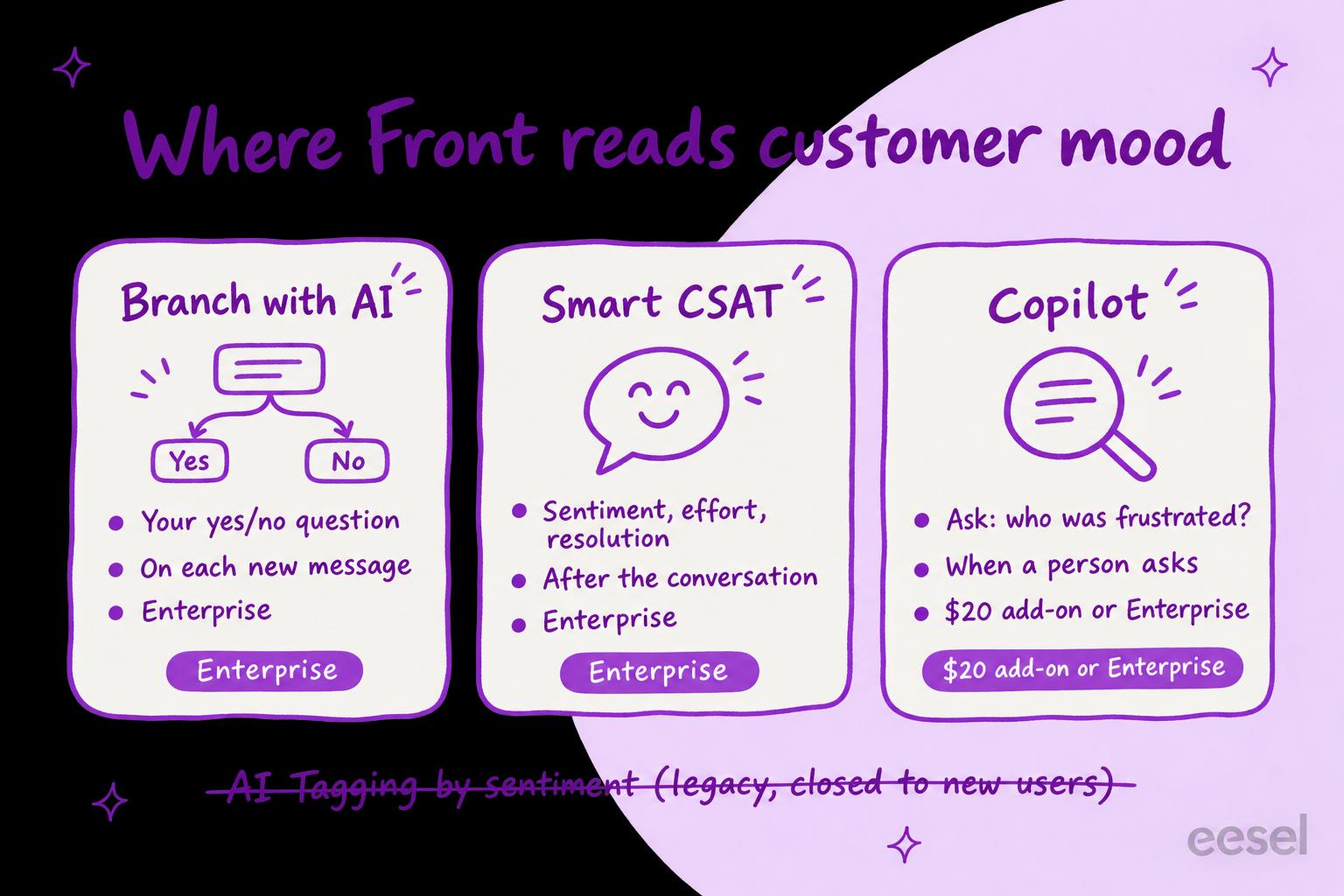
Pick what you want to know to see which Front feature covers it, and on which plan.
How do you flag upset customers in Front as they write?
With a Branch with AI step in a rule, on Enterprise. Front's rules article describes it as a way "to quickly triage conversations using natural language questions". You pick a yes/no or a multiple-choice question, type it in plain words, and each answer becomes a branch with its own actions.
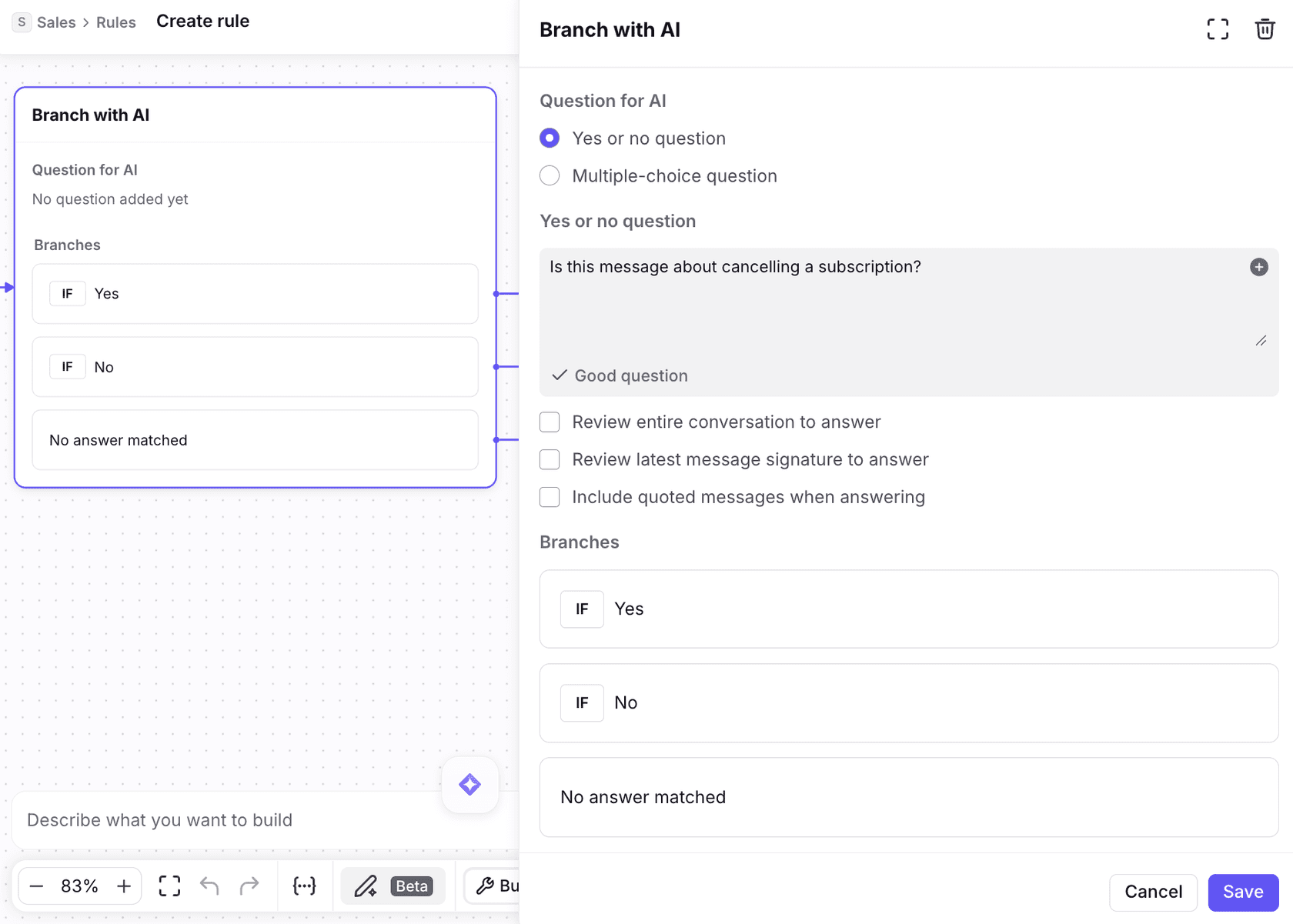
For mood, a yes/no question such as "Is the customer frustrated or upset?" works, and the rule can then:
- Add a tag such as Upset on the Yes branch, so a view and your analytics can find those conversations.
- Assign the conversation to a senior teammate, or move it to an escalations inbox (Front's shared inbox ownership rules decide who holds it next).
- Send the No answer matched branch to a person too, since Front adds that third branch for when the AI can't tell.
Two settings decide how well it works. By default the AI reads only the most recent message, so a calm "any update?" after two angry emails reads as calm. Tick Review entire conversation to answer if the history matters. A Front community thread from November 2026 puts the same advice plainly:
"By default it looks at the last message, so a short "thanks!" follow-up can change the result. There's a checkbox to review the entire conversation, so turn that on if context matters."
Then run it through Front's test rule feature on real conversations before switching it on. The same thread suggests keeping hard facts (a sender domain, an order number format) in ordinary rule conditions and saving AI for "the fuzzier calls (intent, urgency, sentiment)".
The limit is the plan. Front says these AI rule steps "are available on the latest Enterprise plan". On Professional you have keyword conditions, which catch "refund" and "cancel" and miss "this is the third time I've asked".
What does Front Smart CSAT measure?
Smart CSAT is an AI-inferred satisfaction score for each conversation, and it is where sentiment does the most work in Front. Its help article lists three things the AI weighs:
- "Customer sentiment (paying close attention to how it changes and the final sentiment)"
- "Customer effort" (the idea behind a customer effort score)
- "Resolution"
You switch it on with the Review conversations with Smart CSAT rule template, pick the shared inboxes and the time period that triggers it, and Front scores each resolved or archived conversation there that has at least one inbound and one outbound message. Every teammate can see the score in the Smart QA and CSAT sidebar panel, with up to three cited excerpts it used (for conversations scored after 6 September 2026). An admin can edit or delete a score, and the Customer satisfaction report can show Smart CSAT alone or next to real survey answers.
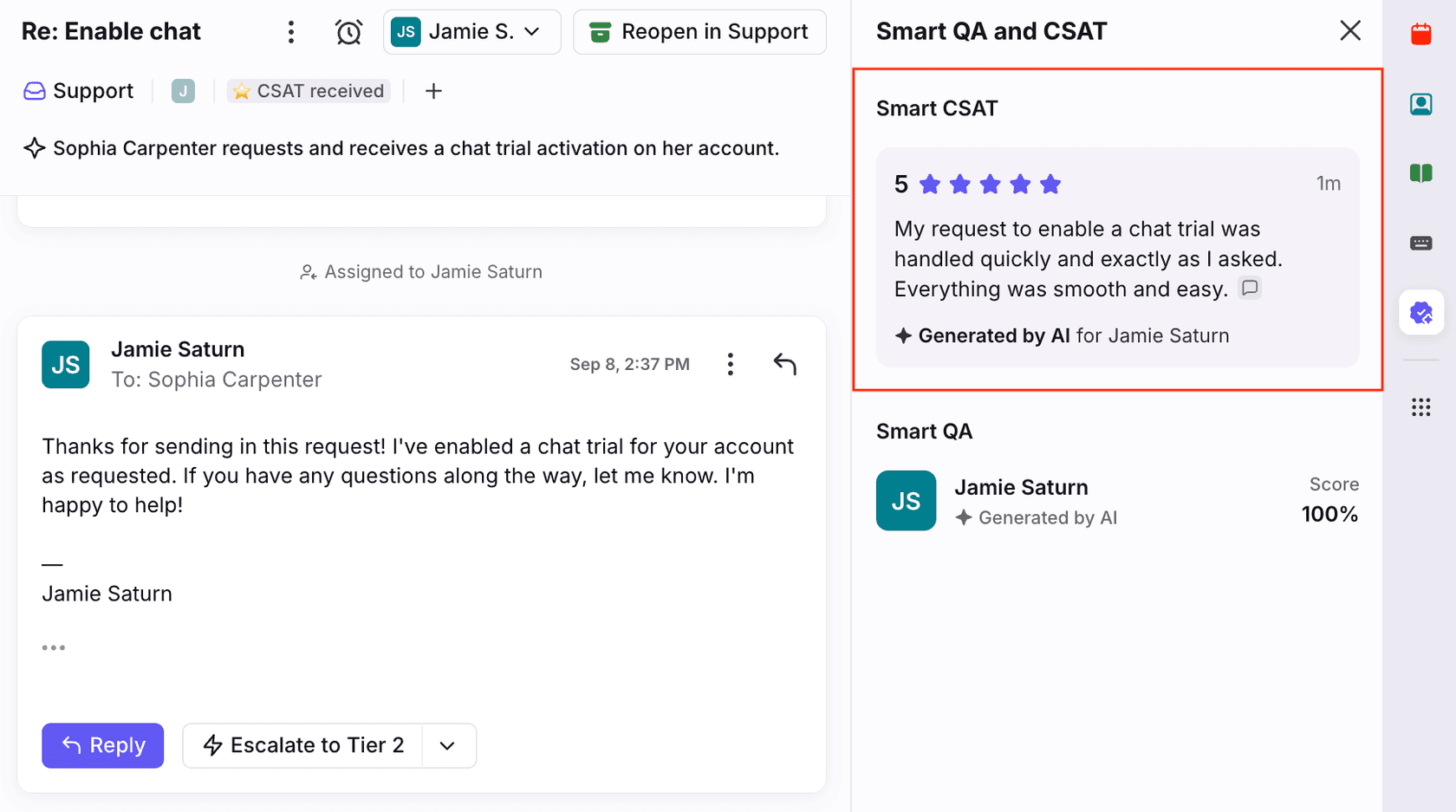
Its pitch is the customers who never answer a survey: Front's Smart CSAT page says relying on surveys "ignores 95% of your customers". That's a fair point. A 1 to 5 score on every conversation shows trends that a low survey response rate hides. My AI CSAT guide covers the idea in general.
What to know before you count on it:
- It comes after. Smart CSAT scores finished conversations. A rule can use the Smart CSAT is applied trigger to notify a manager when the score is below 3 (Front's CSAT rules article shows the recipe, with the score variable on Enterprise), but that is a follow-up call, not a chance to fix the reply.
- Close conversations matters. Front recommends turning on the Close conversations setting so it can tell where one conversation ends and the next begins, especially on SMS. My note on Front ticket statuses covers how closing works.
- English. "Only English is officially supported at this time."
- Enterprise. "Smart CSAT is included with the latest Enterprise plan at no additional cost", and the rule template offers a 30-day Enterprise trial.
Can Front Copilot find frustrated customers?
Yes, when a teammate asks. Front's Copilot article lists "Sentiment-based insights" among its example questions, such as "Show conversations where customers were frustrated or unhappy in @inbox or @view." It also suggests "Are there recent complaints about [feature name]?"
That makes Copilot good for a Monday look back over last week's queue and a quick read before you open a long thread. It doesn't tag, alert or route anything by itself. Copilot is included with Enterprise and costs $20 a seat a month as an add-on on Starter and Professional. More in my Front Copilot review.
What does each Front plan get for sentiment?
Here are the current plans as Front's pricing page listed them on 22 November 2026, billed annually:
| Plan | Price | Sentiment you get |
|---|---|---|
| Starter | $25 a seat a month, up to 10 seats | Copilot questions with the $20 add-on; keyword rules (up to 10 rules) |
| Professional | $65 a seat a month, up to 50 seats | Copilot questions with the $20 add-on; keyword rules (up to 20 rules) |
| Enterprise | $105 a seat a month | Branch with AI, Smart CSAT and Copilot included; unlimited rules |
For a 10-seat team, Professional is $650 a month and Enterprise is $1,050, so live sentiment routing arrives with a $400 a month step up. If you'd buy Copilot anyway ($200 for 10 seats), the gap is $200, and Enterprise also brings Smart QA and AI routing. My Front pricing breakdown has the rest, including Autopilot's per-conversation charge.
How do you get upset customers to a person on any Front plan?
Write the rule down and have something follow it on every message. There are two ways.
Keyword rules and a daily sweep
The no-cost version is a Front rule on inbound messages whose body contains the phrases your customers use when they're fed up ("third time", "cancel", "manager", "unacceptable"), tagging them for a lead, and an escalation path for what the tag catches. Have a lead skim that tag once a day. It catches the obvious cases and misses sarcasm and polite fury, so treat it as a floor. My guide on handling escalations has more patterns.
An AI teammate that follows your handoff rule
The other route is an AI agent that reads each message the way a lead would and acts in Front. This is what I'd set up with eesel. Its Front integration can start a run "when a customer sends a message", and the run already has the whole thread (internal comments included), the conversation's tags, assignee, inbox and custom fields, and the customer's contact record, including any custom fields you keep there.
You write the rule in plain words, for example: "If the customer is angry, has written three times about the same order or asks for a manager, tag it Upset, move it to the Escalations inbox and leave a comment saying why." For each new message, eesel:
- Reads the full thread, not only the last line.
- Checks it against your rule.
- Adds a tag that already exists in Front (one at a time), assigns the conversation to a named teammate or moves it to another inbox, which is how Front hands it to a team.
- Leaves its reasoning as an internal comment, so whoever picks it up knows why.
Two things to know first: eesel doesn't publish a sentiment score, so "upset" means what your rule says, and it adds only tags that already exist, so create the tag before you start. You also choose which of these actions it takes on its own and which wait for a teammate's yes.
Rúngne, a climbing apparel brand on Gorgias, runs the same pattern: a draft agent that reads the full thread first, looking for a promise a teammate already made, a return in motion, or a frustrated customer, and a triage agent that tags each new ticket it runs on, including a human_review_required tag. Cancellations, damaged items and anyone who asks for a human go to the team.
Is Front's sentiment analysis enough?
On Enterprise, Branch with AI plus Smart CSAT covers most of what a support lead wants from sentiment analysis: one flags upset customers while you can still help, the other shows how the week felt across every conversation, not only the surveyed ones, which makes it a fair input to reducing customer effort. Start with one yes/no question about frustration, review the whole conversation, route Yes and No answer matched to a person, and read Smart CSAT's lowest scores each week. My AI sentiment analysis for support guide covers what to do with the signal once you have it, and spotting churn risk is the next step after that.
On Starter or Professional, Front gives you questions (Copilot) and keywords, not a live flag. Whether that's worth $400 a month for 10 seats depends on how often an angry customer slips through today. If the answer is "every week", an AI teammate that follows a written rule on every message costs less to try than a plan change. Other helpdesks handle this differently: Help Scout handles sentiment differently, and so does Kustomer, if you're weighing a move.
Try eesel next to Front
Keep Front for the inbox your team already knows, and let eesel watch every new message for the customers who need a person. What it may do depends on who is asking: for your team, a customer or a visitor, you choose which of its actions run on their own, which ask first and which stay off. Write who counts as upset in plain words, change it whenever your policy changes, and it tags, assigns or comments in Front with its reasons. The same teammate can triage new email and draft replies as internal comments too.
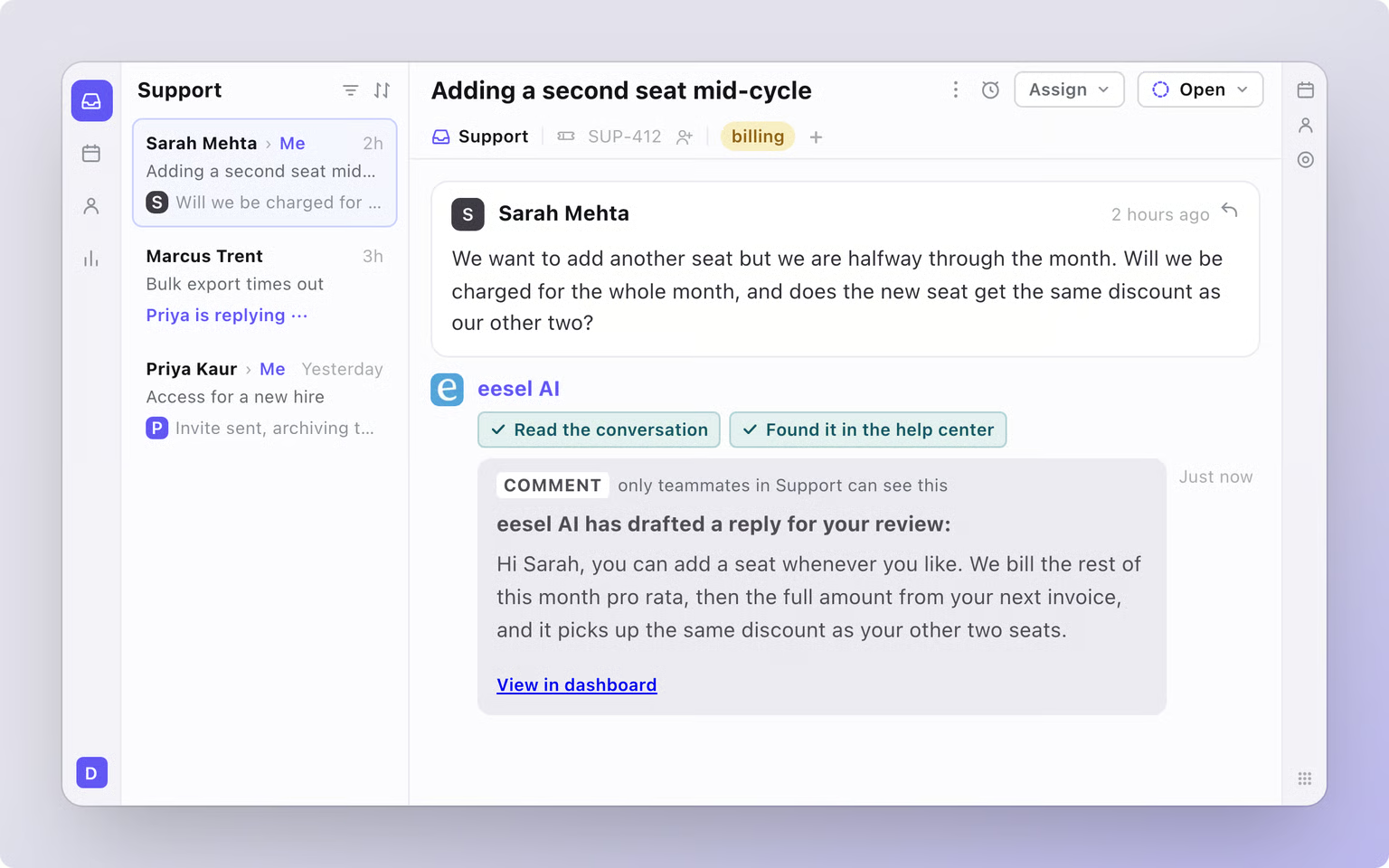
Try eesel on your Front inbox, starting with this week's new messages.