

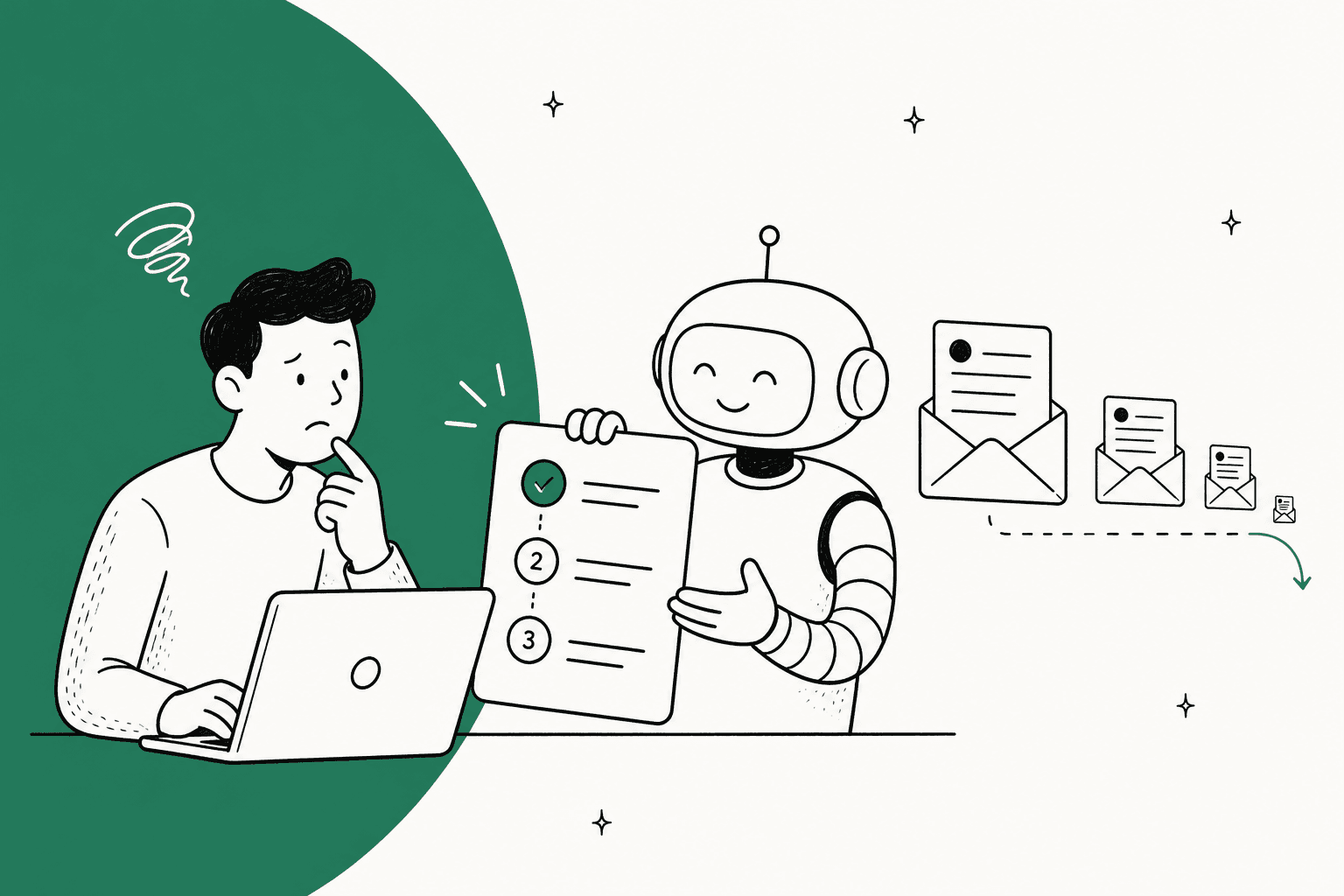
AI helps with customer education by answering each how-to question in the ticket or chat with the steps from your own docs, then showing you which docs are missing or written for the wrong reader. That is where customers actually learn your product: at the moment they are stuck, not in a course they signed up for and never opened.
Most how-to tickets are not a content problem you fix by writing more. Sort them first. Some need an article that doesn't exist, some need an article customers can't find, some need an article rewritten for end users, and some are the product telling you a screen is confusing. AI handles the first three well. The fourth goes to your product team.
eesel's AI helpdesk teammate does both jobs inside the helpdesk you already run. At Qontro, it drafts a reply on every Freshdesk ticket, linking the help article where one exists and writing out the steps, and the team reads each wrong draft as a sign of a thin article. Plans start at $299 a month for 500 tickets or chats.
What does AI for customer education actually mean?
Customer education, put simply, is everything you do to help customers use your product well enough that they don't need to ask, and traditionally it splits into three places. AI now shows up in all of them:
- An academy or course library. Structured lessons in a learning platform, usually for onboarding and certification. AI here mostly helps you build courses faster.
- In-app guidance. Tooltips, checklists and walkthroughs inside the product, triggered while the customer clicks around. AI here writes the guides or answers questions in a panel.
- The answer to a question. The help center, the chat widget and the support ticket. AI here reads your knowledge base and past tickets, answers the specific question, and spots what's missing.
I work the support queue at eesel every day, and the third place is the one that gets underestimated. A customer who has just hit a wall and written in is the most motivated learner you will ever have, because they want to know how to do the thing right now, in their own words. The ones who'd sit through a course are usually not the ones filling your queue.
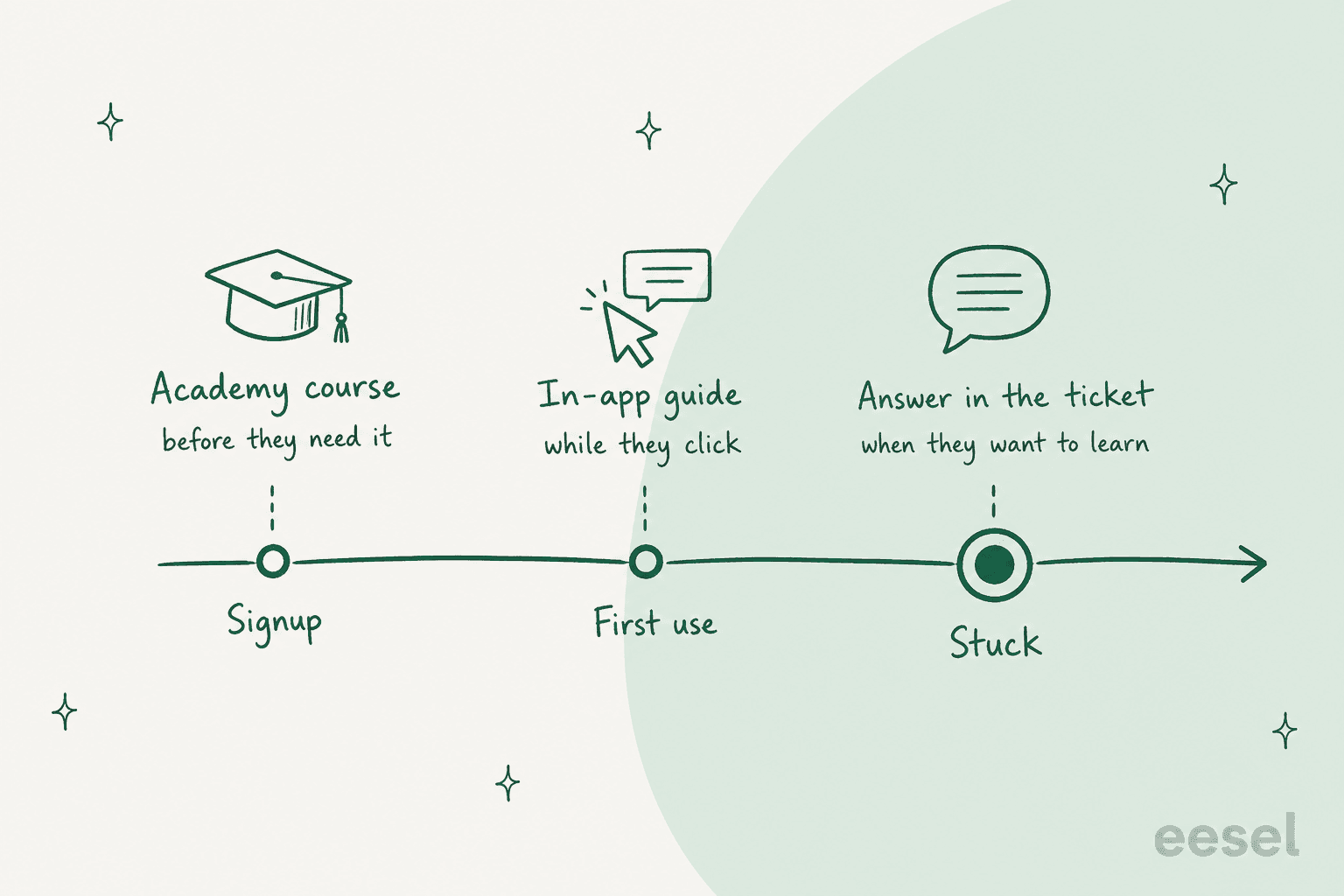
That doesn't make academies or in-app guides pointless. It means the ticket queue is where you find out which lessons customers actually need, and that's the data the other two places run on. I'll get to the tools for each further down.
Why do customers write in instead of reading your docs?
Because reading docs is work, and writing to a person feels like less of it. This one, from a thread about using Zendesk as a knowledge base, is the most honest description of the problem I've seen:
"The trick we use is to spend hundreds of hours carefully documenting and screenshotting all of the processes, then sending links to people who have issues. Updating it with every edge case we find……only to have every single customer just ring and ask a question."

Another support lead in a thread called "Do customers really read knowledge bases?" put the other half of it plainly: their customers aren't failing to find help, they "don't have the time or do not feel like looking for the knowledge in the first place" (u/kolakeia, Reddit). Both point the same way, which is that the customer will always take the shortest path to an answer, so the answer has to be on that path.
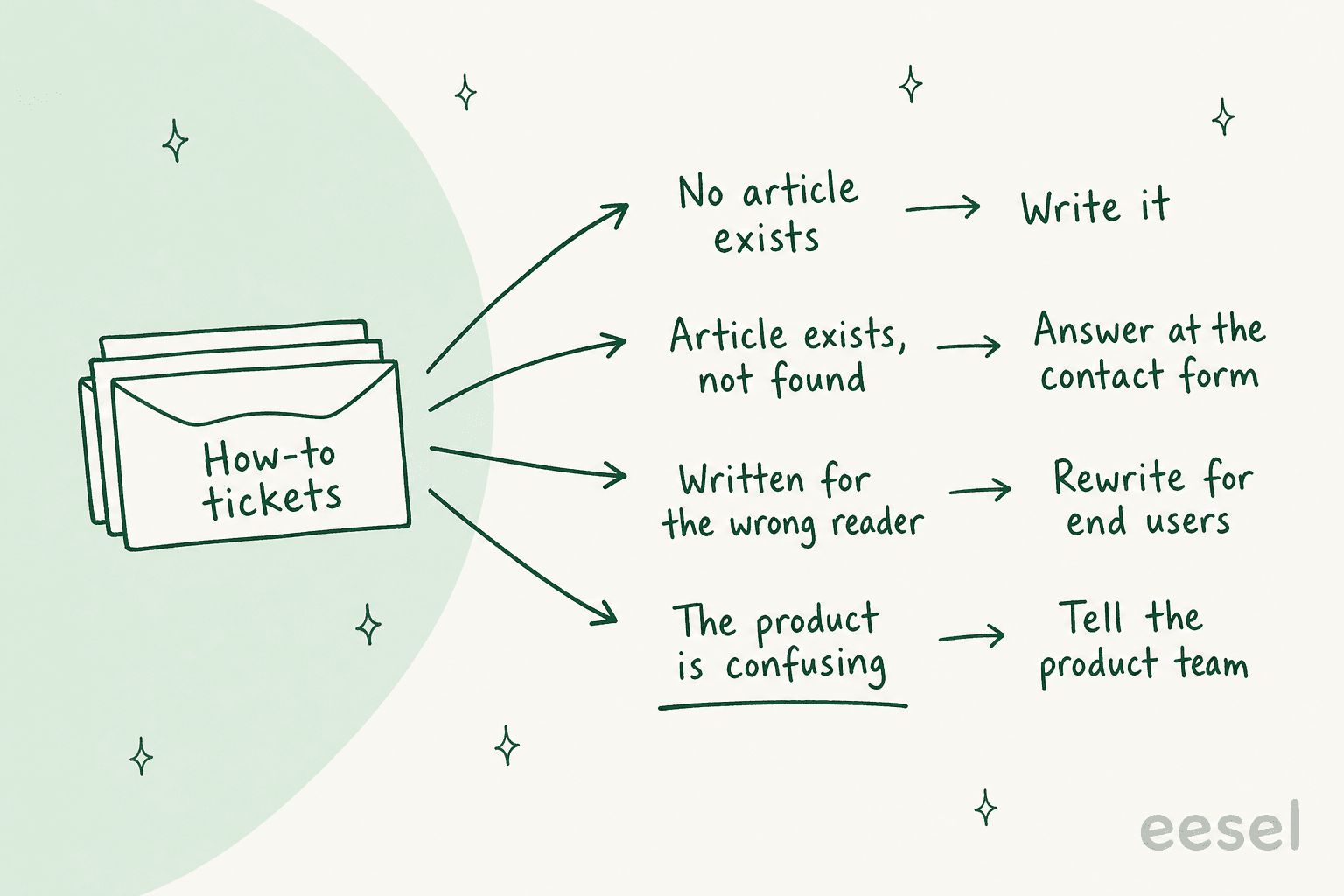
Before you throw AI at it, look at what's in those tickets. When I sort a pile of how-to tickets, they fall into four buckets, and each one has a different fix:
- No article exists. The customer asked a fair question your docs never covered. Write the article, and an AI article writer can draft it from the tickets.
- The article exists, but the customer didn't find it. Their words don't match your title, or they never searched at all. This is where an AI knowledge base chatbot at the contact form or in chat earns its keep, because it meets them before the ticket is filed. My post on AI for help center search covers the search side.
- The article exists, but it's written for the wrong reader. On one eesel sales call, a support manager explained that their entire knowledge base was written for administrators, while the tickets came from end users. An AI trained on admin docs gives end users admin answers. The fix is a rewrite, not a bot. A customer success lead on Reddit described the same trap with onboarding:
"Rigorous onboarding? Yeah, I bet it is, in your eyes. Using your language, and your terms, explained in a way that you understand. Not at all considering those you’re onboarding may not speak your internal language."
- The product is confusing. If 40 customers a month ask where a setting lives, no article fixes that, only a change to the screen does. Count these and send them to your product team.
ChatGPT gave me a version of this warning when I asked it how AI can educate customers. Its answer ended on the point that AI "should not mask genuine usability problems". I'd go a bit further than that, since bucket 4 is the most valuable output of the whole exercise, and the one most teams never measure because the AI quietly answers those tickets and the count disappears.
There's also a fifth thing hiding in the pile: tickets that look like how-to questions but are really account problems. "How do I export my data?" can be a how-to or a broken export. Your AI needs to tell them apart, which I covered for one helpdesk in Gorgias how-to classification.
What should AI do when a how-to question arrives?
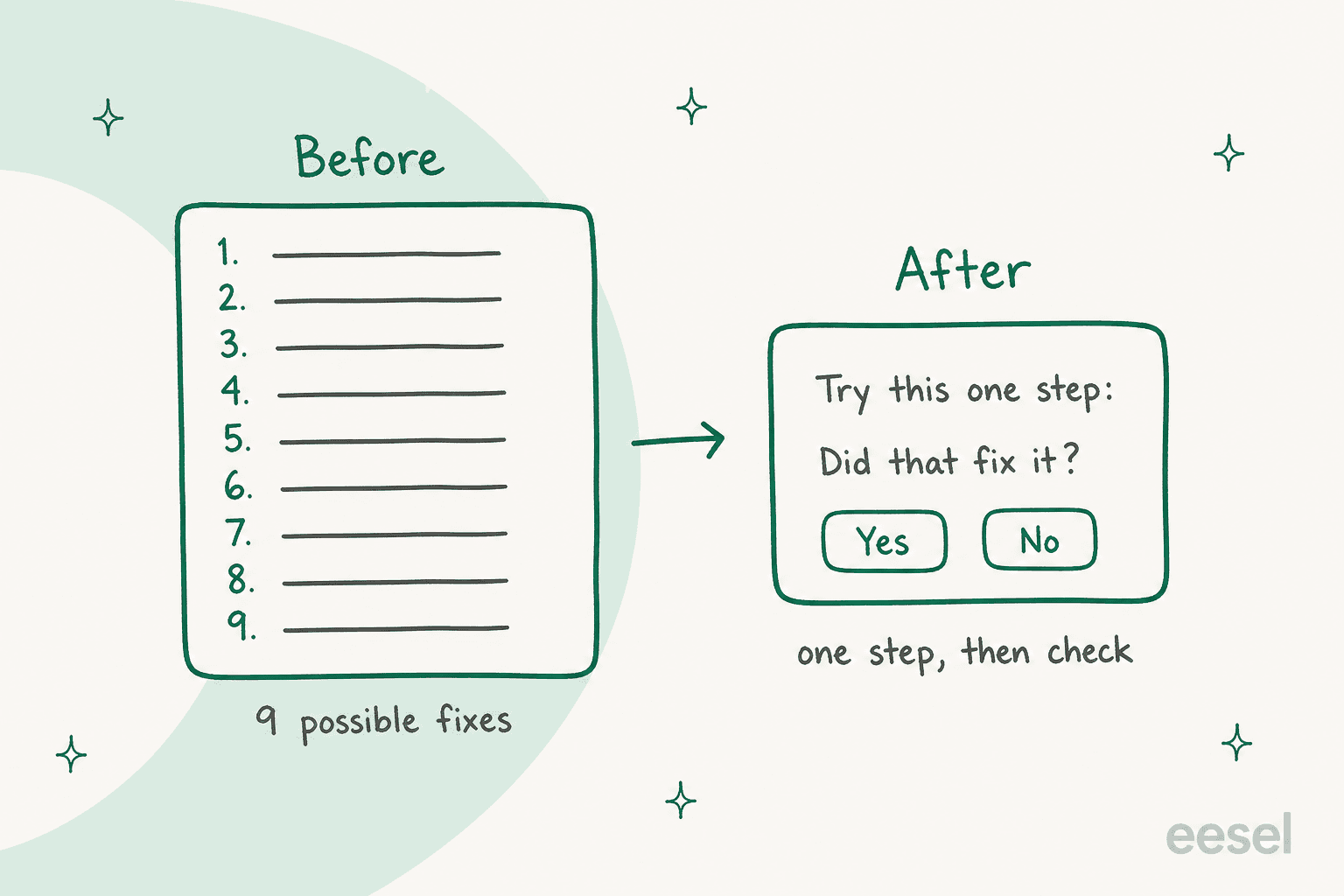
Teach, not dump. In terms of what separates an AI reply that educates from one that annoys, the biggest thing is how much it says at once. A good human agent doesn't paste the whole troubleshooting article, which is also how they keep handle time down. They give one step, ask if it worked, and go from there.
Luxedo, which sells projection mapping systems, set up eesel in Gorgias to work exactly like that for home customers. On a new ticket it searches about 1,000 past tickets, macros and articles, then drafts a reply that names what the customer is trying to do, what's happening instead, and the simplest next step, then asks whether that fixed it. It never sends a long list of possible fixes. When it does need a person (hardware failure, warranty, refunds), it follows the usual handoff rules and gathers the error messages, what was tried and any photos first, so the customer doesn't explain it twice.
Four habits separate an AI that teaches from one that just answers:
- It answers in steps, and links the article. The steps solve today's problem, and the link teaches the customer where to look next time. Qontro's drafts do both: where an article covers the answer it's linked, and where the customer can do it themselves, the steps are written out.
- It asks whether the answer worked. SE Ranking runs one eesel agent per product on Zendesk chat, and every reply ends with "Was this response helpful?" and Yes and No buttons. Across about 2,100 live chats in a month, that question is what tells the team which answers taught something and which didn't.
- It says when it doesn't know. If the docs don't cover it, the right move is to hand over, not to improvise. One team on an eesel sales call found their bot telling customers "yes, we support your car model" for models they didn't support, because the docs said "we support all models". The AI was faithful to a vague doc. More on that in AI hallucinations in support.
- It answers in the customer's words and language. A customer who writes "the thing won't play my video" should get an answer that uses those words before it introduces yours.
This is not a new idea. Good support teams have taught this way for years with macros. A support specialist on Hacker News described it like this:
"I've been a customer support specialist in tech startups for the last many years, and the HUGE and overwhelming majority of questions are about things that have been covered in detail in the support documentation by any even half-competent team. People do not normally search for their own answers. More than 90% of tickets are well-answered (according to the user's satisfaction score!) by a pre-written response explaining how an article in the support center addresses their specific question, and then linking to it."

To be fair, that 90% is one person's estimate. The method is the point, though: explain the answer for their situation, then link the article, and AI does the same thing without needing a macro for every question.
Here's what that looks like inside a helpdesk. eesel leaves the draft as an internal note with the steps numbered, and a person decides whether it goes out:
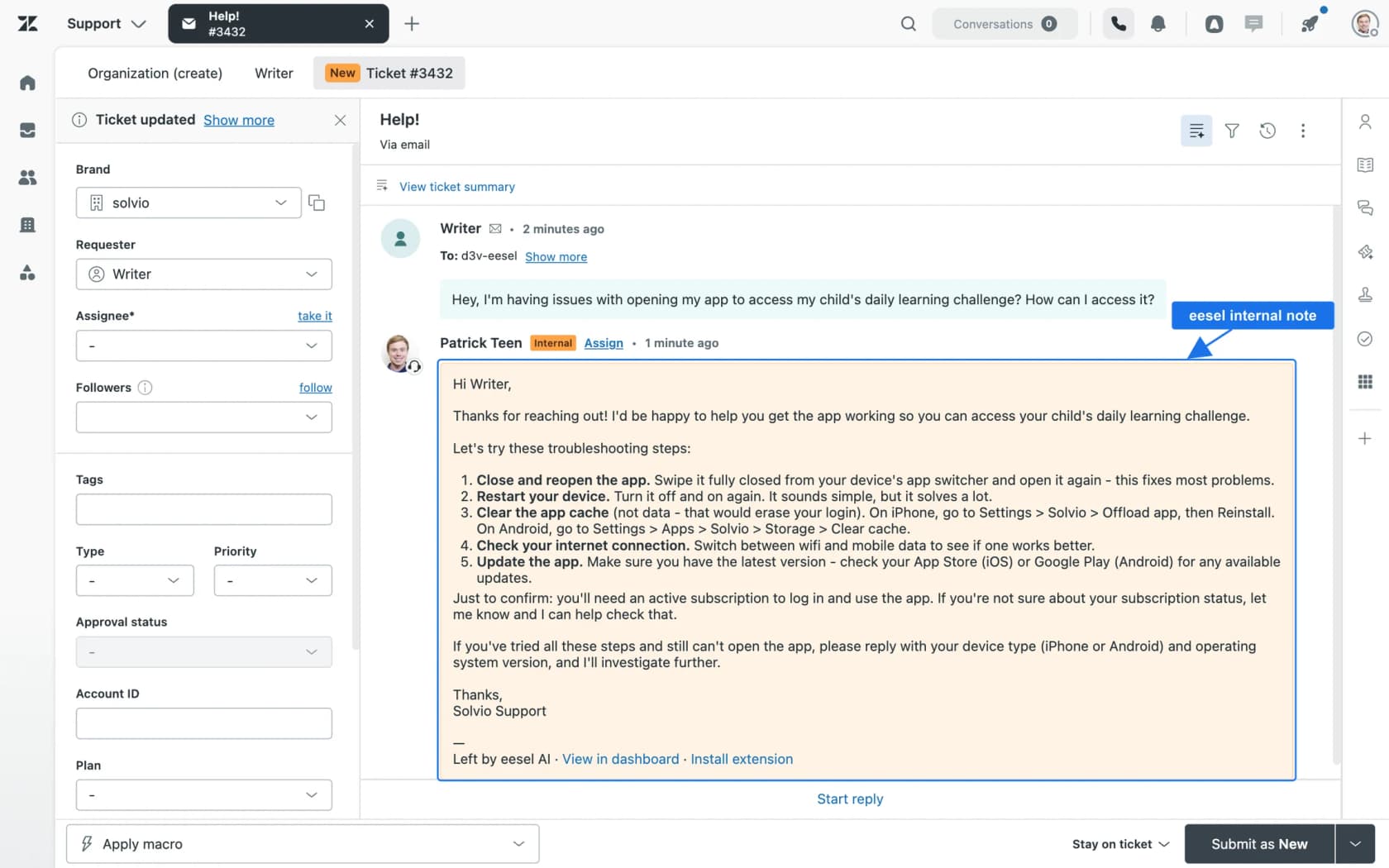
Where the answer appears matters as much as what it says. On a website chat or the contact form, the AI catches the customer before a ticket exists, which is the cheapest kind of education there is (see AI for live chat deflection). Inside the ticket, as a draft, it makes your agents faster and more consistent while you build trust in it. Most teams start with drafts and move narrow, well-documented topics to direct replies later, the same path I'd follow for any tier 1 deflection project.
How do you turn how-to tickets into better docs?
This is the half of customer education AI is quietly best at. Every how-to ticket is a small piece of evidence about what your docs are missing, and nobody has time to read 2,000 of them a month. AI does. A founder on Reddit put the value of that evidence better than I can:
"One thing that helped me more than recordings: look at what people type when they get stuck, in their own words. "How do I change X" or "where is Y" is the task they were trying to do, with no polite filtering. A recording shows where they stopped, but the sentence they wrote tells you what they expected to happen."
The helpdesks have started building this in, each in its own shape:
- Gorgias. Alongside its help center, the AI Library suggests articles based on real ticket data, and each suggestion shows how many tickets it relates to. It's on all plans; the help center's default language must be English.
- HubSpot. Part of the wider HubSpot AI push, a beta knowledge base agent drafts articles from gaps the customer agent finds and from closed tickets. Each new article costs 200 HubSpot credits, and it needs at least five closed tickets and an existing knowledge base.
- Freshdesk. Beyond the Freddy knowledge base features, Freddy Copilot includes a solution article generator for agents, as a
$29per agent per month add-on on Pro and Enterprise. - Zendesk. The old Content Cues gap tool was removed on May 1, 2025. Today the closest thing is the help center search dashboard, which shows what customers search for and where results come up short, plus generative search on top.
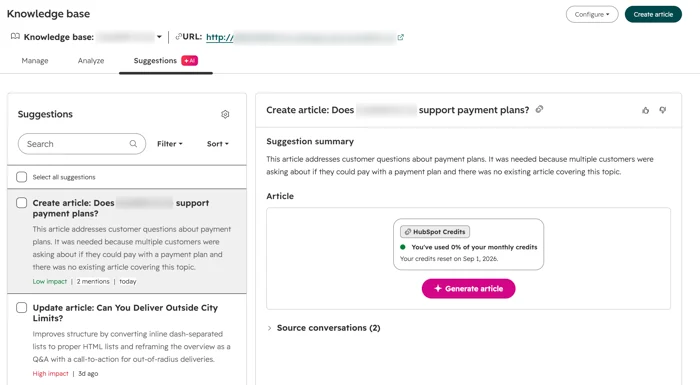
All of these catch bucket 1 (no article) well, but they're weaker on bucket 3 (wrong reader), because a gap tool only sees questions with no answer, not questions with a bad one. That's where the drafts themselves become the signal.
Qontro's team does this by hand, and it's my favourite version of the loop. They compare each eesel draft with the reply a person actually sent. When the draft was wrong, that usually points to a missing or incomplete help article, or a rule that needs tightening, and they fix the article. So the help center keeps getting better, mostly because the AI keeps showing them where it's thin. Their setup answers from about 9,800 past tickets and help articles, and drafted about 190 tickets in its first measured month on Freshdesk.
An anonymised industrial automation company runs the same loop with a documentation team in charge. Engineers who build with its products ask a chat that answers only from the technical library, with the source linked, and a regular digest tells the documentation team which answers were rated badly and where the knowledge had gaps. Those go straight into the documentation backlog. Well over twice as many questions reach that chat as reach the support desk.
eesel also has a Knowledge gaps report that covers the last 30 days of questions it couldn't answer and drafts the top three missing pages. If you want to run the analysis yourself, my guide to support knowledge gap analysis has the step-by-step. For pages that drifted out of date, an AI knowledge base audit catches them.
Where do academies and in-app guides fit?
Academies and in-app guides are the right tools once you know what to teach. The mistake is buying them first and guessing the curriculum. A customer success veteran on Reddit was blunt about how that usually goes:
"I have found over the decades that most trainings done for clients are crap. Not to put to fine a point on it, but your clients aren't paying attention in training. Therefore, they don't know how to use the product/service."
That's harsh on trainings rather than on customers, and courses do work when they teach what customers need, at a moment they care. Here's how the two categories handle AI and support today, from the vendors' own pages:
| Tool | Where it teaches | AI for education | Helpdesk link | Price |
|---|---|---|---|---|
| Skilljar (Skilljar by Gainsight) | Customer academy (courses) | AI Tutor answers learner questions inside a lesson, in open beta at no extra cost, not on SCORM lessons | Zendesk "Enabled with Premium" | Quote-only: annual plan plus a per-active-learner fee |
| Pendo | In-app guides and Resource Center | AI guide builder (open beta) creates guides from a prompt | Resource Center shows Zendesk articles | Pendo Free up to 500 monthly active users, paid plans quote-only |
| Userflow | In-app flows and Resource Center | Adoption Agent answers questions in the product and launches the matching flow | Zendesk knowledge base powers in-app answers (Studio plan) | Essentials $240/month, Studio $400/month with 500 AI credits (billed annually) |
| eesel | The ticket, chat and contact form | Answers how-to questions from docs and past tickets, reports what it couldn't answer | Runs inside Zendesk, Freshdesk, Gorgias, HubSpot, Help Scout | From $299/month for 500 tickets or chats |
Gainsight's old Northpass customer education product now points to Skilljar by Gainsight, so I've treated them as one.
The most useful number I found in any of these vendors' material is also the most honest one. Jamf, which supports more than 76,000 customers, got 80% fewer support tickets on a high-ticket workflow, per its customer story, by embedding training videos directly into the product interface. Note what that is: one workflow, picked because it generated a lot of tickets, with the lesson placed where customers got stuck. That's the four-bucket sort plus education in the moment, done with a learning platform.
So the order I'd follow:
- Under a few thousand tickets a month, or no product analytics yet: start in the ticket, with an AI helpdesk on the tools you already use. An AI that answers how-to questions and logs gaps teaches more customers than a course would, and its gap list tells you what to build later.
- One workflow generating a big share of how-to tickets: add an in-app guide on that screen. Pendo and Userflow both let you pull your existing help articles into the product, so you're not writing everything twice.
- Complex product, customers need certification or structured onboarding: an academy is worth it. Feed it the topics your ticket data says customers struggle with, not the feature list. My roundup of AI customer onboarding tools covers the onboarding side.
How much are how-to tickets costing you?
Before picking any tool, it helps to know the size of the problem. Plug in your own numbers below. The default assumes 2,000 tickets a month, 30% of them how-to questions, and 8 minutes of agent time each.
The number that usually surprises people isn't the cost, it's the hours: hundreds of hours a month of your best product experts teaching the same lessons one customer at a time. That time is also why your docs never get updated, since the people who know what's missing are too busy answering it.
How do you know customers are actually learning?
Fewer tickets is the obvious metric, and on its own it's a trap, because tickets can drop when customers learned or when they gave up. ChatGPT made the same point when I asked it: fewer tickets can mean customers stopped asking because the experience frustrated them. So track these together:
| Metric | What it tells you | Watch out for |
|---|---|---|
| How-to tickets per 100 active customers | Whether demand for teaching is falling as you grow | Raw ticket counts rise with customer count, so normalise |
| Repeat questions on the same topic from the same customer | Whether the answer taught them, or just unblocked them once | A customer asking the same thing twice means the answer didn't stick |
| Share of AI answers rated helpful | Which topics the docs explain well | Low ratings cluster on bucket 3 and 4 tickets |
| Questions the AI couldn't answer | Your writing backlog | Should shrink month on month |
| CSAT on how-to conversations | Whether customers are happy with being taught by AI | Compare against human-answered how-to tickets, not all tickets |
The first two are the real education metrics. If repeat questions on a topic fall after you fix the article, customers learned, which is also what first contact resolution is meant to capture. If they don't, the article or the screen is still the problem. My post on deflection vs resolution rate goes deeper on the first two. For the rating side, see AI CSAT.
A 30-day plan to start
You can get real signal in a month without buying a learning platform:
- Week 1: sort last month's tickets. Tag every how-to ticket by the four causes above. If you have more than a few hundred, let the AI do a first pass and check a sample. You'll come out with a ranked list of topics and a separate list for the product team.
- Week 2: fix the top five articles. Rewrite them for end users, in the words customers actually used. Add the steps and screenshots, and also what to do if it doesn't work.
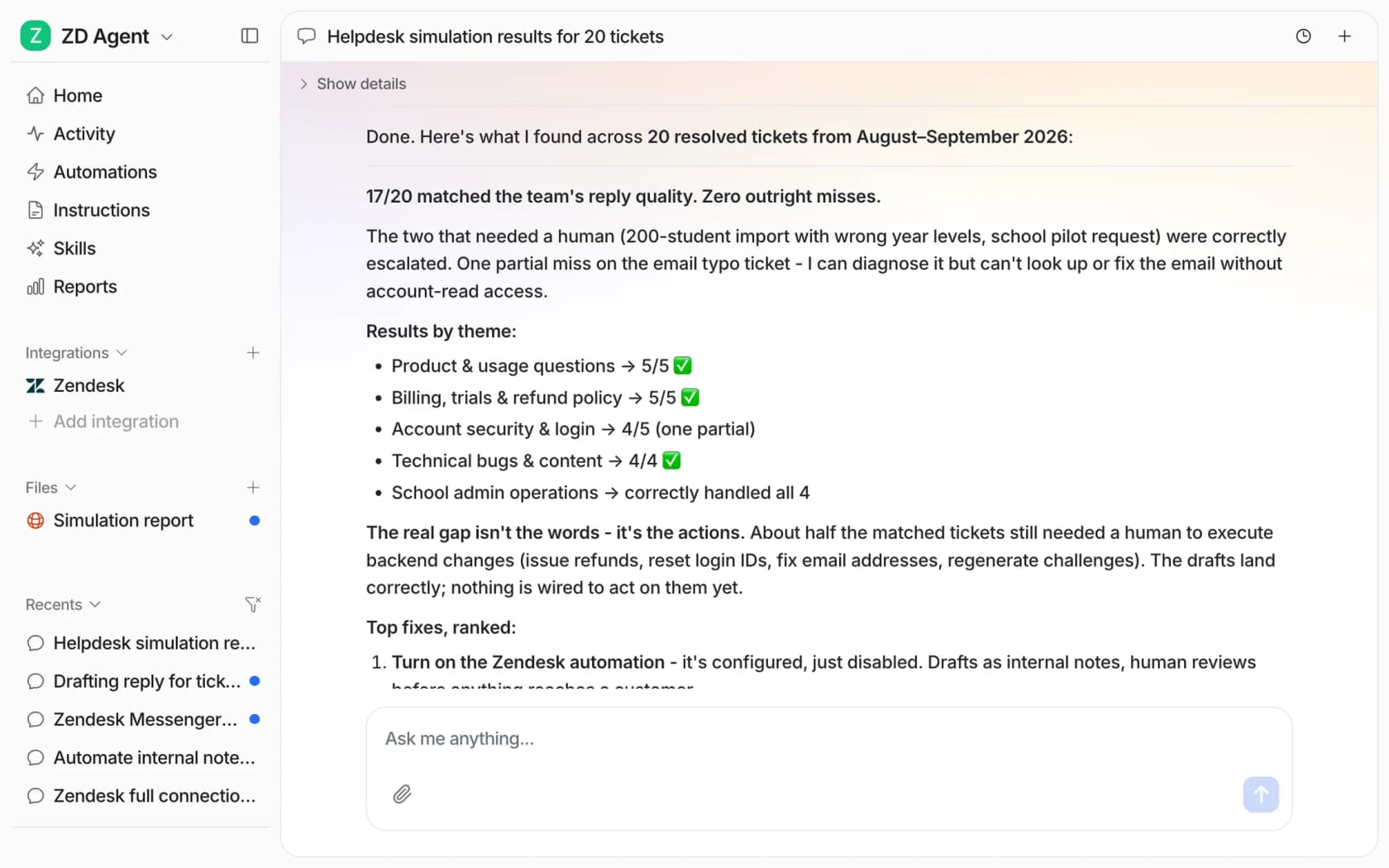
- Week 3: test the AI on past tickets before it talks to anyone. eesel's helpdesk simulation takes 20 tickets your team recently resolved, drafts its own reply to each, compares it with what your team sent and groups the results by theme. It sends nothing. Low-scoring themes are your next articles.
- Week 4: go live on drafts, then narrow direct replies. Start with internal notes your agents send. Move the well-documented how-to topics to direct answers in chat once the drafts go out unedited most of the time. Keep account and billing questions with people.
Then repeat week 1 every month, and keep an eye on support reporting as the numbers move. The list of causes changes as you fix things, and that changing list is the clearest picture you'll ever get of what your customers don't understand.
Try eesel for customer education
If your queue is full of "how do I" questions, eesel's AI helpdesk teammate plugs into Zendesk, Freshdesk, Gorgias, HubSpot or Help Scout, learns from your help center and past tickets, and answers each how-to question with the steps and the article link, in chat or as a draft your team sends. The questions it can't answer become your writing list, so the docs get better while the queue gets shorter. Qontro uses exactly that loop on Freshdesk.
You can run it against your own past tickets before it replies to anyone. Try eesel free with 100 credits, or see the plans from $299 a month for 500 tickets.