

Zoho Desk translates tickets through the free Zoho Translate extension, included from the Standard edition ($14 per agent per month billed annually): an agent opens it in a side pane, reads the customer's message translated into the agent's own language, writes a reply and copies the translation into the editor. Around it sit Zia's writing assistance, which changes the language of a sentence you select, translated ticket summaries, and a composer that translates chat replies into 15 languages. Zoho also detects each new ticket's language, so you can route it to someone who speaks it.
What none of these does is save a translation of the customer's messages to the ticket. Zoho says the extension's translations "are not stored anywhere, except for the reply translations that are sent", so the next agent on the ticket translates it again, and every reply is a copy and paste. If you'd rather have replies written in the customer's language from the start, eesel drafts them inside Zoho Desk as private comments, from $299 a month. An AI coding agent such as Claude Code can set it up with the eesel CLI and ask it for a draft on a real ticket before switching anything on; approving the Zoho Desk connection still needs a person signed in to Zoho.
How does ticket translation work in Zoho Desk?
I build eesel's AI agents, so the first thing I check in a helpdesk's translation feature is where the translated text ends up. In Zoho Desk it mostly ends up in a side pane. There is no translate toggle on the conversation the way Zendesk translation works, or the way Gorgias translates each message when you open it (Gorgias ticket translation covers that one). Freshdesk puts a Translate button on the ticket too (Freshdesk translation). Instead there are four separate tools, each translating a different thing:
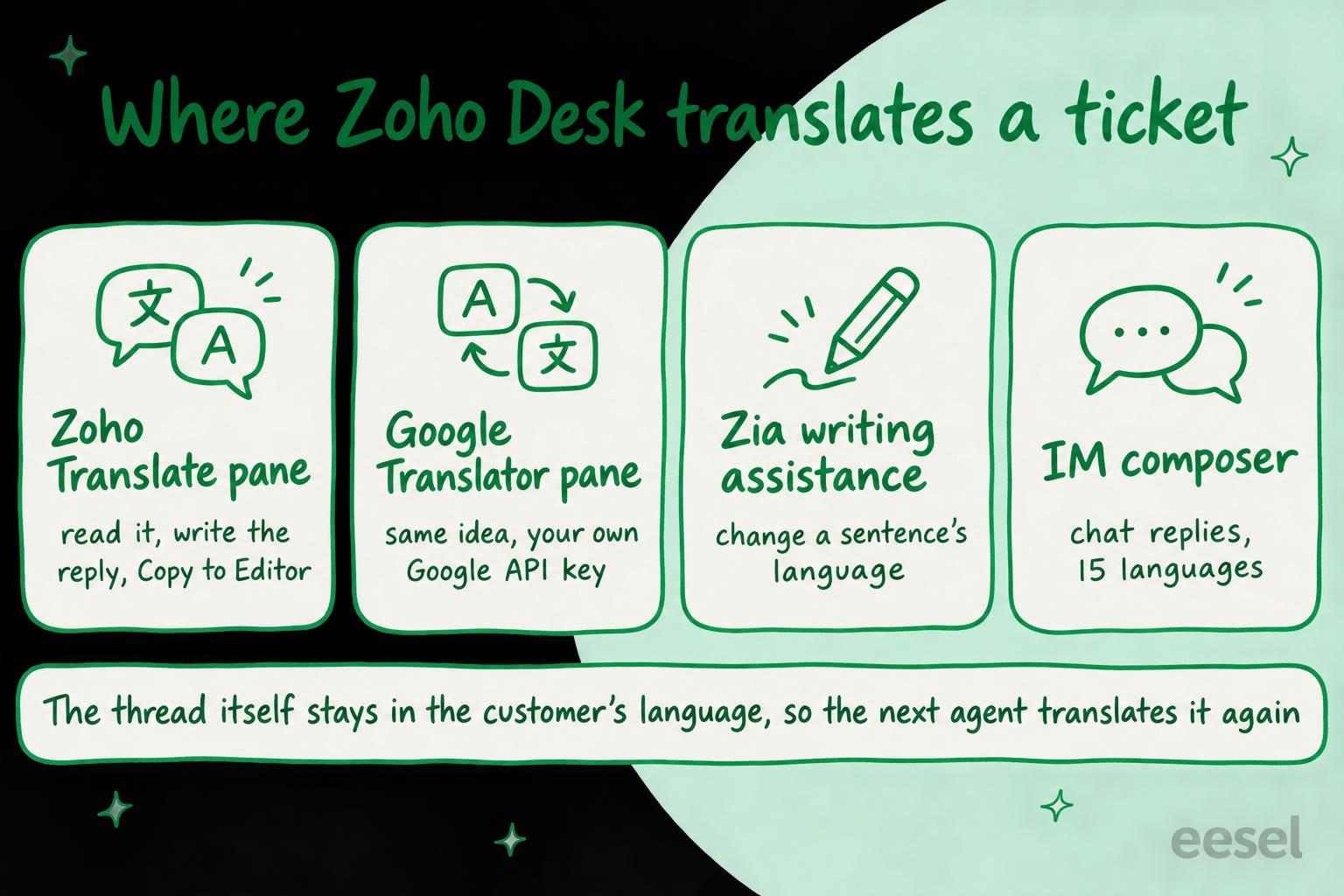
- Zoho Translate, a free extension from the Zoho Marketplace, translates a message and your reply in a pane beside the ticket.
- Google Translator, another free extension, does the same through your own Google API key.
- Zia writing assistance changes the tone, length or language of text you select in the reply editor, and Zia can translate its ticket summary.
- The IM composer translates outgoing replies on chat channels like WhatsApp and Telegram.
Underneath all four is the ticket's Language field. A Zoho staff member explained on the forum that it is filled in automatically when a ticket is created, detects around 70 languages (you can set any of 200 by hand), and can be used as a criterion in direct assignment and workflow rules. That's what most teams build on first, because a ticket that reaches a French speaker doesn't need translating at all. For the bigger picture, see multilingual customer support; for the help-center side, Zia language support.
How to translate a ticket with Zoho Translate
Zoho Translate is the tool most Zoho Desk teams mean by ticket translation. Per the Zoho Marketplace listing it's free, built in house by Zoho, and translates "through a stateless API call to the same data center where your Desk organization resides", so the text stays with Zoho. Zoho's edition comparison includes it from Standard up.
Installing it (an administrator, once). Following Zoho's guide:
- Go to Setup > Integrations > Marketplace and click All Extensions.
- Search for Zoho Translate and open it.
- Pick the Departments that get it and the Profiles that can translate, agree to the terms and click Install.
Translating a ticket (each agent, every time).
- Open the ticket and click the More icon on the conversation.
- Choose Zoho Translate. The pane opens with the message filled in and its language detected.
- Under Translate To, pick your language and read the translation.
- Type your reply under Enter Resolution, choose the customer's language under the second Translate To, and click Copy to Editor.
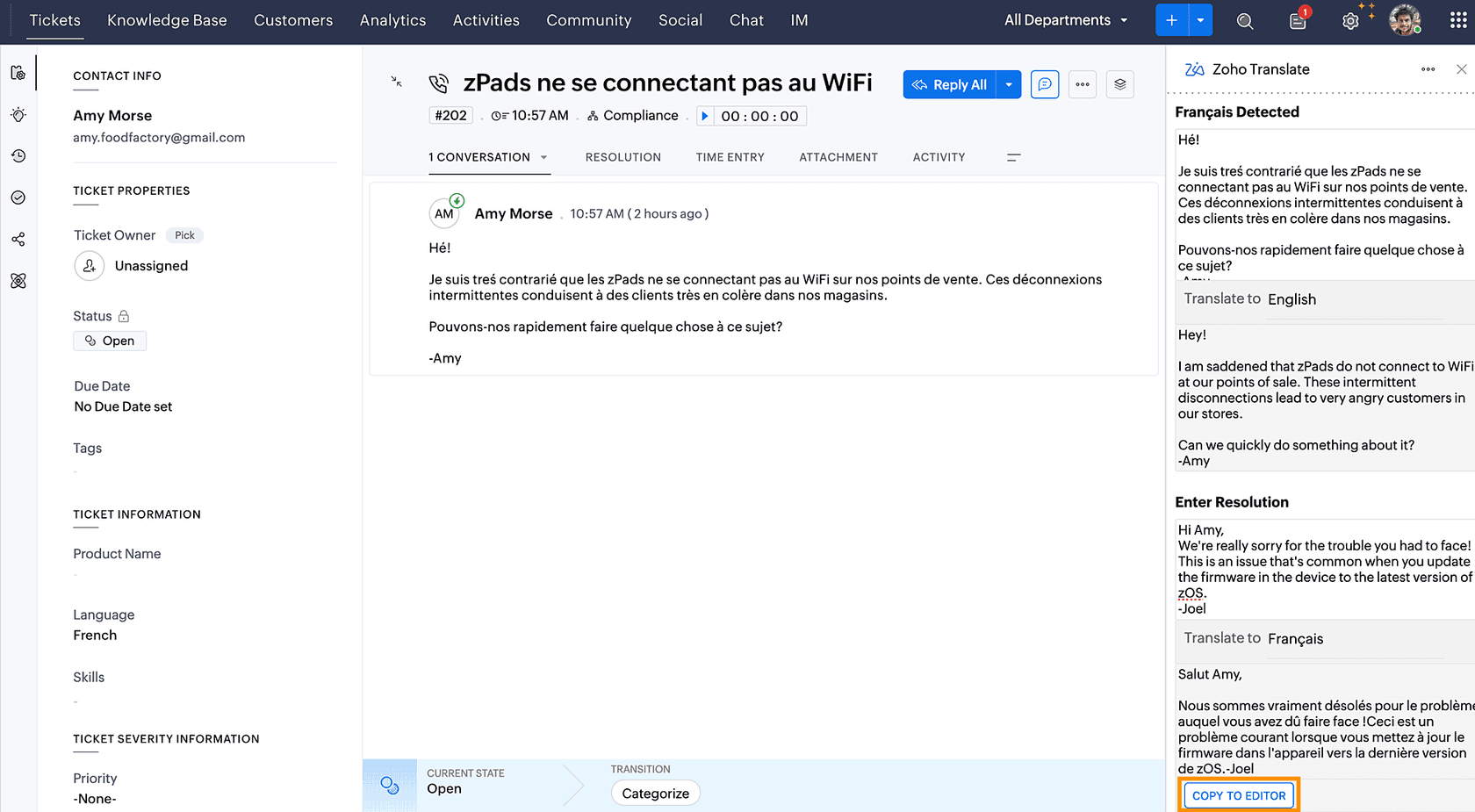
Note the left column in that screenshot: the ticket's Language field already says French. Zoho knew the language before anyone opened the pane, but the agent still picks the target language by hand. One reviewer on the marketplace listing put the trade-off well:
"Practical because it avoids going back and forth in a translation app but could be much more user-friendly. For example, you have to choose the source and destination language each time"
The same listing has reviews from admins who installed it and couldn't get it to work, and a community thread on the same problem was answered by asking for logs. Test it with two or three agents' profiles before you roll it out.
What about the Google Translator extension?
Google Translator for Zoho Desk works the same way: a pane opens beside the conversation, detects the language and translates it, and you write a reply and translate it back. Two differences matter. It ends in Copy to clipboard, so you paste the reply into the editor yourself. And it needs a Google Cloud Translation API key, which needs a Google Cloud project with billing on.
The extension is free; the API isn't, past a point. On Google's Cloud Translation pricing, the Basic tier gives the first 500,000 characters a month free (as a $10 monthly credit) and then charges $20 per million characters. A customer on the extension's listing asked Zoho to say so up front:
"Please make it clear that though the extension is free it requires a Google Translation API key that requires a paid account"
For most teams, Zoho Translate does the same job without a second vendor account. Pick Google only if you already standardise on Google's translations elsewhere.
Can Zia translate a ticket?
Zia, Zoho's AI, translates pieces of a ticket rather than the ticket. From Zoho's guide to Zia's ticket tools:
- Writing assistance. Select sentences in your reply and choose a new tone, length or language. Zoho's own example is a festive greeting "in the customer's regional language" inside an otherwise English email, which tells you what it's designed for: touching up a reply, not writing the whole thing in another language.
- Ticket summary. Zia summarises up to the 30 most recent conversations, and the summary can be translated into any language Zia supports. Each conversation needs at least 50 words. I covered the summaries themselves in Zoho Desk ticket summaries.
- Reply assistance. Zia drafts a reply from your knowledge base, and you can regenerate it in a different language. Zoho is specific about what it reads: "only the ticket subject and incoming email thread is used", and comments and earlier threads aren't sent to the model. It also needs the Answer Bot switched on for the department (Standard and up), and gives no answer when the knowledge base has no relevant article. More in Zia's reply generator.
Which model does the work depends on your edition. Per Zoho's generative AI setup guide, an admin picks one service for the whole organisation: Zia's native model (Qwen, an open-source large language model hosted by Zoho, no charge), ChatGPT with your own OpenAI API key, or Azure OpenAI. The edition comparison gives Express and Standard the bring-your-own-key option only, and Professional and up both. If your team would rather the text not leave Zoho, that makes Professional ($23 per agent per month billed annually) the floor. Zia's generative AI goes through the trade-offs.
How do chats and WhatsApp messages get translated?
Chats on Zoho's IM module (WhatsApp, Telegram and other messaging apps, from Standard up) get the closest thing to built-in reply translation. Per Zoho's guide to translating outgoing messages, the agent types a reply, clicks Translate Message, picks a target language and sends. Canned messages can be translated the same way. Zoho's guide lists 15 languages: Arabic, Danish, Dutch, English, French, German, Hebrew, Hindi, Italian, Portuguese, Russian, Spanish, Swedish, Polish and Turkish.
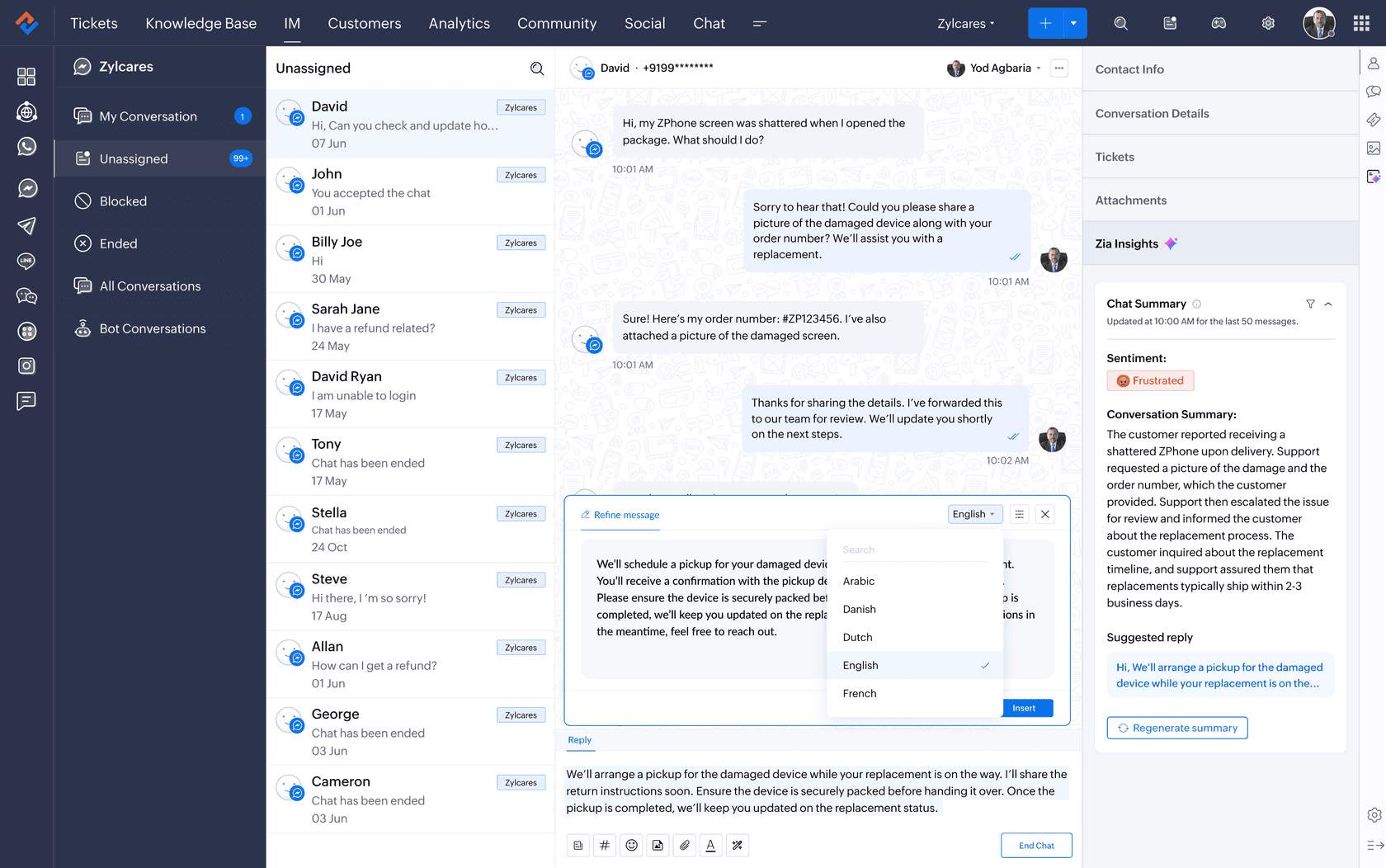
Japanese, Chinese and Korean aren't on that list, though Zoho's community announcement gives replying in Japanese as an example, so test yours before you plan around it. The composer translates what you send; I didn't find a matching guide for translating incoming chat messages. For the bot side, Zoho's 2026 release notes add Zia Translate to Guided Conversations in 16 languages, which is the scripted bot flow, not the agent's inbox (guided conversations explains those). For live chat across tools, see multilingual live chat.
How do you route Zoho Desk tickets by language?
Often the best translation is none: send the ticket to someone who reads it. Zoho detects the language when the ticket is created, and the Language field works as a criterion in two kinds of rule:
- Direct assignment sends tickets that match your criteria to an agent or team. Express gets 2 rules and Standard 5, per the edition comparison.
- Workflow rules can do anything else on a match: set a field, tag it, send a notification in the right language.
On Enterprise ($40 per agent per month billed annually), skill-based assignment goes further: you add a language as an agent skill and Zoho routes tickets to agents "based on their proficiency and availability", in the edition comparison's words. Zoho's own skill-based assignment announcement uses a German-language ticket as its example. The glossary has skills-based routing in general, and my colleague's post on Zoho Desk tagging and routing covers the rest of the rule set.
One catch: detection needs text. A Zoho staff member told one team whose tickets showed "None" that "the email must contain a minimum of three lines" for detection, and it only runs when the ticket is created. A two-word reply-to-a-newsletter ticket will land unrouted, so give your rule a fallback.
Where does Zoho Desk translation fall short?
Each tool works as described. The gaps come from what's left to the agent between them.
- Nothing is saved to the ticket. Zoho's guide says Zoho Translate's translations "are not stored anywhere, except for the reply translations that are sent as response". The next agent who opens a French ticket translates it again, and a manager reviewing it later reads French.
- Every reply is a copy and paste. Zoho Translate ends in Copy to Editor, Google Translator in Copy to clipboard. Edit the reply afterwards and you're editing text in a language you may not read, and brand terms get translated however the engine likes (a support translation glossary is the usual fix).
- The language is picked by hand. The ticket already knows it's French; the pane still asks.
- Zia's drafting reads only part of the ticket. Reply assistance uses the subject and the latest incoming thread. A customer's third message that refers back to their first gets an answer to the third alone.
- Internal notes stay as written. A private comment a colleague in Lisbon wrote in Portuguese stays in Portuguese. Zia's ticket summary includes private comments and can be translated, but that gives you a summary of the note, not the note.
- Chat and email work differently. Chat has the composer's built-in picker and 15 languages; email has the extension's pane. An agent working both learns two habits.
- The help center is a separate project. A multilingual knowledge base starts on Professional, and auto-translating its articles with Google Translate or Unbabel starts on Enterprise, per the edition comparison. If Zia drafts from your knowledge base, a language you haven't published articles in gets thinner answers. Multilingual knowledge base software covers that side.
There are also paid third-party extensions on the Zoho Marketplace that go further. DSVCorp's Email Translator Extension, for example, says it translates incoming emails "in real time without any manual intervention", and lists $20 a month or $180 a year. I haven't tested it, so treat that as the vendor's claim and run it on a trial first.
Pick what your team needs to see which Zoho Desk tool handles it.
What does Zoho Desk translation cost?
The translation tools themselves cost nothing extra; the edition you're on decides which ones you get. From Zoho's edition comparison, per agent per month:
| Edition | Billed annually | Billed monthly | Translation you get |
|---|---|---|---|
| Express | $7 | $9 | 2 direct assignment rules to route on the Language field, Zia writing assistance with your own OpenAI key |
| Standard | $14 | $20 | Adds Zoho Translate, the IM module's composer translation, Answer Bot reply assistance |
| Professional | $23 | $35 | Adds Zia's native model (no OpenAI key), a multilingual help center |
| Enterprise | $40 | $50 | Adds skill-based assignment by language, auto-translated help articles |
| Ultimate | $55 | $65 | Everything in Enterprise, with higher limits |
For a 10-agent team, Standard comes to $140 a month billed annually and Professional to $230. Google Translator adds Google's own bill past 500,000 characters a month, and an OpenAI key adds OpenAI's usage charges if you don't use Zia's own model. The full breakdown is in Zoho Desk pricing.
Where does an AI agent like eesel fit?
Zoho's tools help an agent read a ticket and patch a reply. The work they leave is writing a whole, correct reply in a language nobody on the shift speaks. That is a job an AI agent can do inside Zoho Desk, as long as a person stays in the loop while you build trust in it. Whether AI can carry multilingual support at all is its own question; this is how eesel does it.
eesel joins Zoho Desk as a teammate. Per the eesel Zoho Desk docs, it reads the ticket's fields, the message that woke it, and the full ticket when it needs it (every message, private comments and attachments), and learns from your published help center articles and past tickets. It can leave a private comment, send the reply, tag the ticket or update its fields. So the instruction for a multilingual queue is plain: "draft the reply in the language the customer wrote in, as a private comment, and put a two-line summary in English above it." The agent who reviews it reads the English summary, and the customer gets a reply that was written in their language rather than translated at the last step.

eesel's customers already run this, on Freshdesk rather than Zoho Desk, but the job is the same. Innr, a smart lighting company in the Netherlands, has customers writing in Dutch, German, English and French; eesel leaves a draft as an internal note for each, 180 drafts in a month, in the language the customer wrote in, with the formal "Sie" in every German reply. Koffer.ch has it start from the shop's own macros and translate them into German, French, English or Italian, with Swiss spelling in German. In both, a person reads the draft and sends it.
Where it isn't the right fit: if your team reads every language it gets, a Language-field rule is free and simpler. And eesel doesn't add a button to Zoho's reply editor; it works through private comments, replies and field updates on the ticket. Its automations need Zoho's webhooks, which start on Professional.
Try eesel next to Zoho Desk
If your agents keep a translation pane open on every other ticket, or tickets in a language nobody speaks wait for whoever is on shift tomorrow, try eesel next to Zoho Desk. Start it on one language, with drafts as private comments, and read a week of them before widening it. What it may do alone versus ask a person first is set per action, so it can draft on its own and only send after a yes (actions and approvals). The free trial lets you watch it draft on your real tickets before you pay.

Try eesel on one language first, or compare the field in best AI for Zoho Desk. For tools that work across helpdesks, see best AI for multilingual support.