The 8 best Mio AI alternatives for 2026

Riellvriany Indriawan

Katelin Teen
Last edited August 27, 2026

Why look for a Mio AI alternative?
I've spent the last few years on the operator side of AI support rollouts, and the one thing I've learned is that a confident-sounding bot is easy to demo and hard to trust. That's the lens I'm bringing here, not a knock on Mio.
Mio AI is good at what it's built for. It's a "digital teammate" for the enquiry-to-enrollment journey, with a chat agent (Mio AI Guide) that answers students 24/7 and a voice agent that calls leads to qualify, remind, and reactivate them. Because it's native to Meritto CRM, it knows a student's stage and history before it says a word.

The reasons teams start shopping around are usually these three:
- It's tied to Meritto CRM. The "Mio difference" the site sells (full context before every interaction, zero manual updates after) is the same thing that locks you in. If your school or company doesn't run Meritto, the agent loses most of what makes it special. An AI agent that assumes one CRM is a much narrower buy than one that reads whatever knowledge you already have. It helps to look at real AI agent examples that run on an existing stack before you decide.
- There's no published price. Mio's
/pricingpage returns a 404, and Capterra lists it as "Contact vendor for pricing," with no free trial and no free version. You can't compute a cost of ownership until you've sat through a sales call. - It's narrow and India-first. Mio is built for education and its customer logos are largely Indian institutions (LPU, Christ University, Ramaiah). That's a strength if you're an Indian college, and a mismatch if you're a support team in another vertical or region.
None of that makes Mio a bad product. It just means the right alternative depends heavily on which of those three things is bugging you.
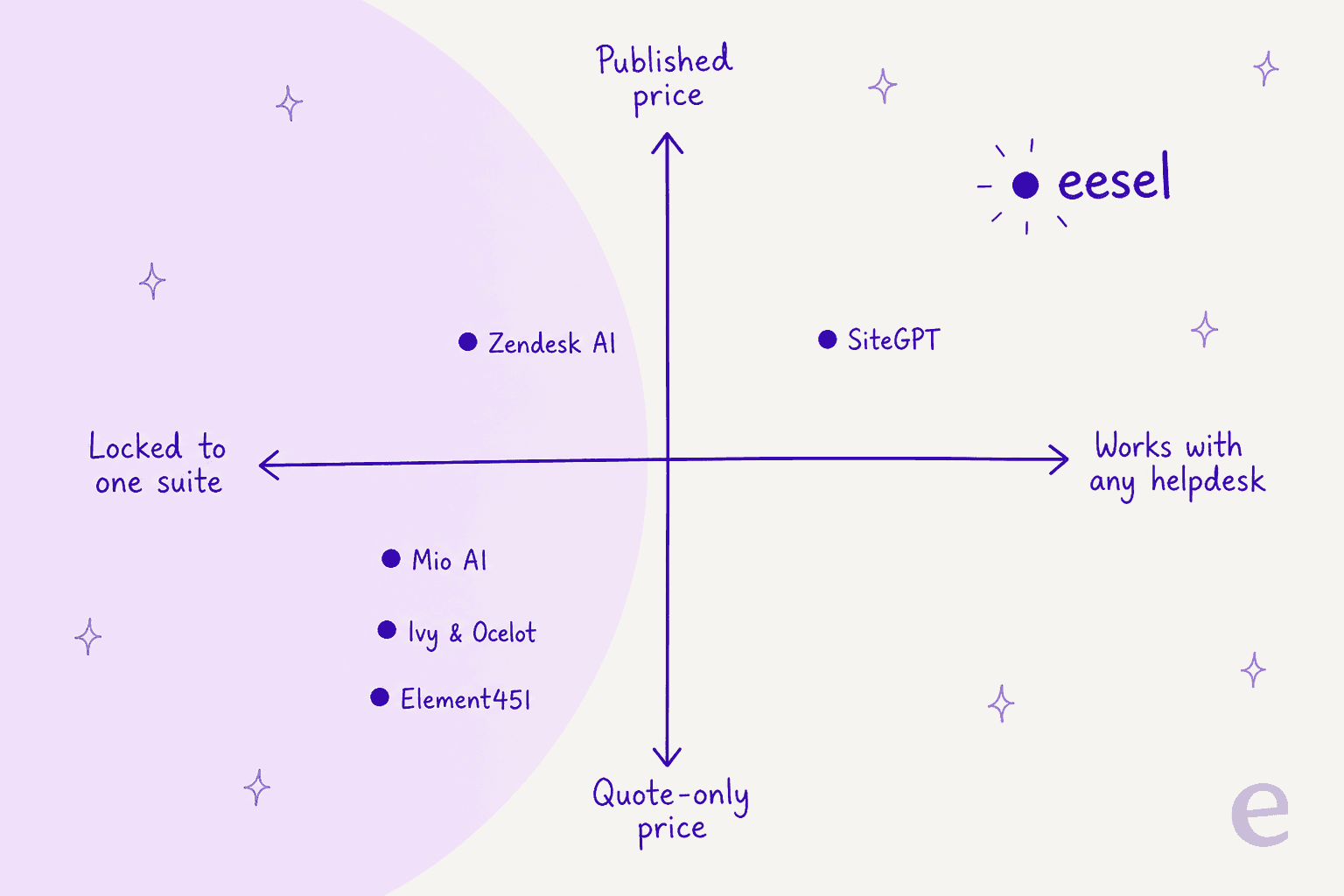
How I picked these alternatives
I weighed each tool on the dimensions that actually decide this purchase, not just the feature grid:
- Scope. Is it education-only, or a general AI customer service agent that happens to work for schools too? There are plenty of AI customer service companies that never touch a campus.
- Lock-in. Does it need its own CRM or helpdesk, or does it work with the stack you already run?
- Pricing transparency. Can you find a real number, or is everything quote-gated?
- Proof before you buy. Can you test it on your own data, or only watch a demo?
- Real user signal. What do reviews on G2, Capterra, and Reddit actually say, and how does each stack up against the best AI helpdesk software?
One quick note on tone: I'm not going to pretend a $39/month DIY bot and a $20,000/year enrollment CRM are the same thing. They solve different problems, and I've tried to say who each one is really for.
The 8 best Mio AI alternatives at a glance
Here's the shortlist side by side before we go deep on each. "Published price?" is doing a lot of work in this table: five of the nine tools here (Mio included) won't tell you what they cost without a call.
| Tool | Best for | Built for education | Works with your helpdesk | AI pricing model | Published price | Free trial | Rating |
|---|---|---|---|---|---|---|---|
| eesel | Any team that wants AI on its existing helpdesk | No (vertical-agnostic) | Yes (Zendesk, Freshdesk, help center, Slack) | Transparent monthly credit plans (from $299) | Yes | Yes | 4.6★ (G2) |
| Ivy.ai | Large campus self-service | Yes (higher ed) | Its own platform | By FTE + content areas | No (quote) | No | 4.3★ (G2) |
| Ocelot | Financial-aid and enrollment texting | Yes (higher ed) | Its own platform | Quote-only | No | No | 4.7★ (Capterra) |
| Element451 | An AI-first higher-ed CRM | Yes (higher ed) | Bolt runs on your stack, or full CRM | Quote-only | No (~$20k/yr on Capterra) | No | 4.6★ (Capterra) |
| Mainstay | Outcomes-driven student nudges | Yes (higher ed) | Its own platform | Quote-only | No | No | 5.0★ (Capterra, few) |
| Zendesk AI | Teams already on Zendesk | No | Native to Zendesk | Per automated resolution | Yes ($1.50-$2.00/AR) | Yes | 4.3★ (G2) |
| Freddy AI | Teams already on Freshdesk | No | Native to Freshworks | Per bot session | Yes ($49/100) | Yes (500 sessions) | 4.4★ (G2) |
| SiteGPT | A cheap DIY knowledge-base bot | No | Embed + a few integrations | Flat monthly | Yes (from $39/mo) | Yes (7-day) | 4.8★ (G2, few) |
Now the detail.
1. eesel: best for AI on the helpdesk you already run
Best for: teams that want an autonomous AI agent working inside their current helpdesk and knowledge base, with a price they can actually plan around.

I'll be upfront that this is our product, so read the specifics and judge for yourself. The reason it leads the list is the exact thing Mio can't do: eesel is an AI helpdesk agent that plugs into the tools you already run instead of asking you to move into a new CRM. Connect Zendesk, Freshdesk, Slack, your help center, and your past tickets, and a single agent searches all of them at once to draft or send a reply.
The other big difference is that you don't have to take the resolution rate on faith. eesel runs a simulation over your real historical tickets first, so you can see how many it would have handled and how it would have phrased them before it ever touches a live conversation. We built that because we've watched confident bots quietly give wrong answers, and simulating against real history is the only honest way to catch it early.
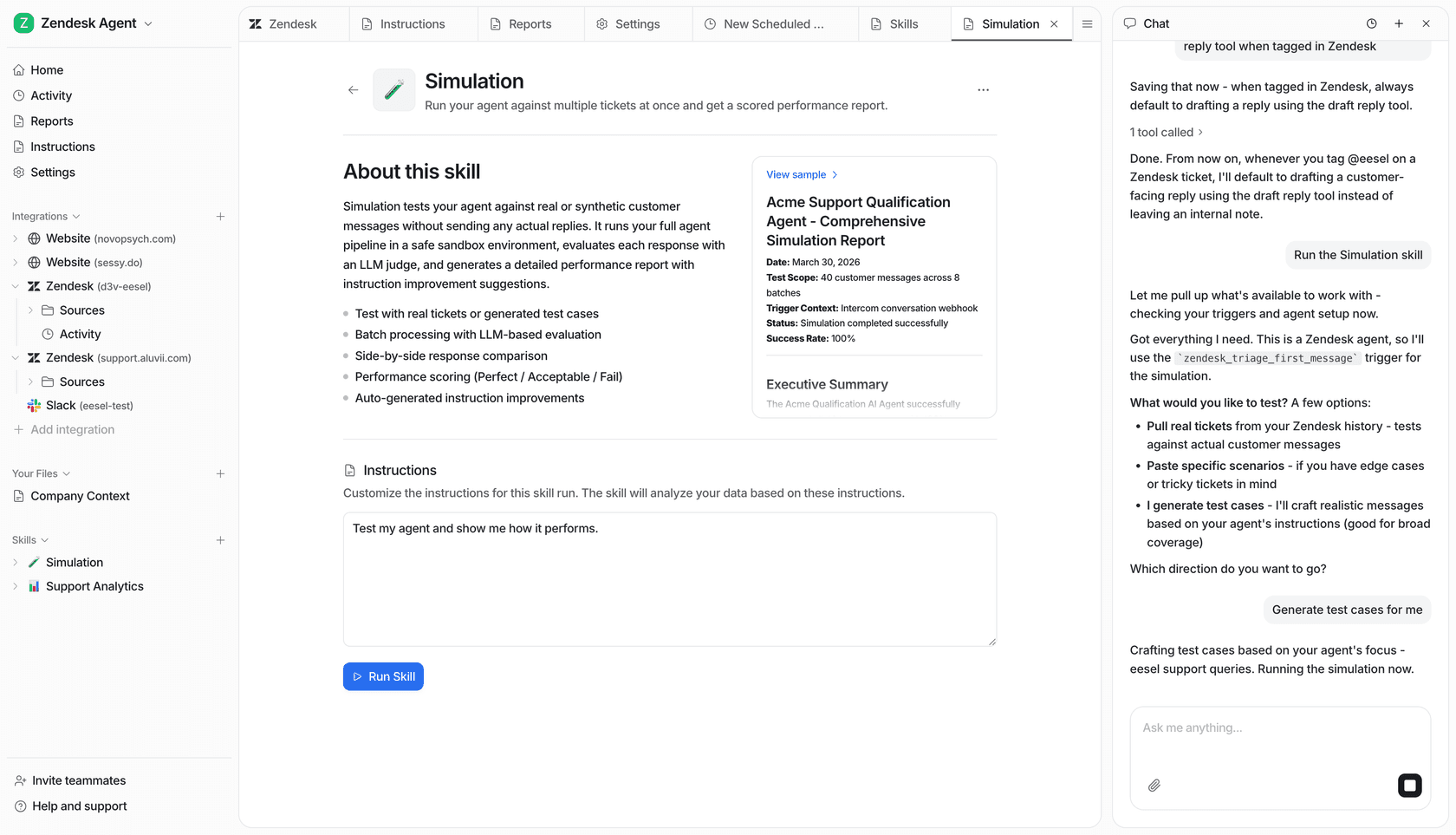
Pros:
- Works across your existing stack, not a walled CRM. A single agent covers Zendesk, Freshdesk, Slack, and your website together.
- Learns from your solved tickets, not just your help center, so replies match how your team actually answers.
- Transparent monthly credit plans with no per-resolution surcharge, so a busy month doesn't produce a surprise bill.
- Simulation mode and confidence-based routing (low confidence drafts for review instead of guessing) let you roll it out safely.
- 80+ languages out of the box; Smava runs 100,000+ German tickets a month on it.
Cons:
- It isn't education-specific. There's no built-in FAFSA assistant or enrollment-funnel logic the way Ocelot or Element451 have, so a school that wants those exact workflows out of the box will do some configuration.
- It's a support-and-operations agent, not a full student CRM. If you want the system of record itself, that's a different category.
Pricing: one fixed monthly price on the pricing page, from $299/month for 500 credits, with 1 credit per ticket however long rather than a charge per resolution, and plans you can read before you talk to anyone. There is a free plan with 100 credits, and HIPAA is available on request through an add-on.
Verdict: if your problem with Mio is the Meritto lock-in or the missing price tag, eesel is the most direct fix. It's the pick for any support team that wants an AI agent on their current helpdesk. It's the weakest fit only if you specifically need a purpose-built higher-ed enrollment suite.
2. Ivy.ai: best for large-campus student self-service
Best for: universities that want a generative chatbot answering high volumes of student questions across every department.
Ivy.ai is a generative-AI chatbot purpose-built for higher education (it also serves healthcare and government). Its core product, IvyQuantum, is pitched as a chatbot "powered only by your content," meaning it crawls your own sites and answers from them rather than freewheeling from a general model. As of 2026 it's part of Gravyty and sold alongside Ocelot as "Ivy & Ocelot."
What makes it clearly a campus tool is how it's structured: pricing and deployment are organized by "content areas" that map to departments (Admissions, Bursar, Financial Aid, Registrar, and so on), and it scales by full-time-equivalent student count.
Pros:
- Built for the shape of a university, with department-level content areas.
- Omnichannel: SMS, email, IVR, voice, and 100+ languages via translation, one of the broader AI chatbot channel sets here.
- Strong self-reported outcomes on client cards (Temple cites call volume down 50%).
Cons:
- Quote-only. Pricing is an estimator that ends in "Request Quote," with no public dollar figures.
- Reviewers flag analytics depth and the bot getting confused on ambiguous pages. One higher-ed buyer on G2 was blunt about a compliance mismatch:
"Some of the things sold to us were not true. We were told it was WCAG 2.0 compliant, and our accessibility office found that wasn't so. It delayed our implementation for a few months... The way the bot reads our webpages it can get very confused pretty quickly."

Pricing: quote-only, based on FTE student count and the number of content areas you cover.
Verdict: a strong Mio alternative if you're a large institution that wants deep campus coverage and you're fine with a sales-led buy. Test its answers on your own messy pages before you sign, since that's where the reviews say it strains.
3. Ocelot: best for financial aid and enrollment texting
Best for: colleges that live and die by financial-aid questions and two-way SMS outreach.
Ocelot has been doing higher-ed communication since 2003 and now serves 500+ institutions as the other half of Gravyty's "Ivy & Ocelot." It's a multilingual AI chatbot with two-way texting and live chat, and its real specialty is financial aid: it ships a FAFSA assistant, SAP policy content (GetSAP), and a library of thousands of how-to financial-aid videos surfaced right inside chatbot answers.
Pros:
- Deep, preloaded higher-ed knowledge base, so it isn't starting from zero on day one.
- Best-in-class financial-aid and enrollment-melt tooling.
- Strong satisfaction scores: 4.7/5 on Capterra across 44 reviews, with Customer Service rated 4.9.
Cons:
- Text-first. I couldn't find a dedicated voice AI product, so if outbound calling is why you liked Mio, Ocelot doesn't match that piece.
- Quote-only, and reviewers wanted deeper SIS integration for personalized answers, as this Pima Community College user noted:
"faTV was the first product we began to use and it has helped us deliver detailed information to students that is 'just enough'... Since 2020, we have included the Chatbot in Financial Aid and we found great success in helping answer general questions."

Pricing: quote-only; every path routes to a demo request.
Verdict: if your student questions cluster around aid, deadlines, and enrollment, Ocelot is arguably a better fit than Mio's chat agent. Just know you're buying a text-and-chat platform, not a voice one.
4. Element451: best for an AI-first higher-ed CRM
Best for: institutions ready to run their whole enrollment motion on an AI-native CRM, not just bolt a chatbot onto the side.
Element451 is the most ambitious tool here. It's an AI-first CRM for higher education (350+ institutions, 60M+ student journeys) whose Bolt agents are pre-trained for specific jobs across Marketing, Admissions, Student Success, and CE. The Admissions agents are the standout: an App Reader that scores submissions against your rubric, and an App Fraud Detector that screens every application for duplicates or falsified info.
Usefully, Element451 offers two paths: run Bolt agents on your existing stack (no migration), or move onto the full Element CRM. That flexibility is more than Mio's single-CRM model gives you.
Pros:
- Role-specialized agents built for the enrollment funnel, working across phone, SMS, email, WhatsApp, and web chat in 100+ languages.
- Bolt can run on your current SIS/LMS/CRM, so it isn't strictly rip-and-replace.
- Well-liked: 4.6/5 on Capterra across 7 reviews.
Cons:
- It's an enterprise, annually contracted platform. Capterra lists a starting price around $20,000/year, with no free trial.
- Reviewers mention a real onboarding learning curve:
"There was a bit of a learning curve with figuring out where to find information and how to set everything up on the front end."
Pricing: quote-only on the site; third-party listings put the entry point near $20,000/year.
Verdict: the right call if you want to consolidate onto one AI-native higher-ed platform and have the budget for it. Overkill if you just wanted to replace Mio's chat widget.
5. Mainstay: best for outcomes-driven student nudges
Best for: enrollment and retention teams that care about measured outcomes (FAFSA completion, summer melt, persistence) more than raw deflection.
Mainstay (formerly AdmitHub) pairs behavioral science with conversational AI to text students and nudge them through the moments where they stall. It's used by 200+ colleges, and unlike most tools here it's sold on evidence: a 2018 Brookings and Georgia State study famously found a 20% reduction in "summer melt." One thing to flag, because it affects long-term fit: in March 2026 Mainstay was acquired by the nonprofit Lemnis and is converting into a division of it. Existing services keep running.
Pros:
- An outcomes-and-research story most competitors can't match, backed by RCTs.
- Proactive SMS coaching plus sentiment insights, tuned to student success.
- Verified higher-ed reviewers praise how attuned the conversations feel:
"The customer service is stellar and the actual AI conversations are highly atuned to higher education. Our students enjoy interacting with the chatbot - both for enrollment and retention purposes."
Cons:
- Narrow. It's student-success coaching, not a general support agent, so it won't cover a broad help desk queue.
- No public pricing, and the nonprofit transition is worth watching if you're signing a multi-year deal.
Pricing: quote-only; there's no pricing page.
Verdict: the best pick if your goal is measurable behavior change in students rather than ticket deflection. It's a specialist, so pair it with something broader if you also need general support.
6. Zendesk AI: best for teams already on Zendesk
Best for: support teams already living in Zendesk that want AI resolution without adding another vendor.
If you're a support org rather than an admissions office, Zendesk AI is the obvious general-purpose alternative. Its AI agents resolve requests end to end across messaging, email, and voice, and the whole thing sits on top of a mature helpdesk. Unlike Mio, it publishes its pricing, and the model is refreshingly outcome-based: you pay per Automated Resolution (AR), meaning only when the AI actually resolves a request without escalating.
Pros:
- Included in every Suite plan, so there's no separate AI contract to negotiate.
- You only pay when the AI actually resolves something (up to a small included allowance first).
- Deep platform: knowledge management, QA, and triage all in one place. See the essential vs advanced tiers for what's gated where.
Cons:
- The per-resolution math adds up. One admin summed up the new model on Reddit:
"From what I can see in regards to this new 'Automated Resolution' pricing model, we'll be paying about $1.50 ~ $1.20 per resolution."

- It really only makes sense if you're on (or moving to) Zendesk.
Pricing: Suite plans run $55-$115 per agent/month (annual), plus $1.50/AR committed or $2.00/AR pay-as-you-go once your included resolutions run out.
Verdict: a strong, transparent alternative for support teams already on Zendesk. If you like the AI but not the platform lock-in, note that eesel can run its agent inside Zendesk on credit-based pricing (1 credit per ticket) instead of per-resolution.
7. Freddy AI: best for per-session AI pricing at volume
Best for: Freshdesk teams that want an autonomous agent billed by conversation rather than by resolution.
Freshworks' Freddy AI is the Freshdesk equivalent: a no-code AI agent that resolves queries across email, chat, WhatsApp, and social, and can take real actions like processing refunds or updating orders. It's a family of three separately billed pieces (the customer-facing AI Agent, an agent-facing Copilot, and Insights), which is worth understanding before you buy.
Pros:
- Session-based billing is often cheaper than per-resolution at high volume, which is the recurring read from teams weighing it against Zendesk's per-resolution model.
- 500 free sessions to trial the agent, and ready-made vertical agents and workflows.
- Speaks 60+ languages and connects to Shopify, Stripe, and more.
Cons:
- The "session" unit is easy to misread. The published list rate is $49 per 100 sessions (about $0.49/session), and an email "session" is a 72-hour window, so your real cost depends on channel and volume.
- Freddy Copilot is a separate $29/agent/month add-on, so the sticker price isn't the whole story.
Pricing: Freshdesk plans run $19-$89 per agent/month (annual); the AI Agent gives 500 free sessions once, then $49/100 sessions. Compare against Freshdesk's own pricing and the Freddy AI pricing detail before committing, and if the session math doesn't work out, there are Freshdesk alternatives too.
Verdict: a good, transparent choice if you're on Freshdesk and run high conversation volumes. Model the session math at your real volume, since that's where it either wins or doesn't.
8. SiteGPT: best for a cheap DIY knowledge-base bot
Best for: small teams that want a self-serve chatbot trained on their content, live in an afternoon, without a sales call.
At the opposite end from Element451 sits SiteGPT, a founder-led, DIY AI chatbot builder. You point it at a URL, sitemap, or uploaded files, it trains a bot in a few minutes, and you embed it as an AI chatbot for your website. It's the most self-serve option here and, notably, it publishes clear prices.
Pros:
- Fast, no-sales-call setup, and answers are grounded strictly in your trained content.
- Affordable entry point with a real free trial.
- Connects to Slack, Zendesk, and Freshdesk Messaging on higher tiers.
Cons:
- The message meter is the real cost lever: a GPT-4.1 reply burns roughly 10x a GPT-4.1-mini reply, so heavy usage climbs faster than the sticker suggests.
- Thin public footprint and limited integrations, as the one Capterra reviewer notes:
"Currently the integration options are limited, so implementing may not be as smooth depending on your other platforms."
Pricing: Starter $39/mo, Growth $79/mo, Scale $259/mo (effective annual rates), plus Enterprise; extra messages are $59 per 5k-message pack.
Verdict: the budget pick, and a fine one for a small site or a simple knowledge-base bot. It's not built for the enrollment funnel or a full support operation, so match it to a modest job.
How these Mio AI alternatives actually charge
If you take one thing from this comparison, make it this: the vendors split cleanly into those that will tell you a price and those that won't. Mio, Ivy, Ocelot, Element451, and Mainstay are all quote-only. Zendesk, Freddy, SiteGPT, and eesel publish rates, and even then the unit differs enough to change your bill by a lot.
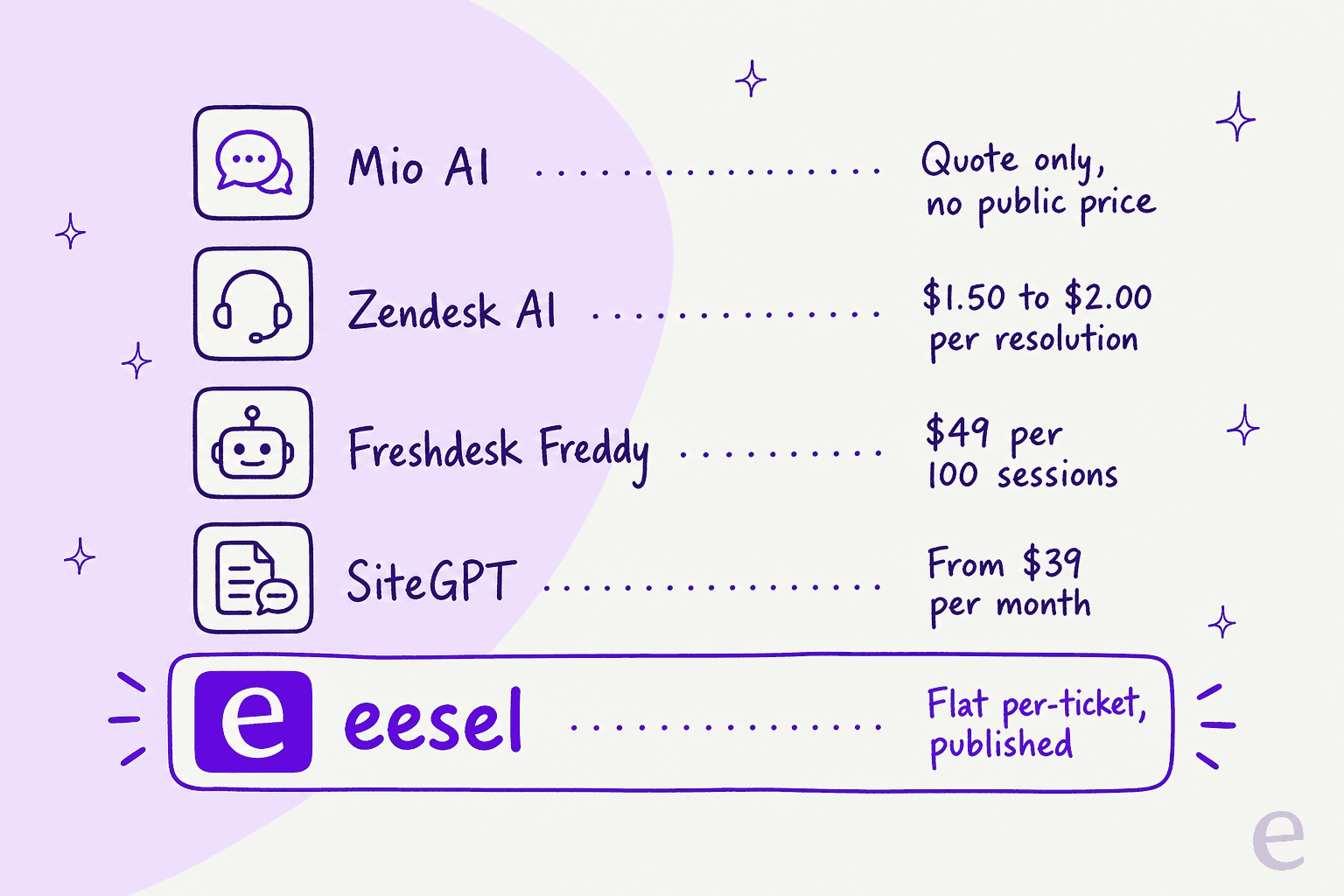
A worked example makes it concrete. Say you resolve 2,000 conversations a month with AI. On Zendesk's committed rate that's roughly $3,000/month in resolution fees on top of seats. On Freddy's list rate ($49/100 sessions) that's around $980 in sessions, though the real figure depends on how sessions are counted. On eesel, 2,000 tickets a month fits the 2,500-credit plan at $999/month. It is designed so that a spike in volume doesn't trigger a per-resolution surcharge (overage is optional and capped at a limit you set), which is the scenario that catches teams out. Whichever you pick, track the customer service metrics that tell you if the automation is actually paying off. And Mio? You can't run this math until after a demo, which is the whole point of looking elsewhere.
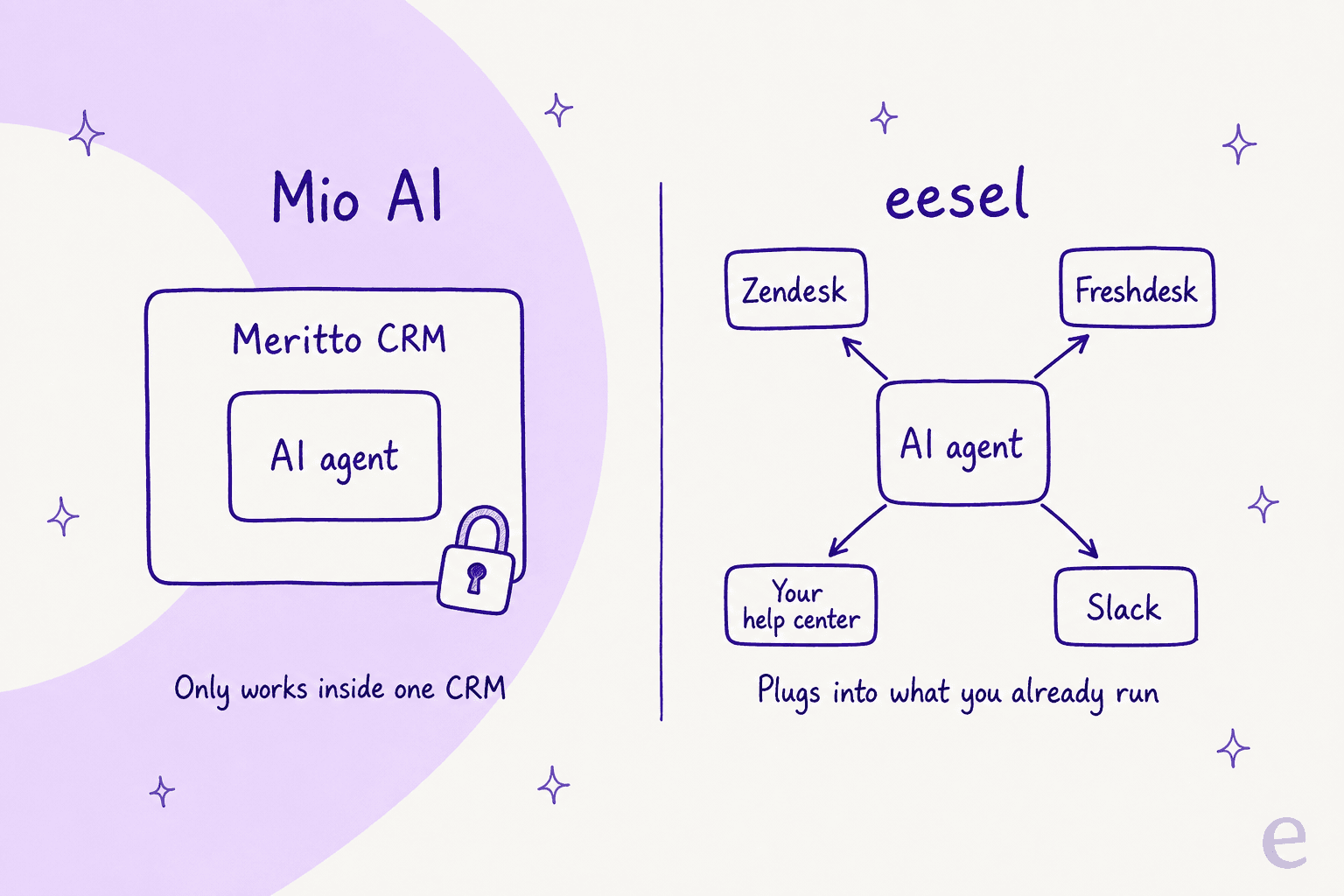
Try eesel
If your reason for leaving Mio is the Meritto lock-in or the missing price tag, that's exactly the gap eesel was built for. It works like a new hire that plugs into the helpdesk you already run (Zendesk, Freshdesk, Slack, your help center) in a few minutes, learns from your solved tickets rather than just your help center, and charges a transparent monthly credit plan (1 credit per ticket, from $299/month) with no per-resolution surcharge.

The part I'd care about most as a buyer: you can run a simulation over your real past tickets and see the resolution rate before the agent answers a single live customer. No sales call required to see a number, and no CRM migration to get started. It's free to try.