What "tier-1 support" actually means
Before you automate it, get specific about what "it" is. Tier-1 is the front line: the high-volume, low-complexity tickets that have a known answer sitting in your help docs or your past replies. Think "where is my order", "how do I reset my password", "how do I cancel", "can you update my address". These are the ones that pile up, burn out your team, and almost never need a human's judgment, just a fast, accurate answer.
What's not tier-1: the angry or at-risk customer, the refund that breaks your normal policy, the edge case nobody's written a doc for. Those need a person. The mistake I see most often is treating "automate tier-1" as "automate everything," and then being surprised when the AI fumbles a ticket that was never tier-1 to begin with.
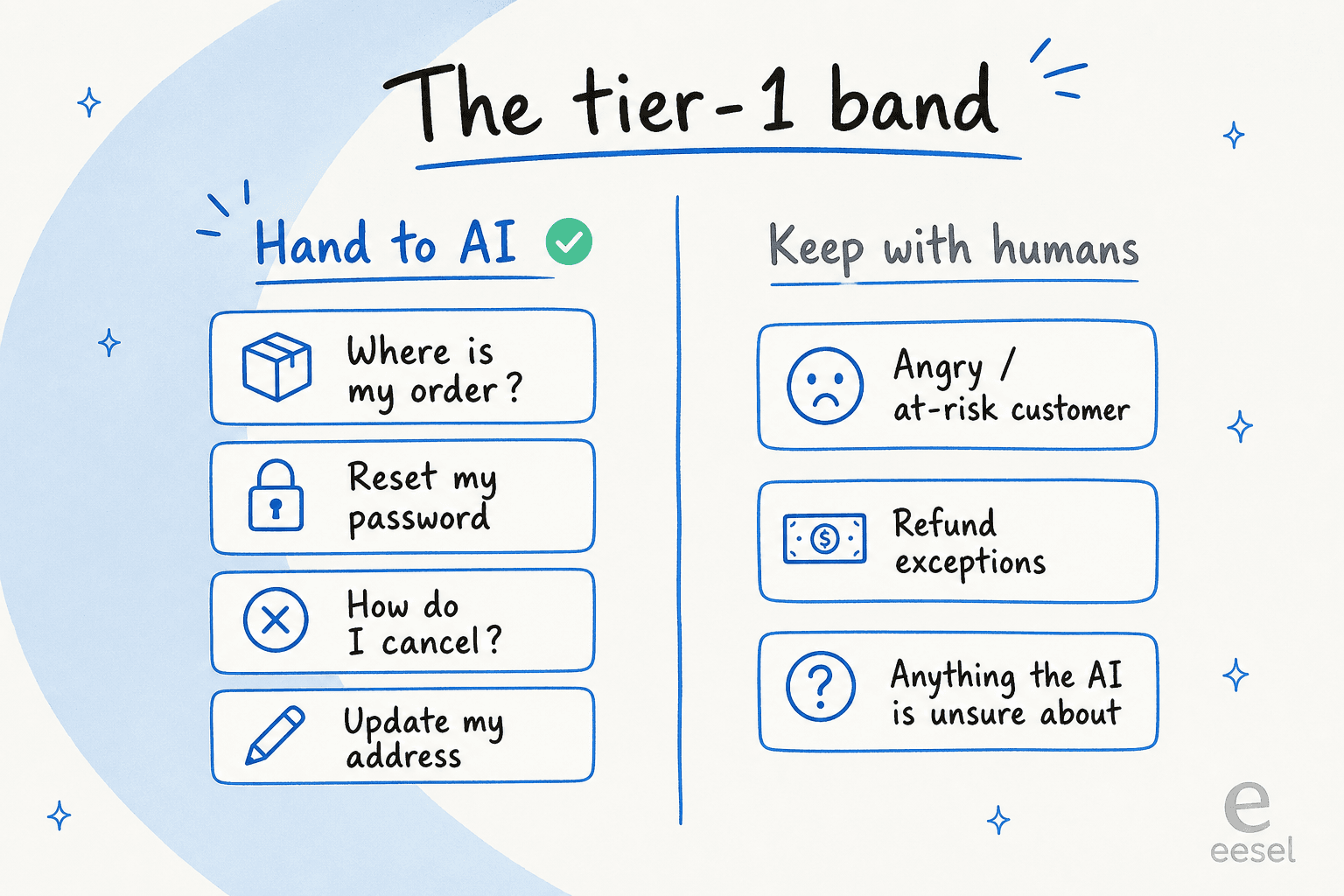
One sales call captures the right instinct perfectly. A support manager at a bus-tracking service running a couple hundred Zendesk tickets a month told us his goal was to "handle 60% of the incoming Zendesk tickets and know when to pull a real person in." That's it. That's the whole brief. Automating tier-1 isn't about hitting 100%, it's about clearing the predictable majority so your team gets their day back for the tickets that actually need them.
The honest answer: automate the band the AI is confident about
Here's the reframe most "AI support" content skips. The question isn't "can AI answer this ticket?" It's "is the AI confident it can answer this ticket correctly, and if not, will it get out of the way?"
A customer running ~7,000 Gorgias tickets a month put the problem better than I could:
"The AI will never be able to answer 100% of the questions, but if it tries and just answers 'sorry I don't know this,' I cannot go and check all my 7,000 tickets to see if the AI actually made a good answer. I need an AI who is only handling the tickets that it's confident to handle and all the other ones, leave them alone."
That's the whole game. An AI that answers everything badly is worse than no AI. An AI that answers the confident band well and routes the rest is the one that actually reduces ticket volume without quietly creating a trust problem. Keep that frame and the setup steps below all make sense.
How to automate tier-1 support with AI, step by step
Here's the rollout sequence I'd recommend to any team, on any helpdesk. It front-loads the safety (training and testing) so that by the time the AI is live, you already know how it behaves.
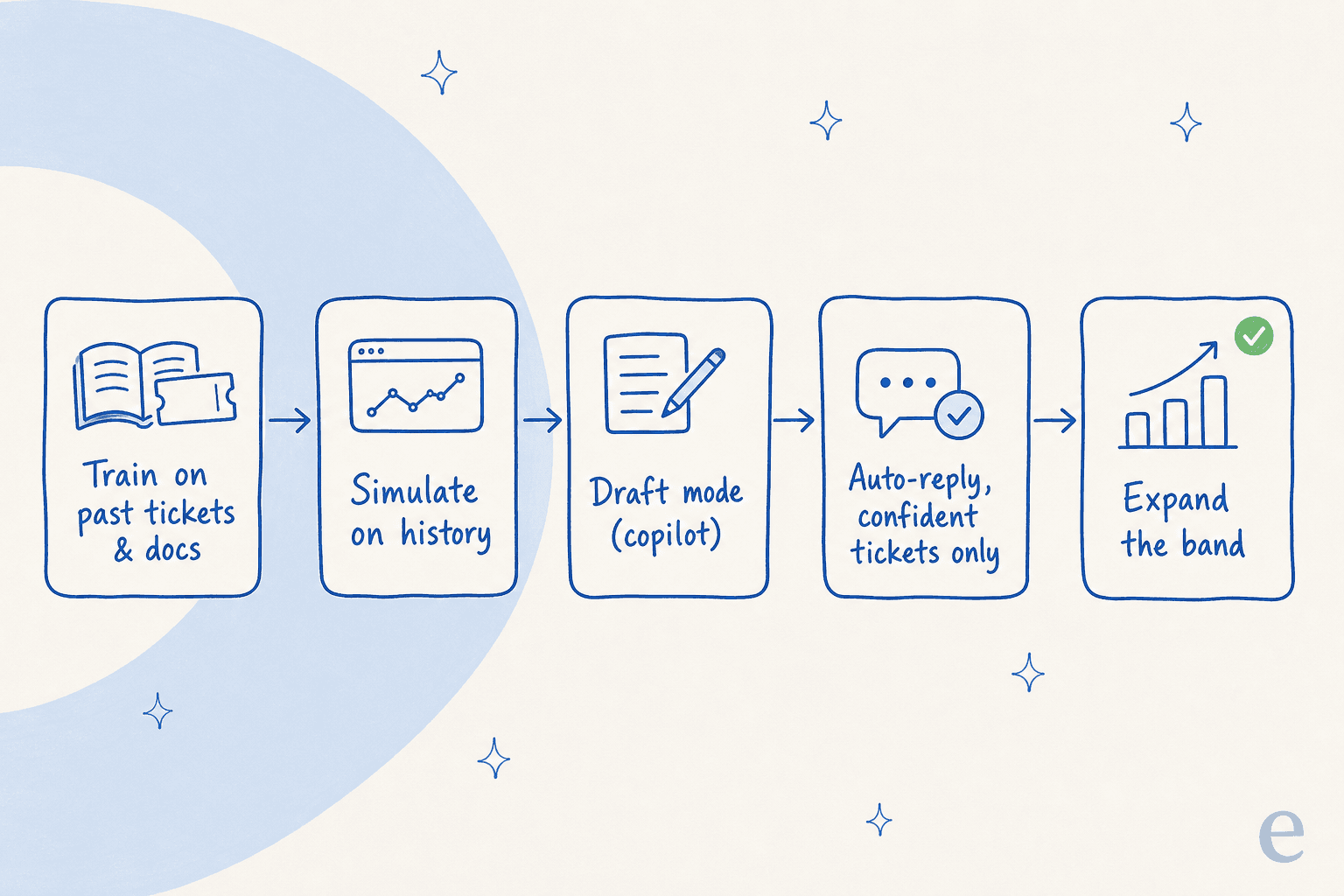
1. Map your tier-1 band
Pull a month of tickets and group them by topic. You're looking for the clusters: the WISMO questions, the password resets, the subscription changes. Those clusters are your starting band. An ops lead at a DTC supplements brand told us they needed to auto-resolve "at least half" of their email volume, and when they actually looked, the categories were obvious: order tracking, subscription management, basic product questions. Yours will be too. This is also where you decide what to deliberately keep off-limits, which a good ticket triage setup will respect.
2. Train the AI on your past tickets and docs
This is the step that separates a useful agent from a generic chatbot. The richest training data you have isn't your help center, it's your resolved tickets, because that's where your team's real answers and tone already live. Point the AI at your past tickets, your help docs, and any internal macros, and it learns how you answer, not how some generic model thinks support should sound.

Training on history is the single most-requested capability I hear about, and for good reason: it's what turns "years of tickets" into knowledge the AI can use on day one. With eesel you connect the helpdesk, and it learns from past tickets and docs automatically, then you tune behaviour in plain language rather than building decision trees.
3. Simulate against your ticket history before going live
This is the step almost everyone skips and later regrets. Before the AI touches a single live customer, run it against your past tickets and look at what it would have said. A simulation shows you coverage by topic and where the answers are weak, so you can fix the gaps and re-run before anything is at stake.
I'll give you the cautionary tale that makes this concrete. A B2B telematics team had a help doc that said "we support all models," so their early bot confidently told customers it supported car brands that weren't actually in their database. A simulation against real tickets surfaces exactly that kind of overconfident wrong answer before a customer ever sees it. On one real-traffic trial, an online jewelry retailer saw 93% triage accuracy and 100% spam detection in testing, which is the kind of number you want to know before launch, not after.

4. Start in draft mode, then hand it the wheel
When you do go live, don't go straight to auto-reply. Run the AI as a copilot first: it drafts a reply, a human reads it, edits if needed, and sends. This does two things. Your customers only ever see human-checked answers, and every edit your team makes is feedback the AI learns from. The pattern nearly every team I talk to wants is the same one: start with draft replies, build trust, then graduate to full automation on the categories that have earned it.

One Zendesk team described exactly this arc: drafts trained on past ticket data first, with AI live chat as the next step once they trusted it. That's the right pace.
5. Gate auto-replies on confidence, and route the rest to humans
Now the part that makes automation safe to leave running. Set a confidence threshold: the AI auto-replies only when it's confident, with the source it used. Everything below that line gets a clean handover to a human, with the context attached so your agent isn't starting cold.
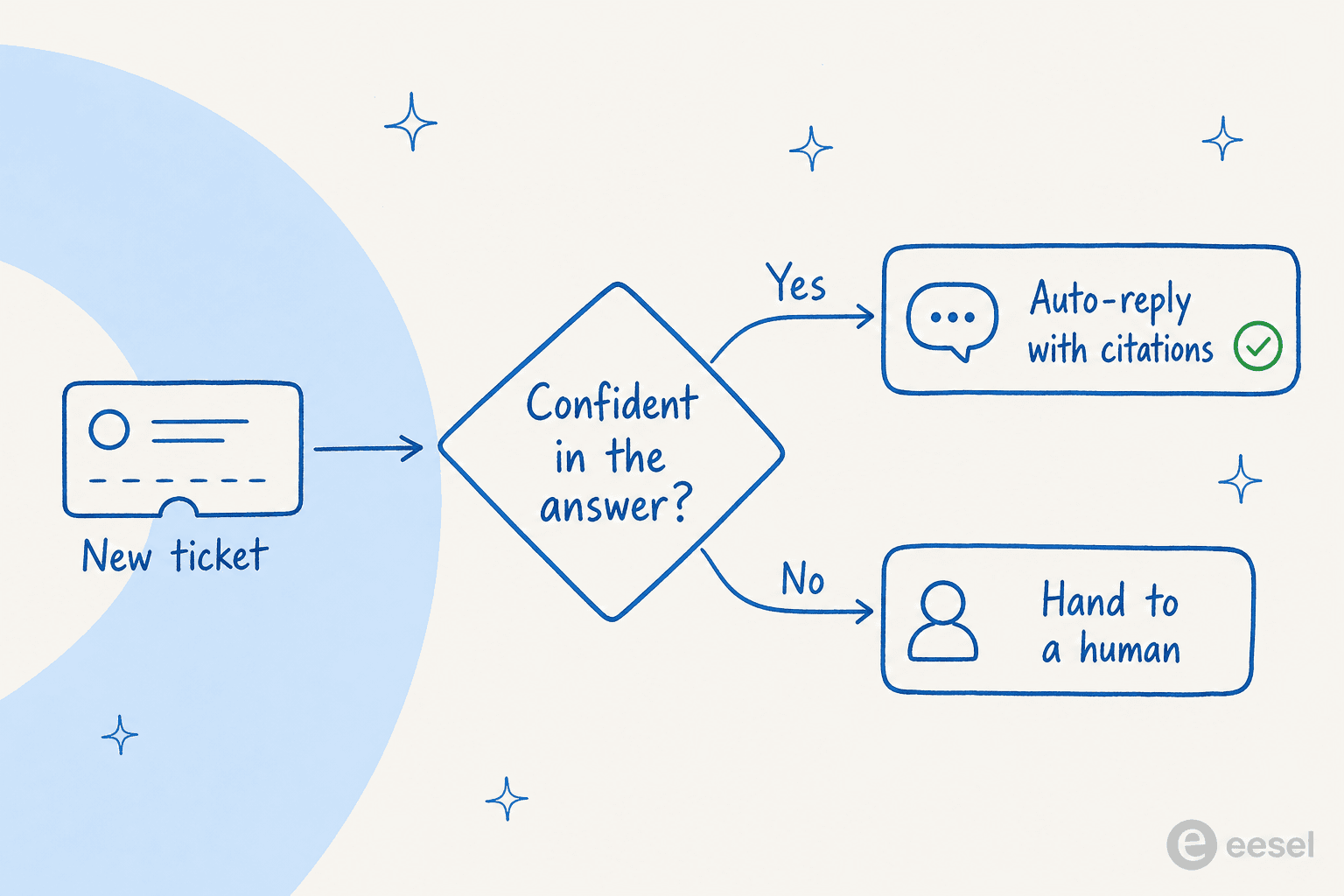
You also want scope controls, not just a confidence dial. Real teams ask for exactly this: "there are certain tickets I don't want to go through AI." Being able to exclude ticket types, set when the agent jumps in, and decide draft-versus-send per category is what turns "AI is answering customers" from a scary sentence into a controlled one. This is also your main guardrail against hallucinations: low confidence means draft or escalate, never a confident guess.
6. Measure, then widen the band
Once it's live, watch the numbers that matter: deflection rate, resolution rate, first response time, and escalation quality. When a category is consistently resolving well, widen the band and let the AI take more of it. When something's slipping, tighten it. Automating tier-1 isn't a one-time switch, it's a dial you turn up as trust builds.

That's the loop one IT team at InDebted runs: they use the AI as the first responder to helpdesk tickets in Jira, started around 15% deflection, and are working toward 55% as confidence in more categories grows.
The part everyone gets wrong: trust and control
If there's one objection that stalls every tier-1 automation project, it's this one, and it's the right objection to have. Teams aren't worried the AI can't answer. They're worried it'll answer when it shouldn't, over-promise, or quietly get something wrong at scale.
So bake the control in from the start:
- Confidence-gated replies. The AI answers only what it's sure of. Everything else is drafted or escalated, never guessed.
- Scope controls. Exclude ticket types, channels, or customer segments you don't want automated yet.
- Citations on every answer. A reply you can trace back to a source doc is one your team can audit. As one legal-tech founder put it, the AI should provide "transparent citations" so you can see why it said what it said.
- Learning from corrections. When a human fixes a draft, that correction should improve the next answer, not vanish.
Get this right and the relationship changes. One support director described eesel as feeling "like a partnership, rather than a vendor relationship," which is what happens when the AI handles the boring volume and your team stays in control of the rest.
Common mistakes when automating tier-1
A few traps I'd steer you around, all of which I've seen play out:
- Automating everything at once. Start with two or three high-volume, low-risk categories. Earn the expansion.
- Skipping the simulation. If you can't see how the AI would have answered your last month of tickets, you're launching blind.
- Training only on help docs. Your docs are written for a different audience than your tickets. Train on the actual resolved tickets too.
- No confidence floor. An AI with no "I'm not sure, escalate this" behaviour is the one that creates the trust problem the Gorgias customer above was so worried about.
- Treating it as set-and-forget. Ticket classification and intents drift as your product changes. Check the containment numbers monthly.
Try eesel
If you want to actually do the above rather than read about it, this is the part eesel is built for. It's an AI helpdesk agent that plugs into Zendesk, Freshdesk, Gorgias, Front, Help Scout, and HubSpot, learns from your past tickets and docs on day one, and lets you simulate against your real ticket history before a single customer sees it. You start in draft mode, gate auto-replies on confidence, and widen the band as trust builds, which is exactly the sequence above.

The free trial gives you $50 of usage with no credit card, and pricing is per ticket the AI actually handles, so you're not paying per seat for a team that's now spending its time on the tickets that need a human. It works like a new hire that already knows your help center, and it's free to try.
Here's what it looks like running live inside Zendesk:
Frequently Asked Questions
What counts as tier-1 support?
How do I automate tier-1 support with AI without it going wrong?
Will AI replace my tier-1 support team?
How much of my ticket volume can AI realistically handle?
How do I test an AI support agent before letting it answer customers?


Article by
Riellvriany Indriawan
Riell is a designer and writer at eesel AI with about two years of experience researching CX platforms, AI chatbots, and helpdesk software. She combines her design background with a sharp eye for how these tools actually look and feel in practice — making her comparisons unusually visual and user-focused.