


Yes, there is a Claude for Outlook: Anthropic's own Outlook add-in, generally available on the Pro, Max, Team and Enterprise plans (not Free), that triages your unread mail, drafts replies that wait unsent in Outlook's compose pane, summarizes long threads with per-email citations and finds meeting times. There's a second route too, the Microsoft 365 connector inside claude.ai, which searches Outlook alongside SharePoint, OneDrive and Teams and can send mail once your admins switch write actions on.
Both are built for one person's mailbox. Anthropic's docs say the add-in "searches, triages, and moves mail only in your own mailbox", and shared or delegated mailboxes aren't supported. That's the right design for a personal assistant. It leaves out the inbox most teams actually worry about: support@, ops@, the supplier thread six people are cc'd on, the follow-up everyone assumed someone else sent.
For that inbox, eesel is an AI teammate that works in the Outlook mailbox you connect, for the whole team, and what it does depends on who's asking: it sends routine replies on its own when your team lead asks, asks first before anything goes to a customer, and never touches a mailbox it wasn't given. If you'd rather not click through setup, the eesel CLI lets Claude Code connect your apps, upload your reply guidelines and ask the agent test questions before it handles a single real email.
I've spent years watching an AI act inside other teams' own tools, and the hard part is never drafting the email. It's deciding what the AI may send alone, what waits for a human, and what it must never show a customer. Claude for Outlook is very good at its job. The question is whose job it was built for.
What is Claude for Outlook?
Claude for Outlook is an add-in that puts a Claude pane inside Outlook, next to the email you have open. Anthropic's Outlook docs describe it as "built for professionals whose work runs through email", and name private equity associates, in-house legal teams and consultants as the people it was designed around. It's part of a family: Claude for Microsoft 365 also covers Excel, PowerPoint and Word, and the four add-ins share context and your org's Claude skills.
If you want the wider category of tools first, my AI for Outlook email guide covers it.
Here's what it does, from Anthropic's own feature list:
| Job | What Claude does | What you still do |
|---|---|---|
| Triage | Sorts unread mail into "action items for you, items Claude can handle for your review, and noise you can archive in one selection" | Approve the archive, ask for drafts |
| Draft replies | Writes replies, reply-alls and forwards into Outlook's compose pane, in your voice if you let it learn your sent mail | Read it and click Send |
| Summarize threads | Lists what's decided, what's open and who owes what, each claim citing its email | Check the citations on anything high stakes |
| Read attachments | Reads .docx and .xlsx inline; PDFs need uploading to the sidebar | Upload PDFs yourself |
| Find time | Checks free/busy and drafts the invite into Outlook's appointment form | Click Send |
| Prep meetings | Pulls the last thread with each attendee into a one-page brief | Walk in prepared |
One detail stood out to me: Claude "chooses reply versus reply-all deliberately and warns before adding anyone who was not on the thread", which is the exact mistake that gets people in trouble.
Anthropic's page sums it up: "Nothing goes out or gets saved until you say so." The add-in doesn't even request Microsoft's Mail.Send permission.
Claude for Outlook or the Microsoft 365 connector: which do you need?
Pick the add-in if you live in Outlook, and the connector if you live in claude.ai. People mix them up constantly.
The Microsoft 365 connector lets Claude "search, analyze, and act on information across SharePoint, OneDrive, Outlook, and Teams", and it's on every plan, Free included. With a work account it can search mail and archived mail, and, when admins enable write actions, "send mail and manage drafts, labels, mail filters, and automatic replies" plus create, update and delete calendar events.
| Claude for Outlook (add-in) | Microsoft 365 connector | |
|---|---|---|
| Where you use it | A pane inside Outlook | A chat in claude.ai, desktop or mobile |
| Plans | Pro, Max, Ultra, Team, Enterprise | Every plan, including Free |
| Sends email? | Never; drafts wait for you | Yes, once admins turn on write actions |
| Scope | Your own mailbox and calendar | Outlook, SharePoint, OneDrive and Teams |
| Shared mailboxes | Not supported | Not on personal accounts; follows your Microsoft access on work accounts |
| Admin setup | Deploy the add-in and grant Microsoft Graph consent | Add the connector for the org and grant tenant consent |
| Whose access | Yours | Yours: "All access is delegated" |
The connector line I'd underline for any team lead is Anthropic's own: "Claude acts on your behalf and can read or change only what your Microsoft 365 account can already read or change." And inside the add-in, the two meet: a connector "can send mail, messages, or invites", and Claude asks for your approval before each connector action unless you've clicked "Always allow" for it. Anthropic notes that sending mail or Teams messages through the Microsoft 365 connector "still ask every time".
If you're weighing Microsoft's own Copilot instead, Copilot in Outlook covers similar ground (drafts, summaries, scheduling, moving mail into folders) with features that vary between Microsoft 365 business and personal plans.
I compare the two assistants in Claude vs Copilot, and price Microsoft's side in my Copilot pricing breakdown.
How do you install Claude for Outlook?
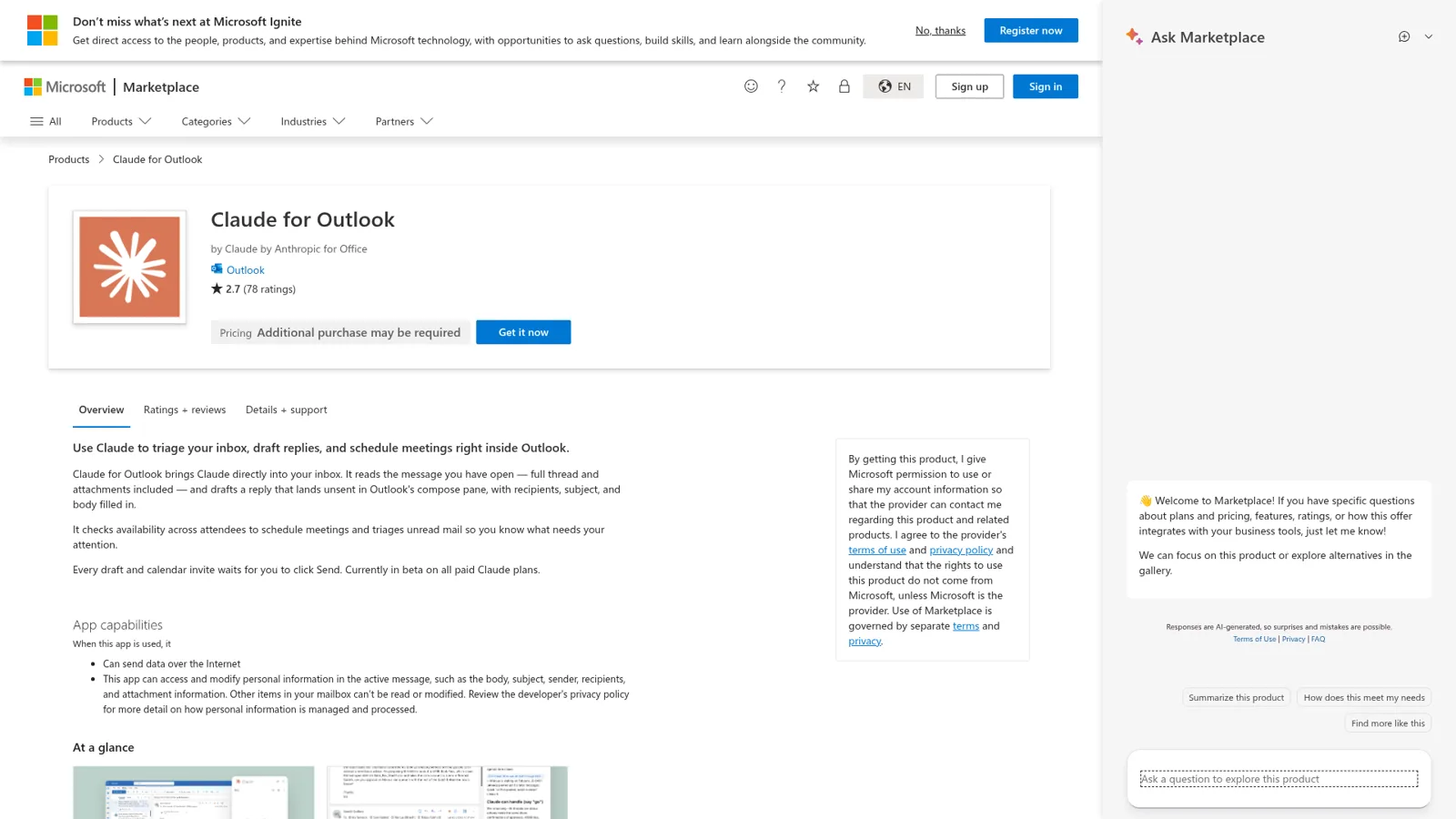
You install Claude for Outlook from its Microsoft Marketplace listing with "Get it now", then open any email, click the Claude button and sign in with a paid Claude account.
For a whole organization, the steps in Anthropic's docs are:
- In the Microsoft 365 Admin Center, go to Settings, then Integrated apps.
- Search for "Claude for Outlook" and deploy it to everyone, or to specific people and groups.
- Have a Global Administrator or Cloud Application Administrator grant Microsoft Graph consent for
Mail.ReadWrite,Calendars.Read,User.Readandoffline_access. That grant is what unlocks triage, search and free/busy across the mailbox. - Wait. Anthropic says the rollout "can take up to 72 hours to appear for everyone".
Step three is where most installs stall. Without Graph consent, people see "Your admin needs to approve access" and can only use Claude on the email they have open. IT teams that won't consent to a third-party app can register their own single-tenant Entra app instead.
Check the client list before you promise it to anyone. The add-in runs on Outlook on the web, new and classic Outlook on Windows, and Outlook on Mac with a Microsoft 365 subscription. It doesn't run on Outlook for iOS or Android, on Exchange on-premises, or on Gmail, Yahoo, iCloud, IMAP or POP accounts added to Outlook.
The early reviews are split: 2.7 stars from 78 ratings when I checked, with 36% five-star and 55% one-star reviews. One German reviewer there describes the habit I'd recommend: let Claude write the email, go get a coffee, then read it, fix it and send it yourself. A Hacker News user describes a similar win on the connector side:
"For example, I just hooked Claude desktop up to my outlook to build a report for my timesheet then I used the chrome extension to fill it out automatically with that data."

How much does Claude for Outlook cost?
Claude for Outlook comes with a paid Claude plan; there's no separate add-in fee. Anthropic's pricing page lists "Claude for Microsoft Outlook" as No on Free and Yes on every paid plan.
| Plan | Price | Claude for Outlook |
|---|---|---|
| Free | $0 | No |
| Pro | $17/month billed annually ($200 up front), $20 monthly | Yes |
| Max | $100/month | Yes |
| Ultra | $200/month | Yes |
| Team, standard seat | $20/seat/month billed annually, $25 monthly | Yes |
| Team, premium seat | $100/seat/month billed annually, $125 monthly | Yes |
| Enterprise | US$20/seat/month billed annually, 20-seat minimum, plus usage at API rates | Yes |
A five-person team on standard Team seats pays $100 a month billed annually, and each person gets Claude in their own Outlook. I go deeper on the plans in Claude pricing and Claude Pro pricing.
For compliance, Anthropic says Claude for Outlook inputs and outputs are deleted on its backend within 30 days and the add-in "does not keep a server-side copy or index of your mailbox". On Pro, Max and Team there's no audit export, and the add-in "is not included in Enterprise audit logs" (Enterprise covers it through the Compliance API instead).
What Claude for Outlook doesn't do
Claude for Outlook doesn't send mail, doesn't work in shared mailboxes, and isn't recommended for unattended sending. Anthropic lists all of it plainly in its current limitations:
- No sending. "The add-in never sends mail or invites." Unattended sending is on the not-recommended list.
- Your mailbox only. "Shared mailboxes and mailboxes you open as a delegate" aren't supported (Microsoft's own shared mailbox quirks are another story).
- No send-time check. It doesn't use Outlook's Smart Alerts, so it won't hold a message when you click Send. Ask it to review a draft first.
- History lives on your device, in the browser's local storage, separate per app. After the September and October 2026 Microsoft 365 updates on Windows, Anthropic warns that "some users are missing their chat history and uploaded skills".
- Email is untrusted input. The docs warn that "a routine inbound email might contain hidden text instructing Claude to forward a thread or draft a reply you did not ask for."
That last one deserves more weight than it gets, because an inbox is where strangers write straight into your AI's context:
"Any time you use an LLM with tools that might be exposed to malicious instructions from attackers (e.g. reading issues in a public repo, looking in your email inbox etc) you need to assume that an attacker could trigger ANY of the tools available to the LLM."
For one person reviewing every draft, unsent drafts are a sensible answer. They're also why the add-in can't help with the inbox nobody is sitting in front of.
Where Claude for Outlook stops: the team's inbox
Claude for Outlook is a personal assistant, and the team's inbox isn't personal. Think about what actually goes wrong in a team's Outlook. A customer's follow-up sits in the shared ops@ mailbox over a long weekend. Five people own "follow up with the venue" and each assumes another did. None of those are drafting problems, and the add-in can't reach them, because they live in a shared mailbox or between people.
To be fair to Anthropic, Claude does have real admin controls. Team and Enterprise owners decide which connectors the org can use, Microsoft 365 write actions only run once admins turn them on, they can enable them "for specific users with role-based access control (beta)", and each tool can be restricted (connector docs). Organizations can also remove the add-in's "Always allow" button. Those controls decide what each person and their Claude may do.
What they don't do is change with who the email is for, or who's asking. A rule like "send the weekly stock reminder to suppliers when the ops lead asks, but ask first before anything goes to a customer, and never touch the finance mailbox" is about the job and the audience. That's the shape of an AI teammate.
What a team teammate in Outlook looks like
eesel works as one teammate the whole team shares, connected to the mailbox the team actually uses. Per its Outlook integration page, you sign in with Microsoft and pick the mailbox; eesel starts when a new email lands there, reads the message and the thread, answers from your docs and tools (including SharePoint), replies or sends a new email, sorts the rest so your team can see what it handled, and can follow up on threads that go quiet. It's AI email triage that keeps going when nobody's at a desk. It "works only the mailbox you connect."
The difference from a personal add-in is that what it may do depends on who is talking:
- On its own. Routine replies your team lead has okayed, like the order-status answers or the "we've received your invoice" note, go out without anyone clicking Send.
- Asks first. Anything to a customer that isn't routine waits for a person's yes. The approval shows the exact email, and whoever you picked can approve it from Slack, email or the dashboard.
- Never. A mailbox you didn't connect, a tool you didn't turn on, or an internal file marked Team only in a conversation with an outsider.
Under the hood, every action is set to On, Ask first or Off, per agent and per action, and you can set it just by saying so in chat ("look things up on your own, but ask me before anything goes to a customer"), as the actions and approvals docs describe. Only editors approve, and an action on On can still be held when eesel's safety check thinks a call is risky. Beyond the team-versus-outsider split, you can also set what it does for specific named people, a verified customer and an anonymous visitor.

A few more things change when the teammate isn't tied to one person:
- It starts work by itself. Automations wake it on a schedule, an event in a connected app or a webhook. Cape Coffee Beans ran 160 scheduled checks in a month, emailing the founder a short list of tickets that slipped through on weekday and Saturday mornings.
- It has its own address. Every eesel agent has an email address your team can forward a thread to, and it replies in the thread with an answer or a draft (more on eesel for email). That address only writes to workspace members, so it's a colleague you email, not a second customer inbox.
- Corrections stick. Tell it "always cc billing on refunds" once and memory carries it into every future email.
- Requests come from anywhere. Teammates ask it from Slack, Microsoft Teams or the dashboard.
Here's how the three options line up:
| Claude for Outlook | Microsoft 365 connector | eesel in Outlook | |
|---|---|---|---|
| Who it works for | You | You | The team |
| Who can ask it | You | You | Anyone on the team, in Slack, Teams, email or the dashboard |
| What decides what it may do | Admin deployment and your approval on each action | Admin connector settings and your own Microsoft access | On, Ask first or Off per action, changing with who's asking |
| Works with nobody at the keyboard | No | No | Yes, on new email, schedules and webhooks |
| Shared mailbox | Not supported | Follows your Microsoft access | The mailbox you connect |
| Sends email | Never | Once admins enable write actions | On its own for the actions you set to On |
| Cost | Paid Claude plan from $17/month | Any Claude plan | From $299/month for 500 credits, unlimited seats |
If the team mailbox is the support inbox, my guide to an AI email agent for Outlook goes through that setup, and shared inbox vs ticketing system covers which mailbox needs what.
Can you use Claude for Outlook and eesel together?
Yes, and it's what I'd recommend: Claude for your own mailbox, a teammate for the team's.
Your eesel workspace is also an MCP server, so you can add eesel to Claude as a custom connector and ask "what did eesel do in the ops inbox today?" or "have eesel draft a reply to the venue". Editors can change things from there, viewers get the read side, and approvals still apply.
My piece on MCP for customer support explains the plumbing, and Claude for work covers the rest of Anthropic's team offering, including Claude Tag.
If your team leans on ChatGPT instead, my sibling post on ChatGPT for Outlook covers OpenAI's Outlook Email and Calendar apps, which, unlike the Claude add-in, can work with shared mailboxes.
Try eesel as your team's Outlook teammate
Claude for Outlook makes your own inbox faster. eesel works the inbox your whole team shares: it picks up new mail in the mailbox you connect, sends the routine replies your lead has okayed, asks first on anything to a customer, and follows up on the threads that go quiet. Start with a free 7-day trial with 100 credits and no card, then plans from $299 a month for 500 credits with unlimited agents and seats (pricing). Try eesel.
