


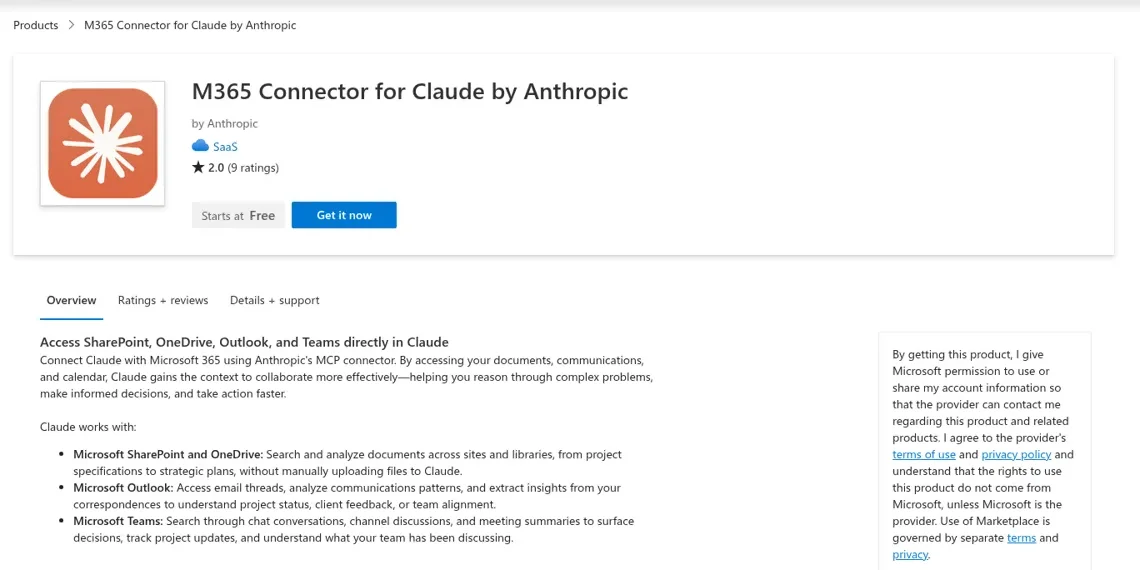
Claude for Microsoft Teams today is Anthropic's Microsoft 365 connector: it lets Claude search your Teams chats, channel discussions and meeting summaries from claude.ai, and post Teams messages as you once your admins turn on write actions. It's on every Claude plan, but Teams content needs a work or school account and a Microsoft Entra admin's consent. What you can't do yet is @mention Claude in a Teams channel. Anthropic's channel teammate, Claude Tag, runs in Slack, and its page says "Coming soon to Microsoft Teams" with a waitlist.
So Claude in Teams is a very good personal research assistant that happens to read Teams, much like the rest of Claude for work. The connector's docs put it plainly with "All access is delegated", meaning Claude sees and does exactly what your account can.
The shared channel is a different job. When #it-help or #ops-questions gets twenty people asking things, you want a teammate in the channel that answers everyone and changes what it may do by who's asking. That's what eesel does in Microsoft Teams: it acts on its own for your leads, asks an editor first when someone else wants something changed, and keeps Team only tools away from anyone outside your company. You can even have Claude Code do the setup: the eesel CLI lets a coding agent connect your knowledge sources, adjust the agent's instructions and ask it test questions before your team ever mentions it.
I've spent years watching an AI act inside other teams' own tools. The hard part is never the answer. It's deciding what the AI may do alone, what waits for a person, and what it must never hand to someone outside the company.
Is there a Claude app for Microsoft Teams?
Not one you can @mention in a channel today. There are four ways Claude and Teams meet right now, and only the first is what most people mean by "Claude for Microsoft Teams".
| Route | What it is | Where you talk to Claude | Status |
|---|---|---|---|
| Microsoft 365 connector | Claude reads Teams chats, channels and meeting info, and can send messages | In claude.ai, desktop or mobile | Available on every plan |
| Claude Tag | A shared @Claude that joins channels and takes requests from anyone | In Slack | Teams waitlist |
| Claude Meetings | Claude joins your video calls, takes notes and starts work | In the call | Google Meet only so far |
| Claude models in Copilot Studio | You build a Microsoft agent that runs on a Claude model | In Teams, as a Copilot agent | Available, built by you |
Anthropic's Office add-ins don't cover Teams either. The Claude for Microsoft 365 listing is Excel, PowerPoint and Word, and Outlook has its own add-in (I cover it in Claude for Outlook). If you came here hoping for a Claude bot in your Teams sidebar, the honest answer is "on the waitlist". Teams calls are on the wait too: my Claude Meetings post covers the Google Meet version.
How does the Microsoft 365 connector work with Teams?
The connector lets Claude search and act across SharePoint, OneDrive, Outlook and Teams "using the access your own Microsoft 365 account already has", per Anthropic's connector docs. For Teams, that splits into two rows:
| Teams service | Read and search | Write (only when admins turn on write actions) |
|---|---|---|
| Teams Calendar | Meeting information, summaries and attendance | None |
| Teams Chat | Channel and chat discussions | Send chat and channel messages |
A personal Microsoft account doesn't get any of this. Anthropic lists Teams among the things a personal account "doesn't include", alongside SharePoint and meeting summaries.
In practice, you turn on Microsoft 365 in a claude.ai chat and ask things like Anthropic's own example: "What discussions happened in Teams about the marketing campaign?" That's the job it's good at: catching up after a week off, or finding the decision buried in a 200-message channel.
The design detail that matters most is who Claude is when it does this. It's you. "Claude acts on behalf of users and can only access and change content that you already have permission to access and change in Microsoft 365." When it posts in a channel, it posts with your name on it.
How do you set up Claude for Microsoft Teams?
You set it up in two places: Claude's organization settings and Microsoft Entra. On Team and Enterprise plans, the steps from the connector docs are:
- A Claude Owner or Primary Owner opens Organization settings, then Connectors, selects Add, finds Microsoft 365 and selects "Add to your team".
- They connect their own account and grant the organization-wide permissions. For a work account, that consent has to come from a Microsoft Entra Global Administrator.
- They restrict which users can use the connector, or revoke specific permission scopes, if needed.
- Each member goes to Customize, then Connectors in claude.ai, and connects their own Microsoft account.
On Free, Pro, Max and Ultra there's no organization step in Claude, but a work account still needs that Entra consent. Anthropic's admin walkthrough has screenshots.
Posting into Teams takes two more switches, and this is where most "why is it read-only?" threads come from. Admins turn on write actions for everyone or for specific users with role-based access control (beta). Then they open Tool permission restrictions and set each Teams messaging tool so users can choose it, because "a per-tool restriction overrides the Default restriction row". The Teams tools also need their own Graph permissions approved: Team.ReadBasic.All to list teams, People.Read to look people up, and ChatMessage.Send, ChannelMessage.Send and Chat.Create to send. If your tenant approved the connector before Anthropic added those, reconnecting doesn't pick them up. An Entra admin has to approve them once through the admin consent link in the docs.
What does Claude for Microsoft Teams cost?
The connector itself costs nothing extra. It's on every Claude plan, Free included, so the real price is the plan your team is already on. From Anthropic's pricing page (my Claude pricing guide breaks down the usage limits):
| Plan | Price | Teams-related notes |
|---|---|---|
| Free | $0 | Microsoft 365 connector available; Teams needs a work account |
| Pro | $17/month billed annually, $20 monthly | Adds Claude for Microsoft 365 add-ins |
| Max | $100/month | 5x Pro usage |
| Ultra | $200/month | 10x Pro usage every week |
| Team, Standard seat | $20/seat/month billed annually, $25 monthly | For 2 to 150 people; includes Microsoft 365 and Claude Tag |
| Team, Premium seat | $100/seat/month billed annually, $125 monthly | 5x the usage of standard seats |
| Enterprise | $20/seat/month billed annually, 20-seat minimum, plus usage at API rates | Adds role-based access, audit logs, SCIM |
Claude Tag is priced differently. Anthropic's Tag docs say "Adding Claude to Slack doesn't add a per-seat charge"; channel work draws from a usage balance the Owner funds, capped by a spend limit.
What about Claude Tag in Microsoft Teams?
Claude Tag is the product people actually want when they search "Claude for Microsoft Teams", and it isn't in Teams yet. It's Slack only, in beta, for Team and Enterprise plans. If you're still choosing between the two chat apps, my Slack vs Teams comparison is a fair place to start.
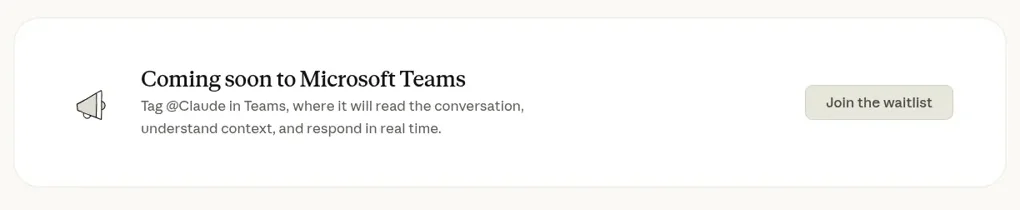
In Slack, it's a strong design. Anthropic's launch post says "within a given Slack channel, there's one Claude that interacts with everyone"; it learns from the channels it follows and can schedule work for itself. My Claude Tag review has the detail.
The gap for Microsoft shops is real, and people say so:
"I know my users would actually like Claude Tag, but unfortunately we are in Teams, not Slack, as are most other non-tech companies."

There's also a question worth asking before you put any shared bot in a channel, Claude Tag or otherwise. Tag acts with the connections an admin sets for each channel, so everyone in that channel reaches the same tools. One early tester put the worry bluntly:
"From what I've seen trying to play around with Claude Tag, it uses shared credentials. You set it up with Github org access, add it to public channel, and all random people in that channel can now ask it to do stuff with code."
To be fair to Anthropic, Owners can restrict channel use to people in the Claude organization, or to specific roles on Enterprise, and every task is logged with who asked. But the tools a channel's Claude can reach are set per channel, not per person asking. That's the crux of the shared-channel problem below.
I compare the options in Claude Tag alternatives.
Can you run Claude inside Microsoft Teams through Copilot?
Yes, in a roundabout way. Microsoft offers Claude models inside its own Copilot products, and an agent built in Copilot Studio can live in a Teams channel.
Anthropic announced in September 2025 that Claude is available in Microsoft 365 Copilot, starting with the Researcher agent and Copilot Studio.
Microsoft's model selection docs now list Claude Sonnet 4.6 and Claude Opus 4.6, 4.7 and 4.8 as models you can pick for a Copilot Studio agent, and Microsoft's Teams publishing docs let you add that agent to a team channel. An admin has to enable Anthropic as an AI subprocessor in the Microsoft 365 admin center first, and EU tenants should read Microsoft's EU Data Boundary note.
This is a build project, though: Microsoft's product with Claude as the engine, not Anthropic's Claude experience in Teams. If you're weighing Microsoft Copilot generally, my Claude vs Copilot comparison and Copilot pricing breakdown cover it.
What do people run into with Claude and Teams?
Mostly permissions and moving parts. Anthropic's own GitHub repos are where the Teams-specific issues show up, and they show a connector still changing shape:
- Channels used to be out of reach. A June 2026 feature request said channel content was "effectively unreachable in normal use" because there was no tool to list teams or channels. Today's docs list channel discussions as readable and mention
Team.ReadBasic.Allfor listing teams, so check your tenant has approved the newer permissions. - Chat search went missing. A July 2026 bug report noted the Teams chat search tool had disappeared.
- "Write scopes granted, still read-only." A Global Administrator on Microsoft Q&A had consented to every write scope and still saw read-only access. That matches the docs: Entra consent is one switch, and write actions plus the per-tool Teams restriction are separate switches on Claude's side.
- Conditional Access. Another Q&A thread hit "Microsoft Entra Conditional Access is blocking Microsoft 365" even after admin consent.
Budget time with your Entra admin.
Why does a shared Teams channel need something else?
Because in a shared channel, the question that matters is "who is asking?", and a personal assistant answers "me".
Picture your #it-help channel on a normal Tuesday: the office manager asks about the Wi-Fi policy, a team lead wants a contractor's access reset, the contractor asks whether they can install some tool, and a new hire pastes a screenshot of an error. With the connector, any one of them can have their own Claude read the channel and draft something, with their own access, under their own name.
Nobody is answering the channel. And if you did wire up a shared bot with one set of credentials, the contractor and the team lead would get the same powers. It's the same gap that turns a busy channel into an internal ticketing system nobody meant to build.
What the channel needs is a teammate that answers everyone and decides what it may do by who's asking:
- Your IT lead asks it to post the outage notice in the company channel, and it posts it.
- Someone else asks for the same company-wide post, and it drafts the exact message and waits for an editor to approve it.
- A contractor from a partner company asks in a shared channel for the internal admin runbook, and it answers the general question while the runbook, set to Team only, stays out of reach.
That's what we built eesel around.
How does eesel work in Microsoft Teams?
eesel joins Teams as an app your team can @mention in a channel or message directly, and it answers from the knowledge you've connected. A Teams admin uploads the eesel app for your organization in the Teams admin center, and it appears within a few hours. From eesel's Teams docs, it can:
- Answer mentions and DMs from your connected sources, such as SharePoint, Confluence, Notion or Google Drive.
- Follow a thread without being mentioned again, and stay quiet when people are talking among themselves.
- Read screenshots pasted into the question, which matters in any help channel.
- Find past discussions by reading a channel's recent posts or searching recent messages, only in channels the person asking belongs to.
- Post updates on its own, starting a new channel post or messaging someone directly from a scheduled automation, like a morning summary.
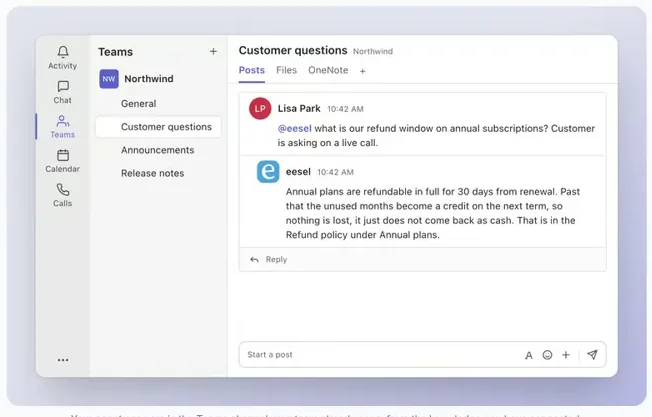
The who-is-asking part is built in. People in your Microsoft Teams count as "your team" for Team only actions and files, so internal runbooks and admin tools never run for someone outside the company. Every action is On, Ask first or Off, per agent and per action, and you can set it by saying it in chat ("look things up on your own, but ask me before changing anyone's access"). You can also set it per kind of person: teammates, specific named people, verified customers and anonymous visitors each get their own On, Ask first and Off. When something waits for approval, eesel posts an approval card right in the Teams thread, and only editors of your eesel workspace can decide it, matched by their Teams email. Editors can change the agent's instructions or automations by asking it in Teams; viewers can ask questions, and eesel declines their setup changes.
Here's how the two compare for a shared Teams channel (more customer setups are on the customers page):
| Claude + Microsoft 365 connector | eesel in Microsoft Teams | |
|---|---|---|
| Who it works for | The person using claude.ai | The whole team in the channel |
| Who can ask it | You, in your own chat | Anyone who @mentions it or DMs it in Teams |
| What decides what it may do | Your Microsoft access plus admin tool restrictions | Who is asking: On, Ask first or Off per action, Team only for insiders |
| Where approvals happen | In your own Claude chat, per your org's tool settings | A card in the Teams thread, decided by an editor |
| Works without anyone at a keyboard | Only tasks you start or schedule for yourself | Yes, scheduled and event-based automations post for the team |
| Cost | Included in your Claude plan | Free 7-day trial, then from $299/month for 500 credits |
The internal-operations version of this is a real job customers hire eesel for. Cactus Club Cafe runs internal IT through eesel: 750 tickets in a month and 1,650 runbook and policy lookups, with a second agent auditing the daily finance extract. eesel's internal operations docs and my internal helpdesk software guide go deeper.
For a wider look at the category, AI in Microsoft Teams and Teams IT support bots compare the options.
Can you keep using Claude alongside eesel?
Yes, and I'd recommend it. Claude is excellent for your own reading, drafting and thinking, and the connector makes it better at catching you up on Teams.
Your eesel workspace is also an MCP server, so you can add eesel to Claude as a custom connector and ask "what did eesel do in Teams today?" or "have eesel post the weekly update". Editors can change things from there, viewers get the read side, and approvals still apply. You keep Claude as your assistant and give the channel a teammate. eesel's security page covers how your data is handled, and your content is never used for training.
If you're on the ChatGPT side of the house, the sibling post on Microsoft Teams ChatGPT integration covers OpenAI's @ChatGPT app, which does sit in Teams today. And for the broader Claude-at-work picture, start with Claude for work or my eesel vs Claude comparison.
Try eesel as your team's Microsoft Teams teammate
If your Teams channels are full of questions that one person shouldn't have to answer, give them a teammate that answers everyone and knows who's asking. Connect your knowledge, upload the Teams app, and set what it does on its own, what it asks first and what stays Team only. The trial is free for 7 days with 100 credits and no card, and plans start at $299 a month with unlimited agents and seats. The same teammate works in Slack and Outlook too.
