8 best ChatGPT Images 2.6 alternatives in 2026 (priced per image)

Rama Adi

Katelin Teen
Last edited November 5, 2026

For marketing graphics and product images, the best ChatGPT Images 2.6 alternative is Nano Banana 2.1: it edits by conversation, takes up to 14 reference images and costs about $0.034 per 1K image. Pick Ideogram 4.5 when the words on the image matter, Recraft for editable SVG logos, and Photoroom for product shots.
The twist: 2.6 keeps 2.5's per-token price but uses about 4x the tokens at low quality, so for cheap drafts the easiest swap is Images 2.5. If the images end up in blog posts, eesel's AI blog writer generates and places them on your brand palette, so the model is one step, not the whole job.
Why look past ChatGPT Images 2.6 at all?
ChatGPT Images 2.6 is a real upgrade in places. OpenAI launched it on November 4 with GIFs, saved reference images, SVG export in the API and a new complexity setting, and says it generates images 50% faster. The two API models, GPT-Image-2.6 Flare and Sunburst, split the job between fast iteration and detailed work. It is in ChatGPT on every tier, Free included.
So why are people already shopping around? Three reasons, all specific to this release.
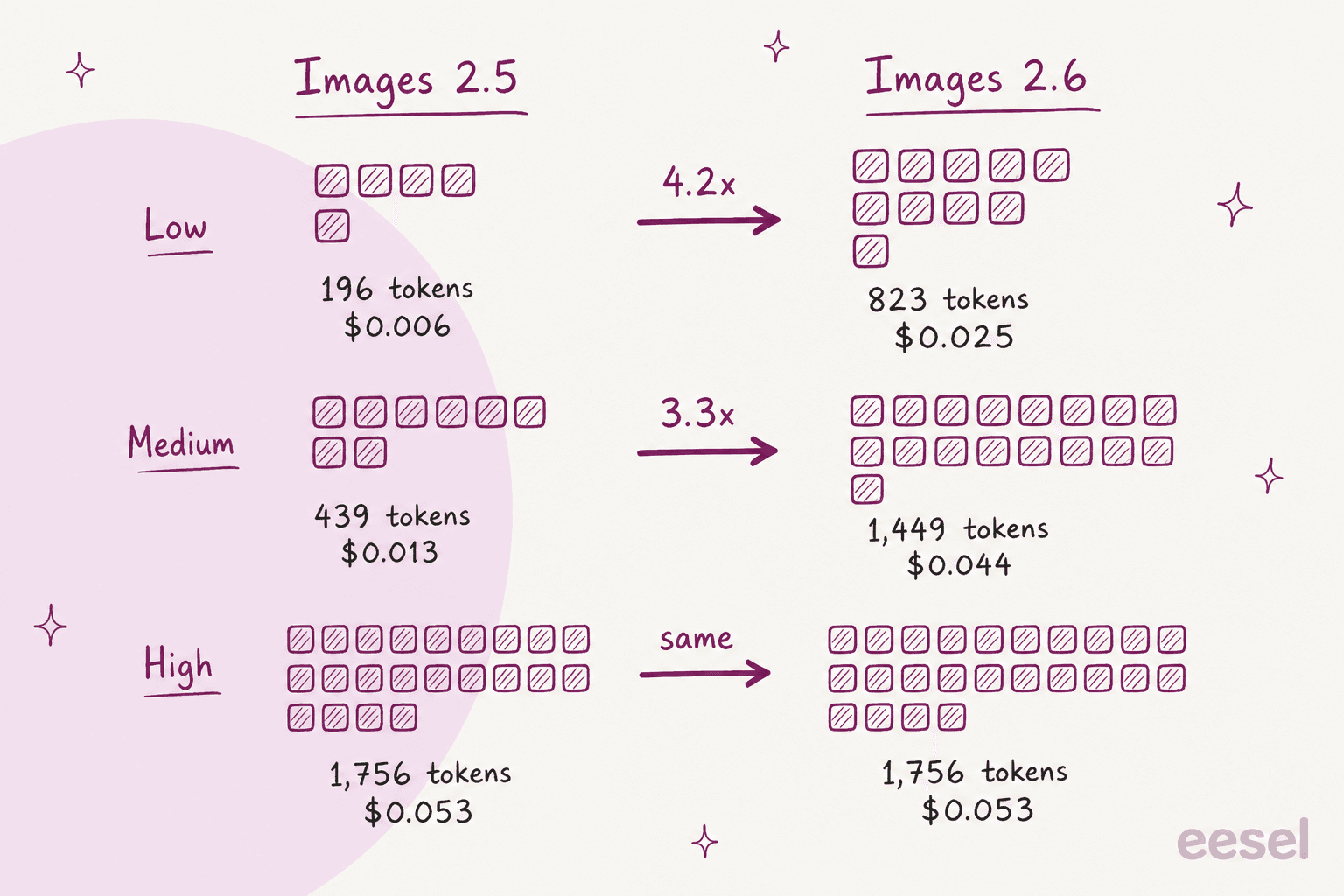
The low and medium settings got more expensive. The pricing page keeps image output at $30 per 1M tokens, the same as 2.5. But OpenAI's own cost calculator uses far more tokens per 2.6 image at the cheap settings. A user on Hacker News spotted it within hours:
"The input and output pricing per token remains the same between 2.5 and 2.6, although using their image pricing calculator shows a quadrupling of token usage at low and medium quality settings for 2.6."
Flare isn't a clear win over 2.5 for everyone. One developer who runs a prompt-to-design site switched both models on the first day and rolled one back:
"After playing with it for an hour, I'm rolling back 2.6-flare to 2.5-flare. I've found 2.6-flare specifically to either be too simplistic in its approaches, or create outputs that are inherently broken in other cases."
The same commenter said 2.6 Sunburst "seems solid", so this is a Flare problem, not a whole-release problem.
The new formats have limits. GIFs work only on the generations endpoint, with no streaming, and SVG output is static: the API makes a raster reference image first, then writes the vector from it, and you pay for both steps (image generation guide). A dedicated vector tool still does that job more directly.
None of this makes 2.6 a bad model. It means the right pick depends on what you're making and at what quality setting.
The cheapest alternative might be Images 2.5
Before switching vendors, look at the model you already have. At 1024x1024, OpenAI's calculator puts a 2.5 low image at 196 tokens ($0.0059) and a 2.6 low image at 823 tokens ($0.0247). At medium it's 439 vs 1,449 tokens. At high, xhigh and max the two models cost the same (OpenAI calculator).
So the practical rule I'd follow: use 2.6 at high quality, where the upgrade is free, and keep drafts on 2.5 low. At 10,000 low-quality drafts a month that's roughly $59 on 2.5 vs $247 on 2.6. My Images 2.6 pricing post has the full token table, and Images 2.5 is still listed in the API. For the very cheapest OpenAI option, GPT Image 1 Mini is still around too.
If the problem isn't cost but what the model can make, keep reading.
How I picked these alternatives
I build the integrations behind eesel's blog writer, and every hero banner and infographic on this blog goes through an image API, so I care about the things that bite in a real pipeline: what one image costs at the setting you'd actually use, whether text comes out legible, whether you get a vector or a raster, and whether there's an API at all.
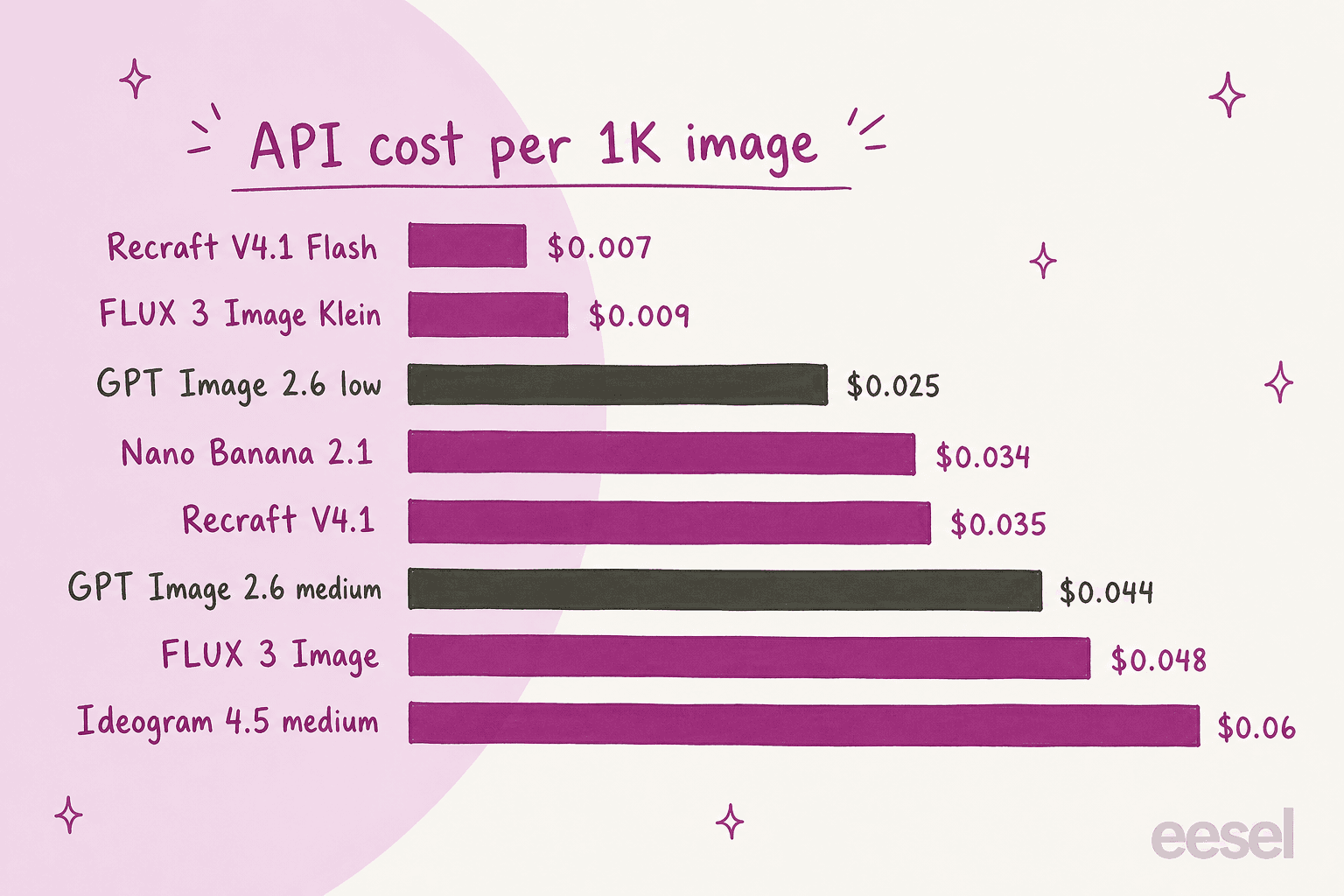
To see what buyers compare, I asked ChatGPT the same question a marketer would ("I make marketing graphics and product images with ChatGPT Images 2.6, what are the best alternatives?"). It checked Gemini, Midjourney, Adobe Firefly, Ideogram and Photoroom, and named Recraft and Canva. That's close to my own list. I dropped tools whose prices I couldn't confirm on the vendor's own page, and I priced every API at one 1K image so the numbers line up.
Every price below comes from the vendor's own pricing page, checked on November 5, 2026.
The best ChatGPT Images 2.6 alternatives at a glance
| Tool | Best for | Latest model | API price per 1K image | Paid plan from | Free tier | Vector/SVG | Open weights | Commercial notes |
|---|---|---|---|---|---|---|---|---|
| Nano Banana 2.1 | All-round swap, edits | Nano Banana 2.1 | $0.0336 | Google AI Plus | Gemini app | No | No | Paid API data not used for training |
| Midjourney | Hero art, aesthetics | V8.2 | No public API | $10/mo | No | No | No | $1M+ revenue needs Pro or Mega |
| Ideogram | Text on images | Ideogram 4.5 | $0.03 to $0.10 | $20/mo | 30 credits/week | Yes ($0.13+) | No | Private generation on Plus |
| Recraft | SVG logos, brand style | V4.1 / V4.1 Flash | $0.007 to $0.035 | $10/mo | Yes | Yes ($0.08) | No | Free tier is non-commercial |
| Adobe Firefly | Brand-safe, Photoshop | Firefly Image 5 | Not published | $9.99/mo | Daily generations | Text to Vector | No | Safety claim covers Adobe models only |
| Photoroom | Product photos | Studio HD | $0.02 to $0.10 | $7.50/mo (yearly) | Yes | No | No | API billed separately from plans |
| FLUX 3 Image | Developers, self-hosting | FLUX 3 Image / Klein | $0.009 to $0.048 | Pay as you go | No | No | Klein (licence) | Builder licence excludes client work |
| Canva | Finished social posts | Canva Craft | Not published | $144/yr | Yes | No | No | AI use counted against a shared allowance |
For comparison, ChatGPT Images 2.6 is about $0.025 (low), $0.044 (medium) and $0.053 (high) per 1024x1024 image on the API.
1. Google Nano Banana 2.1
Best for: marketers who like ChatGPT's chat-and-edit workflow and want it cheaper per image.
Features
Nano Banana 2.1 (model code gemini-nano-banana-2.1) is Google's October 2026 update to Nano Banana 2. Google lists better text rendering and infographic layout, up to 14 reference images (4 characters and 10 objects), grounding in Google Search, and 1K, 2K and 4K output. It also fixed the tiling artifacts on very wide banners (4:1 and 8:1), which matters if you make website headers. If you need the strongest text and world knowledge, Nano Banana Pro is still there at a higher price.
Pros
- About $0.034 per 1K image, half the price of Nano Banana 2 at 1K, and batch halves it again (Gemini API pricing).
- Multi-turn editing that keeps products and characters consistent across a campaign.
- Paid-tier API data isn't used to improve Google products.
Cons
- No free tier for API image output, and no caching or structured outputs on 2.1.
- Thinking can't be switched off, only set to minimal, medium or high.
- Gemini app plans describe limits as multiples of Free, not image counts.
Pricing
| Model | 1K | 2K | 4K |
|---|---|---|---|
| Nano Banana 2.1 | $0.0336 | $0.0504 | $0.113 |
| Nano Banana 2 | $0.067 | $0.101 | $0.151 |
| Nano Banana Pro | $0.134 | $0.134 | $0.24 |
In the Gemini app, the subscriptions page lists Free, Google AI Plus ($4.99/month in the US), AI Pro ($19.99) and AI Ultra ($99.99 or $199.99), with more Nano Banana access at each step. My Nano Banana Pro pricing guide covers the Pro tier in detail.
Verdict
Our take: the closest like-for-like swap, and cheaper than 2.6 medium per image. Pick it if you edit a lot by conversation. Skip it if you need a vector file or a fixed monthly image count.
2. Midjourney
Best for: campaign hero art where the look matters more than automation.
Features
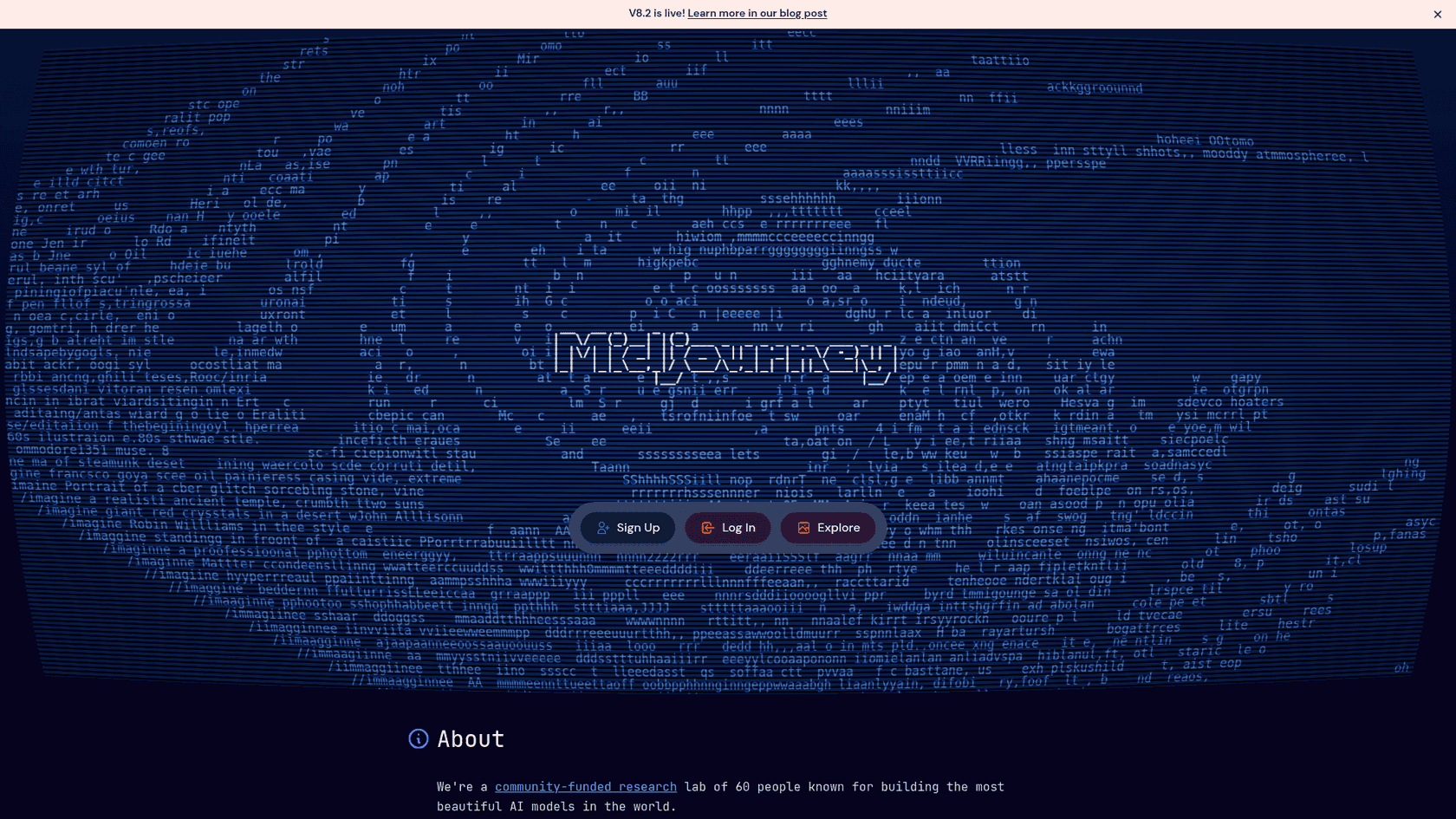
Midjourney's current model is V8.2, released July 24 with a focus on aesthetics and personalization. A V8.2 edit model followed on August 27: instruction edits, up to 4 image references, inpainting and outpainting. In October it started testing a "Thinking" rerun that regenerates where an image missed the prompt, text included, on the alpha site.
Pros
- Still the look art directors reach for on luxury, fashion, food and lifestyle campaigns.
- Targeted edits change only the selected pixels, so repeated edits don't degrade the image.
- You own what you make, even after you cancel (commercial use).
Cons
- No public per-image API, so it's hard to wire into an automated pipeline.
- Stealth mode, which keeps images off the public Explore page, is Pro and Mega only.
- Companies grossing over $1,000,000 a year need Pro or Mega for commercial use.
Pricing
| Plan | Monthly | Yearly (per month) | Fast GPU time |
|---|---|---|---|
| Basic | $10 | $8 | 3.3 hr |
| Standard | $30 | $24 | 15 hr, unlimited Relax |
| Pro | $60 | $48 | 30 hr, Stealth |
| Mega | $120 | $96 | 60 hr, Stealth |
Source: Midjourney plans. Basic works out to about 200 image jobs, or 800 images, a month. More in my Midjourney pricing breakdown.
Verdict
Our take: the best pure aesthetics on this list and the weakest fit for automation. Pick it for hand-made hero images; look at Midjourney alternatives if you need an API.
3. Ideogram
Best for: posters, ads and social graphics where the headline is part of the image.
Features
Ideogram's latest is Ideogram 4.5, which adds up to 5 reference images, Precise Edit (masked inpainting), JSON prompts and a transparent background option at 1K and 2K. Ideogram 4.0 stays available for very wide ratios like 3:1 banners, and 3.0 is the one with style presets and color palettes. Pro adds batch generation of up to 500 prompts from a spreadsheet, handy for ad variants.
Pros
- Text in images has been Ideogram's specialty since launch.
- Transparent backgrounds and a Vector 1 SVG option for logos and stickers.
- The app can also run partner models like GPT Image and Nano Banana.
Cons
- Ideogram's own docs say text is most accurate in English, and long body copy is better added in a design tool.
- Monthly credits don't roll over.
- Magic Prompt is hidden when you attach references on 4.5.
Pricing
| Plan | Monthly | Yearly (per month) | Priority credits |
|---|---|---|---|
| Free | $0 | $0 | 30 a week |
| Plus | $20 | $15 | 2,400/month |
| Pro | $60 | $42 | 7,500/month |
| Team | $30/user | $20/user | 3,600/user, min 2 users |
On the API, 4.5 is $0.03 (low), $0.06 (medium) or $0.10 (high) per image. SVGs from Vector 1 are $0.13 to $0.32. Full detail in my Ideogram pricing post.
Verdict
Our take: if text is the point of the image, Ideogram is the pick. It's narrower than the all-rounders, so most teams use it next to one, not instead of one.
4. Recraft
Best for: brand graphics, icons and logos you need to edit or resize later.
Features
Recraft generates real editable SVG vectors, not a raster traced after the fact, and lets you lock a custom style and color palette so every asset matches. Recraft V4.1 (May 2026) is the default model, and V4.1 Flash (September 23) is a raster-only speed model at about 1.3 seconds per image. Built-in tools cover background removal, upscaling, inpainting and outpainting.
Pros
- Editable SVG output from a prompt, which 2.6's raster-then-vector SVG doesn't match for design work.
- V4.1 Flash at $0.007 per image is the cheapest hosted option here.
- A Hacker News user put it bluntly: "whatever black magic they use for SVG generation kicks ass" (ACCount37).
Cons
- Free-plan images are public and not licensed for commercial use.
- Third-party models in Studio aren't available through the API.
- Recraft's own launch post concedes text accuracy is GPT Image's strength.
Pricing
| Plan | Price | Credits |
|---|---|---|
| Free | $0 | Limited, public, non-commercial |
| Basic | $10/month | 1,000/month |
| Pro | $16/month | 2,000/month, adds video |
| Teams | $18/seat/month | 2,000/seat |
API per image (pricing): V4.1 Flash $0.007, V4.1 raster $0.035, V4.1 vector $0.08. See my Recraft pricing guide.
Verdict
Our take: for logos, icons and repeatable brand assets, Recraft does something 2.6 isn't built for. Pick it whenever the file has to be edited downstream.
5. Adobe Firefly
Best for: brand and agency teams already working in Photoshop and Illustrator.
Features
Adobe Firefly's own model is Firefly Image 5, and the app also hosts partner models: GPT Image 2, Nano Banana 2 and FLUX.2 [pro] among them. A Firefly AI Assistant picks the right tool for jobs like product mockups and social campaigns, and the same credits work across Photoshop, Illustrator and Express.
Pros
- Adobe's models are trained on Adobe Stock, openly licensed and public-domain content, with Content Credentials attached.
- Generate Image, Generative Fill and Text to Vector are unlimited on every paid plan.
- One subscription gives you several vendors' models in one place.
Cons
- The commercial-safety promise covers Adobe's models, not partner models. Adobe says you're responsible for judging partner output.
- GPT Image 2.6 isn't listed as a partner model yet.
- Credits reset monthly and don't roll over, and no per-image credit cost is published for partner models.
Pricing
| Plan | Monthly | Credits |
|---|---|---|
| Free | $0 | Daily generations |
| Standard | $9.99 | 2,000 |
| Pro | $19.99 | 4,000 |
| Pro Plus | $49.99 | 10,000 |
| Premium | $199.99 | 50,000 |
Source: Firefly plans. IP indemnification is for eligible enterprise customers only.
Verdict
Our take: the safest pick when legal wants a clear training-data answer and your designers live in Creative Cloud. Stick to Adobe's own models if that safety claim is why you're buying.
6. Photoroom
Best for: ecommerce teams turning phone shots into listing images at volume.
Features
Photoroom isn't a general image model. It's a product photo studio: background removal, retouching, AI shadows, AI backgrounds and product staging, plus batch editing. Its most realistic backgrounds model, Studio HD, is now on every paid plan, and Max and Ultra add a Video Ad Maker that turns product photos into short video ads.
Pros
- Background remover, retouch and AI shadows cost no credits on paid plans.
- The API starts at $0.02 per image for background removal (API pricing).
- A free sandbox of 1,000 watermarked API calls a month for testing.
Cons
- It edits and stages products; it isn't the tool for posters or illustrations.
- The Shopify integration is Max and Ultra only.
- App plans include no API allowance; the API is billed separately.
Pricing
| Plan | Price (per month, billed yearly) | AI credits | Exports |
|---|---|---|---|
| Pro | $7.50 | 8,000 | 1,000 |
| Max | $20.99 | 25,000 | 3,000 |
| Ultra | $82.50 | 75,000 | 10,000 |
API: Remove Background $0.02 per image, Image Editing (AI backgrounds, shadows, staging) $0.10 per image. More in my Photoroom pricing and Photoroom reviews posts.
Verdict
Our take: if most of your "marketing graphics" are product photos, Photoroom will save more time than any general model. Pair it with a general model for everything else.
7. FLUX 3 Image (Black Forest Labs)
Best for: developers who want low per-image cost or to run the model themselves.
Features
FLUX 3 Image is now live and priced, after months when FLUX 3 was only available as a video model. On October 15 Black Forest Labs added FLUX 3 Image Klein, a 5.6B open-weights model with editing, up to 10 reference images, native 4K and bounding boxes that place or confine edits. Klein runs on an RTX GPU with as little as 8 GB of memory.
Pros
- Klein is $0.009 per 1K image, and rejected or failed outputs aren't charged (BFL pricing).
- Reference images cost nothing extra.
- Self-hosting is an option for teams with privacy rules.
Cons
- No consumer chat app; it's the API and a playground.
- Full FLUX 3 Image at 4K is $0.607 per image, about 6x the 2K price.
- The Builder self-hosting licence isn't meant for client work.
Pricing
| Model | 1K | 2K | 4K |
|---|---|---|---|
| FLUX 3 Image | $0.048 | $0.10 | $0.607 |
| FLUX 3 Image Klein | $0.009 | $0.014 | $0.036 |
FLUX.2 is still sold too, from $0.014 ([klein] 4B) to $0.07 ([max]). See FLUX 3 Klein for the open-weights detail.
Verdict
Our take: the most flexible and, at the Klein tier, one of the cheapest options here. Pick it if you have developers; skip it if you want to type a prompt in a browser.
8. Canva
Best for: small teams that want the image to land straight in a finished social post.
Features
On October 22 Canva launched Canva Craft, its first in-house image model, now live in Dream Lab for every user. It plans the layout first and then renders, up to 2K across 30+ aspect ratios, with text in 55 languages. Canva says it was trained with an emphasis on its own templates, so posters, social posts and menus are its home turf. Magic Layers then turns a generated image into editable layers inside the editor.
Pros
- Output goes straight into the editor with brand kits and resizing.
- Text in 55 languages, and you can prompt in any language.
- Free plan includes limited AI image generation.
Cons
- Canva doesn't publish a per-image count; AI use draws on an allowance described as 10x or 20x the Free plan.
- No public per-image API price.
- Canva lists fine print and technical drawings as areas still to improve.
Pricing
| Plan | Price | AI allowance |
|---|---|---|
| Free | $0 | Limited |
| Pro | $144/year | 10x Free |
| Business | $250/year per person | 20x Free |
| AI Pass add-on | $100/person/month | Up to 40x Pro |
Source: Canva pricing and AI Pass. My Canva AI pricing post goes deeper.
Verdict
Our take: the fastest path from prompt to a post you can publish. Pick it if you'd finish the design in Canva anyway.
Which ChatGPT Images 2.6 alternative fits your job?
ChatGPT itself suggested building a small toolkit rather than replacing one model with another, and I agree. Most marketing teams end up with one all-rounder plus one specialist.
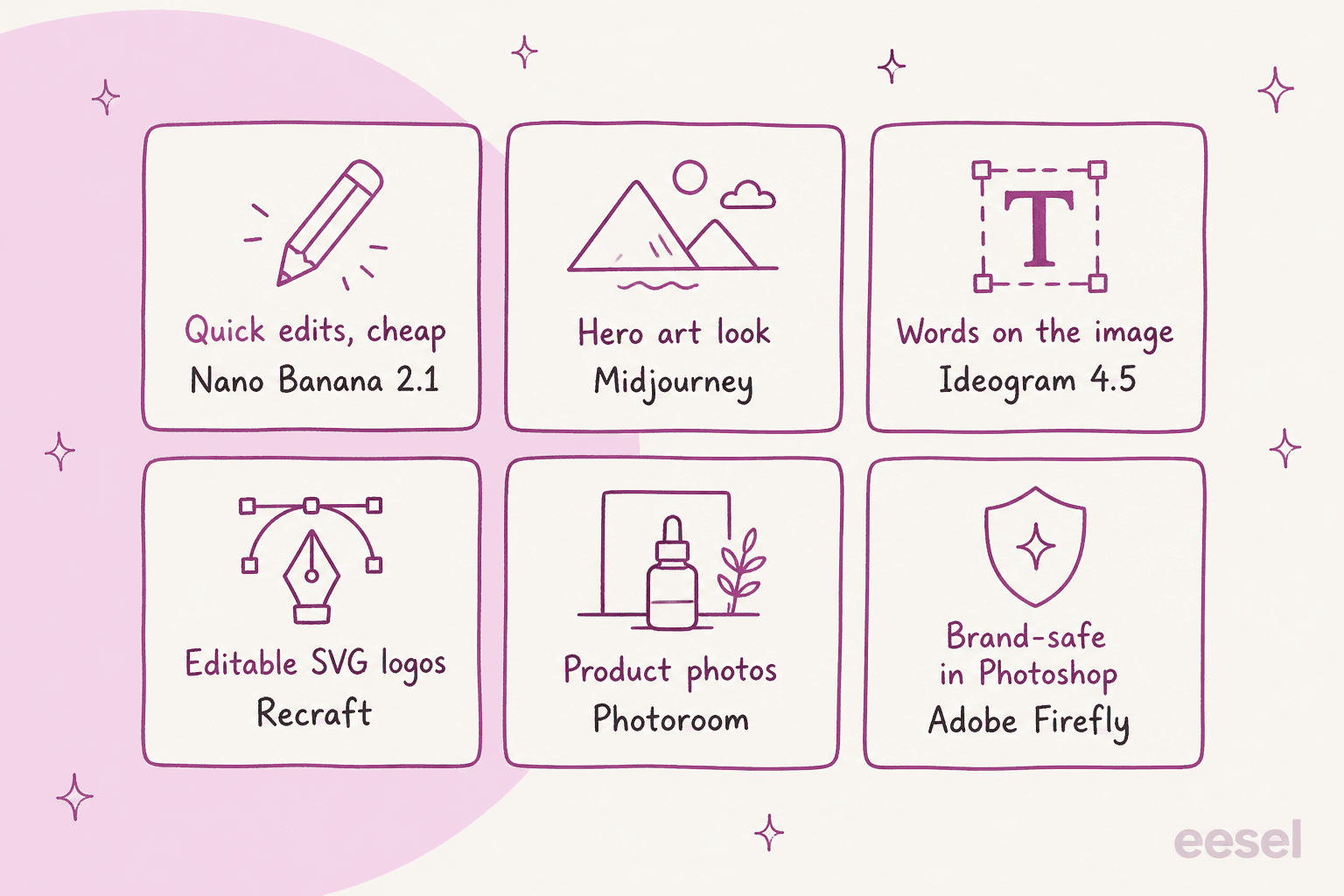
A few pairings I'd start with:
- Ecommerce brand: Photoroom for listing photos, Nano Banana 2.1 for lifestyle scenes.
- Brand and design team: Recraft for logos and icons, Firefly inside Photoshop for campaign edits.
- Performance marketing: Ideogram 4.5 with batch generation for ad variants, ChatGPT Images 2.6 at high for hero shots.
- Developer pipeline: FLUX 3 Image Klein or Recraft V4.1 Flash for volume, 2.6 Sunburst for the images that need detail.
Where eesel fits if your images end up in blog posts
Here's the part every tool above leaves to you. They all hand back a raw image. If that image is going into a blog post, someone still has to decide which section earns a visual, keep the accent color consistent, check that the labels match the facts, and write a caption that credits the source.
That's the job eesel does with its AI blog writer. eesel is an AI teammate platform, and the blog writer is the teammate for content: give it a keyword and your site, and it researches, drafts in your voice, and generates the banner and infographics on your palette, then places and captions them. The three hand-drawn charts in this post came out of that workflow, through an image API, with the palette set once for the whole post.
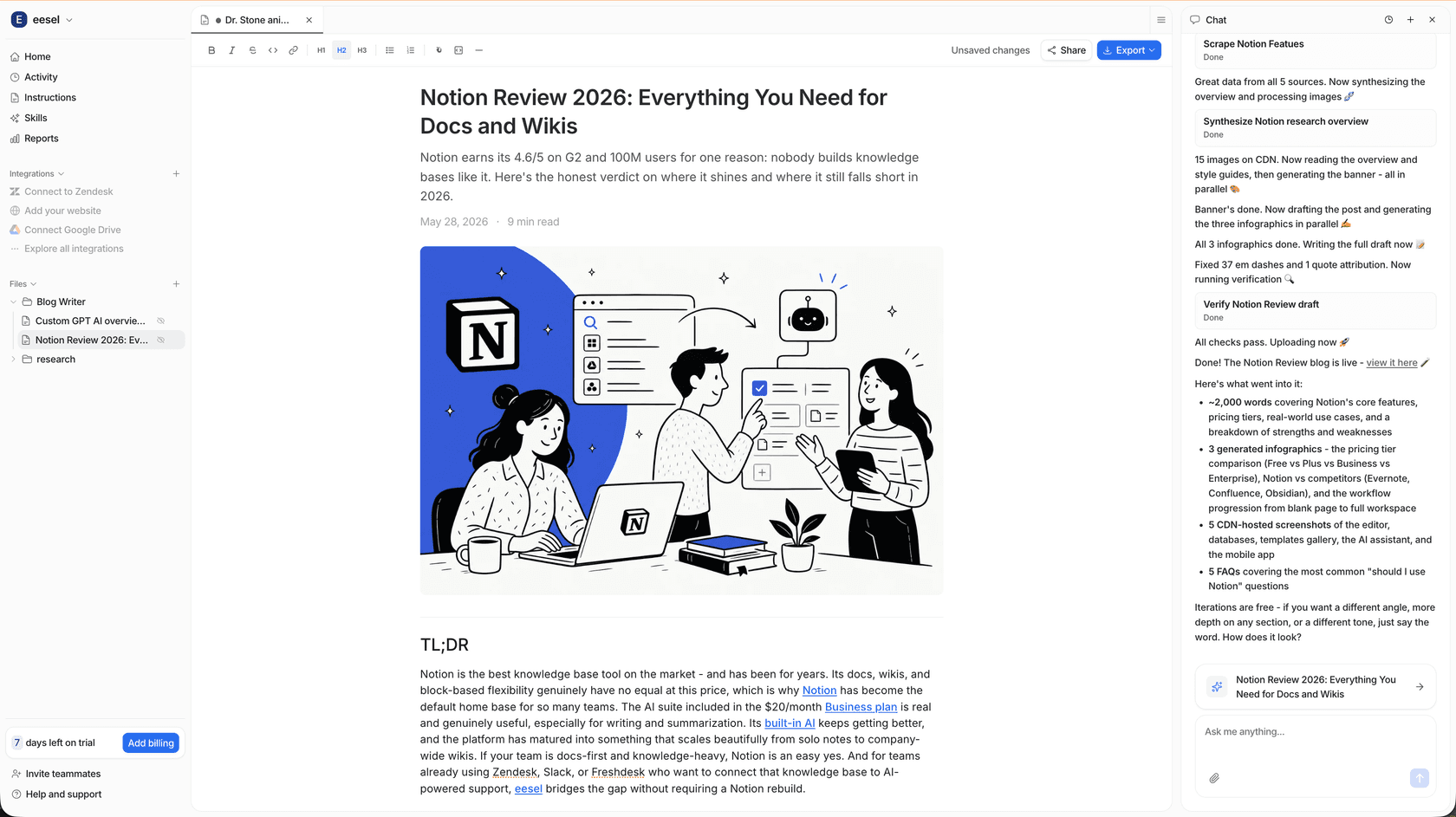
The same platform runs real work for named customers: SE Ranking, the SEO software company, runs one eesel support agent per product across three Zendesk connections. If you'd rather drive it from a terminal, the eesel CLI lets a coding agent like Claude Code upload approved brand material, adjust the writer's instructions and start runs, though each draft still gets a human review before it goes live. It sits next to the other picks in my best AI content writers roundup.
Want images that come out on brand and already placed in a finished post? Try eesel on your next keyword.
Frequently Asked Questions
What is the best alternative to ChatGPT Images 2.6?
For most marketing work, Nano Banana 2.1 is the closest all-round swap: conversational editing, up to 14 reference images and about $0.034 per 1K image on the API. For text-heavy graphics pick Ideogram, for editable logos Recraft, and for product photos Photoroom. The full list is in this ChatGPT Images 2.6 alternatives guide.
Is ChatGPT Images 2.5 cheaper than Images 2.6?
At low and medium quality, yes. The per-token rates are the same, but OpenAI's own calculator shows 2.6 using about 4.2x the tokens at low and 3.3x at medium for a 1024x1024 image, so a low image goes from about $0.006 to $0.025. At high quality and above the cost is the same. My ChatGPT Images 2.6 pricing breakdown has the full table.
Which ChatGPT Images 2.6 alternative is best for product photos?
Photoroom is built for it: background removal, AI shadows and product staging, with Pro from $7.50 a month billed yearly and an API from $0.02 per image. If you need a full scene generated around the product, Nano Banana 2.1 and FLUX 3 Image handle multi-reference product shots well. See my Photoroom alternatives for more options.
What is the cheapest ChatGPT Images 2.6 alternative for developers?
On list price per 1K image, Recraft V4.1 Flash ($0.007) and FLUX 3 Image Klein ($0.009) are the cheapest, and Klein also ships open weights you can run on an 8 GB graphics card. Both are a fraction of the 2.6 medium price of about $0.044. If the images feed blog posts, an AI blog writer API can handle the placement and captions too.
Can I use ChatGPT Images 2.6 alternatives for commercial work?
Most paid plans allow it, but check the details: Midjourney requires Pro or Mega for companies over $1M in yearly revenue, Recraft's free tier is non-commercial, and Adobe Firefly's commercial-safety promise covers Adobe's own models, not partner models like GPT Image. For steady content marketing, pair the model with a workflow that keeps every image on brand, like an AI blog writer with images.