Canva Craft review: how Canva's first image model actually works

Kira

Katelin Teen
Last edited October 26, 2026
Canva Craft is a strong first image model, and its real edge is workflow, not raw ranking. Canva built it in-house, and it plans a layout (what goes where, how big, and the exact text) before rendering anything, which is why its text and composition land cleaner than most models. It debuted at #4 on DesignArena with an Elo of 1340, behind three OpenAI models, and it's live for every Canva user in Dream Lab plus the Connect API.
The surprise in Canva's own numbers: the model trained on millions of design templates ranks #1 for portraits and landscapes but #6 for marketing materials. There's no separate price. Craft spends your plan's shared AI allowance, which is up to 20 uses on Free and on Pro trials, so a trial is a thin test.
My verdict is 4/5. Use it if you already build designs in Canva and want images that drop into editable layers. Stick with OpenAI's models if you only care about the single best-looking frame. And if the image is only half your content job, eesel's AI blog writer handles the other half: it researches, writes the post, and generates every banner and infographic in one house style.
Why should you trust this Canva Craft review?
I build the parts of eesel that call image models. Every hero banner and in-body infographic on this blog is generated through an image model API, including the three diagrams further down this page, so I read a launch like this one the way a heavy user does, which mostly means asking what the model does between prompt and pixel and what one job costs, and also how often it needs a retry.
I haven't lived with Craft for months, and I'm not going to pretend otherwise here. This review leans on what Canva published at launch: the Craft announcement, the Canva Research launch post, the Connect API notes for developers, and Canva's pricing and help pages. Where those sources disagree with each other, I say so.
What is Canva Craft?
Canva Craft is Canva's first image generation model built and trained from scratch, launched on October 22, 2026. It came out of Canva Research, an in-house lab of more than 160 AI scientists and engineers inside a 400-person AI unit. That lab grew out of acquisitions, starting with Kaleido in 2021 and then Leonardo AI in 2024, so Craft is not appearing out of nowhere.
Until now, most image generation inside Canva AI ran on partner models. Canva's head of AI research, Stef Corazza, put the reason for building its own plainly: at more than one billion designs a month, "even a variation of a few cents per generation makes an enormous difference". Craft is partly a quality play and partly a cost play.
You reach it in three places:
- Dream Lab, inside the Canva editor, where Craft now appears as a model option.
- The Connect API, where developers pin it with
craft_v1_2k. - Canva's MCP server, listed as coming soon, so AI assistants can call it as one step in a bigger task.
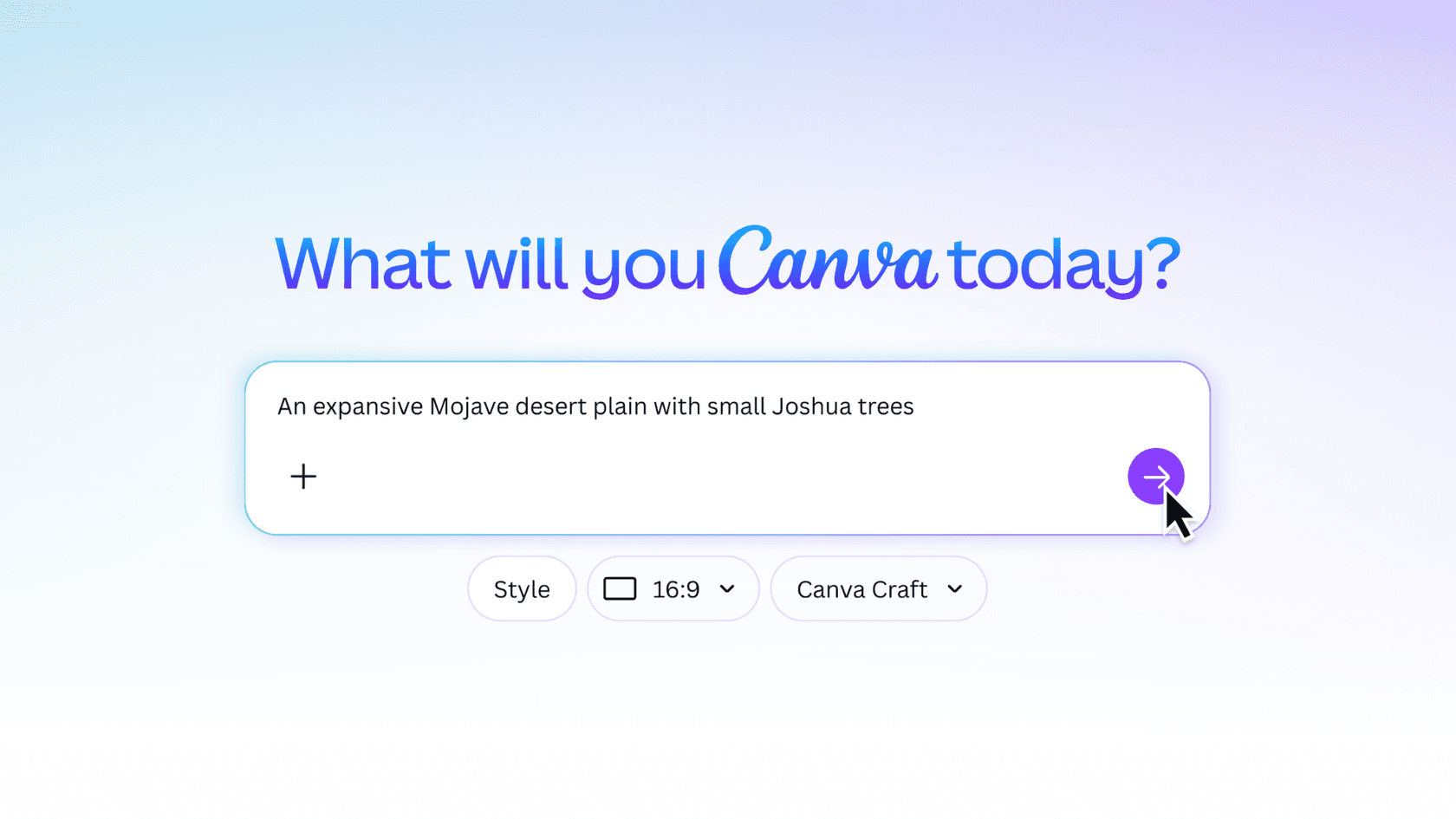
That model picker is the detail I'd point to first. There is no separate app to sign up for, Craft is a dropdown option in the prompt box you may already use, sitting right next to the style and aspect ratio settings.
How does Canva Craft work under the hood?
Craft splits image generation into two models instead of one. Most image models go straight from prompt to pixels. Craft first runs a planning model that writes a detailed composition plan: which elements appear, where they sit relative to each other, their relative scale, the visual hierarchy, and any text that has to appear. A second rendering model then turns that plan into an image at up to 2K, in more than 30 aspect ratios or a custom one.
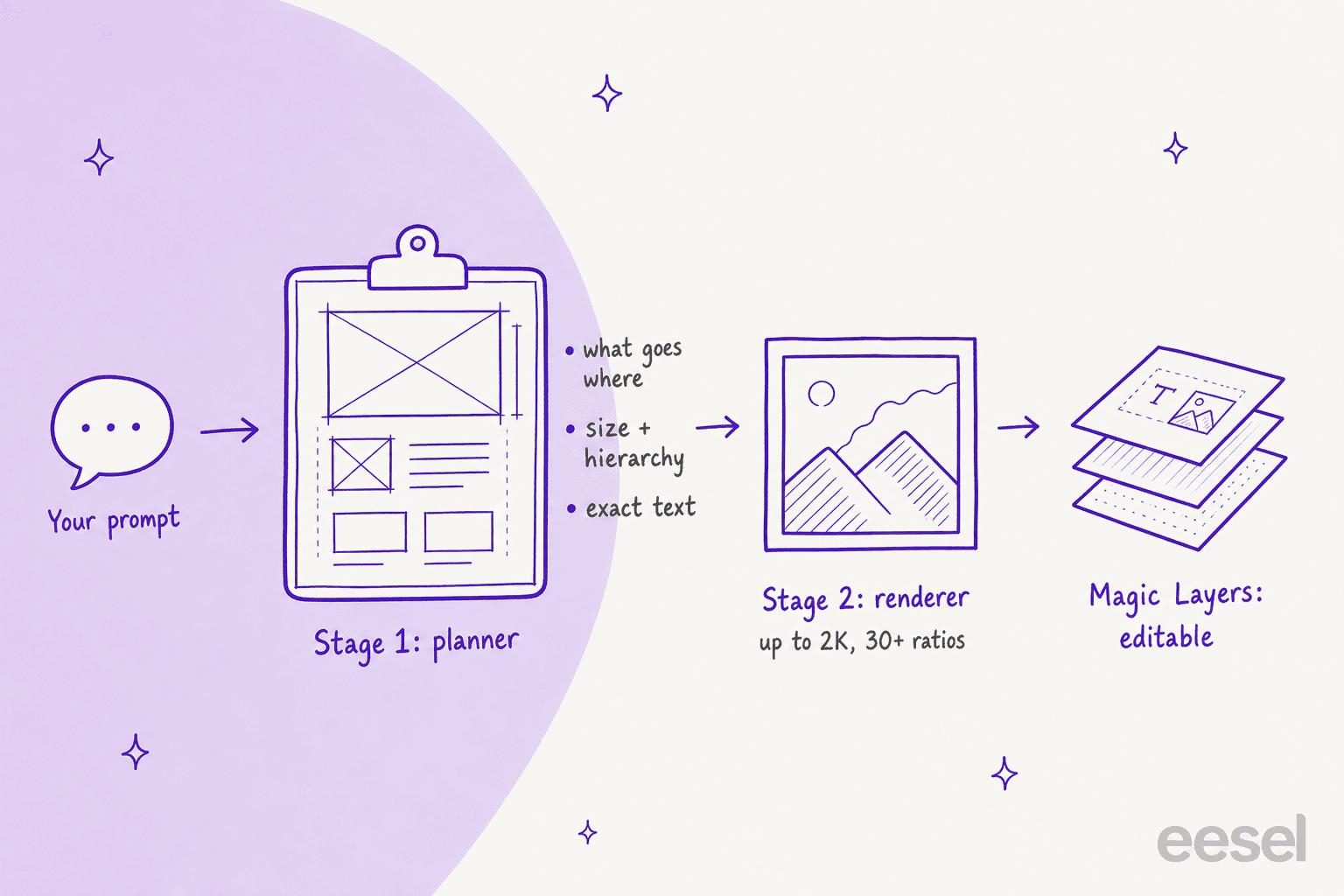
Seen from the engineering side, the split matters for a few reasons:
- Text gets decided before it gets drawn. When the plan already says "headline: Grand Opening, top third, largest element", the renderer isn't guessing letters mid-generation. That's the usual reason AI posters come out with "Grnad Opneing", and it's the problem Craft is built around.
- Edits can stay local. Canva says the structure allows "targeted changes without unnecessarily altering everything else", the same goal OpenAI's image edit API chases with masks.
- The output is easier to take apart. Craft uses what Canva calls JSON boundary boxing, so Magic Layers can split the image back into editable text and objects faster and more accurately. A flat image is the end of the line. A layered one is the start of a design.
Training is the other half. Instead of learning mostly from photographs, Craft trained on millions of human-made Canva templates: posters, social posts, presentations, infographics, menus. Canva then tuned it with supervised fine-tuning and reinforcement learning, and its designers judged more than 25,000 image pairs head to head against leading models. When automated scores and designers disagreed, Canva says it sided with the designer.
Speed got its share of work too. Canva says distillation cut the number of inference steps to a fraction of the original, and a custom inference engine for the planning stage made Craft an order of magnitude faster than its first internal version. Two faster variants, Craft-fast and Craft-ultrafast, are announced but not out yet.
This user summed up why the plan-first approach lands with people who make images every day:
"One of the most annoying things about AI image generation is getting 90% of the way there, only to have one tiny detail ruin the whole thing. Canva Craft is taking a different approach: plan the composition first, then generate the image."
How good is Canva Craft compared to other image models?
Craft debuted as the fourth-ranked image model on DesignArena, a crowdsourced leaderboard where people vote between two anonymous outputs. In the chart Canva published, the top four read: GPT-Image-2.5 Sunburst at 1406, GPT-Image-2.5 Flare at 1382, GPT Image 2 at 1363, and Canva Craft at 1340. Reve 2.1, Microsoft's MAI models, Grok Imagine, Nano Banana 2.1 and Seedream 5.0 Pro all sat below it.
There's two things worth keeping straight here. First, the "second most advanced AI lab" headline counts each lab's best model, so OpenAI's three entries collapse into one row and Canva lands at #2. Accurate, and a framing choice. A Hacker News commenter put the same point more bluntly:
"2nd behind the OpenAI models in DesignArena image ranks"

Second, a 66-point Elo gap to the top is real, but it's Canva's first model measured against OpenAI's latest. I covered ChatGPT Images 2.5 at launch if you want the other side of that matchup.
The category breakdown is where it gets interesting:
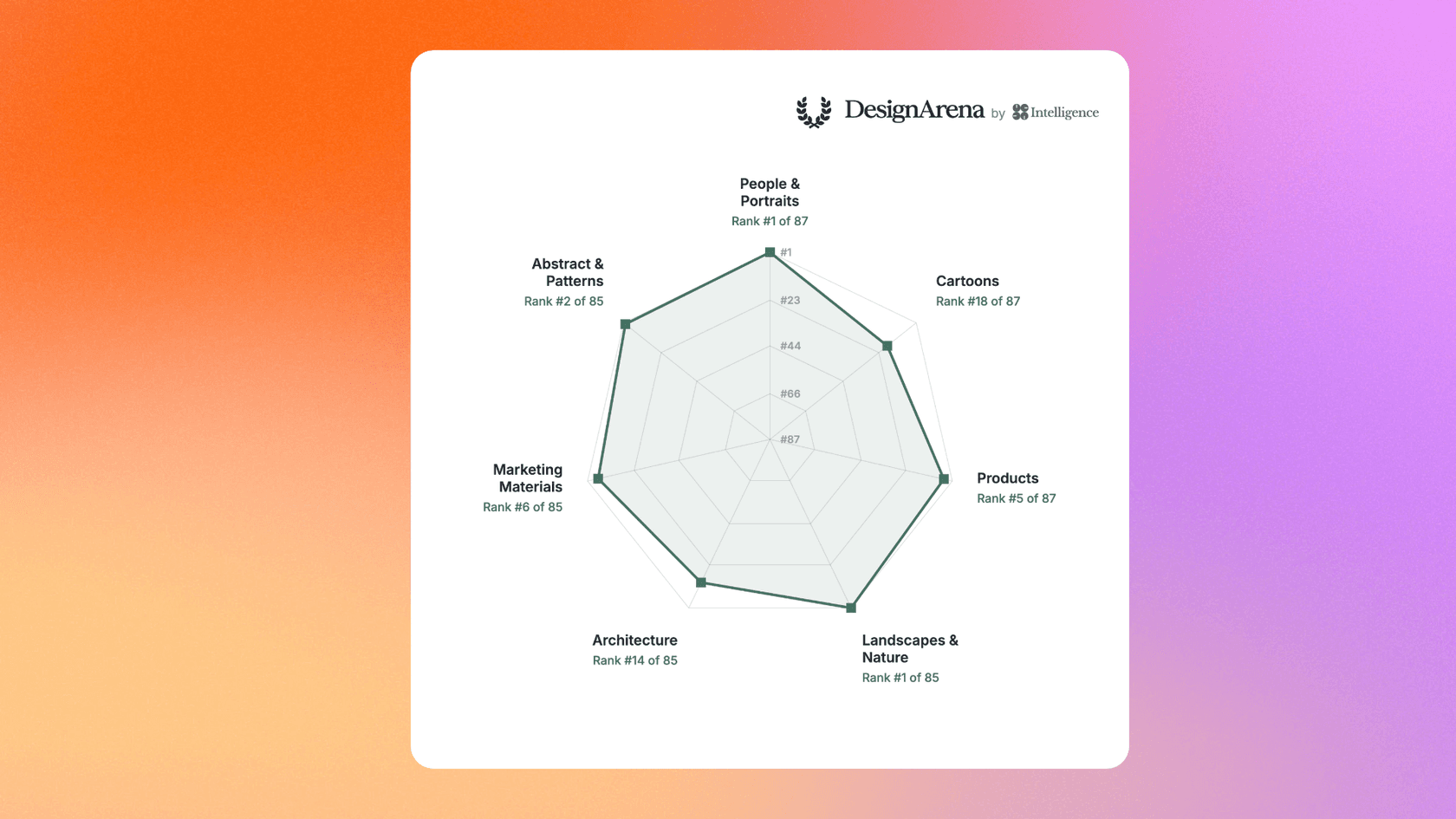
Here's the part I didn't expect. The model trained on design templates is strongest at photography. It ranks first of 87 for People and Portraits and first of 85 for Landscapes and Nature, while Marketing Materials, the closest match to its template training, sits at sixth of 85. Cartoons come in at 18th of 87. One small inconsistency: Canva's announcement text says Craft ranks #4 for Products, while the chart in the same post shows #5 of 87.
My read on it: the template training shows up less as a leaderboard win in "marketing" and more in what you can do with the output afterwards, since a leaderboard vote judges one single frame and never checks whether the headline comes apart into an editable text box. If your work is mostly portraits, lifestyle shots, or landscapes, Craft is a better pick than its "design model" label suggests. If it's cartoons or illustrated characters, compare it against Midjourney before you commit, and Recraft is worth a test too.
Can Canva Craft render text reliably?
Canva's claim is that legible text is the point of the planning stage, and the language support backs that up: you can prompt in any language, and Craft writes text in 55 languages. Canva also says the first version still has room to grow on fine print and technical drawings, which matches what I'd expect from any model at 2K: small type is the last thing to get right.
The community's test is simple, and it's the right one:
"the real test: can it put text on a poster without inventing new letters. if yes, half the image tools I've reviewed just got very nervous"
I'd treat Craft's text the way I treat text from Ideogram, and the same goes for GPT Image 1 Mini: good enough to skip the "fix every letter" step most of the time, never good enough to skip proofreading. A wrong date on a flyer costs more than a slightly off composition, and no leaderboard measures that.
How much does Canva Craft cost?
Canva Craft has no separate price. It spends the shared monthly AI allowance that comes with your Canva plan, and Canva's API notes confirm a Craft job uses the user's AI credits "same as the other models". Canva hasn't said whether Craft counts as a Premium or Ultra AI tool, but its help center lists "Create an image with Canva AI" as Premium, so the Premium column is the closest guide for now.
Here's the allowance on each plan, from Canva's pricing page and its AI usage help article:
| Plan | Price | Premium AI allowance | Ultra AI allowance | AI Pass add-on |
|---|---|---|---|---|
| Canva Free | US$0 | Up to 20 uses (shared with Standard AI) | Not available | Not available |
| Canva Pro | US$144 per year | Up to 200 uses | Up to 20 uses | Available, 40x Pro's AI |
| Canva Pro trial | Free during trial | Up to 20 uses | Not available | Not available |
| Canva Business | US$250 per year, per person | Up to 400 uses | Up to 40 uses | Available, 20x Business's AI |
| Canva Enterprise | Contact sales | Up to 400 uses | Up to 40 uses | Not listed |
Some things the table doesn't show you:
- The allowance is "or", not "and". Premium and Ultra uses draw from one pool, and the numbers assume simple prompts. Complex jobs use more, so real counts land lower.
- Trials are thin. A Pro or Business trial gets the same 20 uses as Canva Free. That's enough to see the model, not enough to judge it on a real campaign.
- Teams don't pool. On Business and Enterprise each member gets their own allowance.
- AI Pass has no public price. Canva's AI Pass page gives multipliers (40x Pro, 20x Business) but no dollar figure.
Magic Layers, the tool that turns Craft output into editable layers, is also a Premium AI tool, so taking an image apart costs allowance on top of generating it. For the full plan-by-plan picture, see my Canva AI pricing breakdown.
What does Canva Craft look like for developers?
The API story is simple, and also a bit early. Craft lives on the existing Connect API endpoint, POST /v1/image-generations, and you pin it with "model": "craft_v1_2k". You then poll GET /v1/image-generations/{jobId} until the job succeeds.
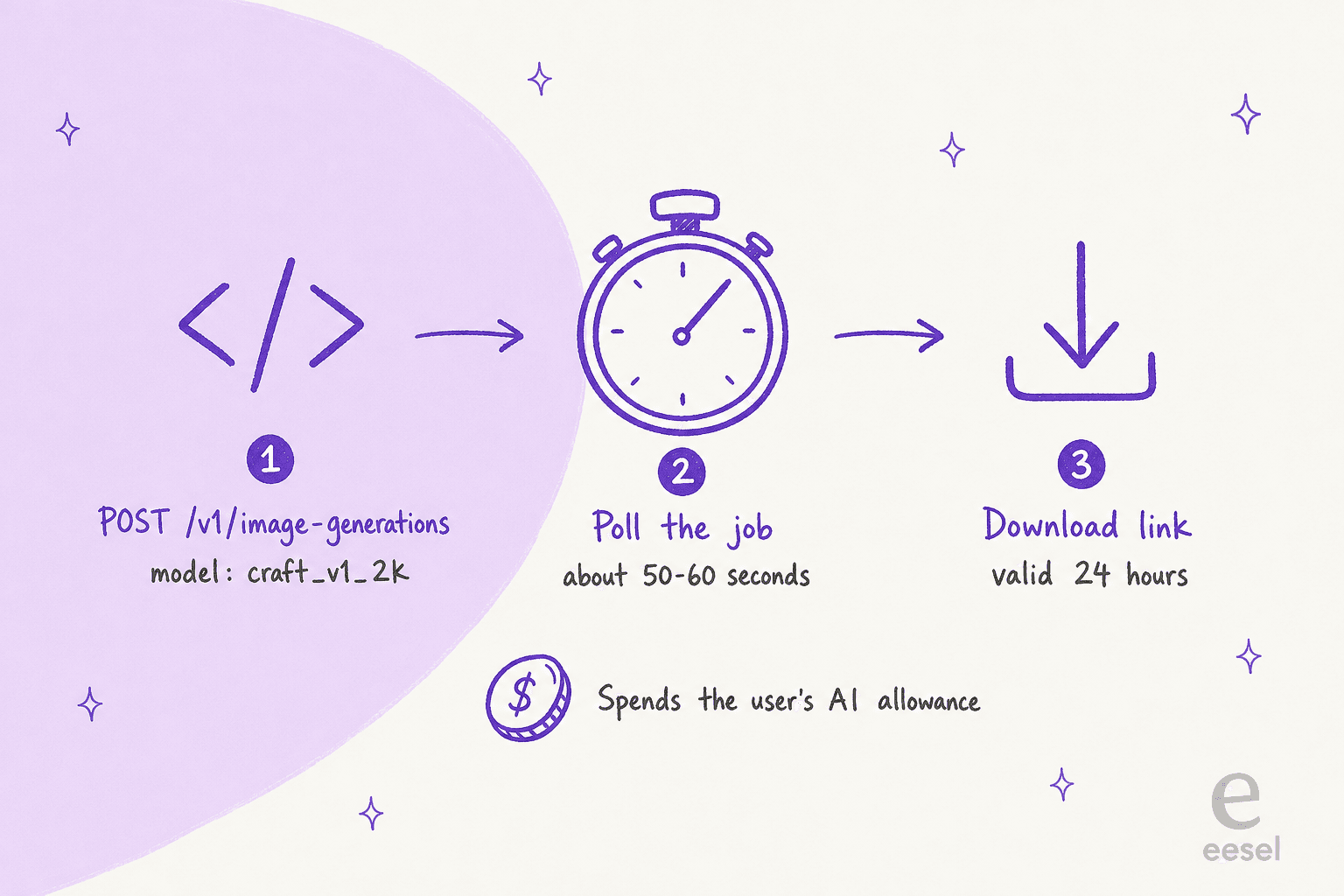
The details in Canva's developer announcement that would change how I build on it:
- It's slow by design. Because Craft plans before it renders, Canva says to expect roughly 50 to 60 seconds per job and to poll with backoff. That rules it out for anything a user waits on in real time.
- The user pays, not you. Jobs need a user access token with the
asset:writescope and spend that user's AI credits. Developer-funded billing isn't live yet, which suits Canva-native integrations and makes standalone products awkward. - Links expire. The download URL is valid for 24 hours, unless you set the job to save straight into the user's uploads.
- It can be unavailable. A pinned job can fail with
model_not_available; you retry or drop the pin and let Canva pick another model. - It's a preview API. Canva warns that breaking changes may happen.
For comparison, OpenAI's image generation API bills the developer per token, so it remains the easier default for a product of your own. Craft's API makes most sense for marketing platforms, print services, and ad builders that already sit on top of Canva accounts. Once the MCP version ships, it also slots into agent setups like the ones in my MCP apps explainer.
What do people say about Canva Craft so far?
Early reaction from Canva users has been warm, and most of it comes back to the same point, which is image generation inside the tool they already use.
"I use Canva all the time and one of my own pain points has been the lack of high-end native image generation. This is such a huge update. Appreciate it, team! My workflows just got easier."
Engineers have read it as a bet on specialized models over general ones:
"Specialized models always beat general models at their specific task. I hope companies continue releasing models like this one."
It's early, a week after launch, so read that as first impressions rather than a verdict from months of daily use. For how people rate Canva's older AI tools after living with them, my Canva AI reviews roundup is the longer-running picture.
Who should use Canva Craft, and who shouldn't?
Use Craft if you already build social posts, flyers, decks or ads in Canva. The real win is that the image arrives where the design happens, in the ratio you need, ready to split into layers. You skip the export-import loop entirely.
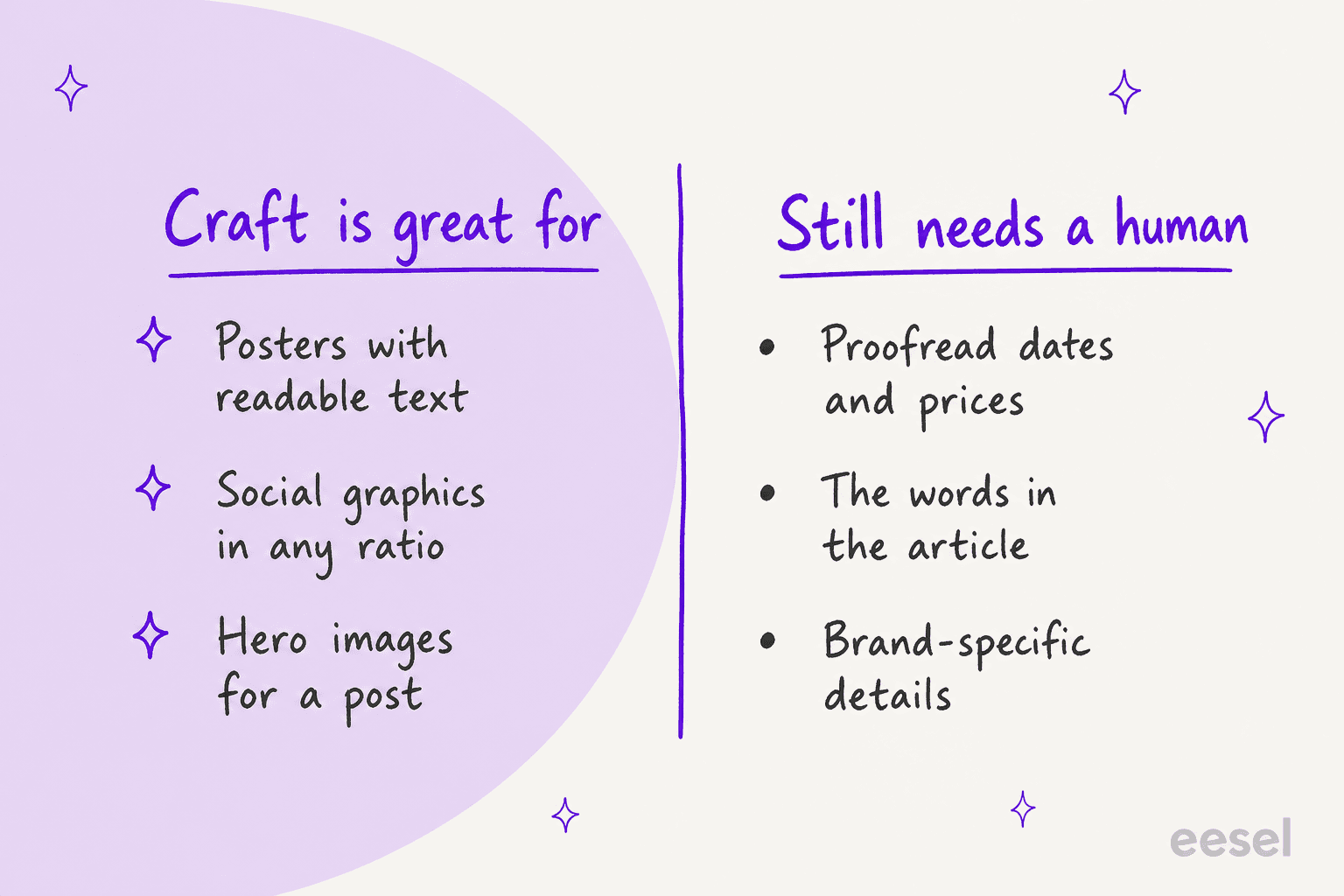
Look elsewhere if:
- You only judge the single frame. ChatGPT Images 2.5 still ranks above Craft, and Nano Banana Pro is the obvious alternative in Google's camp.
- You need cartoons or stylized characters. Craft's 18th-of-87 rank there is its weakest category on Canva's own chart.
- You're building a standalone product. User-paid credits, a preview API and 50 to 60 second jobs make OpenAI or Flux 3 the simpler base for now.
- You generate at volume on Canva Free. Twenty uses a month goes quickly.
My overall rating is 4 out of 5. A first model at #4 on a crowded leaderboard, with an architecture that targets the problem designers complain about most, is a strong start. The point it loses is for the gaps that are about access rather than quality: no stated tier, no public AI Pass price, thin trials, and an API that's still a preview.
Where does eesel fit if images are only half your content?
Craft solves the image. For most marketing teams, though, the image is attached to something, like a launch post or a guide or a pricing page, and that is the part eesel covers. eesel is an AI teammate platform, and one of its ready-to-work teammates is an AI blog writer. It researches a topic from primary sources, drafts the article, and generates the hero banner and every in-body infographic in one consistent house style, as part of finishing the post. Each diagram on this page came out of that loop, in this post's Canva purple.

The difference from an image model is who does the work. Craft waits for your prompt and returns a picture. The AI blog writer takes a keyword and returns a researched, illustrated draft you can edit and publish, the way I describe in my AI blog writer workflow post. The same platform also runs a helpdesk teammate, which handles live chat for SEO software company SE Ranking across 4,650 conversations a month, so the content and support jobs can sit with one vendor.
Generating great images in Canva but still writing every article around them by hand? eesel's blog writer joins your content workflow like a new hire who already knows your brand voice, and it handles the words and the visuals together. It's free to start, and my AI blog writer cost guide shows what scaling up looks like. Try eesel and give it your next Canva Craft launch post to write.
For a wider view of the tools around it, start with my list of the best AI blog writers. If you're comparing broader options, my AI writing tools roundup covers the editors, while the AI teammates list covers tools that do the whole job.
Frequently Asked Questions
Is Canva Craft worth using?
If you already design in Canva, yes. Craft plans the layout before it renders, which shows up as cleaner text and more deliberate composition, and its output can go straight into Canva AI tools like Magic Layers. If you only need the single best-looking image, ChatGPT Images 2.5 still sits above it on the DesignArena leaderboard.
Is Canva Craft free?
Craft is available to every Canva user, including Free accounts, in Dream Lab. It isn't priced separately: it draws on the monthly AI allowance your plan includes, which is up to 20 uses on Canva Free. My Canva AI pricing breakdown covers the allowance on every plan.
How does Canva Craft compare to Midjourney and Nano Banana?
On Canva's published DesignArena chart, Craft (Elo 1340) sits above Reve 2.1 and Google's Nano Banana 2.1, and below three OpenAI models. Midjourney wasn't in the top 15 Canva showed. The bigger difference is workflow: Craft lives inside the editor, while Nano Banana and Midjourney hand you a finished image to bring somewhere else.
Can I use Canva Craft through an API?
Yes. The Canva Connect API takes craft_v1_2k as the model value on its image generation endpoint. Jobs take about 50 to 60 seconds and spend the signed-in user's AI credits. If you're wiring image models into agents, my notes on MCP servers for agents cover the plumbing, and Canva says Craft on its MCP server is coming soon.
What is Canva Craft best at?
By Canva's own chart, photo-style work: it ranks first of 87 models for People and Portraits and first of 85 for Landscapes and Nature. Marketing materials, the category it was trained hardest on, sits at sixth of 85. For text-heavy posters it is strong, and pairing it with an AI blog writer with images covers the words around the visuals.
Does Canva Craft replace a designer?
No. It gets a first draft of a poster or social graphic much closer to usable, but someone still has to check every date, price and name before it ships. Treat it like the other AI marketing tools on your stack: fast at the first 80%, and a person owns the last 20%.
What are the best Canva Craft alternatives?
For pure image quality, look at ChatGPT Images 2.5 and Reve 2.1. For text and typography, Ideogram is the long-standing specialist. For broader options inside Canva-style tools, my Canva AI alternatives list goes further.