ChatGPT Images 2.6: GIFs, the new API models, and what it really costs

Kira

Katelin Teen
Last edited November 5, 2026
ChatGPT Images 2.6 is OpenAI's November 4, 2026 image update: 50% faster generation, animated GIFs, saved reference images, and two new API models, gpt-image-2.6-flare and gpt-image-2.6-sunburst. It is live on every ChatGPT plan, including Free.
The part that is easy to miss: API token prices are unchanged from 2.5, but a low-quality square image now uses about 4.2x the output tokens, so it costs roughly $0.025 instead of $0.006. High quality and above cost the same as before. If you run cheap, high-volume drafts, test before you switch.
If those images are going into blog posts, eesel's AI blog writer handles the placement, palette and captions around whichever model you use, and an AI coding agent can drive it from the eesel CLI.
What is new in ChatGPT Images 2.6?
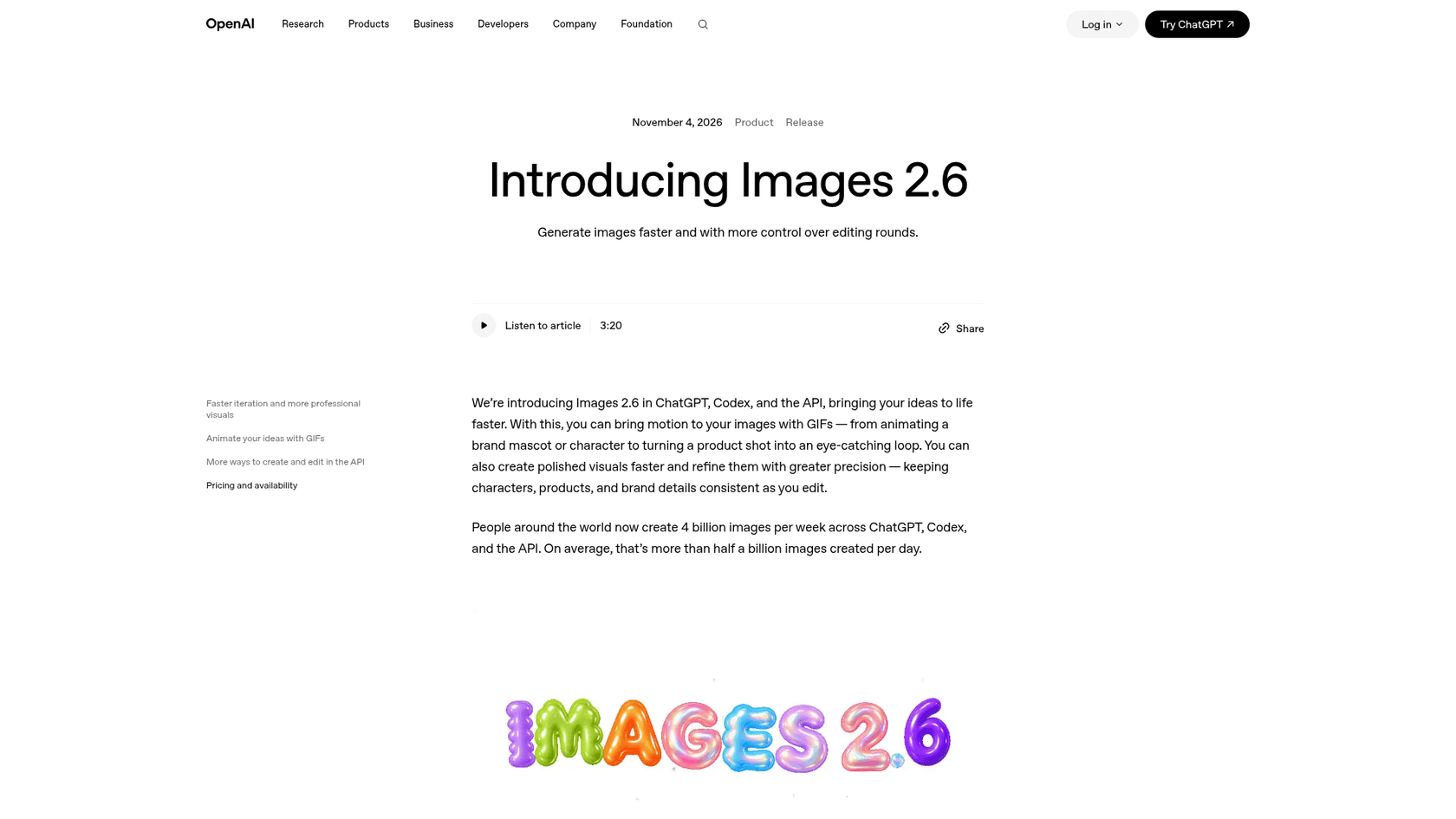
OpenAI announced Images 2.6 on November 4, 2026, two months after ChatGPT Images 2.5. The headline is speed and motion: OpenAI says the model generates images 50% faster than before, and it can now animate a still into a GIF.
I'm a software engineer at eesel, and I build the agent side of the product, including the pipeline that calls OpenAI's image API for every hero banner and infographic on this blog. So when a new GPT Image model lands, my first question is not "is it prettier?" but "what does it change in a pipeline that makes thousands of these?" That lens shapes the rest of this post.
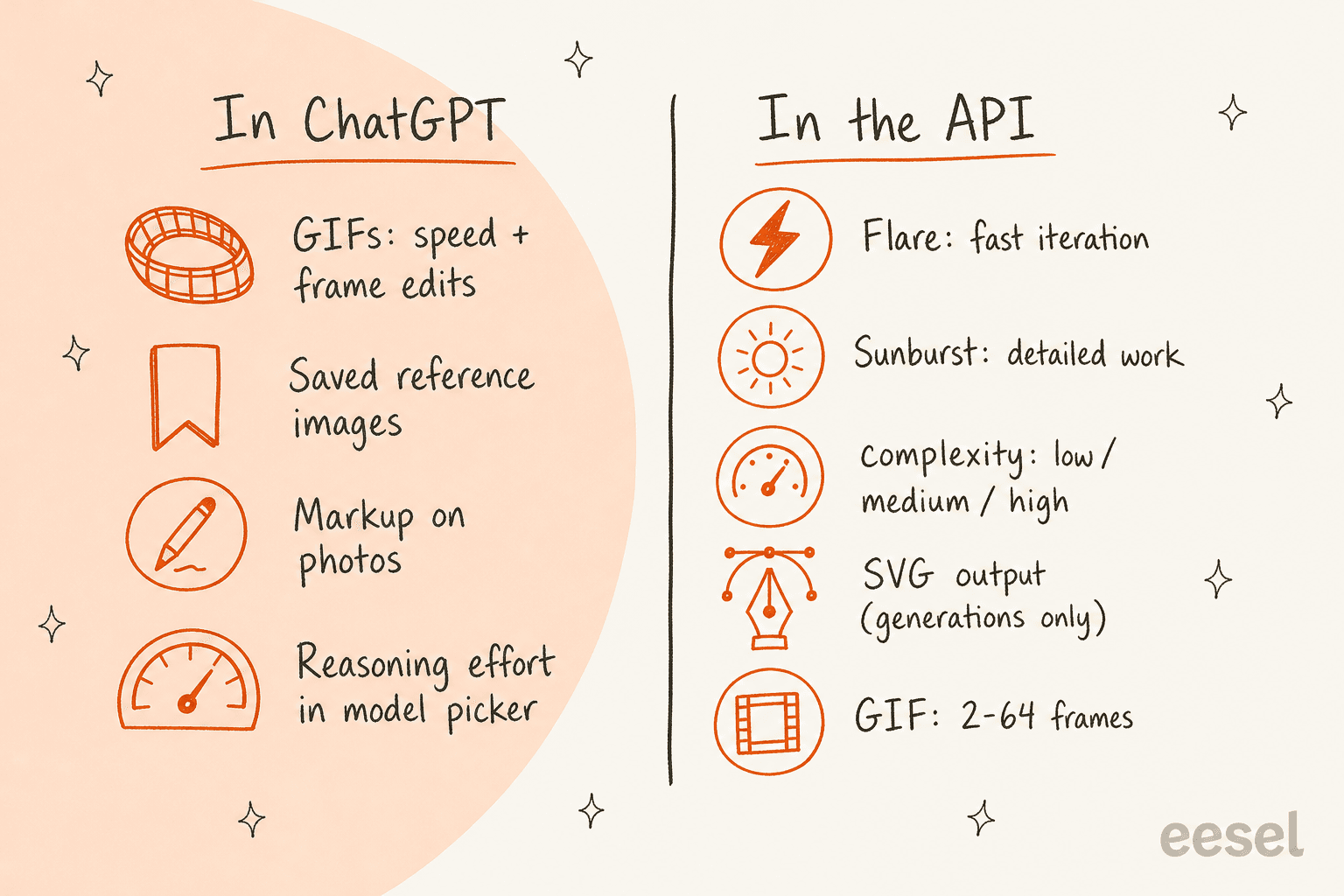
Here is everything that shipped, split by where you will use it:
- GIFs, in ChatGPT and the API. Turn a prompt or an image into an animated GIF. In ChatGPT you can adjust the speed and edit individual frames.
- Saved reference images, in ChatGPT. OpenAI says you can keep reference images of yourself, pets and characters ready to reuse without uploading them again.
- Markup comes to the API. Image markup, already in ChatGPT, now works through the edits endpoint, so you can circle exactly what to change.
- SVG output, API only. Ask for an editable vector file instead of a PNG.
- A complexity setting. A new dial for how much the model plans before rendering, separate from quality.
- Reasoning effort in ChatGPT. The system card says Chat users get configurable reasoning effort through the model picker.
Scale context matters here too. OpenAI says people now create 4 billion images per week across ChatGPT, Codex and the API. Codex users get it on the same plans, as covered in my Codex pricing guide. That is the volume this speed work is aimed at.
"Now with GIFs and reference images. Plus, two new models are coming to the API with 50% faster image generation."
How do GIFs work in Images 2.6?
GIFs are the feature that will get the screenshots, so it is worth knowing what they actually are. In ChatGPT, you describe a motion or upload an image, and you get back a looping animation you can speed up, slow down, or fix frame by frame.
In the API, it is a format switch. You set output_format: "gif" on POST /v1/images/generations and describe the subject, the motion and the loop in the prompt. The image generation guide lists the controls:
| Field | Range | Default |
|---|---|---|
frame_count | 2 to 64 frames | 9 |
frame_duration_ms | 20 to 2,000 ms per frame | 200 |
size | auto or a size in multiples of 16 | auto |
A few limits are easy to trip over. GIF output only works on the generations endpoint, not edits, and it does not support streaming, partial images or custom compression. OpenAI's own example, a Sunburst animation at 9 frames and 200 ms each, loops back to its starting pose after 1.8 seconds.

The early-access customers point at where this lands: OpenArt for social reactions and memes, and a startup called Town that used it for an animated typing-indicator character. That is the honest ceiling right now. These are loops, mascots and storyboards, not a replacement for Sora 2 or other video models.
People testing it on launch day landed in the same place:
"Honestly, you have to think about the use case. GIFs are going to be little throwaway things that you're pasting into Discord or meme-ing. Nobody's reaching for a GIF if they're looking for professional results."

There is also a safety caveat that is fair to mention. The system card reports that OpenAI's GIF-specific moderation caught 77.7% of a targeted set of policy-violating GIFs, and says motion-related violations remain hard to detect. That is an adversarial test set, not a production rate, but it explains why GIF rules block some categories more broadly than still images do.
What are the GPT-Image-2.6 Flare and Sunburst models?
For developers, 2.6 keeps the two-model split that arrived in 2.5. If you read my Images 2.5 review, the logic is the same, with new strengths on each side.
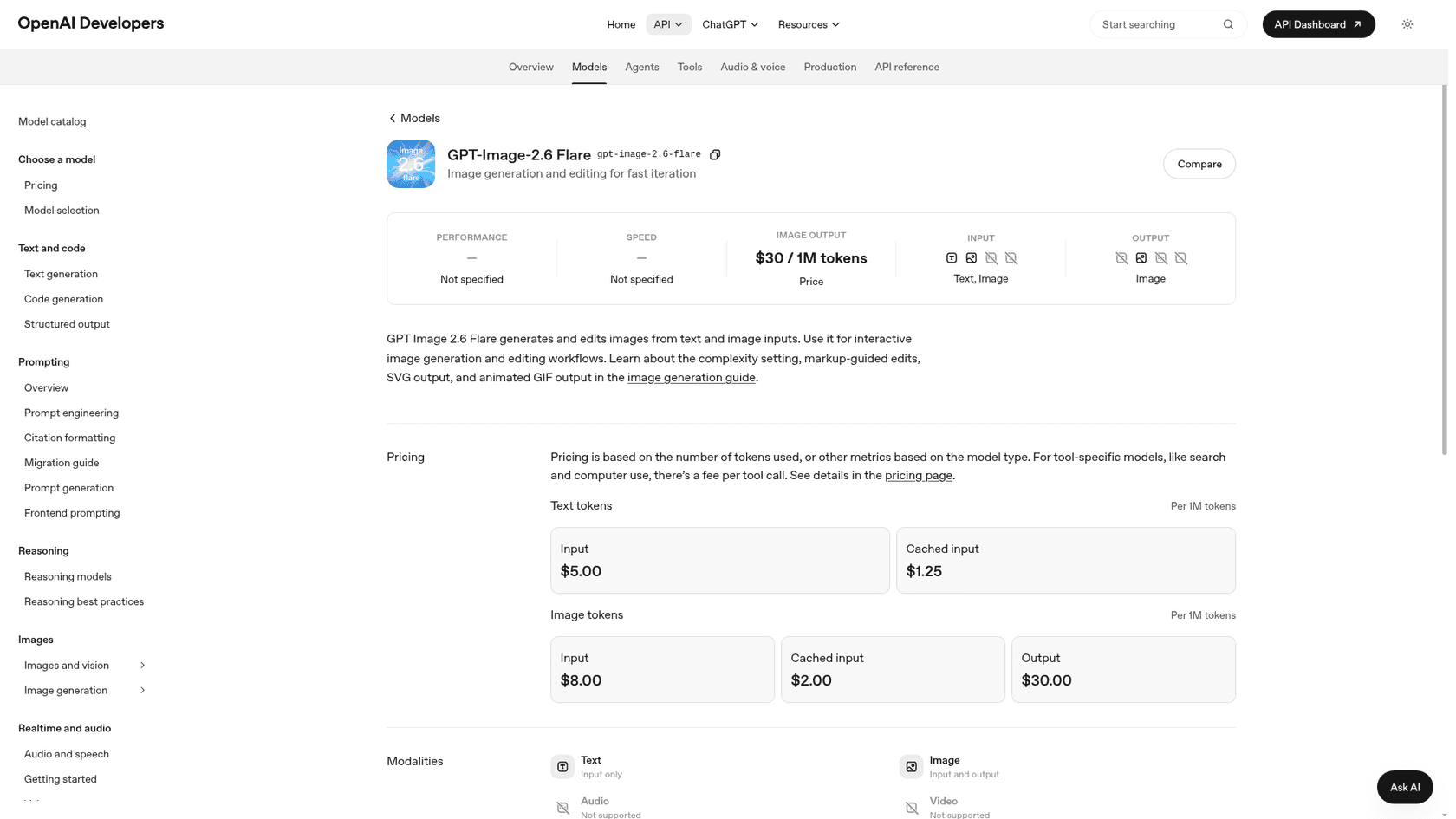
gpt-image-2.6-flare is described on its model page as image generation and editing "for fast iteration". OpenAI says that at low quality, Flare can return an image in as little as six seconds, and that it improves layout quality for posters, product imagery and other professional visuals.
gpt-image-2.6-sunburst is listed on its model page for "detailed visual work". According to the announcement, it brings higher quality and more consistency across edits when quality is set to medium or high. If you are editing the same character or product shot five times in a row, this is the one that should keep it recognizable.
Both models take text and image input, output images, and use the same two endpoints as before: v1/images/generations and v1/images/edits. Quality runs low, medium, high, xhigh and max, the same ladder as 2.5. If you already call the OpenAI image generation API, switching is a model-ID change, and the usual OpenAI API setup, keys and rate limits carry over.
Not every early tester preferred the new Flare, though. One developer who runs a prompt-to-design site rolled back after an hour:
"After playing with it for an hour, I'm rolling back 2.6-flare to 2.5-flare. I've found 2.6-flare specifically to either be too simplistic in its approaches, or create outputs that are inherently broken in other cases."
The same person said 2.6 Sunburst "seems solid". One launch-day thread is not a benchmark, but it is a good reason to A/B your own prompts before you flip a production default.
What does the new complexity setting change?
This is the most useful new control in 2.6, and the easiest to misread. Complexity is not quality. In OpenAI's words, quality controls visual detail and fidelity, while complexity guides how much goes into the scene.
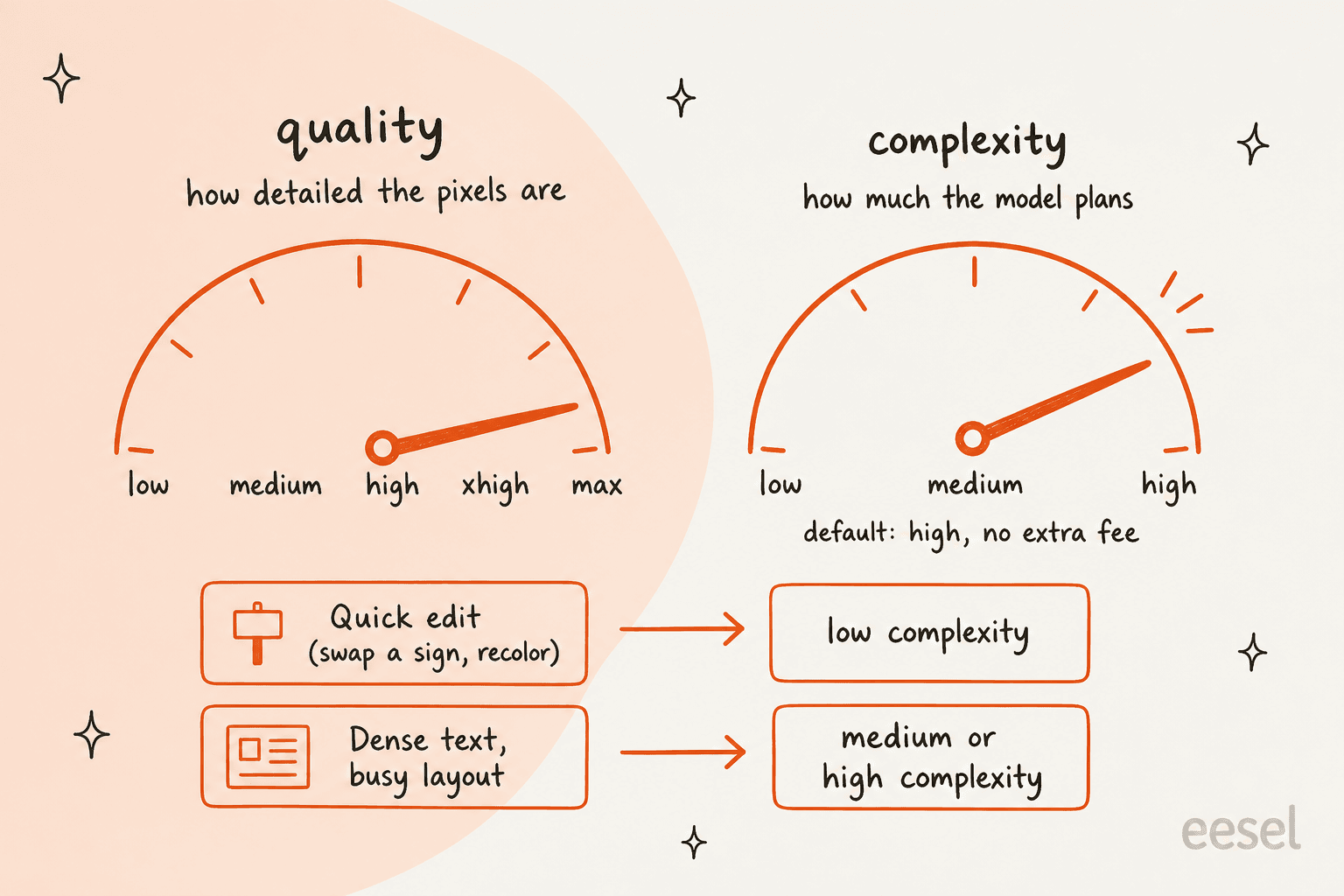
The guide spells out the details:
- The
complexityfield takeslow,mediumorhigh. If you leave it out, both models usehigh. - Adjusting complexity has no separate fee.
- Lower complexity suits focused edits, like changing a background or a sign.
- Higher complexity helps with dense text, complex layouts and relationships between objects, but can add latency and introduce changes you did not ask for.
That last point is the practical one. Because the default is high, a lot of teams will be over-planning simple edits without realizing it. OpenAI's own recommendation is low complexity for most editing tasks, paired with whatever quality your workflow needs. For a pipeline like mine, which mostly asks for clean diagrams with a handful of labels, I would start at medium and only go to high for text-heavy infographics.
How does markup-guided editing work in the API?
Markup is the "circle the thing" workflow. You send the original image plus a separate transparent PNG with your circles or sketches, and describe the change in the prompt. The model edits the marked area and leaves the rest alone.
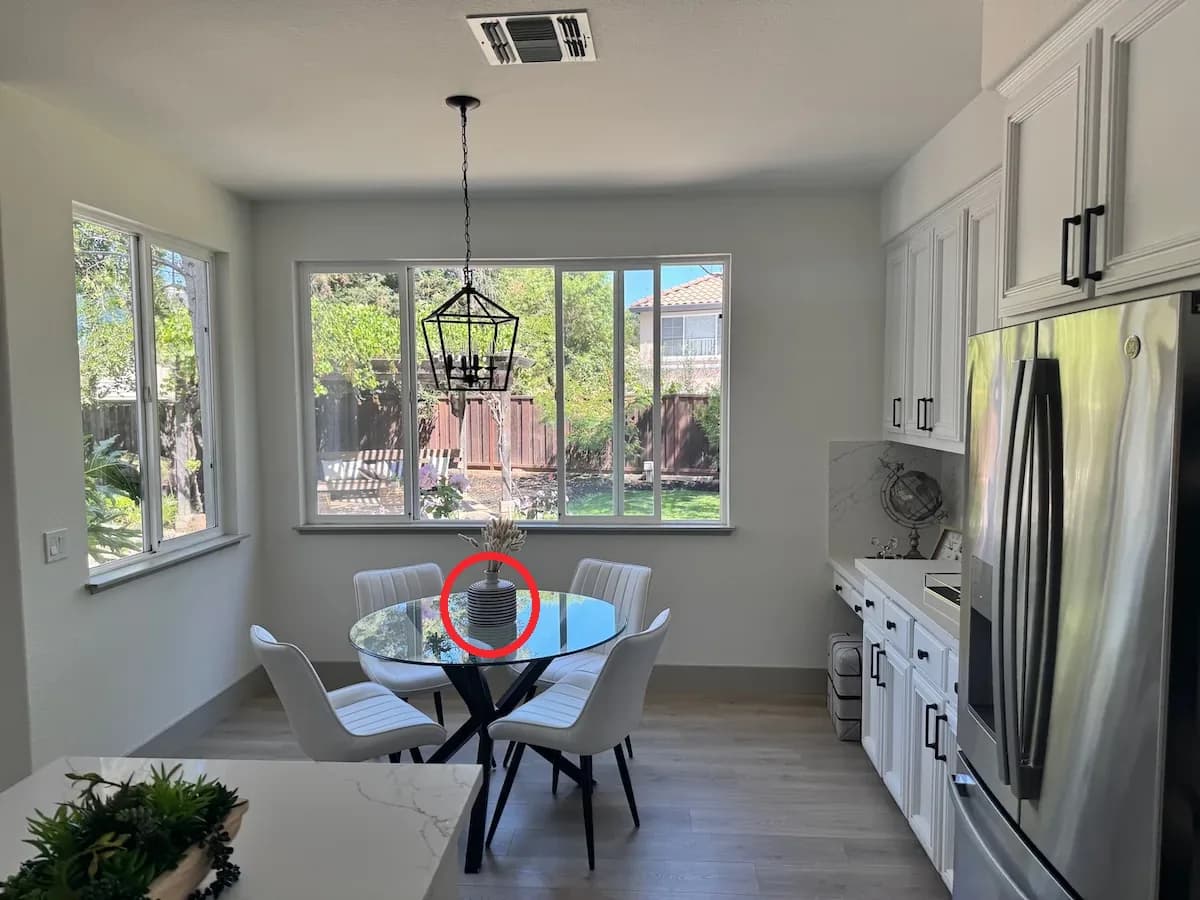
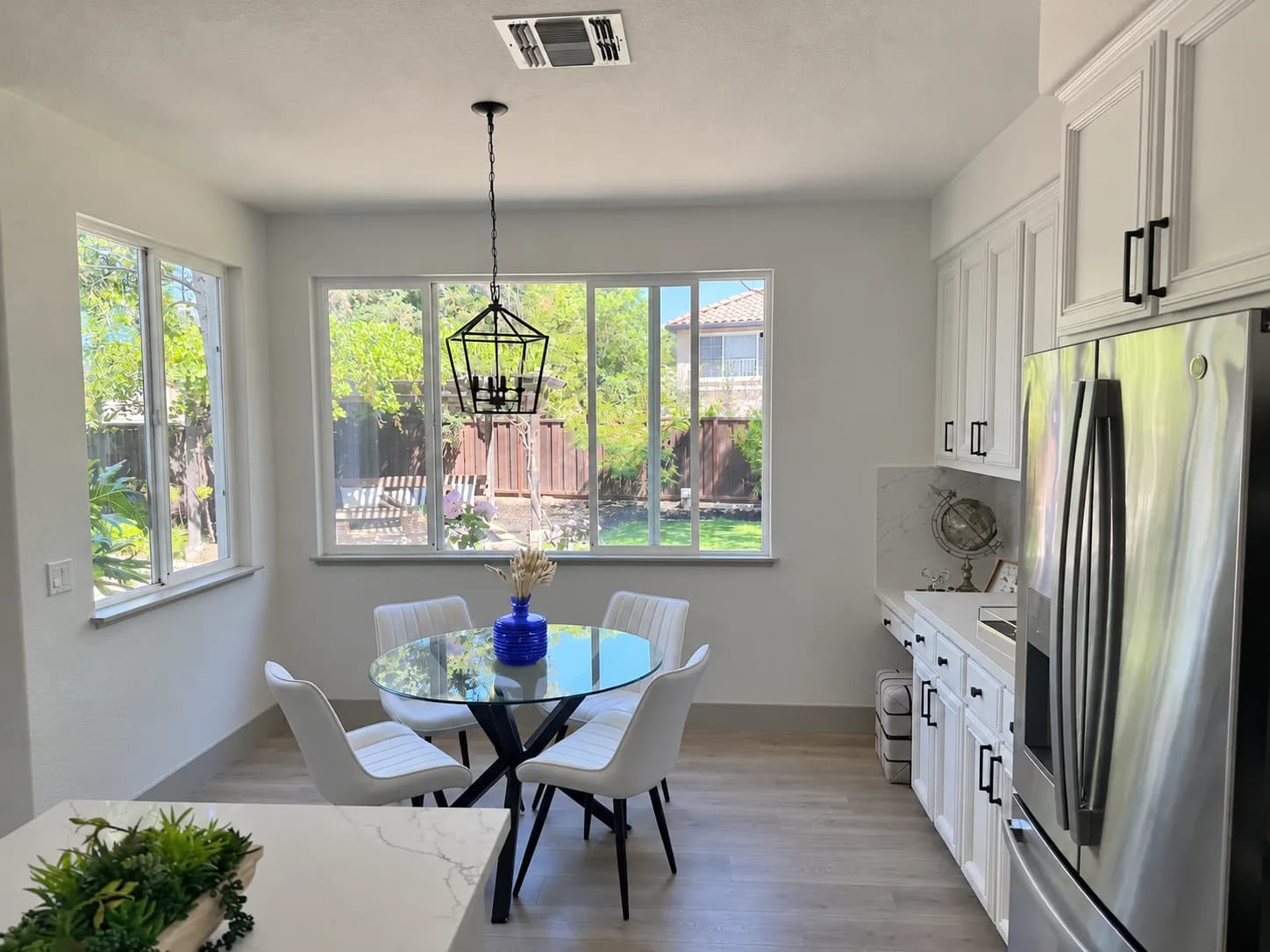
The rules from the image edit docs:
- Use
POST /v1/images/editswith amarkupfile. It works with supported 2.5 and 2.6 models. - The annotation layer must be a transparent PNG with the same width and height as the first input image. Do not flatten it onto the photo.
- Markup applies to the first input image; any extra images act as references.
- Each image can be up to 16,777,216 pixels, and the annotation file has a 50 MB limit.
- You cannot combine
markupwithmaskorprompt_rewriter.
Markup edits use the same token rates as any other edit, with no extra fee. For anyone who has fought with mask files, this is the friendlier way to say "change this, not that".
Can Images 2.6 export SVG files?
Yes, through the API only. Set output_format: "svg" on the generations endpoint and you get back an XML vector file with editable paths, shapes and colors. OpenAI pitches it for icons, logos and illustrations that need to go into websites, apps and print.
It is worth knowing how it is made, because it affects cost. The guide says the API first creates a reference image and then uses it to produce the SVG. You pay the image model's rate for that reference image plus an authoring model's rate for the tokens it uses to write the SVG. So the total is two model calls, not one, and the guide does not publish a fixed per-SVG price.
The limits:
nmust be1.- No streaming, partial images,
output_compressionorprompt_rewriter. - The edits endpoint does not output SVG, and an SVG cannot be used as an input for edits.
- The file is static: no scripts, external resources or embedded raster images.
For a team that hands logos and icons to a designer for cleanup in Canva AI or Figma anyway, this saves the auto-trace step. For anything animated, you are back to the GIF route.
How much does ChatGPT Images 2.6 cost?
This is the section I would screenshot. The per-token prices on OpenAI's pricing page did not change between 2.5 and 2.6:
| Token type (per 1M) | 2.6 Flare and Sunburst | 2.5 Flare and Sunburst |
|---|---|---|
| Text input | $5.00 | $5.00 |
| Cached text input | $1.25 | $1.25 |
| Image input | $8.00 | $8.00 |
| Cached image input | $2.00 | $2.00 |
| Image output | $30.00 | $30.00 |
If you stop reading there, you would assume 2.6 is a free upgrade. It is not, at least at the cheap end. OpenAI's own cost calculator gives 2.6 more output tokens per image at low and medium quality. The calculator's code multiplies 2.6 token counts by 4.2 at low and 3.3 at medium, and leaves high, xhigh and max unchanged.
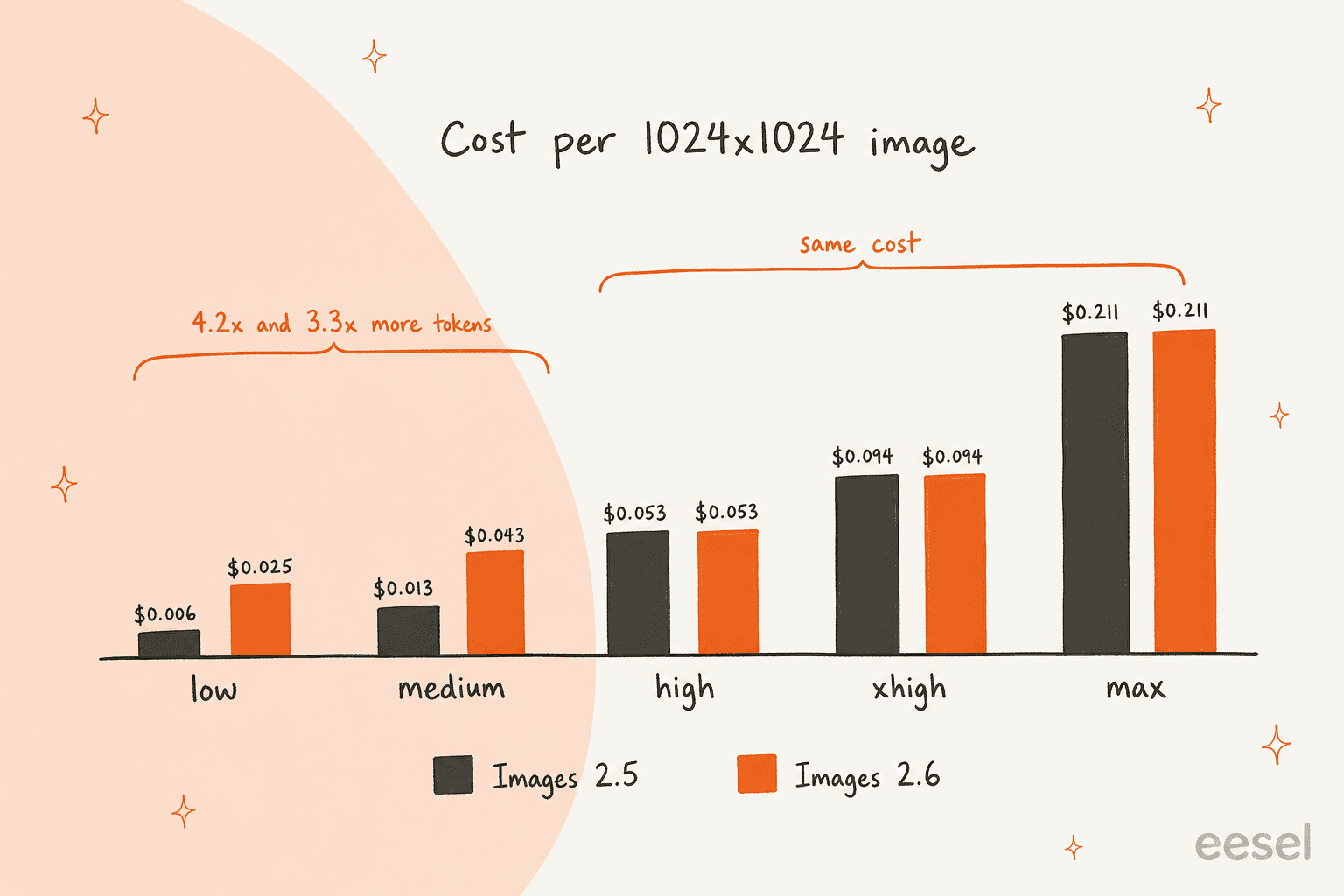
Here is what that works out to per image, using the calculator at $30 per 1M output tokens. These are output costs only, before any text or image input tokens:
| Quality | 1024x1024, 2.5 | 1024x1024, 2.6 | 1536x1024, 2.5 | 1536x1024, 2.6 |
|---|---|---|---|---|
| low | 196 tokens, $0.0059 | 823 tokens, $0.0247 | 158 tokens, $0.0047 | 664 tokens, $0.0199 |
| medium | 439 tokens, $0.0132 | 1,449 tokens, $0.0435 | 343 tokens, $0.0103 | 1,132 tokens, $0.0340 |
| high | 1,756 tokens, $0.0527 | 1,756 tokens, $0.0527 | 1,372 tokens, $0.0412 | 1,372 tokens, $0.0412 |
| xhigh | 3,122 tokens, $0.0937 | 3,122 tokens, $0.0937 | 2,459 tokens, $0.0738 | 2,459 tokens, $0.0738 |
| max | 7,024 tokens, $0.2107 | 7,024 tokens, $0.2107 | 5,488 tokens, $0.1646 | 5,488 tokens, $0.1646 |
Run the maths for a real workload. A team making 10,000 low-quality square drafts a month would pay about $59 in output tokens on 2.5 and about $247 on 2.6. At high quality, the same 10,000 images cost about $527 on either model. So 2.6 is a price increase for drafts and a free upgrade for finals.
Two more pricing notes. First, OpenAI's Batch table currently lists gpt-image-2 and the 2.5 models at half price, but has no 2.6 row yet, so I would not assume Batch discounts for 2.6 until it appears. Second, the calculator is an estimate; OpenAI's guide tells you to check the usage field on real responses, because token counts vary by prompt and model. For more background, see my Images 2.5 pricing breakdown and the wider OpenAI API pricing guide.
Inside ChatGPT, nothing changes on price. OpenAI's pricing page lists limited image creation on Free ($0), more on Go ($8), "more complex and accurate image creation" on Plus ($20), and unlimited, faster creation on Pro ($100). Image generation with Thinking is a Plus and Pro feature. OpenAI did not publish per-plan GIF limits at launch, and my ChatGPT pricing guide covers the rest of each plan.
Is the safety picture any different?
Mostly no. The system card says the core safety stack is the same as 2.5, with extra safeguards for GIFs. On a fixed set of 3,077 adversarial prompts, unsafe outputs that got past moderation went from 1.92% to 1.72% for Sunburst and from 1.49% to 2.14% for Flare. OpenAI says neither overall change was statistically significant.
On provenance, 2.6 images carry C2PA metadata and Google DeepMind's SynthID watermark across ChatGPT, Codex and the API. If you publish AI images on a brand site, that is worth knowing: the images are labeled at the file level whether or not you add a caption.
Who should use Images 2.6, and who should wait?
My read, after going through the docs and the launch-day testing:
- Switch now if you want GIFs, SVG icons or markup-guided edits. Those are new capabilities, not tweaks, and nothing in 2.5 does them.
- Switch for finals if you generate at high quality or above. Same price, faster turnaround, and Sunburst's edit consistency is the right upgrade for product shots and campaign creative.
- Test before switching if your volume runs at low or medium quality. Your output bill can rise 3.3x to 4.2x for the same settings, and at least one design-tool builder found 2.6 Flare's layouts weaker for UI work.
- Stay in ChatGPT if you are not a developer. Saved reference images and GIFs are the features most people will actually touch, and they cost nothing extra on your plan.
If you are comparing across vendors, 2.6 sits in a crowded field with Nano Banana Pro, Midjourney and FLUX 3, with Ideogram and Recraft as other options for text and vector work.
My Images 2.5 alternatives roundup is still the best map of that market, and my Images 2.0 explainer shows how far the line has moved since April.
What I'd change in a blog image pipeline
Here is where I can speak from running this, not just reading about it. Every post on this blog ships with a generated hero banner and three or more hand-drawn infographics, including the ones above, all made through OpenAI's image API. The lesson from doing that at volume is that the model is the easy part, and the workflow around it is the hard part.
For 2.6 specifically, three things in my own pipeline would change. I would set complexity explicitly instead of inheriting high, because most of my diagrams are simple layouts that do not need the extra planning. I would keep drafts on the cheaper settings of 2.5 (or the budget GPT Image 1 Mini) until the cost gap is something I have measured on real prompts rather than the calculator. And I would try SVG output for icon-style diagrams, since an editable vector beats regenerating an image to fix one label.
If you want the long version of that checklist, my guide on creating AI blog images walks through it. What no model release changes: an image API still does not pick which section deserves a visual, keep the accent color consistent across a post, check that the labels match the facts, or write a caption that credits the source. Skip those steps and a blog stops looking like it came from one studio.
That is the gap eesel fills. eesel is an AI teammate platform, and its AI blog writer is the teammate for this job. You give it a keyword and your site, and it researches the topic, writes a post in your brand voice, and generates the banner and infographics with the palette and captions already handled.
It sits alongside the other options in my best AI content writers roundup, and teams that want to wire it into their own stack can use the blog writer API.
The same platform runs real production work every day: SE Ranking, the SEO software company, uses eesel's support teammate to answer Zendesk live chat for three separate products, with one agent per product. The blog writer is built on that same base. If you would rather script it, the eesel CLI lets a coding agent such as Claude Code or Cursor adjust the writer's instructions, upload approved brand material, and kick off runs from the terminal, though you still review each draft before it goes live.
Want images like these to come out on brand, captioned and placed in a finished post? Try eesel and see what it does with your next keyword.
Frequently Asked Questions
What is ChatGPT Images 2.6?
ChatGPT Images 2.6 is OpenAI's image update released on November 4, 2026, following ChatGPT Images 2.5. It generates images 50% faster, adds animated GIFs and reusable reference images in ChatGPT, and ships two API models, gpt-image-2.6-flare and gpt-image-2.6-sunburst. It is live in ChatGPT and Codex on every plan.
How much does ChatGPT Images 2.6 cost in the API?
Both 2.6 models bill $5 per 1M text input tokens, $8 per 1M image input tokens and $30 per 1M image output tokens, the same rates as 2.5. The catch is token count: OpenAI's own calculator puts a low-quality 1024x1024 image at 823 output tokens (about $0.025) versus 196 on 2.5. The full breakdown sits in my Images 2.5 pricing post and the OpenAI API pricing guide.
Is ChatGPT Images 2.6 free to use?
Yes. OpenAI says Images 2.6 is available across all ChatGPT subscription tiers, including Free. The ChatGPT pricing page still caps volume by plan: Free gets limited image creation, Go ($8) gets more, Plus ($20) adds image generation with Thinking, and Pro ($100) gets unlimited and faster creation.
Can ChatGPT Images 2.6 make GIFs?
Yes. In ChatGPT you can turn a prompt or an image into an animated GIF, adjust its speed and edit individual frames. In the API you set output_format: "gif" on the generations endpoint and choose 2 to 64 frames. It suits mascots, reactions and storyboards more than polished motion, which is still Sora 2 territory.
What is the difference between GPT-Image-2.6 Flare and Sunburst?
Flare is the fast one, built for iteration, and OpenAI says it can return a low-quality image in as little as six seconds. Sunburst is for detailed visual work and holds characters and products more consistently across edits at medium or high quality. Both share the same token prices, and the split mirrors the one in my Images 2.5 review.
What does the complexity parameter do in Images 2.6?
Complexity controls how much the model plans before it renders, with low, medium and high options and high as the default. It has no separate fee. OpenAI recommends low complexity for most edits, such as recoloring an object, and medium or high for dense text and busy layouts. It works alongside the image edit API.
Should I switch from Images 2.5 to 2.6?
Switch if you need GIFs, SVG output, markup-guided edits or faster turnaround. Test first if you run high volumes at low or medium quality, because the same settings now use 3.3x to 4.2x more output tokens. Some early testers are keeping 2.5 Flare for layout-heavy work, so compare both on your own prompts, or look at Images 2.5 alternatives.
Is ChatGPT Images 2.6 good for blog images?
It is a strong engine for banners and infographics, and Flare's layout gains help with posters and diagrams. A blog still needs someone to decide which section earns an image, keep the palette on brand and caption it. That is the job of an AI blog writer with images rather than the model itself.