Chatbase vs DocsBot at a glance
I have spent the last few years helping put AI on live support queues, across thousands of real tickets, so I read these two tools less as "which chatbot wins" and more as "which one survives contact with a messy inbox." Here is the short version before we get into the detail.
| Dimension | Chatbase | DocsBot |
|---|---|---|
| Best for | One polished CX agent with a built-in inbox | Broad, no-code doc bot across many content types |
| Free plan | Yes, 50 message credits/mo, 1 MB training | Yes, 100 AI credits/mo, 50 source pages |
| Entry paid plan | Hobby, $40/mo | Personal, $49/mo |
| Top self-serve plan | Pro, $500/mo | Business, $499/mo |
| Billing unit | Message credits (per model request) | AI credits (per message, model-weighted) |
| Agents / bots | 1 on every plan (extra = $300/yr) | 1 to 10 by plan |
| Content sources | ~6 (files, web, text, Q&A, Notion, tickets) | ~38 (web, media, cloud drives, tickets, code) |
| Train on past tickets | Pro only, Salesforce/Zendesk OAuth | Standard up, many helpdesks |
| Voice agents | Standard+ | Standard+ |
| Actions / MCP | Yes | Yes (plus MCP server + remote MCP) |
| Simulate on your tickets before launch | No | No |
| Ratings | 4.8 on G2 | 4.8 on Product Hunt (15 reviews) |
Both are solid tools. The interesting differences are in what they charge you for, how much they let you feed them, and what happens on launch day. Let's take each in turn.
What is Chatbase?
Chatbase calls itself a platform for "conversational agents for customer experience," and it means it literally: the agent is the product. Founded and led by Yasser Elsaid, it claims 10,000+ businesses and names customers like Dolby, Pearson, and Chuck E. Cheese. One agent can play three roles (support, sales, and product guidance) across chat, email, phone, WhatsApp, Slack, Messenger, and Instagram.
The training layer is a Data sources panel, not a help-center product. You feed it files (.pdf/.txt/.doc/.docx), website crawls, text snippets, Q&A pairs, Notion pages, and, on the top plan, support tickets.
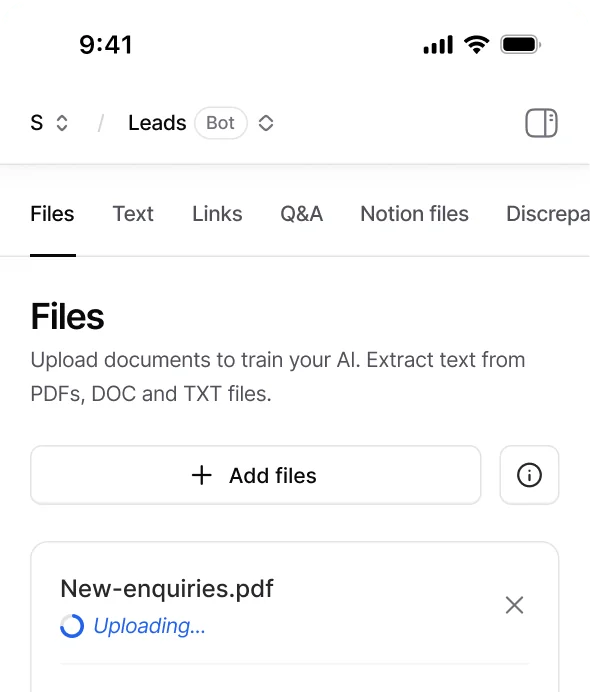
Two things stand out. First, the model picker: Chatbase lets you choose between Claude, Gemini, GPT, DeepSeek, Grok, and Kimi families, which is genuinely useful if you care about tuning cost against quality. Second, the built-in helpdesk inbox (from the Standard plan up), which gives you omnichannel tickets, custom statuses, routing, and manual takeover if you would rather not keep the tool you already have.
Where Chatbase gets tight is scope and testing. Every plan is capped at one agent, and its idea of "test before launch" is the Playground: you type at the agent, channel by channel, and preview its answers.
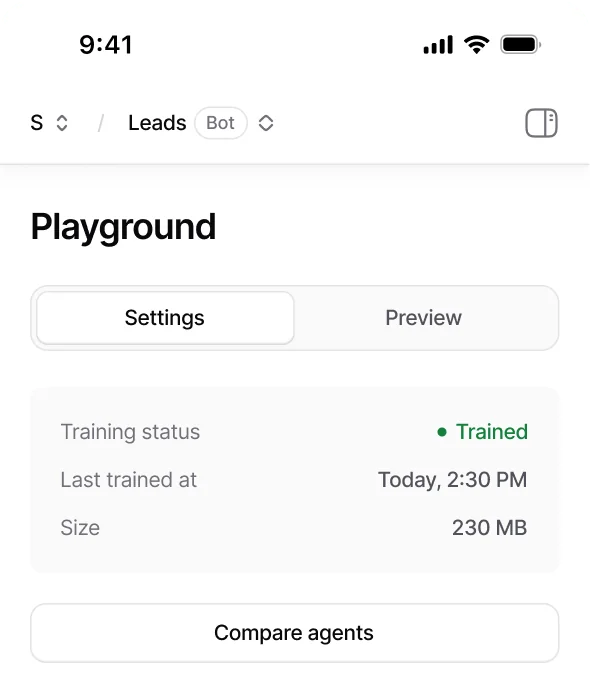
That is a manual preview, not a dry run over your history. There is no documented way to replay your archive of past tickets and get a scored forecast, which is the exact thing I would want before pointing a bot at customers. Community sentiment lines up with the "great for FAQs" read:
"Yeah, totally agree, Chatbase and similar tools nail FAQs but don't really sell. They're great for support, not for driving revenue."

If you want the deeper look, we have a full Chatbase review and a dedicated Chatbase pricing breakdown.
What is DocsBot?
DocsBot AI comes at the same problem from the no-code, self-serve side. Its pitch: "DocsBot turns your knowledge base into AI agents that deliver instant, accurate answers and take action." It says it has spent four years doing this for 3,000+ businesses and 75k+ users, with logos including Sony, and it scored 4.8/5 across 15 Product Hunt reviews.
The dashboard is refreshingly plain: bots, sources, source pages, and questions, all with live counters against your plan limits.
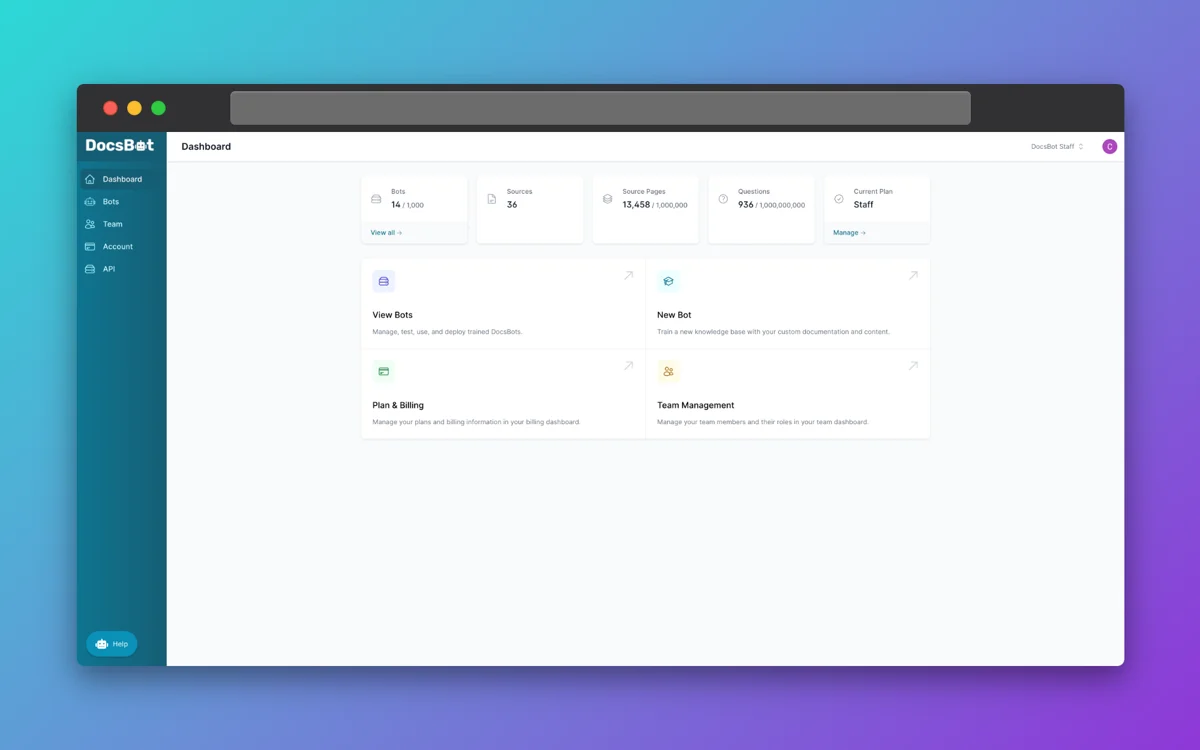
The headline strength is breadth of content sources: DocsBot lists around 38, spanning website crawls, sitemaps, RSS, YouTube transcripts, document uploads, Notion, Confluence, Google Drive, SharePoint, Dropbox, and ticket sources from Help Scout, Freshdesk, Zoho Desk, Zendesk, and Salesforce. On top of that it ships AI Actions (refunds, lookups, webhooks, booking, escalation tickets), realtime voice agents, a Deep Research assistant, and MCP in both directions (consume external tools, or expose your bot as an MCP server). Answers cite their sources with anti-hallucination link checks.
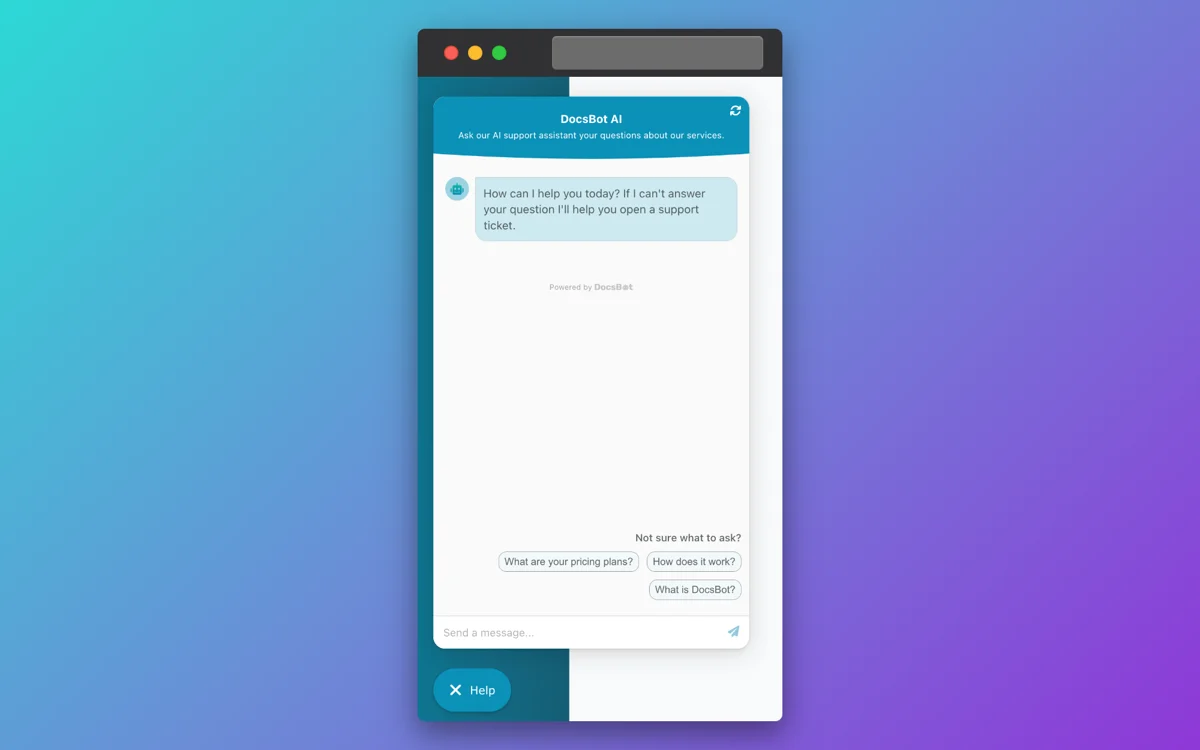
DocsBot is also honest about its own ceiling, in a way I respect. A founder using it in production put it plainly in a testimonial on DocsBot's own site:
"I absolutely love DocsBot... In my experience, it's about 60 percent in terms of giving a REALLY good answer. That's not to say it isn't incredible, because it is, and DocsBot still saves us a ton of time."
Zach Katz, Founder of Gravity Kit (DocsBot testimonial)
Users on G2 echo the "outstanding, easy, cites its sources" theme:
"It's an outstanding AI tool."

The gap is the same one Chatbase has: DocsBot is a website and docs widget that escalates into a helpdesk, not an agent that lives inside your support queue. And like Chatbase, its "test" is you asking it questions, not a replay of your real tickets.
Pricing: two different meters, same trap
Neither tool charges per seat or per resolution. Both charge on credits, and that is the part that catches teams out. Here is how each meter actually works.
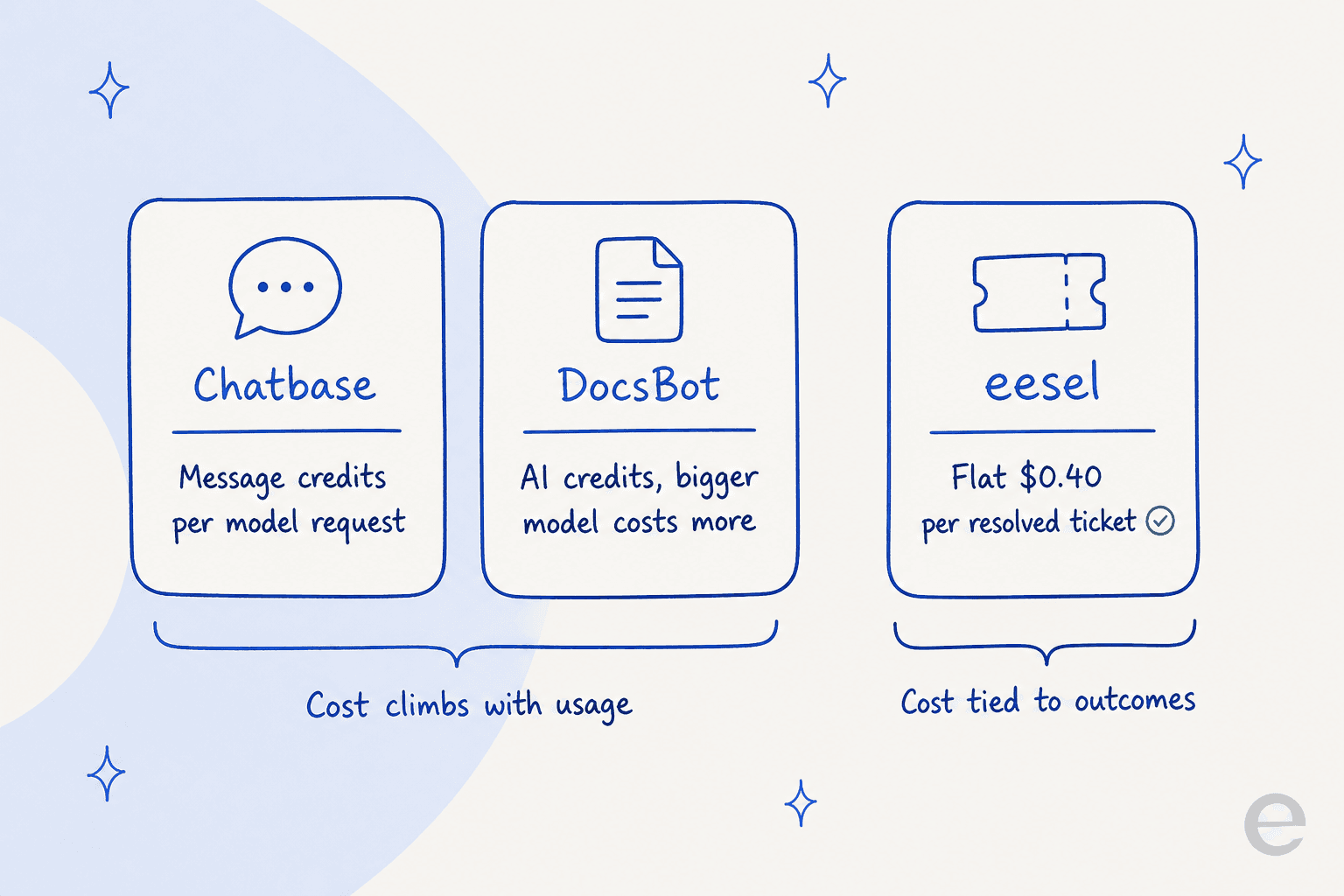
Chatbase bills message credits, and each request to the model burns credits based on the model you picked. Turn on actions and a single reply can make multiple model requests, so it costs multiple credits. Credits reset on the first of each calendar month and unused subscription credits do not roll over.
| Chatbase plan | Monthly price | Message credits/mo | Agents | Training size | Notable |
|---|---|---|---|---|---|
| Free | $0 | 50 | 1 | 1 MB | Agent deleted after 14 days idle |
| Hobby | $40 | 700 | 1 | 10 MB | Advanced models, basic analytics |
| Standard | $150 | 4,000 | 1 | 20 MB | Helpdesk, voice, API, auto-retrain |
| Pro | $500 | 15,000 | 1 | 40 MB | Tickets as a source, advanced analytics |
| Enterprise | Custom | Higher | Higher | Higher | SSO, HIPAA, white-label |
Watch the add-ons: auto-recharge credits are $40 per 1,000, an extra agent is $300/year, and removing "Powered By Chatbase" is $1,188/year (pricing page). At 10 support agents on Standard you are still stuck with one AI agent unless you pay to add more.
DocsBot bills AI credits, where a standard message on a 1x model is one credit and bigger models cost a multiple. Its live model multipliers are steep at the top: GPT-5.6 Luna is 1x, GPT-5.4 mini is 3x, GPT-5.6 Terra is 8x, and GPT-5.6 Sol is 20x. You can connect your own OpenAI key to get 1x usage on any model.
| DocsBot plan | Monthly price | AI credits/mo | Bots | Source pages | Notable |
|---|---|---|---|---|---|
| Free | $0 | 100 | 1 | 50 | No credit card, no expiry |
| Personal | $49 | 5,000 | 1 | 5,000 | Actions, MCP, Zapier, basic analytics |
| Standard | $149 | 15,000 | 3 | 15,000 | Skills, web search, ticket sources, MCP server |
| Business | $499 | 60,000 | 10 | 100,000 | PII redaction, data explorer, SOC 2 |
| Enterprise | Custom | Custom | Custom | Custom | SSO, HIPAA, self-hosted |
DocsBot's add-ons are gentler: $49/mo per extra 5,000 credits, $19/mo per extra bot, $29/mo per 10,000 extra source pages. Its ROI calculator leans on a "75% average deflection rate," which I would treat as a vendor marketing claim until you see it on your own tickets.
The takeaway on price: DocsBot gives you more room to grow for less money and more bots per plan. Chatbase costs more and pins you to one agent, but you are paying for a tighter CX product with an inbox. Neither number tells you what a real month of traffic will cost, because that depends entirely on which model you run and how many model calls each answer triggers. This is a recurring problem with the whole category, which is why I keep pointing teams at transparent AI support pricing instead of a sticker.
How much of your knowledge actually fits?
Here is the limit that quietly decides answer quality: both tools cap how much of your knowledge the bot can hold, just with different units.
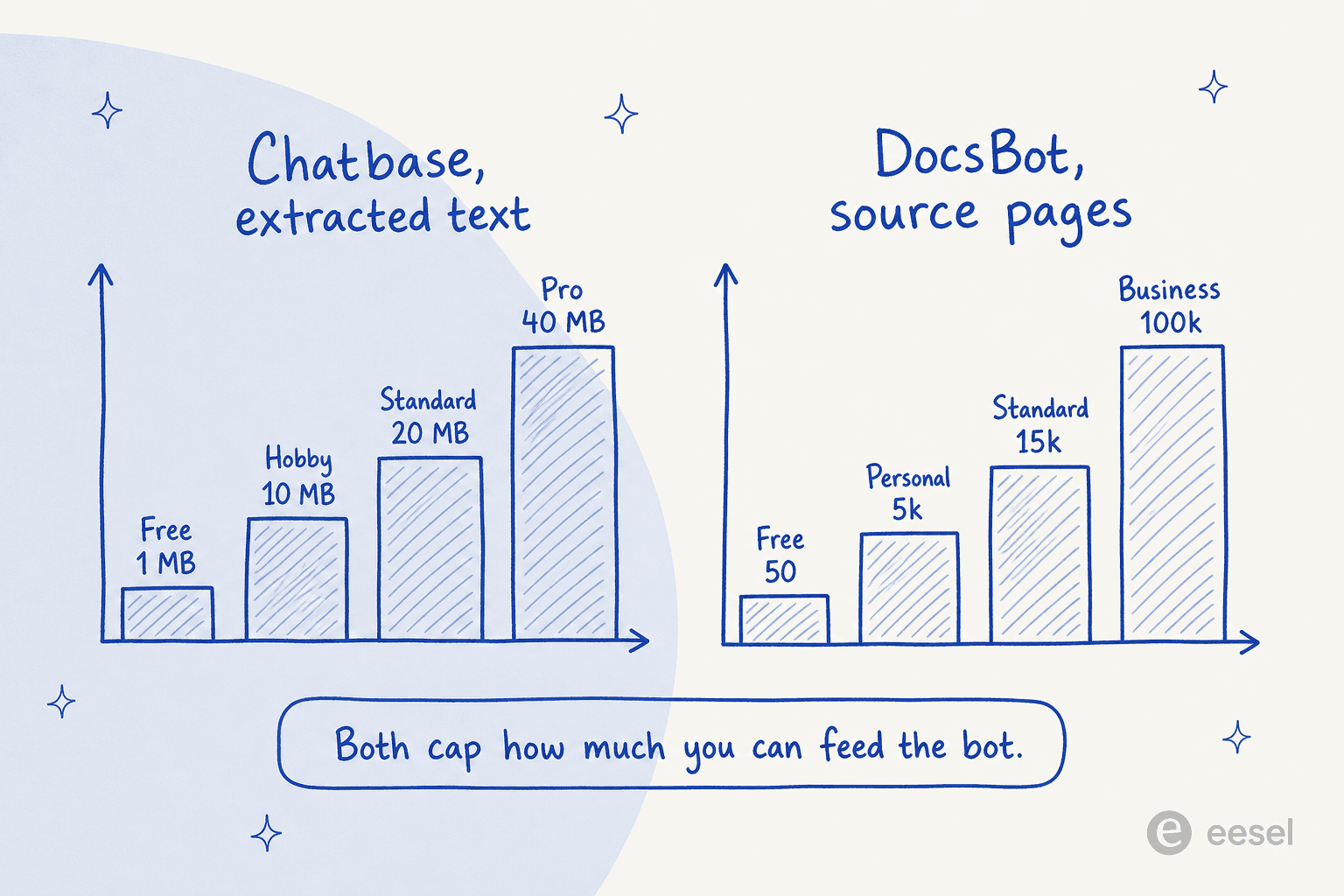
Chatbase measures extracted text size, and it is small: 1 MB on Free, 10 MB on Hobby, 20 MB on Standard, and 40 MB even on the $500 Pro plan. That is the total size of cleaned text, not file sizes, so a big help center plus a few years of docs can bump against it fast.
DocsBot measures source pages (roughly 5,000 characters of cleaned text each): 50 on Free, 5,000 on Personal, 15,000 on Standard, and 100,000 on Business. That is a much higher ceiling, and it is one of DocsBot's clearest advantages if you have a large knowledge base.
But a bigger box does not fix the deeper issue, which is what you put in it. I once worked with a support manager whose entire knowledge base was written for administrators, while every ticket came from end users. A doc-trained bot inherited that mismatch perfectly and confidently answered the wrong audience. Neither Chatbase nor DocsBot solves that, because both learn from the docs you already have. Getting real value out of an AI knowledge base chatbot is as much about your source quality as the tool's page limit, and it is worth reading up on the real benefits of an AI knowledge base before you pour a help center into either.
The step both tools skip: testing on your real tickets
This is the part I care about most, because it is where confident demos meet messy reality. We simulate every eesel rollout against a company's real past tickets first, precisely because we have watched confident-sounding bots answer wrong in ways no amount of hand-testing in a playground would catch.
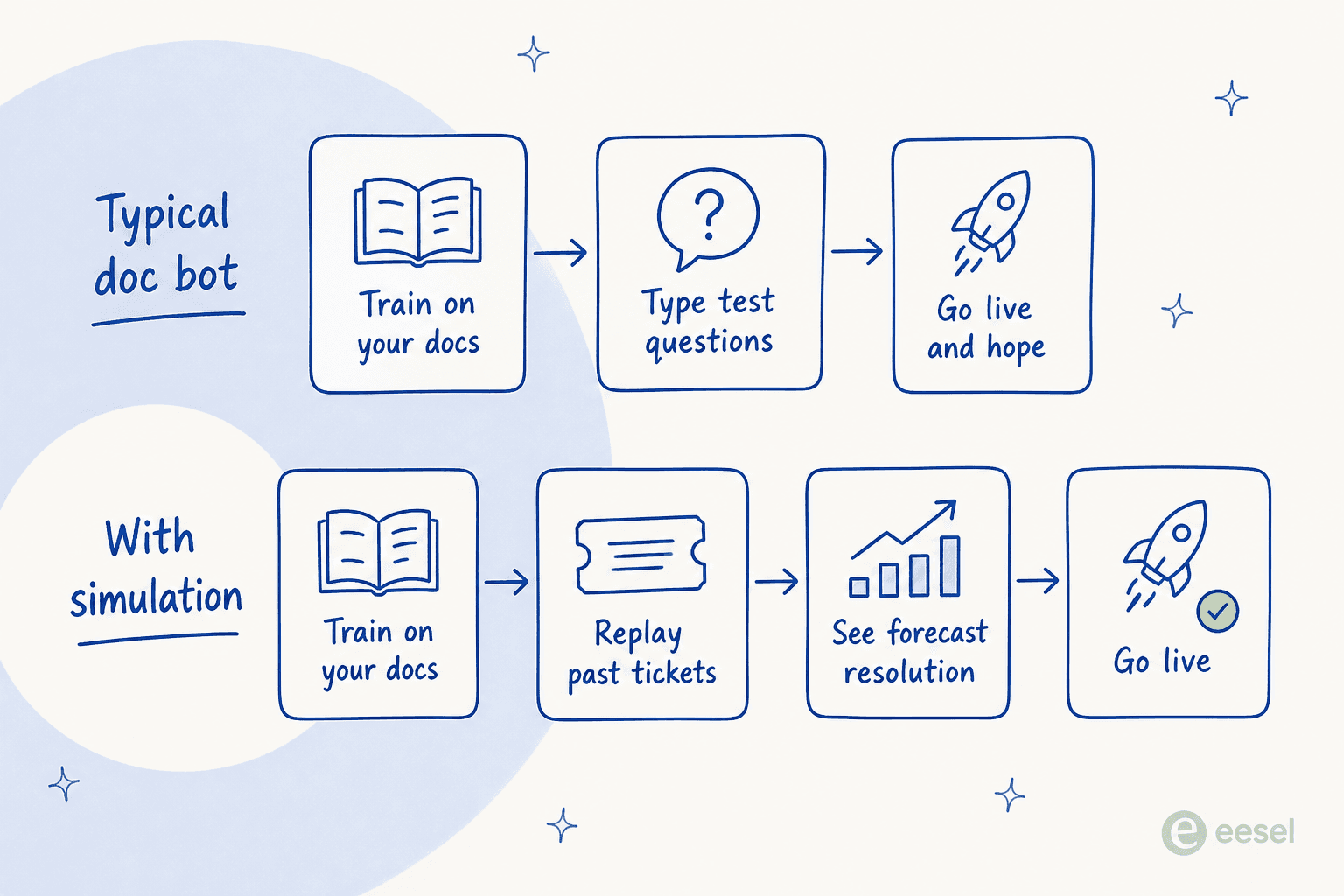
Both Chatbase and DocsBot follow the top row. You train the bot, you type a handful of test questions into a preview, and then you flip it on and watch the analytics roll in. That is a leap of faith, and it is why so many first AI-support launches quietly get switched back off. It is also a big driver of the AI chatbot problems teams run into after go-live.
The bottom row, replaying your actual historical tickets and getting a forecast resolution rate before a single customer is touched, is the difference between hoping and knowing. It is worth being clear-eyed here: if you only need a website FAQ bot, the leap of faith is small and either tool is fine. The stakes rise fast the moment the bot is answering real, revenue-affecting support.
What real users say
Sentiment on both is genuinely positive, with the usual caveats. DocsBot users praise setup speed and source-grounded answers:
"The process of creating an AI Agent was so intuitive. After connecting my website, YouTube, and some of our documents I was able to chat with the agent."
Chatbase users love how fast a non-technical person can stand up a bot, though some note it is stronger at support than sales:
"I recommend chatbase to clients I talk to who want a bot but don't want to take the time to set one up."
I will be straight about one thing, because it is real: teams do pick these tools on price, and sometimes they pick them over us. I have watched a mid-market support team move to a cheaper doc-bot setup that, in their words, "worked well at half the cost." Price is a legitimate reason to choose Chatbase or DocsBot. Just make sure the cheaper tool can actually carry your ticket volume, not only your FAQ page, before you commit.
Which one should you pick?
Here is where I land after living in both.
Pick DocsBot if you want the widest set of content sources, a genuine free tier to start, more than one bot, and useful extras like actions, voice, and MCP, at a lower entry price. It is the better generalist AI chatbot platform for docs, courses, and product education. See our DocsBot pricing math if budget is the deciding factor.
Pick Chatbase if you want one polished CX agent with a model picker and a built-in helpdesk inbox, and you are happy to pay more for that focus. It is a strong AI customer service chatbot for a website funnel, worth a look next to the best AI chatbot builders, and its model picker is a real edge if you care about AI customer service metrics like cost per answer.
Look past both if your real job is deflecting support tickets inside the helpdesk your agents already live in. A widget that escalates into your helpdesk is a different animal from an AI helpdesk agent that drafts and resolves tickets in Zendesk, Freshdesk, or Gorgias directly, and simulates on your history first. That is the gap eesel is built for, and it is why we keep a close eye on the best AI agents for customer service.
Try eesel for real ticket deflection
If the deciding factor is deflecting real support volume, not just answering FAQs on a widget, eesel works differently from both tools here. Instead of a bot on your website that escalates into a helpdesk, eesel's AI helpdesk teammate plugs into the helpdesk you already run, from Zendesk to Freshdesk, Gorgias, and Help Scout, joins the queue, and drafts or sends replies alongside your human agents.

Three differences that matter for a support team weighing these tools: it trains on your full past ticket history, not a capped MB of docs; it simulates on those real tickets and forecasts a resolution rate before it touches a live conversation; and it bills a flat $0.40 per resolved ticket rather than opaque model credits, so your bill tracks outcomes, not model calls. Global Pay's Chief Innovation Officer reported up to 80% time savings after rolling it out.
If you work from the terminal or want programmatic control, the eesel CLI drives the same teammate and workspace a person uses in the dashboard: a human can run it by hand, scripts can automate it, and coding agents like Claude Code, Codex, or Cursor can operate it directly, so you can inspect connections, push an instruction change, and review test answers without leaving your shell. It is free to start, no credit card and no sales call, so you can point it at your own tickets and see the forecast for yourself before you commit to Chatbase, DocsBot, or anything else.
Frequently Asked Questions
Is Chatbase or DocsBot cheaper?
What is the main difference between Chatbase and DocsBot?
Can Chatbase or DocsBot train on my past support tickets?
Do Chatbase or DocsBot work inside my existing helpdesk?
What is a good Chatbase or DocsBot alternative for customer support?


Article by
Kurnia Kharisma Agung Samiadjie
Kurnia is a software engineer and writer at eesel AI with two years of SEO experience, writing about AI tools, helpdesk software, and customer support. He pairs a developer's understanding of how these products are built with search-driven research into what actually ranks and resonates with the people searching for them.